
You are probably looking at two browser tabs right now. One has a low price VPS hosting deal with a monthly fee that looks harmless. The other has your website, which needs to stay fast, secure, and online because it brings in leads, bookings, or sales.
That gap matters.
Cheap VPS plans appeal to Australian business owners for a simple reason. The entry price looks small, and the specs look generous. But hosting is not just rented server space. It is ongoing responsibility. If the server is slow, compromised, misconfigured, or backed up badly, the monthly fee stops reflecting the true cost.
Here, many businesses get stuck. They compare plan price instead of operational cost. They buy infrastructure and only later realise they also bought server administration, patching, monitoring, recovery planning, and support triage.
Early on, it helps to look at the decision in business terms, not just technical ones.
| Hosting option | What you pay for | What you manage yourself | Best fit |
|---|---|---|---|
| Low price VPS hosting | Raw server resources, root access, basic infrastructure | Setup, security hardening, backups, updates, troubleshooting, performance tuning | Developers, staging sites, low-risk projects |
| Managed WordPress hosting | Infrastructure plus WordPress-focused maintenance and support | Content, products, campaigns, day-to-day business work | Business websites, WooCommerce stores, lead generation sites |
| Overseas budget VPS | Lower advertised price, broad provider choice | Same DIY work as above, plus latency and data handling concerns | Testing only, not ideal for serious AU business use |
| AU-focused managed hosting | Local relevance, simpler support path, business-grade operations | Minimal technical maintenance | Australian organisations that need reliability |
That $5/Month Hosting Offer That Seems Too Good to Be True
The ad usually follows the same formula. A tiny monthly fee. A few headline specs. Words like SSD, fast, scalable, full control.
On paper, it sounds reasonable. Globally, low-price VPS plans can start at $2 to $5 per month, often with 1 to 4GB of RAM and 1TB of bandwidth, but those entry prices can hide the true expense for business-critical sites, as noted by Liquid Web’s overview of the cheapest VPS hosting options.
The part left out of the ad is the labour.
A cheap VPS usually sells you a blank machine, not a finished hosting environment. You still need to install and secure the stack, configure backups, monitor uptime, keep PHP and the operating system current, and know what to do when a plugin update collides with a server setting. If you run WooCommerce, that pressure ramps up fast.
I have seen business owners treat hosting like a utility bill, then discover it behaves more like a part-time technical job. The stress rarely starts on purchase day. It starts when email alerts arrive at the wrong time, checkout breaks after an update, or the site slows during a campaign.
That is why cheap pricing can be misleading. A low sticker price does not guarantee low risk.
There is a wider business lesson in an ultra-low-price e-commerce platform that shut down. Aggressive pricing can look attractive until the operating reality catches up.
If you are weighing options locally, this guide to cheap hosting in Australia is useful because it frames the decision around suitability, not just price.
Key takeaway: If your website supports revenue, credibility, or customer data, the cheapest plan is rarely the cheapest outcome.
Decoding Hosting VPS vs Managed WordPress
A VPS provides raw server resources. Managed WordPress hosting provides a WordPress-ready environment with the routine server work already handled.

What a VPS gives you
With a VPS, the provider gives you CPU, RAM, storage, and access to the machine. Everything that turns those resources into a stable WordPress hosting setup is still your responsibility, or your developer's.
That includes choosing and configuring the web server, database, PHP version, caching layer, backups, security rules, monitoring, and recovery process. If performance drops, you investigate it. If updates break compatibility, you sort out what changed. If the server is based overseas, Australian visitors can also feel the delay, especially on admin tasks, checkout, and uncached pages.
That level of control suits agencies, sysadmins, and experienced developers who want to tune the stack themselves. For a small business owner, it often becomes another operational job sitting beside sales, delivery, and customer service.
What managed WordPress hosting gives you
Managed WordPress hosting gives you an environment built for WordPress from the start. The stack is pre-configured, the underlying maintenance is usually handled by the host, and support is more likely to understand WordPress-specific problems instead of stopping at the virtual machine level.
That changes the practical workload. You spend less time dealing with server patching, backup jobs, security hardening, cache setup, and troubleshooting after updates. You also reduce the risk of a cheap plan turning into a late-night support problem because one setting was missed during setup.
For Australian businesses, that matters more than many providers admit. A cheaper VPS can look efficient on paper, but if it is hosted offshore and no one on your team can maintain it properly, the savings disappear into slower response times, extra support hours, and avoidable stress.
The business question behind the technical choice
The business question behind the technical choice is simple. Are you buying server access, or are you buying a hosting service that helps keep WordPress fast, secure, and maintainable after launch?
If you are comparing options for a live business site, this guide to managed WordPress hosting in Australia is useful because it focuses on what needs to be covered once the site starts handling enquiries, orders, and updates.
A low price VPS can be the right tool in skilled hands. For many Australian businesses, managed WordPress hosting is the safer investment because it cuts down the hidden costs that cheap hosting plans leave on your side of the desk.
The Price Tag vs The True Cost A Detailed Comparison
The headline price is the smallest part of the decision. The fundamental question is what work sits behind that price.
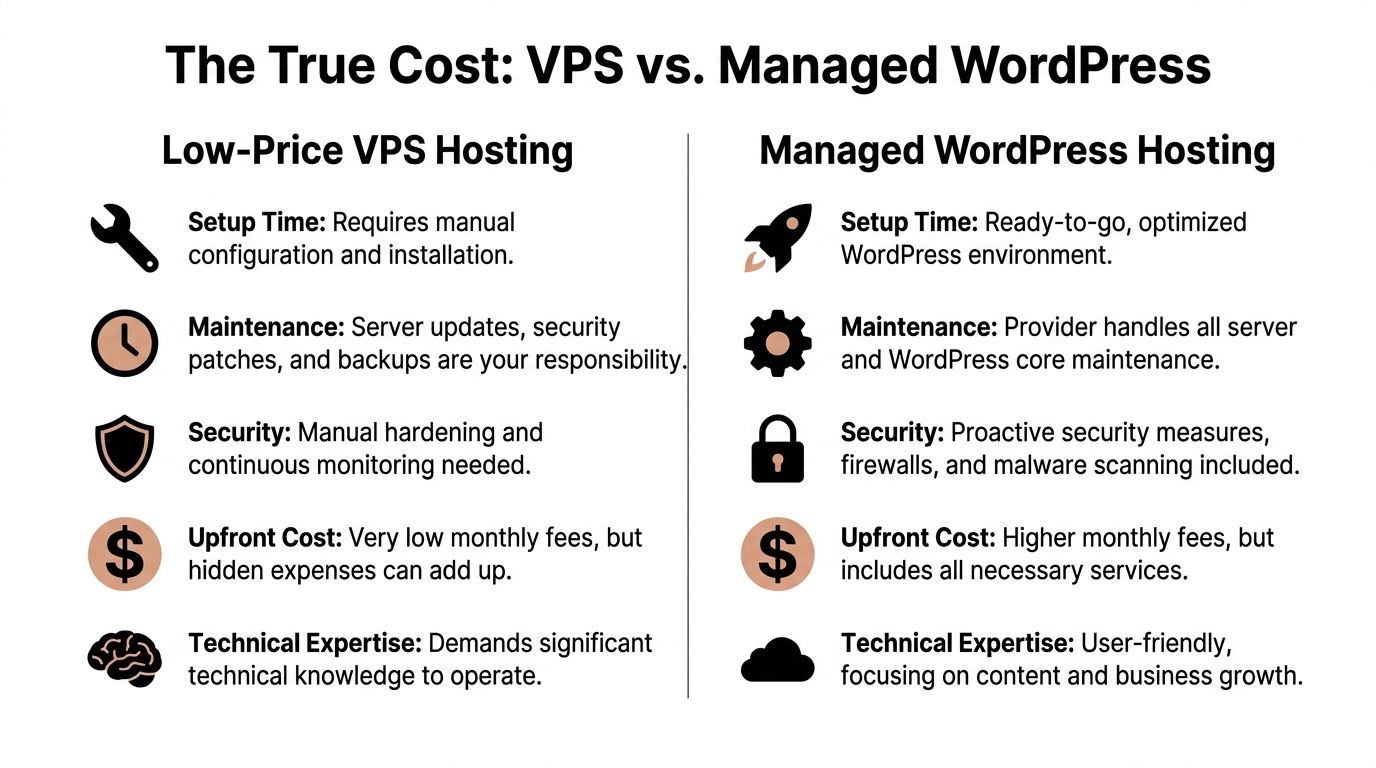
Side by side on the issues that matter
| Area | Low price VPS hosting | Managed WordPress hosting |
|---|---|---|
| Setup | Manual build. You install and tune the environment. | Pre-configured for WordPress use. |
| Maintenance | You own patching, updates, log checks, backup jobs, and server tuning. | Provider handles the underlying routine work. |
| Security | Hardening is your responsibility. So is monitoring and response. | Security controls are usually built into the service. |
| Support | Infrastructure-level help. Application issues are often yours to solve. | WordPress-aware support path. |
| Recovery | You need a tested backup and restore process. | Restores are usually part of the platform workflow. |
Time cost is the first hidden expense
Most small businesses do not struggle because a VPS is impossible to manage. They struggle because it competes with work that already pays the bills.
If you run a services business, your time should go to sales calls, quoting, delivery, and client communication. If you run a store, your time should go to products, fulfilment, merchandising, and campaigns. Server work cuts across all of that.
Tasks that sound minor often spread out:
- installing WordPress properly on a fresh VPS
- configuring caching
- setting backup retention
- checking update compatibility
- troubleshooting permissions or failed scheduled tasks
- tracing slow pages back to plugins, database load, or server limits
None of that appears on the hosting plan tile.
Security is not optional labour
Cheap VPS providers do not remove the need for security work. They move it onto you.
That includes:
- System updates: The operating system and packages need regular patching.
- WordPress maintenance: Core, themes, and plugins still need safe update handling.
- Malware response: If something gets in, cleanup is rarely simple.
- Access control: Weak login hygiene or poor user management can turn a small issue into a major one.
Practical rule: If nobody is clearly responsible for patching, backups, and monitoring, then nobody is responsible. That is when cheap hosting becomes expensive.
Performance problems often come from configuration, not just specs
A VPS with decent raw resources can still feel slow if the software stack is poorly configured. I see this often with sites running too many plugins, no proper caching, oversized images, or database-heavy page builders on a server that was never tuned for WordPress.
Managed environments reduce that risk because the base system is already aligned with common WordPress workloads. That does not fix every site issue, but it removes a lot of avoidable friction.
Support quality changes the recovery path
When a site goes wrong, the difference between support models becomes obvious.
With unmanaged VPS support, the provider may confirm the virtual server is active and reachable. That does not mean they will debug a plugin conflict, isolate a PHP setting problem, or repair a broken WordPress update.
With managed WordPress support, the conversation usually starts closer to the actual issue. That shortens downtime and removes a lot of guesswork.
Backups only matter if restoration works
Many businesses say they “have backups” when what they really have is an untested archive somewhere.
On a VPS, backup strategy is part of the job. You need to decide where backups go, how often they run, how long they are kept, and how quickly you can restore if the site breaks. A backup that is incomplete, stale, or slow to restore can still leave you with a business problem.
The true cost is simple to frame. A VPS can save money on the invoice. Managed hosting saves labour, lowers technical risk, and reduces the chance that your website becomes a recurring source of stress.
When Cheap VPS Makes Sense and When It Is a Trap
Low price VPS hosting is not automatically a bad choice. It becomes a bad choice when the job and the risk profile do not match.
Situations where a cheap VPS is reasonable
There are good uses for budget infrastructure.
A provider like RackNerd can offer a KVM VPS with 1 vCPU, 768MB RAM, and 10GB SSD storage for around $10.28 per year, which is technically enough for a minimal WordPress installation for testing or development, as highlighted in LowEndBox’s budget VPS roundup.
That makes sense for:
- Staging environments: A developer can use it to test plugin updates or theme work.
- Learning projects: Students and junior admins can practise Linux and hosting basics.
- Internal tools: Low-risk, non-public systems can live there if the operator knows what they are doing.
- Hobby sites: Personal projects with no commercial dependency are fine candidates.
There is a broader lesson in buying low-cost access carefully. The same caution shows up in guides about cheap accounts the safe way. Price matters, but the operating context matters more.
Situations where it becomes a trap
A cheap VPS is the wrong place to be clever if your website has real business consequences.
That includes:
- WooCommerce stores where downtime interrupts orders
- Professional services sites where a hacked homepage damages trust
- Lead generation sites tied to active ad spend
- Membership or booking sites where customers expect reliability
- Teams without technical ownership for updates, logs, and security events
The trap is not the server. It is the mismatch.
The server may be capable. The business arrangement is what fails.
If the person buying the plan assumes “hosting” includes active management, but the provider only supplies the virtual machine, trouble follows. The site might run well for weeks or months. Then a plugin update, storage issue, permissions problem, or security event arrives, and the saving disappears into lost time.
Best use for budget VPS: Development, testing, experimentation.
Worst use for budget VPS: Your primary revenue site.
Essential Specs for a Modern Australian WordPress Store
Specs matter, but only if you connect them to real workload.

A WordPress store is not just “a website”. It is WordPress, WooCommerce, PHP workers, a database, scheduled tasks, payment-related plugins, shipping logic, image processing, security tooling, and backups. If you add GA4, Google Tag Manager, landing page builders, or promotional plugins, the resource demand rises again.
That is why tiny VPS plans often disappoint. They can boot the site. They may not run it comfortably under normal business conditions.
A realistic baseline
Performance benchmarks from providers such as Hetzner show that a 2 vCPU / 4GB RAM VPS in the roughly $7 to $10 per month range can deliver multi-core Geekbench scores around 7,900 and network speeds of 5,000 MBit/s, which is a practical baseline for a small WooCommerce store that still needs to handle malware scans and plugin updates efficiently, according to Experte’s VPS benchmark data.
That matters because background tasks are part of normal store operation. They are not edge cases.
What each resource does
CPU
CPU affects how quickly the server can process PHP requests, checkout logic, admin actions, and scheduled tasks. If CPU is constrained, the site can feel fine one minute and stall the next when several things happen at once.
RAM
RAM gives breathing room to the operating system, web server, database, and PHP processes. Too little memory leads to swapping, failed tasks, or sluggish admin screens.
Storage performance
Fast storage helps the database, object caching, log writing, and file access. It also affects maintenance windows. Updates, scans, and backups all touch disk.
A short technical explainer can help if you want a visual overview before comparing plans.
What underpowered hosting looks like in practice
You do not usually notice weak specs as one dramatic failure. You notice them as friction:
- Slow admin pages: Product edits and order management become tedious.
- Checkout hesitation: Dynamic pages take longer to respond.
- Update anxiety: Plugin updates feel risky because the site already has little headroom.
- Maintenance lag: Scans, imports, and backup jobs compete with live traffic.
For a modern Australian store, low price VPS hosting only works when the plan has enough real capacity and the environment is configured properly. Buying the cheapest tier and hoping optimisation will fix everything is a poor strategy.
The Pitfalls of Overseas Low Price VPS Hosting for AU Sites
The cheapest VPS offers usually come from overseas providers. For Australian businesses, that creates two problems that are easy to underestimate.
Latency is not a theory problem
Distance affects response time. A visitor in Australia reaches an overseas server more slowly than a nearby one, and WordPress sites feel that delay.
Data cited by LowEndBox shows that cheap overseas VPS hosting can push average pings from Perth above 120ms, leading to up to 30% slower Time to First Byte for WooCommerce stores compared with local Australian hosting, and that delay can reduce Google Ads conversions by as much as 15% for Australian users, based on the figures discussed at LowEndBox.
For a brochure site, that may be frustrating. For a store, booking site, or ad landing page, it cuts into performance where it counts.
A CDN helps with static assets. It does not remove the origin server delay for dynamic requests, cart actions, account pages, or database-driven responses.
Compliance gets messy quickly
If your business collects customer data, the hosting decision is not purely technical.
Australian businesses need to think carefully about data handling under the Privacy Act 1988 and the Notifiable Data Breaches scheme. Cheap offshore providers often market infrastructure aggressively but say very little about Australian legal obligations, data handling practices, or the practical support you would need after an incident.
That does not mean every overseas host is unusable. It means the burden of due diligence shifts onto you. If you are cost-sensitive and short on time, that is a risky combination.
Why this matters more for WordPress than many owners expect
WordPress sites do not just store pages. They may hold:
- customer account details
- order records
- form submissions
- email marketing data
- staff logins
- plugin-generated logs and exports
Once that data sits across services and vendors, clarity matters. The cheaper the provider, the less hand-holding you should expect.
Practical takeaway: If the site serves Australian customers and handles business-critical traffic or customer data, overseas budget VPS hosting usually creates more risk than savings.
A Decision Checklist for Australian Business Owners
Most hosting decisions become clearer when you stop asking, “What is the cheapest plan?” and start asking, “What am I willing to own?”
Consider these questions carefully
- Time ownership: If the site needs attention on a weekday afternoon or late at night, who handles it?
- Technical confidence: Can you or your team diagnose a plugin conflict, restore a backup, and assess whether the issue is WordPress, the database, or the server?
- Business exposure: If the site is unavailable during a campaign, launch, or busy trading period, what does that interruption cost in lost enquiries or sales?
- Security responsibility: Are you comfortable owning patching, malware response, and access hygiene?
- Data handling: Do you collect information that requires a more careful hosting and compliance posture?
- Growth plans: Will the site stay simple, or will it gain products, forms, tracking, integrations, and heavier workflows over time?
Signs a VPS may still suit you
A VPS can still be the right call if:
- you have hands-on server knowledge
- the website is non-critical
- you want a controlled dev or staging environment
- downtime is inconvenient, not commercially damaging
Signs managed hosting is the smarter investment
Managed hosting usually makes more sense when:
- the site supports revenue or lead flow
- you run WooCommerce
- you rely on ad traffic
- you need dependable backup and restore workflows
- nobody on the team wants to be a part-time sysadmin
The pattern I see most often
Businesses do not regret paying for stability nearly as often as they regret underestimating responsibility.
The monthly saving from low price VPS hosting can look sensible at purchase time. But if that saving buys admin overhead, recovery stress, and performance uncertainty, it is not really a saving. It is a transfer of work from provider to business owner.
Migrating and Setting Up Your Hosting With Confidence
Migration is where many hosting decisions become real.
On a DIY VPS, moving a live WordPress site means handling files, the database, SSL, firewall rules, backup jobs, and environment-specific settings without breaking the site or losing data. Even when the move goes well, you still need to harden the new server and validate that everything works under normal traffic.
That process is manageable for experienced developers. It is not a good use of time for most business owners.
What confidence looks like during a move
A sound migration process should include:
- a clear rollback path
- tested backups before the move
- checks for plugin and theme compatibility
- performance validation after launch
- monitoring once traffic lands on the new environment
If any of those pieces are missing, the risk sits with you.
Why many businesses choose a guided path
A professional migration removes a lot of avoidable stress. Instead of treating hosting like a raw server rental, it treats hosting as part of the website’s operating environment.
That means the move, security posture, backup approach, and post-migration checks all work together. If you are preparing for a move, this website migration checklist is a practical place to start because it focuses on the details that are easy to miss under time pressure.
For Australian businesses, the best setup is rarely the one with the lowest advertised fee. It is the one that keeps the site fast, secure, recoverable, and easy to support after launch.
If your website needs to be faster, safer, and easier to manage without turning you into a server administrator, Webby Website Optimisation provides WordPress help, support, maintenance, recovery, and managed hosting for Australian businesses that want dependable technical ownership.