
You’ve got a solid business, a decent WordPress site, and customers who are happy once they find you. The problem is the finding part.
This is a common challenge for many Perth operators. A cafe in Fremantle, a physio in Subiaco, an electrician in Joondalup, a cleaning company in Balcatta. They’re not losing work because the service is poor. They’re losing it because Google can’t clearly match their business to local intent.
Small business seo perth isn’t about chasing vanity rankings for broad terms that never convert. It’s about showing up when someone nearby is ready to book, call, visit, or ask for a quote. On WordPress, that means getting the basics right, avoiding the common plugin mess, and building pages that help both users and search engines understand exactly where you operate and what you do.
Why Your Perth Business Needs Local SEO Now
If your phone has gone quiet, your booking form has slowed down, or you’re getting traffic from the wrong suburbs, local SEO is usually part of the problem.
Perth is a spread-out market. Ranking in Subiaco isn’t the same job as ranking in Joondalup. A business that serves Perth CBD only needs a different setup from one covering Midland, Canning Vale, Rockingham, and Fremantle. Google pays attention to service area signals, proximity, page relevance, and the strength of your local profile.
The upside is big for businesses that clean up those signals. For Perth-based small businesses, optimised Google Business Profiles receive 7x more clicks, businesses optimising local keywords achieve a 27% increase in leads, and 78% of mobile local searches result in a store visit within 24 hours, according to Searchscope’s 2025 Australian SEO data.
That’s why local SEO isn’t a side task anymore. It sits much closer to revenue than many owners realise.
Practical rule: If someone can buy from you locally, Google Business Profile and suburb-level relevance matter as much as your homepage.
On the strategy side, it helps to think in layers. Your Google Business Profile pulls map visibility. Your website supports it with suburb and service relevance. Your citations and reviews confirm trust. If one of those layers is weak, the whole setup underperforms. If you want a broader framework before getting into WordPress implementation, this small business SEO strategy is a useful companion read.
Most small Perth businesses don’t need more random blog posts. They need a cleaner local setup, tighter keyword targeting, stronger location pages, and a site that doesn’t fight itself.
Your Foundation Finding the Right Local Keywords
Keyword research for local SEO usually goes wrong in one of two ways. Businesses either target terms that are too broad, or they build pages around phrases nobody in Perth would type.
The fix is to build keywords from three parts:
- Service
- Location
- Intent
“Electrician” is too broad. “Emergency electrician Joondalup” is much closer to a real lead. “Wedding florist Fremantle” is stronger than “flower services Perth”. “Strata lawyer Perth CBD” tells Google more than “legal advice WA”.
Start with buyer intent
Not all keywords deserve their own page.
Some phrases signal research. Others signal action. The commercial ones usually include modifiers like:
- Urgent need such as emergency, same day, open now
- Decision stage such as best, cost, quote, near me
- Specific service such as ducted aircon repair, tax accountant, roof leak detection
- Specific suburb such as Subiaco, Morley, Osborne Park, Victoria Park
High-intent, geo-specific long-tail phrases outperform generic terms because they match what the searcher wants. In Perth-focused SEO work, this approach has been noted as driving 2-3x higher conversions than generic terms in the Traffic Radius Perth case study write-up.
That’s why I’d rather see a small tradie site target ten strong suburb-service combinations than chase one vague head term.
Use local language, not just tool data
Keyword tools are helpful, but they can flatten local nuance. Perth users often search by suburb first, then service. They also split areas differently from how businesses talk about their own service range.
A practical process looks like this:
- List your core services
Don’t start with marketing language. Use the phrases customers use on calls and enquiries. - Add real service areas
Include the suburbs you work in. Don’t create pages for places you don’t serve. - Check Google autocomplete and Maps
Search your services manually. Watch for suggested suburb combinations and “near me” variations. - Review competitor title tags
Not to copy them. To see what Google is already rewarding in your area. - Map keywords to pages
One main keyword cluster per page is cleaner than trying to rank one page for everything.
For a deeper process on the research side, this guide on how to do keyword research is worth keeping open while you build your list.
Build a keyword map before touching WordPress
Most Perth small business sites don’t have a keyword problem. They have a page architecture problem.
Here’s a simple keyword map model:
| Page type | Target example | Purpose |
|---|---|---|
| Homepage | small business seo perth | Main business category and city relevance |
| Core service page | WordPress SEO Perth | Primary service intent |
| Suburb service page | WordPress support Subiaco | Local service relevance |
| FAQ page | how much does WordPress maintenance cost Perth | Supporting long-tail intent |
| Blog article | common WordPress SEO mistakes Perth businesses make | Topical support and internal linking |
A weak keyword map usually creates duplicate intent. That’s when your homepage, service page, and suburb page all compete for the same phrase and none of them rank properly.
What doesn’t work
A few things consistently waste time:
- One page for every suburb with near-identical text
That often creates duplicate or thin content. - Targeting only “Perth” when your leads come from outer suburbs
You miss users who search by area. - Stuffing suburb names into paragraphs
It reads badly and doesn’t solve relevance. - Writing pages based only on tool volume
Lower-volume local terms often bring better leads.
The right keywords should feel obvious when you read them aloud. If a real customer in Cottesloe, Willetton, or Malaga wouldn’t say it, don’t build a page around it.
Mastering Your Google Business Profile for Perth
For many small businesses, Google Business Profile is the fastest route to local visibility. It often matters more than owners expect, especially for tradies, clinics, hospitality venues, consultants, and any business that serves a defined area.
A half-complete profile won’t do much. A carefully managed one can become your best local lead asset.
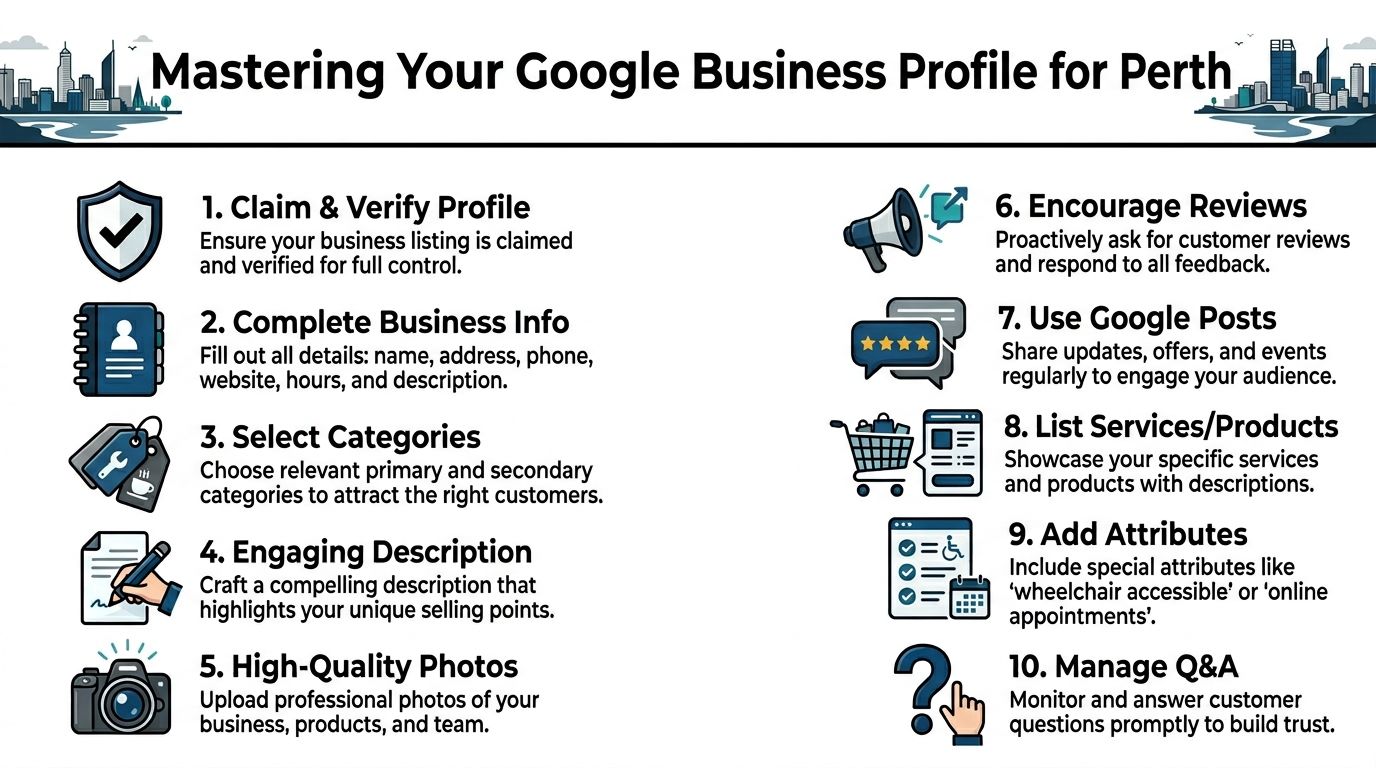
Fill every field that matters
A lot of Perth listings are technically live but strategically incomplete. That’s a missed opportunity.
Focus on these essentials first:
- Business name
Use your real trading name. Don’t jam extra keywords into it. - Primary category
This is one of the biggest relevance signals in the profile. - Secondary categories
Add the supporting services you provide. - Phone and website
Keep them consistent with your site and your other listings. - Opening hours
Update holiday and special hours properly. - Services and products
Write clear entries that match the language used on your site. - Business description
Keep it direct. Mention what you do, where you work, and what makes you credible.
If you’re a service-area business, set your service areas carefully. Don’t claim half of WA if you mainly work in a tight Perth radius.
Reviews are a ranking and trust signal
Reviews do more than help conversion. They also reinforce local trust.
The businesses that do this well don’t ask randomly. They build a routine. After a completed job, successful delivery, or positive follow-up call, they send a simple request with a direct review link. No long paragraph. No awkward script.
A good review strategy includes:
- Ask while the result is fresh
- Make it easy with a direct link
- Reply to every review
- Mention the service naturally in your reply
- Don’t offer incentives that make the review look manipulated
One Perth example is especially useful here. A case study on Fremantle Roofing reported a 300% increase in qualified leads from optimising its Google Business Profile and building local trust signals such as reviews, as documented by Perth Digital Edge.
That result isn’t a guarantee for every business. But it shows what can happen when the profile stops being treated like a placeholder.
Photos, posts, and questions separate active listings from stale ones
Google can tell when a listing is being maintained. Users can too.
Use photos that prove you’re local and real:
- Team photos taken at your premises or on local jobs
- Work examples from real projects
- Frontage and signage if customers visit you
- Product images if you sell physical goods
Posts are useful when they’re tied to something specific. Seasonal offers, service updates, new locations, recent work, or events all make sense. Generic filler doesn’t.
The Q&A section is often ignored. Don’t ignore it. Seed it with common questions if needed and answer them properly. That removes friction before the click.
A simple Perth-focused checklist
| Area | What to check |
|---|---|
| Categories | Primary and secondary categories match actual services |
| Service areas | Suburbs reflect where you really work |
| Reviews | Requests happen consistently, replies are timely |
| Photos | Recent, local, high quality, not stock |
| Posts | Useful updates instead of generic promotions |
| Services | Match website wording and search intent |
| Q&A | Common buyer questions answered clearly |
If your Google Business Profile says one thing, your website says another, and your directories show something else, Google has no reason to trust the profile fully.
For small business seo perth, this profile is often the first thing to fix because it can improve visibility without waiting on a full site rebuild.
Optimising Your WordPress Site for Local Search
Your Google Business Profile can win visibility, but your WordPress site closes the gap between a search and an enquiry. If the site is slow, bloated, hard to crawl, or vague about location relevance, the profile won’t carry everything on its own.
Get the core page signals right
Start with the pages that should rank. Usually that means your homepage, your main service pages, and any high-value suburb pages.
Each one needs a clear job.
Your homepage should establish who you are, what you do, and that you serve Perth. Your service pages should go deeper into one offering. Your suburb pages should connect the service to a local audience without repeating the same copy across every suburb.
At minimum, review:
- SEO title
- Meta description
- H1 heading
- Intro copy
- Internal links
- Image alt text where relevant
- Service area references in body copy
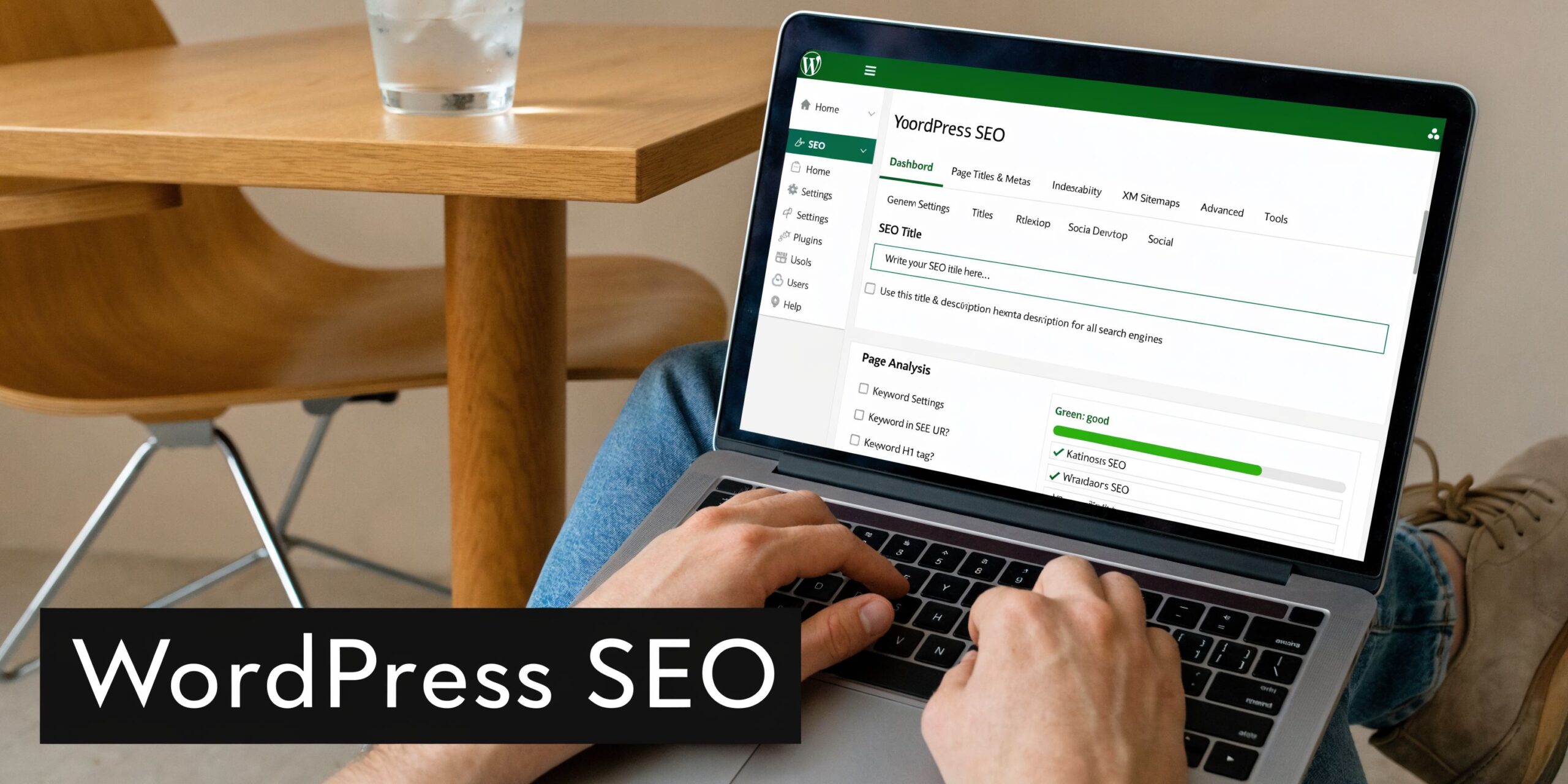
If you’re using WordPress, Rank Math and Yoast SEO are both workable. I care less about brand loyalty here and more about clean implementation. Pick one. Configure it properly. Don’t run both.
For owners planning a rebuild, this is also why it helps to think about integrating SEO from day one. Retrofitting local SEO after a theme, URL structure, and content model are already messy always costs more time.
Build suburb pages that deserve to exist
Suburb pages are useful when they serve a real purpose. They’re useless when they’re spun-up clones with suburb names swapped out.
A strong suburb page should include:
- The service offered in that area
- Local proof, such as jobs, testimonials, or relevant examples if available
- Unique copy tied to local conditions or customer needs
- Clear contact or enquiry path
- Internal links to related services and nearby locations
A weak page usually says the same thing as every other page, just with “Subiaco” changed to “Joondalup”.
Consider this approach:
| Weak suburb page | Strong suburb page |
|---|---|
| Generic intro with suburb swapped in | Specific intro tied to actual service needs in that suburb |
| No proof or differentiation | Local examples, FAQs, or service constraints |
| Repeats homepage copy | Supports homepage with distinct intent |
| No internal links | Linked from service hub and nearby area pages |
Use schema without overcomplicating it
LocalBusiness schema helps search engines understand the business entity behind the site. On WordPress, this is usually easy to add through your SEO plugin or a schema plugin if needed.
The basics matter most:
- Business name
- Address
- Phone
- Opening hours
- Website
- Service type or category where applicable
Keep the details aligned with your Google Business Profile and your directory listings. If the business name, phone number, or location formatting varies all over the web, schema won’t save you.
Clean up plugin bloat and speed issues
Many WordPress SEO campaigns stall at this point. The content might be fine, but the site is dragging around old page builders, duplicate plugins, oversized image files, and scripts loading on every page whether they’re needed or not.
Common issues I see on Perth small business sites:
- Five plugins doing the job of two
- Old themes with heavy builders
- Uncompressed hero images
- Location pages built from copied templates
- Broken internal links after redesigns
- Indexing confusion from accidental noindex settings
A solid stack often includes tools like WP Rocket or LiteSpeed Cache for caching, ShortPixel or Imagify for image compression, and Redirection for managing URL changes. The exact stack depends on the host and theme, but the principle is always the same. Keep the setup lean.
For page-level implementation, this on-page SEO checklist is a practical reference when you’re updating titles, headings, copy, and internal links.
A fast WordPress site doesn’t just feel better. It makes crawling easier, keeps users on page longer, and removes a common reason local pages fail to perform.
A useful walkthrough on local SEO fundamentals is below.
Internal linking is where a lot of gains come from
Internal links are one of the easiest wins on WordPress because you control them completely.
If you want your “electrician Subiaco” page to matter, link to it from:
- Your main service page
- Relevant blog posts
- Nearby suburb pages
- Homepage sections where appropriate
Don’t dump every suburb into the footer and call it a strategy. Build links where they make sense to users.
What works and what doesn’t
What works
- A clear page hierarchy
- One main intent per page
- Unique suburb content
- Fast-loading templates
- Consistent business details
- Schema handled cleanly
What doesn’t
- Auto-generated location pages
- Keyword stuffing in headings
- Running multiple SEO plugins
- Ignoring redirect cleanup after site changes
- Publishing pages with no internal support
For small business seo perth, the best WordPress sites aren’t fancy. They’re clear, fast, locally relevant, and easy for Google to understand.
Building Local Authority with Citations and Links
A strong local site still needs off-page confirmation. Google wants to see that your business exists beyond its own website and profile.
That’s where citations and local links come in. Not as a numbers game. As evidence.

Citations build consistency
A citation is any mention of your business name, address, and phone details on another site. Directories are the obvious example, but chamber listings, supplier pages, and association websites count too.
The important part isn’t volume for its own sake. It’s consistency.
If your business is “Northside Electrical WA” on one listing, “Northside Electrical” on another, and the phone number differs on a third, the trust signal weakens. The same goes for outdated addresses and old URLs.
Start with established Australian business directories and local listings, then work through industry and location-specific options. This list of the top Australian business directories is a good place to build from.
Good links usually come from real local involvement
The best local links often don’t come from SEO outreach emails. They come from actual business activity.
Examples include:
- Sponsoring a local club or event
- Joining an industry association
- Partnering with nearby businesses
- Contributing expert commentary to a local publication
- Being listed by suppliers, builders, or vendors you work with
A Joondalup plumber getting mentioned on a local builders’ partner page is useful. A Fremantle cafe appearing on an event site is useful. A random low-quality directory from outside Australia usually isn’t.
Reputation beats raw quantity
A lot of small businesses get sold on “hundreds of backlinks” as though all links carry equal value. They don’t.
Here’s the trade-off:
| Approach | Result |
|---|---|
| Cheap bulk listings | Messy profile, low trust, little local relevance |
| Selective AU directories | Better consistency and clearer business signals |
| Relevant local partnerships | Stronger authority and referral value |
| Mentions from unrelated sites | Weak local impact |
Local authority is just reputation translated into web signals. If a mention wouldn’t impress a real customer, it probably won’t help much in search either.
A simple rule works well here. Ask whether the listing or link would still be worth having if Google didn’t exist. If the answer is yes, it’s usually the right kind of citation or local mention.
Tracking Performance and Maintaining Momentum
SEO work falls apart when nobody tracks outcomes properly. Rankings matter, but they’re only useful if they connect to calls, enquiries, bookings, or visits.
That’s why tracking needs to be practical. Not bloated.

Track actions, not just traffic
For most small Perth businesses, these are the actions worth measuring:
- Phone click
- Contact form submission
- Quote request
- Booking action
- Address click
- Google Business Profile interactions
On WordPress, that usually means setting up GA4 and Google Tag Manager properly, then defining key events around enquiry actions. If you run a lead-gen site, there’s no point celebrating traffic growth if form quality is poor or calls are dropping.
Google Search Console should sit beside GA4, not beneath it. Search Console tells you what queries are surfacing your pages and which pages are attracting impressions. GA4 tells you what users do after they land.
Use a monthly review that fits in real business life
Most owners won’t maintain a giant reporting dashboard. They will stick to a short checklist.
A practical monthly review looks like this:
- Check Search Console for query changes
Look for new suburb terms, rising pages, and drop-offs. - Review conversions in GA4
Focus on leads, not vanity pages. - Audit top service pages
Confirm titles, links, and contact paths still make sense. - Review Google Business Profile activity
Add fresh photos, answer questions, and reply to reviews. - Test mobile experience
Make sure key pages still load cleanly and forms work. - Update weak pages
Expand, refine, or improve pages with impressions but low engagement.
Maintenance matters more on WordPress
WordPress gives you flexibility, but it also gives you more chances to break something unnoticed.
A plugin update can affect layout. A theme tweak can remove schema. A page-builder change can slow templates. A redesign can strip internal links or create redirect problems. I’ve seen rankings dip not because the SEO strategy was wrong, but because the site’s technical health slipped.
A maintenance mindset helps prevent that.
| Monthly task | Why it matters |
|---|---|
| Plugin and theme review | Avoid breakage and unnecessary bloat |
| Crawl check | Spot broken pages and indexing issues |
| Form testing | Protect lead flow |
| Speed check | Catch media and plugin regressions |
| Content refresh | Keep key pages relevant |
| Review monitoring | Support trust and conversion |
The businesses that hold local visibility usually aren’t doing secret SEO tactics. They’re just staying organised for longer than competitors.
The best local campaigns compound because the site, profile, content, and tracking all keep moving in the same direction.
Frequently Asked Questions about Perth SEO
A lot of small business owners ask the same broad questions. How long does SEO take. Do I need suburb pages. Should I blog more.
Those matter, but they’re not the questions that usually decide whether a campaign pays off. The more useful questions are narrower and less glamorous.
How do I measure ROI on low-volume local keywords
Many good Perth keywords don’t look impressive in keyword tools. That doesn’t make them weak.
A phrase like “eco-friendly backyard Perth” or a tightly defined service-plus-suburb query may have modest search volume, but the intent can be excellent. That’s especially true when the page speaks directly to a buyer with a specific problem.
One practical answer is to use Google Search Console to track the page and query pattern, then compare impressions and clicks with actual call or enquiry actions from that page. According to the guidance referenced in The Social Media Monthly’s Perth local SEO article, small Perth businesses can track impressions-to-calls ratio on these terms, aim for a 5-10% conversion rate, and those low-volume terms can produce 2.5x higher ROI than more competitive keywords.
That’s a much better way to judge long-tail content than dismissing it because the search volume looks small.
Are suburb pages always worth creating
No. They’re worth creating when the suburb has real commercial relevance and you can build a page with unique value.
If you service Subiaco, Leederville, and Mount Lawley in materially different ways, those pages can work. If you create pages for every suburb in WA with the same copy, you’re creating clutter.
A good test is simple. Can you add something on that page that would help a customer in that suburb choose you? If not, it probably shouldn’t exist yet.
What’s the biggest WordPress mistake in local SEO
Plugin sprawl.
A lot of site owners keep adding plugins to solve tiny issues. Then the site becomes slow, messy, and harder to troubleshoot. SEO weakens because page performance drops, duplicate features overlap, and updates create instability.
Keep the stack lean. Review what each plugin does. Remove overlap. Test after updates.
Should I focus on Perth or individual suburbs
Usually both, but not on the same page in the same way.
Your homepage and core service pages can support city-level relevance. Suburb pages should target localised intent where it makes business sense. If all your content tries to target Perth, Subiaco, Joondalup, Rockingham, and Midland equally, relevance gets diluted.
Do privacy changes affect tracking
Yes. If you’re using analytics and form tracking, you need to pay attention to consent and data handling.
The practical issue isn’t just legal compliance. It’s data quality. If tracking is poorly configured, you’ll lose confidence in your reporting. For WordPress businesses, that means using a clean GA4 setup, reducing unnecessary tracking noise, and making sure core conversion events still work properly within your consent framework.
Is Google Business Profile enough on its own
Sometimes it can drive a lot of enquiries, especially for straightforward service businesses. But it’s risky to rely on it alone.
A strong profile works better when the website confirms the same services, areas, and trust signals. The site also gives you more control over content, conversion paths, and long-tail keyword targeting.
If you want your WordPress site kept fast, secure, updated, and properly set up for SEO tracking and support, Webby Website Optimisation helps Perth businesses handle the technical side without the usual WordPress maintenance headaches.