
Your WordPress site can feel slow even when hosting looks healthy, plugins are updated, and your homepage seems fine in quick tests. A customer clicks an ad, waits, refreshes, and leaves. Another tries to check out and sees a timeout. From your side, nothing obvious is broken.
A lot of these problems start before the page itself loads. They start at the point where a browser asks, “Where is this website?” That lookup happens through DNS, and the dns protocol port used for that request can affect both speed and security.
Think of DNS as the internet’s phonebook. A port is the specific door that traffic uses to enter and leave a system. If the right door is blocked, slow, or poorly secured, your site can feel unreliable even when the server is technically online. That matters for sales, lead generation, and campaign performance.
If you already spend time tuning plugins, images, and caching, it’s worth understanding this layer too. A faster site doesn’t only come from page caching and front-end tweaks. It also depends on how quickly the network can find your site in the first place, which is why articles on best WordPress caching plugins only solve part of the speed puzzle.
Why Your Website's Speed Depends on a Single Number
A single number matters more than most business owners realise. That number is 53.
When someone visits your site, their device usually starts by making a DNS request. If that request is delayed, the whole visit starts late. It doesn’t matter how polished your theme is or how well your checkout is designed. The browser can’t load what it hasn’t located.
For a Perth business, this often shows up in practical ways. Google Ads clicks feel expensive because visitors bounce before the page fully loads. Staff report that the website is “sometimes down” while your developer can’t reproduce it on demand. Email may still work, hosting may still be up, and yet users keep hitting intermittent friction.
The hidden delay before your page appears
DNS is basic internet plumbing, but it’s not just an IT concern anymore. For a WordPress site owner, DNS affects:
- First impressions: If lookup is slow, the whole site feels slow.
- Reliability: If DNS traffic is blocked or mishandled, visitors may not reach the site at all.
- Security: Weak DNS handling can expose requests or create openings for abuse.
- Marketing performance: Every extra delay can undermine paid traffic, especially when the landing page itself is otherwise well optimised.
A website can be “up” on the server and still feel broken to customers if DNS lookups are delayed or failing.
The reason this topic gets confusing is that DNS sounds abstract. People hear “port” and assume it’s a specialist networking detail. In practice, it’s more like understanding which loading dock your deliveries use. You don’t need to become a network engineer. You just need to know which door matters, what happens when it’s blocked, and how that affects business outcomes.
Decoding Port 53 The Foundation of DNS
Port 53 is the main door DNS uses. That’s the number your device, server, or resolver expects for standard DNS traffic.
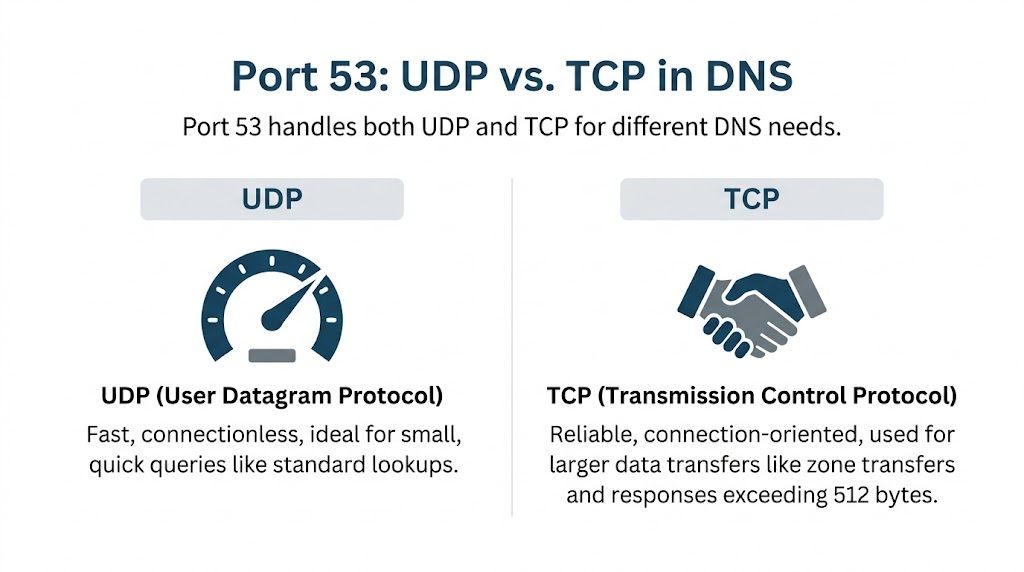
The part that trips people up is this. DNS doesn’t use just one transport method on port 53. It uses UDP and TCP.
UDP for speed and TCP for certainty
A simple way to picture this is:
- UDP is a postcard. It’s fast, lightweight, and ideal for short messages.
- TCP is registered post. It involves more back-and-forth, but it’s better when the message is larger or you need more reliability.
Most DNS lookups start with UDP because it has minimal overhead. The DNS protocol primarily operates on port 53 using both UDP and TCP, with UDP as the default. When a response exceeds 512 bytes in legacy IPv4 handling, it triggers fallback to TCP, which adds overhead but allows larger transfers, as explained by Infoblox’s DNS port 53 overview.
For Australian WordPress sites, this isn’t academic. The same source notes that blocking UDP/53 while allowing TCP/53 can add 20 to 50 milliseconds per query, and APNIC Labs 2025 data showed a 12% TCP fallback rate for .au domains. That means DNS settings can directly influence how quickly local visitors reach your pages.
Why both protocols need to stay open
Some firewall setups make a well-meaning mistake. They allow TCP on port 53 and block UDP because TCP sounds safer or more complete. For DNS, that’s backwards. You need both.
Here’s the practical impact:
| Protocol | Best use in DNS | What happens if blocked |
|---|---|---|
| UDP on port 53 | Fast everyday lookups | Lookups slow down or fail over unnecessarily |
| TCP on port 53 | Larger responses and special DNS tasks | Large responses may fail, and some DNS operations break |
If your site uses a CDN, email services, external verification records, or a more complex domain setup, DNS responses can involve multiple record types. If you want a plain-English refresher on various DNS entries, that guide helps connect record types to what your site is doing.
Practical rule: If DNS is part of your website path, don’t treat UDP/53 as optional.
What this means for WordPress owners
You don’t need to memorise packet sizes. You do need to know that a badly configured firewall can create lookup delays that feel like “WordPress slowness” even when WordPress isn’t the root problem.
That’s why DNS troubleshooting often starts below the application layer. If your site is timing out, loading inconsistently, or behaving differently across networks, it’s worth checking a more focused guide on why DNS isn’t responding before you start changing plugins or themes.
Beyond Port 53 Encrypted DNS for Modern Security
Traditional DNS on port 53 gets the job done, but there’s a privacy problem. Standard DNS queries are typically unencrypted. That means other parties on the path can potentially see what domains are being requested.
For an Australian business, that’s not just a technical curiosity. It affects customer privacy, staff security on shared networks, and your broader risk posture.

Why encrypted DNS matters now
Encrypted DNS wraps those requests in a secure layer, similar to how HTTPS protects web traffic. Two names come up most often:
- DNS over TLS (DoT) on port 853
- DNS over HTTPS (DoH) on port 443
The verified data here is strongest for DoT. With unencrypted DNS on port 53 exposing browsing history, DNS over TLS on port 853 provides a secure channel. The verified dataset also states that 2025 ACMA audits found 72% of Perth SMB WordPress sites leak unencrypted DNS, and that implementing DoT with an AU-optimised resolver can reduce latency to below 30ms while cutting malware risks by an estimated 35% for e-commerce clients, cited in the provided reference to the Domain Name System article.
That should get a business owner’s attention. If your website depends on trust, lead forms, online bookings, or checkout sessions, unencrypted DNS creates visibility you probably don’t want.
DoT and DoH in plain language
DoT and DoH both encrypt DNS, but they behave differently.
| Option | Port | Best understood as |
|---|---|---|
| DoT | 853 | A dedicated secure lane for DNS traffic |
| DoH | 443 | DNS hidden inside normal HTTPS web traffic |
DoT is often easier to reason about because it has a dedicated purpose. DoH can be useful because it blends in with ordinary encrypted web traffic. For many business owners, the right starting point is to ask whether their resolver path is encrypted at all.
If your site is handling customer trust signals, paid traffic, and admin logins, leaving DNS unencrypted is a weak point you can avoid.
A short explainer can help if you want to see the concept visually before talking to your developer or host.
The business impact
For a non-technical owner, the decision isn’t “Which protocol is academically better?” It’s “Do I want DNS lookups exposed when a more private option exists?”
That matters on office Wi-Fi, public networks, shared hosting environments, and distributed teams. It also matters when you’re trying to reduce attack surface without adding visible friction to the customer journey. Encrypted DNS won’t solve every security issue, but it removes a surprisingly basic point of exposure.
Practical Firewall Configuration for WordPress Hosting
Theory becomes a practical checklist. If the firewall allows the wrong traffic or blocks the right traffic, DNS resolution slows down, breaks intermittently, or fails entirely.
For a typical WordPress hosting environment, your DNS-related rules should be deliberate. Not broad. Not guessed. Deliberate.

The ports that usually matter
At a practical level, business owners should know these three groups:
- Port 53 over UDP and TCP for standard DNS
- Port 853 over TCP for DNS over TLS
- Port 443 over TCP and, in some environments, UDP for encrypted web traffic and DNS over HTTPS patterns
The most common mistake is still simple. Someone blocks UDP on port 53 and assumes TCP will cover it. That often creates slower lookups and harder-to-diagnose issues, especially when the site uses third-party services, CDN integrations, or external email tooling.
A sane audit checklist
If you’re reviewing firewall settings with a developer, host, or IT provider, ask them to confirm the following:
- DNS queries can leave the server on port 53 over UDP. This supports normal fast lookups.
- TCP on port 53 is also allowed where needed. Larger DNS responses and special operations depend on it.
- Port 853 is available if you’re using DoT. Without it, encrypted DNS won’t work.
- Port 443 isn’t being restricted in ways that break encrypted resolver paths. This matters for modern web and security tooling.
- Outbound filtering is understood, not assumed. Some environments focus only on inbound rules and forget that the server must also reach external resolvers.
Why hosting environments complicate things
Not all hosting setups behave the same. Shared hosting, managed cloud platforms, and custom VPS stacks often apply different firewall defaults. Some hosts tightly restrict outbound traffic. Others allow broad access and expect you to harden the server yourself.
That’s why generic advice can be frustrating. A business owner may hear “open port 53” and think the issue is resolved, while the actual problem is that only one protocol is allowed, or outbound traffic is blocked, or the resolver path is being intercepted higher up the stack.
A correct firewall rule isn’t just “port open”. It’s the right protocol, in the right direction, for the right service.
If you want a broader non-DNS primer before reviewing host rules, this practical guide to network security and firewalls is useful background reading. It helps frame why firewall decisions should support the service rather than block traffic blindly.
What to ask your provider
When support replies with “DNS looks normal”, push a little deeper. Ask:
- Which protocols are permitted on port 53
- Whether outbound DNS traffic is filtered
- Whether encrypted DNS is supported
- Whether any platform-level firewall or WAF is overriding server rules
- Whether CDN or proxy settings could alter resolver behaviour
You don’t need to phrase this like an engineer. You just need the provider to answer the right questions.
DNS Security Risks and Port-Based Defences
An open network port is a doorway. For DNS, that doorway is necessary, but it also needs guardrails.
One of the clearest examples is DNS cache poisoning. That attack tries to trick a resolver into storing false information, which can send visitors to the wrong destination even when they typed the correct domain. For a business, that can mean traffic hijacking, fake login pages, damaged trust, and support chaos.

What changed with source port randomisation
A major defensive improvement was DNS source port randomisation. Instead of sending queries from predictable source ports, systems randomise them, making it much harder for an attacker to guess the right combination needed to poison the cache.
The scale of the improvement is striking. Before this mitigation, attackers using a 1 Mbit/s connection achieved a 3.8% poisoning success rate. After source port randomisation, the success rate dropped to 0.00005821%, making the attack over 65,000 times harder under the same conditions, according to Palo Alto Networks Unit 42’s review of DNS vulnerabilities.
That’s the sort of configuration choice that sounds small but changes the risk profile dramatically.
Why this matters to a WordPress business site
Most business owners won’t manage recursive resolvers themselves, but the principle still matters. Your hosting provider, DNS provider, and network stack should be modern enough to use defensive defaults that reduce predictable attack paths.
In practical terms, good DNS security means:
- Modern server behaviour: Randomised source ports instead of predictable ones
- Clean resolver design: Avoiding weak or legacy configurations
- Thoughtful exposure: Keeping necessary services available without opening unnecessary pathways
- Monitoring: Looking for unusual DNS patterns before they become visible business problems
Security at the DNS layer is quiet when it works. Customers never notice it. They only notice when attackers redirect traffic or your domain becomes unreliable.
The cat-and-mouse problem
There’s an important nuance here. Security improvements don’t end the story. The verified data notes that researchers later found ways to weaken port-randomisation defences using ICMP techniques to identify open ports on servers. That doesn’t make randomisation unimportant. It shows why DNS security isn’t a one-time setup.
For site owners, the takeaway is simple. DNS security depends on current systems, current configurations, and ongoing maintenance. If your stack is old, inherited, or poorly documented, DNS isn’t the place to assume “it’s probably fine”.
Troubleshooting DNS Port Problems on Your Website
When DNS port issues hit, the symptoms are often vague. Your site loads on one network but not another. Admin access works, yet checkout calls fail. Email deliverability seems inconsistent. A CDN behaves strangely. The hard part is proving where the fault sits.
Start with direct testing rather than assumptions.
Simple checks you can run
If you have terminal access, basic tools like dig and nslookup help confirm whether DNS queries are returning cleanly.
A few examples:
Basic lookup with dig
- Run
dig yourdomain.com - You’re checking whether the domain resolves quickly and returns expected records.
- Run
Force a TCP DNS query
- Run
dig +tcp yourdomain.com - This helps reveal whether TCP on port 53 works when needed.
- Run
Basic lookup with nslookup
- Run
nslookup yourdomain.com - This is a straightforward cross-check if
digisn’t available.
- Run
Test an encrypted resolver path when relevant
- If your environment uses secure DNS, ask your developer to verify that path specifically rather than assuming standard DNS tests cover it.
What suspicious results look like
You don’t need to decode every line of output. Watch for patterns:
| Symptom | What it can suggest |
|---|---|
| Standard lookup works, TCP-forced lookup fails | TCP on port 53 may be blocked or mishandled |
| Queries time out intermittently | Firewall, resolver, or provider-level path issue |
| Site resolves on mobile data but not office Wi-Fi | Local network DNS filtering problem |
| CDN or third-party service behaves oddly | DNS records may be present, but transport or propagation path may be inconsistent |
Provider differences can create odd behaviour
DNS port configurations vary across hosting providers. The verified data notes that some legacy Windows Server environments used a dynamic port range of 1025-5000, while modern Windows Server environments use 49152-65535. That variability can contribute to intermittent connectivity issues for WordPress sites, especially when caching plugins or CDNs are involved, as outlined in Microsoft’s guidance on DNS network ports.
That’s the sort of issue a business owner rarely hears about in plain English. Yet it can explain why one provider says everything is fine while another developer sees inconsistent behaviour.
If DNS faults seem random, they often aren’t random. They’re conditional. Different network paths, protocols, or provider defaults trigger different outcomes.
How to talk to support without getting stuck
When lodging a ticket, avoid saying only “the site is down”. Give support something testable:
- State whether the issue is constant or intermittent
- Mention whether it differs by network or device
- Include whether a TCP-forced lookup behaves differently
- Mention any recent CDN, hosting, or firewall changes
- Ask whether provider DNS port handling differs across environments
If your domain is managed through a registrar setup that’s already causing confusion, a guide on DNS server settings at GoDaddy can help you separate registrar issues from hosting or firewall issues.
Conclusion Taking Control of Your DNS Health
The dns protocol port isn’t a niche technical detail. It affects how quickly people can reach your site, how safely DNS queries travel, and how resilient your setup is when networks or hosting environments get messy.
The most important ideas are straightforward. Port 53 remains the core of DNS. Both UDP and TCP matter. Encrypted DNS adds a privacy and security layer that many businesses now need. Firewall rules should support DNS properly, not partially. And when problems appear, simple diagnostic checks can save hours of guesswork.
For Australian WordPress site owners, this matters because website performance isn’t only about themes, plugins, and image compression. It also starts with reliable network foundations. If DNS is slow, exposed, or misconfigured, the whole customer journey suffers before WordPress even gets a chance to perform.
If you want help auditing DNS behaviour, fixing port-related slowdowns, or keeping your WordPress site secure and reliable, Webby Website Optimisation can handle the technical side for you. Their Perth-based team supports Australian businesses with WordPress maintenance, troubleshooting, performance work, security hardening, and emergency fixes so you can focus on running the business instead of untangling network problems.