

A free audit offer page is a single-purpose landing page with six elements: a benefit-led headline, a clear scope statement, three to five benefit bullets, a short form, one primary CTA, and a thank-you flow. Build it right and it becomes your most reliable lead-generation asset.
Your six-element checklist:
- Headline + value statement — one line that names the service, the suburb or region, and the outcome
- Scope statement — exactly what the audit covers (and what it doesn’t)
- Benefit bullets — three to five plain-English outcomes the prospect walks away with
- Short form — name, email, phone, website URL, and one qualifying question
- Primary CTA — a single button with a specific label (not “Submit”)
- Thank-you flow — a confirmation page plus an automated email with next steps
Copy-and-paste headline: “Free Website Audit for [Suburb] Service Businesses — Get Your Top 3 Fixes in a quick turnaround under two days”
Copy-and-paste CTA: “a clear and action-oriented call-to-action button”
Key Takeaways
A free audit offer page converts when it makes one specific, bounded promise to one specific local audience with a form short enough to complete in under 60 seconds.
| Point | Details |
|---|---|
| Six-element structure | Every audit page needs a headline, scope, benefits, short form, CTA, and thank-you flow. |
| Form length matters | Five fields maximum; cut any field you don’t use within a delivery timeframe within a couple of days of receiving a lead. |
| Privacy compliance | Include a consent checkbox and link to your Privacy Policy, per Australia’s Privacy Act 1988. |
| Tracking from day one | Set UTMs, a GTM form-submission trigger, and a GA4 conversion event before sending any traffic. |
| Webby Website Optimisation | Builds and launches conversion-focused audit pages for Perth local service businesses within within about two weeks. |
Table of Contents
- Why does a free audit page convert better than a general contact form?
- What does your audit page actually need to include?
- How do you build the page step by step?
- Ready-to-use copy for local service niches
- What should the page look like on mobile?
- How do you launch, promote, and measure the page?
- What mistakes kill conversions, and how do you fix them?
- How Webby Website Optimisation builds audit pages
- Webby Website Optimisation can build this page for you
- Sources
Why does a free audit page convert better than a general contact form?
A focused audit page removes the single biggest barrier local buyers face: not knowing what they’re signing up for. A general contact form asks for trust with nothing in return. An audit page makes a specific, bounded promise — a deliverable with a timeline — and that changes the psychology of the decision entirely.
Local service buyers are skeptical by default. They’ve been burned by vague proposals and slow follow-ups. A page that says “here’s exactly what you get, here’s when you get it, and here’s what it costs you (nothing)” answers every objection before it forms. Reduced choice also matters: one page, one offer, one button. No navigation menu pulling attention sideways.
The form itself signals professionalism. A short, purposeful form — a short form with only essential fields — tells the prospect you respect their time. A long form signals the opposite.
Pro Tip: Add one sentence of social proof directly above the CTA button. A line like “Trusted by 40+ Perth trade businesses” costs you nothing to write and removes the last hesitation before the click.
What does your audit page actually need to include?
Start with these components in order: a headline with a named service and location, a one-paragraph scope statement, three to five benefit bullets, client logos or a short testimonial, the form, the CTA button, a privacy statement, and a thank-you page URL.

The form fields below are the minimum viable set for a local service audit. Every field earns its place.
Australian privacy compliance note: Under the Privacy Act 1988 and the Australian Privacy Principles, you must tell users what data you collect, why you collect it, and how it’s stored. Add a one-line consent checkbox: “I agree to [Business Name]’s Privacy Policy and consent to being contacted about my audit results.” Link the policy. Never pre-tick the box. This applies whether you’re in Perth, Melbourne, or anywhere else in Australia.
How do you build the page step by step?
Follow this sequence and you can have a live page within a day, whether you’re doing it yourself or briefing a developer.
- Write the copy first. Draft your headline, scope statement, benefit bullets, and CTA text before touching any tool. Copy drives layout, not the other way around.
- Sketch a wireframe. A single-column layout: hero section (headline + subhead + CTA button), benefit section (three icons + bullets), form section, trust section (logos + one testimonial), footer with privacy link.
- Build in WordPress. Use a blank page template (no header/footer nav) with Elementor or Kadence Blocks. For the form, install WPForms or Gravity Forms — both support conditional logic, email notifications, and Google Sheets integration. For lead qualification and CRM sync, HuperForms connects directly to HubSpot and handles routing logic that basic plugins can’t.
- Use a pre-built template to save time. A free downloadable CRO audit landing-page template for Elementor (note: requires Elementor Pro for one-click install) gives you the hero, trust logos, benefit section, and FAQ structure out of the box. Customize the copy; don’t redesign from scratch.
- Run speed checks before publishing. Target a Largest Contentful Paint under 2.5 seconds on mobile. Compress all images with ShortPixel or Imagify. Use a CDN (Cloudflare’s free tier works). Test on a staging environment first.
- Set up tracking. Install Google Tag Manager, create a form-submission trigger, and push a conversion event to Google Analytics 4. Add UTM parameters to every inbound link before launch.
- Deploy and test on mobile. Check the form submits correctly, the thank-you page loads, and the autoresponder email arrives within two minutes.
Ready-to-use copy for local service niches
Short, benefit-led headlines outperform clever ones every time. The formula is: Free [Service] Audit + [Location] + [Specific Outcome].
Headline templates:
- “Free SEO Audit for Fremantle Trades — See Why Google Isn’t Sending You Leads”
- “Free Website Audit for Perth Plumbers — Your Top 3 Fixes, Delivered in a quick turnaround under two days”
- “Free Local Search Audit for Melville Businesses — Find Out What’s Costing You Customers”
Subhead formula: “We review your [specific element] and send you a plain-English report — no jargon, no sales pitch, just what to fix first.”
Benefit bullet templates:
- Discover exactly why your site isn’t ranking in [Suburb]
- Get a prioritized fix list — not a 40-page report you’ll never read
- Know what your competitors are doing that you’re not
Form label microcopy: Use “Your website address” instead of “URL.” Use “Best number to reach you” instead of “Phone.” These small word choices reduce friction on mobile.
CTA alternatives: “Send Me My Free Audit,” “Get My Fix List,” “Start My Free Review.” Avoid “Submit” — it tells the user nothing about what happens next.
Pro Tip: Keep your CTA button label under five words and make it first-person (“Get My Free Audit” outperforms “Get Your Free Audit” in most split tests because it feels like the user’s own decision).
What should the page look like on mobile?
Single-column layout, always. The form must appear above the fold on a 390px-wide screen — that’s a standard iPhone viewport. If a user has to scroll before they see the form, you’ve already lost a portion of them.
Layout priorities:
- Hero: headline (H1), one-line subhead, CTA button — all visible without scrolling on mobile
- Benefits: three short bullets with icons, no more than eight words each
- Form: immediately below benefits, a short form with only essential fields
- Trust signals: client logos or a short testimonial directly below the form, near the CTA
- Brief FAQ or scope clarifier: two to three questions, collapsed by default on mobile
For images, use a real photo of your team or a local landmark rather than stock. Compress to under 100KB per image. Set descriptive alt text (“Perth website audit team reviewing local business site”) for both accessibility and SEO. The service page structure guide from Webby Website Optimisation covers CTA placement and trust signal positioning in more detail.
How do you launch, promote, and measure the page?
Promote first to the audience segments that match your highest-value existing customers, then measure conversion rate, cost-per-lead, and lead quality from day one.
- Update your Google Business Profile. Add the audit page URL as a product or offer post. This is free and reaches people already searching for your service locally.
- Run a local paid search campaign. Target suburb-level keywords (“website audit Perth”) with a small daily budget. Send all clicks directly to the audit page, not your homepage.
- Boost a Facebook/Meta post to a custom audience of local business owners within a 15km radius of your service area.
- Email your existing contacts. A short three-sentence email to past leads or clients — “We’re offering a free audit this month, here’s the link” — often produces the fastest first conversions.
Tracking checklist: UTM parameters on every inbound link, a GTM form-submission trigger firing a GA4 conversion event, and a thank-you page URL distinct from the main page (so GA4 can count completions). The conversion funnel best practices guide from Webby Website Optimisation details the exact funnel steps and tracking setup for local service pages.
| KPI | What to measure | Target |
|---|---|---|
| Page conversion rate | Form submissions / total visitors | a targeted conversion rate benchmark for paid traffic |
| Cost per lead | Ad spend / leads generated | Set baseline in week 1 |
| Lead quality rate | Qualified leads / total leads | Track manually per week |
| Time to first contact | Minutes from submission to your reply | a fast response time from submission to first contact |
What mistakes kill conversions, and how do you fix them?
The four fastest conversion killers are an unclear scope, a long form, missing social proof, and a slow page. Fix these before running any traffic.
- Unclear scope — state exactly what the audit covers in one sentence on the page. “We review your homepage, Google Business Profile, and top three landing pages” is better than “We audit your online presence.”
- Long form — cut any field you don’t use within a delivery timeframe within a couple of days of receiving a lead. If you never call anyone, drop the phone field.
- Missing social proof — add at least one client name, logo, or result above the fold.
- Slow page — a page that loads in over three seconds on mobile loses a significant share of visitors before the form even renders.
A/B test priority order: headline first (biggest impact), then CTA button label, then form length, then CTA button color. Run one test at a time.
Pro Tip: With low local traffic volumes, use Google Optimize or a simple URL-split test (two page variants, alternate traffic manually via ad sets) rather than a full statistical significance framework. You need directional signal, not a PhD-level p-value, to make a better decision.
How Webby Website Optimisation builds audit pages
Webby’s approach focuses on rapid, testable changes that generate measurable lead uplifts within weeks, not months. The website audit service is built around identifying the specific friction points that stop local service visitors from converting, then fixing them in a prioritized sequence.
The optimized service page examples from Webby’s case study library show before-and-after results across local service industries in Perth and Fremantle, including improvements in organic rankings, traffic volume, and lead form completions after targeted page changes.
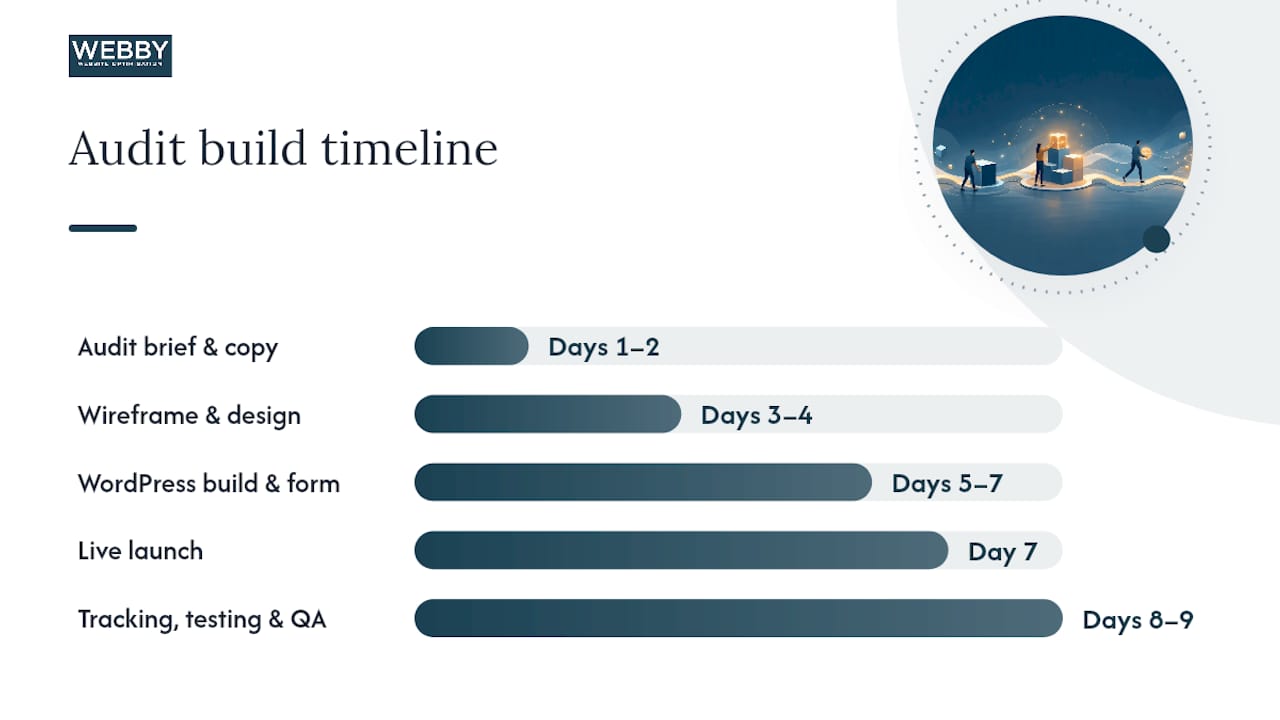
Typical delivery timeline:
| Milestone | Timeframe |
|---|---|
| Audit brief and copy draft | Days 1–2 |
| Wireframe and design review | Days 3–4 |
| WordPress build and form setup | Days 5–7 |
| Tracking, testing, and QA | Days 8–9 |
| Live launch and first traffic | Day 7 |
What the data actually tells you about audit pages
Most local service business owners underestimate how much a single, well-structured free audit page can shift their lead pipeline. The instinct is to add more pages, more services, more options. The data from Webby’s client work points the other direction: one focused page, one clear offer, one conversion path. The businesses that commit to that simplicity and then measure it consistently are the ones that see predictable lead flow. The ones that hedge, adding navigation menus and secondary CTAs “just in case,” dilute the offer and wonder why the form isn’t filling.
If you’re going to build this page, build it with conviction. Scope it tightly, write the copy before you touch a page builder, and get it live within a week. Then measure for two weeks before changing anything.
Webby Website Optimisation can build this page for you
Webby Website Optimisation builds conversion-focused audit offer pages for local service businesses in Perth, Fremantle, and Melville — pages that are live, tracked, and generating leads within about two weeks.

The process is straightforward: a brief call to scope the audit offer, a copy draft for your approval, a WordPress build with full form tracking, and a launch-ready page with UTMs and GA4 conversion events in place. No long retainers, no vague deliverables. If you want a faster path, the website built in a day service gets your audit page live in a single session. For a full implementation with ongoing optimization, the website design and development service covers the complete build. Contact Webby Website Optimisation to get a scope and timeline for your audit page.
Sources
The following sources support the guidance in this article and are worth bookmarking for implementation.
- HuperForms — Better Lead Qualification Forms for HubSpot
Recommended
- Examples of Optimized Service Pages That Actually Convert
- Turn Website Visitors Into Leads: A Local Service Guide
If this post raised some questions feel free to ask me a question