
Yes, a suspended Google Business Profile is usually recoverable, though “usually” isn’t “always” and Google gives you no fixed clock beyond one hard rule: appeal reviews and decisions can take up to five working days. Most reinstatements come down to matching your paperwork to your profile, not luck.
Do these four things in the next hour, before you touch anything else:
- Search your business name on Google Maps and regular Google Search to see if the listing still shows up publicly.
- Do not create a new profile for the same business. Google treats a duplicate listing during an active suspension as grounds for account-level restrictions, which turns a fixable problem into a much bigger one.
- Pull together your business registration, a recent utility bill, and any signage photos, since these are the documents that carry the most weight in an appeal.
- Locate the suspension email from Google and record the case ID, the decision date, and the exact reason listed.
Pro Tip: Once you start Google’s evidence form, the clock starts too. You get a 60-minute window to upload every supporting file before the form closes on you, so have your documents ready and organized before you click “start.”
From here, everything runs through Google’s own Business Profile appeals tool, accessible from the suspension notice or your profile dashboard. That’s the only path. Third-party “reinstatement services” that promise to bypass it are selling you something Google doesn’t offer.
Key Takeaways
Reinstatement after a Google Business Suspension depends on matching your documentation exactly to your profile and following Google’s own appeals timeline without shortcuts.
| Point | Details |
|---|---|
| Diagnose before you act | Check if the listing is missing (hard suspension) or visible but locked (soft suspension) first. |
| Never duplicate the listing | Creating a second profile during an active appeal risks account-level restrictions. |
| Match documents exactly | Business name and address must be identical across registration, bills, and the profile. |
| Respect the timelines | Evidence uploads have a 60-minute window; reviews take up to five working days. |
| Get professional support if denied twice | Webby Website Optimisation offers profile audits, evidence prep, and appeal submission support. |
Table of Contents
- What Does a Google Business Suspension Actually Mean?
- What Are the Most Common Causes of a Google Business Suspension?
- How Do You Submit a Google Business Profile Reinstatement Appeal?
- What Documents Should You Include in Your Appeal Evidence?
- What If Google Denies Your First Appeal?
- How Do You Prevent a Future Google Business Suspension?
- What Do Successful Reinstatement Cases Have in Common?
- Why Does a Google Business Suspension Hit Harder Than It Looks?
- How Webby Website Optimisation Can Help You Recover and Protect Your Listing
- Sources
What Does a Google Business Suspension Actually Mean?
A Google Business Suspension comes in two distinct flavors, and figuring out which one you’re dealing with determines your entire next move. Practitioners split these into “hard” suspensions, where the listing disappears from Maps and Search entirely, and “soft” suspensions, where the listing stays visible to customers but your management access gets cut off. Confuse the two and you’ll waste days chasing the wrong fix.
Run the search check first
Open an incognito browser window and search your exact business name plus city. Check Google Maps separately. If nothing comes up at all, that’s a hard suspension, meaning Google pulled the listing from public view entirely. If your business still appears with normal information but you can’t log in to edit it or claim ownership again, you’re looking at a soft suspension.
Check your account standing next
Sign in to the Google account tied to the profile and confirm it isn’t restricted. This step gets skipped constantly, and it matters because a Business Profile can stay suspended purely because the managing Google Account itself is flagged, independent of anything wrong with the listing content. If your account shows warnings or restrictions, fixing the account has to happen before any profile appeal will succeed.
Read the suspension email like a document, not a notification
Open the actual email Google sent and copy down three things: the stated decision, the date it was issued, and the case ID number. You’ll need all three when you file the appeal, and hunting for them later while the clock is running wastes minutes you don’t have.
- Confirm whether the listing appears in Search and Maps (hard vs. soft).
- Check your Google Account for any separate restriction notices.
- Log the case ID, decision date, and stated reason from the suspension email.
- Note whether you were the one who made a recent edit before the suspension hit, since timing often points to the trigger.
While you’re diagnosing, resist two urges: don’t build a second profile “just in case,” and don’t fire off a second appeal because the first one feels slow. Google explicitly treats repeated appeals for the same issue as a red flag rather than persistence, and it can reset your position in the queue instead of speeding it up.
What Are the Most Common Causes of a Google Business Suspension?
Most suspensions trace back to a short list of repeat offenders, and Google’s detection methods vary depending on which one you triggered. Keyword-stuffed business names, virtual-office or PO Box addresses, duplicate listings, and mismatched hours or addresses account for the bulk of cases practitioners see.
A business name padded with extra keywords, something like “Joe’s Plumbing Perth Emergency 24 Hour Best Service,” gets flagged by Google’s automated name-policy scans almost immediately. The fix is blunt: revert to your actual legal or trading name, nothing appended.
Address problems run deeper. P.O. Boxes are explicitly barred as a listed address under Google’s policies, and virtual offices get caught the same way once Google cross-references the address against other businesses using it. If you don’t have a genuine physical location customers can visit, you need a service-area business setup instead of a storefront listing.
Duplicate listings usually happen by accident, often when an old agency or a previous owner created a second profile years ago that nobody closed out. Google’s system detects the overlap through matching phone numbers or addresses and suspends one or both. NAP inconsistency, meaning your business Name, Address, and Phone number don’t match across your website, directories, and the profile itself, triggers a quieter but equally damaging algorithmic flag.
| Cause | Detection signal | Corrective action | Evidence to submit |
|---|---|---|---|
| Keyword-stuffed name | Automated name-policy scan | Revert to legal or trading name | Business registration showing legal name |
| Virtual office / PO Box | Address cross-reference across listings | Switch to service-area profile type | Lease or utility bill for a real location |
| Duplicate listings | Matching phone/address on two profiles | Merge or remove the extra listing | Screenshot of both listing URLs |
| NAP inconsistency | Mismatch between website and directories | Align name/address/phone everywhere | Website footer screenshot, citation audit |
| Inaccurate 24/7 hours | Reports or unstaffed-hours pattern | Correct hours to reflect real staffing | Staff schedule or signage photo |
| Account-level violation | Google Account restriction flag | Resolve the account issue directly | Account status confirmation |
Some of these are algorithmic, caught by automated pattern matching, and others come from manual review after a competitor or customer flags your listing. The fix is the same either way: correct the underlying data before you appeal, because submitting an appeal against a profile that still has the violation in it is close to a guaranteed denial.
How Do You Submit a Google Business Profile Reinstatement Appeal?
Filing the appeal itself is straightforward once your documentation is ready, but the sequence matters more than people expect. Before you open the tool, confirm three things: your Google Account is in good standing, your profile’s name and address exactly match your official documents, and you have digital copies of every piece of evidence saved and ready to upload.
- Sign in to the Google Account that manages the profile.
- Open the Business Profile appeals tool linked from your suspension notice.
- Select the specific profile and the decision you’re appealing.
- Fill in the appeal narrative, referencing your attached documents by name.
- Open the evidence form only when your files are fully prepared, since the 60-minute upload window starts the moment you click it.
- Zip your files with clear naming (business name, document type, date) before uploading.
- Submit and record your new case ID for tracking.
Your narrative should be short and evidence-anchored, not emotional. Something like: “This business operates from [exact address], matching the attached business registration (Doc 1) and utility bill (Doc 2). Signage photos (Doc 3–4) confirm the location is a permanent, staffed premises.” Avoid pleading your history with Google or explaining how much the suspension is costing you. Reviewers respond to matched documentation, not urgency.
- Do keep the narrative under 150 words and reference each attached file by number.
- Do use the exact business name and address as they appear on your official documents, not how they appear on your website if the two differ.
- Don’t submit a second appeal while the first is still pending. Reviews take up to five working days, and duplicate submissions confuse the queue rather than speed it up.
- Don’t leave the evidence form open and walk away. Once it’s live, the 60-minute clock doesn’t pause.
If you’re managing more than 10 locations, Google asks for a spreadsheet listing each Business Profile ID alongside its individual evidence set rather than one appeal per location, which is worth knowing before you start filing separately for every branch.
What Documents Should You Include in Your Appeal Evidence?
The strongest evidence set proves one thing above all: that your business physically exists at the address you’ve listed, under the name you’ve listed. Everything else is secondary.
Primary documents
Your business registration certificate or license carries the most weight because it’s issued by a government authority and directly ties your legal name to an address. A recent utility bill (electricity, water, internet) in the business name works as a strong backup, especially when the registration document is older or shows a previous address. Tax certificates and lease agreements round out a solid primary set.
Formatting rules that actually matter
Every document needs to show the identical business name and address that appears on your profile. Small inconsistencies, “St.” versus “Street,” a missing suite number, cause rejections far more often than people expect, so check this before you upload anything. Save files as PDFs or high-resolution JPEGs, keep individual files under 10MB where possible, and zip the full set together with a clear naming pattern like “BusinessName_Registration_2026.pdf.”
Photos of physical signage do heavy lifting for storefront suspensions. Take a straight-on shot of permanent exterior signage, an interior shot showing staff or product, and if relevant, a branded vehicle. Label each photo file by what it shows rather than leaving it as a generic camera filename.
| Document type | When it’s strong evidence | Filename best practice |
|---|---|---|
| Business registration | Name/address dispute, any suspension type | BusinessName_Registration.pdf |
| Utility bill | Address verification, recent occupancy | BusinessName_UtilityBill_MonthYear.pdf |
| Exterior signage photo | Storefront presence disputes | BusinessName_ExteriorSignage.jpg |
| Interior photo with staff | Confirming an active, staffed location | BusinessName_Interior.jpg |
| Lease agreement | Virtual office or address-type disputes | BusinessName_Lease.pdf |

Service-area businesses without a public storefront should lean on registration documents and a letter from a landlord or business partner confirming operations, since signage photos aren’t an option. Multi-location businesses and franchises need to submit evidence per location, matching each Business Profile ID to its specific documentation rather than submitting one generic packet for the whole brand.
What If Google Denies Your First Appeal?
A denial isn’t the end of the process, but you have limited runway left, so treat the next step carefully rather than resubmitting in a rush. Google offers an “additional review” option once a first appeal comes back denied, and practitioners generally treat this as the last meaningful opportunity to get reinstated through the standard channel.
- Read the denial reason carefully. It often names a specific gap, missing document type, unclear photo, mismatched address, that you can address directly.
- Add new or stronger evidence rather than resubmitting the same files. If your first attempt used a utility bill, add a lease agreement or a second signage photo this time.
- Rewrite the narrative to directly rebut the stated denial reason, referencing the new documents by name.
- Fix any underlying data issue first. If the denial hints at an address mismatch, correct that on your website and directories before you resubmit, not after.
- Submit the additional review request and expect a similarly timed wait, generally in the same window as the initial appeal.
- If the additional review also fails, contact Google Business Profile support directly through the help center’s contact options, or ask a Product Expert in the Google Business Profile community forum for a second set of eyes.
- Consider professional help at this stage if you’ve exhausted the standard appeal paths and the business impact is significant enough to justify it.
Since practitioners often treat the additional review as your final real shot, resist the temptation to fire it off immediately after the first denial. Take a day, gather the strongest documents you can find, and make sure the narrative speaks directly to why the first attempt fell short.
How Do You Prevent a Future Google Business Suspension?
Most repeat suspensions come from loose profile governance rather than bad luck, which means the fix is largely procedural. Start by limiting who can edit your profile. If an agency or a former employee still has manager access, remove it and audit the list of current managers every few months.
- Keep your business name, address, and phone number identical across your website, your Google Business Profile, and every directory listing you appear in.
- Never add keywords or service descriptors to your business name field, no matter how tempting it is for search visibility.
- Double check your listed hours reflect actual staffed hours, especially if you’ve claimed 24/7 availability without round-the-clock staff.
- Pace major edits. Changing your business name, address, and category all in one sitting reads as suspicious to Google’s systems far more than the same changes made gradually.
- Set a recurring calendar reminder, quarterly is reasonable, to review your profile for accuracy and check for unauthorized manager invitations.
- If you work with a marketing agency, confirm their Google account is in good standing and agree on a change protocol before they touch your listing.
A profile management tool that logs edit history makes the audit step far less painful, since you can spot an unauthorized change within days instead of discovering it months later when the suspension notice lands. Keeping your website’s contact details aligned with your Google listing closes off one of the quieter causes of algorithmic suspension before it ever becomes a problem.
What Do Successful Reinstatement Cases Have in Common?
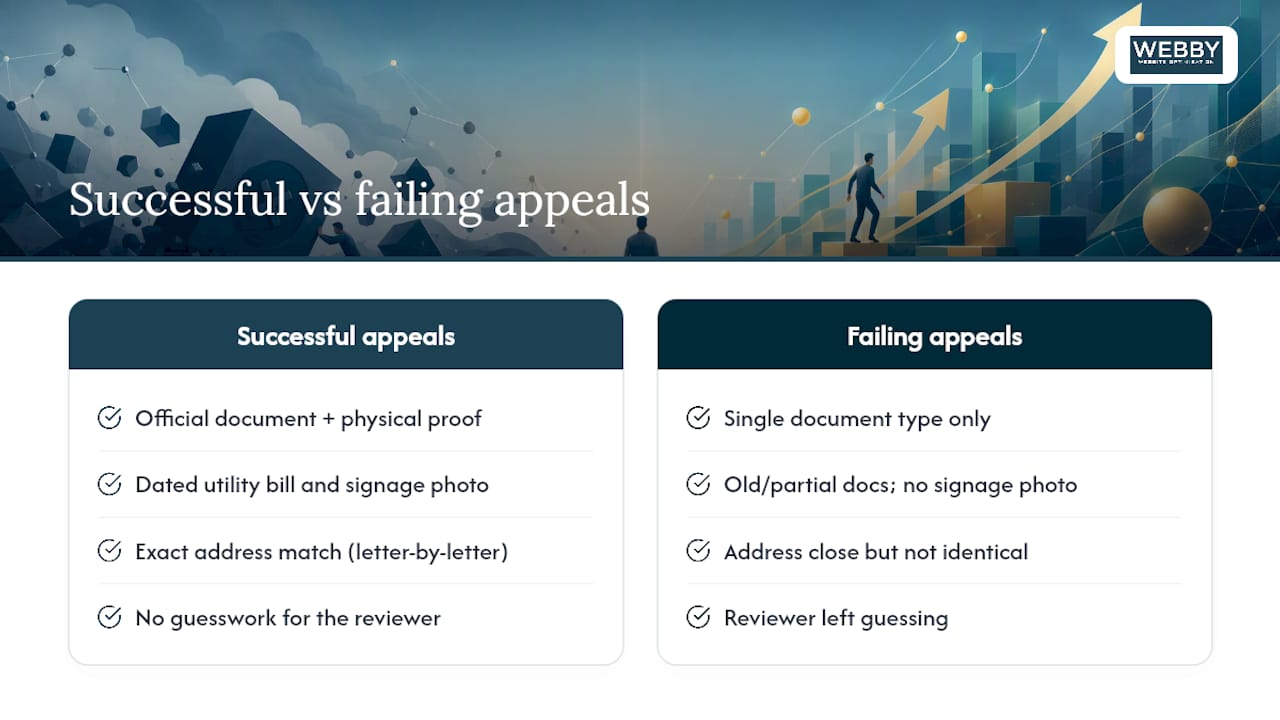
The winning appeals share a pattern: they pair a piece of official documentation with a piece of physical proof, and they never make the reviewer guess. A business registration alone rarely convinces a reviewer that a location is real and staffed. A registration paired with a dated utility bill and a clear signage photo does, because the three pieces corroborate each other from different angles.
The appeals that fail almost always share the opposite pattern. They submit a single document type, or they submit documents where the address is close but not identical to the profile, missing a unit number, an old suburb name, a “Rd” versus “Road” mismatch. The other repeat failure is creating a second profile out of frustration while the first appeal sits pending, which frequently escalates a fixable suspension into an account-level restriction that’s much harder to unwind.
Not every suspension needs the full evidence treatment. Soft suspensions caused by something as minor as inaccurate hours or a wrong business category sometimes resolve within days just by correcting that single field and requesting a review, without a formal appeal at all.
Pro Tip: Before you submit anything, lay your documents side by side and check the address on each one letter by letter against your profile. This single five-minute check catches more rejection causes than any other step in the process.
The businesses that recover fastest are the ones that treat the suspension as a documentation problem, not a Google problem. They stop trying to argue with the decision and start proving, with paper, that the listing is accurate. That shift in mindset, from defending to demonstrating, is what separates a five-day reinstatement from a three-week ordeal.
Why Does a Google Business Suspension Hit Harder Than It Looks?
A suspended profile doesn’t just look bad. It cuts off the exact channel most local customers use to find you, and practitioner reports suggest phone inquiries can drop as much as 90% once a listing disappears from Maps. That’s not a slow bleed. It’s often immediate, because a customer searching “plumber near me” simply never sees you as an option.
I think the checklist approach in this piece matters precisely because the alternative, treating the appeal as a formality and hoping Google reconsiders, wastes the narrow window you actually have. Businesses that gather their registration documents, a utility bill, and a signage photo before they even open the appeals tool consistently move faster through review than those who scramble for paperwork after the evidence form is already open and the clock is running.
One pattern worth remembering: a plumbing business I’ve seen referenced in practitioner case notes lost its listing over an address mismatch between its website footer and its profile, a one-word difference. The fix wasn’t complicated. A corrected website footer, a signage photo, and a current utility bill got the listing back within the standard review window. The lesson isn’t that Google is lenient. It’s that small, boring inconsistencies cause most of the damage, and small, boring fixes usually undo it.
How Webby Website Optimisation Can Help You Recover and Protect Your Listing
Webby Website Optimisation is the practical alternative to fighting this alone or handing it to a generalist agency that treats your Google Business Profile as an afterthought. We build your appeal evidence around the exact match Google’s reviewers look for: business registration, signage, and website details that line up letter for letter, not roughly.

Our process starts with a profile audit to pinpoint what actually triggered the suspension, followed by evidence preparation, appeal submission, and ongoing profile management so a fixed listing doesn’t drift back into inconsistency six months later. Because NAP mismatches are one of the most common repeat offenders, we also check your website design and structure to confirm your business name, address, and phone number match your profile exactly, closing off one of the quieter causes of future suspensions before it starts.
If you need your website details corrected fast to support an active appeal, our rapid website build service can get accurate, matching business information live within a day. Request a profile audit through our contact page and we’ll typically respond with an initial assessment within one business day.
Sources
- Appeal Business Profile content and profile restrictions – Google Business Profile Help
- Fixing a Suspended Google Business Profile – BrightLocal
- How to reappeal a Google Business Profile suspension – Search Engine Land