
Negative keywords stop your ads from showing for searches you don’t want, and that cuts wasted clicks the moment you add them. The fastest way to see the benefit is to pull your search terms report from the last 7 to 14 days and add obvious non-buying queries like “free,” “DIY,” and “jobs” as negatives, along with any product variants you don’t actually sell.
TL;DR:
- Negative keywords should be added based on recent search term reports to exclude irrelevant, high-spend queries that do not convert.
- Use exact and phrase negative match types for safety, and explicitly include variants like plurals and misspellings to prevent leaks.
- Apply negatives at the account level for universal exclusions and refine with campaign and ad group negatives for specific service or location targeting.
- Regularly review search terms data, especially in the first few weeks, to prevent accidental blocking of profitable traffic or valuable queries.
- Avoid broad negatives early on in automated campaign types, as the algorithm needs time to learn which signals truly predict conversions.
Table of Contents
- What negative keywords are and why local advertisers need them
- Negative match types and the mistakes that trip people up
- Where to apply negatives and how account limits work
- How to find your negative keywords
- Keeping your negative list healthy over time
- How we run negative keywords for local clients
- Why heavy-handed negatives can backfire early on
- How we can help with negative keywords and local campaign optimisation
- FAQ
- Sources
What negative keywords are and why local advertisers need them
A negative keyword tells Google Ads not to show your ad when someone searches for that term. We think of it as a filter sitting in front of your campaign, quietly removing the traffic that was never going to convert. The direct payoff is a better click-through rate on the searches that remain, a higher conversion rate because the people clicking actually want what you sell, and a lower cost per acquisition because you stop paying for clicks that lead nowhere.
For local service businesses, the irrelevant searches tend to cluster into a few predictable types:
- Informational queries, like a plumber’s ad showing for “how to fix leaky faucet”
- Job-seeker queries, like “locksmith jobs near me” instead of someone who needs a lock changed
- Free or low-intent queries, like a salon’s ad appearing for “DIY hair dye” searches
- Unrelated product types, like a locksmith’s ad triggered by “key cutting machine parts”
A plumbing business might also want to exclude “wine glasses” if a broad match keyword around “glass repair” accidentally pulls in unrelated retail searches. Spotting these patterns in your own account is the first real skill to build.
Negative match types and the mistakes that trip people up
Negative keywords come in the same three match types as regular keywords, but they behave differently once applied. Negative exact blocks only the precise search typed in. Negative phrase blocks any search containing that exact phrase in order. Negative broad blocks any search containing all the words in the negative, regardless of order.
The part that catches people out: negative keywords do not automatically catch close variants. Google’s own guidance confirms that plurals, misspellings, and acronyms are not covered unless you add them yourself. If you add “job” as a negative, “jobs” might still slip through and trigger your ad. There’s also a 16-word limit on negative phrase and exact keywords, so very long queries can bypass a negative that’s close but not quite matching.
Before you add a batch of negatives, run through this checklist:
- Add explicit variants (plural, singular, common misspellings) rather than assuming one entry covers them all
- Test performance after adding negatives to confirm traffic dropped where you intended
- Audit for overlap with your positive keywords, since a careless broad negative can silently block legitimate searches
Pro Tip: Before adding a negative broad match, search the exact phrase in Google yourself and check whether any of your own ad groups are still targeting it.
Where to apply negatives and how account limits work
Negative keywords can live at three levels: account, campaign, or ad group. Each has a different job. Account-level negative keyword lists apply across your eligible Search and Shopping campaigns at once, which makes them the right home for brand-safety terms and universal exclusions you never want showing up anywhere, such as competitor names or obviously irrelevant categories.
Because account-level lists carry practical limits, treat that space as scarce. Save it for high-impact or brand-safety terms rather than service-specific exclusions that only matter to one campaign.
A workable placement order looks like this:
- Set account-level safeguards first, covering universal exclusions and brand-risk terms
- Tailor campaign-level lists to the service or location each campaign targets
- Refine further at the ad-group level for narrow, specific terms tied to one set of keywords
This sequence keeps your limited account-level slots free for the exclusions that genuinely need to apply everywhere.
How to find your negative keywords
The search terms report is the best source for negative keyword candidates because it shows the actual queries that triggered your ads, not guesses. A repeatable process looks like this:
- Pull the search terms report for the last 7 to 30 days, depending on how much traffic the campaign gets
- Filter for queries with high spend and low or zero conversions
- Mark anything irrelevant to your service, then add it as a negative at the right level
- Repeat the filter for queries with unusually low click-through rate, since those often signal a mismatch too
Beyond the search terms report, a few other sources surface candidates worth checking: your Google Analytics site search data, customer support logs and FAQ pages (which reveal the language customers actually use), and your own landing pages, which often hint at related but non-converting topics.
A few sample starting lists for common local services:
- Plumbers: “DIY,” “how to,” “course,” “jobs,” “salary”
- Hair and beauty salons: “DIY hair dye,” “at home kit,” “free tutorial,” “jobs”
- Locksmiths: “key cutting machine,” “parts,” “course,” “jobs,” “locksmith salary”
When choosing match type for these, exact and phrase negatives are safer defaults because broad negatives can unintentionally block valid traffic that happens to share a word.
Keeping your negative list healthy over time
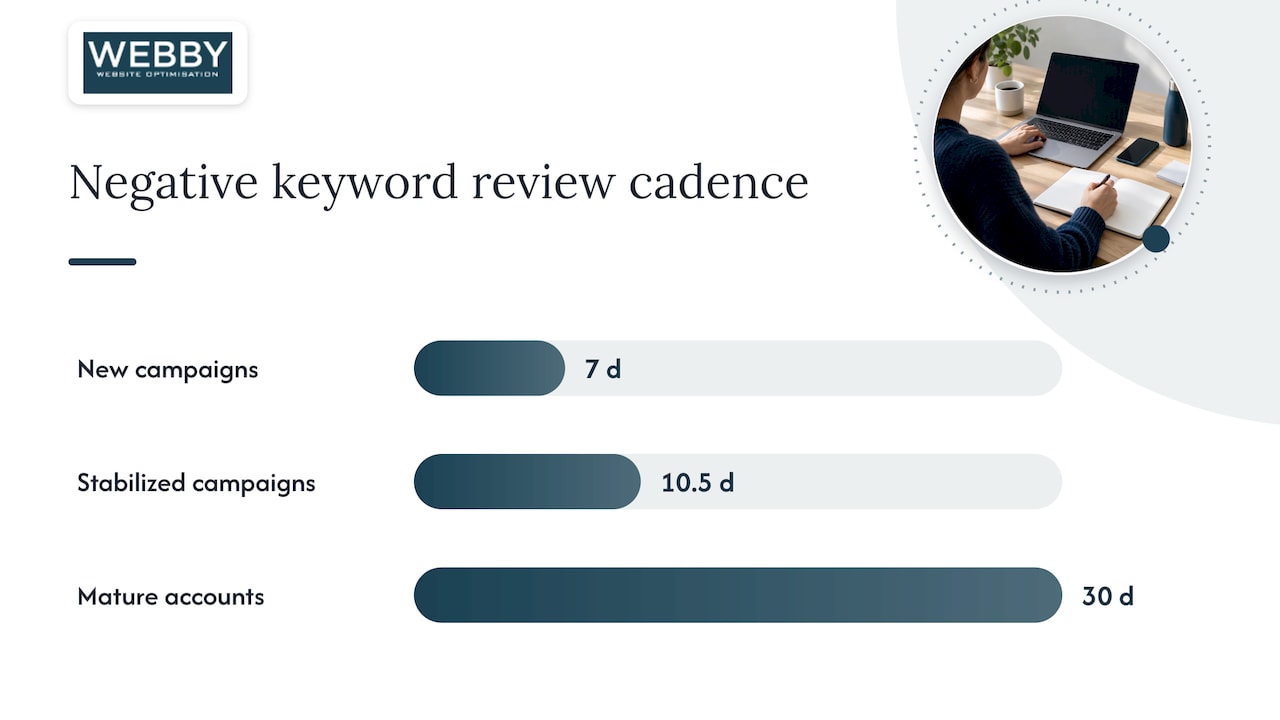
A negative keyword list is never finished. New campaigns benefit from a weekly review of the search terms report while the algorithm is still learning what you want. Once a campaign stabilizes, pull back to every one to two weeks, and mature, steady accounts can usually shift to a monthly check.
After each change, watch impressions, clicks, conversions, and cost per acquisition. Expect small, immediate drops in impressions and clicks since you’ve removed inventory, with the real payoff (a lower CPA and steadier lead quality) showing up over the following one to two weeks.
- Check for accidental blocking by reviewing the search terms report for a drop in previously healthy queries
- Keep a simple change log noting what you added, when, and why
Pro Tip: If conversions drop sharply within a few days of adding negatives, remove the most recent batch first rather than guessing which one caused it.
How we run negative keywords for local clients
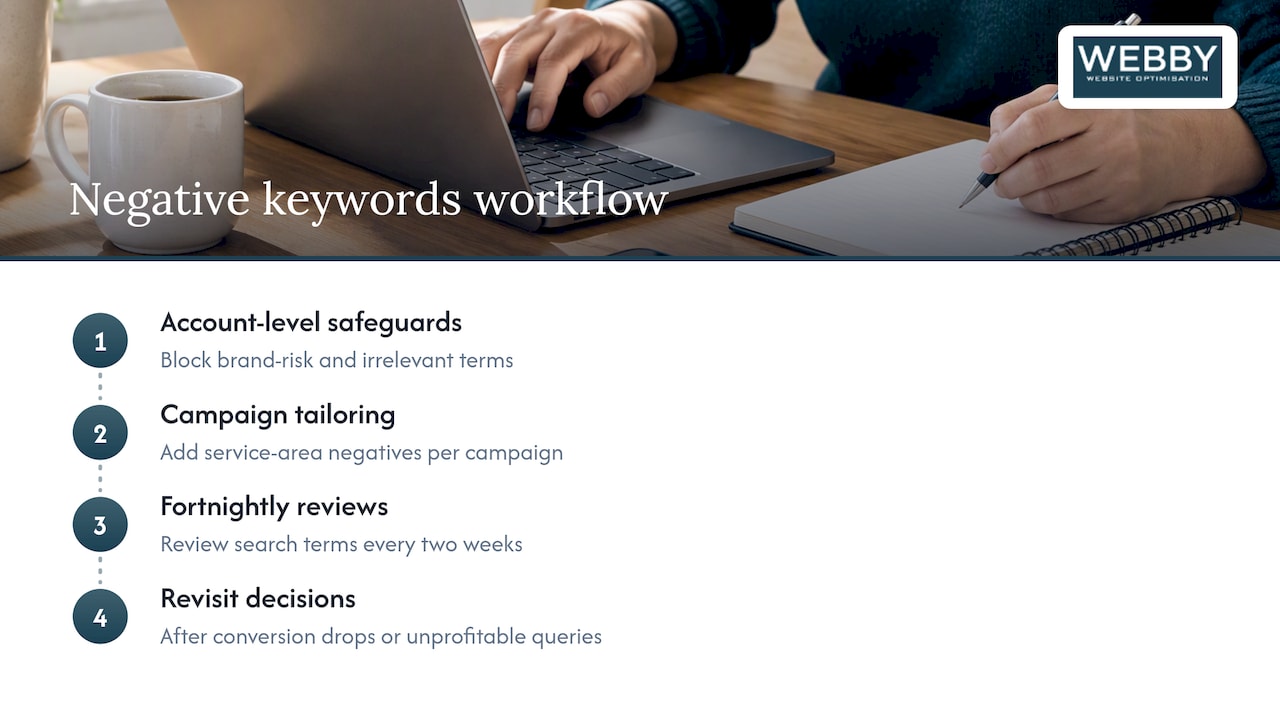
Our approach typically starts with account-level safeguards for brand-risk and clearly irrelevant terms, then moves to campaign-level tailoring for each service area, followed by fortnightly search-terms reviews once a campaign is live. In anonymized cases across our client base, removing an overly broad negative that had been blocking legitimate “emergency” or “same day” searches improved lead quality and lowered cost per acquisition within a couple of weeks. Decisions on negative keywords are revisited whenever conversion volume drops without a clear cause, or when a search terms review turns up new, consistently unprofitable queries.
Why heavy-handed negatives can backfire early on
The instinct to block every irrelevant query fast works against you with Performance Max and other AI-driven campaign types. Google’s guidance recommends waiting roughly 10 to 14 days after launch before making broad exclusions, since the algorithm needs that window to learn which signals actually predict a conversion. Use hard negatives early only for terms that are clearly irrelevant or brand-dangerous, document every change, and run a simple before-and-after comparison where you can. Cutting reach too soon can cost you more in lost learning than it saves in wasted spend.
How we can help with negative keywords and local campaign optimisation
Getting negative keywords right alongside a site that actually converts the traffic you keep is where most local businesses get stuck, and that’s the gap we close. Our Search Engine Optimisation and Google Ads management work goes hand in hand with a Website Audit, which checks whether your landing pages, speed, and tracking are set up to make the most of the traffic your campaigns keep after negatives are applied.

A typical audit diagnoses where budget is leaking, flags the negative keyword gaps in your current setup, and hands you a prioritized list of fixes with a realistic timeline for each. If you’d rather hand the whole thing over, our End-to-End Growth Engine™ combines site and ads optimisation into one managed service. Claim your free website audit and we’ll show you exactly where your campaigns and site are losing ground.
FAQ
What are examples of negative keywords?
Common examples include “free,” “DIY,” “jobs,” “course,” and “salary,” along with specific product variants a business doesn’t sell. A plumber might exclude “wine glasses,” while a locksmith might exclude “key cutting machine parts.”
Can you give me an example of negative marketing?
In Google Ads, negative marketing usually refers to using negative keywords to actively exclude unwanted traffic rather than promoting a product. For example, a salon excluding “DIY hair dye” searches stops its ad from reaching people who have no intention of booking a service.
What is a benefit of negative keywords?
The main benefit is spending your budget only on searches that match what you actually offer, which raises conversion rates and lowers cost per acquisition. Google Ads describes this as letting advertisers focus spend on relevant keywords by excluding irrelevant search terms.
How do I make a negative keyword list?
Start by pulling your search terms report for the last 7 to 30 days and flagging queries with high spend but low or no conversions. Add those as negatives at the account, campaign, or ad-group level depending on how broadly they should apply, and review the list on a regular cadence.
— Steve Doig