
A Demand Gen campaign is a Google Ads campaign type that shows visual ads (video, image and carousel) to people browsing YouTube, Discover, Gmail, Maps and the Google Display Network. For a local service business, it works best as the campaign that creates interest among people who are not searching yet, backed by a website that turns that interest into enquiries. Used that way, it feeds your Search campaigns and your phone instead of competing with them.
This guide explains what Demand Gen is, how it differs from Display, how to set it up, what budget Google recommends and which numbers tell you whether it is working.
TL;DR
- Demand Gen serves visual ads across YouTube (including Shorts), Discover, Gmail, Maps and the Google Display Network, aimed at people who are likely to be interested before they search.
- It is Google’s new home for Display campaigns, and it adds Lookalike segments, carousel ads and more video formats.
- Setup takes six steps: goal, conversion tracking, devices, location and language, bidding and budget, then ads.
- Budget matters: Google’s own guidance ties daily spend to your expected cost per conversion, so plan before you launch.
- Tracking and a fast, clear landing page decide whether the clicks become leads.
Table of Contents
- What a Demand Gen campaign is
- Where your ads appear
- Demand Gen vs Display (and Performance Max)
- Is Demand Gen right for your business?
- How to set up a Demand Gen campaign
- What it costs and how much to budget
- Metrics that show whether it works
- Our view
- How we can help
- FAQ
- Sources
What a Demand Gen campaign is
Google describes Demand Gen campaigns as campaigns that capture engagement and action across YouTube (including Shorts), Discover, Gmail, Maps and the Google Display Network. Google’s AI serves tailored visual ads to people likely to be interested, and Google says the reach is up to 3 billion monthly active users.
The difference from Search is intent. A Search ad answers someone typing “electrician Fremantle”. A Demand Gen ad appears while someone watches a video, checks their inbox or scrolls their Discover feed. They were not looking for you. Your ad puts your business in front of them at the moment it might matter, and the campaign is built to move that interest towards an enquiry.
That suits many local service businesses. Think of a homeowner who has not yet decided to redo a bathroom, a business owner who has never compared accountants, or a family who will need a pest controller next spring. Search captures them when they are ready. Demand Gen reaches them earlier.
Where your ads appear
Ads can run on YouTube, Gmail, Maps, Discover and the Google Display Network, depending on channel controls, which you set at the ad group level. You can pick channels manually or choose all Google channels. Which channels are available for a given ad depends on the ad type, audiences and settings. Maps only serves when a non-affiliated location extension is enabled.
For a service business that covers a defined area, Maps and location targeting are worth understanding early. Location can be targeted by country, region, metro area or proximity, so you can keep spend inside the suburbs you actually service.
Audiences you can use
Google’s audience overview lists several groups:
- Demographics: age, gender, household income and parental status.
- Google segments: interests, in-market, life events, detailed demographics and affinity.
- Your data: website visitors, YouTube users and customer lists.
- AI-powered options: New Customer Acquisition, optimized targeting, Lookalike segments and Made for you audiences.
Your own data is the strongest starting point for a small business. A customer list of past clients lets Google build a Lookalike segment of people who resemble them. Website visitors let you remind people who looked at a service page but did not call.
One setting to know: when optimized targeting is on, demographic expansion also applies, so Google may go beyond the age, gender, household income and parental status you selected. You can restrict expansion to age and gender.
Demand Gen vs Display (and Performance Max)
If you ran Display campaigns before, the change is already happening. Google states that Display campaigns now have a new home in Demand Gen: the same network of more than 2 million sites and apps remains available as the Google Display Network inside Demand Gen. A migration tool updates live campaigns using 42 days of performance history, which Google says cuts learning time to roughly one to two days.
According to the same comparison, Demand Gen adds:
| Area | Display | Demand Gen |
|---|---|---|
| Inventory | GDN, YouTube, Gmail | Adds Discover and Maps |
| Creative | Standard Display formats | Adds carousel ads, generative image tools and more video formats |
| Audiences | Existing Display options | Adds Lookalike segments |
| Bidding | Manual CPC, viewable impressions | Target CPC and flighted campaign total budgets |
| Measurement | Data-driven attribution, conversion lift | Keeps both, plus third-party verification |
In plain terms, Display was built around placements and banners. Demand Gen is built around visual storytelling and audience signals across Google’s most-used feeds.
Performance Max is the other campaign people confuse it with. Google explains that Performance Max looks for converting customers across all Google channels, including Search, Maps and Shopping, with less control. Demand Gen concentrates on the visual surfaces and gives you more control over creative testing, audiences and specific YouTube and Discover placements. If you want to know which creative and which audience brought the enquiries, Demand Gen gives you more to work with.
Is Demand Gen right for your business?
It is a good fit when:
- You already get steady enquiries from Search and want more volume beyond people actively searching.
- You have a service that benefits from being seen (before-and-after work, short explainer videos, team and vehicle photos).
- You have a customer list or enough website traffic to build audiences.
- Your website loads fast and has a clear enquiry path.
The last point is where many small campaigns fall down. A Demand Gen click lands on your site, and if the page is slow, vague or hard to use on a phone, the ad money is wasted. That is why we look at the website before the ads. A Website Audit ($1,250 one-off) shows what to fix first, so the traffic you pay for has somewhere good to land.
If you are still setting up the basics, start with a guide on how PPC works for Australian small businesses, and if you need an account first, here is how to create a Google Ads account.
How to set up a Demand Gen campaign
Google’s setup guide follows six steps. Here is each one, with where it tends to go wrong for a local business.
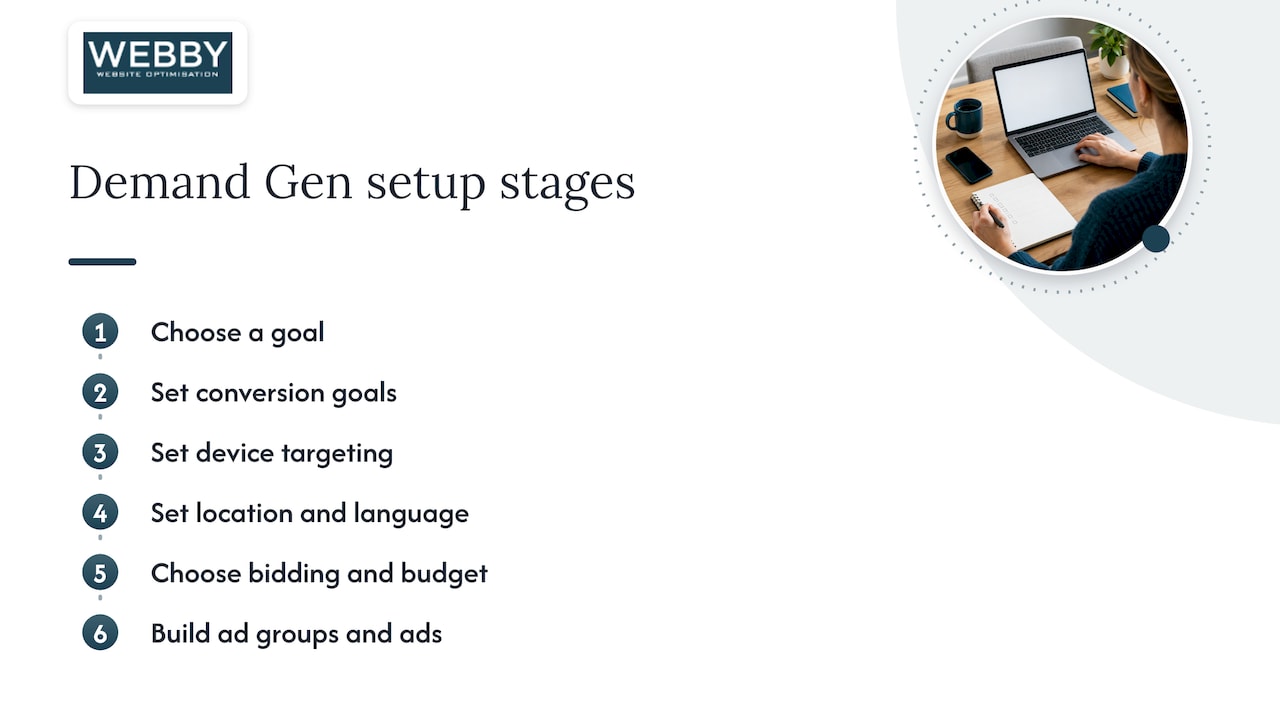
1. Choose your goal
Options include sales, leads, website traffic, app promotion, YouTube reach, views and engagements, local store visits, or no goal. For a service business, choose leads. Choosing traffic tells Google to find clickers, not enquirers.
2. Set conversion goals
This is the step that decides everything else. A conversion is the action you want: a form submission, a call, a booking. If the account tracks the wrong thing (page views, say), the AI optimizes toward the wrong people. Check that each real enquiry is counted once and only once. Our team sets up Google and Microsoft Ads management with the website’s conversion tracking in mind, so the campaign learns from real leads.
3. Set device targeting
You can target computers, mobile phones, tablets and TV screens, with operating system, model and network options. Most local service enquiries come from phones, so check your site on a phone before you send paid traffic to it.
4. Set location and language
This defaults to the ad group level, with All languages and All locations as the starting options. Narrow it to the suburbs or metro area you serve. A Perth plumber does not need clicks from Sydney.
5. Choose bidding and budget
Google’s FAQ says Demand Gen supports Maximize Clicks, Maximize Conversions, Target CPA, Target ROAS, Target CPC and value-based bidding. For a lead-generating business, Maximize Conversions or Target CPA is the usual route once tracking works. More on budget below.
6. Build ad groups and ads
Each ad group holds your audiences and channel choices, and you can create video, image or carousel ads. Use a mix. Give the AI a real photo of your team and work, a short video if you have one, and a clear single offer. Google recommends keeping optimized targeting on.

What it costs and how much to budget
Demand Gen is billed differently by surface, according to Google’s FAQ:
- YouTube video and image ads, and Google Display Network inventory, bill per thousand impressions (CPM).
- Gmail bills on the first click on the teaser ad, with no charge for the second click to your website.
- Discover image ads bill per click, and Discover video bills by CPM or by click or engaged view depending on the bidding setup.
There is no single price per campaign. What you pay depends on your audience, your industry and how competitive the auction is. What Google does publish is a budget rule. In its guidance on video action campaigns, which were all upgraded to Demand Gen as of May 2026, it recommends:
- For Maximize Conversions, a daily budget of at least 10 times your expected cost per conversion.
- For Target CPA, a budget of at least 15 times the target CPA if you want the campaign to optimize in 7 to 8 days, or 5 to 10 times if you can wait around 3 weeks.
- Target ROAS and Maximize Conversion Value become available after 30 conversions.
Worked example. Say a new customer is worth the effort at $40 per enquiry. Ten times that is a $400 daily budget for Maximize Conversions, which is large for a small business. A tighter approach: start with a lower-cost action you can count (a form lead) and a narrow location, and judge results over a longer window, in line with the longer learning periods Google lists for smaller multiples. The budget plan is a good reason to have the account set up carefully rather than switching on the defaults.
Metrics that show whether it works
Google’s reporting guide says you can segment results by network (Discover, Gmail, YouTube, Display and Maps) and by YouTube format (in-stream, feed, Shorts and image). Be careful comparing metrics across formats, because definitions differ. A YouTube in-stream view means 30 seconds or the full video, while a feed or Shorts view is 10 seconds.
For a service business, watch these in order:
- Leads and cost per lead. Calls, forms and bookings, by campaign and by channel.
- Lead quality. Of the enquiries, how many became paying jobs? Feed that back into your customer list.
- Cost per lead by channel. If Gmail or Discover brings cheaper enquiries than YouTube, adjust channel controls.
- Landing-page performance. The share of clicks that become enquiries.
Demand Gen influences people who convert later, sometimes through Search. Google’s Conversion Lift measurement addresses this. It reports incremental conversions (those you would not have had without the ads), relative lift and incremental return on ad spend. For example, $10,000 of incremental revenue on $5,000 of spend is an incremental ROAS of 200%. Lift studies suit larger budgets, but the idea is useful at any size: ask what the ads added, not just what they were present for.
Our view
Most local businesses we meet do not have an ads problem first. They have a website problem: slow pages, unclear services, forms that do not work well on a phone. Adding a Demand Gen campaign to that site is like paying for a bigger crowd to walk into a messy shop.
Our approach is to fix the landing experience, set up tracking so each real enquiry is counted, and then run ads that bring the right people in. Demand Gen is a good tool for the second half of that job. It reaches people early, and it gives you more control over creative and audiences than older Display campaigns did.
We manage Google and Microsoft Ads for local service businesses, and we work on the website and conversion side too, so the ads and the page are planned together. For a small business owner, that means one team accountable for the click and for what happens after it.
Steve Doig
How we can help
If you want Demand Gen running for your service business, we handle Google and Microsoft Ads management alongside website optimisation and conversion optimisation. A good first move is our Business Website Optimisation Campaign ($3,125 one-off), or the Website Audit ($1,250 one-off) to see where your site stands first. You can also claim a free website audit to get started.

For phone-heavy trades, it is also worth reading how lead form extensions work in Australia and how to migrate call ads before the February 2027 change, so your Search and Demand Gen leads arrive through the same reliable channels.
FAQ
What is Demand Gen in Google Ads?
It is a campaign type that serves visual ads across YouTube, Discover, Gmail, Maps and the Google Display Network. Google’s AI shows your ads to people likely to be interested, with the goal of creating demand and driving conversions such as leads.
Is Demand Gen the same as Display?
No, but Display campaigns now have a new home inside it. Google keeps the same Display network and adds Discover and Maps, carousel ads, more video formats and Lookalike segments. Google provides a migration tool that carries over performance history from existing Display campaigns.
Is Demand Gen better than Performance Max?
They do different jobs. Performance Max searches across all Google channels with less control, while Demand Gen focuses on visual surfaces and lets you control creative, audiences and YouTube and Discover placements. For a local business wanting to see which creative and audience works, Demand Gen gives more visibility.
How much should I spend on a Demand Gen campaign?
Google ties budget to your expected cost per conversion: at least 10 times it daily for Maximize Conversions, and 5 to 15 times your target CPA for Target CPA depending on how fast you want the campaign to optimize. Work out what an enquiry is worth to you first, then size the budget from there.
Do I need a website before running Demand Gen?
Yes, and a good one. Clicks land on your site, so speed, mobile layout and a clear enquiry path decide how many become leads. Fix those first and the ad budget goes much further.
Sources
- About Demand Gen campaigns – Google Ads Help
- Channel controls in Demand Gen campaigns – Google Ads Help
- Demand Gen audiences overview – Google Ads Help
- Create a Demand Gen campaign – Google Ads Help
- Create a Demand Gen campaign (en-AU) – Google Ads Help
- Google Display Ads campaigns have a new home in Demand Gen
- Demand Gen Frequently Asked Questions – Google Ads Help
- Create a Video action campaign – Google Ads Help
- About Demand Gen campaign metrics and reporting – Google Ads Help
- Understand your Conversion Lift based on users measurement – Google Ads Help