

Website personalization is the automated practice of delivering unique content, messaging, and navigation to each visitor based on their individual data and behavior. The industry term for this discipline is “web personalization,” though “website personalisation” is equally recognized across digital marketing. 71% of consumers expect personalized experiences online, making static, one-size-fits-all websites a growing liability for businesses. Personalization draws on data inputs like browsing history, geolocation, referral source, and customer segment to dynamically adjust what each visitor sees. The result is a website that feels relevant rather than generic, which directly improves engagement and conversion rates.
What is website personalization and how does it work?
Website personalization is a data-driven process, not a design style. The engine behind it collects signals from each visitor, segments that visitor into a relevant group, and then serves content matched to that group in real time. Effective personalization leverages CRM integrations and AI to dynamically modify elements such as hero banners, product recommendations, and calls to action. That means a visitor arriving from a Google Ads campaign for plumbing services sees a different headline than one who typed your URL directly.
The data sources that drive personalization
The most common data inputs include geolocation, referral source, on-site behavior, device type, and browsing history. Customer data platforms (CDPs) unify these signals into a single visitor profile. AI and machine learning then use that profile to predict which content variant will perform best for that visitor. Without a clean, unified data foundation, the entire system breaks down and delivers irrelevant or contradictory experiences.

Personalization vs. customization vs. targeting
These three terms are not interchangeable. Personalization is automated and data-driven, while customization is user-managed, meaning the visitor manually adjusts settings like language or layout. Targeting is a paid media concept: it brings visitors to your site. Personalization is what happens after they arrive. Confusing targeting with personalization leads to wasted budgets and missed conversion opportunities post-click.
One technical pitfall worth knowing: site flashing. Site flashing is a brief appearance of default content before the personalized version loads, and it harms both user experience and brand perception. Server-side rendering is the standard fix, and any serious personalization implementation should address it from day one.
Pro Tip: Start by auditing your current traffic sources. Knowing whether visitors arrive from organic search, paid ads, or direct links gives you the first segmentation layer for personalization without any advanced technology.
What are the common types of website personalization?
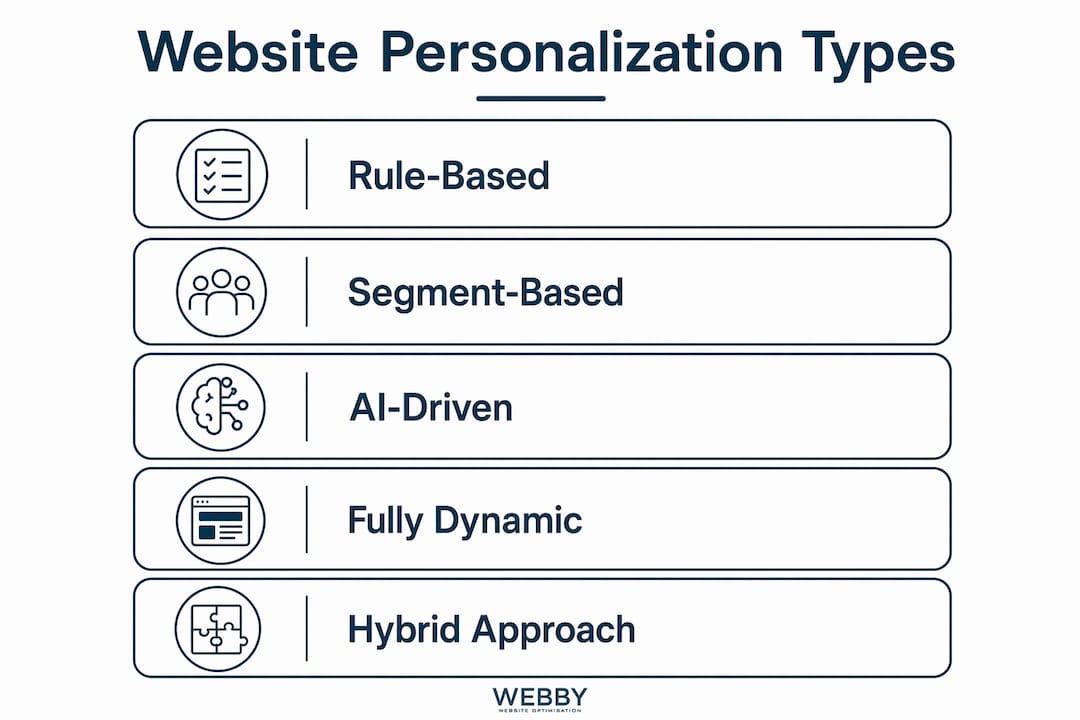
Personalization tactics range from simple content swaps to fully dynamic page structures. The right approach depends on your audience size, data maturity, and business goals. The table below maps complexity levels to common features and use cases.
| Complexity level | Features | Best use case |
|---|---|---|
| Rule-based (entry level) | Swap headlines, CTAs, or images based on referral source or location | Small businesses, single-product sites |
| Segment-based (mid level) | Tailor content blocks by industry, buying stage, or returning visitor status | B2B service firms, local service businesses |
| AI-driven (advanced) | Automate full page structures, product recommendations, and messaging in real time | E-commerce, enterprise platforms with large data sets |
Content personalization
Content personalization changes the text, images, and offers a visitor sees based on who they are. A returning visitor who previously read a case study about commercial cleaning gets shown a pricing page next visit. A first-time visitor from a local suburb sees a headline referencing their area. These are not tricks. They are relevance signals that reduce the mental effort required to decide whether your business is the right fit.
Personalized CTAs and product recommendations
Personalized calls to action consistently outperform generic ones. Showing enterprise buyers enterprise-level case studies and showing small businesses local success stories increases relevance and conversions. The same logic applies to product recommendations: a visitor who browsed landscaping services should not see a banner for commercial fit-outs. Matching the recommendation to the visitor’s demonstrated interest is the core mechanic.
Location-based and device-based variations
Geolocation lets you show suburb-specific offers, local phone numbers, or region-relevant testimonials. Device type personalization adjusts layout and content density for mobile visitors, who typically have shorter attention spans and different intent than desktop users. Both are low-complexity starting points that deliver measurable results without requiring advanced AI infrastructure.
What are the key benefits of website personalization?
The business case for personalization is well established. 81% of customers prefer personalized experiences, and 70% say reflecting their unique interaction history matters to them. That preference translates directly into commercial outcomes. Businesses that personalize effectively see higher engagement, lower bounce rates, and stronger conversion rates across the board.
Reduced friction in the buyer’s journey
The primary goal of personalization is removing friction by delivering content matched to the visitor’s context and needs. A visitor who lands on a page that immediately speaks to their industry, buying stage, and location does not need to search for relevance. They find it instantly. That reduction in cognitive effort is what drives the conversion lift that personalization delivers.
Improved brand perception and competitive advantage
Personalization signals that your business pays attention. For local service businesses competing against larger national brands, this is a genuine differentiator. A user-centric web design approach that adapts to each visitor communicates professionalism and care in a way that static sites cannot match.
Revenue and conversion impact
Personalization has a documented revenue impact. Research points to a 10–15% revenue uplift potential for businesses that implement personalization effectively. That figure reflects the compounding effect of higher engagement, better conversion rates, and reduced acquisition costs when visitors find what they need faster. The conversion funnel benefits are most visible at the decision stage, where relevant content removes the last objections before a visitor contacts you or makes a purchase.
How can businesses implement website personalization effectively?
Implementation is where most businesses either succeed or stall. The most common mistake is over-engineering from the start. Many businesses over-engineer personalization and create clutter without measurable results. The fix is to start simple, test rigorously, and scale only what works.
Start with low-hanging fruit
- Identify your top traffic sources. Referral source is the easiest first segmentation layer. Visitors from a specific Google Ads campaign, a partner website, or an email newsletter each have different intent.
- Swap one element at a time. Change the hero headline or primary CTA for each segment. Do not redesign the entire page.
- Run A/B tests before scaling. Rigorous A/B testing is critical to distinguish genuine uplift from random variation. A test that runs for less than two weeks rarely produces reliable data.
- Measure against a clear goal. Define success before you launch. Is it form submissions, phone calls, or time on page? Vague goals produce vague results.
- Expand to additional segments. Once one personalization rule proves its value, apply the same logic to the next highest-volume segment.
Build the right team structure
Personalization requires cooperation between marketing and technical teams. It is not a developer’s task alone, and it is not something a marketer can execute without technical support. Marketing defines the segments and the content strategy. The technical team handles implementation, data integration, and performance. Without both sides working together, personalization stalls at the planning stage or ships broken.
Choose technology that fits your stage
Entry-level personalization uses rule-based content swaps, while advanced AI platforms automate entire page structures in real time. Most local service businesses do not need AI-driven personalization on day one. A rule-based system integrated with a CRM like Salesforce or HubSpot is sufficient to deliver meaningful results while the team builds data maturity. Upgrade the technology when the data and the team are ready, not before.
Pro Tip: Avoid “set-and-forget” personalization. Customer segments shift over time. Schedule a quarterly review of your personalization rules to confirm they still reflect how your visitors actually behave.
Key Takeaways
Website personalization delivers measurable conversion gains when it is built on clean data, tested rigorously, and maintained as an ongoing discipline rather than a one-time setup.
| Point | Details |
|---|---|
| Personalization is automated | It uses visitor data to adjust content in real time, unlike manual customization. |
| Start simple, then scale | Swap one element per segment and validate with A/B testing before expanding. |
| Data quality determines results | A fragmented customer data foundation undermines every personalization effort. |
| Cross-team collaboration is required | Marketing defines segments; technical teams build and maintain the system. |
| Targeting and personalization are different | Targeting brings visitors to your site; personalization converts them once they arrive. |
Why most personalization projects fail before they start
I have watched businesses invest in personalization technology and see almost no return. The pattern is almost always the same. They buy a platform, build a dozen rules based on assumptions rather than data, and then declare personalization “done.” Six months later, the rules are stale, the segments no longer reflect real visitor behavior, and the team has moved on to the next project.
The uncomfortable truth is that personalization is a discipline, not a feature. It requires the same ongoing attention as SEO or paid media. The businesses that get real results treat it as a continuous process: test, measure, refine, repeat. They also resist the temptation to personalize everything at once. The most effective personalization I have seen starts with a single high-traffic page and one meaningful segment. That focus produces clear data and builds team confidence before complexity increases.
The other mistake I see constantly is confusing personalization with targeting. Marketers spend heavily to bring the right visitor to the site, then serve them the same generic homepage as everyone else. That is a waste of the targeting investment. Personalization is the second half of the equation. Without it, you are paying to bring people to a door that does not open for them.
The businesses that win at personalization share one trait: they treat customer data as a shared asset, not a departmental silo. When marketing, sales, and the technical team all work from the same customer data platform, personalization becomes coherent and consistent. When data is fragmented, personalization becomes noise.
— Steve Doig
How Webby Website Optimisation can help you personalize your site
Building personalized web experiences requires a solid technical foundation before any personalization layer can work effectively. Webby Website Optimisation works with local service businesses in Perth, Fremantle, and Melville to design and build websites that are structured for performance and conversion from the ground up.
If your current site serves the same content to every visitor regardless of where they came from or what they need, you are leaving conversions on the table. Webby’s website design and development service builds the technical architecture that makes personalization possible, including fast load times, clean code, and CRM-ready structure. For businesses that qualify, the pro bono website design program offers an entry point to a professionally built site at no cost. Contact Webby Website Optimisation to find out where your site stands.
FAQ
What is website personalization in simple terms?
Website personalization is the automated process of showing each visitor content tailored to their behavior, location, or profile. The goal is to make the site feel relevant to each individual rather than generic to everyone.
How is personalization different from customization?
Personalization is automated and driven by data the site collects. Customization is when a user manually adjusts settings themselves, such as choosing a language or layout preference.
What data does website personalization use?
Common data inputs include geolocation, referral source, browsing history, device type, and on-site behavior. CRM data and customer segment information can also feed personalization rules for more precise targeting.
How do I start personalizing my website?
Start by identifying your top traffic sources and swapping one element, such as a headline or CTA, for each segment. Run A/B tests to confirm the change produces a measurable improvement before expanding to other pages or segments.
Does website personalization improve conversion rates?
Research points to a 10–15% revenue uplift potential for businesses that implement personalization effectively. The gain comes from reducing friction at key decision points in the visitor’s journey.
Recommended
- Small Business Marketing and Website Optimization – Webby Website Optimisation
- Turn Website Visitors Into Leads: A Local Service Guide
If this post raised some questions feel free to ask me a question