
A Google Business Profile is your free listing on Google Search and Maps, giving local customers a direct way to find, contact, and visit your business. When you set up Google Business Profile correctly, you appear in the Local Pack, the map-based results that dominate the top of local searches. The setup process runs through business.google.com and takes most business owners under an hour to complete. This guide walks you through every step, from gathering your business details to verifying your listing and optimizing it for maximum visibility in Perth, Fremantle, and beyond.
What you need before starting your Google Business Profile setup
Before you open business.google.com, gather everything you need so the process runs without interruption. Missing details mid-setup can cause errors that delay your listing going live.
Here is what to have ready:
- A Google account you control. Use a business-owned email address, not a personal Gmail account that an employee or contractor manages.
- Your exact business name. Use the name customers see on your signage and invoices. Do not add keywords or location modifiers to your business name. Google treats this as spam and can suspend your listing.
- Address or service area. Storefront businesses need a physical address. Service-area businesses, like plumbers or cleaners, list the suburbs they serve instead of a home address.
- Primary phone number and website URL. These must match what appears on your website and other directories.
- Business category. Choose the most specific category that describes what you do. “Plumber” beats “Home Services” every time for local search relevance.
Choosing the right business classification affects not only verification but also how your profile displays location info and influences customer trust. Spend two minutes researching your category before you commit. You can change it later, but getting it right the first time avoids unnecessary re-verification.
Pro Tip: Search for your top local competitor on Google Maps and note their primary category. If it matches your services, it is likely the correct choice for your business too.
How to set up or claim your Google Business Profile step by step
The setup sequence on Google follows a consistent flow: sign in, search for your business, choose your business type, enter your details, agree to terms, and verify. The critical first step most business owners skip is searching for their business before creating anything new.
Step 1: Check if your business already exists
Go to business.google.com and type your business name into the search field. Google may have auto-generated a listing from data it collected across the web. If your business appears, claim it rather than create a duplicate. Claiming an existing profile maintains continuity and protects your local SEO rankings. Creating a second listing splits your reviews and confuses customers.

Step 2: Claim or create
If your business already appears, click “Claim this business” or “Request access.” Google sends an email to the current profile owner. If there is no response within three days, Google provides additional steps to transfer ownership. If your business does not appear at all, select “Add your business to Google” and proceed to enter your details from scratch.
Step 3: Choose your business type
This decision shapes your entire profile. The three options are:
| Business Type | What it means | Address visible to public? |
|---|---|---|
| Storefront | Customers visit your physical location | Yes |
| Service area | You travel to customers; no public address | No |
| Hybrid | You have a location and also travel to customers | Yes |
The business type you choose determines your verification path and how your location displays publicly. A plumber working from home should select service area and list their coverage suburbs. A café should select storefront. Getting this wrong leads to verification failures and, in some cases, listing suspension.
Step 4: Enter your business details
Fill in your business name, address or service area, phone number, website, and category. Double-check every field against your website and any existing directory listings. Inconsistencies between your Google profile and your website are a known ranking signal that works against you.
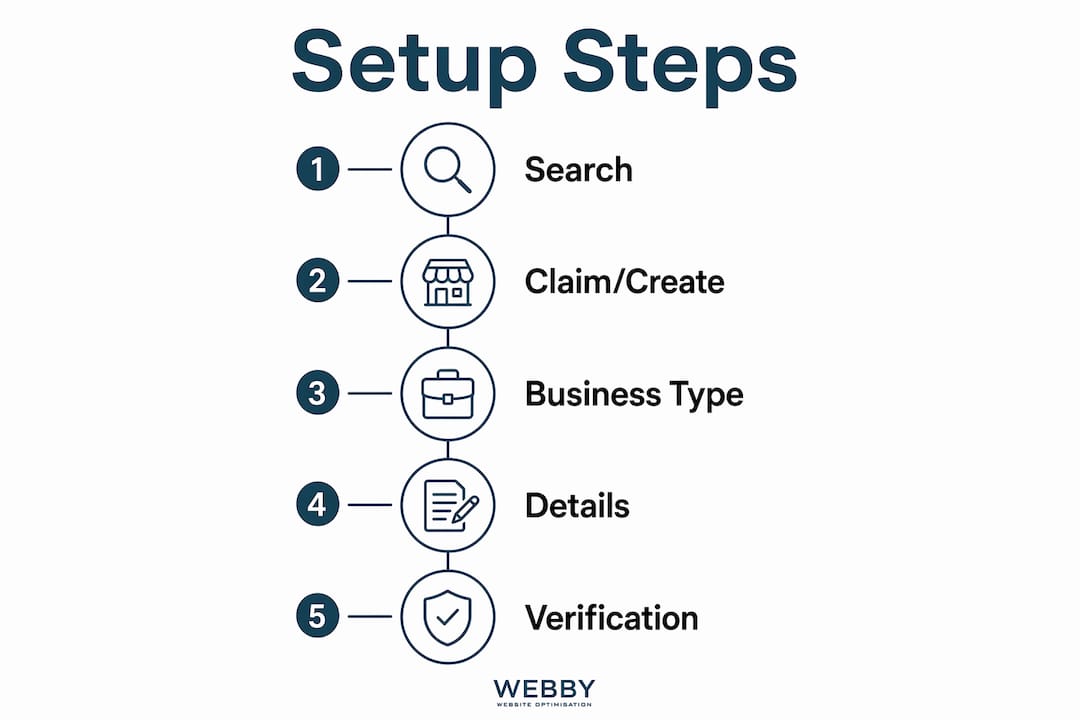
Step 5: Agree to terms and proceed to verification
Once you submit your details, Google moves you directly into the verification flow. You cannot manage or edit your listing publicly until verification is complete.
How does the business profile verification process work?
Verification is the gatekeeper to full control of your Google Business Profile. Until you verify, your listing is invisible to the public and you cannot respond to reviews or update your hours. Verification methods include postcard, phone, email, video, and instant verification via Google Search Console.
Here is what each method involves:
- Postcard. Google mails a card with a five-digit code to your business address. Delivery takes five to fourteen days. This is the most common method for storefront businesses.
- Phone or email. Available for some business types. Google sends a code instantly. This is faster but not offered to all accounts.
- Video verification. Increasingly common in 2026. You record a 30 to 90 second video showing your business location, signage, and proof of operations. Google reviews the video manually, which can take several days.
- Instant verification. Available if you already verify your website through Google Search Console using the same Google account. Verification happens immediately.
Pro Tip: If you manage your website through Google Search Console with the same account you use for your Business Profile, check for instant verification first. It saves days of waiting.
The method Google offers you depends on your business type, location, and account history. Service-area businesses and new accounts are more likely to face video verification. Prepare by having your business signage visible, your tools or products on hand, and your address or service vehicle ready to show on camera.
How to optimize your Google Business Profile after verification
A verified profile with minimal information ranks below a fully completed competitor. Complete and regularly updated profiles appear in the Local Pack and Knowledge Panel and generate more inquiries. Optimization is not a one-time task. It is ongoing.
Focus on these areas immediately after verification:
- Business hours. Add your regular hours and mark public holidays. Customers who arrive at a closed business leave a bad review. Google also factors accurate hours into local ranking.
- Photos. Upload at least ten photos: your storefront or team, your work in progress, and completed projects. Businesses with photos receive significantly more direction requests and website clicks than those without.
- Business description. Write two to three sentences describing what you do, where you operate, and what makes you different. Include your primary service keywords naturally. Avoid keyword stuffing.
- Services and products. Add every service you offer with a short description and price range where applicable. This feeds directly into how Google matches your profile to search queries.
- Messaging. Turn on the messaging feature so customers can contact you directly from your listing. Respond within 24 hours or Google may disable the feature.
- Q&A. Pre-populate the Q&A section with common questions your customers ask. You can post both the question and the answer yourself. This reduces friction for potential customers and adds keyword-rich content to your profile.
Managing your profile via Search and Maps after setup is straightforward. Sign in to your Google account, search your business name, and your profile controls appear directly in the search results. You do not need to log in to a separate dashboard for routine edits.
Reviews deserve special attention. Respond to every review, positive or negative, within 48 hours. A business that engages with its reviewers signals to Google and to customers that it is active and trustworthy. For local service businesses in Perth and Fremantle, review volume and recency are among the strongest local ranking factors. Read more about local service visibility to understand how your profile fits into a broader local SEO strategy.
Common mistakes that hurt your Google Business Profile ranking
Incorrect or inconsistent business information is one of the fastest ways to damage your profile’s visibility. Google cross-references your profile against your website, social media, and third-party directories. Discrepancies reduce trust and lower your ranking.
Watch out for these specific mistakes:
- Creating a duplicate listing. Always search for your business first. Duplicate listings split your reviews, confuse customers, and are difficult to merge once created.
- Choosing the wrong business type. A service-area business that lists a home address as a storefront violates Google’s guidelines and risks suspension. Match your business type to how you actually operate.
- Keyword stuffing your business name. Adding “Perth Plumber” to your business name field when your legal name is “Smith Plumbing” is a guideline violation. Google can suspend listings for this.
- Ignoring verification delays. If your postcard does not arrive within 14 days, request a new one through your profile dashboard. Do not create a new listing.
- Managing multiple locations incorrectly. Each physical location needs its own separate profile. Do not list multiple addresses on a single profile. For service-area businesses covering multiple suburbs, list all suburbs in the service area field of one profile.
For businesses running an AI receptionist or booking system, keeping your Google Business Profile hours and contact details synchronized with your booking platform prevents missed leads from customers who call outside listed hours.
Key takeaways
A fully verified and optimized Google Business Profile is the single highest-return free action a local business can take to improve its visibility on Google Search and Maps.
| Point | Details |
|---|---|
| Search before you create | Always check for an existing listing before adding a new one to avoid duplicates. |
| Business type determines everything | Storefront, service area, and hybrid types each affect verification method and address visibility. |
| Verification unlocks control | Your listing is not publicly visible or manageable until verification is complete. |
| Optimization is ongoing | Add photos, services, and respond to reviews regularly to maintain and improve ranking. |
| Consistency builds trust | Match your profile details to your website and directories to avoid ranking penalties. |
Why I tell every local business owner to get verification-ready before they start
Most business owners treat Google Business Profile setup as a five-minute task. They rush through the form, hit submit, and then spend three weeks waiting for a postcard that never arrives or failing a video verification because their signage was not visible. I have seen this pattern repeatedly with service businesses in Perth and Fremantle.
The single most common mistake is choosing the wrong business type. A cleaning company that selects “storefront” because they have an office address, when they actually travel to clients, ends up with a verification path designed for retail. The video verification request comes back asking for evidence of customer foot traffic they cannot provide. Switching business types mid-verification resets the entire process.
My recommendation: treat the business type decision as the most important choice in the entire setup. Read Google’s definitions carefully. If you travel to customers more than 50% of the time, you are a service-area business, full stop. The address visibility trade-off is worth it for a smoother verification and a profile that accurately represents how you operate.
The other thing most guides undervalue is the ongoing management side. A profile you set up and forget is worse than no profile at all. Outdated hours, zero photos, and unanswered reviews tell Google your business is inactive. Spend 20 minutes a month updating your profile and responding to reviews. That habit, combined with a strong website, is what separates businesses that dominate local search from those that do not appear at all. Pairing your profile with professional web design amplifies both signals significantly.
— Steve Doig
Ready to get more local customers from Google?
Setting up and optimizing a Google Business Profile is the foundation of local search visibility. But it works best when it connects to a fast, professional website that converts visitors into leads.
Webby Website Optimisation works with local service businesses across Perth, Fremantle, and Melville to build that complete online presence. From Google Business Profile optimization to SEO and website design, the team handles the technical work so you can focus on running your business. If your current website is not backing up your Google listing with credibility and conversions, that is a gap worth fixing. Visit Webby Website Optimisation to request a free audit and find out exactly where your online presence stands.
FAQ
How long does it take to set up a Google Business Profile?
Most business owners complete the setup form in under 30 minutes. Verification adds time, ranging from instant approval to 14 days for postcard delivery.
Can I set up a Google Business Profile without a physical address?
Yes. Service-area businesses like plumbers, cleaners, and electricians can hide their address and list the suburbs they serve instead. Google requires that you interact with customers in person, but your home address does not need to be public.
What happens if my Google Business Profile verification fails?
Request a new verification code through your profile dashboard. If the issue persists, switch to a different verification method if one is available, or contact Google Business Profile support directly through the Help Center.
How do I manage my Google Business Profile after setup?
Sign in to your Google account and search your business name. Profile controls appear directly in the search results, giving you access to edit hours, photos, services, and reviews without logging into a separate platform.
Does a Google Business Profile help with local SEO?
A complete and active profile is one of the strongest local SEO signals Google uses. Profiles with accurate information, recent photos, and regular review responses consistently rank higher in the Local Pack than incomplete listings.