
Your website might look great. Clean design, professional photos, maybe even a nice logo. But if visitors are landing on it and leaving without calling, booking, or buying, you have a brochure. Not a business tool. Understanding what is a sales-ready website separates businesses that grow online from those that simply exist there. A sales-ready website, also called a conversion-optimized website in professional circles, is one built with a single north star: turning visitor attention into revenue. This guide breaks down every layer of that, from architecture to AI readiness.
Table of Contents
- Key Takeaways
- What a sales-ready website actually means
- Aligning content with what your visitors actually want
- Technical elements that separate good sites from great ones
- Practical steps to build or upgrade your site
- My honest take on why most websites fail at sales
- How Webby Website Optimisation can help you get there
- FAQ
Key Takeaways
| Point | Details |
|---|---|
| More than good design | A sales-ready website combines content, structure, trust signals, and technical performance to convert visitors. |
| Intent alignment is critical | Landing page content must match exactly what brought a visitor there, or they leave immediately. |
| Trust signals close the gap | Testimonials, case studies, and client logos reduce buyer doubt at the moment of decision. |
| AEO matters as much as SEO | Structured data and schema markup make your site readable by both search engines and AI platforms. |
| Iterate or fall behind | Sales-ready websites require ongoing monitoring and updates as buyer behavior and AI discovery evolve. |
What a sales-ready website actually means
Most business owners assume that getting a website built checks the digital marketing box. The reality is that websites must actively help grow your business, not just sit there as an online brochure. A conversion-optimized website works like your best salesperson, 24 hours a day, seven days a week. It answers questions, builds credibility, and moves visitors toward a decision without anyone picking up a phone.
The features of a sales-ready site are not cosmetic. They are structural. Here is what they look like in practice:
- A clear value proposition above the fold. Visitors decide within seconds whether they are in the right place. Your headline and subheading need to confirm that immediately, without the reader needing to scroll.
- Logical, visitor-centered navigation. Menus should reflect how your customers think, not how your internal team describes your services.
- Core pages done properly. Every sales-ready site needs a homepage, individual service or product pages, an About page, a Contact page, and a Privacy Policy. Core pages and CTAs are non-negotiable for converting visitors into leads.
- Trust signals placed at decision points. This means testimonials, recognizable client logos, star ratings, and case studies positioned where buyers are most likely to hesitate. Trust signals like testimonials reduce buyer doubt at exactly the right moment.
- Conversion mechanisms that match your audience. A service business in Perth needs a click-to-call button and a short enquiry form. An e-commerce brand needs a smooth checkout. The enquiry path should take no more than two clicks from any page.
- Full mobile responsiveness. Over half of web traffic comes from mobile devices. A site that breaks on a phone is not sales-ready by any definition.
Pro Tip: Place your primary call-to-action in the top right corner of your navigation and repeat it at the end of every service page. Visitors who scroll to the bottom are already interested. Make it effortless for them to act.
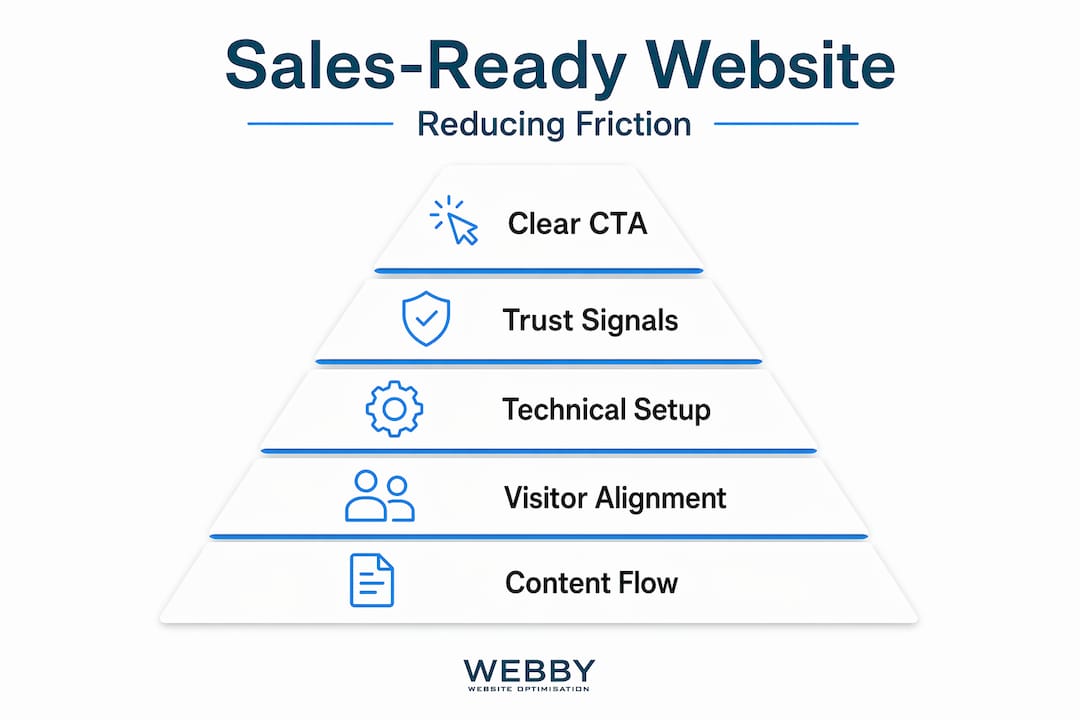
The elements of effective sales websites always come back to one thing: reducing friction. Every extra click, every confusing label, every missing phone number is a leak in your conversion funnel. Plug those leaks before worrying about anything else.
Aligning content with what your visitors actually want
Getting traffic to your site is one challenge. Keeping visitors engaged once they arrive is a different one entirely. The moment of visitor arrival is the crucial battleground, and aligning content with visitor intent can prevent the costly exits that quietly drain your return on investment.
Here is what that looks like as a practical process:
- Identify what search queries are sending people to each page. If your plumbing services page ranks for “emergency plumber Perth,” the top of that page needs to immediately confirm you handle emergencies, you are local, and you are available now.
- Match your proof points to the visitor’s concern. Someone searching “affordable web designer Fremantle” cares about price and proximity. Lead with a pricing range and a suburb mention before you explain your design philosophy.
- Guide visitors through a logical content flow. Start with what you do, follow with why you are credible, and close with a clear next step. This mirrors the natural buying decision process.
- Use specific CTAs for specific pages. A “Request a Free Audit” button makes sense on an SEO services page. A “Get a Quote Today” button fits better on a renovations page. Dedicated landing pages with built-for-conversion layouts outperform generic contact pages consistently.
- Audit your existing pages against real visitor queries. Tools like Google Search Console show you exactly what people typed before clicking your page. If the page content does not reflect those terms, you have a mismatch worth fixing. A website audit guide can help you approach this systematically.
“If your website does not generate leads or support sales, it is not fulfilling its purpose. It needs to be managed as a sales tool rather than a brochure.” — Well-Built Website Is Your Best Salesperson
The content on your SME-focused pages should educate, build confidence, and guide visitors toward the next step. Not every visitor is ready to buy today. Some are comparing options. Some are early in their research. Content that addresses each of these stages keeps you relevant longer and keeps your brand top of mind when the decision moment arrives.
Technical elements that separate good sites from great ones
This is where most business owners’ websites fall short. Design and content get attention. Technical readiness rarely does. But what makes a website sales-ready in 2026 is increasingly tied to how well it performs for both human visitors and the AI platforms that influence discovery.
| Feature | Basic website | Sales-ready website |
|---|---|---|
| SEO setup | Title tags and meta descriptions | Full on-page optimization plus schema markup |
| AI discoverability | Not considered | Structured data readable by AI platforms |
| Lead capture | Single contact form | Conversational AI and intent-specific forms |
| Performance monitoring | Occasional manual checks | Ongoing analytics and KPI tracking |
| Mobile experience | Responsive layout | Optimized load speed and mobile UX |
| CRM integration | None | Leads feed directly into sales pipeline |
SEO and AEO optimization with schema markup and accessibility monitoring are now standard expectations for a sales-ready build, not optional add-ons. AI Engine Optimization (AEO) refers to structuring your content and technical markup so that AI-powered search tools, like AI Overviews in Google or standalone AI assistants, can read, understand, and cite your site accurately. If your site lacks structured data, it becomes invisible to these platforms. Learn more about building that foundation through solid on-page optimization practices.
On the lead capture side, conversational AI can replace traditional static forms to pre-qualify serious buyers before they ever reach your sales team. Instead of a form that sits there doing nothing, a conversational interface asks smart questions, recommends services, and routes high-intent leads to a phone call or booking. That is a meaningful shift in how websites generate sales.
Pro Tip: Run your site through Google PageSpeed Insights at least once per quarter. A one-second delay in load time can reduce conversions by up to 7%. Performance is not a set-and-forget task.
Connecting your website to a CRM platform and analytics suite is the final piece. Without that data loop, you cannot see which pages are converting, which traffic sources are delivering quality leads, or which service pages are leaking interest. A nuanced sales-ready site balances clear content structure, conversion-focused UX, and machine-readable schema to stay credible to both buyers and AI systems simultaneously.
Practical steps to build or upgrade your site
Knowing what a sales-ready website includes is one thing. Knowing how to create a sales website from scratch or upgrade an existing one is where it becomes practical. Here is how to approach it:
- Define your sales goals before touching the design. Are you capturing enquiry forms? Driving phone calls? Getting bookings? Every decision downstream should serve one of those goals.
- Audit what you already have. Check your current pages for intent alignment, broken links, slow load times, and missing trust signals. A full website audit is the most honest starting point for any upgrade project.
- Prioritize UX over visual trends. A clean, fast, predictable layout converts better than a flashy animated one. Visitors want to find information quickly. They do not want to be impressed by your scroll animations.
- Build trust signals into your design, not as afterthoughts. Testimonials should live near your CTAs. Case studies should sit inside your service pages. Client logos belong on your homepage. Position proof where doubt lives.
- Monitor and iterate after launch. Check your conversion rate, bounce rate, and time-on-page weekly for the first three months. Look for patterns. If visitors consistently drop off a specific page, that page needs attention.
- Know when to bring in specialists. If signs your site needs a redesign are stacking up and internal fixes are not moving the needle, working with a team that specializes in conversion-optimized builds saves time and money.
Optimizing websites for sales is not a one-time project. It is an ongoing discipline, much like running a good sales team.
My honest take on why most websites fail at sales
I’ve reviewed hundreds of websites for local businesses across Perth and the surrounding suburbs. The pattern that shows up over and over is not bad design. It is misaligned intent. Business owners spend money on beautiful websites that talk about themselves instead of speaking directly to what the visitor is trying to solve.
I’ve seen a tradie’s website with stunning photography, a slick color scheme, and zero trust signals. No reviews, no project results, no suburb mentions. Visitors from Google had no reason to call over the competitor three listings down. The fix was not a redesign. It was restructuring the content to match what the visitor was already looking for.
What I’ve learned after years of working on this is that most businesses treat their website as a cost to minimize rather than an asset to invest in. The ones that shift that mindset and treat their site as a 24/7 sales tool consistently outperform competitors regardless of their budget.
The thing that genuinely concerns me right now is how few business owners have even heard of AEO. As AI-powered search becomes the default for how people discover local services, sites without structured data and machine-readable content will simply stop showing up in AI-generated results. That gap is already opening. The businesses that address it now will have a clear advantage in 12 months.
My advice: do not wait for your traffic to drop before taking this seriously.
— Steve Doig
How Webby Website Optimisation can help you get there
If reading this has made you realize your current site is more brochure than business tool, Webby Website Optimisation works with local service businesses in Perth, Fremantle, and Melville to build and upgrade websites that are genuinely built to sell. That means intent-matched content architecture, trust signal integration, mobile-first design, and full SEO plus AEO setup from day one.
Whether you are starting from scratch or need a focused audit to identify where your current site is losing leads, the team at Webby offers tailored website solutions designed around your specific sales goals. Free consultations are available, and the process starts with understanding what your visitors actually need when they land on your site. Reach out today and find out exactly what your website is missing.
FAQ
What is a sales-ready website?
A sales-ready website is one designed to convert visitors into leads or customers through clear messaging, trust signals, conversion-focused CTAs, and technical performance. It functions as a 24/7 sales tool rather than a passive online presence.
What makes a website sales-ready vs. just professional looking?
A professional website looks credible. A sales-ready website is also structured to match visitor intent, reduce friction, capture enquiries, and feed leads into a sales process. Design alone does not make a site convert.
How important are trust signals on a sales website?
Trust signals like testimonials and case studies directly reduce buyer hesitation at decision points. Positioning them near your CTAs and service descriptions has a measurable impact on conversion rates.
What is AEO and why does it matter for my website?
AEO stands for AI Engine Optimization. It involves adding structured data and schema markup so that AI-powered search platforms can read and cite your content accurately. Without it, your site may become invisible to AI-generated search results.
How often should I update a sales-ready website?
Content and performance monitoring should happen at least monthly, with deeper audits every quarter. Buyer behavior, search algorithms, and AI platforms change continuously, and your site needs to adapt with them.