
If you’ve ever published a page and wondered why it doesn’t show up on Google, the answer almost always comes back to one concept: the Google index. More precisely, what is a Google index, and why does it determine whether your business gets found online? Many website owners assume that once Google visits their site, it automatically appears in search results. That assumption costs them visibility. The reality involves three distinct stages, and understanding them gives you real control over your search presence.
Table of Contents
- Key takeaways
- What is a Google index, exactly
- The three stages: discovery, crawling, and indexing
- How long indexing takes and what speeds it up
- Google indexing in 2026: AI, structured data, and new signals
- Common indexing problems and how to fix them
- My take on what actually moves the needle
- Ready to get your pages indexed and ranking
- FAQ
Key takeaways
| Point | Details |
|---|---|
| Crawling is not indexing | Google visiting your page does not mean it will appear in search results. |
| Index = organized database | Google stores processed, tokenized page data in a searchable inverted index. |
| Quality determines entry | Duplicate, thin, or technically blocked pages are excluded from the index. |
| Manual submission has limits | Submitting via Google Search Console speeds crawling but cannot bypass quality filters. |
| Structured data matters more | Semantic HTML and structured data now influence both indexing and AI search features. |
What is a Google index, exactly
Think of a book’s index at the back: it maps keywords to page numbers so you can find information instantly. Google’s index works on the same principle, but at a scale that’s almost impossible to picture. It’s a massive digital database where Google stores processed information from billions of web pages so it can return relevant results within milliseconds of a search query.
The technical term for this structure is an inverted index. Rather than cataloging pages by their URL, Google maps words to locations across its entire dataset. When someone searches “plumber in Fremantle,” Google doesn’t scan the web in real time. It queries its pre-built index and retrieves the most relevant matches. That’s why results appear so fast.
Here’s the part most people miss: the Google index is not a copy of the web. It’s a curated, processed catalog. Google evaluates, filters, and organizes content before anything enters the index. If your page doesn’t clear that filter, it simply doesn’t exist in Google’s world, no matter how good your content is.
| Concept | What it means for your site |
|---|---|
| Crawling | Googlebot visits and downloads your page content |
| Indexing | Google processes and stores your page in its database |
| Ranking | Indexed pages are ordered by relevance for each query |
| Appearing in results | Only indexed, ranked pages show up when users search |
“The Google index is the prerequisite for everything else in SEO. Without it, ranking, traffic, and leads are impossible. It’s the foundation, not a feature.”
The three stages: discovery, crawling, and indexing
Understanding the distinction between these stages is where most businesses finally get clarity on why their pages aren’t showing up.
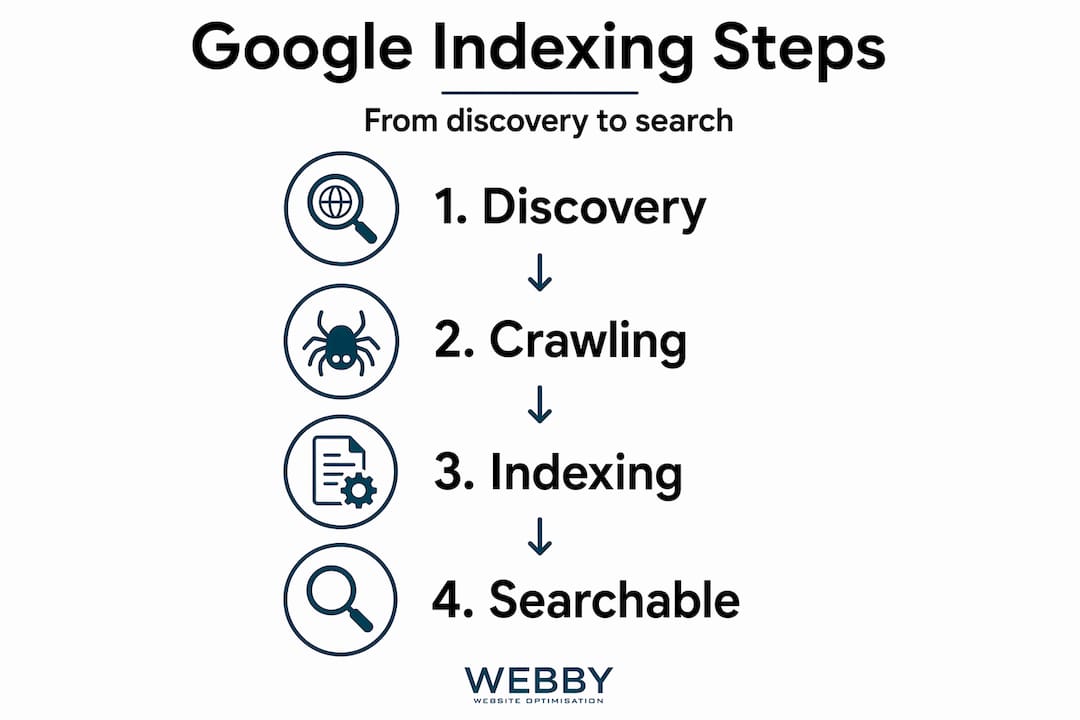
Stage 1: Discovery. Before Google can index anything, it has to know your page exists. Google discovers new URLs through XML sitemaps, backlinks from other sites, internal links within your own site, and manual submissions via Google Search Console. A brand new page with no links pointing to it, sitting on a fresh domain, can wait weeks before Googlebot even visits.
Stage 2: Crawling. Once Google discovers a URL, Googlebot downloads the page and renders it, similar to how a browser loads a website. This is where crawl budget matters. Google doesn’t have unlimited resources to crawl every page on every site equally. Large sites with poor internal linking, slow load speeds, or thousands of low-quality pages may find that Googlebot skips important content. Crawling is essentially Google’s data collection phase.
Stage 3: Indexing. This is the stage where most confusion lives. Crawling a page does not mean Google will index it. After downloading your content, Google evaluates it for quality, uniqueness, and relevance. Pages that are duplicates or provide low information gain get rejected. Technical signals like a noindex tag or a disallow rule in robots.txt will also prevent indexing. This is the filter stage, and it’s stricter than most people expect.
- Google discovers your URL via sitemap, backlink, or Search Console submission
- Googlebot requests and renders the page
- Google evaluates the page for quality, duplication, and technical compliance
- The page either enters the index or gets rejected with a reason logged in Search Console
- Indexed pages become eligible to rank for relevant queries
Pro Tip: Check the “Page Indexing” report inside Google Search Console regularly. It breaks down exactly which pages are excluded and why, saving you hours of guesswork. This is the fastest way to spot noindex tags or crawl errors you didn’t know existed.
How long indexing takes and what speeds it up
Timing is one of the most common questions business owners ask after launching a new page. The honest answer is: it depends heavily on your site’s authority and history.

Brand new domains typically take 2 to 4 weeks for initial pages to be indexed. Established sites with strong authority can see new content indexed within 24 to 72 hours, especially after manual submission via Google Search Console’s URL Inspection tool. That’s a significant gap, and it highlights why building site authority over time compounds your SEO advantage.
Several factors directly affect how quickly your pages get indexed:
- Site authority and backlink profile: Sites with more trusted backlinks get crawled and indexed more frequently. Google allocates crawl budget based partly on perceived authority.
- Content quality and originality: Thin, duplicate, or copied content gets deprioritized or rejected outright. Original, substantive pages move through the index faster.
- Internal linking structure: A page buried three or four clicks from your homepage with no internal links pointing to it is harder for Googlebot to find and prioritize.
- Page speed and Core Web Vitals: Slow pages consume more crawl resources, which can delay how often Googlebot returns to your site.
- XML sitemaps: Submitting an updated sitemap in Search Console signals which pages you want prioritized, which helps discovery significantly.
For faster discovery, tools like IndexNow and Google’s Indexing API allow you to directly notify search engines of content updates. They don’t guarantee indexing, but they accelerate the crawl request.
One critical clarification: manual submission is a priority crawl request, not an indexing guarantee. Submitting a URL tells Google to look sooner. It doesn’t tell Google to approve the page. If the content doesn’t meet quality thresholds, the result is the same whether you submit manually or wait.
Pro Tip: After publishing important pages, run the URL Inspection tool in Google Search Console and click “Request Indexing.” Then pair this with a strong internal link from an already-indexed, high-traffic page on your site. That combination works faster than either method alone.
Google indexing in 2026: AI, structured data, and new signals
The mechanics of what is website indexing haven’t changed fundamentally, but what Google prioritizes once your page is in the index has shifted considerably heading into 2026.
Google’s AI Overviews and AI-powered features are changing what appears at the top of search results. But here’s what many businesses get wrong: there is no separate AI-only indexing. Pages must still be indexed through the standard process before they can appear in any AI-generated summary or featured result. Indexing fundamentals remain the gatekeeper.
What has changed is how you signal quality and relevance to Google’s systems:
- Structured data and schema markup help both Googlebot and AI systems understand what your content is about and how to use it. A local plumber with properly marked-up service pages, reviews, and business details is far more indexable than one with plain HTML.
- Semantic HTML (using heading tags, proper article structure, and meaningful element names) makes it easier for Google to parse the hierarchy and purpose of your content.
- ‘Preferred Sources’ and ‘Highly Cited’ badges are Google’s newer signals rewarding original, authoritative content. Users are twice as likely to click preferred sources, and over 345,000 sources have been labeled so far. Earning that status starts with getting indexed and maintaining content quality over time.
“Despite new AI search features, the core requirement of a page being indexed remains the gatekeeper to appearing in both traditional and AI-driven results.” — Google AI Search Features Technical Guidance
For businesses in Perth and Fremantle competing in local search, this is concrete: structured data for local businesses directly supports both indexing quality and AI search visibility in 2026.
Common indexing problems and how to fix them
Knowing what is google index is only useful if you can act on it. Most indexing failures fall into predictable categories.
- Noindex tags in the wrong place: A developer adds a noindex tag during staging, then forgets to remove it before launch. The entire site gets crawled but never indexed. Check your page source code for "`.
- Blocked by robots.txt: A disallow rule meant for one folder accidentally blocks the whole domain. Verify your robots.txt at
yourdomain.com/robots.txtafter any site changes. - Duplicate content: If multiple URLs serve the same content (www vs. non-www, HTTP vs. HTTPS, trailing slashes), Google may index none of them cleanly. Use canonical tags to tell Google which version is the authoritative one.
- JavaScript-heavy pages: Googlebot primarily parses the initial DOM state. Content that only loads after user interaction, such as clicking a tab or scrolling, may not be indexed at all. Critical content belongs in the initial HTML.
- Thin or low-quality content: Very short pages, pages with placeholder text, or pages that don’t answer a real question are frequently excluded after crawling.
A regular DIY website SEO audit is one of the most practical ways to catch these issues before they cost you traffic. If you want to go deeper on the technical side, understanding what technical SEO covers will give you a clearer picture of what to prioritize.
Pro Tip: Use the site:yourdomain.com search operator in Google to see which pages are currently indexed. If key pages are missing, cross-reference them with the Page Indexing report in Search Console to find the exact rejection reason.
My take on what actually moves the needle
I’ve worked with enough websites to know that most indexing problems aren’t technical mysteries. They’re basic hygiene issues that compound over time.
The biggest misconception I see is business owners treating crawl logs as proof of indexing. Google can crawl your site daily and still index almost nothing if the content doesn’t clear its quality threshold. Crawl frequency is a signal of authority, not a guarantee of results.
What I’ve found actually works comes down to three things. First, content that answers a question no other page on your site already answers. Duplicate intent is as damaging as duplicate text. Second, a clean site structure where every important page is reachable within two to three clicks from the homepage and has at least one strong internal link. Third, technical clarity: no conflicting signals between robots.txt, canonical tags, and meta directives.
Manual indexing requests get overused. I’ve seen businesses submit the same URL dozens of times expecting a different result. If Google keeps rejecting it, the problem is the page, not the submission frequency. Fix the page first.
The shift I’m most focused on in 2026 is structured data. It’s one of the highest-leverage investments you can make for both indexing quality and AI search visibility. Pairing it with genuinely original content is as close to a lasting advantage as SEO currently offers.
— Steve Doig
Ready to get your pages indexed and ranking
If this article has shown you anything, it’s that indexing is not passive. It requires deliberate choices about content quality, technical setup, and how you signal relevance to Google. Most small businesses in Perth and Fremantle are losing visibility not because their service is poor, but because their website isn’t set up to get indexed correctly.
Webby Website Optimisation works with local service businesses to fix exactly these problems. From technical SEO audits to structured data implementation and content strategy, the team helps you build a site Google actually wants to index and rank. If your pages aren’t showing up where they should be, a free SEO consultation is the fastest way to find out why and what to do about it.
FAQ
What is a Google index in simple terms?
The Google index is a massive database where Google stores processed information from web pages. When you search for something, Google queries this database rather than scanning the live web in real time.
Does Google crawling my page mean it’s indexed?
No. Crawling means Googlebot visited and downloaded your page. Indexing only happens after Google evaluates the page for quality, and many crawled pages are rejected for being duplicate, thin, or technically blocked.
How do I check if my page is in the Google index?
Type site:yourdomain.com/your-page into Google search. If the page appears, it’s indexed. You can also use the URL Inspection tool in Google Search Console for a more detailed status report.
How long does Google take to index a new page?
New domains typically take 2 to 4 weeks for initial indexing. Established sites using Google Search Console’s manual submission tool can see pages indexed within 24 to 72 hours.
Does structured data help with Google indexing?
Structured data doesn’t force Google to index a page, but it significantly improves how Google understands and evaluates your content. In 2026, structured data also supports AI-driven search features like AI Overviews, making it a smart investment for both indexing quality and search visibility.