
Your website probably isn’t failing in a dramatic way. It’s more likely failing in small, expensive ways.
A plugin update gets ignored because you’re busy. A form stops sending leads and no one notices for days. Google Ads keeps spending, but GA4 tracking is incomplete, so you can’t see what’s really working. Then something bigger happens. The site slows down, throws errors, or goes offline right when customers are trying to buy.
That’s the point where many Australian business owners start looking into web management services. Not because they want another monthly bill, but because they’re tired of treating their website like a side project when it’s tied to enquiries, sales, bookings, and brand trust.
The Hidden Costs of a Self-Managed Website
A common pattern goes like this. A business launches a WordPress site, everything looks fine, and for a while it is. Then the site starts needing attention that no one has properly budgeted for.
The owner updates a plugin late at night. The checkout breaks. A staff member notices the next morning. Someone calls the developer who built the site, but they’re unavailable. Meanwhile, customers are landing on a broken page, and the team is trying to work out whether the problem is hosting, WordPress, WooCommerce, a payment gateway, or a theme conflict.

That’s the hidden cost. It’s not just the technical issue. It’s the interruption. You lose focus, your staff lose time, and your customers lose confidence.
What self-management usually looks like in practice
Most DIY website management sounds simple on paper. In reality, it often means:
- Delayed updates because no one wants to risk breaking the site during business hours
- Reactive security where malware scans happen only after something looks wrong
- Messy backups with no clear idea whether they’re current, complete, or restorable
- Support gaps because the original site builder only handles projects, not ongoing care
- Hosting decisions based on price alone, which can create problems later. Cheap infrastructure often looks attractive until you need stability, speed, and support. This is exactly why it helps to understand the trade-offs in this guide to low price VPS hosting
A website doesn’t need to be completely down to hurt the business. A slow checkout, a broken form, or a failed tracking script can do enough damage on their own.
There’s also a staffing reality that gets overlooked. Most small businesses don’t need a full-time web specialist. But they do need specialist capability when things go wrong. That’s one reason many businesses end up relying on external experts rather than trying to force digital maintenance into an admin, marketing, or operations role. Come Together Media LLC's analysis makes a useful broader point about why specialist support often outperforms trying to spread that work across internal generalists.
The businesses that handle this best stop thinking of website care as occasional tech support. They treat it as business continuity.
What Exactly Are Web Management Services
A Perth business owner usually notices web management only when something interrupts the day. The booking form stops sending enquiries. A plugin update breaks the checkout. Google Ads is still spending money, but conversions vanish because GA4 tracking dropped out after a theme change.
That is the practical scope of web management services. They keep the website working as a business tool, not just as a published set of pages.
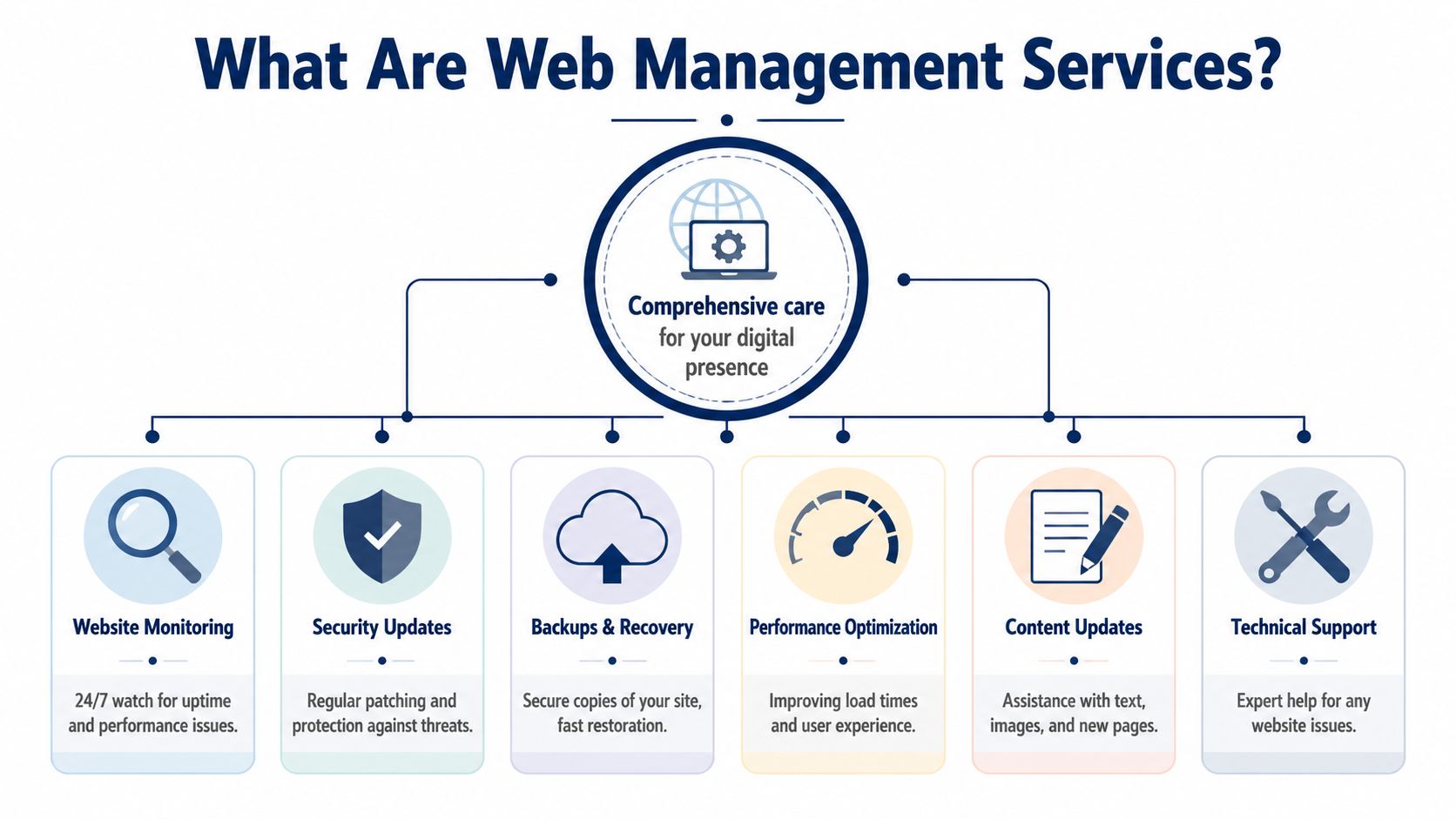
For a WordPress site, that usually means ongoing technical care, routine checks, issue prevention, support when something fails, and advice on changes that affect performance, security, or marketing data. A good provider is not there just to update plugins. They are there to protect the parts of the site that affect enquiries, sales, reporting, and customer trust.
Proactive maintenance
WordPress changes constantly. Core files update. Plugins release patches. Themes change behaviour. Server software moves on. Third-party tools such as payment gateways, CRMs, GA4, and consent plugins also change.
Proper maintenance means checking those changes before they create a business problem. On a live Australian business site, that often includes:
- WordPress core, plugin, and theme updates handled with compatibility checks
- Testing after updates for forms, checkout, booking tools, mobile layouts, and key conversion pages
- Staging or rollback planning for higher-risk changes
- Database cleanup to reduce clutter that slows the site over time
- Plugin review to remove old tools that add risk without adding value
The trade-off is simple. Aggressive updating reduces exposure to known issues, but careless updating can break revenue paths. Good management balances both.
Security management
Security work on a business website is ongoing operational work. It covers prevention, detection, and response.
For Perth and wider Australian businesses, that often includes extra attention to privacy and compliance settings. Contact forms, booking systems, email marketing tools, and analytics tags can all collect personal data. If those tools are misconfigured, the problem is bigger than a technical fault. It can create privacy risk, poor consent handling, and bad reporting.
A serious web management service usually includes:
- Malware scanning and file integrity checks
- Firewall and login hardening
- User access review so former staff, weak passwords, and unnecessary admin accounts are cleaned up
- Vulnerability monitoring for risky plugins and themes
- Incident response if the site is hacked, blacklisted, or starts redirecting traffic
The critical test is response quality. A maintenance plan has limited value if nobody can isolate the issue, restore the site, and explain what happened in plain English.
Backups and recovery
Backups matter because failures rarely happen at a convenient time.
A backup service should answer a few direct questions. How often is the site backed up? Are files and databases both included? Are copies stored off-server? Has anyone tested a restore recently? If a WooCommerce store goes down on a Monday morning, how much data could be lost?
That is why managed services usually include both backup routines and a recovery process. The backup itself is only half the job. The other half is restoring the site quickly, checking that the site works properly, and confirming that forms, transactions, and tracking are still intact.
Performance and marketing integrity
Performance work is not only about speed scores. It affects search visibility, ad efficiency, and how many visitors complete an action.
On many small business sites, performance management also overlaps with marketing setup. If GA4 events, Google Ads conversion tags, call tracking, or landing page scripts break, the business can keep spending while losing visibility on what is working. A provider offering WordPress support for Australian businesses should be able to spot that kind of issue early, not treat it as somebody else’s problem.
Typical work here includes:
- Caching and image optimisation
- Script cleanup and plugin weight review
- Core Web Vitals improvements where practical
- Checks on GA4, Google Ads, Meta Pixel, and form tracking after site changes
- Review of hosting limits, PHP versions, and server settings when speed bottlenecks sit below WordPress
There are trade-offs here too. Heavy caching can interfere with carts, member areas, and dynamic forms. Script delays can improve page speed while breaking conversion tracking. Good management improves performance without blinding the business.
Content support and technical help
Many owners do not need a developer every day. They need reliable help when a staff profile changes, a landing page needs an update, a new suburb page has to go live, or a campaign form stops working.
That support layer is part of web management. It keeps the site current, reduces internal delays, and gives the business a clear place to go when small issues start affecting larger outcomes.
For a broad example of how providers package these services, NZ Apps service offerings show the general pattern. Ongoing support, maintenance, and technical help work best when they sit under one service responsibility.
Monitoring and emergency response
Monitoring shortens the gap between a problem starting and somebody acting on it. That includes downtime checks, SSL warnings, failed cron jobs, unusual resource usage, and signs that a plugin conflict is affecting key pages.
Emergency response is the part many business owners only ask about after a problem. A capable provider should already have a process for alerts, escalation, isolation, restoration, and communication. If the site fails at 7:30 am Perth time, the business should know who is handling it, what is being checked first, and when the next update is coming.
That is what web management services are. Ongoing technical oversight tied to business outcomes, with enough local context to support Australian compliance, marketing systems, and the realities of running a small business without an in-house web team.
The Business Case for Managed WordPress Support
A well-managed WordPress site protects revenue in two directions. It reduces the chance of technical loss, and it improves the odds that your marketing spend turns into leads or sales.
That matters because most websites aren’t standalone assets anymore. They’re tied to search visibility, advertising, bookings, and customer service. If the site underperforms, the rest of the business feels it.

One clear market signal is adoption. In the Australian region, 90% of SMBs are using or considering managed service providers for cybersecurity, which is their top challenge, according to Infrascale’s managed services statistics. That doesn’t mean every website owner needs the same package. It does mean outsourced support has become a practical business decision, not a niche technical one.
What the return actually looks like
The return on managed support rarely shows up as one dramatic win. It usually appears through avoided disruption and better day-to-day performance.
Consider what managed support protects:
- Sales continuity when updates are handled carefully and critical functions are checked
- Brand trust because customers don’t hit broken pages, suspicious redirects, or browser warnings
- Team time because staff stop chasing technical issues they aren’t equipped to solve
- Decision quality when forms, events, and conversion tracking stay intact
That last point gets underestimated. A site can look fine on the surface while failing as a marketing asset in ways not immediately apparent. If form submissions aren’t tracked, purchase events are incomplete, or phone click tracking is missing, you’re making decisions with partial information.
Support becomes more valuable when the site matters
A brochure site with low traffic can survive rough edges for a while. An active ecommerce store, lead generation site, or campaign landing page can’t.
Once your site supports ad campaigns, SEO, remarketing, or regular content publishing, every technical change has wider effects. A plugin conflict can interrupt checkout. A theme issue can bury your call to action on mobile. A cache misconfiguration can make old prices or outdated promotions appear in front of customers.
Good support pays for itself by preventing bad days. Great support also makes the good days work harder.
This is why many businesses move from occasional freelance fixes to ongoing specialist support. They want someone responsible for the health of the whole system, not just one-off repairs. If you’re comparing that option, this overview of WordPress support in Australia is a useful place to frame what ongoing support should cover.
A short explainer can help put the business logic in plain terms:
The trade-off most owners make too late
The trade-off isn’t “pay for support” versus “pay nothing.”
It’s “pay a predictable amount for prevention” versus “absorb unpredictable costs when something breaks.” The second option often looks cheaper until you count the interrupted leads, wasted ad spend, staff distraction, customer frustration, and rushed repair work.
Managed WordPress support is easiest to justify when you stop viewing it as maintenance. It’s operations support for a business channel that stays live all day.
Understanding Pricing Models and Service Levels
Pricing for web management services is often confusing because providers bundle very different work under similar labels. One plan might cover only updates and backups. Another might include development time, content edits, emergency recovery, hosting support, and performance work.
That’s why the monthly fee alone doesn’t tell you much. You need to look at the model behind it.

The market has moved this way for a reason. The global web hosting market expanded from $103.1 billion in 2023 and is projected to grow significantly, with Australian SMBs increasingly adopting managed WordPress hosting, according to Global Market Insights on the web content management market. As hosting and security requirements become more specialised, service structures tend to split into a few common patterns.
Monthly plans
This is the best fit for businesses that want continuity.
A monthly plan usually works well when the site is important enough that regular updates, backups, security checks, and support should happen without anyone needing to request them each time. It creates rhythm. The provider already knows the site, already has access, and already has a workflow when something urgent comes up.
Monthly plans generally suit:
- Ecommerce stores with live transactions
- Lead generation sites where forms and tracking need constant reliability
- Businesses with frequent plugin or content changes
- Marketing teams running ongoing campaigns
The main advantage is predictability. The limitation is that not all plans include the same level of hands-on work, so you need to check what counts as routine support and what becomes extra.
Ad hoc support
Some businesses only want help when there’s a problem. That’s the ad hoc model.
It can be reasonable for smaller sites with few moving parts, especially if the business accepts slower turnaround and understands that emergency work is usually more expensive and less efficient than prevention. The provider also starts at a disadvantage because they don’t know the site’s history, stack, or risk points.
Ad hoc support tends to work poorly when the site has active campaigns, custom functionality, or an online store. In those situations, waiting until something breaks is often the most expensive workflow available.
Development retainers
A retainer is different from maintenance. It’s for businesses that want ongoing improvement, not just protection.
This model works when a business regularly needs landing pages, CRO changes, design improvements, new integrations, or SEO-related implementation. Rather than quoting each task separately, the provider allocates a block of time each month.
A retainer can sit alongside a maintenance plan, or the two can be combined. The key is clarity. Maintenance keeps the website healthy. Retainer time changes and improves it.
What an SLA should tell you
A Service Level Agreement, or SLA, is the practical part of the service promise. It should define what happens after you ask for help.
A useful SLA usually makes these points clear:
| Service area | What to check | Why it matters |
|---|---|---|
| Response times | How fast urgent and standard requests are acknowledged | You need to know whether a critical issue will sit untouched |
| Request channels | Whether support happens by email, phone, ticket, or chat | Fast channels matter when the site is down |
| Priority definitions | What counts as urgent, high, or routine | Providers and clients often define urgency differently |
| Included work | Which tasks are covered by the monthly fee | This prevents billing surprises |
| Escalation process | Who handles incidents when first-line support can’t solve them | Complex issues need a clear path to resolution |
If a provider can’t explain their response workflow in plain English, expect confusion when you need urgent help.
The right pricing model depends less on your budget than on your operational risk. If the website matters every day, support should be structured that way.
How to Choose the Right Provider in Australia
It is 8:15 on a Tuesday morning in Perth. Your phones are ringing, a staff member says the enquiry form is broken, and your Google Ads campaign is still spending money. The provider you hired for “website support” replies three hours later asking for hosting access they should already have.
That is the true test.
Choosing a web management provider in Australia is less about who says “security, updates and backups” on their homepage, and more about who can keep your site stable during business hours, work with your marketing stack, and deal with local business requirements without turning every issue into a project.
Start with operating fit
A good provider should fit the way your business already runs. For Perth businesses, that often means support during AWST business hours, plain-English communication, and someone who understands that a broken contact form is a sales problem, not just a technical ticket.
It also helps if they understand the Australian context properly. That includes privacy expectations, consent handling, GST on invoices, local hosting discussions, and the practical reality of working with small internal teams who do not have an in-house developer. If your site supports lead generation or ecommerce, they should also be comfortable with GA4, Google Tag Manager, and Google Ads landing page requirements.
Here is a practical checklist to use in sales calls.
| Area | What to ask | Why it matters |
|---|---|---|
| Update process | How are plugin, theme, and core updates tested before going live? | Poor update handling can break forms, checkout, tracking, or layouts |
| Backups and recovery | Where are backups stored, how often are they taken, and when was the last full restore test? | Recovery speed matters more than backup promises |
| Hosting responsibility | Do you deal with the host directly during outages or performance issues? | You do not want to mediate between support companies while the site is down |
| Support hours | Who responds during Australian business hours, and what counts as urgent? | Local timing matters when leads or sales are affected |
| Reporting | What will I actually receive each month? | Useful reports show work completed, issues found, risks, and next actions |
| Marketing stack | Can you support GA4, Tag Manager, Search Console, consent mode, and landing page changes? | Many businesses need tracking and campaign support, not just maintenance |
| Content changes | Are routine page edits included or quoted separately? | Small changes should not stall for a week over admin |
| Documentation and exit | If we leave, what access, records, and backups do we get? | A reliable provider keeps your business in control |
Ask how they make decisions under pressure
The strongest providers are usually the clearest.
Ask what happens if a plugin update breaks WooCommerce on a Friday afternoon. Ask how they would respond if GA4 stopped firing after a redesign. Ask who checks the site after updates, what gets tested, and how they roll changes back if something goes wrong.
The answer should be specific. “We monitor things closely” is not specific. “We update on staging, test checkout, forms and tracking, then push live with a restore point ready” is specific.
That distinction saves money.
Check whether they can support marketing, not just maintenance
A lot of Australian small businesses outgrow basic support because the website and marketing are treated as separate jobs. One provider keeps WordPress updated. Another runs ads. Nobody owns the point where tracking, landing pages, form quality, page speed, and conversions meet.
That gap shows up in wasted ad spend and weak reporting. If your provider cannot work comfortably with conversion tracking, form events, call tracking, and landing page changes, they may keep the site online while still letting performance slip. Businesses investing in paid traffic should understand the basics of conversion rate optimisation for business websites and ask whether their support partner can help implement those changes cleanly.
A useful outside perspective on provider selection is Ascendly Marketing's agency insights. The same buying logic applies here. Process, communication, accountability, and relevant experience matter more than polished pitch language.
Look for local judgement, not generic promises
Australian businesses do not all need a provider in the same city, but they do benefit from someone who understands local operating conditions. A Perth business often needs support that lines up with WA trading hours, local campaign schedules, and a direct phone or email path when something affects leads.
Judgement matters just as much. A provider should know when to delay an update, when to patch urgently, when to involve the host, and when a “small website issue” is affecting enquiries, ad attribution, or compliance.
Red flags to take seriously
Some problems show up before you sign.
- No clear answer on backup storage or restore testing
- No staging site for testing changes on active business websites
- No ownership of hosting issues
- No explanation of how urgent requests are prioritised
- No experience with GA4, Tag Manager, or consent-related setup
- No monthly reporting beyond a generic “all good”
- No documented handover process if you change providers
One more red flag is worth adding. Be careful with providers who only talk about low monthly fees. Cheap support often means slow response times, shallow checks, and extra invoices for the work that keeps a business site useful.
The right provider should sound organised, practical, and calm. That is usually a better sign than big promises.
Growing Your Business Beyond Basic Maintenance
Basic maintenance keeps the website alive. Strong web management services also make the website more useful.
That shift matters because many Australian businesses have already covered the basics. They have hosting, a design, and some level of support. What they often lack is the link between website management and business growth. The site is maintained, but it isn’t tuned to support search visibility, ad performance, clean measurement, or conversion improvement.
The overlooked gap in Perth and Australia
One of the clearest examples is tracking and compliance. According to UX4Sight’s discussion of website design and management services, 55% of Perth ecommerce sites fail GA4 consent mode integration under Australia’s Privacy Act, leading to 20-30% lost ad ROI. The same source notes that optimised landing pages can boost Google Ads conversion by 41% for Australian SMBs.
Those are not design problems. They’re management problems.
If consent mode is wrong, data quality drops. If tags are inconsistent, campaign reporting becomes unreliable. If landing pages are built without testing, ad spend leaks through weak user journeys. A provider who only handles updates and backups won’t fix that.
Where maintenance and marketing meet
A more useful support relationship usually includes a few growth-focused capabilities.
GA4 and Tag Manager setup
GA4 should do more than collect surface-level traffic data. For most businesses, it needs to track actual business actions such as form submissions, phone clicks, purchases, add-to-cart behaviour, or booked consultations.
Tag Manager helps organise that properly, but only when someone sets clear event logic, tests what fires, and checks whether the data aligns with what the business is trying to measure. Otherwise, reports look busy while answers stay fuzzy.
Search Console and on-page SEO
Technical maintenance and SEO often overlap. A provider who monitors indexing issues, broken pages, redirects, metadata gaps, and page performance can stop small technical faults from becoming search visibility problems.
This doesn’t mean every support provider must run a full SEO campaign. It means they should be able to maintain the technical foundation that SEO depends on.
Conversion-focused landing pages
When businesses run Google Ads, they often send traffic to generic service pages that were never designed to convert paid clicks. That’s a common waste point.
A stronger web management partner can help shape pages around one offer, one audience, one message path, and one measurable action. That’s where maintenance starts contributing to revenue, not just stability.
For businesses trying to improve that side of the site, this explanation of conversion rate optimisation gives useful context on how small page changes can improve outcomes over time.
The websites that grow fastest usually aren’t the fanciest. They’re the ones where tracking, messaging, speed, and page structure all support the same goal.
Training is part of growth too
A good support partner doesn’t need to control every edit forever.
For many businesses, the best outcome is a mix. The provider handles the risky or technical work, and the owner or marketing team gets enough training to update content, publish products, change images, or create blog posts confidently. That reduces bottlenecks and helps the business move faster.
Practical training often covers:
- How to make content edits safely
- How to upload images without slowing pages down
- How to avoid breaking layouts in page builders
- How to check whether forms and links still work after edits
- How to understand the basics of reporting dashboards
That kind of support is easy to undervalue until staff turnover happens or the person who “sort of knew the website” leaves.
The provider’s role changes as the business grows
Early on, a website manager is mostly there to keep things from breaking.
Later, the role becomes broader. They help align the site with campaigns, check that data is trustworthy, improve page performance, and make sure the website keeps up with the business instead of slowing it down.
That’s the difference between a maintenance vendor and a digital operations partner. One keeps the lights on. The other helps the site earn its place in the business.
Putting It All Together Your Next Steps
If your website is central to enquiries, sales, bookings, or paid traffic, then managing it casually is a risk. Not because WordPress is unreliable, but because busy businesses rarely have the spare time and technical process needed to keep everything stable, secure, compliant, and useful.
That pressure is increasing. The Australian threat trend noted in this industry summary says the ACSC Annual Cyber Threat Report recorded a 32% increase in web application attacks on WordPress sites in Australia, with SMBs making up 68% of victims. That’s a practical reminder that reactive website care is getting harder to defend.
A sensible next step doesn’t need to be complicated.
A simple way to move forward
Audit the current site
Check the obvious pressure points. Are updates current? Are backups clearly in place? Does the site feel fast on mobile? Do forms, checkout steps, and tracking events still work?
Write down the recurring problems
Be specific. Late updates, hosting confusion, poor support response, broken tracking, plugin conflicts, or uncertainty around GA4 and consent are all useful signals.
Talk to a specialist before the next issue lands
You don’t need a disaster to justify support. In most cases, the smartest time to organise web management is while the site is still functioning.
The best web management services don’t just fix emergencies. They reduce the chance of them happening and make the website more dependable as a business tool.
If you want local help from a Perth-based WordPress specialist, Webby Website Optimisation provides ongoing maintenance, security monitoring, backups, emergency recovery, hosting support, GA4 and Tag Manager setup, SEO implementation, landing page support, and practical training for Australian businesses that need their website to stay fast, secure, and useful.