

Most local service business owners think the biggest lead generation problem is getting people to find them online. The real problem? What happens after someone finds them. Online lead generation explained properly isn’t just about attracting attention. It’s about capturing interest, responding fast, and building a system that converts curiosity into paying customers. Get one part wrong and the whole chain breaks. This article walks you through how the process works, what separates businesses that win leads from those that lose them, and the specific changes you can make today.
Table of Contents
- Key Takeaways
- Online lead generation explained: what it really means
- Key components of lead generation for local services
- Why response time is the variable most businesses ignore
- Measuring results and optimizing what you spend
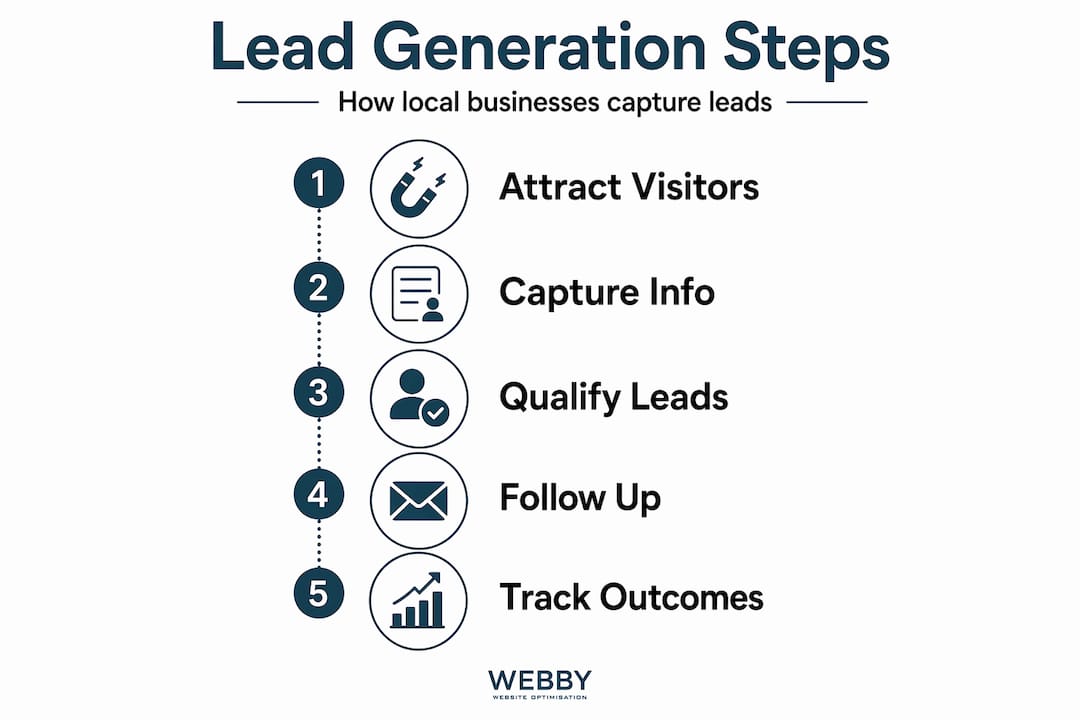
- Practical steps to build your lead generation system
- My honest take on where local businesses lose the game
- Ready to build a system that actually captures leads?
- FAQ
Key Takeaways
| Point | Details |
|---|---|
| Leads need a fast response | Contacting a lead within 5 minutes dramatically increases your chances of conversion compared to waiting hours. |
| Phone calls dominate local leads | Most local service businesses receive the majority of their leads by phone, making call tracking non-negotiable. |
| Automation cuts lost leads | Automating lead routing and notifications removes the manual delays that kill response times. |
| Track every channel separately | Mixing form and call data gives you misleading numbers that waste your ad budget. |
| Conversion data improves ad performance | Feeding real conversion data back into your ad campaigns lowers cost per lead significantly over time. |
Online lead generation explained: what it really means
A lead is any person who has shown real interest in your service and given you a way to contact them. Online lead generation is the process of attracting those people through digital channels and capturing their details so your business can follow up.
Here’s where most explanations miss the mark. Lead generation is not the same as demand generation. Demand generation creates awareness. Lead generation captures people who are already interested. If you’re running Google Ads for your plumbing business, demand generation would be a broad social media post about pipe maintenance. Lead generation is the ad that appears when someone types “emergency plumber Perth” and then fills out your contact form or calls your number directly.
Common ways local service businesses capture leads online include:
- Contact forms on service pages, landing pages, or quote calculators
- Phone calls generated by ads, local SEO, or Google Business Profile clicks
- Live chat or chatbots that collect contact details and qualify intent
- Email signups tied to a free quote, checklist, or booking offer
- Online booking tools where a confirmed appointment counts as a captured lead
A “conversion” happens when a visitor takes one of these actions. A “prospect” is a lead you’ve qualified as a genuine buyer. Understanding those distinctions matters because it changes how you measure success and where you spend your budget.
Key components of lead generation for local services
Local service businesses operate differently from ecommerce stores or software companies, and your lead generation strategy should reflect that. The channel mix matters enormously here. Local service businesses get 60 to 75% of their leads from phone calls, with form submissions accounting for another 20 to 30% and bookings making up the rest.
That means if you’re only tracking form submissions in your Google Ads dashboard, you’re blind to the majority of your results. You’ll misread which keywords and campaigns are performing, and you’ll cut spend on ads that are actually generating calls.
The best practices for lead generation at the local level come down to a few specific habits:
- Track calls separately from forms. Use Dynamic Number Insertion (DNI), which swaps phone numbers automatically to attribute each call to the exact campaign, keyword, or page that triggered it.
- Segment leads by source and intent. A lead from an organic search for “hot water system replacement” has different intent than someone who clicked a retargeting ad. Treat them differently.
- Use multi-channel coverage. Email marketing remains the top channel for 48% of marketers because it reaches people directly. For local services, combine it with paid search, SEO, and a strong Google Business Profile.
- Audit your forms regularly. With GDPR data minimization principles now standard practice, collect only what you genuinely need. Fewer fields typically means higher completion rates.
Pro Tip: If your contact form asks for more than name, phone number, and service type, you’re probably losing leads before they submit. Shorten the form, then use your follow-up call to gather the rest.
A balanced mix of inbound and outbound strategies consistently outperforms either approach alone. That means SEO and content working alongside Google Ads and targeted email sequences, not competing with them.
Why response time is the variable most businesses ignore
Here’s a number that should change how you think about lead follow-up. Responding to a lead within 5 minutes increases your chance of connection by up to 100 times compared to waiting 30 minutes. Most businesses are nowhere close. The average actual response time sits around 42 hours because manual processes introduce delays at every step.

Speed-to-lead isn’t about how fast your sales team works. It’s a system problem. The delays happen before a rep ever sees the lead. A form submission lands in a shared inbox. Someone has to check it, decide who handles it, and forward it. By that point, the prospect has already called a competitor.
Here’s a practical breakdown of what a fast lead response system looks like versus a slow one:
| Stage | Slow system | Fast system |
|---|---|---|
| Lead captured | Email notification, checked manually | Instant automated alert to assigned rep |
| Lead assigned | Manager decides and forwards | Automated routing based on service type or territory |
| First contact attempt | 2 to 48 hours later | Under 5 minutes |
| Lead qualification rate | Low, interest has cooled | High, intent is still active |
Automated lead routing reduces response time by 80% compared to manual assignment. Adding real-time notifications on top of that cuts it by another 50%. That’s not a marginal gain. That’s the difference between a thriving local business and one that constantly wonders why its ad spend isn’t paying off.
The steps that get you there fastest:
- Connect your contact forms and call tracking to an automated notification tool.
- Set routing rules so each lead type goes directly to the right person or team.
- Use SMS alerts, not just email, because SMS is opened within minutes while email sits.
- Set up a follow-up sequence that triggers automatically if no contact is made within the first attempt.
- Review response time data weekly and treat any result over 10 minutes as a problem to fix.
Pro Tip: Use a service like LocateHire or a CRM with built-in automation to handle lead routing without manual intervention. Even a simple setup cuts average response time dramatically and pays for itself quickly.
Companies that respond within one hour are nearly 7 times more likely to qualify a lead than those that respond later. And 78% of customers choose the first business that responds. Speed is your competitive edge, especially when your competitors are slow.
Measuring results and optimizing what you spend
Most local service businesses either track nothing or track the wrong things. Tracking form submissions alone gives you a fraction of the picture. You need visibility across all three conversion types: phone calls, form submissions, and completed bookings. Each tells you something different about where your best customers are coming from.
Google Tag Manager makes this practical without requiring a developer for every change. You can set up triggers for form completions, click-to-call button taps, and page visit milestones, then pass that data to Google Ads and Google Analytics simultaneously.
Here’s what to track and why it matters:
| Conversion type | What it tells you | How to track it |
|---|---|---|
| Phone calls (30 sec+) | High-intent lead, ready to book | DNI + call tracking software |
| Form submissions | Mid-intent lead, wants more info | Google Tag Manager event trigger |
| Completed bookings | Revenue-confirmed lead | Booking platform integration |
Assigning realistic conversion values to each type is the step most businesses skip. A completed booking might be worth $300 on average. A phone call might convert to a booking 60% of the time, making it worth around $180. A form submission might convert at 20%, making it worth $60. When your ad platform knows those values, it can optimize toward the leads most likely to generate actual revenue.
Offline conversion uploads that link leads to closed revenue take this even further. Campaigns with full conversion tracking including calls, forms, and offline revenue data achieve 30 to 50% lower cost per lead than campaigns running on incomplete data. That’s real money returned to your marketing budget every single month.
Practical steps to build your lead generation system
Understanding online lead generation techniques is useful. Actually building the system is what changes your revenue. Here’s the order that makes the most sense for a local service business starting from scratch or fixing what’s broken:
- Audit your current tracking. Log in to Google Ads and confirm that phone calls and form submissions are both set as conversion actions. If calls aren’t tracked, fix that first.
- Install Dynamic Number Insertion. Pick a call tracking tool that integrates with your ad platform and swap static numbers for DNI numbers on your website.
- Set up automated lead notifications. Every form submission should trigger an instant SMS and email to the person responsible for follow-up.
- Build a routing rule. Route leads by service type, location, or time of day so the right person gets them without a manual handoff.
- Create a follow-up sequence. If no contact is made in 5 minutes, send an automated text to the prospect. If no contact in 30 minutes, trigger a second attempt.
- Review and iterate monthly. Look at cost per lead by channel, conversion rate by source, and average response time. Any channel with a poor lead-to-booking rate gets examined before it gets cut.
This is what online lead acquisition explained in practice actually looks like. Not a single tactic, but a connected system where every piece feeds the next.
My honest take on where local businesses lose the game
I’ve worked with dozens of local service businesses on their digital presence, and the pattern is almost always the same. They invest in a website, run some ads, and then wonder why the leads aren’t converting into customers. The culprit is almost never the ad or the website. It’s what happens in the 20 minutes after someone submits a form or clicks to call.
I’ve seen businesses spending $3,000 a month on Google Ads while a shared inbox sits unchecked for hours. I’ve seen call tracking completely absent from campaigns that generate 80% of their leads by phone. The technology to fix these problems is not expensive or complicated. The problem is that most business owners don’t know what they don’t know.
What I’ve learned from fixing these systems is that automation isn’t a luxury. It’s the floor. You can’t rely on humans to respond in 5 minutes at 7pm on a Tuesday when a lead comes in. You need the system to do the first step automatically. The human follows up on a warm conversation, not a cold trail.
My honest advice is to treat lead generation as an ongoing system that you improve over time, not a campaign you launch and forget. The businesses I’ve seen grow consistently are the ones that review their data monthly, test new approaches, and never assume the setup they built six months ago is still the best one.
— Steven
Ready to build a system that actually captures leads?
At Webby Website Optimisation, we work specifically with local service businesses in Perth, Fremantle, and Melville who are tired of spending money on digital marketing without seeing it convert into booked jobs. We set up conversion tracking across calls, forms, and bookings, build automated lead routing systems, and optimize your website to turn more visitors into real inquiries. If you’re not sure where your leads are going or why your response rate is low, we can audit your current setup and show you exactly what to fix. Visit Webby Website Optimisation to get started with a free consultation.
FAQ
What is online lead generation for local businesses?
Online lead generation is the process of attracting potential customers through digital channels and capturing their contact details for follow-up. For local service businesses, this typically includes phone calls, contact forms, and online bookings.
How fast should you respond to an online lead?
You should respond within 5 minutes. Responding in that window increases connection rates by up to 100x compared to waiting 30 minutes, and businesses that respond within an hour are nearly 7 times more likely to qualify the lead.
Why are phone calls important in local lead generation?
Phone calls account for 60 to 75% of leads for most local service businesses. Not tracking those calls means your ad data is incomplete and your budget is being optimized toward the wrong results.
What is Dynamic Number Insertion and why does it matter?
Dynamic Number Insertion swaps the phone number on your website based on how a visitor arrived, letting you trace each call back to the specific ad, keyword, or page that generated it. It’s the most reliable way to measure your true return on ad spend for local services.
How do you lower cost per lead with conversion tracking?
By uploading offline conversion data that links leads to closed revenue, you give your ad platform accurate signals to optimize toward. Campaigns with full tracking including calls, forms, and revenue data achieve 30 to 50% lower cost per lead than campaigns running on incomplete data.
If this post raised some questions feel free to ask me a question
Trackbacks/Pingbacks