

Most people think website architecture means the navigation menu or how pages look. It doesn’t. Website architecture is the underlying system that determines how every page on your site connects, how search engines crawl it, and whether users can find what they need in seconds or give up in frustration. Get it wrong, and no amount of great content or polished design will save your SEO rankings or conversion rate. This guide breaks down what website architecture actually means, how it differs from information architecture, and how to design it in a way that serves both users and search engines.
Table of Contents
- Key Takeaways
- What is website architecture and how it differs from information architecture
- Core components of good website architecture
- How architecture affects SEO and user experience
- How to plan and design website architecture
- Simple vs. complex architecture and the hidden costs
- My take on architecture complexity and getting it right
- Ready to build an architecture that actually performs?
- FAQ
Key Takeaways
| Point | Details |
|---|---|
| Architecture is not design | Website architecture governs page hierarchy, URL structure, and internal linking, not visual layout. |
| Internal linking drives rankings | Pages with 3 to 5 internal links from crawled sources rank significantly better in search results. |
| Simplicity protects brand trust | Over-engineered sites with slow load times directly damage user perception and brand credibility. |
| Orphan pages kill crawlability | Any page with no internal links pointing to it is effectively invisible to search engines and users. |
| Architecture is never finished | Treating your site structure as a living system, not a one-time build, prevents costly future rebuilds. |
What is website architecture and how it differs from information architecture
Website architecture is the technical organization of a site. It covers how pages are structured in a hierarchy, how URLs are constructed, which pages link to which, and how crawlers move through the entire domain. Think of it as the engineering blueprint beneath the surface.
Information architecture (IA) is a related but distinct discipline. Where website architecture is primarily technical, IA focuses on the user’s mental model. It answers questions like: How should content be grouped? What labels make sense to the user? How do people search for things on this site? According to the Information Architecture Authority, success depends on integrating technical hierarchy with user mental models, not treating the two as separate concerns.
The four frameworks of information architecture are:
- Organization systems: How content is grouped and categorized (by topic, audience, task, or format)
- Labeling systems: The language used to describe categories, links, and navigation items
- Navigation systems: The mechanisms users use to move through the site (global menus, breadcrumbs, contextual links)
- Search systems: How users locate content they cannot find through browsing
“Website architecture and information architecture are not interchangeable terms. One is the technical skeleton. The other is the cognitive map. A site built without both tends to fail at one or the other.”
When web developers build a site structure without input from UX designers, the technical hierarchy often makes sense to machines but confuses users. When IA is designed without developer involvement, the user-facing grouping may be impossible to implement cleanly. Both disciplines need to work together from the start.
Core components of good website architecture
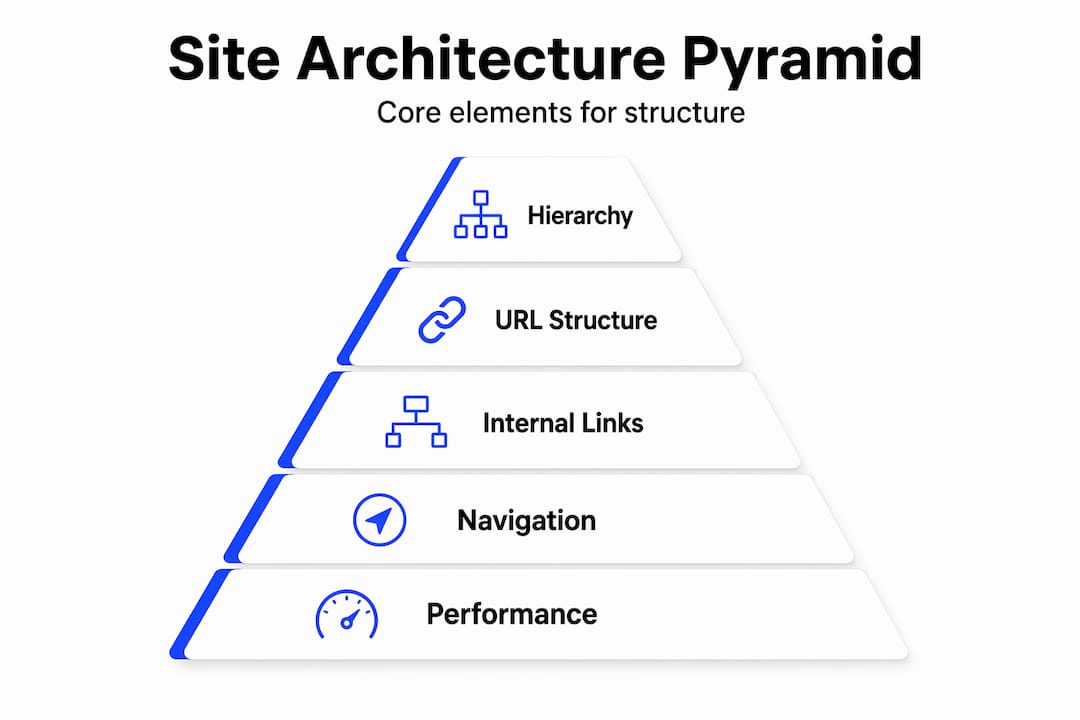
Designing effective website architecture means making deliberate decisions across several interconnected systems. Here is how the key components break down.
Site hierarchy and structure models
Most sites follow one of three structural models. A hierarchical structure organizes pages in a parent-child tree (Home > Services > SEO > Local SEO). It works well for most business sites and blogs. A sequential structure guides users through a defined path, common in checkout flows or onboarding. A matrix structure allows users to navigate through multiple pathways and filters, typical in e-commerce or large databases.

The choice of model shapes everything downstream, from URL construction to internal linking logic to how Google crawls your content.
URL structure and naming conventions
URLs should reflect the hierarchy of your site and use plain language. A URL like "/services/seo/local-seo-perth` tells both users and search engines exactly where they are and what the page covers. Avoid dynamic URLs with strings of numbers and parameters wherever possible on content pages.
Internal linking and authority distribution
Internal linking is where most sites leave significant SEO value on the table. The two proven models are:
- Pillar-cluster model: A pillar page covers a broad topic in depth. Cluster pages cover subtopics and link back to the pillar. The pillar links to each cluster. This creates a closed loop of topical authority.
- Silo model: Content is grouped into strict topic silos with no cross-linking between silos. Links stay within each vertical. This creates clean authority channels for competitive niches.
The pillar-cluster model builds hubs of content with mutual reinforcement, and proper internal linking can boost rankings by up to 40% by signaling topical authority to search engines.
Pro Tip: When auditing your internal links, prioritize pages with high business value but few inbound internal links. A single well-placed link from a high-traffic page can meaningfully improve rankings for a page that was previously underperforming.
Navigation and click depth
Every page that matters should be reachable within three clicks from the homepage. Pages buried five or six levels deep rarely get crawled regularly, and users rarely reach them organically. Global navigation handles the top-level structure. Local navigation (sidebar or section menus) covers subcategories. Contextual links within body content handle the deepest connections.
| Navigation type | Where it lives | Primary function |
|---|---|---|
| Global | Header and footer across all pages | Connect top-level sections |
| Local | Sidebar or section-level menus | Navigate within a category |
| Contextual | Body content and inline text | Connect related content at depth |
| Breadcrumbs | Top of page, below header | Show hierarchy and aid back-navigation |
How architecture affects SEO and user experience
Good website architecture is not a nice-to-have for SEO. It is the foundation that all other SEO work depends on.
Search engines assign authority through internal links. When a high-authority page links to a lower-authority page, it passes ranking power. This is called PageRank distribution, and your internal architecture controls it entirely. Sites using pillar-cluster internal linking have achieved 4 times the organic traffic of competitors with similar domain authority, simply because authority flowed more efficiently through the structure.
Orphan pages are the silent killers of crawlability. A page with no internal links pointing to it receives no link equity and may not be indexed at all. Even large sites should maintain near-zero orphan pages. Research recommends that a site with 10,000 pages should have fewer than 10 orphan pages (0.1%).
From a user experience standpoint, architecture affects orientation. A clear hierarchy and consistent breadcrumb navigation tell users exactly where they are and how to get back. When users feel lost, they leave. When they feel oriented, they explore. That difference shows up directly in bounce rate and session duration, both of which influence how Google evaluates your site’s quality.
Page performance metrics like time to interactive and load speed are also brand trust signals, not just technical benchmarks. A site that loads in under two seconds feels professional. One that takes five seconds feels unreliable, regardless of how good the copy or design is.
How to plan and design website architecture
The most common mistake is designing architecture around the content you already have rather than the content strategy you need. Start with user intent and business goals first.
A practical process looks like this:
- Define your content categories based on what users actually search for, not internal company jargon or department names.
- Choose your structural model (hierarchical for most service sites, matrix for product catalogs, sequential for funnels).
- Map your pillar pages and clusters before writing a single word. Each pillar should represent a primary keyword topic. Each cluster page targets a specific subtopic or question within it.
- Audit existing content using a tool like Screaming Frog or Ahrefs to identify orphan pages, dead-end pages, and pages with too few inbound internal links.
- Build your site map before development begins. A visual site map forces decisions about hierarchy, naming, and depth early, when changes are cheap.
- Establish internal linking rules for your team: how many links per page, which pages are priority destinations, and what anchor text conventions to follow.
For tips on how internal linking boosts authority, there is solid external guidance available. But the framework above gives your team a process that scales.
Pro Tip: Content readiness is the most underestimated bottleneck in any site build or redesign. Treating architecture as a dynamic engineering challenge means planning for the content you need, not just the pages you have today.
Simple vs. complex architecture and the hidden costs
There is a real temptation, especially among developers, to build sophisticated systems. Custom CMS configurations, complex taxonomy layers, headless architecture with multiple APIs feeding a front end. Sometimes this is justified. Often, it is not.
A template-based refresh costs between $3,000 and $8,000. A custom build runs $15,000 to $40,000. A full platform rebuild can exceed $100,000. The jump in cost is not always matched by a proportional improvement in user experience or SEO performance.
| Architecture type | Typical cost range | Best suited for |
|---|---|---|
| Template-based refresh | $3,000 to $8,000 | Small service businesses, early-stage sites |
| Custom build | $15,000 to $40,000 | Mid-size businesses with specific requirements |
| Full platform rebuild | $40,000 to $100,000+ | Enterprise, e-commerce, complex integrations |
Excessive technical overhead damages brand trust. A site that is slow because of a bloated tech stack sends a message to users, even if they cannot name what is wrong. They feel it. And they leave.
“Most brand reputation damage online does not come from bad copy or poor design. It comes from over-engineered, slow, and unstable websites. Simplicity is a brand strategy.”
The other hidden cost of complexity is organizational. Complex architectures require more specialized knowledge to maintain. When the developer who built the system leaves, the business is stranded. Simple, well-documented architectures are easier to hand off, easier to audit, and easier to scale.
My take on architecture complexity and getting it right
I’ve worked with enough sites to know that complexity rarely makes things better. What I’ve found is that the teams most proud of their sophisticated tech stacks are often the same ones struggling to explain why their traffic has stalled or why a simple content change takes three days to implement.
The uncomfortable truth is that architectural decisions are brand decisions. Every time your site loads slowly, redirects unnecessarily, or buries useful information three levels deep, you are telling your users something about your business. And it is not something flattering.
What I’ve learned is that the best architectures are not the most technically impressive ones. They are the ones that a new team member can understand in an hour, that Google can crawl fully in a single pass, and that users can navigate without thinking. Simplicity is not a compromise. It is the goal.
Treat your website architecture as something that evolves with your business. Audit it once a year. Watch where users drop off. Track which pages are getting links and which are sitting as orphans. Architecture is not a one-time decision. The sites that grow consistently are the ones built by teams who revisit and refine the structure as the content and goals change.
— Steven
Ready to build an architecture that actually performs?
If you’ve read this far, you already understand that website architecture is not just a developer concern. It affects your search rankings, your user experience, and the way your brand is perceived every time someone lands on your site.

At Net, we work with local service businesses across Perth, Fremantle, and Melville to build and optimize site structures that search engines can crawl cleanly and users can navigate confidently. Whether you’re starting from scratch or trying to fix an existing site that isn’t performing, our team brings together SEO strategy, UX thinking, and development expertise. Visit Webby.net.au to request a free site audit and find out exactly what your current architecture is costing you in rankings and leads.
FAQ
What is website architecture in simple terms?
Website architecture is the system that organizes and connects all pages on a website through hierarchy, URL structure, and internal links. It determines how users navigate the site and how search engines crawl and index it.
How does website architecture affect SEO?
Architecture controls how link authority flows between pages and whether search engines can find and index all your content. Sites with clean hierarchies and strong internal linking structures rank significantly higher for competitive keywords.
What is the difference between website and information architecture?
Website architecture refers to the technical structure of a site, including URL paths, page hierarchy, and linking. Information architecture focuses on how content is organized and labeled to match the user’s mental model and improve findability.
How many internal links should a page have?
Important pages should receive 3 to 5 internal links from other relevant, already-crawled pages on the same site. This signals priority to search engines and distributes authority effectively.
What are orphan pages and why do they matter?
Orphan pages are pages with no internal links pointing to them, meaning search engines may never crawl or index them. Keeping orphan pages near zero is a core website architecture best practice for maintaining full site visibility.
If this post raised some questions feel free to ask me a question