

Most website owners pour time into writing blog posts and building backlinks, then wonder why their rankings stay flat. The problem is rarely the content itself. What is technical SEO? It is the infrastructure layer of your website that determines whether search engines can actually find, crawl, and index everything you have created. Without it working correctly, even your best content stays invisible. This guide breaks down technical SEO explained in plain language, covering the core components, the most common pitfalls, and how to implement technical SEO in a way that produces real, measurable results.
Table of Contents
- Key Takeaways
- What technical SEO really is
- Core technical SEO components
- Technical SEO pitfalls that hurt rankings
- How to implement technical SEO step by step
- My honest take on technical SEO
- Ready to fix your site’s technical foundation?
- FAQ
Key Takeaways
| Point | Details |
|---|---|
| Technical SEO is foundational | It controls whether search engines can access and index your content before any other SEO effort matters. |
| Core Web Vitals have hard thresholds | LCP under 2.5s, CLS under 0.1, and INP under 200ms directly affect your rankings and user experience. |
| JavaScript slows indexing | Client-side rendered pages face rendering delays; server-side rendering speeds up how fast Google indexes your content. |
| File size limits are real | Google stops crawling HTML files at 2MB, meaning content beyond that threshold may never be indexed. |
| Audits beat guesswork | Regular technical SEO audits surface hidden issues that silently hold back your rankings. |
What technical SEO really is
Technical SEO covers the backend elements of your website that control how search engines interact with it. We are talking about site architecture, crawlability, and security, along with performance, structured data, and indexing signals. These are not visible to your visitors, but they are the first thing Google evaluates before your content ever enters the picture.
Think of it this way. Content and backlinks are the fuel. Technical SEO is the engine. Without the engine running properly, the fuel does nothing.
Here is what falls under the technical SEO umbrella:
- Crawlability: Can Googlebot access your pages without being blocked?
- Indexability: Are your pages eligible to appear in search results?
- Site speed: Does your site load fast enough to meet Google’s performance benchmarks?
- Mobile-friendliness: Does your site work correctly on smaller screens?
- Structured data: Are you using schema markup to help Google understand your content?
- Security: Is your site running on HTTPS?
- Site architecture: Are your pages organized and linked in a way that distributes crawl budget efficiently?
“Without a strong technical foundation, content and backlinks cannot achieve their full value.” This is not a theory. It is something Google’s own documentation reinforces repeatedly, and it is something the team at Net sees play out with real clients every month.
The importance of technical SEO has grown significantly as Google’s AI search features have expanded. Pages must be crawlable and indexable to even be considered for inclusion in AI-generated answers and featured snippets. If your technical foundation is weak, you are locked out of both traditional and AI search results.
Core technical SEO components
Understanding the individual components helps you prioritize what to fix first. Here is a detailed breakdown of each major area.
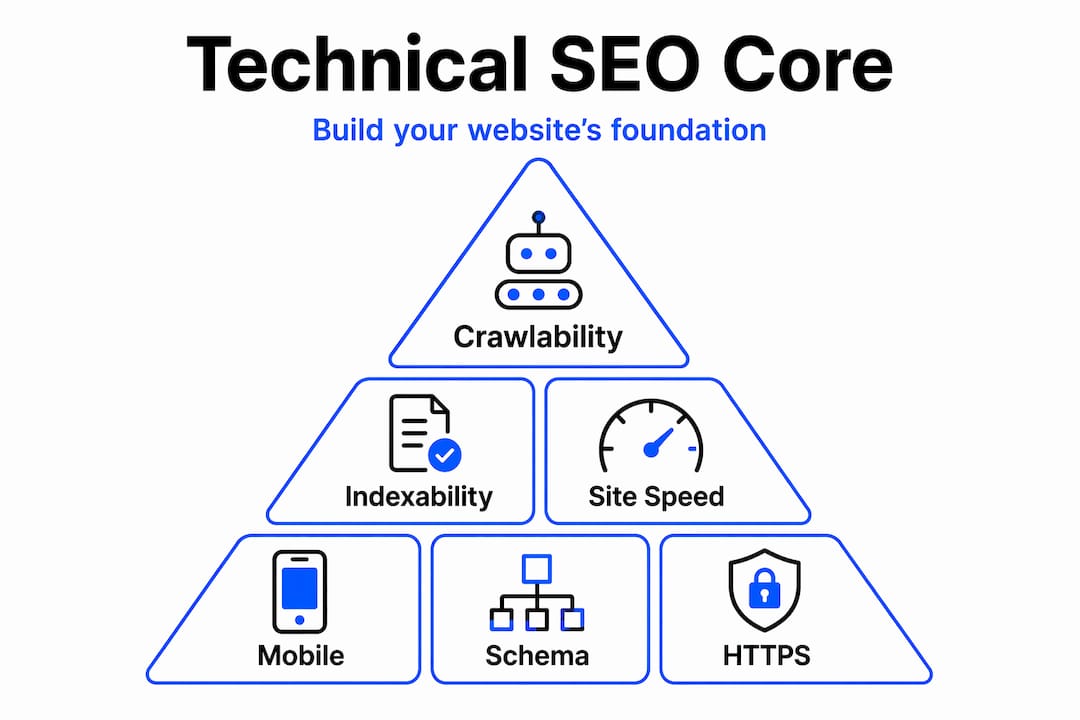
Crawlability and robots.txt
Googlebot follows links and reads your robots.txt file to understand which pages it is allowed to visit. A misconfigured robots.txt can accidentally block entire sections of your site. Check it regularly, and never block URLs that you want indexed.
Indexability and XML sitemaps
Your sitemap tells Google which pages exist and when they were last updated. Keep it clean, submit it in Google Search Console, and remove any URLs that return errors, redirects, or duplicate content. Google is more likely to crawl pages it knows about.
Site speed and Core Web Vitals
This is where many sites lose ground silently. Good LCP is below 2.5 seconds, Cumulative Layout Shift should stay under 0.1, and Interaction to Next Paint needs to come in below 200 milliseconds. These thresholds are not arbitrary. They reflect real user experience benchmarks that Google uses as ranking signals.

| Metric | What it measures | Good threshold |
|---|---|---|
| LCP (Largest Contentful Paint) | How fast the main content loads | Under 2.5 seconds |
| CLS (Cumulative Layout Shift) | Visual stability during load | Under 0.1 |
| INP (Interaction to Next Paint) | Responsiveness to user input | Under 200 milliseconds |
Mobile-friendliness
Google indexes the mobile version of your site first. If your desktop site looks great but the mobile experience is broken or slow, your rankings will reflect the mobile version, not the desktop one. Responsive design is non-negotiable.
Structured data and schema markup
Schema markup tells Google what type of content is on a page. A local business schema signals your name, address, and phone number. A review schema can produce star ratings in search results. This is one of the faster wins available in technical SEO because the implementation effort is relatively low compared to the visibility gains.
HTTPS and security
Google confirmed HTTPS as a ranking signal years ago, and it remains one. Beyond rankings, an insecure site (one showing “Not Secure” in the browser) destroys trust with visitors before they read a single word.
Pro Tip: Run your site through Google Search Console’s Coverage report and cross-reference it with your sitemap. Any pages marked “Excluded” are not ranking and may be worth investigating immediately.
The 2MB crawl limit
Googlebot limits each URL crawl to 2MB of HTML, JavaScript, or CSS. Anything beyond that is simply ignored. For most sites this is not an issue, but bloated page templates, excessive inline scripts, or large JavaScript bundles can push pages over that limit. Content that Google never reads cannot rank.
Technical SEO pitfalls that hurt rankings
Knowing what to do matters. Knowing what not to do matters just as much. These are the mistakes Net sees most often when auditing sites for local businesses.
-
Relying entirely on client-side rendering. Google processes pages in two phases: it first crawls raw HTML, then renders JavaScript in a separate queue. Client-side rendered content can sit in that queue for days or weeks before being indexed. If your site relies on JavaScript to display its main content, Google may never see it in time to rank it.
-
Ignoring soft 404 errors. A soft 404 is a page that returns a 200 OK status code but shows “page not found” content. Google’s crawler sees it as a valid page, indexes it, and it competes with your real pages for crawl budget and relevance signals. These should return a proper 404 or 410 status code instead.
-
Blocking the wrong pages in robots.txt. A single misplaced rule can block Googlebot from your entire site. This happens more often than you would expect, particularly after a website redesign or CMS migration.
-
Letting Core Web Vitals drift over time. A site that passed the thresholds six months ago may not pass today. New plugins, heavier images, or third-party scripts added without performance testing can push your LCP or INP into the “needs improvement” range.
-
Poor internal linking structure. If your most important pages are buried several clicks deep from your homepage, Googlebot may not crawl them frequently enough to reflect content updates. A flat, logical site architecture keeps crawl budget flowing to your highest-value pages.
-
Exceeding the 2MB file size threshold. Content beyond Google’s crawl limit is silently dropped. You will not receive an error. The content simply will not be indexed, and you will have no obvious way of knowing unless you audit for it specifically.
Pro Tip: Use Google Search Console’s URL Inspection tool on your most important pages. It shows you exactly what Googlebot saw the last time it crawled each page, including any rendering issues.
How to implement technical SEO step by step
Knowing what technical SEO covers is half the battle. The other half is putting it into practice without getting overwhelmed. Here is a practical sequence that works.
-
Run a technical SEO audit. Start with a crawl of your site using a tool like Screaming Frog or the audit feature inside your preferred SEO platform. Export a list of all pages, their status codes, title tags, meta descriptions, and indexability status. This gives you a full picture before you touch anything.
-
Prioritize by impact. Not every issue deserves the same urgency. Fix crawl blocks and indexing errors first since they prevent pages from ranking at all. Then move to Core Web Vitals, which affect every page’s ranking potential. Structured data and schema improvements come after the foundations are solid.
-
Assess your rendering setup. If your site uses a JavaScript framework like React or Vue, check whether pages are server-side rendered or client-side rendered. Server-side rendering reduces indexing delays significantly and is worth prioritizing for any content you need indexed quickly.
-
Set up ongoing monitoring. Performance monitoring tools that combine lab data with real user monitoring help you catch regressions before they affect rankings. Google Search Console, combined with a real user monitoring tool, gives you both perspectives.
-
Coordinate with your developer. Many technical SEO fixes require code changes. The clearest way to get developer buy-in is to frame issues in terms of their ranking and traffic impact. Show them the data, explain what the fix involves, and agree on a timeline before the next content push goes live.
| Priority | Fix type | Typical timeline |
|---|---|---|
| Immediate | Crawl blocks, robots.txt errors, sitemap issues | 1 to 3 days |
| Short-term | Core Web Vitals, HTTPS, mobile fixes | 1 to 4 weeks |
| Medium-term | Structured data, site architecture, rendering | 1 to 3 months |
| Ongoing | Monitoring, audits, performance reviews | Monthly |
Fixing technical SEO issues often produces faster ranking improvements than content changes alone because it unlocks the value of content that is already on your site. That is worth repeating. You may not need new content. You may just need Google to actually find and process the content you already have.
My honest take on technical SEO
I have worked with enough websites to say this without hesitation: technical SEO is the most undervalued discipline in the entire SEO ecosystem. Teams spend months on content calendars and link outreach while their robots.txt is blocking half their site or their JavaScript is sitting in a rendering queue for two weeks.
What I have found is that fixing technical issues is almost always faster and more impactful than producing new content. One client had a sitemap submitting 400 URLs that were all set to “noindex.” The content was there. The effort had been made. It was just invisible. Fixing that took two hours and produced ranking movement within three weeks.
The other thing I want to say plainly: AI search has not replaced the need for technical SEO. It has increased it. AI-generated answers pull from indexed content. If your pages are not indexed, they are not included. The same crawl and index signals that have always mattered now also control eligibility for AI search features. Teams that treat technical SEO as a one-time setup are going to fall further behind over the next two years.
My recommendation is to treat technical SEO not as a project but as an ongoing discipline. Audit quarterly. Monitor Core Web Vitals monthly. Review your crawl data any time you make significant changes to your site structure or CMS.
— Steven
Ready to fix your site’s technical foundation?
If this article has made one thing clear, it is that technical SEO is not optional. It is the difference between a website that ranks and one that stays buried despite all the effort you have put into it.

At Net, we run detailed technical SEO audits for local service businesses in Perth, Fremantle, and Melville. We do not hand you a list of problems and leave. We fix them alongside your team, prioritize what will move rankings fastest, and set up monitoring so your results hold over time. Whether your site has crawl issues, speed problems, or a rendering setup that Google cannot process, we can help. Visit Webby.net.au to request your free audit and find out exactly what is holding your site back.
FAQ
What is technical SEO in simple terms?
Technical SEO is the process of optimizing your website’s backend so search engines can crawl, render, and index your content correctly. It includes site speed, mobile-friendliness, HTTPS, structured data, and crawlability.
How does technical SEO differ from on-page SEO?
On-page SEO focuses on the content and keywords visible to users. Technical SEO focuses on the infrastructure that determines whether search engines can access and process that content at all.
Why do Core Web Vitals matter for SEO?
Core Web Vitals are Google’s official performance benchmarks. Sites with good LCP, CLS, and INP scores provide better user experiences and receive a ranking boost over slower competitors with similar content.
How often should I run a technical SEO audit?
Run a full technical SEO audit at least once per quarter, and always after major site changes like a redesign, CMS migration, or significant structural update.
Does technical SEO affect AI search results?
Yes. AI-generated search features rely on the same crawl and index signals as traditional results. If your pages are not crawlable and indexable, they are excluded from both traditional and AI-powered search answers.
If this post raised some questions feel free to ask me a question