
Outsourcing web development means paying an outside specialist or team to build, fix or look after your website, instead of hiring a developer onto your payroll. For most local service businesses in Australia it is the practical choice. You get the skills when you need them, and you don’t carry a full-time salary for work that comes in bursts. It goes well when you define the job clearly, own what is built, and agree in writing how the site will be looked after once it is live.
This guide covers when to outsource, which model suits which job, what a sound contract covers in Australia, how to run the project, and how to handle WordPress security and support.
TL;DR
- Outsource when your website work is project-based or irregular. A permanent hire only makes sense if you have steady, full-time development work.
- Put ownership in writing. Under Australian law, IP created by a contractor stays with the contractor unless your contract says otherwise.
- If your provider is overseas and touches customer data, your privacy obligations still apply to you.
- For WordPress, agree who handles updates, backups, staging and emergencies before launch, not after something breaks.
- Judge providers on a written scope, clear communication and a handover plan, not on the lowest quote.
Table of Contents
- What outsourcing web development actually involves
- When outsourcing makes sense, and when to bring work in-house
- What does outsourced web development cost in Australia?
- How to choose a provider
- What your Australian contract should cover
- Running the project from brief to handover
- Outsourcing WordPress development safely
- Perspective: why we think outsourcing works best as a partnership
- Where Webby can help
- Common mistakes to avoid
- FAQ
- Sources
What outsourcing web development actually involves
You hand a defined piece of work to someone outside your business. That might be a new site, a redesign, a speed fix, a new booking form, or the ongoing care of a site you already have. You pay for the outcome or the hours, and the provider supplies the people, tools and process.
The alternative is an in-house developer. That gives you someone who knows your business deeply and is available daily. It also means salary, super, leave, equipment, management time and the risk that the person leaves and takes the knowledge with them. A site for a plumber, accountant or physiotherapy clinic rarely generates enough development work to keep a specialist busy all year.
There are three common ways to outsource:
| Model | Best for | What to watch |
|---|---|---|
| Freelancer | Small, well-defined tasks and one-off fixes | One person means one point of failure: holidays, illness, changing availability |
| Local agency or studio | Full builds, redesigns, SEO-linked work, ongoing care | Make sure scope, ownership and support terms are written down |
| Offshore team | Larger custom builds with a technical lead on your side | Time zones, privacy obligations and the effort of managing communication |
The right model depends less on price than on how much of the management you want to do yourself. A business owner with no technical background usually gets better results from a provider who runs the project and explains things in plain language than from a cheaper arrangement where they have to direct every task.
When outsourcing makes sense, and when to bring work in-house
Outsourcing tends to fit when:
- You need a website built or rebuilt once, then maintained lightly.
- Your needs change from month to month: a new service page one month, a speed problem the next.
- You need several skills at once, such as WordPress development, design, speed optimisation and SEO, and no single hire covers them all.
- You can’t wait months to recruit. Hiring a senior developer takes time, while engaging a provider can start within weeks.
- The website is a lead-generation tool, not your product.
In-house starts to make sense when development is your product, or when you have a continuous backlog of technical work and the budget for a full-time role plus management. Many growing businesses land on a hybrid: an outsourced partner for the build and the technical care, and one person internally who owns content and priorities.
What does outsourced web development cost in Australia?
Prices vary widely because the work varies widely. A five-page brochure site, a quoting tool and a custom booking system are different jobs, and each provider prices differently. Be wary of any article that gives you one number for “a website”.
What helps more is knowing the pricing structures you will meet:
- Fixed project price. A set fee for a defined scope. Good for builds. The risk is scope creep, so the quote should list what is and isn’t included.
- Hourly rate. Suits unpredictable fixes and emergencies. Ask for an estimate and a cap before work begins.
- Monthly retainer. A recurring fee for maintenance, updates or ongoing development. Good when you want predictability.
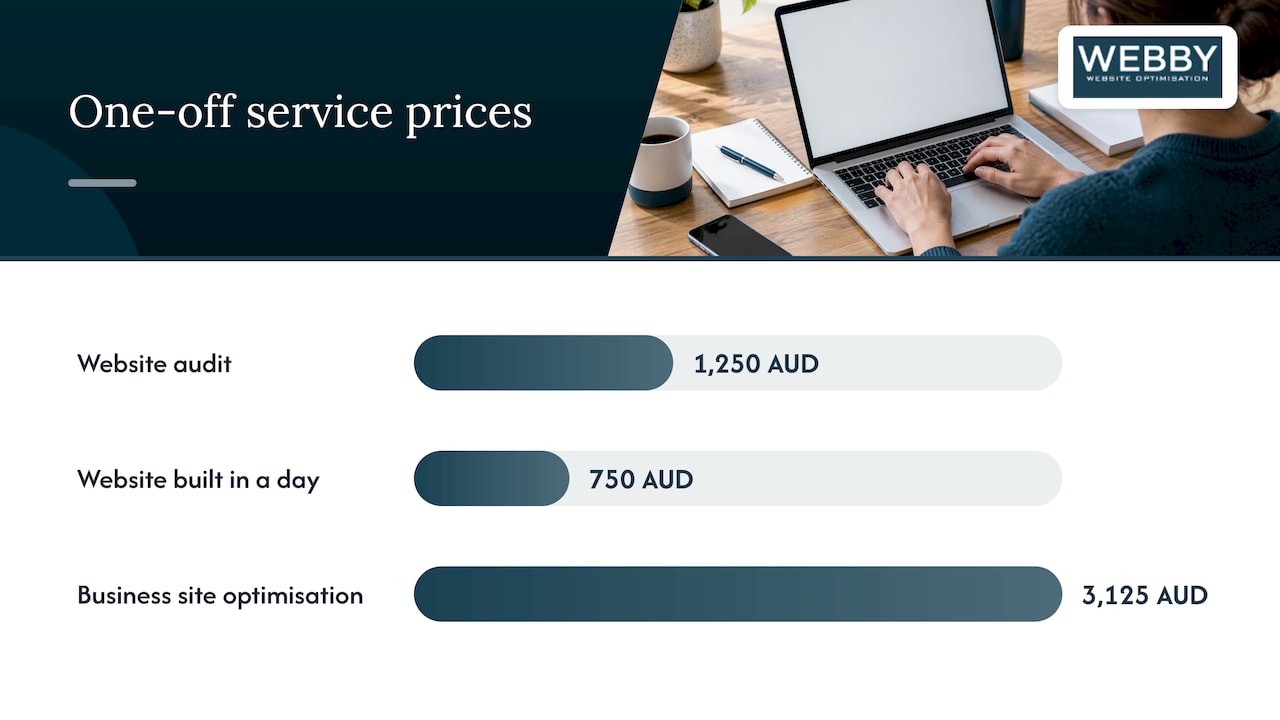
As a reference point, here is how we price at Webby, as published on our site:
| Service | Price |
|---|---|
| Website Audit | 1250 AUD, one-off |
| Website Built in a Day | 750 AUD, one-off |
| Business Website Optimisation Campaign | 3125 AUD, one-off |
| Monthly Maintenance | 59 AUD per month |
| Monthly Updates | 123 AUD per month |
| Monthly Development | 600 AUD per month |
| Emergency Services | 120 AUD per hour |
Custom website development and SEO are quoted to the project, because the right answer depends on your industry, your competition and your existing site.
When you compare quotes, compare what is covered, not just the total. Check hosting, content, stock images or licensed plugins, revisions, training, post-launch support and who pays for the renewal of anything the site depends on.
How to choose a provider
A polished portfolio shows what a provider can design. It doesn’t show how they behave when a deadline slips or a plugin breaks. Assess these things directly.
Relevant experience
Ask for examples close to your situation: a similar size of business, a similar type of site, the same platform. If you run on WordPress, you want people who work in WordPress every day. Ask what the result was, not only what it looked like: did enquiries rise, did the site get faster, did rankings move?
Communication
You will learn most from the first two weeks. Notice how quickly they reply, whether they ask good questions about your customers, and whether they explain trade-offs without jargon. A provider who is vague before you sign is rarely clearer afterwards. Agree one point of contact and a reporting rhythm, such as a short weekly update.
Security practices
Ask how they store your logins, how they back up the site, how they test updates, and who else has access. The WordPress project’s own security guidance lists the basics: keep WordPress up to date, update and delete unused plugins, limit access, maintain backups and monitor the site. A provider should be able to describe how each of those happens in practice.
Fit with your business goals
A site is not finished when it looks good. It is finished when people find it and contact you. Look for providers who think about search visibility, speed and conversion during the build, not as an afterthought. That is why we build SEO and conversion thinking into our website design and development work.
A short checklist for your first call
- Who will actually do the work, and who is my contact?
- What happens if that person is unavailable?
- What is in the scope, and what costs extra?
- Who owns the code, design files, content and accounts at the end?
- How are updates, backups and emergencies handled after launch?
- How do we exit if it isn’t working?
What your Australian contract should cover
A verbal agreement and a friendly quote are not enough. The contract is where outsourcing succeeds or fails. These are the points that matter most for an Australian business.
Intellectual property
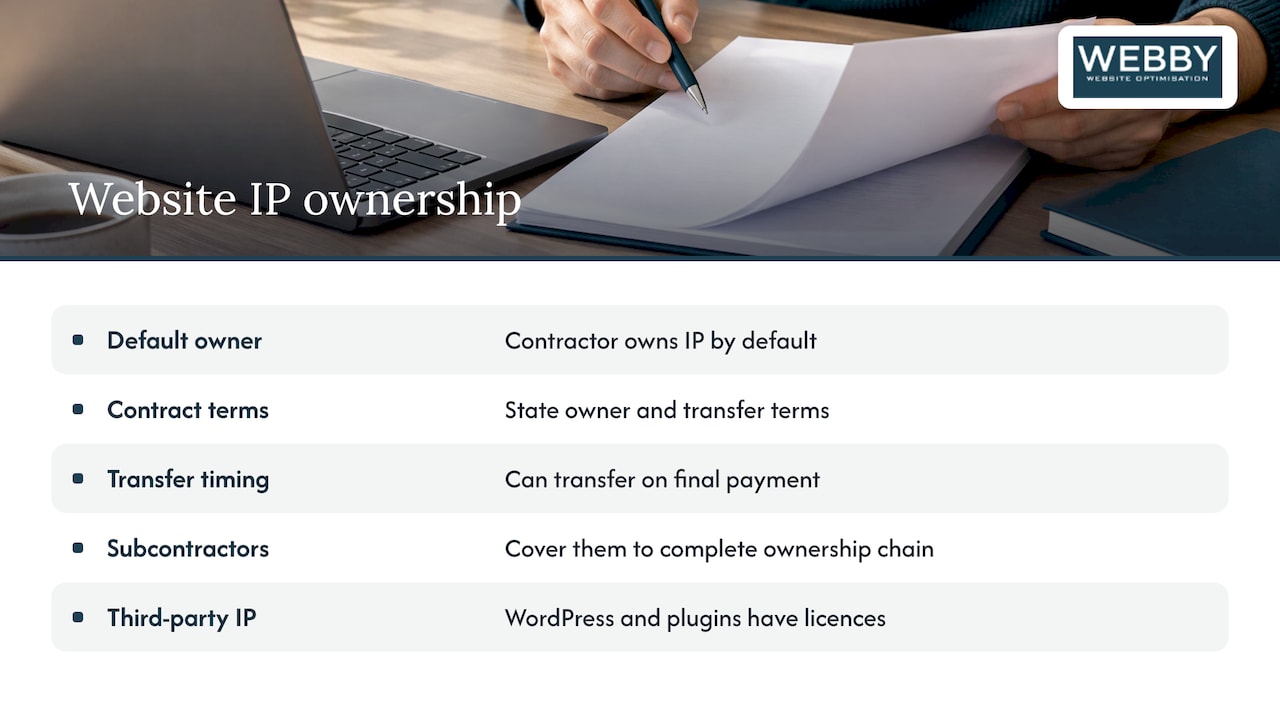
This is the one that surprises people. IP Australia explains that IP created by a contractor belongs to the contractor unless the contract says otherwise. That means paying for a website does not automatically make the custom code and design yours. Your contract should state who owns the IP, when it transfers (for example, on final payment), and how subcontractors are covered so the chain of ownership is complete.
Separate what is bespoke from what is third-party. Open-source WordPress and licensed plugins come with their own licences, and the contract should say which licences you will need to hold in your name.
Access, credentials and handover
You should hold the domain registration, hosting account and admin logins in your own name, or have a clear date on which they move to you. Ask for the source files, documentation and a short handover session. If you can’t log in to your own website without calling the provider, you are locked in.
Scope, acceptance and changes
List the pages, features, integrations and deliverables. Define what “done” means: how you will test, how many rounds of revisions are included, and how changes beyond the scope are quoted and approved in writing.
Warranties, liability and consumer law
Check what the provider warrants after launch, such as a fix period for defects, and whether liability caps are reasonable. Australian Consumer Law may apply to services bought by small businesses, so have a lawyer review any clause that tries to exclude all responsibility.
Privacy and data
If your site collects names, emails or phone numbers, you carry privacy duties. The OAIC’s guidance on Australian Privacy Principle 8 says that when an entity engages a contractor overseas to perform services on its behalf, providing personal information to that contractor is in most circumstances a disclosure, and the entity must comply with APP 8 before making it. If a provider or subcontractor will access customer data from outside Australia, raise it before you sign and ask your lawyer how the Privacy Act applies to your business.
Exit terms
Write down how either side can end the arrangement, the notice period, and what you receive on exit: files, credentials, backups and documentation.
Running the project from brief to handover
A good provider helps with all of this, but the more clearly you work, the better the result.
- Write the brief. One page is enough. Who the site is for, what you want visitors to do (call, book, request a quote), the pages you need, the sites you like, and your deadline.
- Agree scope and timeline. Break the project into milestones with dates and payments tied to them.
- Gather content early. Late text and photos are the most common cause of delays. Decide who writes the copy and who supplies the images.
- Review a staging version. Work is checked on a private copy, not the live site. Our WordPress staging checklist explains how that safe-push process works.
- Test properly. Click every form, phone link and button on mobile and desktop. Submit a test enquiry and confirm it reaches the right inbox.
- Launch with a plan. Set up redirects for old URLs, confirm analytics and Search Console are working, and take a full backup before and after going live.
- Hand over. Receive credentials, documentation and a short walkthrough. Agree who looks after the site from day one.
Setting a clear point where each stage is signed off protects both sides and keeps payments fair.
Outsourcing WordPress development safely
WordPress powers a huge share of small business sites, and the same openness that makes it flexible makes upkeep important. Outsourcing doesn’t remove the work of maintaining it, it just moves it to someone else, so make sure that someone is named.
Updates are urgent. The WordPress documentation notes that keeping core and plugins current is a foundation of site security, because publicly known weaknesses in old versions are easier to attack.
Updates also need care. Blindly applying updates to a live site can break forms or checkout. A safer routine is to apply updates on a staging copy, test the features that matter to your business, keep a separate backup, and know how to roll back.
Agree these points with whoever looks after your site:
- Who applies updates, and how often?
- Are updates tested on staging first?
- Where are backups stored, and how often are they taken?
- Who has admin access, and is it removed when people leave?
- What happens if the site goes down at 7pm on a Friday?
- Who pays for premium plugin licences and renewals?
That last question about emergencies is worth settling in advance. A fixed hourly emergency rate and a monthly care plan beat negotiating while your site is offline. See our WordPress maintenance and support plans for how we structure this.
Perspective: why we think outsourcing works best as a partnership
Most small business owners we meet don’t need a developer. They need a website that brings in enquiries and stays online. Those are different problems, and a one-off build rarely solves both.
Our view is that outsourcing works best when one team looks after the build, the speed, the search visibility and the ongoing care. When those are split between four suppliers, nobody is responsible for the result, and the business owner ends up as the project manager.
That is why we offer audits, builds, optimisation and monthly support under one roof, and why we put prices on the services we can. You should know what you will pay before the first call. We would rather you had a clear scope, ownership of your site and a provider who answers the phone than a cheap quote that turns expensive in month three.
If you take one thing from this guide: write down who owns what, who looks after what, and what happens when something goes wrong. Everything else follows from that.
Steve Doig
Where Webby can help
If you are weighing up whether to outsource, a good first step is understanding the state of the site you have. Our Website Audit (1250 AUD, one-off) reviews your site’s performance, search visibility and conversion gaps, so you know what to fix before you brief anyone.

If you need a site fast, Website Built in a Day is 750 AUD one-off. If your existing site needs to work harder, the Business Website Optimisation Campaign is 3125 AUD one-off. And if you’d like to talk it through first, you can claim a free website audit and we’ll tell you honestly where you stand.
Common mistakes to avoid
- Choosing on price alone. The cheapest quote often leaves out content, testing, support or ownership.
- No written scope. “A simple website” means something different to everyone.
- Not holding your own accounts. Domain, hosting and analytics should be in your name.
- Skipping staging and backups. Changes tested on the live site put your leads at risk.
- Forgetting the afterlife. A site without maintenance gets slower and less secure each month.
- Treating launch as the finish. Search visibility and conversions improve through ongoing work.
FAQ
Is it cheaper to outsource web development than to hire a developer?
Usually, for small and mid-sized businesses, yes. A developer on your payroll costs a salary plus super, leave, equipment and management time, whether or not there is work that week. With outsourcing you pay for the project or the hours you actually need. If you have steady full-time development work, the maths can differ.
Who owns the website when I outsource?
Only who the contract says. In Australia, IP created by a contractor stays with the contractor unless the contract states otherwise, according to IP Australia. Ask for a written assignment of the custom work, and for the domain, hosting and admin logins to be held in your name.
Can I outsource WordPress maintenance separately from the build?
Yes, and many businesses do. Maintenance covers updates, backups, security monitoring and fixes, and it can be handled by a different provider from the one who built the site. Just make sure the new provider has full access and knows how the site is built. Our monthly plans start at 59 AUD per month for maintenance.
Is it safe to outsource to an overseas developer?
It can be, if you manage the risks. Agree who has access to customer data, put security obligations in the contract, and get advice on your Privacy Act duties, since the OAIC treats giving personal information to an overseas contractor as a disclosure in most cases. Time zones and communication also need planning.