
Lead form extensions are now called lead form assets in Google Ads. They let a person submit their contact details inside your ad, without visiting your website. For a local service business, that can mean fewer steps between a search and an enquiry. It also means you must be ready to follow up fast, meet Google’s eligibility rules and handle personal information properly under Australian privacy law.
This guide covers what the feature is, who can use it in Australia, how to build one, how to get the leads into your systems and how to keep the quality high.
TL;DR
- Lead form assets (formerly lead form extensions) open a form inside your ad, so people can enquire without loading your website.
- In Australia, some formats, such as Search headlines that open the form directly, need more than $50,000 AUD in total Google Ads spend. Check the policy page for your account.
- Google stores leads for 60 days, and CSV download covers only the last 30 days. Connect a CRM or webhook so no lead is lost.
- Ask only for what you need, and show a privacy notice and your privacy-policy URL on the form.
- Speed of follow-up and lead verification decide whether the form pays off.
Table of Contents
- What lead form assets are and how they work
- Eligibility in Australia
- How to create a lead form asset
- Privacy and consent under Australian law
- Getting leads out of Google and into your business
- Keeping lead quality high
- Lead forms versus other extensions and landing pages
- Our perspective
- Get the whole journey working
- FAQ
- Sources
What lead form assets are and how they work
Google describes lead form assets as forms that open within an ad, where a person can submit contact information such as an email address or phone number to show interest. The older name, lead form extension, still turns up in searches and in many guides, but the feature is the same.
The workflow is simple:
- You create a lead form in Google Ads.
- You attach it to a campaign.
- Someone sees your ad, opens the form and submits it.
- You receive the lead and export or route it to your own systems.
The key difference from a normal ad is where the conversion happens. A standard Search ad sends people to a landing page, where your page speed, layout and copy decide whether they enquire. A lead form keeps them in Google’s interface. That removes the website from the journey, which helps when your site is slow or outdated. It also removes your chance to persuade, reassure and qualify on your own page.
When a lead form suits a local service business
A form tends to suit enquiries that are quick and low-commitment: a quote request, a callback, a booking of an assessment. Think of a plumber in Fremantle, an accountant in Melville or a cleaning company across Perth. The person wants a price or a call, and a short form is enough.
It suits less when the decision is complex, when you need a lot of detail before quoting, or when your website does a strong job of convincing people. In those cases a well-built landing page usually does more. We cover how to diagnose that choice in our guide to why a website gets no leads.
Eligibility in Australia
Not every advertiser can switch these on. Google’s Australian guidance requires a good policy compliance history, an eligible vertical and a privacy-policy URL for your business. The same page restricts sensitive categories and lists limits on adult content, alcohol, gambling, healthcare and medicines, political content, affiliate networks and lead aggregators, and misuse of personal information.
Spend thresholds matter too. According to the same Australian policy page, Video or Display campaigns, and Search campaigns where the headline opens the lead form directly, require more than $50,000 AUD of total Google Ads spend. The page also describes a route for reputable advertisers spending more than $1,000 per account or more than $15,000 across accounts, subject to verification and good standing. Policies change, so read the current page before you plan around a format.
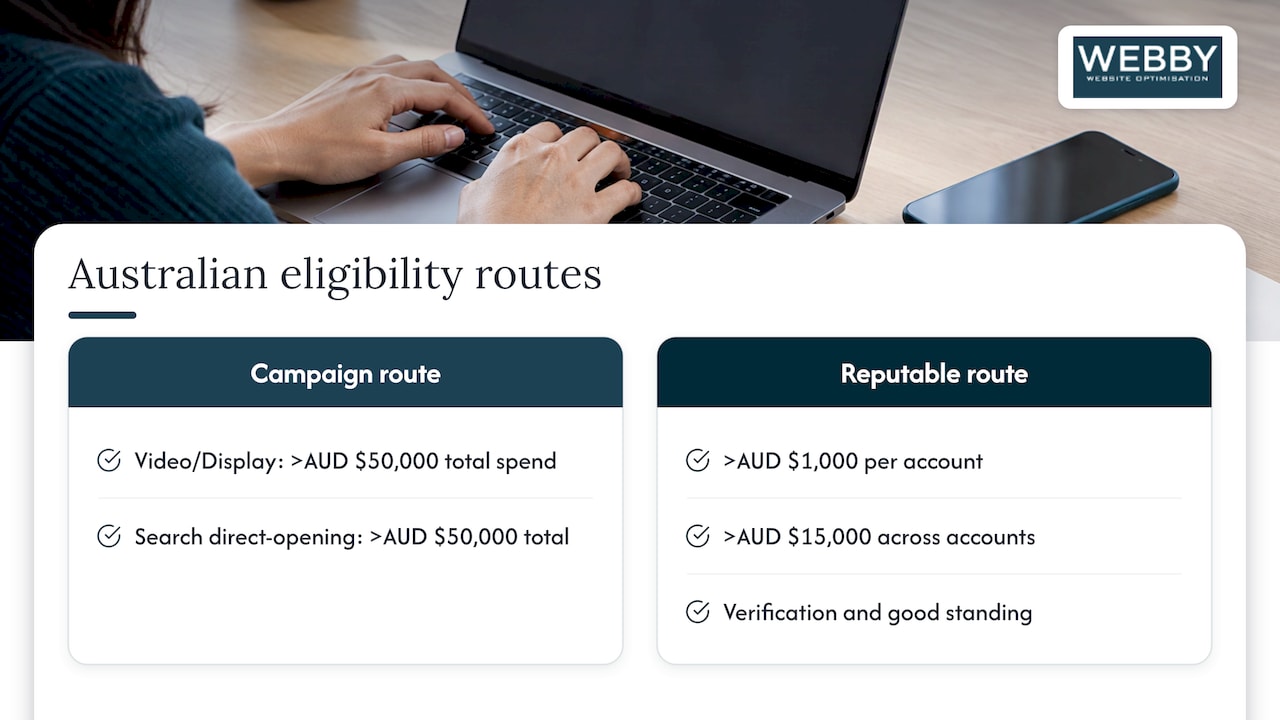
Campaign and bidding requirements
The campaign setup counts as well. Google says your campaign should use conversion-focused bidding and include or optimise toward the lead form conversion goal. Expanded text ads are not eligible for the responsive search format. For the lead forms inside responsive search ads, only one lead form can be added per campaign, and the feature works only with responsive search ads.
If you do not yet have an account, start with our walkthrough on how to create a Google Ads account.
How to create a lead form asset
Google’s own instructions run like this. In the Create lead form assets guide, the steps are:
- Choose the Leads goal and add the Google-hosted lead form conversion goal.
- Select Search or Performance Max.
- Open the lead form editor.
- Add the headline, business name and description.
- Choose the contact fields you want.
- Add your privacy-policy URL, a submission message and a call to action.
- Add custom questions if needed.
- Set the delivery method: CSV, webhook or email.
An existing campaign starts running with the form once Google approves it.
Writing the form itself
Google’s best-practice guidance points to compelling ad text, a clear call to action and questions that match the campaign goal. For a local service business, we would apply that like this:
- Headline: state the outcome, such as a free quote in your suburb, rather than your company name.
- Description: say what happens next and when. “We call within one business day” beats a vague promise, provided you can keep it.
- Fields: name and phone for urgent trades; add email only if you quote by email.
- Custom question: one question that helps you sort leads, such as the type of job or the suburb.
- Submission message: confirm the next step and give a phone number for urgent cases.
Every extra field cuts completions. Ask yourself whether you will actually use each answer in the first conversation.
Privacy and consent under Australian law
A lead form collects personal information, so Australian privacy rules apply to your business. The OAIC explains that under APP 5, you must take reasonable steps to notify the person of required matters at or before collection, or as soon as practicable afterwards if that is not practicable. The same guidance says an online form can do this by displaying the information clearly and prominently, or by giving a readily accessible link to the notice.
OAIC assessment material lists what a notice should cover: your identity and contact details, the circumstances of collection, whether collection is required by law, the purposes, the consequences of not providing it, usual disclosures, privacy-policy information and likely overseas disclosures.
On data minimisation, the OAIC says organisations should collect only the personal information they need, not information that might be useful later. That matches good form design: a short form is both easier to comply with and easier to complete.
Practical steps:
- Keep your privacy-policy page current and make sure it describes lead form enquiries and who receives the data, including any CRM or email tools.
- Use the form’s description or disclaimer text to say how you will use the details.
- If you are unsure whether your business is covered by the Privacy Act or how your notice should read, ask a privacy lawyer or check the OAIC’s guidance for your situation.
Getting leads out of Google and into your business
This is where many local businesses lose money. Google says you can use CSV download, email notifications, the Google Ads API, a webhook or Zapier. Leads are stored for 60 days, CSV access covers only the last 30 days, and Google advises downloading often.
| Method | Best for | Speed |
|---|---|---|
| CSV download | Very low volume, manual checks | Slow, manual |
| Email notification | Small teams who reply from an inbox | Fast, but easy to miss or lose |
| Webhook or Zapier | Quick follow-up and CRM entry | Near real time |
| Google Ads API | Automatic export to a CRM at scale | Automated |
Google’s CRM guidance says a webhook or Zapier is preferable when rapid follow-up matters, while the API can automatically export lead data to a CRM. It also warns that a single lead may be delivered more than once, and recommends using lead_id to deduplicate.
For a tradie or clinic, the simplest setup is a webhook into your CRM or job-management tool that also sends an SMS or email alert to whoever answers the phone. A form lead that waits two days for a reply is usually a lost lead.
Keeping lead quality high
Form leads can be cheap per submission and poor in quality, because the form is so easy to complete. Google’s guidance for high-quality leads suggests choosing conversion goals that match business outcomes, uploading conversion data regularly and considering extra verification such as reCAPTCHA, double opt-in or server-side validation.
Features inside the form help too, according to Google’s creation guide:
- Qualifying responses can tag matching submissions as qualified, which helps you filter valuable leads.
- Conditional answers let you mark some questions optional.
- Phone number verification by one-time password can filter out invalid numbers, automated spam and bots. Google says it is currently supported for Search campaigns only. It adds friction, so you trade some volume for cleaner leads.
Google also recommends sending leads quickly into a CRM and using Enhanced Conversions for Leads and data-driven attribution so Google can connect submissions to later outcomes. In practice, tell Google which leads became jobs. Without that, the system optimises for form fills, not customers.
A simple quality routine
- Call or message every lead within the same business day.
- Mark each as won, lost or junk in your CRM.
- Review the junk rate each month by campaign and keyword.
- Tighten questions or add verification if junk is high.
- Pause the form and send traffic to a landing page if the leads never turn into work.
Lead forms versus other extensions and landing pages
A lead form is one of several assets you can attach to a Search campaign. Calls, locations and sitelinks each serve a different type of enquiry. Our post on which Google Ads extensions actually drive local leads compares them for local service businesses.
The choice between form and landing page is not either/or. Many advertisers run both: a form for people who want a fast callback, and a landing page for people who want detail. If you do send traffic to a page, make sure it is built to convert; see how to optimise a service page for Google.
Our perspective
We see the same pattern with local service clients: the ad is rarely the weak link. The weak link is what happens after the click, or after the form fill. A fast, clear website and a disciplined follow-up routine turn the same ad spend into far more work.
Lead forms are a useful tool when your website is slow, outdated or hard to use on a phone, because they let you capture interest while the site is being fixed. But we would not treat them as a replacement for a good site. Every enquiry from a form is one you did not get to nurture on your own pages, and your own pages are the asset you keep.
Our approach is to pair paid campaigns with a website that converts, then measure the outcome in jobs, not clicks. If a form brings you leads, we help you connect it to your CRM so you respond in minutes. If it brings junk, we look at the targeting, the questions and the landing alternative.
Steve Doig
Get the whole journey working
If you are paying for clicks, the form and the site both need to work. Our Website Audit is priced at 1,250 AUD one-off and reviews how your site turns visitors into enquiries. If you want the site and campaigns improved together, see our Business Website Optimisation Campaign at 3,125 AUD one-off.

You can also claim a free website audit to see where leads are being lost today.
FAQ
Are lead form extensions and lead form assets the same thing?
Yes. Google renamed extensions as assets, and the lead form feature kept its function. You may still see the old name in guides and in older advice. Any steps you follow should match the current Google Ads interface.
Can any Australian business use lead forms?
No. Google requires a good policy history, an eligible vertical and a privacy-policy URL, and it restricts categories such as healthcare and medicines, gambling and alcohol. Some formats also need more than $50,000 AUD of total spend. Check Google’s Australian lead form requirements for your account.
How long does Google keep my leads?
Google stores leads for 60 days, and CSV download covers only the last 30 days. Connect a webhook, Zapier or the API so each lead lands in your CRM straight away. Use lead_id to remove duplicates.
How do I cut spam and fake leads?
Use phone number verification by one-time password on Search campaigns, and consider reCAPTCHA, double opt-in or server-side validation. Mark junk and won leads in your CRM and upload outcomes so Google optimises for real customers. Expect slightly fewer submissions in return for better quality.
Sources
- About lead form assets – Google Ads Help
- Lead form requirements – Advertising Policies Help
- How to use lead forms in responsive search ads
- Create lead form assets – Google Ads Help
- Best practices for lead form assets – Google Ads Help
- Best practices to integrate lead form ads with your CRM
- Best practices for generating high-quality leads
- OAIC: Chapter 5, APP 5 Notification of the collection of personal information
- OAIC: Handling of personal information assessment
- OAIC: Protecting customers’ personal information