
Enable sitelinks, callouts, call assets, location assets, and a lead form, and you’ll see more clicks turn into calls. That’s the short version. These assets add extra lines and buttons to your search ad, and Google doesn’t charge a cent extra for showing them. For a plumber or electrician competing against three other ads on the same results page, more real estate usually means more phone calls.
The immediate move: log into Google Ads, enable those five asset types at the account or campaign level, then link your Google Business Profile so location details populate automatically. That single afternoon of setup often produces the biggest jump in call volume you’ll get from any single change to an existing campaign.
Key Takeaways
Enabling sitelinks, callouts, call, location, and lead form assets at no extra cost is the fastest lever most local service businesses can pull to increase qualified calls and leads.
| Point | Details |
|---|---|
| Enable five core assets first | Sitelinks, callouts, call, location, and lead form assets cover the highest-impact ground for service businesses. |
| Assets never guarantee display | Google selects assets per auction based on Ad Rank, expected impact, and search context. |
| Match sitelinks to landing pages | Each sitelink should point to a specific, relevant page, not a generic homepage. |
| Give it four to six weeks | Judge new asset combinations against cost per lead and conversion rate over that window, not days. |
| Get a professional setup review | Webby Website Optimisation audits existing asset configurations and builds a practical fix plan for local service accounts. |
Table of Contents
- Google Ads Extensions Audit: A 20-Minute Setup Checklist
- How Google Ads Assets Work (And Why Yours Might Not Show)
- Setting Up Each Asset Type the Right Way
- Tracking What Works and Fixing What Doesn’t
- How Webby Website Optimisation Approaches Asset Setup for Local Clients
- What Most Advertisers Get Wrong About Extensions
- Get a Free Google Ads Assets Audit
- Sources
Google Ads Extensions Audit: A 20-Minute Setup Checklist
Before touching anything else in your account, run through this list. It’s built to take less than half an hour, and you can hand it to an office manager who’s never opened Google Ads before.
- Sitelinks: Add multiple sitelinks pointing to distinct pages such as services, service areas, reviews, and contact.
- Callouts: Write several short phrases like “Same-Day Service” or “Licensed & Insured” that add information without repeating your headline.
- Structured snippets: Pick a header like “Services” and list a few concise values.
- Call asset: Add your business phone number, set it to your actual operating hours, and turn on call reporting.
- Location asset: Link your Google Business Profile so your address and map pin show under the ad.
- Lead form asset: Build one short form for your highest-intent keyword (think “emergency plumber near me”) with a clear next-step statement.
- Automated assets: Leave them switched on for coverage, but check back in a week to confirm nothing Google generated is inaccurate.
That’s the whole audit. Nothing here needs a developer or a media buyer.
How Google Ads Assets Work (And Why Yours Might Not Show)
Assets, what Google used to call extensions, split into two categories. Manual assets are the ones you write yourself: your sitelink text, your callout phrases, your uploaded images. Automated assets are ones Google generates on its own, pulled from your website content or your Business Profile, things like dynamic sitelinks or automated location details.
Adding an asset costs nothing, but it doesn’t guarantee it appears on any given search. Google decides per auction which combination of assets to display, weighing Ad Rank, the expected impact of showing that asset, and the context of the specific search. A landscaper’s ad might show call and location assets on a mobile search near their service area, then show sitelinks and callouts on a desktop search from someone still comparing options.
A few things noticeably increase the odds your assets actually appear:
- Higher ad position and stronger Ad Rank both improve the chance Google surfaces more of your assets on any given impression.
- Adding several different asset types at once, rather than just one, gives Google more combinations to choose from.
- A tighter match between your ad copy and your landing page content raises the “expected impact” score Google uses to justify showing an asset.
Pro Tip: Don’t treat one strong sitelink as enough. Google is more likely to expand your ad when it has four or more solid, relevant options to pick from, not just one.
The practical takeaway: give Google more good material to work with, and improve your underlying ad quality, rather than fixating on any single asset not appearing.
Setting Up Each Asset Type the Right Way
Generic advice like “add sitelinks” doesn’t tell you much. Here’s what actually works for each asset type, based on how local service businesses use them.
Sitelinks. Build four to six links, each pointing somewhere genuinely useful, your booking page, a specific service page, your reviews, your service-area list. Matching link text to landing page content matters more than most advertisers realize; a sitelink labeled “Emergency Repairs” that lands on your generic homepage wastes the click.
Callouts. Write six to eight short, distinct phrases, “24/7 Availability,” “Free Quotes,” “10-Year Warranty.” Avoid repeating whatever’s already in your headline; callouts exist to add new information, not echo it. WordStream’s guidance on extension types backs this up with real examples worth studying.
Structured snippets. Choose one header, “Services” works well for most trades, and list three to five concise values underneath it. Keep each value to a word or two.
Call assets. Turn on Google forwarding numbers so you get call tracking data, then schedule the asset to match your actual business hours. There’s little point in a call button ringing through at 2 a.m. if nobody answers. Set a minimum call duration threshold, often 60 seconds, before Google counts it as a conversion, since a 5-second hang-up isn’t a lead.

Location assets. Link your Google Business Profile directly and double-check your listed address and hours are current. Local visibility signals compound here: an accurate, active profile helps both your ads and your organic map pack presence.
Lead form assets. Keep the form short, name, phone, maybe one qualifying question. State the incentive plainly (“Get a free quote within 24 hours”) and include a privacy statement. Track every submission as a conversion in Google Ads, and make sure your landing pages are actually built to convert the traffic these forms send.
Image, price, and promotion assets. Follow Google’s format and size limits exactly, mismatched dimensions get rejected. Prices and promotion dates need to match your landing page precisely; nothing kills trust faster than an ad promising a rate the website contradicts.
Automated assets. Leave these on for broader coverage, combining manual control with automated reach is standard practice, but review them weekly. Disable anything Google generated that’s inaccurate or off-brand.
Tracking What Works and Fixing What Doesn’t
You can’t optimize what you don’t measure. Inside Google Ads, the Assets page under each campaign shows asset-level performance: impressions, clicks, and click-through rate for each individual sitelink, callout, or call asset. Pair that with your overall campaign reports to track the metrics that actually matter for a service business: total ad CTR, number of calls generated, lead form submissions, conversion rate, and cost per lead.
When an asset isn’t showing or isn’t converting, work through this sequence:
- Confirm the asset’s approval status, some get rejected for policy reasons and sit invisible until fixed.
- Check your call asset’s schedule against your actual hours; a mismatch here quietly kills call volume.
- Look at Ad Rank and ad position; a low-ranking ad simply won’t get the same asset real estate as a top slot.
- Audit for landing page mismatches between what the asset promises and what the page delivers.
- Review automated assets for accuracy, an outdated phone number or wrong address will tank trust fast.
Give any new asset combination four to six weeks before judging it. That’s roughly the window needed for cost per lead and conversion rate to stabilize enough to compare honestly against your previous setup.
How Webby Website Optimisation Approaches Asset Setup for Local Clients
The workflow Webby Website Optimisation runs for local service clients starts with an audit of what’s already live, then moves to priority enablement: sitelinks, callouts, call, and location assets go live first, since call and location assets tend to drive the strongest conversion signals for trades and home services. That gets a four to six week test window before scaling whatever’s converting.
One habit that consistently pays off: match each sitelink to a landing page built around a single high-intent search term, not a generic services page. A sitelink for “Hot Water System Repairs” should land on a page about exactly that, not a homepage listing ten unrelated services.
Case studies and client results specific to asset performance are available on request through Webby Website Optimisation’s Perth-based team.
What Most Advertisers Get Wrong About Extensions
Most advice on this topic treats extensions as a set-and-forget checklist item, enable them once, move on. That’s backwards. The businesses that get real lead volume out of assets treat them as living content that needs the same attention as ad copy: updated seasonally, tested against alternatives, pruned when something stops performing.
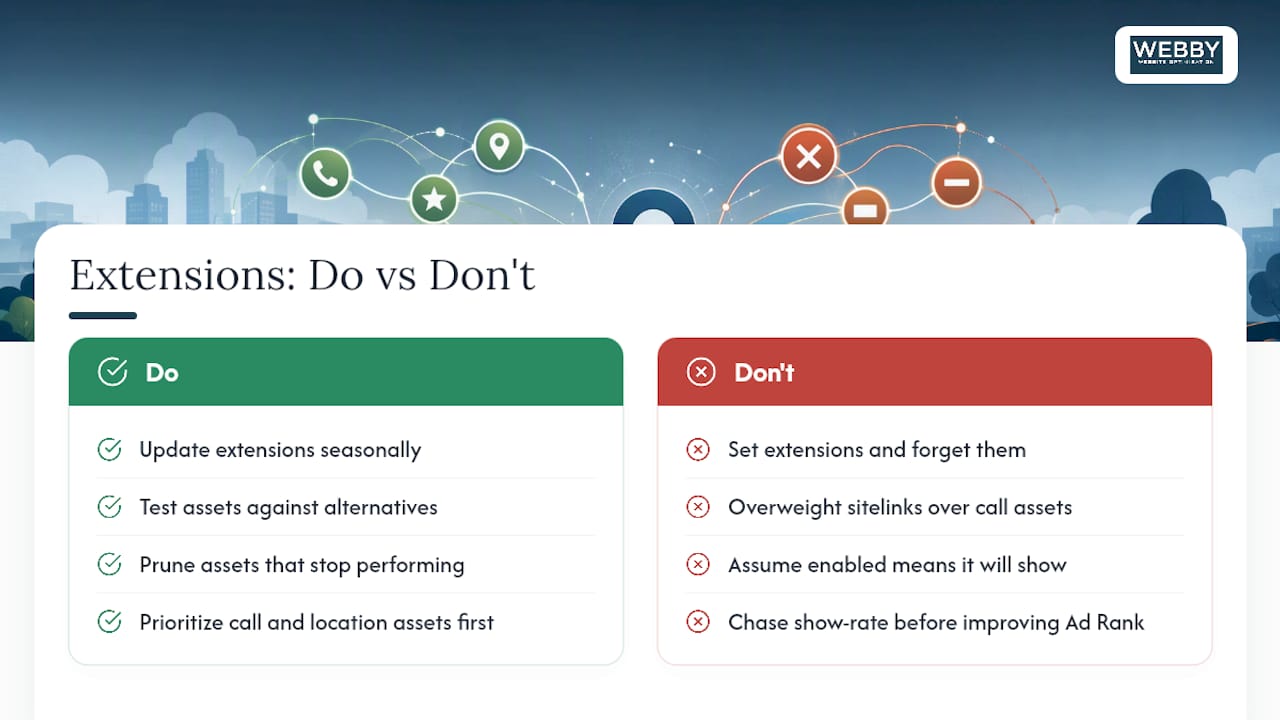
The conventional wisdom also overweights sitelinks and underweights call assets for trades and home services. A plumber or electrician gets more value from a call button that actually rings during business hours than from a sixth sitelink nobody clicks. If you’re time-constrained, get the call and location assets right first. Sitelinks and callouts matter, but they’re not where a stalled water heater sends someone.
The other gap: business owners assume enabling an asset means it’ll show. It won’t, not every time, not for every search. Google decides that per auction. Chasing a phantom “why isn’t my callout showing” problem for hours is usually less productive than improving your Ad Rank and adding more asset variety for Google to choose from.
Get a Free Google Ads Assets Audit
Webby Website Optimisation is the alternative to guessing at your own asset setup, or paying an agency retainer to babysit a Google Ads account that a focused week of work could fix outright. Local service businesses often have the assets half-configured: sitelinks pointing at the wrong pages, call extensions running outside business hours, no lead form at all. That’s lost calls, not a strategy problem.

Webby Website Optimisation offers a free, practical audit of your current asset setup, plus a straightforward implementation plan you can run yourself or hand back to us. Because the team focuses specifically on local service businesses rather than general e-commerce or enterprise accounts, the recommendations are built around what actually generates calls and quote requests, not vanity metrics. If your ads are already live but your website isn’t built to convert the traffic those assets send, that’s worth fixing at the same time. Request your free assets audit through Webby Website Optimisation today and find out exactly which assets are costing you leads.
Sources
- About assets – Google Ads Help
- Improve search ads with assets — Google Business resources
- 19 Google Ads Extensions to Boost Your CTR (+Examples) — WordStream