
Dynamic number insertion (DNI) is a small script on your website that swaps the phone number a visitor sees for a tracking number, chosen by where that visitor came from. When they call, the call forwards to your normal line and your reports show which ad, search or page produced it. For a plumber, electrician, dentist or accountant who gets most leads by phone, it turns “the phone rang” into “this keyword paid for that job”.
This guide explains what DNI is, what your customers see, how the script decides which number to show, what it costs to run in Australia, how it affects your local SEO, and how it fits with a click-to-call or sticky call button.
TL;DR
- DNI replaces the phone number on your site with a tracking number based on the visitor’s source (Google Ads, Facebook, organic search), and the call forwards to your real line.
- Source-based tracking uses one number per channel. Session-based tracking uses a pool of numbers so you can see the keyword and landing page behind each call.
- A click-to-call button records an intent to call. DNI records the call itself, so use both: a sticky button for convenience and DNI for the data.
- Done badly, DNI can create inconsistent phone numbers for Google and slow your pages. Done well, it leaves your local SEO intact.
- Update your privacy policy and collection notice, because linking web activity to a phone call can engage the Privacy Act.
Table of Contents
- What dynamic number insertion is, in plain words
- What your customer sees (and does not see)
- How the script knows where a visitor came from
- Source-based or session-based: which do you need?
- What you can learn from the data
- Setting up DNI step by step
- Protect your local SEO
- DNI, click-to-call and sticky call buttons
- What it costs
- Privacy: one thing to do before you switch it on
- Is DNI worth it for your business?
- Our view
- Get the website ready before you track it
- FAQ
- Sources
What dynamic number insertion is, in plain words
Most small business websites show one phone number. When someone calls it, you know the phone rang, but not why. Was it the Google Ad for “emergency plumber”, the Facebook promotion, or someone who found you in the map listings? Without that answer, the click trail goes dark at the moment of the call, which is the moment that matters.
DNI fixes this with a snippet of JavaScript, a small piece of code that runs in the visitor’s browser. As one call tracking explainer describes it, the script swaps the displayed number for a tracking number based on where the visitor came from, either by source (one number per channel) or by session (a unique number from a pool). The call is then credited to that source or visit.
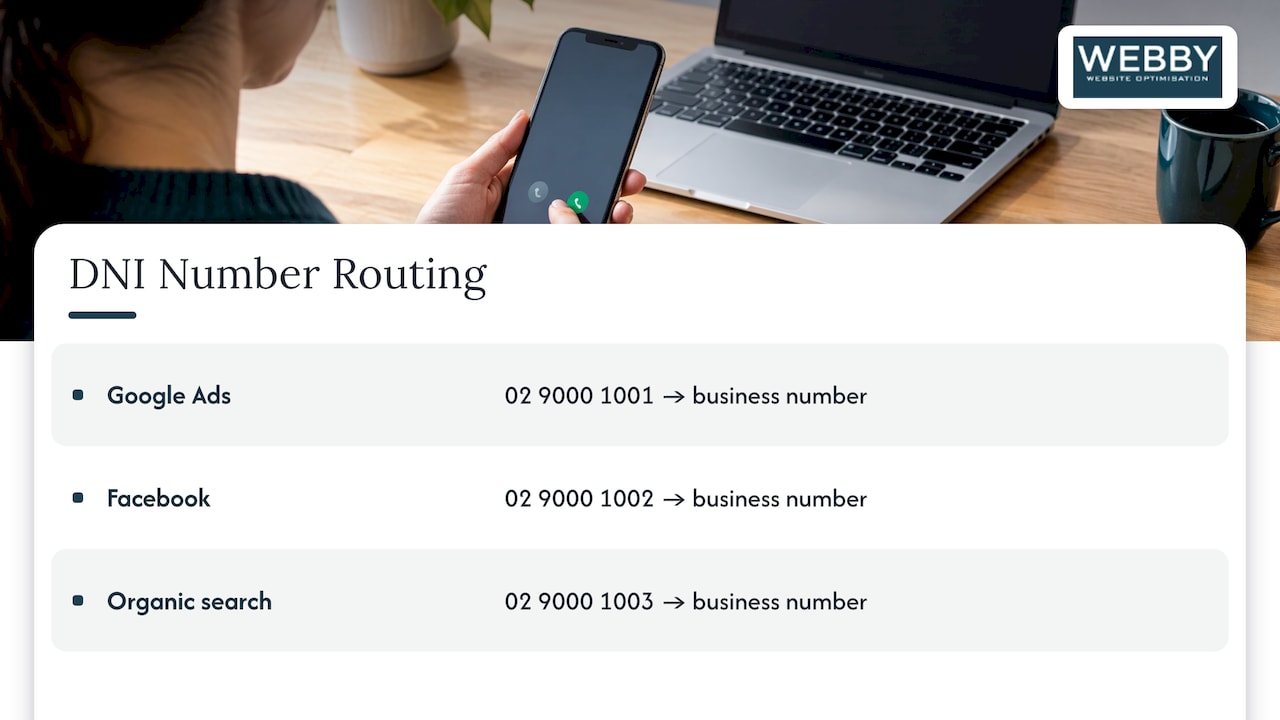
For example, a visitor from Google Ads might see 02 9000 1001, one from Facebook 02 9000 1002 and one from organic search 02 9000 1003. All three forward to your actual business number. These are illustrative numbers, but the pattern is how DNI works everywhere.
What your customer sees (and does not see)
The visitor sees an ordinary phone number on your page. The swap happens in milliseconds after the page loads. They tap or dial, the call is routed through the tracking number and arrives on your usual phone, so the caller notices nothing different.
Two people on your site at the same moment can see different numbers, each tied to how they arrived. The Australian customer experience professionals’ association explains this in its glossary entry on call tracking and dynamic number insertion.
How the script knows where a visitor came from
When someone lands on your site, the script looks at clues in the page address and the browser:
- The referrer, meaning the site they clicked from (a search engine, Facebook, a directory).
- UTM parameters, the tags added to ad links such as
utm_campaign, which you or your ad manager set. - Click IDs such as
gclid(Google Ads),fbclid(Facebook) andmsclkid(Microsoft Ads), added automatically to ad clicks.
Based on what it finds, it requests a tracking number from the call tracking platform, swaps the number on the page, and holds that number for the visitor’s session, typically 30 to 90 minutes according to an Australian call tracking explainer. If the same person calls back later in that window, the call is still tied to the original visit.
With Google Ads, the click ID lets the platform connect the call to the exact campaign, ad group and keyword, as set out in this technical walkthrough.
Source-based or session-based: which do you need?
This is the decision that drives cost and the quality of your data.
| Source-based | Session-based (pool) | |
|---|---|---|
| How it works | One fixed number per channel | Each visitor gets a number from a pool for their session |
| What you learn | Which channel or campaign | Keyword, ad variation and landing page as well |
| Numbers needed | One per source, so 5 to 10 for a small business | Enough to cover visitors on your site at the same time |
| Best for | Businesses with a few channels and low call volume | Businesses spending on Google Ads who want to cut wasted keywords |
The figures on numbers needed come from a call tracking help centre. The same source notes that keyword-level tracking at enterprise scale can need hundreds of numbers.
Pool size matters. If the pool is too small for the number of people on your site at once, two sessions can share a number and the call cannot be matched to the right visitor. If it is too large, you pay for numbers you never use, as another provider explains. A local tradie getting a few hundred visits a month needs a small pool. Check the busiest hour in your analytics rather than the monthly total.
What you can learn from the data
The point of DNI is not the swap itself. It is the decisions you can make afterwards.
Here is an invented example for a Sydney pest controller, adapted from an Australian illustration of keyword call tracking:
| Keyword | Clicks | Calls | Bookings | Cost | Cost per booking |
|---|---|---|---|---|---|
| termite inspection sydney | 47 | 12 | 8 | $282 | $35.25 |
| pest control sydney cheap | 124 | 18 | 0 | $620 | no bookings |
On clicks alone, the second keyword looks more popular. With call data, it is clearly the wrong one to pay for. That is the kind of insight a single static number can never give you.
Once calls are attributed, you can usually answer questions like these:
- Which keywords and ads produce calls, and which only produce clicks?
- Which landing page converts best on mobile?
- Are calls answered, missed or sent to voicemail? Missed calls from paid traffic are money lost.
- How long do calls last? A 10-second call is rarely a job.
If you pass qualified calls back into Google Ads as conversions, the ad platform can also optimize toward calls rather than just clicks. Our guide to GA4 conversion setup covers the checks that keep conversion data trustworthy, and our piece on tracking Google Business calls covers the map listing side.
Setting up DNI step by step
For a typical Australian small business running Google Ads, the setup has three parts, according to one local walkthrough. The script takes about 10 minutes to install and needs no changes to your phone system.
1. Choose your tracking numbers
Decide how many sources you want to separate. Australian numbers usually require proof of business, such as an ABN, address and ID. Some overseas tracking tools cannot forward to 1300 numbers or use 04 mobile numbers as tracking numbers, so confirm your own number type is supported before you sign up.
If you want a memorable 1300 number, a typical carrier summary shows plans starting at $5 a month plus per-minute charges, with DNI listed among available features. Per-minute rates can be two to three times higher when calls are answered on a mobile than on a landline, so check how your team answers.
2. Install the script on your website
On WordPress, the script goes in the header through a plugin or your theme settings, or through Google Tag Manager. Tell it which elements to swap: the visible number in your header and footer, and also the link behind any call button (the tel: link). If the link is not swapped, the visible number may be tracked while the tap on a mobile button goes to your untracked line.
3. Create the conversion action in Google Ads
Set up a conversion of the type for phone calls from a number on your website, and upload qualified calls back using the API or a Google Ads formatted CSV. Our post on migrating Google call ads before February 2027 explains how changes to call ad formats affect local service phone leads.
4. Test on real devices
Visit your own site through a test ad link or a URL with UTM tags. Check the swapped number on iPhone, Android, desktop and at least two browsers. Call it and confirm the call arrives, is recorded as the right source, and that the tap-to-call button dials the tracking number.
Protect your local SEO
Google uses your name, address and phone number (NAP) across the web to confirm that your business is real and consistent. If DNI changes the number that search engines read, you can confuse those signals.
The safe approach, as one Australian number provider recommends, is to swap numbers only for human visitors, not crawlers, to do the swap with JavaScript after the page loads, and to load the script asynchronously so it does not slow the page. Keep your main number in the page’s underlying content and in your Google Business Profile. We go through this in more detail in call tracking without breaking NAP.
Speed matters too. A heavy script placed badly can delay the page, which costs both rankings and enquiries.
DNI, click-to-call and sticky call buttons
These are different tools that work best together.
- A click-to-call button is a link that asks a phone to dial your number. It makes calling a single tap.
- A sticky call button is the same link, fixed to the bottom or top of the screen so it stays visible as the visitor scrolls. For mobile visitors, who are often ready to call, this is one of the simplest changes you can make.
- DNI tells you which visit led to the call.
The difference in what they record is important. A tel: link only records that someone tapped. It does not confirm a call was placed, connected or answered, because the user may cancel after tapping. DNI tracks the actual call, including its duration.
So the practical set-up is: add a sticky call button on mobile, place a visible number near your pricing or booking information, and point the DNI script at both the visible number and the button’s tel: link. Tracking the tap as a separate event in GA4 gives you a useful early signal, while DNI gives you the real calls.
What it costs
Expect two cost layers: the call tracking platform and the numbers.
Australian platforms typically publish entry plans from around $25 to $100 a month, with session-based dynamic numbers, integrations and CRM sync sometimes priced as add-ons. For example, one Australian provider lists bundles from $25 a month, with session-based dynamic numbers at $50 a month per account. Another lists plans from $30 a month, with the plan that tracks leads back to the PPC campaign and keyword at $60 a month. Prices change, so confirm the current figures on the provider’s page.
The cost that matters is not the tool, it is the setup. A tracking number that does not forward properly, or a script that slows your site, costs more in lost leads than any subscription.
Privacy: one thing to do before you switch it on
Linking a person’s web activity to their phone call and storing it can engage the Privacy Act and the Australian Privacy Principles where personal information is involved. ACXPA advises that businesses be clear in their privacy policy and collection notice. If you record calls, also tell callers at the start of the call. For your specific obligations, speak to your lawyer.
Is DNI worth it for your business?
It is worth it when phone calls are a main way customers reach you and you spend money on Google Ads or other paid channels. It is less urgent if you only get a handful of calls a month and no paid traffic. Even then, a source-based setup with two or three numbers can show whether your Google Business Profile or your website brings more calls.
The best sequence is: fix the page first, then track it. Tracking a slow, confusing website tells you precisely how few people are calling.
Our view
Most of the local businesses we speak to spend money to get people to their site, and then have no idea what happens next. Calls are the blind spot. The phone rings, the owner is on a job, and nobody knows whether that call came from a $12 click or from a listing that costs nothing.
We think DNI is worth doing, but only on top of a site that is built to convert. The number needs to be prominent, the sticky call button needs to work on mobile, the pages need to load quickly, and the tracking needs to leave your local SEO signals intact. That is a website and conversion problem as much as a tracking problem, which is where our work sits: SEO, WordPress design and development, speed optimization and conversion optimization for local service businesses.
Our advice is to get the foundation right, then measure calls by keyword and page, and then put your budget where the calls and bookings are.
Steve Doig
Get the website ready before you track it
DNI only pays off when visitors are able to find and use your number. Our Website Audit is a one-off A$1,250 review of your site, covering the things that stand between a visitor and a phone call. If your site is on WordPress and you want someone to look after it, our monthly WordPress plans include Monthly Maintenance at A$59 per month.

If you would rather talk it through first, you can claim a free website audit.
FAQ
Does dynamic number insertion change the number Google sees for my business?
It should not. A well-built setup swaps the number only for human visitors and after the page loads, so search engines keep seeing your main number. Keep that number consistent with your Google Business Profile and directory listings.
Do I need a different number for every visitor?
Not necessarily. If you only want to know which channel produced a call, one number per channel is enough. If you want to know the keyword or landing page, you need a pool of numbers so each concurrent visitor gets a different one.
Can I use a click-to-call button instead of DNI?
They do different jobs. A click-to-call button makes it easy to ring you, but it only shows that someone tapped, not that a call connected. DNI records the call and where it came from, so the two are best used together.
Will callers know they are dialling a tracking number?
No. The call forwards to your normal business line and the caller experiences no difference. If you record calls, you should let them know at the start of the call.
How long does setup take?
The script itself takes about 10 minutes to install. Allow extra time for choosing numbers, testing across devices, and setting up the conversion in Google Ads.
Sources
- Dynamic Number Insertion: What It Is and How It Works
- Call Tracking and Dynamic Number Insertion Explained (ACXPA)
- How Phone Numbers Become Data
- How does dynamic number insertion work?
- DNI script 101
- Dynamic Number Insertion, Explained
- Track Google Ads Keywords That Drive Phone Calls
- Call Tracking DNI Guide
- How to Set Up Call Tracking with Google Ads and Google Tag Manager
- Critical Information Summary: 1300 Numbers
- Pricing, Jet Interactive
- Call Tracking in Australia, WhatConverts