

Before you can transfer domain names, you need to do a little prep work. Think of it as a pre-flight check. Getting these few things sorted upfront will help you sidestep the most common transfer failures and save you a lot of headaches later.
Your Essential Pre-Transfer Checklist
A smooth domain transfer is all about preparation. I’ve seen countless transfers get stuck simply because the domain was still locked or the confirmation email went to an old, forgotten address. Taking a few minutes to run through this checklist can save you hours of back-and-forth with support teams.
This is your game plan before kicking things off. It's designed to help you avoid those classic pitfalls and make the whole process feel less like a technical nightmare.
Confirm Your Domain is Eligible
First things first, you need to make sure your domain can actually be transferred. The rules here are set by ICANN, the organisation that manages domain registrations, and they're pretty straightforward:
- The 60-Day Lock: You can't transfer a domain within 60 days of when you first registered it or since its last transfer. This is a standard industry-wide rule.
- Expiration Status: Don't leave it to the last minute. If your domain is already expired or getting close, the transfer can fail. It’s always best to start the process at least two weeks before the renewal date.
Disable the Registrar Lock
Your current registrar most likely has a registrar lock (sometimes called a transfer lock) enabled on your domain. This is a security feature, and it’s a good thing—it stops someone from trying to transfer your domain without your permission.
But for your transfer to work, you have to temporarily disable it. Just log in to your current registrar's control panel and find the setting. It’s usually a simple toggle switch in the domain management area, but every provider tucks it away in a slightly different spot.
Pro Tip: Forgetting to turn off the registrar lock is probably the number one reason I see transfers fail. Make a point to double-check this before you go any further.
This quick visual breaks down the essential pre-transfer checks.
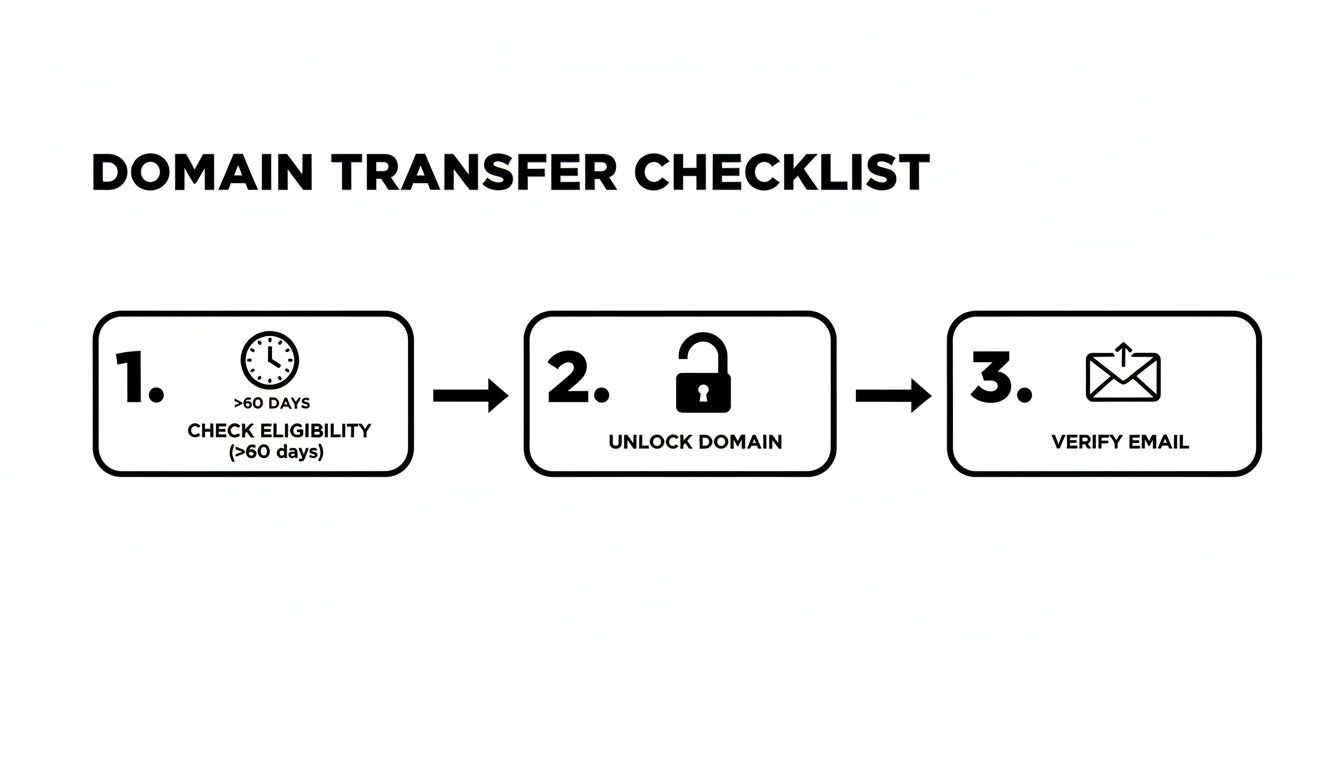
Think of these as the non-negotiable steps to tick off before you initiate any domain move.
Verify Your Admin Contact Email
Finally, and this is a big one, you need to find and check the administrative contact email for your domain. This is the email address listed in the public WHOIS record.
All the important communication about the transfer, including the final email you need to click to approve it, will go to this address. If it’s an old work email you no longer have access to, your transfer will come to a dead stop.
With more Australian businesses establishing their presence online, the number of registered domains is climbing. The market is projected to grow to over 5.3 million registered domains by March 2026, which shows just how many businesses are actively managing—and often transferring—their digital assets. This flurry of activity makes getting your domain management right more important than ever. You can read more about Australia's growing domain market and pricing trends at StateGlobe.
Getting Your EPP Code and Kicking Off the Transfer

Alright, with your domain unlocked and the contact info squared away, it’s time to get the actual keys to move it. This comes in the form of an EPP code, which stands for Extensible Provisioning Protocol. You don't need to remember the name, just think of it as a secure, one-time password for your domain name.
This code can only come from your current registrar—no one else. Your new provider will need it to prove to the registry that you've authorised the move.
Finding Your Authorisation Code
Every registrar’s dashboard is a little different, but the general idea is the same. Log in to your current provider and head to the section where you manage your domains. The option to get the EPP code is usually tucked away under a heading like "Security" or "Sharing & Transfer".
Sometimes, the code will pop up right on the screen. Other times, for security, they'll email it to the domain’s administrative contact. This is precisely why we double-checked that email address in the previous step was correct and accessible!
Here are a few common spots to look:
- Domain Management: Look for an option like "Transfer Out" or "Transfer to Another Registrar".
- Domain Security Settings: It's often located right next to the "Registrar Lock" toggle you just switched off.
- Account Details: In some cases, it might be in a more general account settings area.
If you’ve clicked around for a few minutes and still can't find it, don't waste any more time. Just search their support docs or contact their help desk directly. Ask for the "EPP code" or "Authorisation code" for your domain. They are required to give it to you.
For our friends with Australian domains ending in .au, this code is often called the Domain Password or AuthInfo code. It works exactly the same way as an EPP code.
Once you have that code safely copied, you're all set to begin the process with your new registrar.
Starting the Transfer at Your New Registrar
Now, pop over to your new registrar’s website. You'll find a dedicated "Domain Transfer" page—it's almost always a major item in their main navigation menu.
First, you'll be asked to type in the domain name you want to move. Their system will run a quick check to confirm it's unlocked and ready to go. Assuming all is well, the next screen will ask you to enter that EPP/Authorisation code you just retrieved.
From there, you’ll head to the checkout. This is a point that trips a lot of people up: when you pay for a domain transfer, the fee almost always includes a mandatory one-year renewal.
So, if your domain has six months left before it expires, completing the transfer will extend its registration to 18 months from today. You aren't just paying a small service fee; you're pre-paying your next year of registration, which gets added to whatever time you already have left. This is a standard ICANN policy, not just a sneaky upsell. Once you've paid, the final approval steps can begin.
Keeping Your Website and Email Online During the Transfer
The single biggest fear when moving a domain is, without a doubt, downtime. Nobody wants their website to vanish or their emails to stop flowing. The good news is that with a bit of prep work, you can make sure your transfer happens with absolutely zero downtime.
First, let's get one of the biggest worries out of the way. Transferring your domain registration is not the same as changing your nameservers. Think of it this way: the transfer moves your domain's ownership from one company to another. Your nameservers, on the other hand, are the signposts that direct internet traffic to your website hosting and email services.
As long as those nameservers remain unchanged during the transfer process, your website and emails will carry on working just as they always have. The domain will simply keep pointing to the exact same spot. The trick is to have your DNS settings locked down and documented before you start.
The Zero-Downtime Insurance Plan
My go-to strategy, and one I recommend to everyone, is to create a simple log of all your current DNS records before you even think about starting the transfer. DNS records are the specific instructions for your domain—things like the A record pointing to your website's server or the MX records that handle your email.
Think of it as taking a detailed snapshot of your current setup. This log becomes your safety net. If anything unexpected happens, or if your new registrar fails to copy your settings over correctly (which can happen!), you have a precise blueprint to quickly rebuild them and get everything back online. It’s the best insurance policy for a seamless move. If you want to get more comfortable with these settings, our guide on GoDaddy DNS server management covers concepts that apply to nearly any provider.
You’ll want to log into your current registrar and look for records like these:
- A Record: This points your main domain (e.g., yourdomain.com.au) to your web hosting server's unique IP address.
- CNAME Record: Often used for subdomains like
www, pointing them to the main domain. - MX Record: This is crucial for email. It directs all incoming mail to the right server, whether it’s Google Workspace, Microsoft 365, or your host's email.
- TXT Record: These are used for all sorts of verification tasks, like proving ownership to Google or setting up security measures like SPF for email.
Don't let the technical jargon throw you off. You don't need to be a DNS expert; you just need to be able to accurately copy and paste. Taking this one proactive step is what separates a stressful, panicked transfer from a smooth, controlled one.
Creating Your DNS Backup Log
Documenting these records is dead simple. A basic spreadsheet or even a text file will do the job perfectly. The goal is to capture the handful of key details for each record so you can replicate them at your new registrar if needed.
Here’s a simple template you can use to build your own pre-transfer DNS record log. Taking a few minutes to fill this out provides an incredible amount of peace of mind.
My Pre-Transfer DNS Record Log
Use this template to document your critical DNS records before initiating the transfer. This ensures you have a backup to restore services quickly if needed.
| Record Type (e.g., A, MX, CNAME) | Host/Name (e.g., @, www, mail) | Value/Points To | TTL (Time To Live) |
|---|---|---|---|
| A | @ | The IP address of your server | 3600 |
| CNAME | www | yourdomain.com.au | 3600 |
| MX | @ | aspmx.l.google.com | 14400 |
| TXT | @ | v=spf1 include:_spf.google.com ~all | 14400 |
By logging your DNS settings, you're taking control of the process. You're no longer just crossing your fingers and hoping for the best; you're actively ensuring a smooth transition. With this backup safely in hand, you can move forward with the transfer, confident that your website and email will stay online from start to finish.
What Happens After You Hit ‘Transfer’? The Approval and Timeline
Alright, you’ve plugged in your authorisation code and sorted out the payment. Now the waiting game starts, but you're not just waiting around. What you do in the next few hours is the single biggest factor in how fast this whole process moves.
Almost immediately, an approval email will be sent out. This message, officially known as a Form of Authorisation (FOA), goes straight to the administrative contact email you confirmed earlier. You need to watch your inbox like a hawk for this one.
Somewhere in that email is the golden ticket: a unique approval link. Clicking it takes you to a simple page where you give the final go-ahead. Do this straight away. Acting fast tells the registry you're serious and ready to move, which can shave days off the transfer time.
How Long Does a Domain Transfer Actually Take?
So, what's a realistic timeline? While the official ICANN rules give registrars up to seven days to release a domain, I can tell you from experience it almost never takes that long.
If you approve that FOA email within a few hours, you can expect the transfer to be done and dusted in 3 to 5 days. The most common hold-up, by far, is people letting that email sit unread. If you don't click the approval link, the transfer just hangs in limbo until the old registrar is forced to let it go automatically, and that can take the full seven days.
The key takeaway is simple: the quicker you approve the FOA email, the quicker you can transfer domain names. Don't let it get buried in your inbox—it’s the one thing you control to speed up the process.
What's with the Transfer Fee?
One of the questions I get asked all the time is about the transfer cost. When you pay to move a domain, you aren’t just paying a simple service fee. That payment always includes a mandatory one-year extension of your domain's registration.
For example, if your domain has four months left before it expires, it will have one year and four months of registration after the transfer is complete. You’re essentially just pre-paying your next renewal. It's an important detail to remember when budgeting, especially as domain costs continue to climb.
Here in Australia, we've seen renewal fees jump significantly. Between 2024 and 2025, many registrars hiked their prices by 10-18%, a direct result of wholesale fee increases. These rising costs are why it's so important to consider a registrar's long-term pricing when you decide to transfer domain names. You can read more about these Australian domain pricing trends on 2easyit.net.
Troubleshooting Common Domain Transfer Issues
Even when you follow every step perfectly, a domain transfer can sometimes hit a roadblock. Instead of bracing yourself for a long call with customer support, let’s go over how to diagnose and fix the most common transfer problems. Think of this as your field guide for getting a stuck transfer moving again.
The process is usually a breeze, but when things go wrong, it’s almost always one of a handful of familiar culprits. Knowing what to look for can turn a moment of panic into a five-minute fix.
Transfer Rejected or Failed
Getting an email that says "Transfer Rejected" sounds serious, but don't worry. In my experience, this is almost always due to a simple oversight during your prep work. It’s usually a quick fix.
Before you do anything else, double-check these three things:
- Is the Domain Locked? The number one reason transfers fail right out of the gate. Log back into your old registrar and make sure the registrar lock is definitely switched off.
- Is the EPP Code Correct? A single typo in the EPP code (or Authorisation Code) will cause an instant rejection. Don't re-type it; copy and paste it again, being careful about case sensitivity.
- Is the Domain in a 60-Day Lock Period? As a reminder, you can't transfer a domain within 60 days of a new registration or a previous transfer. If you're caught in this window, you simply have to wait it out.
Once you’ve found and fixed the problem, you can just head back to your new registrar’s dashboard and kick off the transfer again.
A rejected transfer is rarely a major crisis. It's just the system's way of telling you that one of the initial security checks didn't pass. A quick review of the basics almost always solves it.
My Transfer Is Stuck on Pending
Alright, so what happens when the transfer isn't rejected, but it’s just… stuck? If it's been more than a day or two and the status is still showing as "Pending," the hold-up is almost certainly the approval email.
This is the Form of Authorisation (FOA) email we talked about earlier. You need to log in to the webmail account for the domain's administrative contact. Search your inbox—and definitely your spam folder—for an email with a subject line like "Domain Transfer Authorisation."
Once you find that email, click the approval link inside. That single click is the green light that pushes the transfer forward. If you genuinely can't find it, just ask your new registrar to resend it. While you're waiting, it’s also a good time to review what to do if you ever find your domain name has expired, as getting it back involves its own unique set of challenges.
I Can't Access the Admin Email Address
Now, this scenario is a bit trickier. If you've lost access to the domain’s official administrative email, you have no way to approve the transfer.
Your one and only move here is to contact your current registrar's support team directly. You'll need to prove you're the legitimate owner of the domain, which will likely involve providing some form of ID or business documentation.
Once they've verified your identity, ask them to update the administrative contact to an email address you can access. After that change is confirmed, you're clear to restart the transfer process from the beginning.
Choosing a Registrar and When to Get Expert Help

Moving your domain name isn't just a bit of technical housekeeping; it's a real strategic decision for your business. It's so easy to get drawn in by a cheap transfer offer, but that initial price tag often hides what really matters over the long haul.
Think of it this way: a low transfer fee means nothing if you're stuck with a clunky, impossible-to-use dashboard or find yourself waiting hours for a support reply when something goes wrong. You need to look past the upfront cost and judge a new registrar on the things that will actually affect your day-to-day operations.
What Really Matters in a New Registrar
When you're ready to transfer domain names, I've found it always pays to prioritise these three things above everything else. Getting these right will save you a world of pain down the track.
- Responsive Customer Support: When you have an urgent issue, you need fast, competent help. Look for registrars that offer 24/7 support through phone and live chat, staffed by people who genuinely know what they're talking about.
- An Intuitive Dashboard: A clean, logical control panel makes managing your domain simple. You shouldn't need a computer science degree just to update your contact details or find your DNS settings.
- Transparent Renewal Pricing: That super-low transfer price is a classic hook. Always, and I mean always, check the renewal price. This is what you'll be paying year after year, and it’s often much higher.
If you want an in-depth look at providers that get this right, check out our guide on finding the best domain name registrar in Australia. The local market here is growing fast, giving you plenty of great options.
The global domain registrar market is booming, projected to hit $2,745 million by the end of 2025. Australia’s digital economy is a key part of this, holding 6.70% of the Asia-Pacific market share. This growth means more competition and better tools for Aussie businesses, making it a great time to find a registrar that truly meets your needs. You can discover more insights about the expanding domain market at cognitivemarketresearch.com.
When to Consider a Managed Transfer
Let's be honest: not every business owner wants to spend their weekend wrestling with DNS records. If the thought of unlocking domains and chasing down EPP codes sounds like a job you’d rather palm off, you have another option: a managed transfer.
This is a completely hands-off service where an expert team, like us at Webby, handles the entire process for you from start to finish. In my experience, it’s the perfect solution for busy Australian WordPress site owners who just want a seamless, stress-free move.
Opting for a managed transfer takes all the guesswork out of the process.
- Zero Stress: You don't have to lift a finger. We coordinate everything with both registrars, handle the technical steps, and make sure it all goes off without a hitch.
- Guaranteed No Downtime: Our number one priority is keeping your website and emails online. We proactively manage your DNS settings to guarantee a flawless transition with zero disruption to your business.
- Expert Oversight: We do all the technical heavy lifting, from securing the auth codes to verifying the final transfer and making sure your site is working perfectly afterwards.
A managed transfer is the perfect choice for anyone who would rather focus on running their company than getting bogged down in the technical weeds of a domain move. It gives you complete peace of mind, knowing your digital assets are in safe hands.
Frequently Asked Questions About Domain Transfers
Moving your domain name can feel a bit daunting, and it's natural for questions to pop up. Let's clear up a few of the most common ones I hear from business owners.
How Long Does a Domain Transfer Actually Take?
Officially, registrars can take up to seven days, but in my experience, it's almost always quicker. If you've got all your ducks in a row and you action the transfer approval email right away, you're usually looking at a 3-5 day turnaround.
Honestly, the biggest hold-up is nearly always human delay. The process stalls when that crucial approval email sits unopened in an inbox. Staying on top of that is the key to a speedy transfer.
Will Transferring My Domain Affect My SEO?
This is a big one, but you can relax. No, transferring your domain between registrars has no direct impact on your SEO.
Search engines like Google tie your site's authority to the domain name itself, not the company you register it with. As long as your nameservers and DNS records are pointed correctly to your web hosting throughout the process, your website stays online and your rankings won't miss a beat.
Can I Transfer an Expired Domain Name?
Technically it’s possible, but I strongly advise against even trying. It's incredibly risky. The moment a domain expires, most registrars lock it down, making a transfer impossible.
Your best bet is to renew the domain with your current registrar first. Once that's sorted, and any "Redemption Grace Period" has passed, you can kick off the transfer without a fuss. I always tell my clients to start the transfer at least two weeks before the expiry date to dodge any potential headaches.
For anyone wanting a complete walkthrough, particularly for Australian businesses, this guide on a flawless domain name transfer is a fantastic resource for building extra confidence.
If you'd rather have an expert handle the entire process with zero stress, Webby Website Optimisation offers managed transfers and comprehensive WordPress support. Let us take care of your site so you can focus on your business.
If this post raised some questions feel free to ask me a question