

Page titles directly change how many people click your search result. That’s not a theory — it’s measurable. If your pages already rank on page one or two but pull a lower-than-average click-through rate, your title is the first thing to fix. Pull Google Search Console right now, filter for pages with strong impressions and weak CTR, and treat that list as your testing queue.
- Pages ranking in positions 1–10 with below-average CTR are leaving traffic on the table that no amount of link-building will recover.
- The title tag is the one element you control that affects clicks without requiring a ranking improvement.
- A controlled title test on 10–20 pages with existing impressions can show measurable CTR movement within 28 days.
The impact of title tags extends beyond raw clicks. A title that earns a click and then satisfies the reader reinforces positive behavioral signals. A title that earns a click but disappoints sends the reader straight back to the SERP, which is a signal search engines can detect.
Key Takeaways
Page titles are the single highest-leverage element for converting existing search impressions into clicks, and the evidence from controlled experiments consistently points to numerals, question formats, front-loaded keywords, and content-type badges as the patterns most likely to lift CTR.
| Point | Details |
|---|---|
| Titles change clicks, not just rankings | Pages already ranking on page one can double CTR with a better title, without any ranking improvement. |
| Test before broad rollout | Etsy’s multivariate tests showed H1 and title changes interact unpredictably — always run a 28-day controlled test first. |
| Numerals and question formats lift CTR | The 423-page AB test found these formats consistently outperformed generic descriptive titles on informational queries. |
| Pogo-sticking erases CTR gains | A title that earns clicks but disappoints readers produces negative behavioral signals that can lower rankings over time. |
| Webby Website Optimisation | Provides title audits, controlled testing, and rollback support for local service businesses wanting measurable CTR improvements. |
Table of Contents
- What is a page title tag, and where does it appear?
- Why page titles affect clicks: the psychology and mechanics behind it
- Do title tags directly affect your search rankings?
- What experiments and case studies reveal about title changes
- Actionable best practices for writing titles that earn more clicks
- How to test title changes and measure what actually works
- Step-by-step plan for changing title tags safely at scale
- Common title mistakes that quietly kill your CTR
- Before and after: title rewrites that change click behavior
- When should you prioritize titles over other SEO fixes?
- Webby Website Optimisation can audit and test your title tags
- Sources
What is a page title tag, and where does it appear?
The title tag is an HTML element in your page’s <head> section. It looks like this:
<title>10 Plumbing Fixes You Can Do Without a License</title>
It is not the same as your H1 heading, though the two should be closely related. The H1 is visible on the page itself. The title tag lives in the code and surfaces in three distinct places:
- Search engine results pages (SERPs): The blue clickable link in a Google result is drawn from your title tag — though Google may substitute its own version.
- Browser tabs: The tab label a user sees when your page is open.
- Social shares: When someone shares your URL on LinkedIn, Slack, or Facebook, the title tag is what populates the preview headline (unless Open Graph tags override it).
Google states that it often generates title links automatically using page content and references from across the web. Making your main on-page heading (H1) distinctive reduces the likelihood that Google will substitute its own wording — meaning your carefully crafted title is more likely to survive in the SERP as written.
One more wrinkle: what users see on mobile can differ from desktop. Google truncates titles that exceed roughly 600 pixels in width, which translates to about 55–60 characters in a standard font. On mobile, that pixel budget is sometimes narrower. In AI Overviews, the title may appear in a compressed format or not at all, depending on how Google constructs the answer block.
Why page titles affect clicks: the psychology and mechanics behind it
The reason page titles affect clicks comes down to a simple cognitive reality: searchers scan, not read. Your title has roughly a second to signal relevance before the eye moves to the next result.
Psychological drivers that move CTR:
- Specificity and numerals. “7 Ways to Lower Your Heating Bill” outperforms “Ways to Lower Your Heating Bill” because a number sets a concrete expectation. The reader knows exactly what they’re getting.
- Curiosity gaps. A title that implies a surprising or counterintuitive answer creates tension the reader wants to resolve. The key is leaving just enough open to compel a click without being so vague it reads as clickbait.
- Emotional triggers. Negative-emotion words (words that signal risk, loss, or urgency) tend to lift CTR in controlled experiments. The Upworthy Research Archive analysis published in PLOS ONE found that specific linguistic features — including negative-emotion framing, headline length, and certain pronoun choices — were associated with higher clickthrough under randomized conditions.
- Format signals and bracket badges. Adding
[Guide],[Video], or[Checklist]at the end of a title reduces uncertainty about what the reader will find. Less uncertainty means a lower perceived risk of wasting time. - Social proof framing. Titles that reference volume (“Used by 10,000+ contractors”) or authority (“According to Google’s own data”) borrow credibility before the click.
The technical pathway from title to ranking:
A better title drives more clicks. More clicks, combined with readers who stay on the page, feed behavioral signals into Google’s ranking systems. The NavBoost-style behavioral feedback loop works roughly like this: a “good click” is one where the user clicks, stays, and does not immediately return to the SERP. A “bad click” is the opposite — the user bounces back within seconds, signaling the result did not satisfy the query. A title that overpromises and underdelivers generates bad clicks at scale, which can erode rankings over time.
Google rewrites and H1 alignment:
Google rewrites title tags more often than most site owners realize. When your HTML title and your H1 are misaligned or when the title is vague, Google is more likely to substitute its own version — which may be less click-optimized than what you wrote. Keeping your title and H1 thematically consistent, with the primary keyword prominent in both, reduces rewrite frequency and keeps your wording in the SERP.
Device and truncation effects:
Titles beyond 60 characters risk being cut off with an ellipsis on both desktop and mobile. The front of the title carries the most weight — both for the reader’s eye and for Google’s relevance assessment. Front-load the keyword and the hook; treat everything after character 55 as optional.
Do title tags directly affect your search rankings?
The honest answer is: a little directly, a lot indirectly.
Title tags are a relevance signal. Google reads your title to understand what the page is about, and a title that clearly matches a query helps confirm topical relevance. But as a direct ranking factor, it is lightweight compared with backlinks, content quality, and E-E-A-T signals.
The indirect path is where the real leverage sits:
- A better title earns more clicks from the same ranking position.
- More clicks, paired with satisfying content, generate positive behavioral signals.
- Those behavioral signals can, over time, influence where Google places the page.
- A page that climbs from position 6 to position 3 because of improved engagement gets exponentially more impressions — compounding the original CTR gain.
Pro Tip: Never optimize a title purely for clicks. If the page can’t deliver on what the title promises, the resulting pogo-sticking will hurt more than the extra clicks helped. The title is a contract with the reader.
The pogo-sticking risk is real enough that it deserves its own mental model. Think of your title as a preview trailer. A trailer that misrepresents the film fills seats opening weekend but kills word-of-mouth. A title that misrepresents the page fills clicks this week and tanks rankings next month.
For service page structure, the same principle applies: the title sets an expectation the page must fulfill, from the H1 down to the call to action.
What experiments and case studies reveal about title changes
The evidence base for title optimization is stronger than most SEO guides acknowledge. Three sources stand out for their methodological rigor.
Randomized headline experiments (Upworthy/PLOS ONE)
The Upworthy Research Archive gave researchers access to thousands of headline A/B tests run under controlled conditions. The PLOS ONE analysis identified specific linguistic features that consistently correlated with higher clickthrough: generality of language, negative-emotion words, headline length, and certain pronoun choices. Crucially, these were randomized experiments — not correlational studies — which means the findings carry genuine causal weight for hypothesis generation.
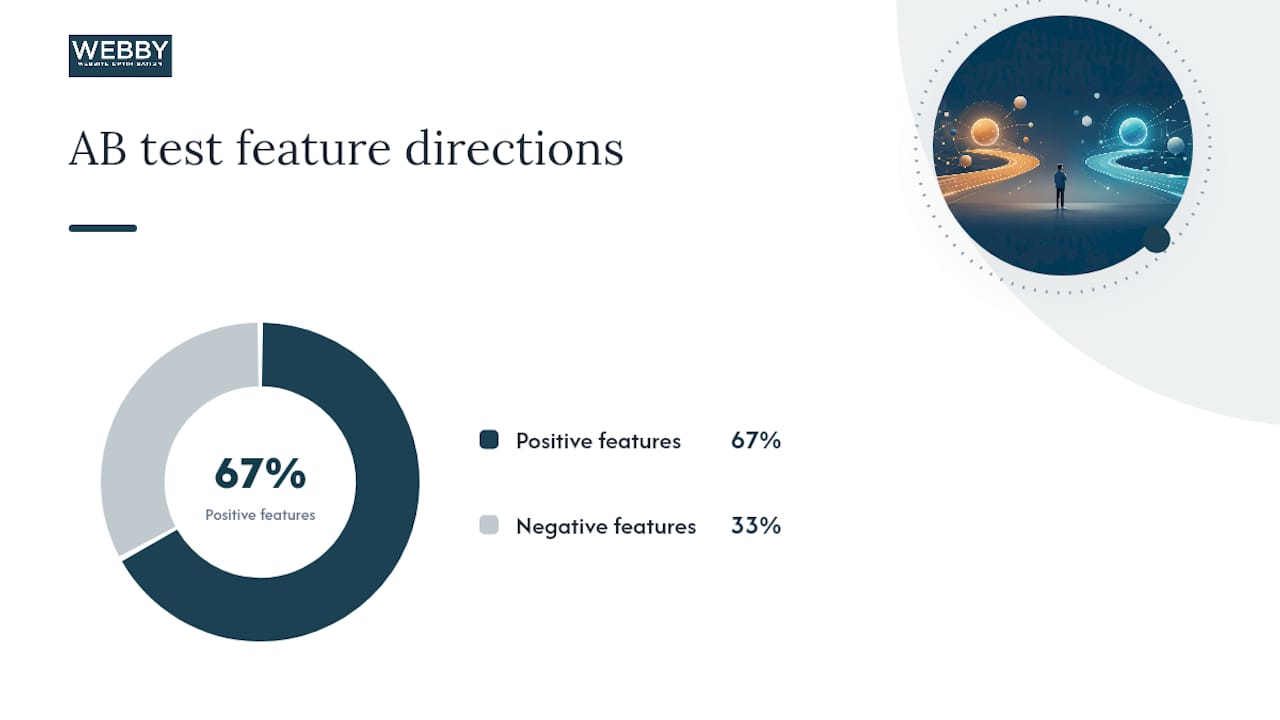
The 423-page AB test
A directional AB test across 423 pages identified patterns that lifted CTR and patterns that hurt it:
| Title Feature | CTR Direction | Notes |
|---|---|---|
| Numerals in title | Positive | Sets concrete expectations |
| Question format | Positive | Matches conversational queries |
| “vs” framing | Positive | Signals comparison content clearly |
| Bracket badges [Guide] | Positive | Reduces uncertainty about content type |
| Brand name first | Negative | Hurts non-branded informational queries |
| Bare terminal year only | Negative | Adds no hook for non-branded queries |
Etsy’s multivariate SEO testing
Etsy’s engineering team ran multivariate experiments across their product pages and found that shorter title tags improved visits, meta descriptions had a statistically significant effect on organic traffic, and H1 changes interacted unpredictably with title changes. The key takeaway from Etsy’s work: changes that look safe in isolation can produce unexpected results when combined. Test before rolling out broadly.
The caveats matter here. Directionality in an AB test is not the same as universal causation. A pattern that lifts CTR for informational queries may do nothing for transactional ones. The Upworthy findings apply to social-media headline behavior, not purely to SERP clicks. Use these studies to generate hypotheses, then validate on your own pages.
Actionable best practices for writing titles that earn more clicks
The rules below are prioritized by impact. Start at the top.
- Front-load the primary keyword. Google bolds query-matching words in SERP titles. A keyword at the front gets bolded early, catches the eye, and confirms relevance before the reader decides whether to read further.
- Stay within 40–60 characters. This keeps the full title visible on most devices without truncation. If the title must be longer, make sure the first 55 characters carry the complete hook.
- Use numerals, not spelled-out numbers. “7 Ways” reads faster and signals specificity more forcefully than “Seven Ways.”
- Add a question format for informational queries. “How Do You Remove Rust From Cast Iron?” matches conversational search behavior and signals the page answers a specific question.
- Use bracket badges for content-type clarity.
[Video],[Checklist],[Template]at the end of a title reduce the reader’s uncertainty about what they’ll find. Industry analyses suggest these badges can materially lift CTR by lowering perceived risk. - Reserve brand-first placement for branded queries. For non-branded informational pages, leading with your brand name pushes the relevant hook further right — where it may be truncated or ignored. Put the brand at the end: “Keyword-Rich Hook | Brand Name.”
- Avoid bare terminal-year endings. “Best Accounting Software 2026” with no other hook is a weak title. “Best Accounting Software for Freelancers in 2026 [Ranked]” gives the reader a reason to click.
- Match the title to search intent. An informational query needs an informational title. A transactional query needs a title that signals the reader can act — “Get a Quote,” “Book Online,” “Compare Prices.”
A fabricated claim in a title is both an ethical problem and a pogo-sticking risk.*
For a practical look at how these rules apply to service pages that convert, the same front-loading and intent-matching principles apply whether you’re writing for a blog post or a local service landing page.
How to test title changes and measure what actually works
Testing titles without a structured workflow produces noise, not signal. Here’s the process that generates reliable data.
- Select your test pages. Use Google Search Console to identify pages with at least 500 impressions over 28 days and a CTR below the average for their position band. These pages have enough traffic to show movement but aren’t already performing well.
- Create treatment and control cohorts. Group pages by template type (informational, comparison, service). Change titles only in the treatment group. Keep the control group unchanged so you have a baseline to compare against.
- Run a 28-day measurement window. Shorter windows are unreliable because ranking fluctuations and seasonality create noise. Etsy’s testing methodology used multi-week windows for exactly this reason.
- Verify body content supports the new title. Before any title goes live, confirm the page body contains the specific claims the title implies. This is the fabrication gate — it prevents misleading titles from going out at scale.
- Monitor and record results. Pull Search Console data at the end of the window and compare treatment vs. control on all key metrics.
Metrics to track:
- Impressions: Did the new title affect how often Google shows the page? (Usually minimal, but worth checking.)
- CTR: The primary metric. Did more people click?
- Average position: Did ranking shift during the test window? A position change can confound CTR results.
- Sessions from organic: Confirms the CTR change translated to actual visits.
- Bounce rate / return-to-SERP rate: A CTR increase paired with a bounce-rate spike is a red flag for pogo-sticking.
Pro Tip: If your site uses Google Analytics 4, set up a custom segment for organic sessions landing on your test pages. Comparing pre/post session duration and engagement rate gives you a pogo-sticking proxy without needing server-log access.
Statistical note: 28 days is a minimum, not a guarantee. If a page gets fewer than 200 clicks per month, the test window may need to extend to 60 days before the CTR difference is meaningful. Avoid running tests during major seasonal events (Black Friday, tax season) unless the page is specifically seasonal.
Step-by-step plan for changing title tags safely at scale
Changing 10 titles is manageable manually. Changing 200 requires a process that prevents errors and protects against ranking damage.
- Audit and prioritize. Export all page titles using Screaming Frog’s title tag crawl and cross-reference with Search Console performance data. Flag pages with duplicate titles, titles over 60 characters, titles under 30 characters, and pages with impressions but below-average CTR.
- Draft title variants by template group. Group pages by type (blog posts, service pages, product pages) and write 2–3 variants per group using the best-practice patterns above. Batch drafting by template is faster and produces more consistent output.
- Run the fabrication gate. For every title that includes a number, percentage, or specific claim, verify the page body contains supporting evidence. This step is non-negotiable at scale — one misleading title is a problem; fifty is a liability.
- Controlled rollout with a canary subset. Before updating all 200 pages, push the new titles to 10–15% of the group (the “canary” subset). Monitor for 7 days. If CTR holds or improves and Google isn’t rewriting the titles at an unusual rate, proceed with the full rollout.
- Monitor and roll back if needed. Track the rewrite rate in Search Console’s “Search Appearance” data. If Google is substituting its own titles on more than 30–40% of updated pages, the new titles may be misaligned with page content or H1 headings. Roll back the affected subset and revise before re-deploying.
Checklist for each title update:
- Title and H1 are thematically aligned (reduces Google rewrites)
- Primary keyword appears in the first 40 characters
- No duplicate titles across the site
- Character count is 40–60 characters
- Any numeric claim is verified against page body content
- SERP rendering checked on both mobile and desktop after indexing
For CMS-level bulk edits, most WordPress SEO plugins (Yoast SEO, Rank Math) support bulk title template editing. Use the template fields to set site-wide patterns, then override individually for high-priority pages.
Common title mistakes that quietly kill your CTR
Most title problems fall into a handful of repeating patterns.
- Brand-first on non-branded pages. Putting your company name at the start of every title wastes the most valuable real estate for non-branded queries. Searchers who don’t know your brand yet have no reason to click a result that leads with an unfamiliar name.
- Keyword stuffing. “Plumber Perth | Perth Plumbing | Emergency Plumber Perth” is not a title. Google will rewrite it, and even if it doesn’t, no human will click it.
- Misleading curiosity gaps. A title like “You Won’t Believe What This Plumber Found” might pull a click, but the resulting pogo-sticking will cost more than the click gained.
- Unsupported numeric claims. “Save 73% on Your Energy Bill” is a specific promise. If the page doesn’t back it up, you’ve created a bad-click machine.
- Boilerplate duplication. Fifty pages all titled “Services | Brand Name” tell Google nothing and give searchers no reason to choose one result over another.
Red-flag metrics that signal a title change is hurting you:
- CTR increases but average session duration drops sharply — classic pogo-sticking pattern.
- Google starts rewriting your title in the SERP within days of an update — the new title is likely misaligned with page content.
- Rankings drop within 2–3 weeks of a title change — behavioral signals may be turning negative.
Before and after: title rewrites that change click behavior
These rewrite pairs illustrate the principles in action. Each change targets a specific CTR mechanism.
| Page Type | Before | After | Why It Works |
|---|---|---|---|
| Informational blog | “Roof Maintenance Tips” | “7 Roof Maintenance Tips That Prevent Costly Leaks” | Numeral adds specificity; consequence adds stakes |
| Comparison page | “CRM Software Options” | “HubSpot vs Salesforce: Which CRM Fits Small Teams?” | “vs” framing signals comparison; question matches intent |
| Service page | "Webby Website Optimisation | SEO Services" | “SEO Services for Local Businesses: Get Found on Google” |
| How-to guide | “How to Write a Business Plan” | “How to Write a Business Plan [Free Template]” | Numeral sets scope; bracket badge reduces uncertainty |
| Local service | “Electrician Perth” | “Licensed Electrician in Perth: Same-Day Bookings Available” | Qualifier adds trust; urgency hook added |
Template bank:
- Numeral-led:
[Number] [Adjective] Ways to [Achieve Outcome] Without [Common Pain] - Question-led:
How Do You [Accomplish Task]? [Short Answer Hook] - Comparison:
[Option A] vs [Option B]: Which [Category] Is Right for [Audience]? - Bracket badge:
[Primary Keyword]: [Benefit or Hook] [Content Type] - Brand-suffix:
[Keyword-Rich Hook] | [Brand Name]
For service pages specifically, the brand-suffix template consistently outperforms brand-first placement on non-branded queries, which is where most new customer traffic originates.
When should you prioritize titles over other SEO fixes?
Title optimization is the highest-leverage fix in one specific scenario: your page already ranks but underperforms on CTR. No amount of new backlinks will fix a title that fails to communicate relevance.
The calculus flips when the page has no impressions at all. Zero impressions means Google isn’t ranking the page for any meaningful query — and that’s a content or keyword-targeting problem, not a title problem. Rewriting the title on a page with no impressions is rearranging furniture in a room nobody enters. Fix the content gap first.
Similarly, if a page has a technical indexing issue — blocked by robots.txt, marked noindex, or caught in a crawl trap — title optimization is irrelevant until the indexing problem is resolved. Screaming Frog’s crawl report will surface these issues quickly.
The sequencing recommendation: resolve indexing issues first, address content gaps second, then optimize titles for pages that rank but underperform. That order maximizes the return on every hour spent.

Brand name placement in titles is one of the most consistently misapplied decisions in SEO. The instinct to lead with the brand name on every page is understandable — it feels like brand building. But for a local service business whose brand is not yet a recognized search term, brand-first titles on informational pages actively suppress CTR. The role of brand recognition in click behavior is real, but it only kicks in when the searcher already knows the brand. For everyone else, the keyword hook is what earns the click.
Webby Website Optimisation can audit and test your title tags
Fixing titles at scale without a structured process is where most site owners lose time and rankings. Webby Website Optimisation runs title and metadata audits for local service businesses, identifying the exact pages where a title rewrite will move the needle — and the ones where it won’t.

The service covers the full workflow: crawl-based title audits using Screaming Frog, Search Console CTR analysis to prioritize high-opportunity pages, drafting and verifying title variants against page content, controlled rollout with monitoring, and rollback support if results move in the wrong direction. For businesses that want faster results, the website built in a day option includes metadata setup from the start. For a full-service approach to website design and SEO, Webby handles title strategy as part of a broader on-page optimization engagement. Book a free audit to see which of your pages are leaving clicks behind.
Sources
These are the sources cited throughout this guide, organized by what each one offers:
- Influencing your title links in search results
- Optimizing meta descriptions, H1s and title tags: lessons from multivariate SEO testing at Etsy
- Title Tag – Moz Learn SEO
- Title Tag Optimization for Higher Organic CTR
Recommended
- Examples of Optimized Service Pages That Actually Convert
- The Role of Service Page Structure in Getting Leads
If this post raised some questions feel free to ask me a question