
Reply publicly within 24–48 hours using this formula: apology + specific acknowledgment + concrete fix offer + invitation to take it offline. That single structure, applied consistently, is how small businesses turn a one-star thread into a trust signal for every future customer who reads it.
Here is a template you can copy right now:
Two quick variants for different situations:
- One-star reply (short): “Hi [Name], we sincerely apologize for [issue]. Please call us at [phone] so we can fix this immediately.”
- Two-star reply (fuller): “Hi [Name], thank you for the honest feedback. We’re sorry your [service/product] experience didn’t meet expectations. Our team would like to understand exactly what happened and make it right — please email us at [email] at your convenience.”
Key Takeaways
Responding to negative Google reviews within 24–48 hours using a short apology, specific acknowledgment, and a private follow-up invitation is the single most effective reputation recovery action a small business owner can take.
| Point | Details |
|---|---|
| Reply within 24–48 hours | Speed signals attention; delayed replies let negative sentiment compound with no counter-narrative. |
| Use the four-part formula | Apology + specific acknowledgment + fix offer + offline invitation covers every legitimate complaint. |
| One-third update their rating | Roughly one-third of resolved one-star reviewers raise their rating after a proper private follow-up. |
| Verify before you flag | Only flag reviews that clearly violate Google’s policy categories; legitimate complaints need a reply, not a removal request. |
| Track velocity and conversion | Monitor new review rate, average rating, and listing clicks monthly to measure the real business impact. |
Table of Contents
- Why responding to negative Google reviews is worth your time
- What to do before you type a single word
- How to post your reply on Google step by step
- The four tone principles that keep every reply professional
- Copy-ready templates by star rating and industry
- When a Google review violates policy and how to flag it
- How to convert a resolved complaint into a retained customer
- Legal and privacy cautions for U.S. businesses
- Which metrics tell you if your responses are actually working
- The part most guides get wrong about negative reviews
- Is your Google Business Profile ready to handle this?
- Sources
Why responding to negative Google reviews is worth your time
A negative review left unanswered tells every future visitor one thing: you don’t care. A calm, professional reply tells them the opposite, and that audience is often larger than the original reviewer.
Research cited by Reviewz points to a study by Proserpio and Zervas showing that businesses actively responding to reviews saw an average rating increase of a small but meaningful fraction of a star and a noticeable uplift in positive reviews over time. Those numbers sound modest, but in a local market where your Google rating sits between 4.1 and 4.3 versus a competitor at 4.5, a fraction of a star matters.
“A simple public reply that acknowledges the issue and moves the conversation offline helps recover a meaningful share of lost conversions and can improve perceived trust with future visitors.” — Search Engine Land
The SEO angle is real too. Google Business Profile engagement, including replies, is a local ranking signal. Review velocity and response rates factor into how prominently your listing appears in local search results and Maps. Partner research from babylovegrowth.ai links active review management directly to measurable revenue uplift for small and medium businesses.
The business case is straightforward: a resolved complaint has a real conversion rate. According to GoodMarks’ operator field guide, roughly one-third of resolved one-star reviewers later update their rating to four or five stars. That is not a rounding error. That is a meaningful recovery rate from what most owners treat as a lost cause.

What to do before you type a single word
Replying in the first 20 minutes, while you’re still frustrated, is how professional responses turn into public arguments. Pause first.
- Pull the records. Match the reviewer’s name and date to an order, appointment, or visit log. If you can’t find a match, note that — it matters for your response and for any flagging decision.
- Talk to the staff involved. Get their account before you commit to any public statement. You may learn the complaint is valid, partially valid, or completely fabricated.
- Verify authenticity. Signs of a fake review include: no prior review history, a generic profile photo, a username that doesn’t match any record, and timing that coincides with a competitor’s activity. Review-bombing often shows as multiple one-star reviews posted within hours of each other.
- Choose your track. Three options: (a) reply publicly and follow up privately, (b) flag the review for policy violation, or © ignore it if it’s clearly spam with no engagement value. Most legitimate complaints belong in track (a).
Shopify’s guide on handling negative reviews and Search Engine Land both recommend this triage step before drafting any response. Speed matters, but accuracy matters more than speed.
How to post your reply on Google step by step
You cannot reply to a Google review without a verified Google Business Profile. If your profile isn’t verified, Google won’t show the reply option at all. Check your verification status at business.google.com — a verified profile shows a checkmark next to the business name.
Once verified, here are the steps:
- Sign in to your Google Business Profile at business.google.com.
- Click “Reviews” in the left menu.
- Find the review you want to address and click “Reply.”
- Type or paste your response in the text box.
- Click “Post reply.” Google reviews your reply for policy compliance before it goes live — this usually takes around 10 minutes but can occasionally take longer.
“Replies are publicly posted under the review and reviewed by Google for policy compliance before appearing.” — Google Business Profile Help
Practical tips for the UI:
- Keep replies under 150 words. Most people read these on mobile, and a wall of text gets skipped.
- Include your first name and role in the sign-off (“— Sarah, Owner”). It adds accountability.
- Never include a personal email address in a public reply. Use a business contact address or a phone number only.
If your profile isn’t set up yet, the Webby Website Optimisation guide to Google Business Profile setup walks through the full verification process.
The four tone principles that keep every reply professional
Every reply you post is read by far more people than just the original reviewer. The person who matters most is the undecided prospect reading the thread three weeks later.
The four pillars:
- Empathy: Acknowledge the experience before you explain anything. “I understand how frustrating that must have been” lands better than “We’re sorry but…”
- Accountability: Own what went wrong, even partially. Deflecting blame publicly reads as defensive.
- Brevity: Say what needs to be said in 60–120 words. Longer replies often signal you’re arguing.
- Action: Always close with a private next step. A public reply that ends without an invitation to resolve privately leaves the thread open-ended.
“Acknowledge the issue and move the conversation offline. That combination recovers lost conversions and builds trust with future readers.” — Search Engine Land
What to avoid:
- Arguing facts publicly, even when you’re right
- Naming or quoting the customer’s complaint back in detail (especially in healthcare)
- Promising to remove the review in exchange for compensation — that violates Google’s policies
- Signing off as “Management” with no name. It reads as corporate deflection.
Pro Tip: Sign with your first name and role when the complaint is serious. “The Team” works for minor feedback, but a one-star review deserves a named human response. It signals ownership.
The L.A.S.T. framework (Listen, Apologize, Solve, Thank) from Reviewz maps directly onto these pillars and gives you a reliable mental checklist before you hit post.
Copy-ready templates by star rating and industry
One-star reviews
Short (under 60 words):
Fuller (80–120 words):
Two-star reviews
Three-star reviews
Industry-specific phrasing
Restaurant: “We’re sorry your reservation experience on [date] didn’t reflect the meal we aim to deliver. Please contact our manager at [email] so we can make your next visit right.”
Retail: “We’re sorry your order arrived with [issue]. Please contact us at [email] with your order number and we’ll arrange a replacement or refund immediately.”
Professional services: “We’re sorry your appointment on [date] didn’t go as expected. Please call us at [phone] so we can review what happened and find a resolution.”
Healthcare (privacy-safe): “Thank you for sharing your experience. We take all patient feedback seriously and want to address your concerns properly. Please contact our office directly at [phone] so we can speak with you in confidence.”
Pro Tip: Once you’ve resolved the issue privately, follow up with: “We’re glad we could work this out. If you feel your experience has changed, we’d genuinely appreciate an updated review — but only if it reflects how you feel now.” Never offer incentives for a review update.
After resolution, building a stronger review pipeline is the most durable way to dilute the impact of occasional negative feedback.
When a Google review violates policy and how to flag it
Not every negative review deserves a reply. Some deserve a removal request.
Google’s policy categories that support flagging include:
- Spam or fake content: Paid reviews, bot-generated content, or reviews from someone who never visited
- Conflict of interest: Reviews from current or former employees, or from a competitor
- Off-topic content: Reviews that describe a different business or location
- Harassment or hate speech: Personally threatening or discriminatory language
- Personal information: Reviews that include someone’s private contact details or sensitive data
Steps to flag a review:
- Go to your Google Business Profile and open the Reviews tab.
- Find the review and click the three-dot menu next to it.
- Select “Flag as inappropriate.”
- Choose the policy category that applies.
- Submit. Google will review the request — this can take several days.
For stronger cases, document your evidence: screenshots, date discrepancies, records showing the reviewer was never a customer. If Google denies the removal and the review contains genuinely false statements of fact, consult a U.S.-based attorney about your options.
When not to flag: A review that is negative but accurate doesn’t qualify for removal. Flagging a legitimate complaint wastes your time and can look retaliatory if the reviewer notices. A calm, professional public reply is the better move.
How to convert a resolved complaint into a retained customer
The public reply is step one. The private follow-up is where the actual recovery happens.
Call or email within 24 hours of posting your public reply. Keep it short:
One follow-up only. If the customer doesn’t respond or declines to update the review, respect that. Don’t send a second nudge.
If they still won’t update the review after a genuine resolution, post a brief public note on the original thread: “We’re glad we had the chance to connect and address this. We remain committed to [specific improvement].” This signals to future readers that the issue was resolved, without naming the customer or disclosing private details.
GoodMarks’ field guide reports that roughly one-third of resolved one-star reviewers do update their rating when the follow-up is handled well. That conversion rate makes the follow-up call worth every minute.
Legal and privacy cautions for U.S. businesses
This section is general information, not legal advice. For specific situations involving threats, extortion, or alleged illegal conduct, consult a licensed U.S. attorney.
Never disclose patient or customer personal data in a public reply. For healthcare businesses, this means no confirmation of whether someone is a patient, no reference to their condition, treatment, or visit details. HIPAA applies to your public responses just as it does to your records. The privacy-safe template in the section above is the correct model.
Avoid admissions of fault that could be construed as legal liability. “We’re sorry you had that experience” is safe. “We’re sorry our staff failed to follow safety protocols” is a potential liability statement. Apologize for the experience; don’t narrate the failure in legal terms.
Pro Tip: If a reviewer threatens legal action, stop the public conversation immediately. Reply once: “We take this seriously and will be in touch directly.” Then hand it to your attorney.
When to call a lawyer: the review alleges illegal conduct by your business, the reviewer is demanding payment to remove it (extortion), or the content is clearly defamatory (a false statement of fact presented as true).
Which metrics tell you if your responses are actually working
Tracking the impact of your review responses doesn’t require expensive software. Start with what’s already available.
- Review velocity: How many new reviews per month? A rising rate after active response work is a positive signal.
- Average star rating: Check monthly. Even a 0.1-point improvement over 90 days reflects real progress.
- Listing conversion rate: In Google Business Profile Insights, track calls, direction requests, and website clicks from your listing. These often improve as your rating and response rate rise.
- Click-through rate from search: Monitor in Google Search Console. A higher rating displayed in rich results can lift CTR.
- Review updates: Track how many resolved complaints result in an updated rating. This is your private follow-up conversion rate.
Set a weekly check for new reviews using Google Alerts (search your business name) or the notification settings inside Google Business Profile. Monthly, review your average rating and listing conversion metrics. For deeper reputation tracking, platforms like ReviewTrackers and Customer Alliance aggregate reviews across Google, Yelp, and other platforms into a single dashboard, which is useful once you’re managing volume across multiple locations.
Reputational SEO connects review signals directly to local search performance. Businesses that maintain a consistent reply rate and positive review velocity tend to hold stronger positions in the local pack over time.
For broader small business SEO strategies that complement your review management, Webby Website Optimisation’s resource library covers the full local visibility picture.
The part most guides get wrong about negative reviews
Most advice on this topic focuses on damage control. That framing misses the bigger opportunity.
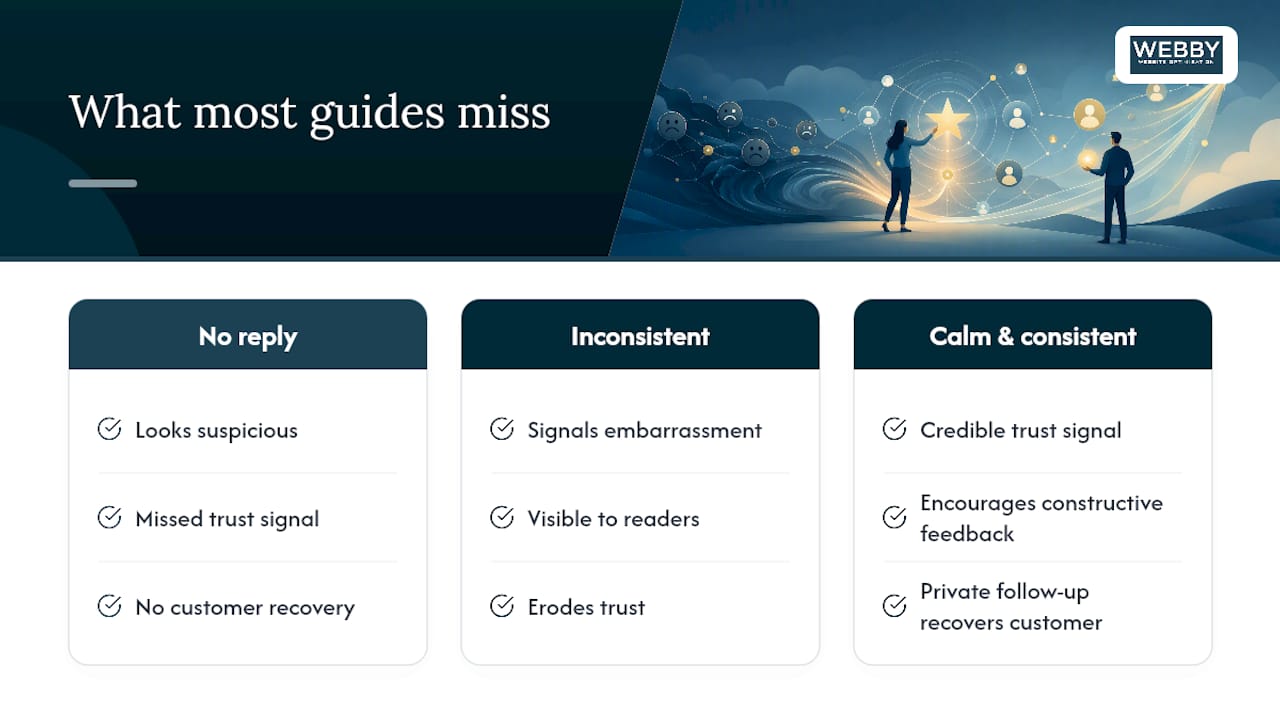
A negative review, handled well and publicly, is one of the most credible trust signals a small business can display. Prospects don’t expect perfection. They expect accountability. A business with 47 five-star reviews and zero responses to the three one-star reviews looks suspicious. A business with 40 five-star reviews, three one-star reviews, and three calm, professional replies looks like a real operation run by real people.
The mistake most owners make isn’t replying badly. It’s replying inconsistently. They respond when they’re proud of the outcome and go silent when they’re embarrassed by it. That pattern is visible to anyone scrolling the review thread, and it signals exactly the wrong thing.
The second mistake is treating the public reply as the finish line. The public reply is a signal to future readers. The private follow-up is where you actually recover the customer. Both matter, and neither replaces the other.
One more thing the guides understate: your response tone affects how the next reviewer writes their complaint. When customers see that a business engages calmly and constructively, they tend to frame their own feedback more constructively. The culture of your review thread is partly your creation.
Is your Google Business Profile ready to handle this?
If you’re spending time crafting the right review responses but your Google Business Profile isn’t verified, optimized, or even fully set up, you’re building on an unstable foundation. The reply process only works when the profile behind it is solid.

Webby Website Optimisation works with local service businesses to get their Google presence right from the ground up: verified profiles, optimized listings, and a review management process that feeds into broader local SEO. If your website and digital presence need the same attention as your review strategy, that’s exactly what the team is built for.
Sources
The following resources support the guidance in this guide and are worth bookmarking for ongoing reference:
- Manage customer reviews – Google Business Profile Help
- How to respond to negative reviews: the L.A.S.T. framework + 7 real examples · Reviewz
- How to respond to bad Google reviews, the operator’s field guide | GoodMarks
- How to handle negative Google reviews & protect your brand
- Negative Reviews: How To Handle Negative Product Reviews (2026) – Shopify