
Getting a professional business website used to mean choosing between paying an agency thousands of dollars or spending weeks wrestling with complicated code. In 2026, that is no longer the case. The options to build affordable business website 2026 projects are genuinely good, and small business owners who know where to look can launch something fast, professional, and effective without blowing the budget. This guide walks you through how to assess your needs, pick the right platform, execute the build, and keep things running without ongoing costs spiraling out of control.
Table of Contents
- Key Takeaways
- Defining your website needs and budget first
- Comparing affordable website building options in 2026
- Step-by-step process to build your site
- Maintaining and optimizing your site affordably after launch
- My honest take on affordable website building
- How Webby can help you get this right
- FAQ
Key Takeaways
| Point | Details |
|---|---|
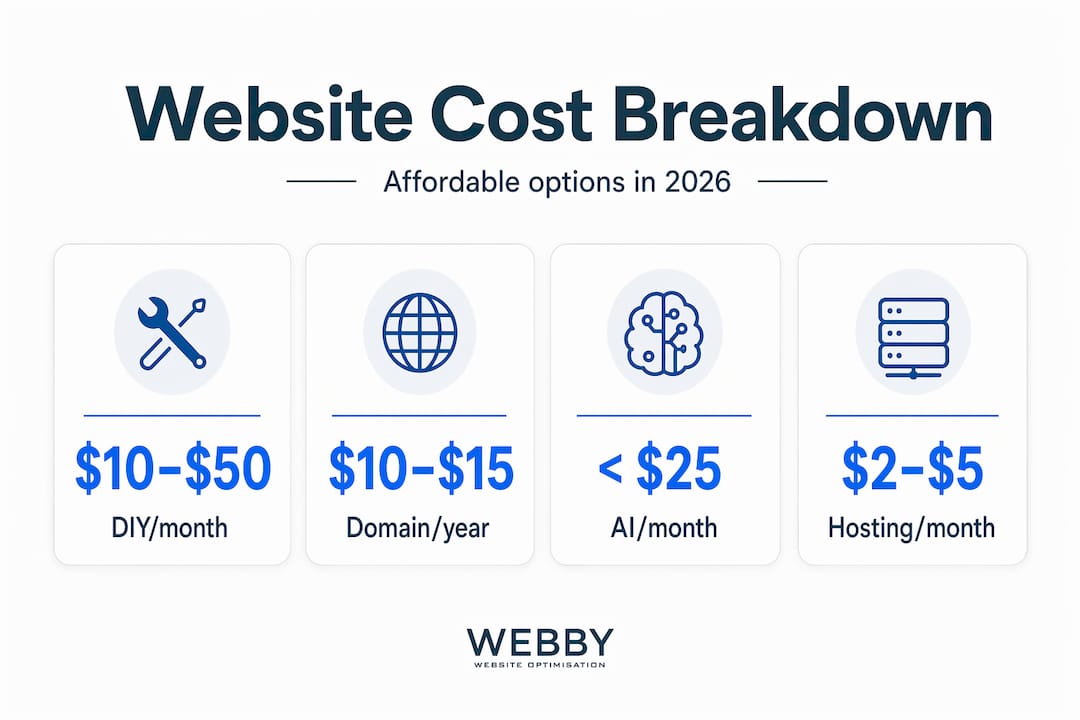
| Know your budget upfront | DIY builders cost $10–$50/month; AI-powered options keep total costs under $25/month. |
| Start free, upgrade later | Begin with free tiers to reduce risk and only pay when your site needs to scale. |
| Mobile-first beats fancy design | Fast, mobile-optimized sites convert better than visually complex ones that load slowly. |
| Content takes the most time | AI speeds up design fast, but writing quality copy is where most of your time will go. |
| Watch long-term costs | Low introductory pricing often hides multi-year commitments and steep renewal rates. |
Defining your website needs and budget first
Before you touch a single platform or compare any pricing page, you need to get clear on what your website actually needs to do. A one-page site for a local plumber has completely different requirements from a ten-page portfolio for a graphic design studio or a store selling products online. Confusing these from the start is how small business owners waste money on features they do not need.
The three main categories worth thinking about are:
- Brochure sites for service businesses: 3–6 pages covering who you are, what you do, where you operate, and how to contact you. These are the most affordable to build and maintain.
- Portfolio or content sites: Need more pages, a blog section, and image galleries. Slightly more complexity but still very manageable on a budget.
- Ecommerce sites: Product pages, payment processing, inventory management. These add cost and complexity at every level.
Once you know what category you are in, setting a realistic budget gets much easier. DIY monthly costs run $10–$50, AI-powered builders with a domain keep you under $25 per month, and professional agencies typically charge $2,000 to $15,000 or more for a full build. The middle ground, using a good DIY builder or an AI-powered platform with some of your own time invested, is where the real value is for most small and medium businesses.
Do not forget to factor in domain registration, which runs roughly $10–$15 per year, and hosting, which you can find for as little as $5 per month if you shop carefully.
Pro Tip: Plan your website architecture before you build. Knowing what pages you need and how they link together saves you hours of rework later and makes your site more usable from day one.
A critical thing most guides skip over: monthly pricing shown on builder websites is almost always based on annual billing. You will often pay upfront for a full year. For cost-effective business web design, budget based on total 12-month spend, not the headline monthly number.
Comparing affordable website building options in 2026
The market for affordable website solutions 2026 has matured significantly. Here is an honest look at what is actually available.
| Platform Type | Monthly Cost | Ease of Use | SEO Tools | Ecommerce |
|---|---|---|---|---|
| Wix (DIY builder) | $17–$35 | Very easy | Built-in basics | Yes (higher tier) |
| Squarespace (DIY builder) | $16–$49 | Easy | Built-in basics | Yes (all tiers) |
| Hostinger (AI-powered) | $2.99–$9.99 | Very easy | Integrated AI SEO | Yes (Business plan) |
| SiteForge (AI WordPress) | Free preview, pay to publish | Moderate | WordPress SEO | Via plugins |
| WordPress + hosting | $5–$15 | Moderate | Plugin-dependent | Via WooCommerce |
Hostinger stands out in this group for small business owners who want everything in one place. Hostinger’s AI-powered plans include hosting, SEO tools, and ecommerce under a single subscription, which eliminates the headache of managing separate services. The trade-off is that you are locked into their ecosystem.
SiteForge takes a different approach. It lets you design and preview a full site before entering any payment details, which means you can test whether the platform actually works for you before spending a cent. For risk-averse business owners, that is a genuinely useful feature.
WordPress with a separate hosting provider gives you the most long-term flexibility and the deepest SEO capabilities, but it requires more setup time. Platforms like Wix and Squarespace are better easy website builder options if you want to publish quickly.
A few things to watch for with any of these:
- Renewal pricing: The advertised rate is often a first-year promotional price. Long-term commitment pricing tells the real story.
- Storage and bandwidth limits: Brochure sites rarely hit these, but ecommerce sites can run into them fast.
- Export restrictions: Some platforms make it difficult or impossible to move your site later. Check this before committing.
The best affordable website builders in 2026 are the ones that match your technical comfort level, your feature needs, and your realistic total budget over two to three years, not just the first month.
Step-by-step process to build your site
Here is a practical workflow for building a budget-friendly site in 2026, whether you go full DIY or use AI assistance.
-
Register your domain. Use a registrar like Namecheap or Google Domains. Keep the domain name short, memorable, and tied to your business name or location. Avoid hyphens in domain names (they reduce trust and are hard to say aloud).
-
Choose your platform and hosting. Based on the comparison above, pick the option that fits your category. If you are a service business launching a brochure site, Hostinger or Wix gives you the fastest path to live with minimal cost.
-
Gather your content before you design. This is where most people lose time. AI tools speed up the design side, but writing your service descriptions, about page, and calls to action still takes real effort. Draft all your copy in a Google Doc before you open the builder.
-
Use AI tools or templates to set up your layout. Most modern builders will ask you a few questions about your business type and generate a starting layout. Accept the structure, but replace every piece of placeholder text and every generic stock photo immediately.
-
Optimize for mobile and speed. Mobile-first design directly affects conversions. Check your site on a phone before you publish. Large images, autoplay videos, and excessive animations kill load speed and drive visitors away.
-
Set up basic on-page SEO. Add a unique page title and meta description to every page. Use your main keywords naturally in headings and the first paragraph of each page. Connect Google Search Console so you can monitor performance from day one.
-
Test everything before going live. Click every link, submit your contact form, test your checkout if you have one, and view the site on at least two different devices.
-
Publish and ask for early feedback. Share the live URL with a few customers or colleagues. Real users catch things you miss after staring at a page for hours.
Pro Tip: Start with free tools and only upgrade to paid features when you hit a specific limit that is costing you business. This keeps your launch lean and your options open.
Maintaining and optimizing your site affordably after launch
A lot of small business owners build their site, publish it, and then ignore it for two years. That is a mistake. A neglected site loses search rankings, builds broken links, and stops converting visitors. The good news is that ongoing maintenance does not have to cost much.
Here are the most impactful things you can do post-launch without spending extra money:
- Run a DIY SEO audit every quarter. A DIY website SEO audit takes about an hour and can catch technical issues like broken links, missing meta tags, or slow-loading pages before they quietly drain your traffic.
- Update your content regularly. Google favors sites that show signs of life. Even small updates like adding a new FAQ, updating a service description, or publishing a short blog post signal that your site is active.
- Monitor uptime with a free tool. Services like UptimeRobot send you an email if your site goes down. A site that is offline during business hours is losing you real customers.
- Use free analytics. Google Analytics 4 is free and tells you which pages people visit, how long they stay, and where they drop off. Use that data to make small improvements over time.
- Review your hosting plan annually. As your traffic grows, the cheapest hosting tier may start to limit your speed. Upgrading one tier usually costs an extra few dollars per month and can make a measurable difference in performance.
The 2026 website design trends worth watching for maintenance purposes are speed optimization and structured data markup, both of which are free to implement and improve how search engines read your content.
My honest take on affordable website building

I have seen hundreds of small business websites get built the wrong way. Owners spend weeks picking between template color schemes and font combinations, then launch a site with vague copy, no clear call to action, and contact details buried in a footer. The design is polished. The site does nothing.
In my experience, the single biggest factor in whether an affordable website actually generates leads is the quality of the writing, not the visual design. A plain site with a clear headline, a specific description of who you help and how, and a phone number at the top of every page will out-convert an expensive-looking site with generic taglines every time.
What I have also seen repeatedly is business owners get stung by what looks like a $5 per month platform. The real number, once you calculate renewals, add-on features, transaction fees, and the cost of eventually migrating to a better platform, can be far higher. Total cost of ownership over two to four years is the number that actually matters.
My advice: spend 80% of your website time on content and conversion. Make it easy for visitors to understand what you do, trust that you are credible, and contact you. The design choices that affect trust are simpler than most people think. Clean layout, real photos, clear contact information, and fast load time cover most of it.
AI-powered tools have made the design and code side of websites nearly trivial. They are genuinely good in 2026. But they cannot write your story, articulate your difference, or explain why a customer should call you instead of a competitor. That part still requires you.
— Steve Doig
How Webby can help you get this right
Building your own site is absolutely achievable, and this guide gives you everything you need to start. But if you want a site that does not just exist online but actually ranks on Google and converts visitors into customers, that requires more than a good builder and a template. Webby Website Optimisation works with small and medium service businesses across Perth, Fremantle, and Melville to create websites built to convert from the ground up. From WordPress design to speed optimization to local SEO, the team at Webby Website Optimisation delivers professional results at prices that make sense for growing businesses. Contact us today for a free consultation and see what a targeted approach can do for your online presence.
FAQ
How much does it cost to build a business website in 2026?
DIY website builders cost $10–$50 per month, while AI-powered platforms keep total costs under $25 per month including hosting. Domain registration adds roughly $10–$15 per year.
What is the easiest way to build a cheap website for a small business?
AI-powered builders like Hostinger or SiteForge are the fastest low-cost web development options in 2026. They generate a starter layout from a few prompts, include hosting, and require no coding knowledge.
Should I use a website builder or hire a professional?
For a basic brochure site, a DIY builder is cost-effective and practical. If you need strong local SEO, custom functionality, or a site that actively generates leads, hiring a professional who specializes in small business websites typically delivers a better return over time.
What are the most common hidden costs in website building?
Multi-year commitment pricing is the biggest trap. Platforms advertise low monthly rates that require annual or biennial upfront payments, and renewal prices are often significantly higher after the first term.
How do I make sure my business website shows up on Google?
Connect Google Search Console after launch, write unique page titles and meta descriptions for every page, and run a quarterly SEO audit to catch and fix technical issues before they affect your rankings.
Recommended
- SME Website Design Best Practices That Convert
- How to perform a DIY website SEO audit in 2026
- Why website design affects trust: A local business guide
- What Is Website Architecture: A Practical Guide
If this post raised some questions feel free to ask me a question