

Most business owners assume a website audit is just an SEO check. Run a few keyword reports, fix some broken links, done. That assumption leaves serious money on the table. A website audit is a full diagnostic of your site covering usability, content quality, visual design, security, accessibility, and technical performance. Understanding what is a website audit in its complete form is the difference between patching surface problems and actually fixing what’s costing you traffic, leads, and trust.
Table of Contents
- Key Takeaways
- What is a website audit and what does it cover
- How to conduct a website audit step by step
- Benefits of conducting regular website audits
- Common website audit findings and what they mean
- Maintaining website health with ongoing monitoring
- My take on why audits have become non-negotiable
- How Webby can turn your audit findings into real results
- FAQ
Key Takeaways
| Point | Details |
|---|---|
| Audits go beyond SEO | A full website audit covers seven areas: usability, accessibility, design, content, SEO, information architecture, and security. |
| Structured process matters | Follow a clear sequence of planning, data collection, evaluation, reporting, and action to get results you can act on. |
| Regular cadence prevents decay | Audits every six months prevent the gradual traffic and performance decline that quietly kills your organic visibility. |
| Findings need prioritization | Not every issue carries equal weight. Prioritize fixes by their impact on rankings, conversions, and user experience. |
| Automation reduces workload | AI-powered audit tools can cut manual review time by up to 50% while providing continuous site health monitoring. |
What is a website audit and what does it cover
A website audit is a structured evaluation of every factor that affects how your site performs for users and search engines. Think of it like a property inspection before a sale. You’re not just checking if the lights turn on. You’re checking the foundation, the plumbing, the roof, and the wiring.

According to research, a thorough website audit includes seven core aspects that each contribute critically to overall site performance. Here’s what each one actually examines:
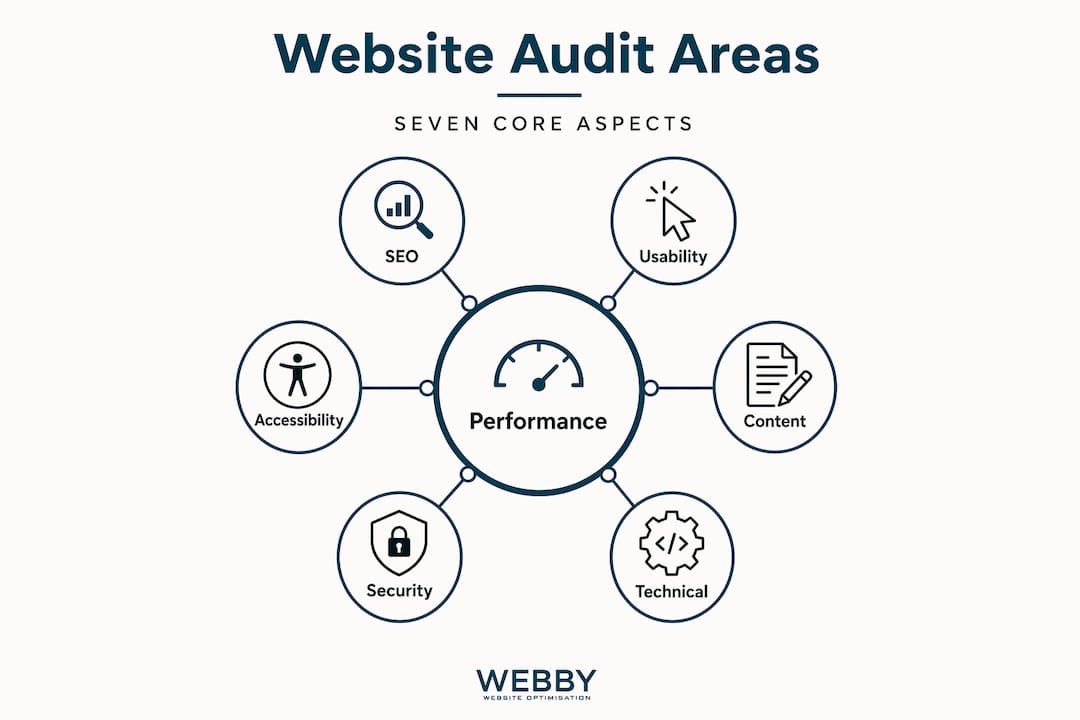
| Audit Type | What it examines | Why it matters |
|---|---|---|
| Usability | Navigation, layout clarity, call-to-action placement | Affects how quickly visitors find what they need |
| Accessibility | Screen reader compatibility, contrast ratios, keyboard navigation | Expands your audience and protects legal compliance |
| Information architecture | Site structure, menu logic, internal linking | Determines how easily users and Google can move through your site |
| Visual design | Branding consistency, mobile responsiveness, whitespace | Shapes first impressions and perceived credibility |
| Content quality | Accuracy, relevance, readability, keyword alignment | Drives both search rankings and visitor engagement |
| SEO performance | Meta tags, page speed, backlink profile, indexing status | Determines how well Google can find and rank your pages |
| Data privacy and security | SSL, GDPR compliance, secure forms, outdated plugins | Builds trust and protects your business legally |
Pro Tip: SEO audits address roughly 40% of website potential; combining SEO with technical, content, and UX audits is what captures the full opportunity.
The common misconception is that fixing meta descriptions and title tags constitutes a real audit. It doesn’t. A plumber wouldn’t diagnose a flooding house by only checking the taps.
How to conduct a website audit step by step
A structured website audit process removes guesswork and produces results you can actually prioritize and act on. Here’s how a proper audit runs from start to finish.
- Define your goals. Before touching any tool, clarify what you’re auditing for. Is conversion rate the issue? Are rankings slipping? Are users bouncing quickly? Your goal determines where you focus first.
- Crawl your site. Use a tool like Screaming Frog, Semrush, or Ahrefs to crawl every URL on your site and flag technical errors, broken links, redirect chains, and missing metadata.
- Review Google Search Console. The Index Coverage Report categorizes URLs into errors, valid pages, pages with warnings, and excluded pages. Each category tells you something specific about crawlability and quality.
- Analyze site speed and Core Web Vitals. Use Google PageSpeed Insights or GTmetrix. Slow pages hurt both rankings and conversions.
- Evaluate content quality. Check every key page for thin content, outdated information, keyword misalignment, and poor readability.
- Assess UX and mobile experience. Walk through your site on a phone as if you’re a first-time visitor. Note friction points in navigation, forms, and checkout.
- Check security and compliance. Confirm SSL is active, forms are secure, and your privacy policy reflects current data handling practices.
- Compile findings and prioritize. Group issues by severity and business impact. Not everything needs fixing immediately.
- Build an action plan. Assign owners, deadlines, and success metrics to each fix.
Pro Tip: When prioritizing, use a simple matrix. High impact and low effort go first. High impact and high effort get scheduled. Low impact and low effort get batched. Low impact and high effort get dropped or deferred.
Your website audit checklist for what to include should cover at minimum: all page-level technical errors, indexing status, load time on mobile, internal link structure, duplicate content, image alt text, and security certificates. For a practical walkthrough you can follow yourself, the DIY SEO audit guide from Webby Website Optimisation walks through the process in detail.
Running audits on a regular schedule is where the real gains compound. Experts recommend comprehensive audits at least twice yearly, with quarterly checks for sites that update frequently.
Benefits of conducting regular website audits
The importance of website audits becomes obvious when you see what neglect costs. A site that hasn’t been audited in 12 months is almost certainly losing ground to competitors who are actively maintaining theirs.
“Addressing audit-identified issues leads to better rankings, engagement, and trust.” — Website audit performance research
The benefits of website audits stretch well beyond SEO rankings. Here’s what regular audits actually deliver:
- Organic traffic protection. Technical issues accumulate and can cause an average 12% quarterly traffic decline if left unaddressed. Audits catch these issues before they compound.
- Higher conversion rates. Fixing UX friction points, slow load times, and confusing navigation directly increases the percentage of visitors who take action.
- Stronger security posture. Outdated plugins, expired SSL certificates, and insecure forms expose your business to breaches and liability.
- Compliance confidence. Regular audits keep your site aligned with accessibility standards and data privacy regulations, reducing legal risk.
- Better brand trust. A site that loads fast, looks consistent, and behaves predictably signals professionalism. Research on how website design affects trust shows that visual credibility directly influences buying decisions.
From a return on investment perspective, fixing a page-speed issue that reduces bounce rate by 15% costs far less than the leads you lose while the problem sits unfixed.
Common website audit findings and what they mean
Most audits surface a predictable set of issues. Knowing what to expect helps you interpret an audit report with confidence rather than confusion.
Typical common audit findings include broken links, slow site speed, poor mobile usability, duplicate content, indexing errors, and missing security protocols. Each one carries a specific downstream consequence:
- Broken links erode user trust and dilute your internal link equity, which signals poor site maintenance to Google.
- Slow load times on mobile are a conversion killer. A one-second delay in page load can drop conversions by up to 7% on some platforms.
- Duplicate content confuses Google about which page to rank, often causing both versions to underperform.
- Indexing errors mean Google either can’t access your pages or has chosen not to index them. Managing crawl budget is essential for ensuring important pages get indexed and ranked, especially on larger sites.
- Weak security protocols show up as mixed content warnings, expired certificates, or vulnerable plugins that leave your site open to attack.
- Poor mobile experience is particularly damaging because Google uses mobile-first indexing. What mobile users experience is what Google evaluates.
It’s worth distinguishing a website audit from a pure SEO audit here. An SEO audit focuses on rankings and organic traffic signals. A website audit covers all of that, plus the user experience, design, content strategy, accessibility, and legal compliance layers. They overlap, but a website audit is the more complete picture.
When you receive an audit report from a professional, ask these questions: Which issues are affecting my rankings right now? Which issues are causing visitors to leave without converting? What should we fix in the next 30 days versus the next quarter?
Maintaining website health with ongoing monitoring
A one-time audit is a starting point, not a strategy. The websites that consistently outperform their competitors treat auditing as an ongoing practice, not a once-a-year panic check.
Here’s how to build a sustainable audit and monitoring workflow:
- Set a quarterly review schedule for technical checks and a bi-annual deep audit covering content, UX, and design.
- Connect Google Search Console and Google Analytics to a live dashboard so you’re alerted to traffic drops, crawl errors, and Core Web Vitals regressions as they happen.
- Automate technical monitoring using tools that check for broken links, uptime, and page speed on a weekly basis.
- Tie audit findings to business KPIs. If a page speed fix improves load time by two seconds, track what happens to bounce rate and conversion rate on that page in the following month.
- Log all changes with dates. When you fix something from an audit, document it. This creates an audit trail that helps you understand which fixes drove which improvements.
Pro Tip: Combine your audit findings with heatmap data and user session recordings. Numbers tell you what’s happening. Recordings tell you why. Together, they make your prioritization far more accurate.
Automated audit tools reduce manual effort significantly and provide the continuous monitoring that catches issues before they affect rankings. For smaller businesses without a dedicated marketing team, this kind of automation makes regular website health management genuinely practical.
For more structured guidance on what to review and when, the audit checklist resource from Babylovegrowth covers the critical steps with clear action items for each stage.
My take on why audits have become non-negotiable
I’ve reviewed hundreds of small business websites over the years, and the pattern I see repeatedly is the same: a business owner invests in a new website, launches it proudly, and then essentially never looks under the hood again. Three years later, they’re wondering why their traffic has stalled and their competitors are showing up above them on Google.
What I’ve learned is that a website is not a finished product. It’s a living business asset that degrades without attention. The businesses I’ve seen transform their online results all had one thing in common. They started treating their website like they treat their finances: with regular review, clear benchmarks, and deliberate action when the numbers moved in the wrong direction.
The aspect most people overlook is how interconnected the audit categories are. A slow site isn’t just a speed problem. It’s a conversion problem, a mobile experience problem, and a search ranking problem simultaneously. When you fix it, you’re not solving one issue. You’re improving outcomes across the board.
My honest advice: stop waiting until something is visibly broken. Schedule your first audit now, build a remediation plan, and check in quarterly. Your website is either working for your business or quietly costing it. An audit tells you which one.
— Steve Doig
How Webby can turn your audit findings into real results

At Webby Website Optimisation, we work with service businesses across Perth, Fremantle, and Melville to assess exactly where their websites are underperforming and fix it with precision. Our website audit and SEO services cover every layer of the audit framework covered in this article, from technical indexing issues to content gaps to conversion-blocking UX problems.
We don’t hand you a 60-page report and wish you luck. We translate findings into a prioritized action plan and execute it alongside you. Whether your site needs a full redesign or targeted improvements to existing pages, the SME design practices we apply are grounded in what actually converts visitors into customers. Get in touch with the Webby team for a free initial assessment and find out exactly where your site stands.
FAQ
What is a website audit in simple terms?
A website audit is a thorough evaluation of your site’s technical health, content quality, SEO performance, usability, security, and design to identify what’s hurting your online performance and what to fix first.
How often should you conduct a website audit?
Most sites benefit from a comprehensive audit at least twice a year, with quarterly technical checks for sites that publish content frequently or run active marketing campaigns.
What tools are used in a website audit?
Common tools include Google Search Console, Screaming Frog, Google PageSpeed Insights, Semrush, and Ahrefs. Automated platforms can reduce manual audit time by up to 50% while providing continuous monitoring.
What is the difference between a website audit and an SEO audit?
An SEO audit focuses specifically on rankings and organic search signals. A website audit covers SEO plus usability, accessibility, content strategy, visual design, security, and compliance, making it a far broader evaluation.
What are the most common issues found in a website audit?
The most frequent findings include broken links, slow page load times, poor mobile usability, duplicate content, indexing errors, and missing or expired security certificates, all of which directly affect search rankings and conversions.
Recommended
- How to perform a DIY website SEO audit in 2026
- SME Website Design Best Practices That Convert
- Why website design affects trust: A local business guide
- What Is an SEO Campaign? A Guide for Marketers
If this post raised some questions feel free to ask me a question