

The most popular advice on cheap hosting in australia is also the most expensive advice in the long run: buy the lowest monthly price and worry about the rest later.
That works right up until your site matters.
A brochure site that never changes can limp along on a bargain plan for a while. A WordPress site that collects leads, runs campaigns, takes payments, or supports a sales team is different. When hosting fails, the invoice is not the monthly fee. It is lost enquiries, slower pages, emergency fixes, staff time, and the stress of discovering that “24/7 support” means a ticket queue with no real ownership.
A lot of small businesses also choose a platform before they understand the long-term hosting implications. If you are still weighing your website stack, this guide on WordPress vs Wix vs Squarespace is worth reading because the platform decision affects how much control, maintenance, and hosting flexibility you have.
The True Cost of a Bargain Bin Website Host
Cheap hosting sounds sensible when cash is tight. A plan that costs less than lunch each month looks easy to justify.
The problem is that hosting is not just a utility. It is the base layer under your website, email forms, checkout flow, and campaign landing pages. When that layer is weak, every other marketing dollar works harder for a worse result.
A common business mistake is treating hosting like printer paper. It is closer to shop rent. If the door will not open during business hours, the cheap lease was not a saving.
Where cheap goes wrong
An online store can survive a plain design. It cannot survive a slow checkout, a dead cart page, or a backup that does not exist.
That is why the headline price rarely tells the full story. In Australia, the web hosting services market is projected to reach AUD 4.07 billion in 2025, and shared hosting remains the affordability entry point, typically ranging from AU$11 to AU$171 per month according to Expert Market Research on the Australia web hosting services market. Entry plans can start much lower, but the key question is what has been stripped out to hit that number.
Price is not the same as value
There is a useful distinction between buying something affordable and buying something cheap for the sake of it. The same logic applies outside hosting too. This piece on the important distinction between affordable and merely cheap services makes the point well. A low sticker price can still be poor value if it creates extra work, weak outcomes, or hidden costs.
Key takeaway: A host is cheap only if the total cost stays low after you factor in speed, security, backups, renewals, and support.
Decoding Cheap What You Get for Your Money
Cheap hosting in australia usually means shared hosting. You are renting a small slice of a server that also carries plenty of other websites, and that setup can be fine for a simple business site if the provider is honest about the limits.
The problem is that cheap plans are often sold on the wrong metrics. Storage gets the headline. Intro pricing gets the click. The parts that affect day-to-day ownership, CPU limits, backup rules, staging, malware cleanup, and support quality, tend to sit in the fine print.
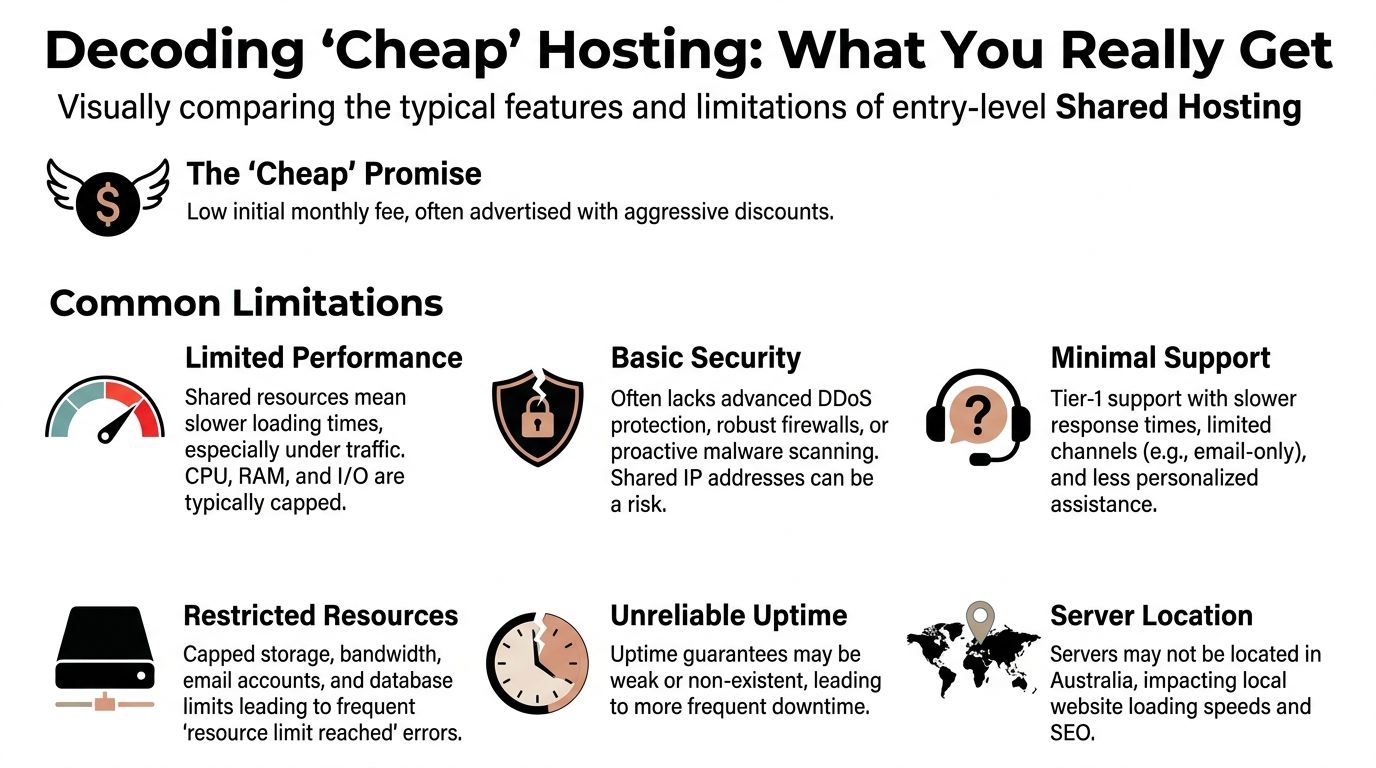
What entry plans usually include
At the low end, you are generally paying for a shared server, a basic control panel, email at varying quality, and enough disk space to get a standard WordPress site online. Entry pricing from big brands like GoDaddy can look attractive for a startup, but the first invoice is only part of the cost. Renewal pricing, paid backups, SSL conditions, migration fees, and support delays matter more once the site is live.
Disk space also sounds more important than it usually is. Hostings.info’s Australia hosting ratings show that many Australian hosting plans offer more storage than a typical small business WordPress site will ever use. In practice, I rarely see a brochure site fail because it ran out of disk. I see it struggle because the server is crowded, the PHP workers are thin, or the host makes routine maintenance harder than it should be.
What your WordPress site needs
A WordPress site that represents a real business needs a few basics covered before the price matters.
| Requirement | Why it matters |
|---|---|
| Free SSL | Without it, browsers show warnings and enquiry form trust drops fast |
| Automated backups | Recovery after a bad update, plugin conflict, or hack depends on them |
| Australian data centre option | Local visitors usually get faster response times |
| Current PHP and database versions | WordPress performs better and stays easier to secure |
| Clear resource limits | You need to know what happens under traffic spikes or plugin load |
| Competent support | A low monthly fee loses its appeal when nobody can solve a live issue |
For WordPress, caching support also matters. A host does not need to bundle premium caching, but it should not block the tools that improve performance. If you are comparing setups, this guide to the best WordPress caching plugins will give you a clearer sense of what the host should allow and what the site may still need at plugin level.
Read the sales page like a contract
A few phrases deserve caution.
- “Unlimited” usually comes with fair use clauses, inode caps, or throttling.
- “Optimised for WordPress” can mean nothing more than a one-click installer.
- “24/7 support” only promises that someone is rostered on. It says nothing about whether they can troubleshoot a broken WooCommerce checkout.
That distinction matters more than many owners expect. A trades site with a quote form, some images, and a suburb landing page set is one thing. A WooCommerce store with live shipping, payment gateways, and order emails is another. Both may fit on shared hosting at the start, but they do not carry the same support risk or performance load.
Shared hosting still has a place
Shared hosting is often a reasonable choice for a new business site, a temporary campaign microsite, or a basic brochure site with modest traffic and low operational complexity.
It becomes a bad bargain once the site is tied to leads, bookings, or sales. At that point, the smarter question is not “How cheap is the plan?” It is “How much admin, risk, and recovery work am I taking on in exchange for that price?” A business owner should assess the plan as an operating environment, because that is what determines the true cost after launch.
Performance, Security, and Support The Hidden Trade-Offs
The monthly hosting fee is the visible cost. The expensive part sits underneath it.
Performance problems show up first. Then security gaps. Support failures usually appear when the first two collide.

Performance suffers when servers are oversold
A hosting plan can look fine during setup and still fail when real traffic arrives.
According to Uptime Web Hosting’s analysis of cheap web hosting in Australia, 60% of cheap Australian shared hosts oversell by placing 500+ sites on a single server, and that can triple website latency during AEST peak hours. That is the kind of issue a business owner feels as “the site is randomly slow” even when nothing appears technically broken.
For WordPress, this gets worse when the site relies on page builders, WooCommerce, heavy plugins, or uncached dynamic content. A host can advertise storage all day long, but CPU and memory contention are what usually make the admin area sluggish and front-end pages inconsistent.
A good caching setup helps, but it cannot rescue a badly crowded server. If you run WordPress, this guide to the best WordPress caching plugins is useful for understanding what caching can and cannot fix.
Security costs more when it is missing
The cheap plan often includes a padlock icon and not much else.
That is not the same as proactive security. Many low-cost plans do not include serious malware scanning, reliable backups, or a restoration process that someone can execute quickly under pressure.
The same Uptime Web Hosting analysis reports that the absence of automated backups on many budget plans contributes to a 25% hack rate for vulnerable sites, with recovery downtime averaging 48 hours. For a business site, that downtime is often worse than the original breach. It disrupts ads, enquiries, search visibility, and customer confidence all at once.
Support quality decides how long the pain lasts
Support is where the total cost of ownership becomes obvious.
A weak host can take a minor issue, such as a failed plugin update or expired SSL setup, and turn it into a day of internal chaos. Staff start forwarding screenshots, marketing blames the site, and someone from the business is suddenly learning more about server settings than they ever wanted to know.
Here is the trade-off in plain terms:
| Cheap host claim | What it may mean in practice |
|---|---|
| 24/7 support | You can submit a ticket at any time |
| WordPress friendly | One-click install, not WordPress troubleshooting |
| Secure hosting | SSL included, but limited monitoring and recovery help |
| Scalable | Upgrade path exists, but only after performance issues appear |
The hidden bill arrives later
A business owner usually does not leave a budget host because of the monthly fee. They leave because of the interruption cost.
That cost shows up as:
- Lost leads from forms not sending or pages not loading properly
- Sales friction when carts stall or checkout slows down
- Emergency labour to clean malware, restore files, or rebuild broken functionality
- Team distraction because internal staff end up acting as go-betweens
Tip: If a host saves a few dollars a month but creates one urgent issue a year, the “cheap” option often stops being cheap.
Your Pre-Purchase Vetting Checklist for Australian Hosts
Do not buy hosting from the headline price. Buy it from what you can verify.
Most providers are happy to list features. Fewer are willing to prove where the servers are, how backups work, or who answers support when a live site fails.

Check the server location first
If your customers are in Australia, ask where your site will be hosted. Not where the company is registered. Not where support sits. Where the server is.
Phantom Host’s guide to cheap web hosting in Australia notes that verifying Australian data centre locations is a critical step to keep latency low for local visitors, with a target of under 50ms. The same source notes that overseas servers can increase Time to First Byte by 100 to 200ms, and that 99.90% uptime is a reasonable benchmark for reputable cheap hosts, while a drop to 99% can mean more than 7 hours of downtime per month.
If your audience is mainly Perth-based, Sydney or Melbourne hosting is usually still better than an overseas server, but it is worth asking the provider directly how they route Australian traffic and whether they can confirm local hosting.
Test support before you need support
Send a pre-sales question before you buy.
Do not ask, “Do you offer support?” Every host says yes. Ask something specific:
- Do you migrate WordPress sites?
- How are backups handled?
- What happens if a plugin update breaks the site?
- Can you confirm the data centre location for my plan?
The answer tells you a lot. Clear, direct responses usually indicate a team that understands real support. Scripted replies full of sales language are a warning.
Audit the backup and SSL policy
Backups are not useful unless you know four things:
- How often they run
- How long they are retained
- Whether restoration is included
- Whether the backups are stored separately from the main server
SSL matters too, but not just as a checkbox. If you need a refresher on what an SSL certificate does in practical business terms, this explainer on SSL certificates and GoDaddy gives useful context.
Ask about the actual WordPress stack
A host does not need fancy branding. It does need a sensible stack.
Look for:
- LiteSpeed support if available, especially for WordPress caching
- Current PHP versions
- Simple staging or cloning options
- Malware scanning or basic web application firewall support
You are not trying to buy the most advanced enterprise environment. You are checking whether the host has moved beyond a bare-minimum commodity setup.
Use a shortlist, not a guess
A simple comparison table helps avoid impulse purchases:
| Question | Good sign | Bad sign |
|---|---|
| Where is the site hosted? | Australian location confirmed | Vague wording like “global network” |
| How is support handled? | Specific channels and clear answers | Generic promises only |
| What are the backups? | Frequency and restore process explained | “Backups available” with no detail |
| What happens on renewal? | Pricing is easy to find | Renewal terms are buried |
Checklist mindset: If a provider avoids direct answers before the sale, expect worse after the sale.
Recognising Red Flags and Dodging Bad Deals
Some hosting deals are not budget-friendly. They are bait.
The pattern is familiar. The homepage promotes a very low first-term price. The checkout adds extras that feel mandatory. The renewal is harder to spot than the sign-up button.
The discount trap
An introductory discount is not automatically dishonest. It becomes a problem when the business owner compares only the first invoice.
A host might be workable at the promo rate and poor value at renewal. If the provider is not upfront about the standard price, walk away. Hosting should not require detective work.
The add-on ambush
A lot of cheap plans look complete until checkout.
Then the extras appear:
- SSL that should have been included
- backups sold separately
- malware tools pushed as upgrades
- migration support hidden behind a fee
That changes the economics fast. A plan that looked lean and sensible becomes fragmented and annoying.
The review pattern that gives it away
Do not rely on star ratings alone.
Read the negative reviews first. Not to find one angry customer, but to spot repeated complaints. The same themes matter more than the score:
- billing surprises
- support loops
- failed migrations
- restore requests that go nowhere
If ten reviewers complain about the same operational issue, assume it is a system problem.
Vague ownership and vague responsibility
Another warning sign is a provider that makes it hard to tell who runs the service, where support is based, or who is accountable for outages.
That matters because cheap hosting works only when someone competent owns the problem. If every issue gets bounced between frontline support, a billing team, and an offshore escalation queue, the business ends up carrying the risk.
Walk-away rule: If the plan looks cheap only because critical services are excluded, you are not looking at a bargain. You are looking at deferred costs.
When to Choose Managed WordPress Hosting Instead
There is a point where cheap hosting in australia stops being frugal and starts being risky.
That tipping point usually arrives before the site owner notices it. The site gains traffic, plugins multiply, forms become business-critical, and someone starts saying, “We really can’t afford for the website to go down.”

The businesses that should move up
Managed WordPress hosting is the smarter option when your website is no longer a side asset.
That includes:
- E-commerce stores where uptime affects revenue directly
- Lead generation sites where form delivery and speed matter every day
- Teams without technical staff who do not want to troubleshoot plugins, backups, and server behaviour
- Organisations handling customer data that need tighter control over security and operations
In these cases, the monthly fee is not the main decision factor. Reliability, accountability, and specialist support matter more.
What managed hosting changes
A proper managed WordPress setup shifts the burden away from the business owner.
Instead of wondering whether the host supports your plugin stack or whether a failed update will be your problem, you get an environment built around WordPress itself. That usually means more active maintenance, better troubleshooting, stronger monitoring, and support from people who understand the application, not just the server.
If you want a deeper look at how that model differs from standard hosting, this guide to managed WordPress hosting in Australia outlines the practical differences.
Local support matters more than cheap headline pricing
One part of the conversation gets ignored in most comparison lists: local accountability.
According to DigitalOcean’s Australia hosting page, many reviews focus on price while failing to quantify the value of local support and data sovereignty, and Australian businesses should question vague 24/7 support claims and ask for documented response times. The same source notes that a local provider can offer transparent, region-specific performance and support SLAs that ultra-cheap international hosts cannot match, which is especially relevant for agencies and e-commerce stores looking at Australian hosting considerations from DigitalOcean.
That is the key tipping point. Once the website supports business operations, the better question is not “What is the cheapest plan?” It is “Who will own this problem when something breaks?”
A simple decision test
Managed WordPress hosting is usually the better choice if two or more of these are true:
| Situation | Better fit |
|---|---|
| The site earns revenue | Managed hosting |
| The site stores customer data | Managed hosting |
| Your staff are not technical | Managed hosting |
| The site is mostly static and low stakes | Shared hosting may still be fine |
Cheap shared hosting still has a place. It is just not the right place for every business.
If your WordPress site has outgrown bargain hosting, Webby Website Optimisation helps Australian businesses keep sites fast, secure, and properly maintained with Perth-based WordPress support, managed hosting, backups, malware scanning, updates, and emergency recovery when things go wrong.
If this post raised some questions feel free to ask me a question
Trackbacks/Pingbacks