
Your WordPress site might already be costing you work.
A Perth business owner usually notices it in small ways first. The homepage feels sluggish on mobile. A plugin update breaks a contact form. A campaign sends paid traffic to a landing page, but nobody can tell which enquiries came from which ad. Then a larger problem lands all at once. The site goes down, rankings slip, or a malware warning appears in the browser.
That’s when the website stops feeling like an asset and starts behaving like a staff member who misses calls, loses paperwork, and leaves the front door unsecured.
Professional website optimisation services perth businesses rely on aren’t only about ranking higher in Google. They’re about making a WordPress site fast, stable, secure, measurable, and commercially useful. In Australia, the SEO industry that includes website optimisation services is valued at $1.5 billion, and SMBs spend an average of $1,350 per month on SEO-related services according to this Perth SEO industry overview. That says something important. Businesses aren’t paying for vague “traffic”. They’re paying because a poorly maintained website subtly drains leads and revenue.
For WordPress sites in particular, optimisation works best when performance, security, maintenance, backups, hosting, SEO, and analytics are treated as one connected system. Splitting them across random freelancers, cheap hosting, and neglected plugins usually creates more friction than savings.
Your Perth WordPress Site Should Be Your Best Employee
A good business website should do useful work all day without supervision. It should answer questions, load quickly, handle enquiries, support your marketing team, and stay online when you’re busy doing actual client work. If it’s built on WordPress, that’s completely achievable. But only if somebody is maintaining it properly.
Many Perth businesses start with a site they were happy with when it launched. A year or two later, the cracks show. The theme is bloated, forms are unreliable, product pages are slow, and no one wants to touch the backend because every change feels risky. The site still exists, but it isn’t helping enough.
What a healthy site actually does
A well-optimised WordPress site behaves like a strong operations person.
- It shows up ready for work: Pages load quickly, mobile layouts hold together, and users don’t hit broken elements.
- It handles routine tasks: Enquiry forms, bookings, product sales, and content updates work without constant troubleshooting.
- It supports marketing: Search visibility, landing pages, and conversion tracking all depend on technical stability.
- It protects the business: Updates, backups, and malware checks reduce the chance of an emergency becoming a disaster.
A website isn’t “finished” when it launches. That’s the point it starts needing operational discipline.
Perth businesses also operate in a competitive local market where buyers compare quickly. If your site is slower, harder to use, or less trustworthy than the alternative, people won’t send you a note explaining why they left. They’ll just move on.
A specialist is essential. A WordPress support provider with long-term maintenance experience sees patterns generalist agencies often miss, especially around plugin conflict, hosting bottlenecks, caching mistakes, weak backup practices, and missing analytics. Those issues rarely look dramatic on day one. They become expensive over time.
Why Your Website Is An Underperforming Asset
Most underperforming sites don’t fail loudly. They fail subtly. A visitor lands on the page, waits, gets annoyed, and leaves. A staff member updates a plugin and something breaks in checkout. A contact form submits, but the notification email never arrives. None of these issues feels dramatic in isolation. Together, they turn the site into a leaky bucket.
That’s why I compare neglected websites to a physical shopfront with a sticky door, poor lighting, and no lock on the back entrance. People can still walk in. Some will. But many won’t stay, and the security risk keeps growing in the background.
The cost of slowness and friction
WordPress can be very fast. It can also become painfully slow when too many plugins are stacked on low-grade hosting with unoptimised images, poor caching, and page builders doing far more work than necessary.
Common problems include:
- Heavy pages: Oversized images, autoplay video, web fonts, and unused scripts drag down load time.
- Bad plugin choices: Plugins that duplicate functions or load assets site-wide create bloat.
- Weak mobile experience: Menus, popups, and layout shifts frustrate users trying to act quickly.
- No technical oversight: Sites drift over time because no one reviews performance after updates.
A slow site doesn’t only annoy visitors. It also makes every marketing effort less efficient. If you’re paying for SEO, Google Ads, email traffic, or social traffic, speed problems waste the investment before the sales conversation even begins.
WordPress security isn’t optional
Security gets ignored until a site is hacked. Then it becomes urgent.
Australian businesses experienced a 34% rise in cyberattacks in 2025, and WordPress sites accounted for 43% of targeted CMS platforms in WA, often because of outdated plugins. For small businesses, a hacked website can cause over $10,000 in downtime losses according to this local SEO and WordPress security reference.
Practical rule: if updates, backups, malware scanning, and recovery planning aren’t part of normal operations, you don’t have a maintenance process. You have a gambling habit.
The trade-off is simple. Reactive fixes feel cheaper until the day they aren’t. Rebuilding trust after malware, downtime, spam injections, or a broken store is always harder than preventing the issue in the first place.
Why neglect keeps compounding
Website problems stack on top of one another.
- Outdated plugins increase security exposure and compatibility risk.
- Poor hosting amplifies speed issues and makes recovery slower.
- Missing backups turn routine failures into major incidents.
- No reporting means nobody sees the decline until leads drop.
A business owner usually doesn’t need to know every technical detail. But they do need to know this. If WordPress is central to your sales, enquiries, or client service, neglect is not neutral. It creates commercial drag.
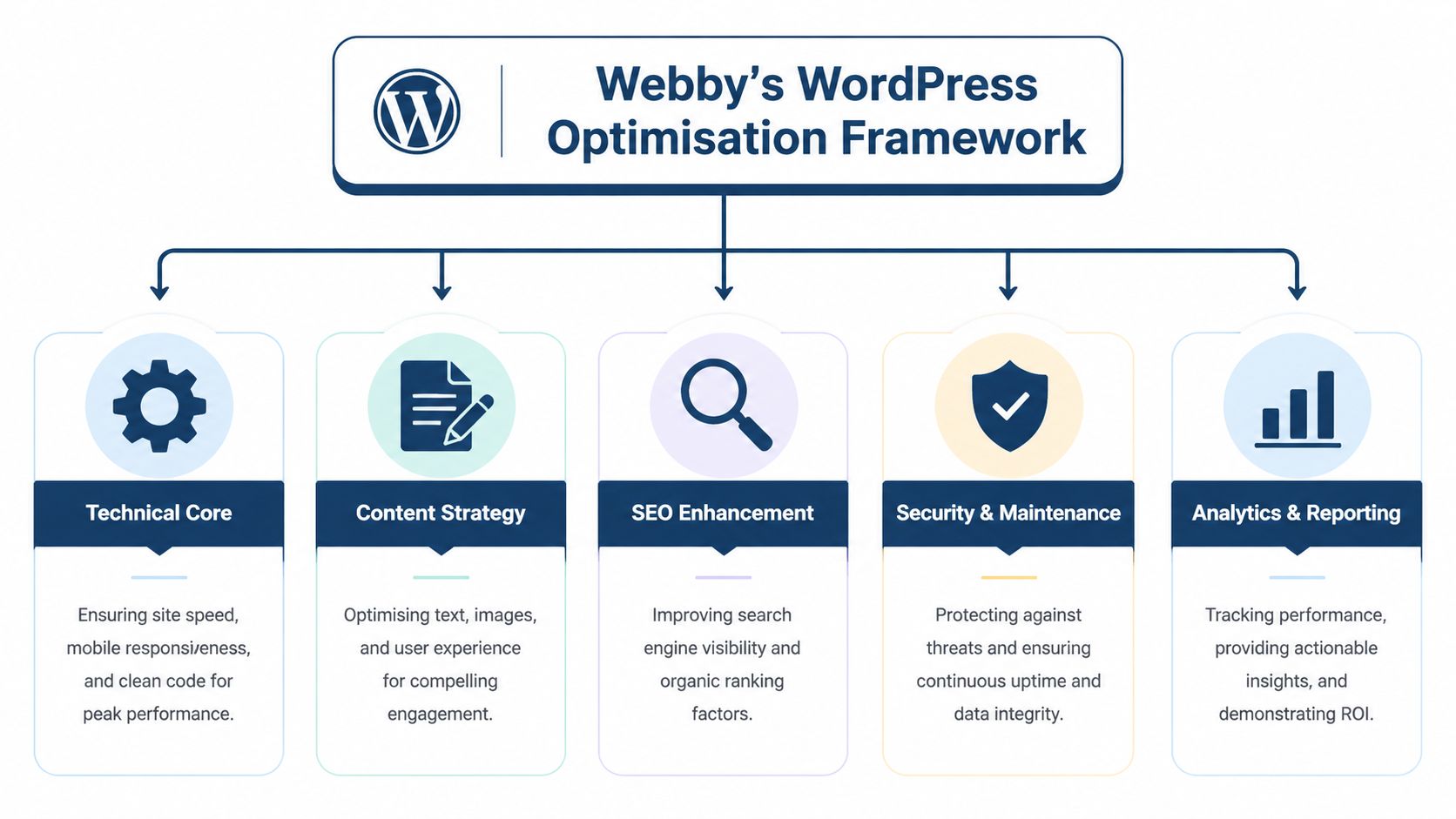
Our Complete WordPress Optimisation Framework
A Perth business owner usually sees the symptoms first. Slow pages. Form enquiries that go missing. Traffic reports that do not line up with actual leads. Admin warnings after plugin updates. Those problems look separate, but on WordPress they are usually connected.
That is why optimisation needs to be handled as a system. A fast site with weak security is still risky. A secure site with poor tracking is still hard to improve. Good WordPress optimisation brings performance, maintenance discipline, security controls, hosting fit, and marketing analytics into one operating model so the site can support sales properly.
Performance
Performance work starts with what the visitor experiences and what the server has to process to deliver it. On WordPress, that usually means too many heavy plugins, oversized media, unused scripts, poor cache rules, and third-party tools loading on every page whether they are needed or not.
A proper review checks:
- Image handling: large media files should be resized, compressed, and served in the right format. If you want a practical primer on how to boost site speed with image compression, that resource gives a useful non-technical overview.
- Caching behaviour: page caching, browser caching, and object caching should match the site’s build. A lead generation site, WooCommerce store, and membership site all need different cache rules.
- Asset control: scripts, stylesheets, fonts, sliders, and embedded tools should only load where they serve a purpose.
Caching deserves special attention because it can improve load times quickly, or break carts, logins, and dynamic content if it is set up badly. This guide to WordPress caching plugins is useful when comparing common approaches.
Security
Security work on WordPress should reduce risk without creating unnecessary admin friction. The job is to keep the site clean, keep access tight, and make recovery straightforward if something fails.
That usually includes:
- Core, theme, and plugin updates done on a schedule with testing
- Malware scanning to catch suspicious file changes early
- Access control that limits admin privileges and removes unused accounts
- Firewall and hardening settings that reduce common attack paths
Security also affects performance and marketing. A compromised site can become slow, send spam, inject rogue pages into search results, or lose trust with both users and Google. That is one reason I treat security and optimisation as part of the same WordPress system, not two separate services.
Maintenance and compatibility
Maintenance is the operating discipline that keeps WordPress stable as the site grows. Themes age. Plugins change direction. PHP versions move on. Marketing teams add tools that developers then have to clean up later.
A practical maintenance layer covers:
- Plugin compatibility checks
- Theme integrity
- Form and checkout testing
- PHP and server environment review
- Broken feature detection after updates
The site that "worked fine for years" often has the highest hidden risk, because nobody has tested what happens when a payment gateway updates, a form plugin changes behaviour, or the host forces a newer PHP version.
Backups and recovery
Backups are only useful when they are current, stored offsite, and tested. A line in a hosting dashboard is not a recovery plan.
WordPress sites change constantly. Orders come in. Leads are submitted. content is edited. Plugin settings shift. Recovery planning has to account for that, especially for Perth businesses running campaigns, bookings, or ecommerce outside normal office hours. The ultimate test is simple. Can the site be restored quickly to a known-good version without guesswork or data loss that damages the business?
Hosting
Hosting sets the ceiling for everything else. Good optimisation work gets limited fast on weak infrastructure.
For WordPress, better hosting usually means:
- Resources matched to traffic, plugins, and site features
- Server-level caching or tuning
- Support for current PHP versions
- A stable setup for backups, staging, and troubleshooting
Cheap hosting can look acceptable on a brochure site with little traffic. It becomes expensive when page speed drops during campaigns, WooCommerce processes stall, or developers spend hours working around limits that should not exist in the first place.
Analytics and SEO integration
This part gets missed more often than it should. Many Perth businesses pay for speed work or SEO work without fixing the measurement layer underneath, so nobody can tell which changes improved enquiries, calls, bookings, or sales.
On WordPress, optimisation should include clean integration with GA4, Search Console, Tag Manager, conversion events, and page-level technical SEO settings. That means forms should be tracked properly. Landing pages should be indexed correctly. Search traffic should be tied back to real business actions, not vanity metrics.
This is the difference between a site that merely loads faster and a site that performs better commercially.
Our Optimisation Process for Perth Businesses
Most business owners don’t need a lecture on technical theory. They need to know what happens, in what order, and what they’ll get at the end. A proper optimisation process should be structured, visible, and calm. Not a stream of random fixes applied in panic.
Audit before action
The first job is diagnosis. Not assumptions.
A useful audit checks the areas that usually affect WordPress performance and reliability most:
- Technical setup: theme quality, plugin load, render-blocking assets, hosting fit, mobile issues
- Security exposure: update status, weak plugins, suspicious behaviour, user access patterns
- Functional reliability: forms, checkout, booking tools, emails, redirects, search indexing
- Measurement gaps: GA4, Tag Manager, Search Console, conversion tracking, event quality
The point isn’t to generate a scary report. It’s to identify what’s broken, what’s risky, and what’s inefficient.
Prioritise what matters commercially
Not every issue deserves equal attention. Some changes improve site health but won’t materially affect the business. Others are directly tied to leads, sales, and visibility.
A disciplined plan usually sorts work into three groups:
| Priority | What it includes | Why it matters |
|---|---|---|
| Immediate fixes | Broken forms, downtime risk, malware, serious errors | Protects revenue and trust |
| Performance work | Caching, image handling, code cleanup, mobile issues | Improves usability and supports SEO |
| Growth setup | Tracking, landing pages, search improvements | Helps marketing spend become measurable |
Perth providers often tune sites against Google’s performance standards, including Largest Contentful Paint under 2.5 seconds, because Core Web Vitals influence user experience and local search visibility according to this technical SEO reference from Fisher Digital.
Implement carefully, not aggressively
This is where experience matters. A rushed developer can make a site look faster in a testing tool while breaking key business functions behind the scenes.
Implementation should include controlled changes such as:
- Staging critical updates before touching the live site
- Testing forms and conversion paths after each meaningful change
- Removing plugin overlap instead of piling on more tools
- Adjusting server and caching settings to suit the actual site type
- Rechecking mobile behaviour after front-end optimisation
Fast scores are useless if the quote form fails or the checkout cache serves stale cart data.
Report clearly
Business owners shouldn’t have to decode developer notes to understand progress.
Good reporting answers practical questions:
- What was fixed
- What improved
- What still needs attention
- What risk has been reduced
- What the marketing team can now measure properly
That creates a working relationship based on visibility, not blind trust. It also makes future decisions easier, especially when weighing maintenance against larger redevelopment work.
Driving Growth with SEO and Analytics Integration
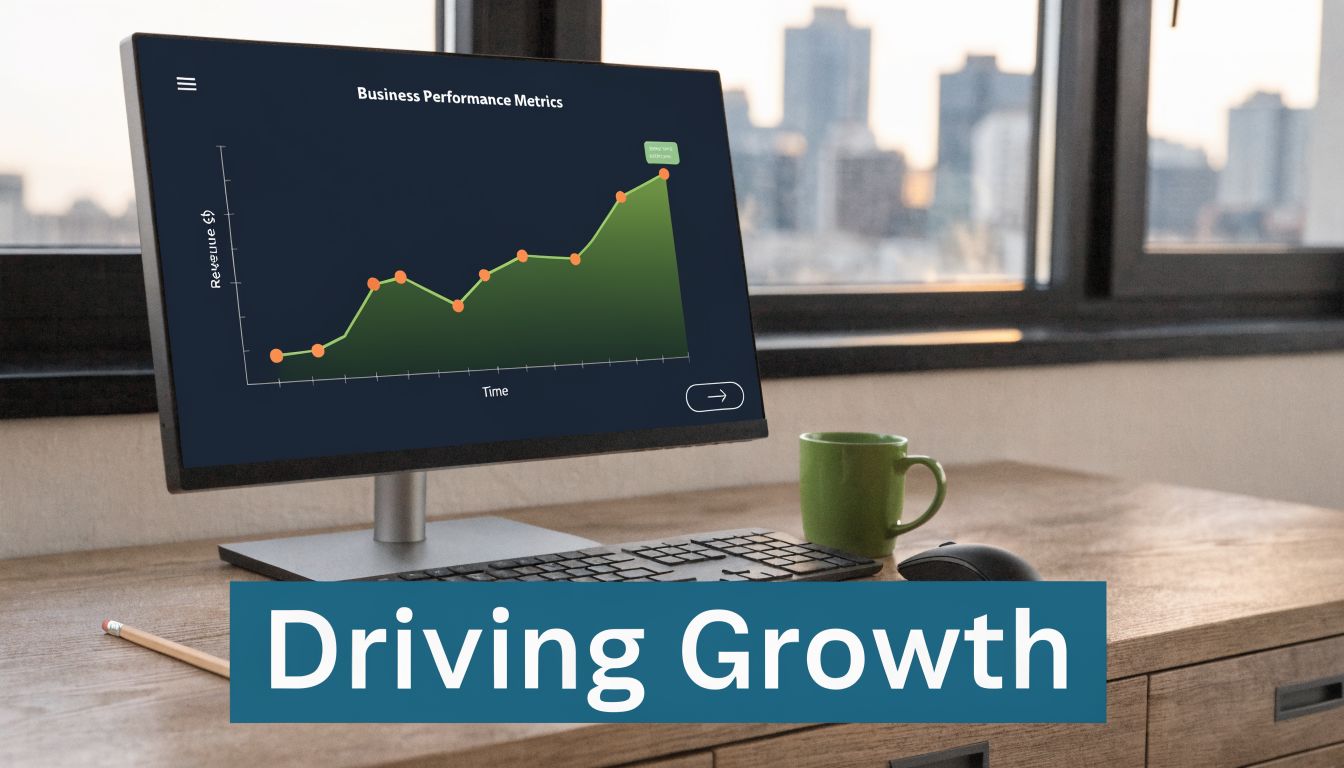
A fast, stable site is only the starting point. Growth happens when technical work supports visibility, paid traffic, and decision-making. That’s where many WordPress projects fall short. They spend heavily on rankings or ads while the site itself is hard to measure and even harder to improve.
For Perth businesses, value in website optimisation services perth providers offer comes from connecting the technical layer to the marketing layer. SEO, landing pages, GA4, Google Tag Manager, and Search Console should all feed the same commercial goal. Better enquiries, cleaner data, and stronger return from the traffic you already pay to attract.
SEO works better on technically sound WordPress sites
Search optimisation gets discussed as though it lives only in keywords and content. It doesn’t. Technical quality changes how effectively content performs.
A well-maintained WordPress site gives SEO a proper foundation:
- Faster pages reduce user frustration and support crawl efficiency
- Clean site structure helps internal linking and page discovery
- Reliable mobile rendering improves usability on the devices commonly used
- Healthy indexation prevents low-quality or duplicate pages from cluttering results
Local SEO also benefits when the underlying site is stable. There’s no point improving service pages and local intent content if the page template is bloated, the schema is broken, or forms fail on mobile.
GA4 and Tag Manager stop marketing guesswork
Tracking is where many businesses lose visibility into what’s working. They know traffic exists, but not which channel produced the call, form submission, or sale.
In WA, Google Ads spend rose 22% in the last year, yet only 17% of Perth SMBs use GA4 properly, leading to an estimated 40% in lost conversions from poor tracking. The same source notes that optimised landing pages can lift Google Ads ROI by 3.2x in competitive Perth markets according to this SEMrush agency listing reference.
That’s why proper setup matters:
- GA4 event design: track real business actions, not vanity clicks
- Google Tag Manager: deploy and manage tags without turning the site into a mess. If your team needs a plain-English explainer, this guide on Google Tag Manager is a useful starting point.
- Search Console integration: identify indexing issues, page visibility trends, and technical warnings
- Campaign attribution: connect ads, landing pages, and outcomes properly
If tracking is wrong, the business doesn’t know what to fix next. It only knows it spent money.
Landing pages and conversion design
A common mistake is sending paid traffic to generic service pages built for everybody. Those pages often explain too much, ask for too much, or fail to match ad intent.
High-converting landing pages usually do a few things well:
- Match the search or ad message
- Focus on one clear offer
- Reduce distractions
- Use a direct form or call path
- Load quickly on mobile
For e-commerce stores, the same logic applies to collection pages, campaign pages, and product funnels. A fast and secure WordPress environment makes A/B testing easier, reduces friction, and gives the marketing team cleaner data to act on.
Measurable Results and Perth Success Stories
Results from optimisation should be visible in operations, not just in a dashboard. The business should feel the difference. Fewer support emergencies. Smoother updates. Better confidence when running campaigns. Cleaner reporting from forms, calls, and sales activity.
That’s the standard I’d use when judging whether any optimisation work was worth paying for.
What useful results actually look like
The strongest outcomes usually show up in a few practical areas:
- More reliable uptime: the site stays available when customers need it
- Faster key pages: service pages, product pages, and landing pages become easier to use
- Lower maintenance risk: updates stop feeling like a gamble
- Cleaner conversion data: sales and enquiries can be tied back to channels with more confidence
- Improved search readiness: technical issues stop holding back content and local SEO work
A good example of how speed work can be analysed is this WordPress website speed case study, which shows the kind of before-and-after thinking that matters more than vague “optimisation” claims.
Two common Perth scenarios
A Fremantle retailer with a WooCommerce store often has one cluster of problems. Heavy product imagery, too many plugins, poor mobile category pages, and unreliable checkout behaviour after updates. In that case, useful optimisation usually means simplifying the stack, improving asset delivery, checking transactional functions, and making sure backups and recovery are solid before the next campaign pushes traffic.
A Subiaco service business tends to have a different pattern. The site may look acceptable on desktop but underperform on mobile, forms may not be tracked properly, and local service pages may exist without a clear technical foundation. There, the win usually comes from tightening page structure, improving speed, fixing tracking, and reducing plugin clutter so the site becomes easier to maintain.
Good optimisation doesn’t only make a website faster. It makes the business less fragile.
That distinction matters. A small business owner rarely wants another pile of technical tasks. They want the website to stop interrupting operations and start supporting growth consistently.
Our WordPress Optimisation Plans and Pricing
Pricing for optimisation should reflect scope, risk, and business dependence on the website. A simple brochure site does not need the same level of monitoring and support as a WooCommerce store, a membership platform, or a lead generation site feeding paid traffic.
In Perth, professional website optimisation packages commonly range from $500 to over $5,000 per month, while specialist hourly rates usually sit between $75 and $200 according to this Perth SEO pricing overview. That range makes sense. The right spend depends on how central the website is to revenue, how complex the WordPress setup is, and how costly downtime would be.
Webby Optimisation WordPress Plans
| Feature | Maintenance Plan | Growth Plan | E-commerce Pro Plan |
|---|---|---|---|
| Best fit | Brochure sites and smaller service businesses | Growing lead generation sites and active marketing teams | WooCommerce and revenue-critical WordPress stores |
| Core updates | Scheduled WordPress, theme, and plugin updates | Scheduled updates with broader testing | Scheduled updates with store-specific compatibility checks |
| Backups | Regular offsite backups | More frequent offsite backups with stronger recovery workflow | Frequent backups with rollback priority for store continuity |
| Security | Malware scanning and basic hardening | Enhanced monitoring and proactive issue handling | Stronger monitoring for transactional risk and urgent recovery |
| Performance | Baseline speed and health checks | Ongoing optimisation for key templates and landing pages | Performance review across product, cart, and checkout experience |
| Support model | Routine maintenance and support requests | Maintenance plus growth-related technical support | Priority support for store issues, outages, and campaign readiness |
| Analytics help | Basic measurement support | GA4, Tag Manager, Search Console, and reporting support | Conversion tracking and campaign landing page support for e-commerce |
| Development time | Usually limited or ad hoc | More room for iterative improvements | Greater need for ongoing technical changes and testing |
How to choose without overbuying
A cheaper plan isn’t better value if it excludes the work your site needs.
Use these criteria:
- Choose maintenance-first if the site mainly needs stability, updates, backups, and security.
- Choose growth support if SEO, content, landing pages, and analytics are active parts of your marketing.
- Choose e-commerce-level support if a broken checkout or plugin conflict directly affects revenue.
For some businesses, monthly support is the right model. Others need emergency repair capacity plus a development retainer. The key is to match the plan to operational risk, not just the lowest invoice.
Frequently Asked Questions
Will optimisation changes affect my website’s design
They can, but they shouldn’t unexpectedly. Sensible optimisation work preserves the site’s visual identity while improving what sits underneath it. If a design element is causing real speed or usability problems, the right approach is to explain the trade-off and adjust it carefully, not rip it out without warning.
How long until I see results
Some improvements are immediate. Broken functionality, obvious speed bottlenecks, and tracking gaps can often be addressed quickly once they’re identified. Broader gains from technical SEO support, landing page refinement, and ongoing maintenance usually build over time because they depend on consistent execution.
Can I still update my own content
Yes. A well-managed WordPress site should be easier for your team to use, not harder. Good support separates routine content editing from risky structural changes, so staff can update text, images, posts, and products without feeling like they’ll break the site.
What happens if my site breaks after an update
That depends on whether there’s a proper maintenance and recovery process behind it. With controlled updates, tested backups, and clear rollback procedures, most issues can be isolated and resolved without prolonged downtime. Without that setup, even a minor plugin conflict can turn into a business interruption.
Do I need optimisation if my website already looks fine
Usually, yes. Visual appearance is only one layer. Many WordPress sites that look acceptable still have weak caching, oversized media, poor tracking, outdated plugins, fragile backups, or mobile UX problems that affect leads and sales behind the scenes.
Is hosting really part of optimisation
Absolutely. Hosting affects speed, stability, update safety, and recovery. A poorly matched hosting environment can undermine good development work and create recurring performance problems no plugin can fully solve.
Will this help with SEO or only with maintenance
It helps both, when done properly. Maintenance keeps the site stable and secure. Technical optimisation improves the conditions SEO needs to work well. Analytics and landing page work then make the marketing side measurable, which is where many businesses finally start seeing which efforts are paying off.
If your WordPress site feels slow, risky, hard to update, or difficult to measure, Webby Website Optimisation provides Perth businesses with WordPress help, maintenance, security, backups, hosting support, GA4 setup, and emergency recovery in one place.
If this post raised some questions feel free to ask me a question
Trackbacks/Pingbacks