
You’ve done the work to get people to your website.
You paid for Google Ads. You spent months on SEO. You posted on social media, updated service pages, maybe even rebuilt the homepage. Traffic goes up, and for a moment that feels like progress.
Then a key question arises. Why aren’t more visitors turning into enquiries, phone calls, bookings, or sales?
That is where many small business owners in Perth get stuck. The website is live, the analytics show activity, but the business result does not match the effort. People arrive, browse, then disappear. It feels a bit like running a shop with a steady stream of foot traffic while most customers walk out without speaking to staff or buying anything.
That gap is what conversion rate optimisation, or CRO, is about.
If you’ve ever asked “what is conversion rate optimisation” in plain English, the short answer is this. It is the process of improving your website so more of your existing visitors take the action you want them to take. That action might be submitting a quote form, buying a product, booking a call, downloading a guide, or calling your office.
For WordPress websites, CRO matters even more because the platform gives you flexibility, but that flexibility can also create friction. Extra plugins, bulky themes, awkward forms, and slow mobile pages can hurt results.
A good CRO process does not rely on hunches. It looks at what users are doing, finds where they get stuck, and improves the experience step by step. Instead of chasing more traffic straight away, you make the traffic you already have work harder.
Introduction Getting Traffic Is Only Half the Battle
A common scenario goes like this.
A Perth business owner checks their website report and sees visits climbing. The SEO campaign is starting to work. Paid ads are sending people to landing pages. Staff are pleased because the graph points up.
But the inbox is still quiet.
The contact form gets only a few submissions. Online sales stay flat. Visitors land on the site, click around, and leave. No obvious problem jumps out, which makes it even more frustrating.
This is the moment where traffic and business performance part ways. More visitors do not automatically mean more customers. If the page is confusing, the offer is vague, the form is too long, or the mobile experience is clunky, people move on.
Think of your website as a storefront. SEO, ads, and social media bring people through the door. CRO helps the store itself do a better job of selling. It improves the signs, clears the walkway, answers the customer’s questions, and makes the checkout counter easier to find.
That is why CRO matters to small and medium businesses. It focuses on efficiency. You have already paid, in time or money, to attract the visitor. The next job is to remove the reasons they hesitate.
For WordPress site owners, this is often where the biggest gains live. Many sites are technically “fine” but still hard to use. Menus are crowded. pages load slowly on mobile. Forms ask for too much. Product pages bury important details. None of those issues seem dramatic on their own, but together they leak leads and sales.
CRO gives you a practical way to fix that leak.
Why Conversion Rate Optimisation Is a Business Superpower
CRO is powerful because it improves the return on work you are already doing.
If you are spending on SEO, Google Ads, email campaigns, or content, every visitor has a cost attached to them. Some costs are direct. Some are hidden in staff time, agency retainers, or software subscriptions. When more of those visitors convert, the value of all that effort increases.
In Australia, that opportunity is not theoretical. In the e-commerce sector, the average landing page conversion rate is 4.2%, compared with a 2.9% global benchmark, according to Blogging Wizard’s summary of conversion rate optimisation statistics. For a site with 10,000 monthly visitors, that difference works out to 130 extra customers per month.

That simple comparison explains why smart businesses take CRO seriously. You do not always need a bigger audience first. Sometimes you need a better-performing page.
CRO makes your marketing spend go further
When a landing page improves, your ad budget stretches further. When a service page explains things more clearly, your SEO traffic becomes more valuable. When a form becomes easier to complete, the same number of visitors can produce more leads.
This is one reason CRO feels like a business superpower rather than a marketing tactic. It affects the economics of your entire website.
A business owner usually sees marketing in separate buckets. SEO is one bucket. Google Ads is another. Website design is another. CRO cuts across all of them because it improves what happens after the click.
CRO teaches you what customers need
There is another benefit that gets less attention. CRO forces you to learn.
You stop arguing about whether the button should be green or black and start asking better questions:
- What are visitors looking for first when they land on this page?
- What makes them hesitate before they enquire?
- Which pages create trust and which ones create doubt?
- What information is missing at the moment they need it?
Those lessons matter beyond the website. They improve your sales messaging, ad copy, product descriptions, and follow-up process.
A strong CRO process is customer research in action. It shows you where people get stuck, not where you assume they get stuck.
CRO rewards businesses that reduce friction
In crowded Australian markets, many businesses offer similar services. The winner is often not the one with the flashiest branding. It is the one that makes the next step easiest.
If your competitor’s site loads faster, explains the offer more clearly, and has a cleaner contact path, they may win the lead even if your service is stronger.
A few common examples:
- A tradie website gets more calls when the phone number is visible on mobile.
- A professional services firm gets more enquiries when reviews and trust cues sit near the form.
- A WooCommerce store gets more orders when product images, shipping details, and checkout steps are easy to understand.
CRO is compounding, not one-off
One reason business owners underestimate CRO is that they think of it as a redesign task. It is not. It is a habit.
You improve one page. Then one form. Then one checkout step. Then one product template. Over time, the site becomes easier to use and better at converting.
That is why the businesses that treat CRO as ongoing website maintenance often outperform businesses that keep rebuilding from scratch.
The Core Components of a CRO Strategy
A proper CRO strategy has structure. It is not random tweaking.
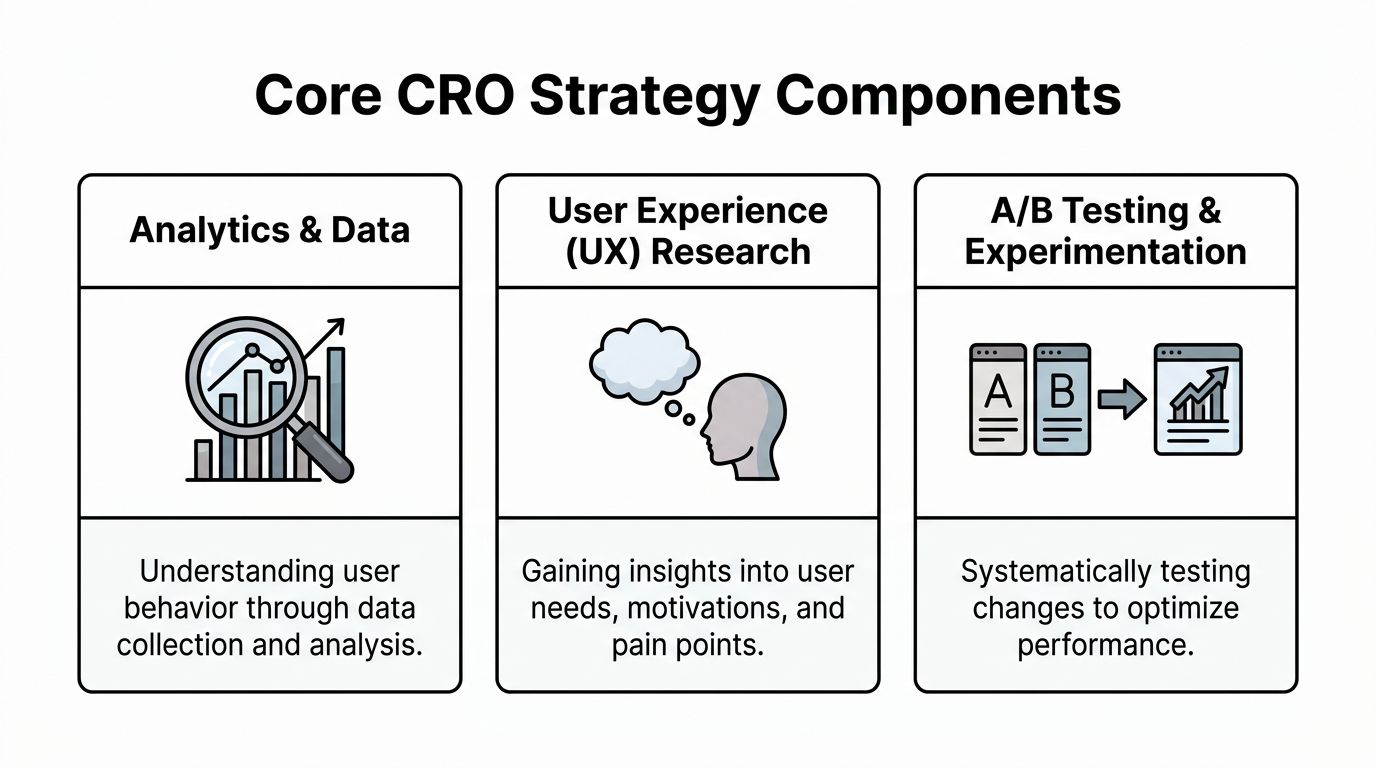
The easiest way to understand it is to break it into three parts. First, you measure what people are doing. Second, you learn why they behave that way. Third, you test improvements instead of guessing.
Analytics and data collection
This is the foundation.
Before changing anything, you need to know which pages attract traffic, which pages lose people, and which actions count as success. On a WordPress site, that usually starts with Google Analytics 4, plus event tracking for key actions such as form submissions, phone clicks, add-to-cart actions, and checkout progress.
For many Australian B2B sites, this matters because organic search converts at 2.7%, according to VWO’s conversion rate optimisation statistics. The same source notes that organic search drives over half of website traffic in Australia. If your organic landing pages are underperforming, you may be wasting a channel that already brings in qualified visitors.
Data collection answers questions like these:
- Where do users enter the site
- Which pages have strong traffic but weak enquiries
- Which device types perform poorly
- Where do people abandon a form or funnel
Useful tools in this stage often include:
- GA4 for events, paths, and conversion reports
- Google Search Console for search queries and landing page visibility
- Heatmap tools for click behaviour and scroll depth
- Google Tag Manager for cleaner tracking setup
The point is not to gather endless reports. The point is to spot problems worth fixing.
User experience research
Numbers tell you what happened. They do not always tell you why.
A page might have lots of visits and almost no conversions. Analytics can show the drop-off. They cannot always show the hesitation behind it. That is where user experience research helps.
For a WordPress website, this might include:
- session recordings
- short on-page surveys
- review of live chat questions
- sales team feedback
- checking forms and checkout flows on real mobile devices
A practical example helps. Suppose a service page gets plenty of traffic but very few quote requests. User research might reveal that visitors cannot tell whether you service Perth only, WA statewide, or all of Australia. The problem is not traffic. It is missing clarity.
Another example is a WooCommerce product page where people scroll, zoom in on images, then leave. That may suggest uncertainty about quality, sizing, delivery, or trust.
If you only look at analytics, you can see the leak. If you add UX research, you can often find the hole.
Testing and implementation
Here, CRO becomes disciplined. Once you have evidence, you form a clear hypothesis. Not “let’s freshen up the page.” Something more specific, like:
- making the primary call to action clearer will increase form starts
- moving trust signals closer to the contact form will reduce hesitation
- shortening the checkout flow will lower abandonment
- rewriting a vague headline will improve message match from ads
Then you test.
Sometimes this means an A/B test. Sometimes it means a controlled before-and-after change on a lower-traffic page. On WordPress, the exact method depends on your setup, page builder, plugin stack, and traffic volume.
A sensible testing cycle usually looks like this:
- Find the issue through analytics or user behaviour.
- Write a hypothesis about what is causing it.
- Make one meaningful change rather than ten at once.
- Track the result against the right conversion event.
- Keep, refine, or reject the change based on evidence.
Why these three parts need each other
If you skip analytics, you are guessing where the problem lives.
If you skip UX research, you may fix the wrong thing.
If you skip testing, you turn personal opinions into website changes and hope for the best.
CRO works because these parts support each other. Data points to a problem. research explains the human reason. Testing validates the fix.
That is the difference between website decoration and website optimisation.
Proven CRO Techniques to Boost Your Conversions
Once the basics are in place, you can start using practical CRO techniques that improve real pages.
The best techniques are usually not flashy. They remove friction, answer doubts, and make the next step obvious.
A B testing for real decisions
A/B testing is often the first thing people hear about when they ask what is conversion rate optimisation.
The idea is simple. You create two versions of a page element, show each version to different visitors, and measure which performs better. That element could be a headline, call to action, form layout, hero image, or page structure.
For small business websites, useful A/B tests are often straightforward:
- Headline tests that sharpen the value proposition
- CTA tests such as “Submit” versus “Get My Free Quote”
- Layout tests that move trust signals above the fold
- Form tests that reduce fields or change the order
The mistake is testing tiny cosmetic changes before fixing bigger issues. If the page is unclear, changing a button shade is unlikely to help much.
Funnel optimisation
A conversion is rarely one click. It is usually a path.
For a service business, that path might be ad click, landing page, service details, contact form, thank you page. For an online store, it might be category page, product page, cart, checkout, confirmation.
CRO looks at where people fall out of that path.
A good funnel review asks:
- Are visitors landing on the right page
- Do they understand the offer quickly
- Is the next step obvious
- Does anything create unnecessary effort
A lot of websites lose people because they ask for commitment too early. They send traffic to generic pages instead of relevant pages. They bury key details. They make users hunt for answers.
Stronger copy and clearer calls to action
Website copy is not just decoration. It guides decisions.
Many WordPress sites use safe, generic phrases such as “Learn More”, “Contact Us”, or “Submit”. Those labels are not wrong, but they often fail to tell the visitor what they get.
A stronger CTA is specific and benefit-led. It reduces uncertainty.
Compare these:
- Submit
- Request a Quote
- Book My Free Consultation
The last two give the user a clearer sense of what happens next.
If you want a practical reference point for page structure, form clarity, CTA placement, and related conversion optimization best practices, that guide is useful because it translates broad ideas into page-level actions.
Mobile performance and speed
This is the silent conversion killer on many WordPress sites.
A page can look acceptable on a desktop in the office, then feel awkward and slow on a phone in practice. Buttons may sit too close together. Pop-ups may block content. Large images and heavy plugins may drag load times out.
Video can help show what this process looks like in practice:
Social proof and trust signals
People rarely convert when they feel uncertain.
That is why trust matters so much. Reviews, testimonials, security cues, delivery information, refund details, ABN details, local service information, and real photos all help people feel safer taking the next step.
For service businesses in Perth, trust often improves when the site clearly shows who you help, where you operate, and what previous customers say. For WooCommerce stores, trust usually improves when product information is complete and reassuring.
Good CRO does not pressure people into converting. It removes the reasons they hesitate.
The simple rule behind most CRO wins
Most improvements come from one of three actions:
- Make it clearer
- Make it easier
- Make it faster
That sounds basic because it is. Many websites underperform for basic reasons.
CRO Quick Wins for Your WordPress Website
Generic CRO advice often treats every website platform the same. That is not realistic.
A WordPress site has its own moving parts. Themes, plugins, page builders, form tools, WooCommerce add-ons, caching layers, hosting setups, and custom code all affect conversion performance. If those pieces are not managed carefully, the site can become slow, clunky, and harder to use.
One source highlighting this gap notes that WordPress powers 43% of all websites globally, yet generic CRO advice often skips platform-specific issues like plugin bloat and theme performance challenges, according to Uforocks’ article on conversion optimisation tips.
Start with performance before design tweaks
For WordPress, speed is often the first conversion fix.
WordStream’s CRO statistics summary notes that on Australian WordPress sites, mobile conversion rates can drop by 40% compared to desktop, with 2.49% versus 5.06%, when load times exceed 3 seconds. The same source says that adding zoomable product images can reduce cart abandonment by 22%.
That tells you two important things. First, mobile users are less forgiving when pages drag. Second, practical improvements to product page usability can change buying behaviour.
Common WordPress causes of poor speed include:
- Too many plugins doing overlapping jobs
- Heavy page builders with lots of effects and scripts
- Oversized images uploaded straight from a phone or camera
- Poor hosting setup that struggles during traffic spikes
If a page feels slow on your own phone over mobile data, treat that as a conversion problem, not just a technical issue.
Fix forms that ask for too much
Many WordPress forms collect more information than the business needs.
A quote form does not always need six fields, a file upload, a dropdown maze, and a long message box. Every extra field gives the visitor another reason to stop.
Good form optimisation usually means:
- Remove non-essential fields
- Make labels plain and specific
- Show one clear benefit near the form
- Test the form on mobile
- Confirm what happens after submission
If you run landing pages on WordPress, these WordPress landing page plugins can help you compare tools built for cleaner page creation and testing workflows.
Improve WooCommerce product pages
WooCommerce gives you flexibility, but many stores leave product pages underdone.
A strong product page usually needs clear photos, pricing, delivery details, return information, reviews, and a visible call to action. If any of that is missing or buried, conversion suffers.
A few quick wins for WooCommerce include:
- Use better images with zoom where helpful
- Show trust cues near add-to-cart areas
- Make shipping and return details easy to find
- Check product pages on mobile, not just desktop
- Reduce visual clutter from tabs, pop-ups, and side widgets
If you also drive paid social traffic to those pages, this guide on strategies for conversion rate on Facebook ads is useful for aligning ad expectations with the landing experience users see after the click.
WordPress CRO Quick Wins Checklist
| Optimisation Area | Quick Win Action | Potential Impact |
|---|---|---|
| Site speed | Audit plugins, compress images, review theme and builder weight | Better mobile usability and less abandonment |
| Forms | Remove unnecessary fields and simplify labels | More completed enquiries |
| Product pages | Add zoomable images, clearer pricing, and trust signals | Better product confidence and fewer drop-offs |
| Mobile layout | Check spacing, button size, and pop-up behaviour on phones | Easier navigation and cleaner conversion paths |
| Tracking | Confirm forms, phone clicks, and cart actions are measured properly | Clearer visibility into what is working |
A practical way to prioritise
Do not start with a full redesign unless the site is broken.
For most WordPress businesses, the better order is:
- Fix tracking
- Improve speed
- Simplify forms
- Clean up key landing pages
- Refine product or service pages
- Test messaging changes
That order tends to produce clearer wins because it tackles friction before aesthetics.
Measuring CRO Success and Proving ROI with GA4
Many business owners get understandably sceptical at this point.
They hear that CRO is important, but they want to know whether it is paying off. That is a fair question. In fact, one of the clearest gaps in common CRO content is ROI measurement. Matomo’s discussion of CRO best practices notes that while the A/B testing market is projected to reach $3.6 billion by 2033, there is still very little guidance on calculating the financial payoff for small and medium businesses.
Start by defining what counts as a conversion
In GA4, a conversion should reflect a meaningful business action.
For a service business, that could be:
- contact form submission
- quote request
- phone number click
- booking confirmation
- brochure or capability statement download
For e-commerce, it may include add-to-cart, checkout start, and completed purchase.
The key is consistency. If the business cares about qualified leads, track actions that indicate qualified intent, not vanity metrics.
Use Google Tag Manager to track actions cleanly
Many WordPress sites rely on basic analytics installs and little else. That leaves big blind spots.
With Google Tag Manager, you can track form submissions, button clicks, phone taps, file downloads, and other actions without cluttering the site with scattered code changes. If you want a plain-English explanation of how it works, this guide on what Google Tag Manager is is a good starting point.
Once GTM is in place, GA4 becomes much more useful because you are measuring actions that matter, not just page views.
Connect activity to business value
CRO success is not just “the conversion rate went up.” It is whether the site generated more useful outcomes.
A practical GA4 setup helps answer questions like:
- Which landing page brings in the most quote requests
- Which traffic source produces users who enquire
- Which form has the strongest completion rate
- Which device type struggles most
- Which page changes lead to more high-intent actions
If your business knows the average value of a lead or sale internally, you can connect website changes to that business value. You do not need complex financial modelling to start. You need clean event tracking and a habit of comparing before-and-after performance.
If your tracking only shows traffic, you cannot prove CRO. If your tracking shows real actions, you can.
Keep reporting simple enough to use
Small businesses do not need giant dashboards full of noise.
A practical CRO report often includes:
- primary conversions
- conversion rate by page or source
- device performance
- top landing pages
- form completion or checkout drop-off points
- notes on tests or changes made
That is enough to support decisions. The point is not to admire data. The point is to make the next improvement with confidence.
How Webby Can Manage Your WordPress Optimisation Journey
Most business owners do not struggle with the idea of CRO. They struggle with the time, technical setup, and consistency needed to do it properly.
That is especially true on WordPress. A site might need plugin review, speed work, form fixes, GA4 events, Tag Manager setup, landing page improvements, and testing support all at once. Generic CRO advice rarely deals with those platform-specific issues, even though WordPress powers 43% of all websites, as noted earlier in the Uforocks source.
Why specialist WordPress support matters
A WordPress site is not just a marketing asset. It is a stack of moving parts.
Theme choices affect speed. Plugins affect stability. Page builders affect layout control and code weight. Form plugins affect friction. Analytics setup affects visibility. If those pieces are managed separately, optimisation becomes messy.
That is why businesses often get better results when technical maintenance and conversion work are handled together rather than in isolation.
CRO works best as an ongoing process
The strongest WordPress sites are rarely the result of one big fix.
They improve because someone keeps working through the list. Tracking is cleaned up. Slow pages are trimmed back. key landing pages are rewritten. forms are simplified. product pages are sharpened. tests are run. results are reviewed. Then the next improvement starts.
That steady cycle matters more than dramatic redesigns.
For businesses that want help across performance, tracking, maintenance, and conversion-focused improvements, Webby’s website optimisation service brings those pieces together in one place.
The ultimate goal
CRO's ultimate goal is not to chase a prettier dashboard.
It is to make your WordPress website easier to use and better at turning visits into business outcomes. More useful leads. More sales. Better return from traffic you already worked hard to earn.
For Australian businesses, that is often where the biggest opportunity sits. Not in another marketing channel first, but in making the website itself do its job better.
If your WordPress site gets traffic but not enough leads or sales, Webby Website Optimisation can help you fix the friction. From speed improvements and plugin clean-ups to GA4 tracking, landing page optimisation, and ongoing support, Webby gives Perth and Australian businesses practical WordPress help focused on measurable results.