
Website indexing is defined as the process where search engines analyze, interpret, and store web page data in their databases, making those pages eligible to appear in search results. Without indexing, your pages are invisible to Google regardless of how well written or designed they are. For business owners and marketers, understanding what is website indexing is the first step toward building real organic visibility. Webby Website Optimisation works with local service businesses in Perth every day to fix exactly this problem. A page that never gets indexed never ranks, never gets found, and never generates a lead.
What is website indexing and how does it differ from crawling?
Website indexing is the storage and cataloging step that follows crawling. The two terms get confused constantly, and that confusion costs businesses real rankings. Crawling is when a search engine bot visits your pages to discover content. Indexing is the decision to store that content in the search engine’s database so it can appear in results.
Indexing is a prerequisite for ranking. A page that gets crawled but fails Google’s quality threshold never enters the index. That means no ranking, no traffic, and no leads from that page, no matter how much time you spent writing it.

The distinction matters because fixing a crawling problem and fixing an indexing problem require completely different actions. A robots.txt file blocks crawling. A “noindex” meta tag blocks indexing. Confusing the two leads to wasted effort and missed opportunities.
How does website indexing work, step by step?
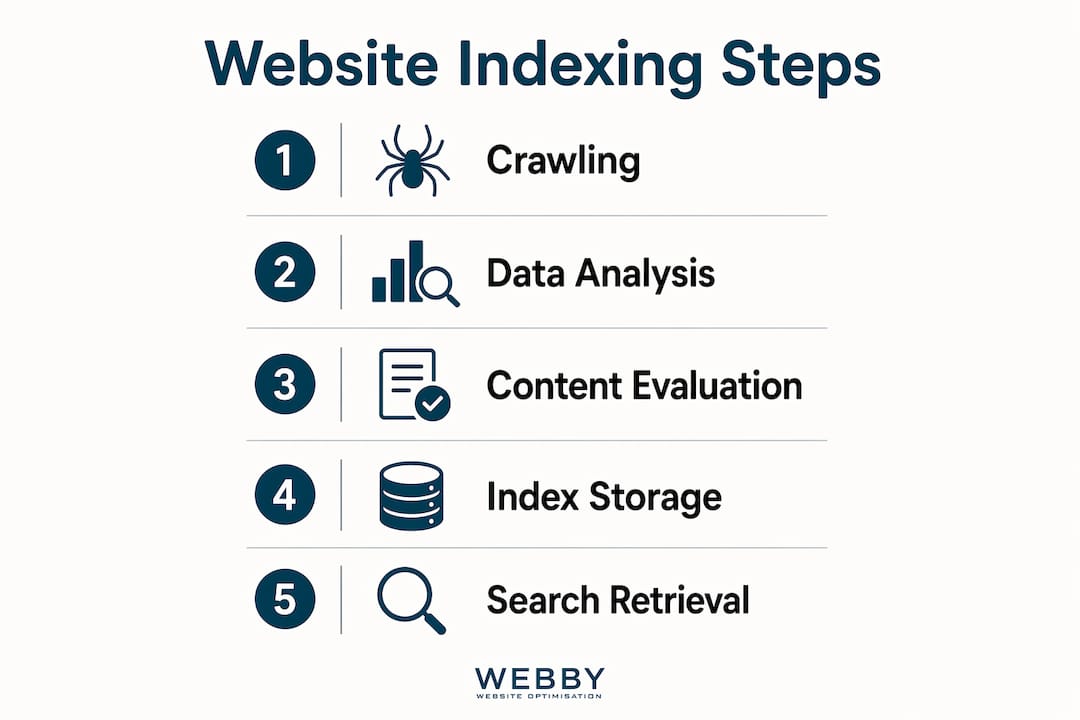
The search engine indexing process follows a clear pipeline: crawling, rendering, evaluating, and storing.
- Crawling. Googlebot discovers your pages by following links from other pages, reading your XML sitemap, or both. It requests the raw HTML of each page it finds.
- Rendering. Google executes JavaScript on the page to see the fully loaded version. This step is critical because content hidden behind JavaScript may be invisible to the crawler without rendering.
- Evaluating. Google assesses the page’s content quality, uniqueness, metadata, canonical tags, HTTP status codes, and structured data. Pages that fail this evaluation get excluded.
- Storing. Pages that pass evaluation get added to Google’s index database. Indexing speed varies from hours to weeks depending on your site’s authority and how frequently Googlebot visits.
Once a page is stored, Google can return it as a result in milliseconds when a user searches a relevant query. That speed is only possible because the work of analysis happened in advance.
Pro Tip: A page can be crawled and still never indexed. If Google visits your page but finds thin content, duplicate text, or a soft “noindex” signal, it will skip storage entirely. Check your Google Search Console coverage report regularly to catch these silent exclusions.
For WordPress site owners, WordPress SEO optimization covers the specific plugin settings and technical configurations that affect how Google crawls and indexes your site.
What factors affect whether your pages get indexed?
Indexability depends on both technical signals and content quality. Getting both right is what separates sites that rank from sites that sit invisible.
Technical factors
| Factor | Effect on crawlability | Effect on indexability |
|---|---|---|
| XML sitemap | Helps bots discover pages faster | Does not guarantee indexing |
| Internal linking | Passes link equity to pages | Signals page importance to Google |
| robots.txt | Can block bots from visiting | Blocked pages cannot be indexed |
| Meta robots “noindex” | No effect on crawling | Directly prevents indexing |
| Canonical tags | No direct effect | Tells Google which version to index |
| JavaScript rendering | Bots may miss JS-loaded content | Hidden content may not be indexed |
XML sitemaps assist crawler discovery but do not guarantee indexing. Many business owners submit a sitemap and assume the job is done. It is not.
Content quality factors
Google’s quality systems exclude crawled pages deemed low value. Thin pages, duplicate content, and pages with no clear purpose all risk exclusion. Poor indexing management with large volumes of duplicate pages can suppress valuable pages’ rankings across your entire site, not just the duplicates themselves.
Index bloat is a real risk. A site with 500 pages where only 100 provide genuine value forces Google to spread its crawl budget across 400 low-quality pages. That dilutes the signal for your best content.
Pro Tip: Monitor your index coverage report in Google Search Console at least monthly. Filter for “Excluded” pages and investigate the reason codes. “Crawled, currently not indexed” is the most common silent killer of good content.
The 2026 SEO indexation guide covers how Google’s quality evaluation has tightened in recent algorithm updates, making content quality more decisive than ever.
How to improve website indexing for your business site
Getting more of your best pages indexed requires deliberate technical and content decisions. These strategies apply whether you run a five-page service site or a 200-page content hub.
- Build a focused XML sitemap. Include only the pages you want indexed. Exclude thank-you pages, login pages, filtered category URLs, and any page with a noindex tag. A clean sitemap signals to Google which pages deserve attention.
- Strengthen your internal linking structure. Every priority page should receive at least one internal link from a high-traffic or high-authority page on your site. Orphan pages, those with no internal links pointing to them, rarely get indexed. A well-planned site structure for SEO distributes crawl equity to the pages that matter most.
- Audit and apply meta robots tags correctly. Pages you want indexed must not carry a “noindex” directive. Check your CMS settings, plugin configurations, and individual page templates. A single misconfigured setting can noindex an entire category of pages.
- Consolidate duplicate content with canonical tags. If your site generates multiple URLs for the same content, such as filtered product pages or paginated archives, use canonical tags to point Google to the preferred version.
- Remove or noindex low-value pages. Old blog posts with no traffic, thin service pages, and auto-generated tag archives all consume crawl budget without contributing rankings. Either improve them or exclude them from the index. A smaller, well-indexed site with high-value pages typically outperforms larger sites with many poorly indexed pages.
- Fix JavaScript rendering issues. If your site relies heavily on JavaScript frameworks, test how Google sees your pages using the URL Inspection tool in Google Search Console. JavaScript rendering issues can prevent crawlers from seeing real content, blocking correct indexing even when your sitemap is perfect.
For small business owners new to these concepts, SEO for small business owners provides a practical starting point before diving into technical configurations.
How to monitor and troubleshoot indexing issues
Indexing is ongoing maintenance, not a one-time setup. Sites change constantly, and new issues appear with every content update, redesign, or plugin change.
- Open Google Search Console and check the Index Coverage report. This report shows how many pages are indexed, how many are excluded, and why. Review it monthly at minimum.
- Investigate “Excluded” status codes. Common reasons include “Noindex tag detected,” “Duplicate without user-selected canonical,” “Crawled, currently not indexed,” and “Blocked by robots.txt.” Each reason requires a different fix.
- Request indexing for priority pages. Use the URL Inspection tool to submit individual URLs for indexing after you publish new content or fix a previously excluded page. This speeds up the process for high-priority pages.
- Track the ratio of indexed pages to total pages. Monitoring the ratio of indexed to actual content pages is a critical SEO health metric. If you have 300 pages but only 80 are indexed, that gap signals a serious quality or technical problem.
- Recheck after every major site change. A theme update, a new plugin, or a URL restructure can accidentally introduce noindex directives or break internal linking. Regular audits using Google Search Console’s index coverage reports catch these issues before they damage your rankings.
Understanding technical SEO principles gives you the framework to interpret these reports and prioritize fixes by their impact on visibility.
Key Takeaways
Website indexing is the foundation of search visibility. Every ranking, every click, and every lead from organic search depends on Google first deciding to store your page in its index.
| Point | Details |
|---|---|
| Indexing precedes ranking | A page must be indexed before it can rank; crawling alone does not make a page visible. |
| Technical signals matter | Meta robots tags, canonical links, and JavaScript rendering all determine whether a page gets indexed. |
| Quality controls indexability | Thin, duplicate, or low-value pages are excluded from the index and can drag down your entire site. |
| Index health needs monitoring | Use Google Search Console’s coverage report monthly to catch silent exclusions early. |
| Fewer, better pages win | A focused index of high-value pages outperforms a bloated site with hundreds of low-quality URLs. |
Why indexing is the SEO problem most businesses never see coming
Most business owners I work with come in focused on keywords and content. They want to know why their blog posts are not ranking. The real answer, more often than not, is that those posts are not indexed at all.
The confusion between crawling and indexing is the most expensive misunderstanding in SEO. A site can be perfectly crawlable and still have half its pages excluded from Google’s index. I have audited sites where entire service categories were accidentally noindexed by a plugin setting the developer never noticed. The business had been publishing content for two years into a void.
What I have learned from working with local service businesses is that index quality beats index quantity every time. A plumber in Fremantle does not need 400 indexed pages. They need 30 well-structured, genuinely useful pages that Google trusts enough to rank. The moment you start treating your index as a curated asset rather than a dumping ground for every page you have ever published, your rankings respond.
The other shift I push for is treating indexing as a maintenance task, not a launch task. Most businesses set up their site, submit a sitemap, and never look at their coverage report again. Google’s quality evaluation changes. Your site changes. Pages that were indexed last year may be excluded today. Proactive index management is what separates businesses that hold their rankings from those that wonder why traffic quietly dropped six months ago.
— Steve Doig
How Webby Website Optimisation helps you get indexed and found
Getting your pages indexed correctly requires technical precision and a clear content strategy working together.

Webby Website Optimisation specializes in website design and development built with indexability at its core. Every site we build for Perth service businesses includes proper sitemap configuration, internal linking architecture, canonical tag setup, and meta robots validation from day one. We also run technical SEO audits that identify exactly which pages are excluded from Google’s index and why. If your site has an indexing problem, we find it and fix it. Contact Webby Website Optimisation for a free site audit and get a clear picture of where your pages stand in Google’s index.
FAQ
What is the difference between crawling and indexing?
Crawling is when Google’s bot visits your pages to discover content. Indexing is the separate decision to store that content in Google’s database so it can appear in search results.
Why would Google crawl a page but not index it?
Google may crawl a page but not index it if the content is thin, duplicate, or low value. A noindex meta tag or a canonical tag pointing to another URL also prevents indexing.
How long does website indexing take?
Indexing speed varies from hours to weeks depending on your site’s authority and how frequently Googlebot visits. New sites with low authority typically wait longer than established sites.
Does submitting a sitemap guarantee indexing?
No. XML sitemaps assist crawler discovery but do not guarantee indexing. Google still evaluates each page’s quality and technical signals before deciding to store it.
How do I check which pages are indexed?
Use the Index Coverage report in Google Search Console. It shows which pages are indexed, which are excluded, and the specific reason for each exclusion.