

Start with a 3-month SME content calendar in a Google Sheet using these six fields: Title, Publish Date, Channel, Format, Owner, and Status. That’s the minimum viable setup. You can be publishing your first planned piece within a week.
Here’s the fastest path to get running:
- Open a new Google Sheet and label six columns: Title, Publish Date, Channel, Format, Owner, Status
- List your top dozen or so content ideas (start with the common questions your customers ask most often)
- Assign a publish date and an owner to every row before you close the tab
- Set Status to one of four values: Idea, In Progress, Review, Published
- Schedule a 15-minute weekly check-in to update the sheet and flag anything slipping
- Copy the starter template in Section 6 below and paste it directly into your sheet
Google Sheets works for teams of one to three. When you need richer views, linked databases, or more than one person editing simultaneously, move to Notion. Both are free to start.
Key Takeaways
A content marketing calendar for SMEs works when it’s built around a specific business goal, maintained with a consistent review cadence, and kept simple enough that a small team will actually use it.
| Point | Details |
|---|---|
| Start with six fields | Title, Publish Date, Channel, Format, Owner, and Status are the minimum viable calendar. |
| Plan three months out | A 3-month horizon gives small teams enough runway to see compounding results before judging effectiveness. |
| Assign owners to every item | A calendar row without a named owner is a task that will not get done. |
| Track one or two KPIs | Leads, email signups, or booking requests tied to content are the metrics that connect publishing to revenue. |
| Webby Website Optimisation | Offers calendar audit and setup services for service-based SMEs, including template build, workflow documentation, and a handover session. |
Table of Contents
- Why a content calendar is business infrastructure, not busywork
- Editorial calendar vs. content calendar: what to plan at each level
- Step-by-step: build an SME content marketing calendar
- Which tools fit your team size and complexity?
- Your copy-ready starter template
- How to maintain and scale the calendar
- Common mistakes and a launch checklist
- What actually works for service-based SMEs
- Webby Website Optimisation can set up your content calendar
- Sources
Why a content calendar is business infrastructure, not busywork
Most small business owners treat content as something they do when they have time. A calendar flips that. It turns content from a reactive task into a scheduled business activity with predictable outputs and measurable results.
The concrete benefits show up fast. Fewer last-minute posts means less scrambling and better quality. A shared calendar eliminates version conflicts when two people are working on the same campaign. Planned content lets you coordinate a blog post, a social series, and an email in the same week instead of publishing them randomly across three months. And when you can see what went out and when, tracking which content actually drove leads becomes straightforward rather than guesswork.
Operationally, the gains are real:
- Consistent publishing cadence (even one piece per week compounds over a quarter)
- Repurposing built into the plan, not bolted on after the fact
- Predictable workloads so freelancers and contractors can be briefed in advance
- Clear ownership so nothing falls through the cracks between team members
- A visible link between content activity and business outcomes like demo requests, bookings, or email signups
The content calendar best practices that matter most for small teams are the ones that reduce friction, not add it. Which is why the governance model in Section 7 is deliberately lean.
Pro Tip: Add one KPI column to your calendar, right next to the Status column. After each piece publishes, log the single metric that matters most for that content type: leads generated, email signups, or page views. A 15-minute Monday sync to update this column is the habit that separates teams who know their content is working from teams who just hope it is.
A documented content marketing strategy that includes governance, measurement, and resource planning consistently produces better outcomes than an undocumented one. The calendar is where that strategy becomes a daily operating system.
Editorial calendar vs. content calendar: what to plan at each level
These two terms get used interchangeably, but they operate at different altitudes. Mixing them up leads to either over-complicated planning or a calendar that has no strategic logic behind it.
An editorial calendar handles the big picture: quarterly themes, content pillars, campaign windows, and seasonal priorities. Think of it as the map. A content calendar handles individual posts, their publish dates, assigned owners, formats, and approval status. That’s the turn-by-turn navigation. Using both together lets you plan thematic coverage at the strategy level while managing production steps at the execution level.
Here’s how the layers connect in practice:
- Quarterly theme (editorial level): “Build trust with local service buyers” for Q3
- Content pillar (editorial level): “Client results and case studies”
- Anchor content (calendar level): 1,200-word blog post published Week 1 of the month
- Support content (calendar level): Three LinkedIn posts pulling quotes from the blog, one email newsletter summary, one short FAQ page
For a one- or two-person SME, combining both layers into a single spreadsheet is usually the right call. You get the strategic view without managing two separate documents. Once your team grows past three or four people, or you’re running simultaneous campaigns across multiple channels, separating them makes coordination easier.
Treating content as Anchor, Support, or Signal is a practical way to categorize items in your calendar and plan repurposing from the start rather than improvising it later.
Step-by-step: build an SME content marketing calendar
This process works for a solo operator or a team of five. Follow the steps in order. Skipping Step 1 is the most common reason a calendar gets abandoned after six weeks.
-
Define your business goal and 1–3 KPIs. Pick one primary goal: more inbound leads, more demo requests, more email subscribers. Then choose the KPIs that measure it directly. Vague goals (“get more traffic”) produce vague content. Specific goals (“generate 10 qualified consultation requests per month from organic search”) tell you exactly what to write and what to measure.
-
Identify your audience segments and 3–5 content pillars. Start with the 15–20 questions your customers ask before they buy. Group them into themes. Those themes become your pillars. A buyer persona workflow helps you map each pillar to a specific segment so content stays relevant rather than generic. Three to five pillars are enough to start for a small team.
-
Choose formats and channels that match your capacity. Pick one anchor format (a blog post, a podcast episode, a video) and two or three support formats (social posts, emails, short clips). The anchor does the heavy lifting; the support pieces distribute it. Don’t plan for six channels if you have one person producing content.
-
Set a realistic cadence and a 3-month horizon. Plan three months out at the theme and pillar level. Schedule individual pieces week by week or biweekly. One anchor piece per week is ambitious for most SMEs; one per two weeks is sustainable. A three-month runway is the minimum before you can judge whether the cadence is working.
-
Build your template fields and workflow. Every row in your calendar needs: Title, Publish Date, Status, Owner, Channel, Format, CTA, Target Persona, Keywords, Assets (links to drafts/images), and Approval. The HBS Online content strategy guide confirms these fields are the foundation of any multi-person content workflow. You don’t need all of them on day one, but you need Publish Date, Owner, and Status from the start.
-
Assign roles, approval steps, and reminders. Map every piece through a four-stage workflow: Draft → Edit → Approve → Publish → Promote. Name a person for each stage. In a two-person team, one person may hold three of those roles. That’s fine. What matters is that every piece has a named owner at every stage, not that the roles are distributed.
-
Schedule your first 12–16 items, add buffer time, and publish Month 1. Fill the first month completely before you start. Leave some buffer in your weekly capacity for edits, delays, and reactive content. Then publish. A production timeline built into the calendar reduces the manual back-and-forth that kills momentum in small teams.
Before you launch, check these boxes:
- Every item in Month 1 has a publish date and a named owner
- Status labels are defined and consistent
- At least one KPI is tracked per content type
- Approval steps are documented, even if it’s just “Owner self-approves”
- The calendar is shared with everyone who touches content
Which tools fit your team size and complexity?
The right tool is the one your team will actually update. Complexity is the enemy of adoption for small teams. Start simple and upgrade only when the tool becomes the bottleneck.
| Dimension | Google Sheets | Notion | Trello / Airtable |
|---|---|---|---|
| Best team size | 1–3 people | 3–6 people | 4+ or multi-campaign |
| Setup time | Under 30 minutes | 1–2 hours | 2–4 hours |
| Collaboration | Basic (comments, sharing) | Strong (inline editing, mentions) | Strong (boards, assignments) |
| Social tool integrations | Manual | Limited native; Zapier | Airtable has native integrations |
| Calendar view | Via Google Calendar sync | Built-in | Built-in (Airtable) |
| Cost | Free | Free tier available | Free tier; paid for advanced |
| Ease of maintenance | High | Medium | Medium |
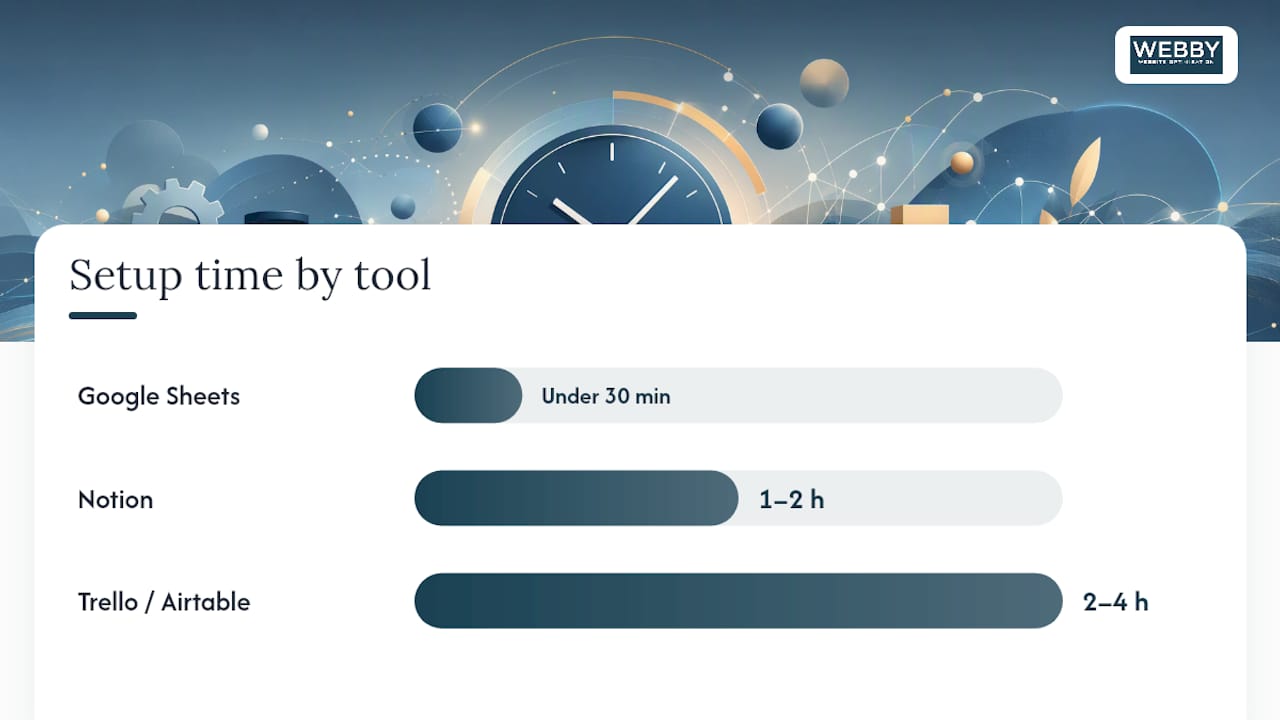
For SMBs, Google Sheets or Excel are practical starting points because they require no onboarding and every team member already knows how to use them. The tradeoff is that relational data (linking a blog post to its social derivatives, for example) gets messy fast.
Notion earns its place when you want linked databases, multiple views of the same data (calendar, table, kanban), and richer collaboration without paying for a dedicated project management tool. Small teams can start with Google Sheets or Trello and migrate to Notion or Airtable when they need those relational views.
Trello works well for visual thinkers who want a kanban board. Airtable is the step up when you need spreadsheet logic plus relational fields plus calendar views in one place.
The practical recommendation: start in Google Sheets. Migrate to Notion when you have more than three people editing the calendar or more than two simultaneous campaigns running. Move to Airtable or a dedicated content tool only when Notion’s limitations become a daily friction point.
For a step-by-step content calendar planning guide that pairs well with any of these tools, the partner resource How to plan a content calendar for marketing success walks through the tactical setup in detail.
Your copy-ready starter template
Paste this structure directly into a new Google Sheet. Each column below maps to one field in your calendar.
| Column | Description | Example Value |
|---|---|---|
| Title / Topic | Working title of the piece | “5 Signs Your Website Is Losing Leads” |
| Publish Date | Target live date | March 12, 2026 |
| Channel | Where it publishes | Blog / LinkedIn / Email |
| Format | Content type | Long-form post / Carousel / Newsletter |
| Owner | Person responsible for delivery | Sarah M. |
| Status | Current stage | In Progress |
| CTA | Desired reader action | “Book a free audit” |
| Target Persona | Audience segment this serves | Local service business owner |
| Keywords | Primary SEO keyword | “website losing leads” |
| Assets | Link to draft, images, brief | [Google Doc link] |
| Approval | Who signs off and by when | Manager / March 10 |
Two example rows showing a piece moving through the workflow:
Row 1 (in production): “5 Signs Your Website Is Losing Leads” | March 12, 2026 | Blog | Long-form post | Sarah M. | In Progress | Book a free audit | Local service owner | website losing leads | [Draft link] | Manager by March 10
Row 2 (published, KPI logged): “How to Get More Google Reviews” | February 26, 2026 | Blog + Email | Post + Newsletter | Sarah M. | Published | Request a review template | Local service owner | get more Google reviews | [Published URL] | Self-approved
Setup steps:
- Open a new Google Sheet and name it “Content Calendar Q1 2026”
- Paste the column headers above into Row 1; bold them
- Freeze Row 1 (View → Freeze → 1 row) so headers stay visible as you scroll
- Add data validation dropdowns to the Status column: Idea, In Progress, Review, Published
- Add dropdowns to the Channel column matching your active channels
- Fill in your first 12–16 rows before you share the file
Pro Tip: Use dropdowns for Status, Channel, and Format from day one. When a new hire or freelancer joins, they inherit clean, consistent data instead of a column full of variations like “blog post,” “Blog,” “BP,” and “written piece.” Standardized naming is what keeps a calendar usable six months after you build it.
Dropdowns and standardized naming conventions are the single most underrated maintenance feature in any content calendar template.
How to maintain and scale the calendar
A calendar that nobody reviews is just a spreadsheet. Governance is what turns it into a living system.
Roles for a small team (one person can hold multiple):
- Owner / Strategist: Sets quarterly themes, approves pillar changes, owns KPI reporting
- Editor: Reviews drafts for quality, consistency, and SEO alignment before publish
- Publisher: Schedules and posts content, updates Status to Published, logs the KPI result
Review cadence:
- Weekly (15 minutes): Update Status on all active items, flag anything at risk of missing its publish date, confirm the next two weeks are fully assigned
- Monthly (60 minutes): Review KPI results for the previous month, identify the top-performing piece, decide what to repurpose or update, confirm the next month’s items are ready to enter production
- Quarterly (2–3 hours): Refresh cornerstone content, review channel strategy, update content pillars if audience needs have shifted, and schedule SEO and AEO content refreshes as recurring calendar tasks
Metrics to track (keep this list short):
Priority KPIs tied directly to business outcomes:
- Leads or consultation requests attributed to content
- Email list signups from content-driven CTAs
- Demo or booking requests from organic traffic
Secondary metrics (useful context, not the headline):
- Organic page views per piece
- Social engagement rate
- Email open and click rates
A documented content marketing strategy that includes governance and measurement planning consistently outperforms one that tracks everything and acts on nothing. Pick two or three KPIs and measure them every month without exception.
For deeper small business content strategy guidance on aligning your calendar to business goals, the Webby resource linked here covers the strategic layer in detail.
Common mistakes and a launch checklist
The most predictable failure mode for an SME content calendar is an over-ambitious cadence set in week one and abandoned by week five. The second most common is a calendar with no named owners, which means every piece is everyone’s responsibility and therefore nobody’s.
Common mistakes to avoid:
- Planning daily content when your team can realistically produce two pieces per week
- Leaving the Owner column blank (“the team will handle it”)
- No publish dates, just vague quarters or months
- Inconsistent naming in the Status or Channel columns (see the Pro Tip in Section 6)
- Treating repurposing as optional rather than building it into every anchor piece from the start
- Ignoring KPI results for the first three months because “it’s too early to tell”
Red flags in your first month:
- More than two items slip their publish date in Week 1
- The Status column hasn’t been updated in five or more days
- No one can name the KPI the calendar is supposed to move
- The calendar has items but no owner names
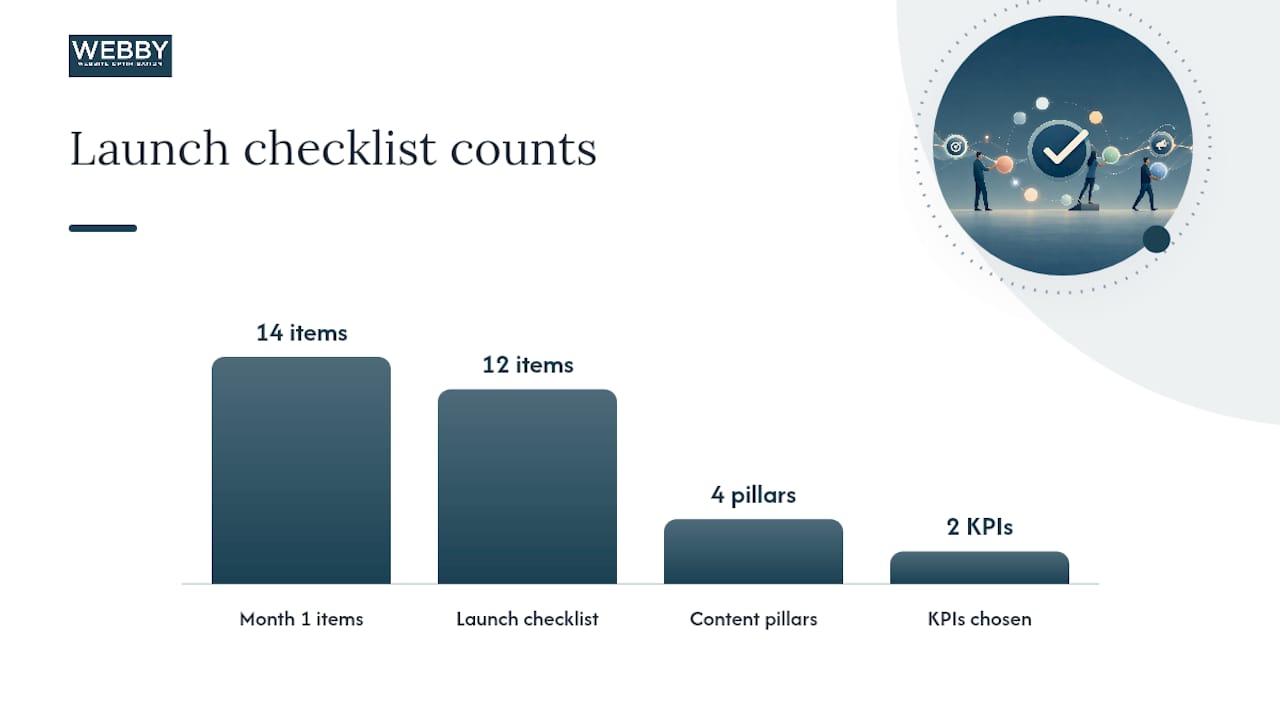
Launch checklist (12 items):
- Business goal defined and written into the calendar header
- 1–3 KPIs chosen and logged in a dedicated column
- 3–5 content pillars documented
- Channels selected and matched to team capacity
- Cadence set (weekly, biweekly, or monthly anchor)
- Template fields complete (minimum: Title, Date, Owner, Status, Channel)
- Status dropdowns added and labeled
- Month 1 fully populated with 12–16 items
- Every item has a named owner and a publish date
- Approval workflow documented (even a one-line note)
- Weekly sync scheduled in the team calendar
- KPI tracking column added and explained to the team
For a broader content marketing campaign checklist that covers the execution layer beyond the calendar itself, the Webby guide linked here is a practical companion.
What actually works for service-based SMEs
The businesses that get the most from a content calendar are rarely the ones with the most sophisticated tools. They’re the ones that pick a cadence they can hold, assign real owners, and review results monthly without skipping it.
One pattern that shows up repeatedly with service-oriented small businesses: the teams that start with a single anchor piece per week, turn that piece into three or four support assets, and track one KPI consistently outperform teams that publish more but measure nothing. Turning one long-form anchor piece into multiple support assets is the repurposing habit that stretches a small team’s output without burning people out.
The other thing worth saying plainly: a content calendar is not a content strategy. The calendar is where the strategy gets executed. If you build a calendar without first defining what business outcome you’re trying to move, you’ll produce consistent content that consistently fails to generate leads. Get the goal right first, then build the calendar around it.
When the calendar starts to feel like it’s running the business instead of serving it, that’s usually a sign the cadence is too aggressive or the pillars have drifted from what buyers actually care about. A quarterly review fixes both.
If you’re six months in and the calendar is working but you don’t have the internal capacity to maintain it, that’s the right moment to bring in outside help. Not before.
Webby Website Optimisation can set up your content calendar
Building a content calendar from scratch takes time most SME owners don’t have. Webby Website Optimisation offers a practical alternative: a calendar audit and setup service that gets your editorial infrastructure built correctly from day one, so you’re not rebuilding it three months later.

The service covers a template built in your chosen tool (Google Sheets or Notion), your first month of content pre-populated with pillar-aligned topics, a documented workflow with roles and approval steps, and a one-hour handover session so your team can maintain it independently. It’s designed for service-based businesses that need a working system, not a workshop.
If you also need a website that can actually convert the traffic your content generates, the website design and development service at Webby pairs directly with the calendar setup. Content without a converting website is effort without a destination.
To request a calendar audit or setup consultation, contact Webby Website Optimisation directly at Webby.
Sources
- Content strategy — Harvard Business School Online (HBS Online) blog
- Content marketing plan — HubSpot blog
- Developing a content marketing strategy — Content Marketing Institute
- Monday
- Why every SME needs a content calendar — Plentext blog
Recommended
- How to Build an Awesome Small Business Content Marketing Strategy – Webby Website Optimisation
- 11 Steps for a Successful Small Business Content Marketing Campaign – Webby Website Optimisation
- 11 Steps for a Successful Small Business Content Marketing Campaign – Webby Website Optimisation
- Content Marketing Strategy for Small Business Owners – Webby Website Optimisation
If this post raised some questions feel free to ask me a question