
Use an invisible, layered spam stack: a honeypot field, a JS token with a time-to-submit check, and Akismet or CleanTalk running behind it. Add Cloudflare Turnstile or reCAPTCHA v3 only if that combination still lets spam through. This order matters because it stops bots before they ever see a challenge, keeps friction near zero for real visitors, and gives you logs to catch anything that slips past.
TL;DR:
- Combining invisible layers such as honeypots, JavaScript timing checks, and spam database filters blocks over 90 percent of WordPress contact form spam without adding user friction.
- Hiding honeypots with off-screen positioning and accessibility attributes avoids detection by sophisticated scrapers, maintaining effectiveness without excluding screen-reader users.
- Placing local, instant checks before third-party API calls like Akismet saves costs and reduces latency, ensuring only suspicious submissions reach external filters.
- CAPTCHAs, especially reCAPTCHA v2, should only be added as a last resort after invisible layers fail to contain spam, to prevent unnecessary user friction.
- Regularly reviewing flagged submissions in quarantine logs and testing filters with known spam strings ensures ongoing accuracy and prevents false positives from blocking genuine leads.
Table of Contents
- Fixing Contact Form Spam in WordPress: The 10-Minute Checklist
- How Do Honeypots and Timing Checks Stop Bots Without Annoying Humans?
- What Do Akismet, CleanTalk, and CF7 AntiSpam Actually Block?
- Should You Add Cloudflare Turnstile or reCAPTCHA to Your Form?
- Do You Need Server-Side Protections Like Rate Limiting and a WAF?
- Setting Up Anti-Spam in Contact Form 7, WPForms, and Gravity Forms
- How Do You Catch False Positives Before They Cost You a Lead?
- Building Your Contact Form Spam Stack Step by Step
- Webby’s Operational Checklist for Client Spam Protection
- Why Blocking Spam and Protecting Leads Are the Same Problem
- Get Your Contact Forms Audited and Protected
- Sources
Fixing Contact Form Spam in WordPress: The 10-Minute Checklist
Most WordPress sites bleed spam because they jump straight to CAPTCHA and skip the cheap stuff that actually does the heavy lifting.
- Add a honeypot field. If your form plugin has a built-in honeypot toggle, flip it on. If not, install AntiSpam for Contact Form 7 or a similar plugin. A honeypot alone blocks roughly 85 to 95 percent of generic bot traffic with zero impact on real visitors.
- Turn on Akismet or CleanTalk. Both plugins scan submission content against a spam database in the background. Akismet ships free with most WordPress installs and connects directly to Contact Form 7 and WPForms in a couple of clicks.
- Add a JS token plus a time-to-submit check. Drop a hidden field that records when the page loaded, then reject any submission that arrives faster than 1.5 to 3 seconds. Bots fill and submit forms almost instantly; humans don’t.
- Turn on form logging or quarantine. Whatever gets flagged as spam should land somewhere you can review, not vanish. Contact Form 7 users get this through the Flamingo plugin; WPForms has quarantine views built into its entries screen.
- If spam keeps getting through, add Cloudflare Turnstile or reCAPTCHA v3. Treat these as a tie-breaker, not your first line of defense. Practitioners generally recommend starting with honeypots and rate limiting, then reaching for CAPTCHA only when analytics show a more sophisticated attack getting through.
Run through this list once and check your spam folder or quarantine view a week later. You’ll likely see the volume drop by an order of magnitude before you’ve touched a single third-party script. That’s the whole point of stacking cheap, invisible checks first: you solve most of the problem without asking a single legitimate visitor to prove they’re not a robot.
Pro Tip: Test each layer with a known spam string like “viagra-test-123” in a form field. If Akismet or CleanTalk doesn’t flag it, the integration isn’t wired correctly, and you’ll find out now instead of after three weeks of lost leads.
How Do Honeypots and Timing Checks Stop Bots Without Annoying Humans?
A honeypot works on a simple trick: you add a form field that’s invisible to human visitors but visible to any bot scraping your HTML. Bots fill in every field they find, including the one no person can see. If that field contains anything on submission, you know it’s spam and can reject it silently.
The implementation detail that trips people up is how you hide the field. A lot of tutorials tell you to use display:none in CSS, but that’s a mistake. Sophisticated scrapers now check computed styles and skip fields that are hidden that way, which defeats the whole purpose. The more durable approach hides the field visually while keeping it in the document flow:
- Position the field off-screen with absolute positioning and a large negative offset, rather than hiding it with
display:none. - Add
aria-hidden="true"so screen readers skip over it entirely. - Set
tabindex="-1"so keyboard users never accidentally tab into it. - Never label the field anything predictable like “leave blank” or “spam check,” since scrapers increasingly look for those labels.
Skipping the accessibility attributes is how well-meaning site owners accidentally lock out screen-reader users. The field needs to stay technically present in the DOM for bots to find, while being functionally invisible to anyone using assistive technology. Get that balance wrong and you either lose the honeypot’s effectiveness or you lose real visitors.
The second invisible layer is a JS token combined with a timing check. When your page loads, a small script writes a timestamp into a hidden field. When the form submits, your server compares that timestamp against the current time. A submission that arrives in under a second almost certainly came from a script that never rendered the page at all, let alone read it.
Most sites do fine with a 1.5 to 3 second floor, though the right number depends on the form. A short contact form with two fields can reasonably reject anything under 1.5 seconds. A longer application form with several fields should allow more time since real people genuinely need it to read and fill everything in. Setting the floor too aggressively on a longer form risks rejecting real, careful submitters right alongside the bots.
One detail matters more than people realize: run the honeypot and timing checks before you make any call to a third-party spam API like Akismet. Rejecting an obvious bot with a local, instant check costs you nothing. Sending that same submission to a third-party service first burns an API call and adds latency for a submission you were always going to throw away. Cheap local checks go first; anything that costs money or time goes last.
What Do Akismet, CleanTalk, and CF7 AntiSpam Actually Block?
Honeypots and timing checks catch dumb bots. Content-analysis filters catch the smarter stuff: submissions that pass every technical check but are still obviously spam once you read the actual message.
Akismet is the plugin most WordPress site owners already have installed, since it ships with the default install and just needs an API key to activate. It runs each submission through a machine-learning model trained on patterns from hundreds of billions of spam items collected across millions of WordPress sites, and it flags matches without adding any friction to the form itself. For Contact Form 7, you connect Akismet through the Flamingo integration, which stores every submission (spam or not) so you can review what got caught. WPForms has a native Akismet toggle under its anti-spam settings that you can turn on in under a minute.
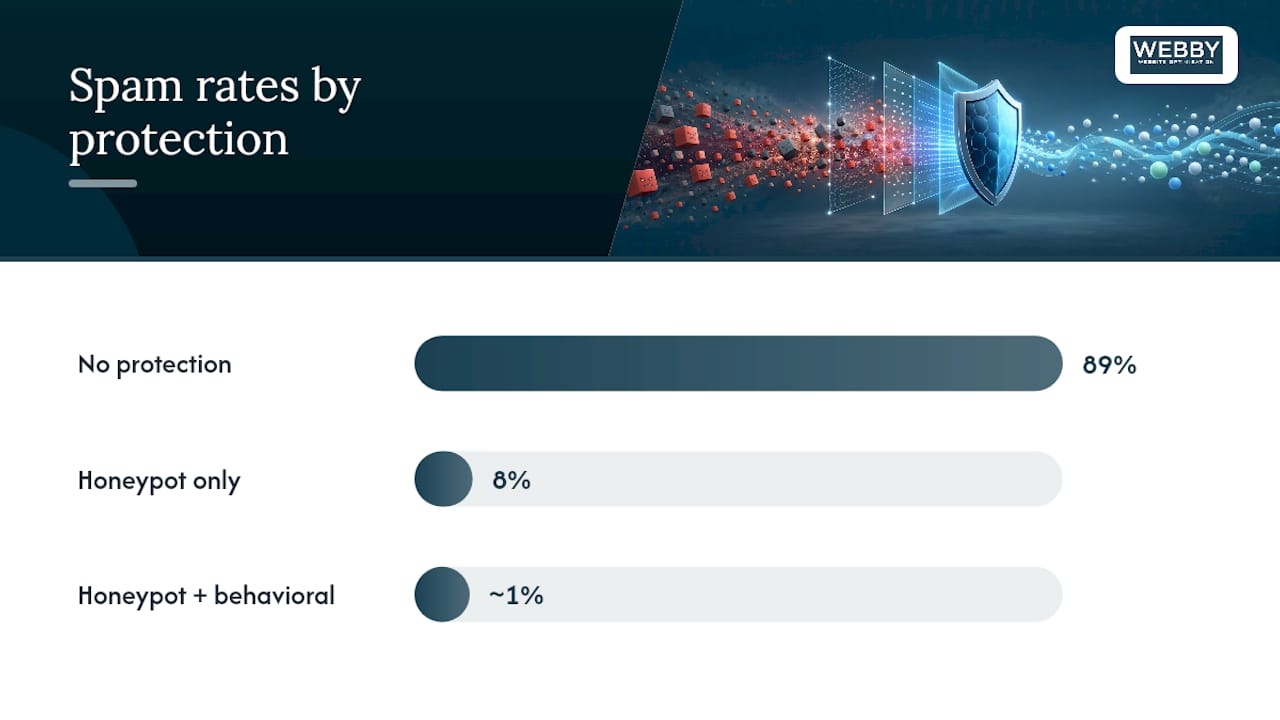
Splitforms ran a 90-day split test comparing raw form performance to protected versions. A honeypot alone cut a form’s spam rate from 89% down to 8%. Adding a behavioral layer on top of the honeypot pushed that down to roughly 1%, with only a small measurable dip in conversion.
CleanTalk is worth considering instead of, or alongside, Akismet if you’re running several sites and want a single dashboard for spam stats across all of them. It also checks submitting IP addresses against a shared blocklist that updates continuously, which catches known spam networks that content analysis alone might miss. AntiSpam for Contact Form 7 (cf7-antispam) is the lighter option: a free, dedicated plugin that adds honeypot fields and basic content filtering specifically for CF7 users who don’t want to manage a separate API key.
A few things to keep in mind as you pick between them:
- Akismet is free for personal sites and low-volume small business use, with paid tiers for higher volume or commercial use.
- CleanTalk charges a small annual fee per domain but includes IP-level blocking that Akismet doesn’t offer.
- cf7-antispam costs nothing but only covers Contact Form 7, so it won’t help if you’re running WPForms or Gravity Forms elsewhere on the site.
- All three log flagged submissions somewhere reviewable rather than deleting them outright, which matters for catching false positives.
Whatever you use, don’t let “spam” mean “deleted forever.” Every one of these tools should route flagged submissions to a quarantine view, not the trash. Review that queue at least weekly early on. A form quality issue here directly affects lead flow, which is exactly the kind of thing worth tracking alongside your broader conversion optimization work. On the privacy side, both Akismet and CleanTalk send submission content to their own servers for analysis, so if you’re handling sensitive information through a form, that’s worth disclosing in your privacy policy.
Should You Add Cloudflare Turnstile or reCAPTCHA to Your Form?
Add one of these only after the invisible layers are running and you’re still seeing spam get through. That’s the honest answer, and it runs against a lot of default advice that treats CAPTCHA as step one.
Here’s why the ordering matters. CAPTCHA and CAPTCHA-adjacent tools are good at stopping unsophisticated scripted bots, but they’re not the wall people think they are. Manual solver farms exist specifically to defeat these challenges, and they’ll do it for an attacker for $1 to $3 per 1,000 puzzles solved. Against a determined spammer running a real campaign, CAPTCHA alone is a speed bump, not a wall. Against the generic scripted bots that make up most of your spam traffic, a honeypot already does the job for free and without loading a third-party script on every page.
That said, these tools do have a real role as a secondary layer once the cheap checks aren’t enough on their own:
- Cloudflare Turnstile runs invisibly in most cases, without asking users to click anything, and doesn’t rely on tracking cookies the way older CAPTCHA products did. It’s a solid default if privacy is a concern and you’re already on Cloudflare.
- reCAPTCHA v3 scores each visitor’s behavior in the background and returns a risk score you act on server-side, so most legitimate users never see a challenge at all.
- reCAPTCHA v2 is the checkbox or image-grid version most people recognize, and it’s the most visible, most friction-heavy option on this list. It’s worth avoiding on a form where every extra click costs you a lead.
- hCaptcha functions similarly to reCAPTCHA v2 but markets itself as a more privacy-respecting alternative, since it doesn’t feed data back into Google’s advertising systems.
The mistake to avoid is putting any of these in front of your honeypot and timing checks instead of behind them. If CAPTCHA runs first, you’re loading a third-party script and asking for a network round-trip on every single form view, including the vast majority that a free local check would have caught anyway. That’s wasted site speed for no benefit. Worse, on a high-conversion landing page, a visible challenge is exactly the kind of extra step that makes a hesitant visitor abandon the form altogether. Save the visible friction for when your logs actually justify it.
Do You Need Server-Side Protections Like Rate Limiting and a WAF?
Once the form-level defenses are solid, the next layer lives below the form entirely, on your server. This is where you catch the attackers who are targeting your specific site rather than blasting generic spam at every WordPress form they find.
Start with nonce verification. WordPress has this built in through its wp_nonce_field() and wp_verify_nonce() functions, and it stops a category of attack that honeypots don’t touch: forged POST requests sent directly to your form’s processing URL, skipping your page and its JavaScript entirely. If your form plugin doesn’t already generate and check a nonce, that’s a gap worth closing before anything else on this list.
Rate limiting comes next. If a single IP address submits your form more than a handful of times per minute, that’s not a person; it’s a script. A reasonable starting default is something like 5 submissions per IP per hour for a typical contact form, adjusted up if you’re running a high-traffic support form where genuine repeat submissions happen. Once you hit that limit, return an HTTP 429 status rather than a normal error, which tells well-behaved clients (and some scripts) to back off.
For persistent, sophisticated abuse that clears your rate limits by rotating IPs, IP reputation and a web application firewall pick up where rate limiting stops. Cloudflare’s firewall rules, or your hosting provider’s built-in WAF if you’re on managed WordPress hosting, can block traffic from known bad ranges before it ever reaches PHP.
- Nonce checks reject forged submissions that bypass your form’s JavaScript entirely.
- Rate limits (5 to 10 submissions per IP per hour is a reasonable starting point) catch volume attacks from a single source.
- A WAF or IP reputation list catches attackers who rotate IPs to dodge rate limits.
- Silent rejection, meaning you return a normal 200 OK response while quietly dropping the submission, denies low-sophistication attackers the feedback they’d use to refine their script.
Pro Tip: Silent rejection sounds counterintuitive, but it works because most automated spam scripts adjust their approach based on error responses they receive. A visible “submission blocked” message teaches the bot what to fix. A quiet 200 OK that discards the payload teaches it nothing, which wastes the attacker’s time instead of yours.
Setting Up Anti-Spam in Contact Form 7, WPForms, and Gravity Forms
Each plugin handles this a little differently, and the setup steps matter more than the general theory once you’re actually in the WordPress admin.
- Contact Form 7. Install the free AntiSpam for Contact Form 7 plugin, which adds a honeypot field automatically to every form without you touching the form’s markup. Pair it with the Flamingo plugin, which stores every submission (including ones tagged as spam) so you have a review trail. If you want custom logic beyond what these plugins offer, the
wpcf7_validatehook lets you write your own server-side validation, including a time-to-submit check tied to a hidden timestamp field. - WPForms. The plugin includes a built-in honeypot and a time-to-submit token under its anti-spam settings, both switched on by a checkbox, no extra plugin required. There’s also a native Akismet toggle in the same settings panel, and a Cloudflare Turnstile add-on for accounts on the Pro tier and above, which you’d enable only if the built-in layers aren’t cutting it.
- Gravity Forms. Gravity Forms doesn’t ship a native honeypot the way WPForms does, so you’ll typically add one through a third-party anti-spam add-on from the Gravity Forms marketplace. Its entry log doubles as your quarantine view, letting you filter and review flagged submissions without a separate plugin like Flamingo.
The most common setup mistake across all three plugins is naming a honeypot field something a bot’s scraper would recognize, like hp_field or honeypot. Name it something that looks like a normal form field, such as middle_name or company_website, since spam scripts increasingly skip fields with obvious anti-spam names. The second common mistake is forgetting the aria-hidden and tabindex="-1" attributes when customizing a form’s markup by hand, which can expose the hidden field to screen reader users and defeat the point of hiding it in the first place.
How Do You Catch False Positives Before They Cost You a Lead?
A spam filter that’s too aggressive is its own problem: it quietly deletes a real customer inquiry, and you never find out because nothing tells you it happened. This is why quarantine, not deletion, has to be the default for every layer in your stack.
Set up logging through Flamingo for Contact Form 7 or the native entries screen for WPForms and Gravity Forms, and make sure every flagged submission lands there rather than getting discarded outright. Review that quarantine queue on a set schedule, weekly at first, then monthly once volume settles down. You’re looking for two things: obvious spam that got through (a false negative) and anything that looks like a real inquiry sitting in the spam pile (a false positive).
- Log every flagged submission somewhere reviewable instead of deleting it automatically.
- Review the quarantine queue weekly for the first month, then monthly once your filters stabilize.
- Track your false-positive rate specifically. If real leads keep landing in quarantine, your timing threshold or content filter is tuned too tight.
- Loosen thresholds gradually. Move a timing floor from 3 seconds to 2 seconds rather than dropping it to zero in one step.
- Run a standardized test string like “viagra-test-123” or the Akismet test address through your form periodically to confirm the integration is still catching what it should.
That last point matters more than it sounds. Plugin updates, theme changes, and hosting migrations can quietly break an API connection to Akismet or CleanTalk without throwing any visible error. A standardized test string run through the form every month or so is a five-minute check that confirms your filter is actually still filtering, not just sitting there disconnected while spam piles up unfiltered.
Building Your Contact Form Spam Stack Step by Step
The order below isn’t arbitrary. It runs from free and instant to costly and slow, so you’re never paying (in API calls, load time, or user friction) for something a cheaper check further up the chain could have caught first.

Start at stage one and only move to the next stage once your quarantine logs show spam still getting through at a rate you don’t like. Most small business sites never need to go past stage three. If you’re still seeing spam after stages one through three are running correctly, verify each one is actually active (using the test-string check above) before assuming you need CAPTCHA or a WAF rule. Adding complexity to fix a broken integration is a wasted step; fixing the integration is faster and free.
Webby’s Operational Checklist for Client Spam Protection
Rolling this out for a client site follows the same order, just with a monitoring layer built in from day one. Webby Website Optimisation starts every engagement with an audit: checking whether a honeypot is present, whether Akismet or CleanTalk is actually connected (not just installed), and whether the site’s contact forms are logging anywhere reviewable at all. A surprising number of small business sites have a spam plugin installed and inactive, quietly doing nothing.
From there, implementation follows the layered order above, tuned to the client’s form volume and lead value. A local trades business getting three inquiries a day needs a lighter touch than a firm running a high-volume quote request form. Webby Website Optimisation sets thresholds conservatively at launch, then reviews quarantine logs on a monthly cadence, tracking spam volume caught, false positives found, and any change in genuine lead flow month over month.
Ongoing WordPress maintenance clients get this monitoring folded into their regular reporting, alongside uptime and performance checks. If a client’s site needs a rebuild rather than a patch job, spam controls get built into the new form setup from the start rather than bolted on afterward.
Why Blocking Spam and Protecting Leads Are the Same Problem
The instinct with spam is to treat it as a nuisance to eliminate completely, and that instinct causes more damage than the spam itself usually does. Every additional layer of friction you add, a checkbox, a CAPTCHA image, a delay, is friction a real customer pays too. The goal isn’t zero spam. It’s the lowest spam rate you can hit without a single real inquiry getting caught in the net.
That’s why I’d push back on any advice that leads with CAPTCHA. It feels like the obvious answer because it’s the most visible one, but visibility and effectiveness aren’t the same thing, and a determined spammer can route around it for a few dollars per thousand attempts anyway. The invisible layers do more of the real work, and they do it without asking your visitors to prove anything.
Measure before you add. Measure again after. Adding a CAPTCHA on top of a system that’s already working is friction you didn’t need to add, and small business owners underestimate how much a single lost inquiry costs relative to the mild annoyance of a little spam emails a week.
Get Your Contact Forms Audited and Protected
Webby Website Optimisation is the alternative to guessing whether your spam filters actually work: a real audit of your existing forms, honeypots, and plugin integrations, done once, instead of you piecing together settings across three different plugin dashboards. Local service businesses in particular tend to have contact forms nobody has checked since the site launched years ago.

A free audit covers what’s currently active on your site, what’s silently broken (a disconnected Akismet key is more common than you’d expect), and what layered stack fits your form volume and lead value. If your site needs more than a patch, a full rebuild through WordPress design and development folds spam protection into the form setup from day one, alongside the speed and conversion work most rebuilds need anyway. For a faster turnaround, the website built in a day package includes basic security hardening as part of the build.
Request a free audit and find out exactly what’s catching spam on your site right now, and what isn’t.