

UTM tracking appends short query parameters to a URL so analytics platforms know exactly which campaign, channel, and creative sent a visitor. The immediate next step is simple: build one link using the three required fields, utm_source, utm_medium, and utm_campaign, before you publish anything else this week. Do that consistently and every future report about what’s actually driving traffic gets a lot more honest.
TL;DR:
- Consistently use lowercase and a single separator like hyphens in all UTM parameter names to prevent attribution fragmentation.
- Always verify UTM values match approved lists before publishing, and test links to ensure correct landing pages and parameters.
- Keep UTM parameters in the base URL, not just click IDs, and test on actual devices to avoid data loss from privacy protections.
- Connect UTM data reliably to CRM or marketing automation platforms using hidden fields in forms to attribute leads correctly over time.
- Avoid embedding personally identifiable information in UTMs to comply with privacy laws and maintain straightforward campaign tracking.
Table of Contents
- What Do the UTM Parameters Actually Track?
- How Do You Build a UTM-Tagged Link?
- Why Do UTM Naming Conventions Matter So Much?
- What Platform Quirks Break UTM Attribution?
- What Should You Check Before Publishing a UTM Link?
- How Does UTM Data Feed Your CRM and Marketing Automation Tools?
- Does UTM Tracking Raise Privacy or GDPR Concerns?
- How Do You Compare Campaigns Across Channels With UTMs?
- Webby’s Take on Getting UTM Tracking Right
- Sources
What Do the UTM Parameters Actually Track?
Five original parameters exist, plus a sixth that GA4 users increasingly rely on. Each one answers a different question about where a visitor came from and why, and analytics platforms read every one of them the moment a tagged link gets clicked. UTM parameters work as plain query strings, which means any platform, from GA4 to a marketing automation tool, can parse them the same way.
- utm_source: where the click came from (newsletter, google, facebook).
- utm_medium: the channel type (email, cpc, social, referral).
- utm_campaign: the specific initiative (spring-sale-2026, webinar-launch).
- utm_term: paid search keyword, when relevant.
- utm_content: distinguishes creative variants, like two buttons in the same email.
- utm_id: a GA4-focused field used mainly to join cost data from ad platforms back to campaign performance.
A tagged URL looks like this: https://example.com/landing?utm_source=newsletter&utm_medium=email&utm_content=headerbutton&utm_campaign=spring-sale-2026. In GA4, some of these values populate session-scoped dimensions (which campaign drove this visit), while others populate first_user-scoped dimensions (which campaign drove the person’s very first visit, ever). Mixing these up is why acquisition reports sometimes contradict each other.
How Do You Build a UTM-Tagged Link?
Building the link is mechanical once you’ve decided on the values. The mistakes happen when people skip a step or guess at capitalization.
- Pick the destination URL, the exact landing page you want traffic to hit.
- Choose your required parameters, source, medium, and campaign, based on your approved list (more on that below).
- Apply your naming rules before you type anything, not after.
- Generate and URL-encode the link. Spaces need to become %20 or underscores, never left raw.
- Shorten the link if the platform or placement calls for it, but keep the untouched version on file.
An email example: ?utm_source=newsletter&utm_medium=email&utm_campaign=spring-sale-2026&utm_content=cta-top. A paid-social example on the same sale: ?utm_source=facebook&utm_medium=paid-social&utm_campaign=spring-sale-2026&utm_content=video-ad-1. Same campaign name across both, so GA4 can roll them up together, but different source and content values so you can tell the channels and creatives apart.
For the actual link generation, use a dedicated tool rather than typing parameters by hand every time.
- Google’s own Campaign URL Builder handles encoding automatically and is the safest default for one-off links.
- A dropdown-based UTM builder or template locks in approved values so nobody free-types “FB” one week and “facebook” the next.
- For high-volume tagging, spreadsheet formulas in Excel can batch-generate dozens of links from a source list, which is still common practice at agencies managing several clients.
Whatever method you use, click the finished link once before it goes live and confirm it lands on the right page with the string intact.
Why Do UTM Naming Conventions Matter So Much?
Because GA4’s Default Channel Groupings are built almost entirely off your utm_medium values. Tag something “Social” one month and “social” the next, and GA4 treats them as two different channels, splitting a single source of traffic into fragments that never add up correctly in a report.
The fix is a short, boring rulebook that everyone on the team actually follows:
- Lowercase everything, always. No exceptions for brand names or acronyms.
- Pick one separator, hyphens are the common recommendation, and never switch to underscores mid-project.
- Maintain an approved list of source and medium values (email, cpc, paid-social, organic-social, referral) and nothing outside it.
- Standardize campaign names with a formula, something like product-audience-goal-YYYYMM, so anyone scanning a report knows what a link was for without opening it.
Pro Tip: Build a locked-dropdown template in a shared spreadsheet or form, rather than a blank text field. A dropdown can’t be misspelled, and it turns a five-minute naming debate into a ten-second click.
Run a quick audit monthly. Inconsistent casing and separators are, according to naming-convention research from linkutm, the single biggest cause of attribution fragmentation, and it compounds fast when three people are tagging links without talking to each other.
What Platform Quirks Break UTM Attribution?
GA4 reads your UTM values into two different buckets: session-scoped dimensions that describe this visit, and first_user-scoped dimensions that describe the visit that first created the user record. The utm_id field exists specifically to help join campaign cost data from ad platforms back to this performance data. Get familiar with that split, because it’s the reason two reports can show different “top campaigns” for the exact same traffic.
Click IDs add another layer. Google’s gclid and Meta’s fbclid get appended automatically by ad platforms, and they carry their own attribution logic separate from your UTMs. The recommended pattern, per Google’s own documentation, is to let the ad platform’s Final URL Suffix handle the click ID while your UTM parameters stay the authoritative, human-readable signal for reporting.
Then there’s link-tracking protection. Apple’s iOS Link Tracking Protection and similar privacy features in some browsers and email clients can strip identifiers from a URL before the click even registers. UTMs generally survive this stripping better than click IDs do, which is one more reason not to depend on gclid or fbclid alone for campaign-level reporting.
- Keep UTMs in the base URL, not just the click ID, for every paid placement.
- Use server-side capture where the platform supports it, so a stripped parameter on the client side doesn’t blank out your data entirely.
- Test links from an actual iOS device before a big campaign launch, not just a desktop browser.
GA4 also handles AI-referred traffic strangely in some cases, another reason to check your acquisition reports for unfamiliar source names rather than assuming everything is tagged correctly.
What Should You Check Before Publishing a UTM Link?
A five-minute preflight catches almost every avoidable mistake.
- Confirm the link contains no personal data, no email addresses or customer IDs in any parameter.
- Check encoding, no raw spaces, no stray characters that break the query string.
- Verify every value is lowercase and matches your approved list exactly.
- Click the link yourself, then check GA4’s real-time or Traffic acquisition report for the correct session_source, session_medium, and session_campaign.
- Confirm any downstream conversion event still attributes correctly once the session is tagged.
Store your approved values somewhere the whole team can see, not in one person’s memory. Schedule the naming audit on a calendar, monthly is reasonable, so drift gets caught in weeks, not quarters.
How Does UTM Data Feed Your CRM and Marketing Automation Tools?
UTM parameters don’t have to stop at the analytics dashboard. Most marketing automation platforms and CRMs can capture the UTM string from a landing page URL the moment a form gets submitted, storing it against the lead record permanently. That means a sales rep can see, months later, that a closed deal originated from utm_campaign=webinar-launch rather than guessing which effort actually worked.
This is where UTM tracking earns its keep for small business owners specifically. A campaign that looks mediocre in raw session counts might be generating the leads that actually convert to paying customers, and you only see that by connecting the tagged URL to a CRM field, not by staring at GA4 alone.
The practical setup usually involves a hidden form field that captures the current page’s UTM parameters at the moment of submission, then maps that string to campaign fields in the CRM. Some automation platforms do this natively; others need a short script or a native integration. Either way, the UTM values have to survive the trip from the landing page to the form to the CRM record without getting dropped, which is worth testing the same way you’d test the link itself.
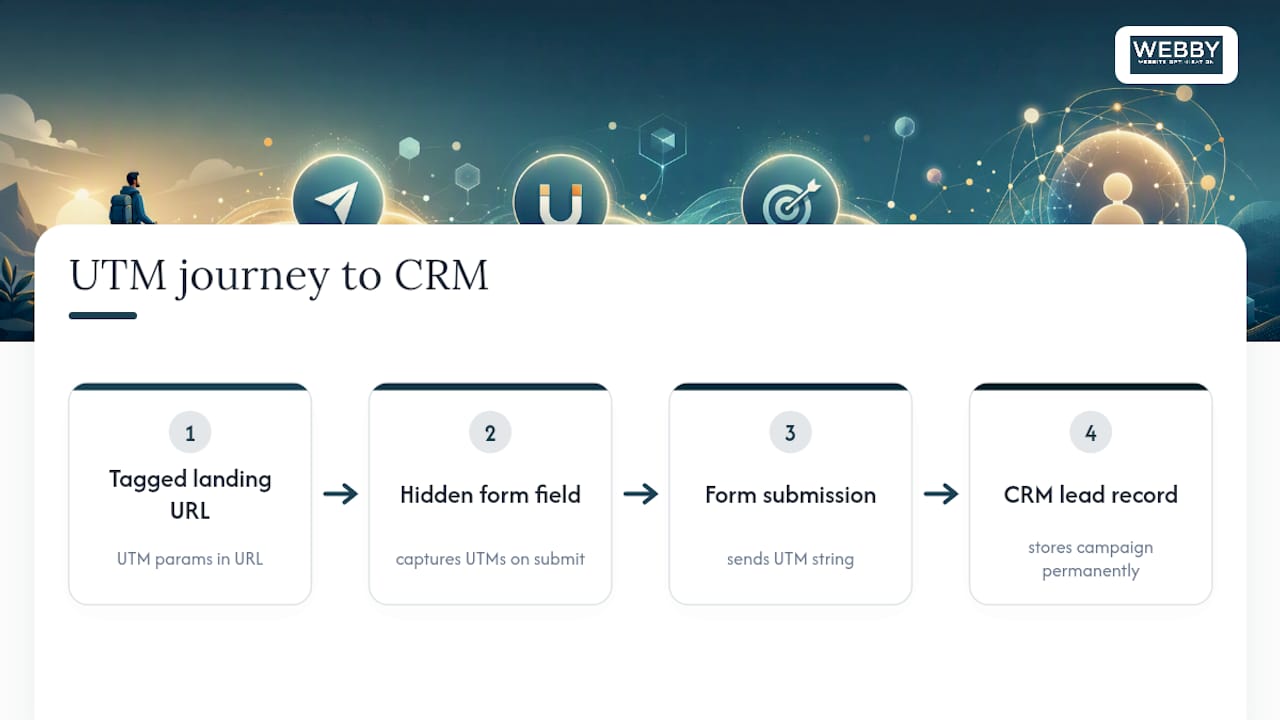
Once that pipeline works, campaign performance comparison stops being an analytics exercise and becomes a revenue conversation, tying marketing measurement directly to lead volume and quality rather than session counts alone.
Does UTM Tracking Raise Privacy or GDPR Concerns?
UTM parameters themselves are not personal data. A well-formed tag describes a campaign, a channel, and a piece of creative, not a person. The compliance risk shows up when someone stuffs a name, email address, or customer ID into a parameter value, which turns an anonymous marketing tag into something that falls under GDPR and similar privacy frameworks.
The rule is straightforward: never put personally identifiable information anywhere in a UTM string. Keep utm_content descriptive of the creative (“cta-top”, “video-ad-1”), never descriptive of the recipient.
Where things get more nuanced is downstream, once that UTM-tagged session gets tied to a cookie, a CRM record, or an advertising identifier for retargeting. At that point you’re in the territory that consent banners and privacy policies are meant to cover, and the UTM tag is just one small piece of a much larger data trail. If your business runs retargeting campaigns built on tagged traffic, make sure your consent management and privacy disclosures account for that combination, not just the tracking pixel or cookie itself.
Treat the UTM string as a label, not a data store, and most of the compliance risk disappears on its own.
How Do You Compare Campaigns Across Channels With UTMs?
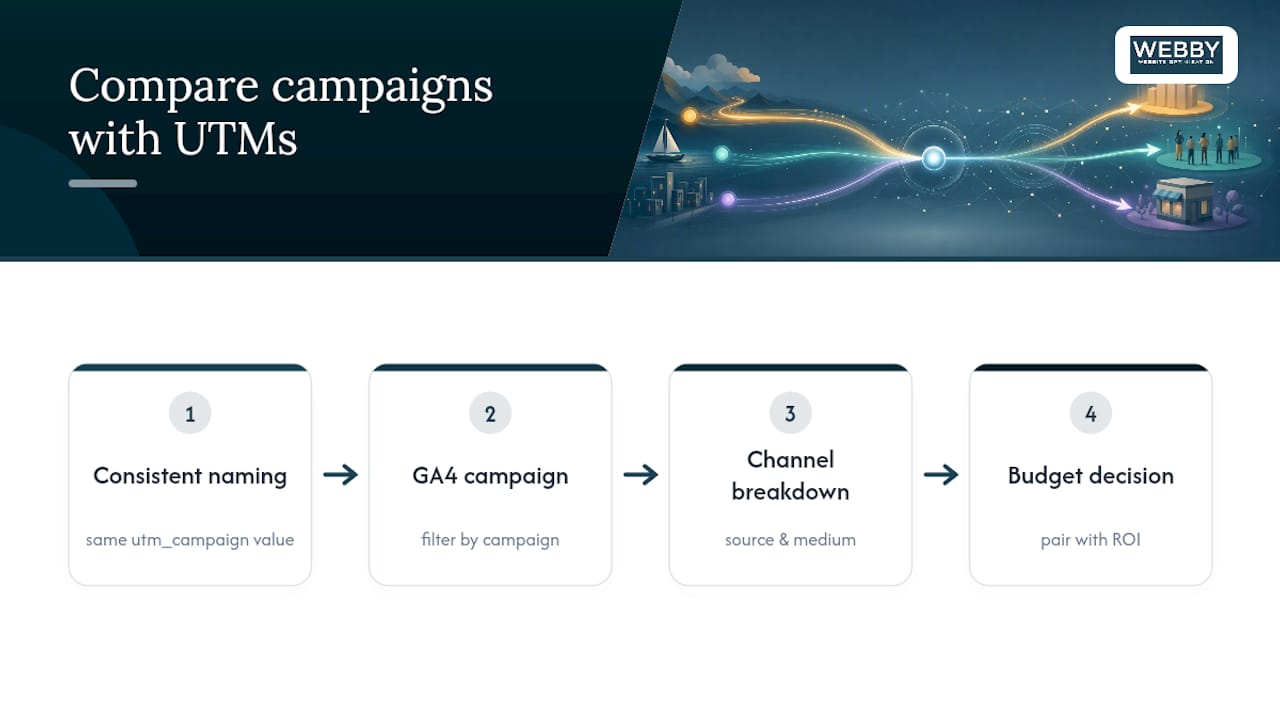
The entire point of consistent naming is making an apples-to-apples comparison possible across channels that otherwise report completely differently. Email platforms, ad networks, and social schedulers all have their own internal dashboards, and none of them talk to each other. UTM tracking is the layer that lets you ask GA4 one question, “which campaign performed best,” and get an answer that spans email, paid social, organic social, and referral traffic all at once.
That only works if utm_campaign carries the exact same value across every channel promoting the same initiative. If your spring sale is “spring-sale-2026” in the email tool but “SpringSale26” in the ad platform, GA4 sees two unrelated campaigns instead of one multi-channel push.
Once the naming lines up, GA4’s Traffic acquisition and conversion reports let you filter by campaign and break it down by source and medium underneath it, showing exactly which channel within the campaign is pulling weight. That’s the level small business owners actually need: not “did the sale work,” but “was it the email list or the Facebook ad that got people through the door.” Pairing that campaign-level view with ROI reporting turns a pile of session data into a defensible budget decision for next quarter.
Webby’s Take on Getting UTM Tracking Right
Most small business owners don’t fail at UTM tracking because it’s technically hard. They fail because nobody owns the naming convention, and three months in, the campaign list in GA4 looks like alphabet soup. Webby Website Optimisation builds a locked naming template into client reporting from day one, precisely because retrofitting clean data later is far more expensive than doing it right the first time.
The session versus first_user scope distinction in GA4 trips up even experienced marketers, and it’s usually the reason a client asks why “the numbers don’t match” between two reports pulling the same date range.
If your website’s tracking setup needs a rebuild alongside your tagging discipline, Webby’s website design and development service builds GA4 and UTM governance into the site from the start, and it’s worth exploring for anyone tired of guessing which campaigns actually work.
— Steve Doig
Sources
- URL builders: Collect campaign data with custom URLs – Analytics Help
- UTM naming conventions: 8 rules + templates for teams — linkutm
Recommended
- What Is Google Tag Manager and How Does It Actually Work?
- 6 Simple Ways to Revamp Your SMB’s Online Presence for Better Visibility
- Geo Targeting in Google Ads: A Local Setup Guide
- Small Business: Measure your marketing so it will work
If this post raised some questions feel free to ask me a question