
You can’t optimize for the words “near me” directly. You optimize for the things Google uses to decide who is nearby, relevant and trustworthy: a complete and verified Google Business Profile, consistent business details, genuine reviews, and a website that clearly says what you do and where you do it. Get those right and you appear when someone in Perth, Fremantle or Melville types “electrician near me” on their phone. This guide shows what to fix, in what order, and how to tell whether it is working.
TL;DR
- Google ranks local results mainly on relevance, distance and prominence. You can’t change distance, so work on the other two.
- Your Google Business Profile is the first job: verified, complete, with the right categories, hours, photos and review replies.
- Your website backs the profile up with clear service and suburb pages written for people, not stuffed with “near me”.
- Consistent name, address and phone details across the web, plus real reviews and local links, build prominence.
- Track calls, direction requests and enquiries by suburb, not just rankings, because every searcher sees a different result.
Table of Contents
- What “near me” searches really are
- How Google decides who shows up nearby
- Step 1: Get your Google Business Profile right
- Step 2: Make your business details consistent everywhere
- Step 3: Build prominence with reviews and local links
- Step 4: Make your website support the profile
- Common reasons businesses don’t show up
- Measuring whether it is working
- Our perspective: near me is a trust problem, not a trick
- Where we can help
- A simple six-week plan
- FAQ
- Sources
What “near me” searches really are
“Near me” is how people phrase a need, not a technique. Nobody can add it to a page and win. Local SEO, in the plainest definition, is optimizing a business’s digital assets to increase visibility for geographically related searches, including searches from people physically close to the business.
When someone searches “plumber near me”, Google doesn’t look for pages containing that phrase. It reads the searcher’s location, works out which businesses fit the need, and shows the best matches within a sensible area. A page that repeats “plumber near me” ten times gives Google nothing it can use, and it reads badly to the customer.
The practical consequence is that the same search gives different results to different people. A searcher in Cottesloe and one in Rockingham see different lists for the same words. That is why the aim is not “rank number one”. As one industry guide puts it, local results centre on the searcher’s position, so there is no single number one for everyone. The goal is to be visible to as many people as possible across the suburbs you actually serve.
How Google decides who shows up nearby
Google states that local results are based mainly on three factors: relevance, distance and prominence, as explained in its guidance on improving your local ranking. Here is what each means for a service business.
Relevance
Relevance is how well your profile matches what the person is looking for. Google says complete and detailed business information helps here. In practice this means the right primary category, a full list of services, an accurate description, and a website whose pages talk about the same services.
Distance
Distance is how far you are from the searcher, or from the location they named. You can’t move your office, but you should understand the limit. Research on Google Maps notes that the search area adapts to the query type, population density and the searcher’s location. In a dense suburb the radius is tight. In a thin area it stretches further. A tradie based in Melville may be well placed for Melville and Booragoon but a long shot for a search from Joondalup.
Prominence
Prominence is how well known and trusted you appear. Google says information from across the web, including links and reviews, feeds into it. Review count and score, mentions on other local websites, and links to your site all contribute. This is the factor where a business with an established reputation beats a closer but unknown competitor.
One more detail worth knowing: the same Maps research points out that ranking and the labels you see on the map are separate processes. A business can rank well and still not appear as a named icon at a given zoom level. If a customer says “I couldn’t see you on the map”, that doesn’t always mean your ranking is poor.
Step 1: Get your Google Business Profile right
For “near me” searches, the profile does more work than your website. It is what appears in the map pack and in Maps. Google’s own advice is to verify your profile and keep it complete and accurate, including full address, hours, business type and relevant attributes, and to respond to reviews and add photos and videos.
A working checklist:
- Verify the profile. An unverified profile gets little visibility.
- Pick the most specific primary category. “Electrician” beats “Contractor” if that is what you are. Add secondary categories only for services you genuinely offer.
- Enter your real name. Add nothing extra such as “Perth Cheap Plumber 24/7”. It breaks Google’s guidelines and can get the profile suspended.
- Set your hours properly, including public holidays and after-hours call-outs if you do them.
- List your services with short, plain descriptions.
- Add real photos: your team, your vehicle, finished jobs. Stock images tell customers nothing.
- Reply to every review, good or bad, in a calm and specific way.
If you travel to customers and don’t serve walk-ins, set up as a service-area business and list the suburbs you cover. Our guide on service area business SEO and the three pages to build first covers this setup. For a fuller walk-through of the profile itself, see our Google Business Profile explainer for local service owners.
Step 2: Make your business details consistent everywhere
Your business name, address and phone number (often shortened to NAP) should read the same on your website, your profile, and every directory or social page that mentions you. Small differences such as “St” versus “Street”, an old mobile number or a former suite number create doubt about which details are right.
The reasoning is simple. Google cross-checks what it finds about you. When sources agree, it can be confident. When they conflict, it has less reason to show you over a competitor whose details are clean. Out-of-date details also cost you directly: a customer who rings a dead number or drives to the wrong address won’t try twice.
A quick audit takes an afternoon:
- Search your business name and phone number in Google and list every site that shows up.
- Write down the exact name, address and phone you want everywhere. This is your master record.
- Fix or claim each listing: major Australian business directories, industry bodies, chamber of commerce pages, social profiles.
- Remove or merge duplicates. Duplicate listings split your reviews and confuse customers.
Focus on listings that real customers use and that are relevant to your trade. Fifty junk directories will not help you more than ten good ones.
Step 3: Build prominence with reviews and local links
Reviews are the most visible prominence signal, because customers read them as well as Google. A steady flow of genuine reviews with specific details (the suburb, the job, how it went) helps people choose you and gives Google more to understand about what you do.
Good habits:
- Ask at the right moment. Ask when the job is finished and the customer is pleased. A text with a direct link to your review form works better than a request to “find us on Google”.
- Ask every customer, not just the happy ones. Selective asking is against Google’s policies and tends to show.
- Never buy reviews or offer rewards for positive ones.
- Answer negative reviews politely and offer to resolve the problem offline. Prospects read your replies as much as the complaint.
Local links are the other half. A link from your local business association, a sports club you sponsor, a supplier’s “find an installer” page or a local news story tells Google that real organizations know you. Ten relevant local links beat a hundred from unrelated sites. If you sponsor the junior football club, make sure they link to you.
Step 4: Make your website support the profile
Your website won’t win the map pack alone, but it matters more than most owners think. It tells Google what you do and where, and it turns a click into an enquiry. Many businesses lose the customer here: the profile attracts the visit, then a slow or confusing site sends them back to the results.
Write service pages and suburb pages for people
Give each core service its own page. A sparky who does switchboard upgrades, EV charger installs and fault finding should have three pages, not one “Services” page with a list. Each page should say:
- what the service is and who it is for
- how the job works, including typical timeframes
- the suburbs you cover
- proof: photos, a short job example, a review
- one clear next step, usually a call button and a short form
Our article on how to optimize a service page for Google goes through this in detail.
Suburb pages are worth building only where you have something real to say. A page for “Fremantle” that mentions a job you did on a specific street, a local regulation you deal with or a typical issue with older homes there is useful. Forty pages with the suburb name swapped in are not, and they are what Google calls thin content.
Avoid keyword stuffing
The phrase “near me” almost never belongs on your page. Instead:
- Use the natural name of your service and the place together once or twice in headings and opening text: “Blocked drain repairs in Fremantle”.
- Put your full address and phone number in the footer and on a contact page in plain text, not just in an image.
- Embed a map on the contact page.
- Mention landmarks, suburbs and streets only where a local would mention them in conversation.
Read each page aloud. If it sounds like a robot trying to rank, rewrite it.
Add structured data and keep the site fast
Local business structured data (schema markup) gives Google your name, address, phone, hours and service area in a machine-readable form. It is not magic, but it removes guesswork and should match your profile exactly. Most WordPress SEO plugins can add it, though they often need checking.
Speed matters because “near me” searchers are usually on mobile and in a hurry. A page that takes several seconds to load loses people who then ring the next result. Compress images, remove plugins you don’t use and check how the site looks on a mid-range phone, not just your office monitor.
Common reasons businesses don’t show up
When an owner says “I never appear in near me searches”, the cause is usually one of these:
| Problem | What it looks like | Fix |
|---|---|---|
| Profile not verified or suspended | Not found in Maps even by business name | Complete verification and check for policy warnings |
| Wrong or vague category | You appear for the wrong service, or not at all | Choose the most specific primary category |
| Keyword-stuffed business name | Works for a while, then suspension | Use your real trading name |
| Inconsistent details | Different phone or address across directories | Fix to one master record |
| No or few reviews | Competitors with 80 reviews outrank you | Build a steady, genuine review routine |
| Service pages missing | One generic page for everything | One page per core service |
| Thin suburb pages | Dozens of near-identical pages | Fewer, genuinely local pages |
| Slow mobile site | Visits but no calls | Speed work and a visible call button |
| Serving an area too far away | Not visible outside your own suburb | Focus on suburbs you can win, then expand |
We have a more detailed 10 point checklist for local service owners not showing on Google Maps if you want to work through the profile problems one by one.
Measuring whether it is working
Because results differ by searcher location, checking “where do I rank?” from your own phone tells you little. It shows your result for your location, probably next to your own office, and your device has your history. Use these measures instead:
- Profile insights. Google Business Profile reports show how people found you and what they did: calls, direction requests, website clicks. Watch the trend month to month.
- Calls and forms by source. Use a call tracking number on the website only (never replace the number on your profile or directories, which breaks consistency) and a “how did you hear about us?” question on the enquiry form.
- Website analytics. Look at visits from Google organic search to your service and suburb pages, and whether those visits turn into enquiries.
- Grid or suburb checks. Search your main service from several suburbs you serve, using a private window, and note where you appear. Do it at the same time each month.
- Review count and rating. The number added each month is a leading indicator.
Give changes time. Fixing a profile can show movement within weeks, while reviews, links and content build over months. Judge by enquiries, not by a rank position that nobody else sees.
Our perspective: near me is a trust problem, not a trick
We work with local service businesses around Perth, Fremantle and Melville, and the pattern is consistent. The owners who struggle with “near me” are rarely missing a clever tactic. They are missing the basics, done properly and kept up: a profile that is complete, details that match, reviews that arrive every month, and a website that answers the customer’s question quickly.
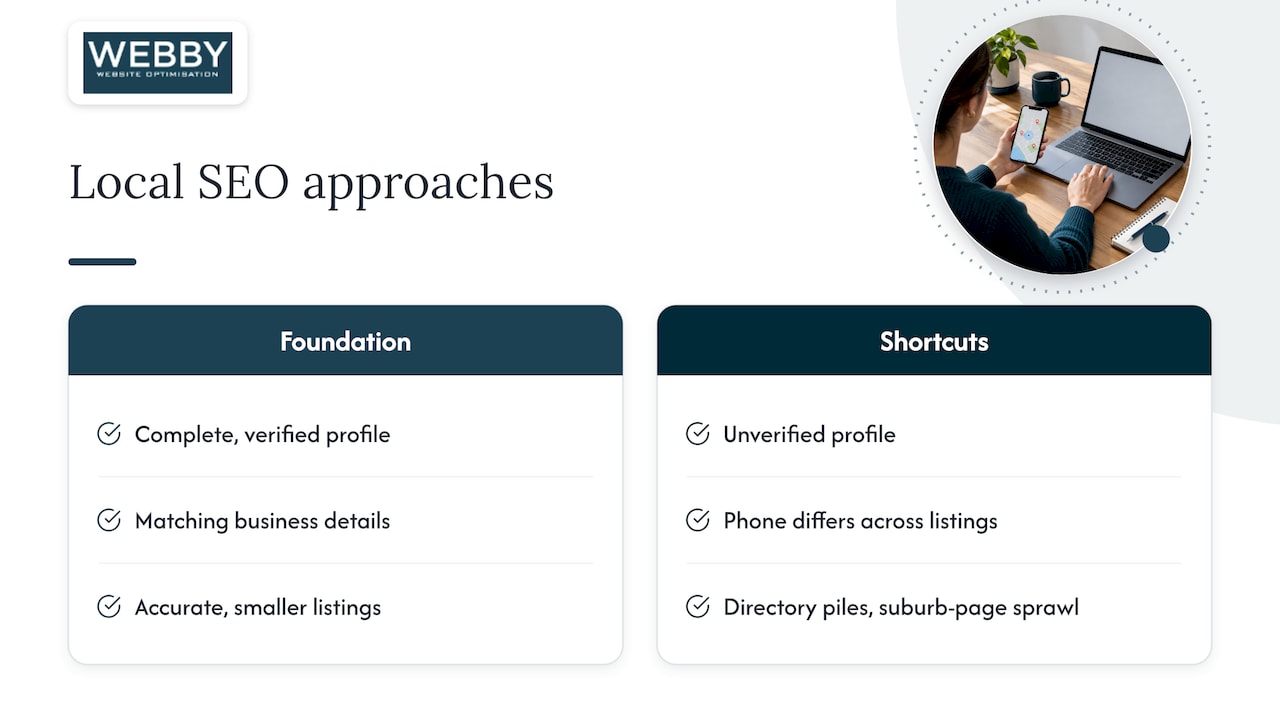
We also see the opposite mistake. An owner pays for a pile of directory submissions or generates a hundred suburb pages, and none of it helps because the profile is unverified or the phone number differs across three listings. Fix the foundation first. Our own view is that a smaller, honest set of pages and listings that are accurate will beat a large, sloppy one every time.
The other thing we would tell any owner is to treat the website as part of the sales process, not a brochure. If Google sends a person who is ready to book and your page makes them hunt for the phone number, the ranking work was wasted. Speed, clarity and a visible next step are as much “near me optimization” as any listing.
— Steve Doig
Where we can help
If you would rather have an expert check where you stand, our Website Audit is a one-off A$1,250 review of your site’s technical health, content and conversion problems, with clear priorities. If you already know the site needs work, the Business Website Optimisation Campaign is a one-off A$3,125 project to fix the issues that hold back rankings and enquiries.

For ongoing local visibility, our Search Engine Optimisation service covers the profile, on-page and content work described above. For a quick look at your pages first, you can try the SEO Inspector.
A simple six-week plan
If you want a sequence to follow, this order delivers the most for the least effort:
- Week 1: Verify or claim your Google Business Profile. Choose categories, set hours, add services.
- Week 2: Write your master name, address and phone record. Fix the main listings and remove duplicates.
- Week 3: Add real photos to the profile. Start your review request routine after every job.
- Week 4: Build or rewrite your main service pages. Make the call button and form obvious on mobile.
- Week 5: Add structured data and fix speed problems. Create one or two genuinely local suburb pages.
- Week 6: Pursue three or four local links through associations, suppliers and sponsorships. Set up your monthly measurement routine.
After that, the work is maintenance: reviews every month, a fresh photo or post now and then, and a check that your details haven’t changed anywhere.
FAQ
Should I put “near me” on my website?
No, not as a target phrase. Google works out nearness from the searcher’s location, so a page doesn’t need the words to appear. Use your service name and the suburbs you serve in a natural way instead.
How long does near me optimization take to work?
Profile fixes can change your visibility within a few weeks, but reviews, local links and content build over several months. The time depends on how competitive your trade and suburb are. Judge progress by calls, direction requests and enquiries rather than a single ranking.
Do I need a physical shopfront to appear in near me results?
No. Service-area businesses that travel to customers can appear, provided they set up the profile correctly and follow Google’s guidelines on addresses. Your service areas should reflect where you genuinely work.
Why do I see different results from my customers?
Local results depend on the searcher’s location, so each person sees a different list. Your own search probably favors you because you are standing near your office and have visited your own site. Check results from several suburbs in a private window to get a fairer picture.
Do reviews really affect near me rankings?
Yes. Google lists reviews among the information that contributes to prominence, and they also persuade customers to pick you once you appear. Genuine, recent and detailed reviews help most.
Sources
- Tips to improve your local ranking on Google, Google Business Profile Help
- What Is Local SEO? Guide to Ranking in Local Search Results, Search Engine Land
- Inside Google Maps: 72 ranking signals and the architecture behind local search, Search Engine Land