
That gut-wrenching moment you realise your domain name has expired is a feeling many business owners know. It’s like turning up to your shopfront to find the locks have been changed and the power switched off. For any Australian business, this isn't just an inconvenience—it means your website is down, customer emails are bouncing, and your entire online presence has just vanished into thin air.
Your Domain Name Expired: What Happens Next?
The initial wave of panic is normal, but take a breath. The good news is that you haven't lost your digital real estate forever, at least not yet.
Think of it like the lease on your physical office. If you miss a payment, you don't get evicted the next day with a new tenant moving in. Instead, there's a formal process with several notices and chances to sort things out. It’s the same with your domain name.
This kind of sudden outage is almost never a technical disaster. More often than not, it’s down to a simple, and very human, admin error.
Common Reasons for Domain Expiry
Before we jump into the fix, it’s worth knowing why this happens. Pinpointing the cause is the best way to make sure it never happens again.
Most of the time, it boils down to one of these common slip-ups:
- Outdated Payment Information: This is the big one. An expired credit card is the #1 reason auto-renewals fail.
- Missed Renewal Emails: Those critical reminders from your registrar can easily get buried in a busy inbox or, worse, end up in your spam folder.
- Incorrect Contact Details: If the email address linked to your domain account is an old one you no longer check, you’ll never see the warnings.
- Employee Turnover: The person who first registered the domain might have left the company, and the renewal responsibility was never handed over.
Finding out your domain name expired is jarring, but it’s a problem with a clear solution. You aren't locked out for good.
A domain expiry isn't the end of the road; it's the start of a timed recovery process. Knowing the stages is the first step to getting your website and emails back online without the stress.
This guide is here to walk you through that exact process. We’ll cut through the confusion, explain what’s happening behind the scenes, and give you a calm, clear-headed action plan to get you back in control. The trick is to act quickly but without panic.
Navigating the Expired Domain Lifecycle
When a domain expires, it doesn't just vanish into thin air. Think of it like an overdue library book; you don't lose your borrowing rights forever the day after it's due. Instead, a very structured timeline kicks in, giving you a few chances to make things right. Understanding these distinct phases is the key to getting your domain back with minimal stress and cost.
Each stage comes with its own rules, fees, and level of urgency. If you miss one window, you’re pushed into the next—and that usually means higher costs and more hassle. Knowing this roadmap helps you figure out exactly where you stand and how fast you need to act to protect your online identity.
This timeline shows you the journey a domain takes after its expiry date, from the initial Grace Period right through to the final Redemption phase before it's deleted.
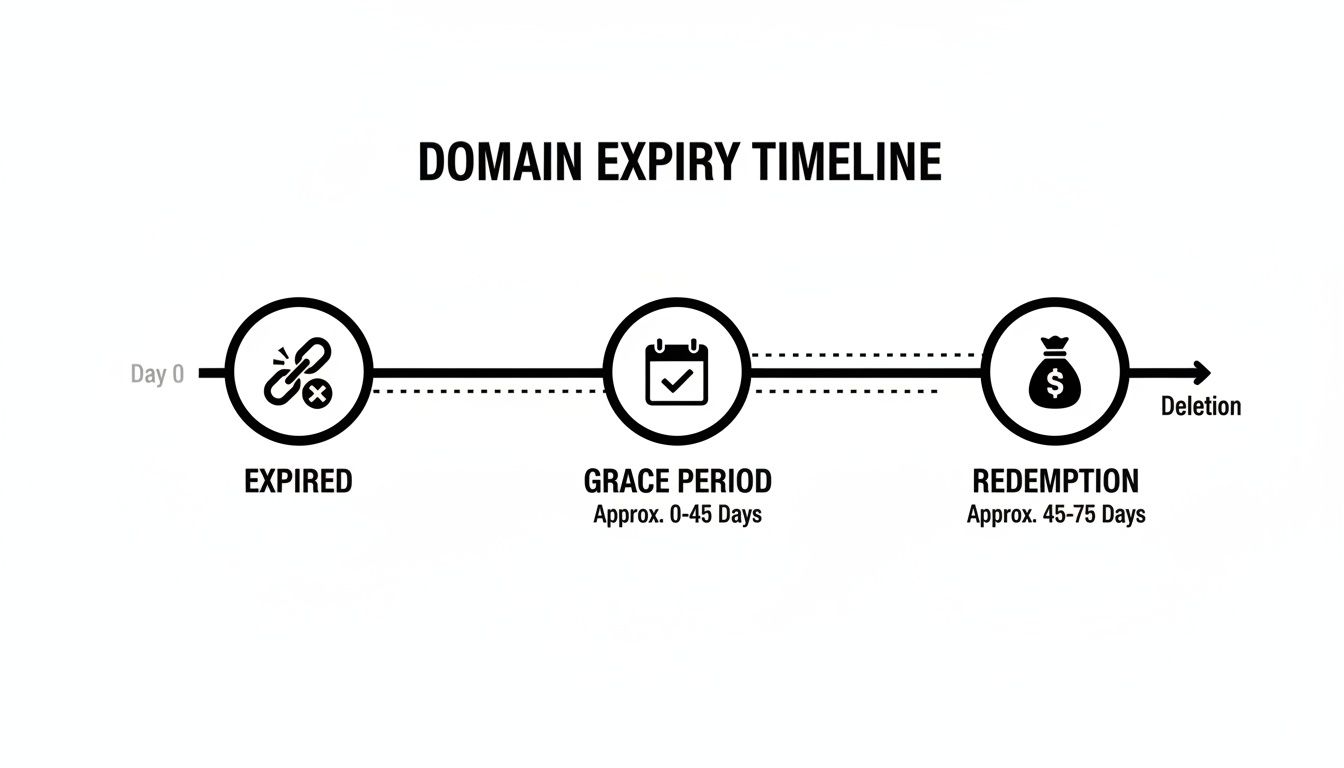
As you can see, your best and cheapest shot at getting it back is right at the start. But even if you miss that, you still have options—they just get a lot more expensive.
The Grace Period: Your Best Chance
The moment your domain name expires, it enters what’s known as the Renewal Grace Period. This is your first and best window of opportunity to easily reclaim it. For most common domain types like .com, this period usually lasts between 30 to 45 days, though the exact timing can vary a little depending on your registrar.
During this time, your website and emails will go offline, but the domain is effectively on hold just for you. You can renew it at the standard annual price, with no extra penalties. It’s a simple process, usually handled right from your domain registrar’s dashboard. This phase is really a safety net, designed to protect you from losing your domain over simple mistakes, like an expired credit card on file for auto-renewal.
The Redemption Grace Period: A Costly Last Resort
If you don't act during the grace period, the domain doesn't immediately go up for grabs. Instead, it moves into a much more serious stage: the Redemption Grace Period (RGP). This phase typically lasts for about 30 days after the initial grace period ends.
Think of this as the final, urgent notice before eviction. You can still get your domain back, but it's going to hurt your wallet. Registrars add a hefty redemption fee on top of the normal renewal cost, often more than $150-$200. The process can also be more complicated, sometimes requiring you to get in touch with your registrar’s support team to get the ball rolling.
The Redemption Grace Period is a crucial but expensive safety net. It’s there to give legitimate owners one last chance to salvage their domain before it's lost for good or sold off to the highest bidder.
Pending Deletion: The Point of No Return
Once the Redemption Grace Period is over and you haven't taken action, the domain enters its final phase: Pending Deletion. This stage is incredibly brief, usually lasting only about five days. At this point, the domain is completely locked down. You can no longer renew or redeem it; it’s officially in the queue to be deleted from the central domain registry.
At the end of this short window, the domain is wiped and released back to the public. From here on out, it’s first come, first served. Anyone—including your competitors or professional domain squatters—can register it the second it becomes available. Once it reaches this stage, your ownership is gone, and getting it back becomes a frantic race against everyone else. This is why understanding these timelines is so critical to avoid a devastating impact on your search engine optimisation and your entire online brand.
Special Considerations for Australian .au Domains
For those of us running businesses in Australia, the rules for .au domains have some specific quirks. Imagine running a bustling e-commerce store on WordPress in Perth, only to wake up and find your .au domain expired overnight. Suddenly, your online presence is gone, and customers are left confused.
Under auDA's strict renewal policies, .au domains in 'Not Verified' status won’t auto-renew. They drop straight into a 30-day grace period, leaving them vulnerable to "drop-catching" by opportunistic domain squatters. While you can still explicitly renew within those 30 days, if your verification details are incorrect, the domain is immediately slapped into 'Suspended' status. This blocks all access until you file a corrective 'Trade' with accurate registrant data. It’s a perfect example of why Australian businesses must keep their details perfectly up-to-date to avoid sudden and chaotic disruptions.
The Hidden Costs of an Expired Domain Name

When your domain name expires, it’s easy to think it's just a minor technical glitch. In reality, it’s more like the front door to your business suddenly vanishing. The consequences go far beyond a simple "site down" error message, triggering a domino effect that can seriously damage your operations, reputation, and bottom line.
The first hit is the most obvious: your entire digital presence goes dark. Your website becomes inaccessible, and just as critically, your email server stops working. Every contact form, every product page, and every blog post you’ve ever published is gone. This immediate outage slams the brakes on your business, severing your main line of communication with customers and cutting off sales.
Your SEO Rankings Will Plummet
All those years you spent building authority with Google can be undone in a shockingly short time. When search engine crawlers arrive at your site and find nothing there, they don’t just wait patiently. After a few failed attempts, they start de-indexing your pages.
This means your hard-won rankings for valuable keywords begin to slide, and eventually, your site can disappear from search results completely. Suddenly, a competitor can swoop in and grab the top spot you worked so hard for. Clawing your way back up is a slow, frustrating, and often expensive fight.
An expired domain isn't just a temporary offline notice; it's a signal to search engines that your site is no longer reliable. The long-term SEO damage can far outweigh the immediate cost of renewal.
For Australian small businesses running on WordPress, this is a very real threat. Research shows that around 14% of .au domains expire annually without being renewed, a figure that mirrors trends in the .nz space. That means roughly one in seven local businesses could be putting their digital assets at risk every year.
Security Risks and Brand Damage
This is where things get truly dangerous. Cybercriminals are always on the lookout for expired domains, especially those that once belonged to a legitimate business. If they snap up your old domain, they can cause absolute havoc for your brand.
These bad actors can quickly throw up a fake website that looks just like your old one, launching phishing scams to trick your customers into handing over personal information. They can also intercept any emails still being sent to your old address, giving them a backdoor into confidential client data, invoices, and private conversations. A security breach like this can permanently shatter the trust you’ve spent years building.
The damage is twofold:
- Financial Loss: You're hit with the direct loss of sales from downtime, plus the potential costs of managing a data breach.
- Reputational Harm: Your brand becomes associated with scams and security risks, which can be incredibly difficult to shake.
A solid plan for website development in Fremantle and beyond must include a strict domain management protocol to prevent these exact scenarios.
The True Financial Impact
The full cost of an expired domain is so much more than the renewal fee you missed. You have to factor in the lost revenue from every hour your site was down, the significant cost of an SEO recovery campaign, and the potential ransom you might have to pay a domain squatter to get your name back. On top of all that is the intangible, yet very real, cost of a tarnished brand reputation.
The ripple effect is significant. To give you a clearer picture, here’s a breakdown of how an expired domain impacts different parts of your business.
Impact of an Expired Domain on Your Business
| Business Area | Immediate Impact | Long-Term Consequence |
|---|---|---|
| Operations | Website and email services go offline instantly. | Loss of customer data, disruption to internal systems. |
| Sales & Marketing | All online leads and sales stop. | SEO rankings vanish, forcing costly recovery campaigns. |
| Brand Reputation | Customers see error pages or malicious content. | Permanent loss of trust and association with security risks. |
| Security | Old email addresses can be hijacked. | Potential data breaches and phishing attacks against your clients. |
When all is said and done, letting your domain expire is one of the most expensive administrative mistakes you can make. The price of proactive renewal is a tiny fraction of the immense financial and reputational clean-up that follows.
How to Recover Your Expired Domain Name

That sinking feeling when you realise your domain has expired is something no business owner wants to experience. But don't panic just yet. In almost every case, you can get it back, provided you act quickly.
The recovery path depends entirely on how long it’s been since the expiry date. Think of it as a series of windows of opportunity—the earlier you act, the easier and cheaper it is to fix. The first and most important step is to log into your domain registrar's account (like GoDaddy, Crazy Domains, or VentraIP). This will show you the domain's exact status and tell you which recovery option is available.
Step 1: Renew During the Grace Period
If your domain only just expired, you’re most likely in the Renewal Grace Period. This is the best-case scenario and your golden ticket for a quick, stress-free recovery. This period usually lasts for 30 to 45 days after the official expiry date.
During this time, the domain is essentially held in reserve just for you. You can reclaim it by simply paying the standard annual renewal fee. No extra penalties, no fuss.
Here’s what to do:
- Log into your registrar account and head to your domain management dashboard.
- Find the expired domain. It will probably have a big "Expired" or "Renew Now" warning next to it.
- Follow the renewal prompts to add it to your cart and check out.
- Double-check your payment details. Make sure the card on file is up-to-date to avoid this happening again.
Once your payment goes through, your domain should be back in your hands. It can take anywhere from a few minutes to 48 hours for your website and emails to fully come back online as the changes spread across the internet, but the crisis will be over.
Step 2: Redeem from the Redemption Period
Missed the grace period? Your domain has now slipped into the Redemption Grace Period (RGP). You can still get it back, but the process becomes more urgent and a lot more expensive. This stage typically lasts for 30 days.
At this point, you can't just click a simple "renew" button anymore. The registrar will slap on a hefty redemption fee, which can be anywhere from $150 to over $200, on top of the normal renewal cost. It’s essentially a penalty for letting it lapse for so long.
To get your domain back now, you’ll likely need to:
- Contact your registrar’s support team directly by phone or by lodging a support ticket.
- Verify your identity to prove you’re the rightful owner.
- Pay both the standard renewal fee and the expensive redemption fee.
The Redemption Grace Period is your expensive last chance. It’s a loud and clear warning that your domain is dangerously close to being lost forever. Acting within this window is your final shot at guaranteeing you get it back.
Step 3: Use a Backorder Service
If both the grace and redemption periods have passed, your domain enters a short "Pending Deletion" phase. After this, it’s released back into the wild for anyone to register. And trust me, it will be snapped up in an instant by automated systems run by domain investors.
Your only realistic chance now is to use a domain backorder service. These services are designed to try and register the domain for you the exact millisecond it becomes available again.
Here’s how it works:
- Pick a backorder service. Many popular registrars and specialised companies offer this.
- Place your backorder. You pay a fee for them to attempt to catch the domain for you.
- Cross your fingers. If the service successfully snags the domain, it’s transferred to your account. If they fail, you’ll usually get a refund or credit.
This method is never a sure thing. If multiple people place a backorder on the same name, it often goes to a private auction. While it's a long shot, it's the only real option once a domain is fully deleted.
Navigating these recovery steps efficiently is crucial, as a restored domain is the first step in rebuilding the online presence that drives valuable website traffic. To see how impactful this can be, check out our case study detailing a 5,275% increase in blog traffic after a series of targeted SEO improvements: https://www.webby.net.au/blog/case-studies/5275-increase-in-blog-traffic-after-6-months-of-seo-improvements/
Proactive Strategies to Prevent Domain Expiry
When it comes to an expired domain, the best way to deal with it is to make sure it never happens in the first place. Shifting from reactive panic to proactive protection is the smartest move any business owner can make.
This isn't about getting bogged down in technical details. It's about putting simple, solid habits and systems in place that act as a safety net. Trust me, preventing an expiry is infinitely cheaper and less stressful than scrambling to fix one.
Enable Auto-Renewal Immediately
This is your single most important line of defence. Auto-renewal is a simple feature offered by every domain registrar that automatically charges your card on file to renew your domain before it expires. Turning this on is non-negotiable.
Think of it like setting up a direct debit for your rent. By automating the payment, you remove the biggest risk factor: human error. When the system handles it, forgetting a date or missing a single email doesn't matter.
But, auto-renewal is only as good as the information it’s working with, which leads to the next crucial step.
Keep Your Contact and Payment Details Current
Your auto-renewal setting is completely useless if the credit card on file has expired. This is, without a doubt, the most common reason domains slip through the cracks, even when their owners thought they had it all covered.
Make it a habit to log into your registrar twice a year and check that your payment information is up-to-date. While you're there, confirm the primary contact email is an address you actually check every day. Renewal notices sent to an old, abandoned inbox are as good as no notice at all.
A proactive check-up twice a year takes less than five minutes, but it can prevent days of downtime and thousands of dollars in lost revenue and recovery fees. It's one of the highest-value maintenance tasks you can do for your business.
To build an even stronger safety net, add a secondary payment method and a backup email address from a different provider (like a personal Gmail alongside your main business address). This creates redundancy, so if one method fails, the other can kick in.
Organise Your Domain Portfolio
Many businesses, especially those that have been operating for a few years, end up with domains scattered across a handful of different registrars. This usually happens when different team members or agencies register domains over time.
A fragmented portfolio is a recipe for disaster. It makes tracking renewal dates a nightmare and dramatically increases the odds of one getting missed.
Here’s how to get organised:
- Consolidate Your Domains: Pick one registrar you trust and transfer all your domains to it. This gives you a single, central dashboard to manage everything, making renewals and security checks so much simpler.
- Create a Master List: Keep a straightforward spreadsheet that lists every domain you own, where it's registered, its purpose, and its exact expiry date.
- Set Calendar Reminders: Don’t just rely on emails from your registrar. Add renewal reminders to your business calendar for 90, 60, and 30 days before the expiry date. This gives you plenty of warning to sort out any issues.
Invest in Professional Website Maintenance
For any business where the website is directly tied to revenue, managing domains should be part of a bigger professional maintenance strategy. A reliable WordPress specialist can essentially act as your digital asset manager.
A proper website maintenance plan, like the ones we offer at Webby, nearly always includes domain and SSL certificate monitoring. This means you have an expert set of eyes watching over your most critical assets. We make sure renewals are processed correctly and act as a crucial backstop, catching potential problems before they turn into a full-blown crisis.
Think of it as an insurance policy for your online presence. For a small monthly fee, you get the peace of mind that comes from knowing a specialist is safeguarding your most valuable digital property. This proactive oversight is the ultimate defence against the chaos an expired domain can cause.
Right, let's get into when you should stop trying to fix an expired domain yourself and call in the cavalry.
When to Call an Expert for Domain Recovery
Renewing a domain in the grace period is usually a piece of cake. A few clicks, a credit card, and you're back in business. But sometimes, things get messy. Knowing when to wave the white flag and bring in a professional isn't admitting defeat—it's a smart move that can save you a world of time, money, and stress.
Think of it like a plumbing problem. You can easily unblock a sink with a plunger. But if a pipe bursts behind a wall, you call a plumber, fast. Some domain recovery situations are exactly like that burst pipe; they need specialist tools and know-how to avoid a complete disaster.
When Your Domain Is Hijacked
One of the most frightening things that can happen is when your domain name expired and a "domain squatter" snapped it up instantly. These people make a business of grabbing valuable expired domains just to sell them back to the original owner for a fortune.
At this point, you're not just renewing a domain; you're entering a high-stakes negotiation. A WordPress specialist or a domain broker is your best ally here. They can:
- Properly size up the situation: They'll figure out the squatter's track record and what your domain is actually worth on the open market.
- Negotiate for you: An expert without the emotional attachment can almost always get a better price than a stressed-out business owner.
- Handle the transfer securely: They’ll make sure you get the domain back safely, without any more nasty surprises.
Technical Nightmares After Recovery
Here’s the thing: just getting your domain back is often only half the job. After your site has been down, especially a complex WordPress site, simply pointing the domain back won't magically fix everything. You could be staring at a real technical hornet's nest.
Recovering a domain is often just the first step. The real challenge can be untangling the technical knots that downtime creates, from broken site functionalities to corrupted databases.
This is where a WordPress expert is worth their weight in gold. You'll need one when you run into problems like:
- SSL certificate errors that flag your site as "not secure" to visitors.
- Database connection problems that stop your site from loading at all.
- Broken links and missing images, which torpedo both user experience and your SEO.
- Email not working, cutting off your main line of communication.
Instead of losing days trying to troubleshoot this yourself, an expert can pinpoint the issues and get them sorted quickly. They can restore your site from backups, re-secure your WordPress installation, and get everything running smoothly again. If you find yourself in this situation, getting professional WordPress help is the quickest way to get your business—and your sanity—back on track.
Got Questions About Expired Domains? We've Got Answers.
Here are the answers to the questions we hear most often from Australian business owners when they realise their domain name has expired. Let's get straight to the practical advice you need right now.
Can I Get My Domain Back After It Has Expired?
Yes, you almost certainly can, but you need to act fast. Your best chance is during the initial Grace Period, which is a window of about 30-45 days right after the expiry date. Getting it back during this time is straightforward – it just costs the standard renewal fee.
If you miss that window, your domain slips into the Redemption Period. Recovery is still on the cards here, but it comes with a hefty penalty fee. Once a domain is fully deleted and released, it’s a free-for-all. You’ll be up against automated domain-snapping services and other buyers, making it incredibly difficult to reclaim.
How Much Does It Cost to Renew an Expired Domain?
The cost hinges entirely on how long it's been since the domain expired.
- In the Grace Period: You'll only pay your registrar's standard annual renewal fee. It’s no different than renewing on time.
- In the Redemption Period: This is where it gets painful. Registrars will add a significant penalty fee on top of the renewal cost, which can easily be anywhere from $100 to over $200.
The main thing to remember is that quick action will save you a lot of money. The penalty for delaying is steep and turns a routine cost into a major, unnecessary expense.
How Long Until My Website Is Back Online After Renewal?
So you've paid the renewal fee – great! But don't expect your website and emails to pop back up instantly. It can take anywhere from a few minutes to 48 hours for everything to come back online properly.
This delay is caused by something called DNS propagation. Think of it like the internet's giant, global address book needing time to update. Servers all around the world have to catch up and learn that your domain is active again. A little patience is needed here.
What Happens to My Business Emails When My Domain Expires?
This is one of the first and most damaging things you'll notice. As soon as your domain expires, your email service stops working completely.
Anyone trying to email you will get a bounce-back message saying their email was undeliverable. More importantly, you won't receive any of these emails, even after you renew the domain. They are simply lost for good.
If you're dealing with the fallout of an expired domain or just want to make sure this never, ever happens again, the team at Webby Website Optimisation is here to help. We provide expert WordPress support to keep your business online and your digital assets secure. Find out more about our WordPress help and support services.