
Google sitelinks are additional links that appear beneath a website’s main listing in search results, pointing users directly to key internal pages without requiring a homepage visit. Think of them as shortcuts Google places on your behalf, collapsing what might be a three-click navigation path into a single search result. They appear in two distinct forms: organic sitelinks, which Google generates algorithmically based on your site’s structure and relevance, and paid sitelinks, which advertisers configure manually inside Google Ads. Both serve the same core purpose: getting users to the right page faster.
Here is what sitelinks do in practice:
- Organic sitelinks appear automatically beneath the top-ranked result for branded queries, selected by Google’s internal ranking system based on site hierarchy, internal linking, and page relevance.
- Paid sitelinks (called sitelink assets in Google Ads) are manually created ad extensions that let advertisers choose specific destination URLs and link text.
- Both formats reduce friction between a user’s intent and the content they need, which directly affects click-through rates and on-site behavior.
- Sitelinks appear only when Google determines a site’s collective value and structure meet a threshold of quality and authority.
Why sitelinks matter for SEO and advertising performance
The benefits of sitelinks extend well beyond a visual upgrade to your search listing. They reshape how users interact with your brand from the moment they see your result.
SERP real estate. A result with full sitelinks can take up to 90% of the above-the-fold space on mobile screens. That alone pushes every competitor below the visible area, before a user even scrolls.
Click-through rates. Sitelinks give users multiple entry points from one result. According to Google Search Console data, 12.9% of clicks on the branded query “ahrefs” go to sitelinks rather than the homepage. That is traffic that would otherwise require manual navigation or, more likely, a bounce.
Reduced bounce rates. When a user lands directly on a pricing page or a contact page via a sitelink, they arrive with intent already matched to content. That alignment cuts the friction that drives bounces.
Trust signals. Sitelinks only appear when Google considers your site well-structured and authoritative. Their presence tells users, before they click anything, that your site is organized and worth their time. This connects directly to search engine trust and how Google evaluates your domain.
Competitive advantage. Full organic sitelinks appear only on the first result. If you have them, your competitors do not. That is a structural advantage no paid ad can fully replicate.
Stat to know: Sitelinks appear in roughly 1.8% of general US search results, but a large portion of organic keywords for high-profile sites like Wikipedia trigger them, confirming they are most powerful for branded queries.
How organic sitelinks and Google Ads sitelinks work differently
The mechanics behind organic and paid sitelinks are fundamentally different, and confusing the two leads to misplaced expectations.
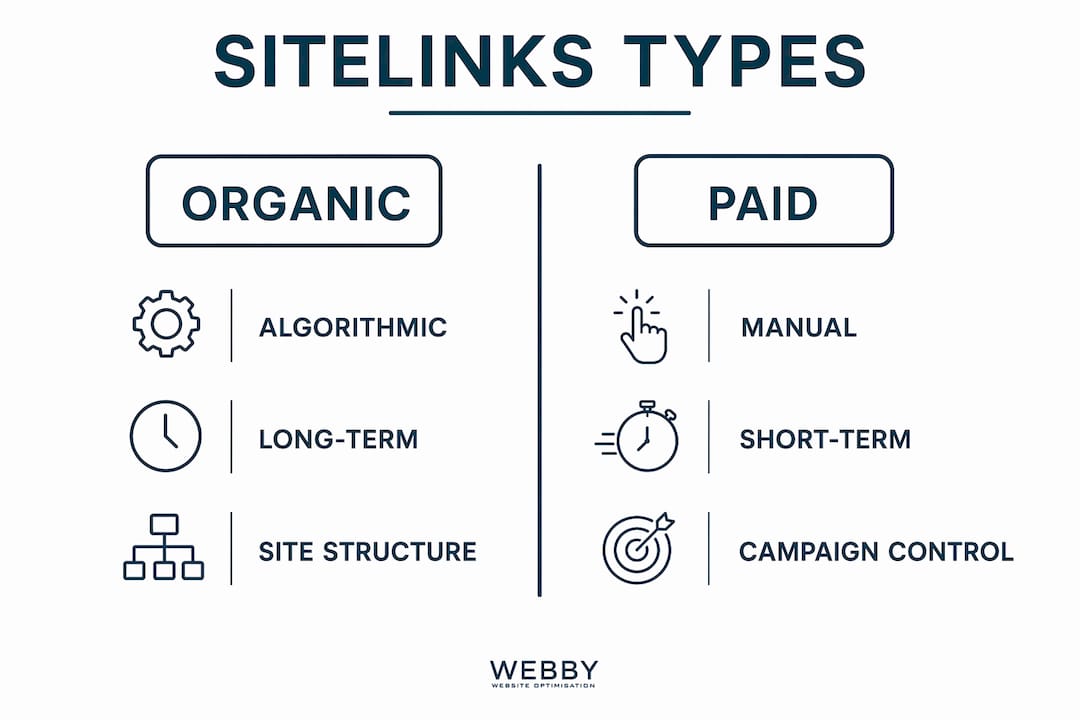
Organic sitelinks are generated algorithmically by Google, drawing on your site’s architecture, internal linking patterns, page titles, and anchor text. You have no direct control over which pages appear. Google Search Console no longer offers a demotion tool, so if an unwanted page shows up as a sitelink, your only options are indirect: reduce internal links to that page, remove it from navigation, or noindex it entirely.

Google runs a mini-ranking process to match sitelinks to query intent, prioritizing pages with strong internal linking, clear anchor text, and crawl accessibility. It is not simply picking your most-visited pages. It is matching navigation paths to what the query suggests the user wants next.
Paid sitelinks work entirely differently. Inside Google Ads, you create sitelink assets manually, specifying the link text, destination URL, and even scheduling windows. Paid sitelinks can run in search and YouTube video campaigns, giving advertisers direct control over which pages receive traffic from ads.
| Property | Organic sitelinks | Paid sitelinks (Google Ads) |
|---|---|---|
| Control | Algorithmic, no direct editing | Fully manual via Google Ads |
| Appearance trigger | Branded queries, top-ranked result | Advertiser-defined campaigns |
| Location | Below the #1 organic result | Below search ads and in YouTube ads |
| Link text | Set by Google from page titles | Defined by the advertiser |
| Scheduling | Not available | Available with start/end dates |
| Demotion option | No (removed from Search Console) | Yes, edit or pause at any time |
The practical takeaway: organic sitelinks reward long-term site architecture investment, while paid sitelinks reward campaign planning and copy discipline.
What sitelinks look like in search results and ads
Sitelinks appear in two visually distinct formats, and knowing the difference helps you set realistic expectations for your own listings.
Full column sitelinks show up to six links beneath the main result, each with a page title and a short description snippet. They appear almost exclusively for branded searches on the top-ranked result. This format occupies the most vertical space and delivers the strongest brand presence on the page.
One-line sitelinks (sometimes called inline sitelinks) appear as a horizontal row of links beneath a result. Unlike full sitelinks, one-line sitelinks can appear on non-branded queries and can even link to anchor sections within the same page, making them particularly useful for long-form content with a table of contents.
In Google Ads, sitelink assets appear as additional clickable lines beneath the ad headline and description. They can include optional description lines for extra context, and they show on both desktop and mobile. YouTube video ads can also display sitelinks, extending their reach beyond traditional search.
One practical implication: sitelinks in ads occupy above-the-fold real estate that organic results cannot match in paid placements. A well-configured ad with four sitelinks can dominate the top of a results page in a way that a single headline never could.
Pro Tip: Add a table of contents with anchor links to your long-form pages. Google can pull those anchors as one-line sitelinks, giving how-to guides and FAQ pages extra visibility in non-branded queries.
How to add, edit, schedule, and troubleshoot sitelinks in Google Ads
Managing paid sitelinks in Google Ads is straightforward once you know where to look. Here is the process from setup to troubleshooting.
- Navigate to Assets. In your Google Ads account, go to the campaign or ad group where you want to add sitelinks. Select “Assets” from the left menu, then click the blue “+” button and choose “Sitelink.”
- Write the link text. Keep it short and specific. “Get a Free Quote,” “View Pricing,” and “Book a Consultation” outperform generic labels like “Learn More” because they match user intent directly.
- Set the destination URL. Point each sitelink to a specific landing page, not your homepage. A sitelink that sends users to a general page wastes the specificity that makes sitelinks valuable.
- Add description lines (optional but recommended). Two description lines appear beneath the link text on desktop. Use them to add context that reinforces the click, such as a key benefit or a time-sensitive offer.
- Schedule your sitelinks. Under “Advanced options,” set start and end dates or restrict display to specific hours. This is useful for promotions, seasonal campaigns, or business-hours-only offers.
- Apply at the right level. Sitelinks set at the campaign level apply to all ad groups within it. Ad-group-level sitelinks override campaign-level ones for that group, giving you granular control when needed.
- Check for disapprovals. If a sitelink is not showing, check the “Status” column in the Assets tab. Common disapproval reasons include destination URL errors, misleading link text, or policy violations. Fix the flagged issue and resubmit.
- Diagnose low impression share. Sitelinks do not show on every impression. Google selects them based on predicted performance. If yours rarely appear, review your ad rank, bid strategy, and the relevance of your sitelink text to the ad’s keywords.
Pro Tip: Create at least four sitelinks per campaign. Google needs options to rotate and test, and campaigns with more sitelink assets tend to show them more frequently because the system has more material to match against query intent.
Best practices to influence which organic sitelinks appear
You cannot edit organic sitelinks directly, but your site architecture is the lever that controls them indirectly. The internal linking structure you build today shapes which pages Google selects tomorrow.
- Build a clear hierarchy. Sites with flat navigation, where every page sits one level below the homepage, give Google no signal about which pages matter most. A logical structure with categories, subcategories, and service pages tells Google exactly how to rank your internal navigation.
- Use descriptive anchor text. Google’s sitelink selection prioritizes anchor text clarity over the sheer quantity of internal links. “Our Plumbing Services” as anchor text beats “click here” every time.
- Write tight, specific page titles. Since sitelinks display the page title, a vague title like “Page 2” or “Services” produces a weak sitelink. “Emergency Plumbing Perth” is specific enough to earn a click on its own.
- Avoid link overload. Overloading pages with too many internal links dilutes the structural signals Google uses to identify important pages. Keep navigation focused and meaningful.
- Handle unwanted sitelinks carefully. To reduce a page’s sitelink eligibility, remove it from main navigation and reduce internal links pointing to it. Noindexing is the last resort since it removes the page from all search results, not just sitelinks.
- Strengthen the pages you want. Rather than trying to suppress an unwanted sitelink, increase internal links to the page you prefer, improve its title tag, and link to it from your homepage. Google recalculates over time.
Pro Tip: Add SiteNavigationElement schema markup to your main navigation links. This gives Google an explicit signal about which pages are most important in your hierarchy, reinforcing the structural signals that drive sitelink selection.
How sitelinks affect click-through rates and user behavior
Sitelinks change user behavior at the point of decision, before a click even happens. A search result with full sitelinks presents users with a structured preview of your site, letting them self-select the most relevant destination. That self-selection is the mechanism behind improved CTR.
Sitelinks are not a direct ranking factor, but they influence SEO performance through behavioral signals. When users land on the exact page they intended to visit, bounce rates drop and session depth tends to increase. Those behavioral signals feed back into Google’s quality assessments over time. The relationship is indirect but real: better navigation leads to better engagement, and better engagement supports stronger rankings.

For branded queries specifically, sitelinks capture clicks that would otherwise require homepage navigation. The 12.9% of clicks going to sitelinks on a branded query (referenced earlier) represents traffic that arrives with sharper intent and higher conversion likelihood than a generic homepage visit.
Automated vs. manual sitelinks: what actually differs
The distinction between automated and manual sitelinks is not just about who controls them. It affects what you can optimize, how fast you can respond, and what data you can access.
Automated organic sitelinks are Google’s interpretation of your site structure. They update when Google recrawls your site and recalculates relevance, which can take weeks or months. You cannot A/B test them, you cannot change the link text, and you cannot track their individual performance directly in Google Analytics without additional configuration. Google Search Console shows impression and click data for sitelinks at the query level, which gives you a read on which pages are appearing and how often.
Manual sitelinks in Google Ads are the opposite. You write the text, choose the URL, set the schedule, and pause or edit them in real time. Google Ads reports clicks, impressions, and conversion data per sitelink asset, so you can see exactly which links drive results and cut the ones that do not. This feedback loop makes paid sitelinks a genuinely testable asset, not a passive feature.
The practical implication: treat organic sitelinks as a long-term structural investment and paid sitelinks as a short-term conversion tool you can tune weekly.
Real-world examples of sitelinks working effectively
Consider a local law firm ranking first for its own brand name. Without sitelinks, every branded search lands on the homepage, where users must find “Practice Areas,” “Contact,” or “Free Consultation” themselves. With sitelinks, those three pages appear directly in the search result. The firm does not change its SEO strategy. It simply earns the sitelinks by maintaining a clear site hierarchy and strong internal linking, and the result is that users arrive on the right page immediately.
In paid search, an e-commerce retailer running a Google Ads campaign for “running shoes” might add sitelinks for “Men’s Running Shoes,” “Women’s Running Shoes,” “Sale,” and “Free Returns.” Each sitelink targets a specific user segment within a single ad. The advertiser does not need four separate campaigns. One ad with four sitelinks effectively serves four different intents simultaneously, and the Google Ads reporting shows which sitelink drives the most conversions.
For service page structure specifically, businesses that organize their offerings into clearly named, well-linked service pages consistently report stronger sitelink eligibility than those with a single catch-all “Services” page.
How sitelinks show up in voice search and mobile results
Voice search and mobile search handle sitelinks differently, and the gap matters more than most marketers realize.
Voice search results, delivered through Google Assistant or smart speakers, do not display sitelinks visually. The response is spoken, not shown. However, the underlying page selection logic still applies: Google’s understanding of your site structure influences which page it reads aloud as the answer. A well-structured site with clear page roles gives Google better material to work with, even when the output is audio rather than a link.
On mobile, sitelinks are particularly impactful because screen space is limited. A full sitelink block can occupy up to 90% of above-the-fold mobile space, meaning a competitor’s result may not be visible at all without scrolling. For local service businesses, where mobile search dominates, this is the most direct competitive advantage sitelinks provide. Paid sitelinks on mobile also display prominently, often collapsing into a scrollable row that keeps the ad compact while still offering multiple destinations.
Good WordPress SEO practices that improve mobile page speed and navigation structure directly support sitelink eligibility on mobile, since Google’s mobile-first indexing means the mobile version of your site is what drives algorithmic decisions.
Want your site to earn sitelinks? Start with structure.
If your site does not have sitelinks yet, the most likely reason is a flat or unclear architecture, not a lack of authority. Webby Website Optimisation works with local service businesses in Perth, Fremantle, and Melville to build SEO-friendly websites that earn organic sitelinks through proper hierarchy, internal linking, and page title optimization. If you want a site built to perform in Google from day one, the website design service is the place to start.

Key Takeaways
Google sitelinks improve click-through rates, reduce user friction, and signal site authority, but only sites with clear architecture and strong internal linking earn them organically.
| Point | Details |
|---|---|
| Organic sitelinks are algorithmic | Google selects them based on site hierarchy, internal linking, and anchor text clarity. |
| Paid sitelinks are fully controllable | Google Ads sitelink assets let you set link text, URLs, and scheduling for each campaign. |
| Mobile impact is outsized | Sitelinks can occupy up to 90% of above-the-fold mobile space, pushing competitors below the fold. |
| CTR lift is measurable | On branded queries, sitelinks capture clicks that would otherwise require homepage navigation. |
| Architecture drives eligibility | Sites with flat navigation rarely earn organic sitelinks, regardless of domain authority. |