
For most local service businesses, hiring a specialist delivers the fastest, most predictable path to phone calls and booked appointments. A professionally built WordPress site with proper local schema, optimized Core Web Vitals, and a verified Google Business Profile consistently outperforms a DIY build on the metrics that matter: search visibility and conversion rate. That said, if budget is the hard constraint right now, several website builders for service providers give you a workable foundation. The short list: Wix for fast launches, Squarespace for visual trades, and WordPress with SeedProd for owners who want to own their digital asset long-term.
Your immediate next step: request a free audit from a local specialist, or pick one builder below and commit to a 30-day test with a single service page live.
Table of Contents
- Which website builders work best for local service businesses?
- What features does a local service website actually need?
- How do you decide between DIY and hiring a specialist?
- Key Takeaways
- The agency route is underrated by owners who’ve never tried it
- Webby Website Optimisation builds local service sites that generate leads
- Useful sources for deeper reading
Which website builders work best for local service businesses?
Common review roundups consistently surface the same eleven platforms when ranking the best website builders for local service businesses: Wix, Squarespace, GoDaddy Website Builder, Hostinger Website Builder, Elementor (WordPress/Elementor One), Webnode, Strikingly, Jimdo, IONOS (MyWebsite), Webflow, and WordPress.com. Each has a different sweet spot.
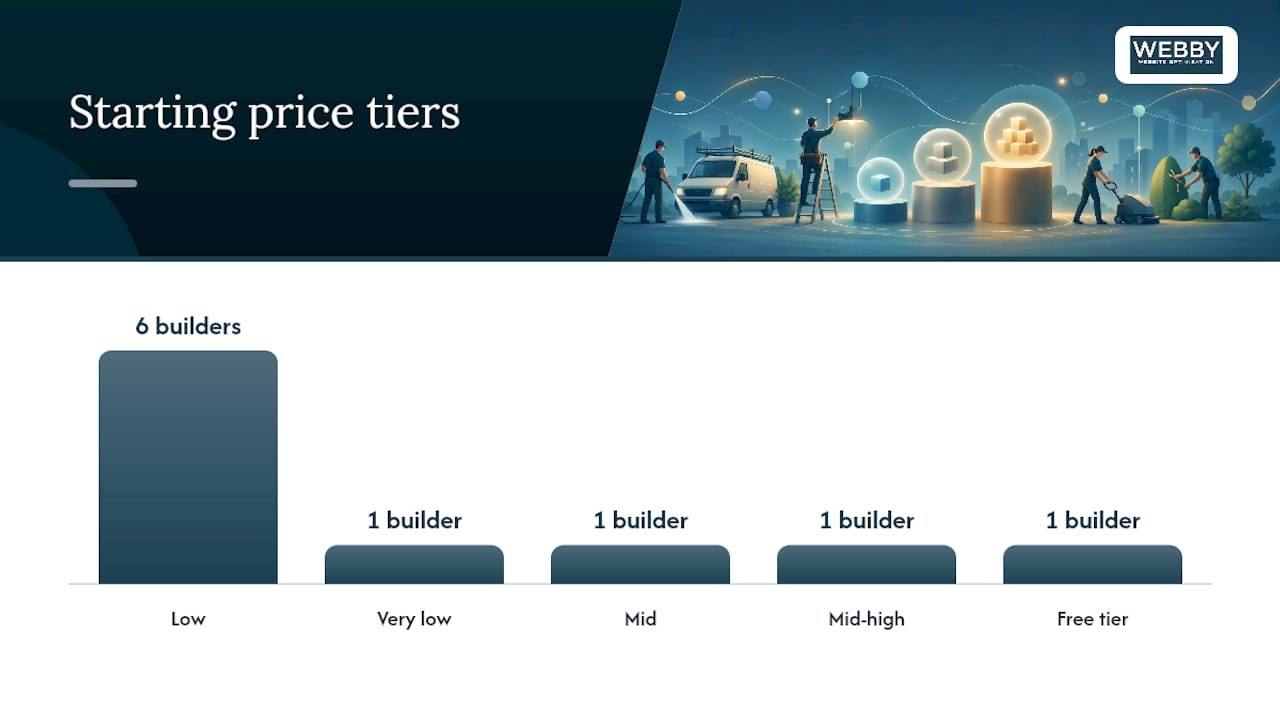
| Builder | Best for | Starting price tier | Ease of use | Booking tools | Local SEO | Mobile performance | Customization |
|---|---|---|---|---|---|---|---|
| Wix | Fast launch, most service types | Low | Very easy | Built-in (Wix Bookings) | Good | Good | High |
| Squarespace | Visual trades, portfolios | Mid | Easy | Add-on | Moderate | Good | Moderate |
| GoDaddy Website Builder | Absolute beginners | Low | Easiest | Built-in | Basic | Good | Low |
| Hostinger Website Builder | Budget-first owners | Very low | Easy | Limited | Basic | Good | Moderate |
| Elementor (WordPress) | Owners who want full control | Low (+ hosting) | Moderate | Via plugins | Strong | Moderate | Very high |
| Webnode | Multilingual service businesses | Low | Easy | Limited | Basic | Good | Low |
| Strikingly | Single-page micro-sites | Free tier | Very easy | Limited | Weak | Good | Low |
| Jimdo | Solo operators, fast setup | Low | Easy | Basic | Basic | Good | Low |
| IONOS (MyWebsite) | European-rooted SMBs, U.S. available | Low | Easy | Limited | Basic | Good | Low |
| Webflow | Design-forward agencies, developers | Mid-high | Hard | Via integrations | Strong | Strong | Extremely high |
| WordPress.com | Content-heavy service sites | Free to mid | Moderate | Via plugins | Strong | Moderate | High (paid plans) |
Three fast picks:
- Best for high-design portfolios: — Squarespace, though moving off it later is genuinely difficult.
- Best for WordPress-powered ownership: SeedProd plus WordPress gives visual builder ease with full asset ownership and plugin-based SEO control.
What features does a local service website actually need?
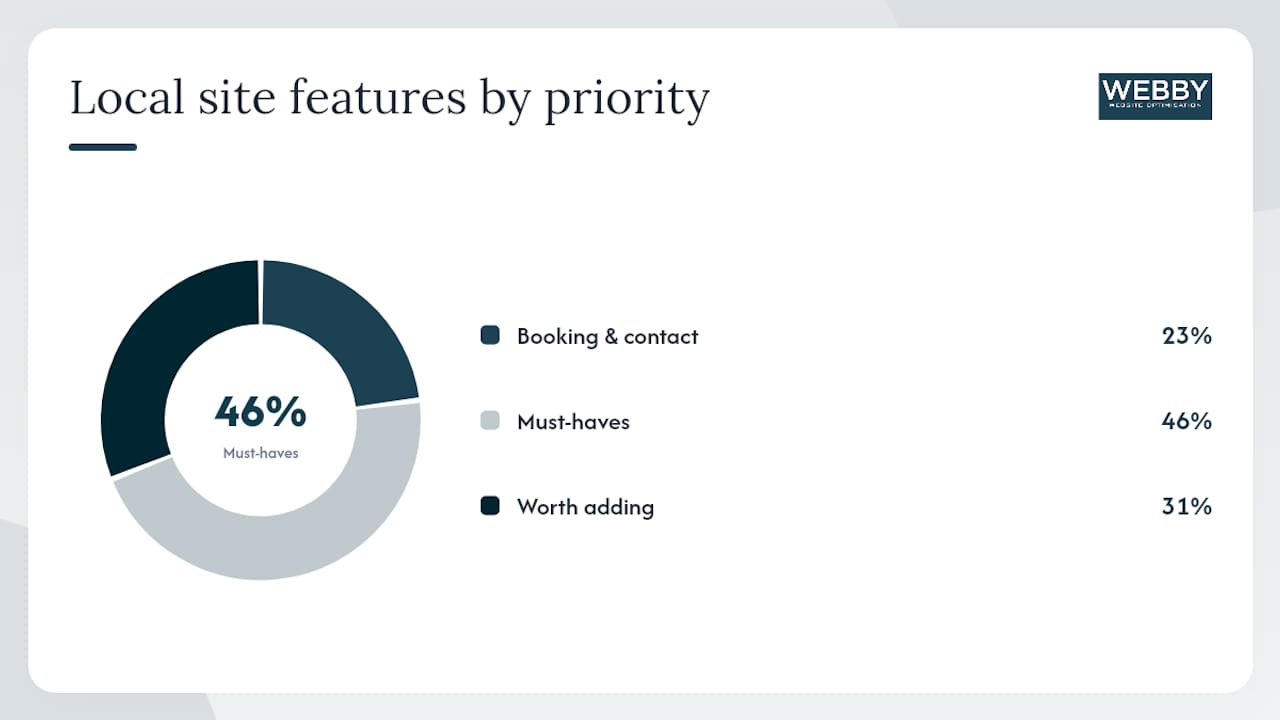
Booking and contact tools come first. If a potential customer can’t call you, book you, or find your address in under ten seconds, the site is failing regardless of how it looks. Every platform for service providers should offer a prominent click-to-call button, an appointment scheduler (Wix Bookings, Acuity Scheduling via embed, or a Calendly widget), and a contact form that works on mobile without pinching.
Beyond that, the feature checklist breaks into two tiers:
Must-haves:
- Dedicated service pages with clear descriptions and pricing ranges (or “starting from” estimates)
- Embedded reviews or testimonials, ideally pulling from Google
- Google Business Profile signals: consistent NAP (name, address, phone) across every page
- Local schema markup (LocalBusiness, Service, Review schema)
- Fast mobile load times that pass Core Web Vitals thresholds
- Clear calls-to-action above the fold on every key page
Worth adding once the basics are live:
- Online payment processing for deposits or retainers
- SMS and email appointment reminders
- Multilingual support for businesses serving diverse communities
- Basic e-commerce for hybrid businesses selling products alongside services
Pro Tip: The most underrated local SEO item is consistent NAP and schema markup. DIY builders vary wildly here: Wix and Webflow let you edit schema manually or via apps, while GoDaddy’s builder and Strikingly offer little to no structured data control. An agency-built WordPress site gives you full ownership of every schema field. AI-driven tools like EZlocal’s Dash automate local schema and sitemaps, which is useful, but you should verify what gets generated rather than assuming it’s accurate.
AI website builders can produce a functional local-business site in under ten minutes and often include mobile-first templates with local SEO presets, making them a real option for appointment-driven businesses that need a working booking flow fast.
How do you decide between DIY and hiring a specialist?
Hire an agency if your revenue depends directly on booked appointments and you want predictable lead growth. DIY if budget is genuinely tight and you can commit real time to building and maintaining the site yourself.
Decision checklist:
- Revenue tied to bookings? Lean agency.
- Need local SEO to rank against established competitors? Lean agency.
- Budget under $500 for the year? DIY is the realistic path.
- Have 10+ hours to build and maintain the site? DIY is viable.
- Need custom functionality (multi-location, complex booking logic)? Agency.
Questions to ask any agency before signing:
- Who owns the site files and domain after the project ends?
- Do you install and configure local schema markup?
- Is booking data exportable if we switch platforms?
- What’s your process for Core Web Vitals optimization?
- Do you provide ongoing maintenance, or is it a one-time build?
Red flags in DIY builders: locked content that can’t be exported, no structured data options, poor mobile scores out of the box, no backup or version history. Red flags in agency proposals: no mention of local schema, vague deliverables, no post-launch support plan.
Typical cost ranges:
- DIY: $10–$30/month for a builder subscription, plus $50–$200/year for a domain, plus optional booking or SEO plugins.
- Agency: project fees typically range from $1,500 to $8,000+ for a full build, with ongoing maintenance and SEO retainers on top. The benefits of professional web design for local services go well beyond aesthetics, covering conversion architecture and search visibility from day one.
For owners who want speed plus ownership, a hybrid approach works well: an AI-assisted WordPress build (via SeedProd or a managed WordPress host) gives you a fast launch without surrendering the asset.
Key Takeaways
For most local service businesses, a professionally built WordPress site with local schema and conversion optimization delivers better lead results than any DIY builder alone.
| Point | Details |
|---|---|
| Hire vs DIY decision | Hire a specialist if revenue depends on booked appointments; DIY only if budget is under $500 and you have time to build. |
| Ownership matters | WordPress-based sites (SeedProd, Elementor) give you full asset ownership; rented platforms like Squarespace and Wix lock content and limit schema control. |
| Local SEO non-negotiables | Consistent NAP, local schema markup, and a verified Google Business Profile are the three items that most directly affect local search rankings. |
| First metric to watch | Track phone calls and booking completions in the first 30 days post-launch as the clearest signal the site is working. |
| Webby Website Optimisation | Offers WordPress design, local SEO, and booking integration for local service businesses, with a free audit to start. |
The agency route is underrated by owners who’ve never tried it
Most business owners who go DIY do so because they assume an agency is out of reach, either in cost or in control. That assumption is worth questioning. A well-scoped agency engagement typically hands you a fully owned WordPress asset, not a rented template, and the local SEO services built into the project compound over time in a way that a monthly builder subscription simply does not.
The hybrid approach deserves more attention than it gets. For businesses that need a fast launch but want long-term ownership, starting with an AI-assisted WordPress build and then layering in professional SEO and conversion work is often the most cost-effective path. You get speed without surrendering the asset.
When a pure DIY approach makes sense: you’re testing a new service line, you’re pre-revenue, or you genuinely want to learn the mechanics. In those cases, Wix or SeedProd on WordPress are the two platforms worth your time. Everything else on the list is either too limited for growth or too complex for a first build.
Webby Website Optimisation builds local service sites that generate leads
Skip the template guesswork. Webby Website Optimisation builds WordPress websites for local service businesses with local SEO, booking integration, speed optimization, and ongoing maintenance included from the start. The difference from a DIY build is concrete: you get structured data configured correctly, Core Web Vitals optimized at launch, and a site you own outright.

Core services include WordPress website design and development, local SEO strategy, Google Business Profile optimization, page speed improvements, and conversion rate work. Case studies on the site show measurable improvements in local search visibility and lead volume for service businesses across multiple industries.
Ready to see what’s holding your current site back? Request a free website audit or explore the fast-start website package if you need to be live within days, not weeks.
Useful sources for deeper reading
These are the primary sources used to compile this guide. Verify current pricing and features directly on vendor pages before committing to any platform.
- 17 Best Website Builders in 2026 – Discover Your Ideal Platform
- 5 Best Website Builders for Service Based Businesses 2026
- 7 Best AI Website Builders for Local Businesses Tested in 2026 | Kleap Blog
- AI Website – Dash by EZlocal
- webby.net.au