
You’ve probably seen this play out already. The website looks polished, the branding is tidy, the copy reads well enough, and WordPress is happily running in the background. Yet enquiries are thin, organic traffic is weak, and the only visits you can clearly trace are your own staff checking pages on their phones.
That’s the gap most businesses miss. A WordPress site can be visually strong and still be invisible where it matters. Search, analytics, tracking, and conversion paths are the missing pieces. Without those, the site behaves like a brochure, not a sales asset.
That’s why seo services for wordpress need to go beyond plugin settings and rank reports. For Australian businesses, the work that moves the needle sits at the intersection of technical SEO, measurement, and conversion improvement.
Why Your WordPress Site Is a Ghost Town
A common scenario goes like this. A Perth business launches a new WordPress site after spending good money on design and development. The homepage looks sharp. The mobile menu works. Everyone signs off on the final build.
Then nothing happens.
The site gets indexed slowly, key service pages don’t rank, contact form submissions barely move, and the owner starts wondering whether SEO is just smoke and mirrors. It isn't. Instead, the problem is more practical. The site was built to exist, not to compete.
I see the same pattern in service businesses, online stores, and local operators with multiple suburbs to cover. The homepage gets the attention. The search intent doesn’t. A plugin is installed, but no one fixes page speed, metadata, internal links, crawl issues, or measurement. The result is a site that’s online but hard to find.
A good-looking WordPress site can still be structurally weak for search.
That’s where specialised work matters. WordPress is flexible, but flexibility creates mess fast. Bloated themes, duplicate archive pages, weak heading structure, oversized images, scattered plugins, and missing conversion tracking all stack up.
If your site feels quiet, start with the basics. Check whether pages load quickly, whether service pages target real searches, and whether you can measure leads properly. If speed is an issue, this guide on WordPress speed optimisation service is a useful place to start.
A quiet website isn’t a mystery. It’s a set of fixable problems. Once those are identified and prioritised, the site starts acting less like a forgotten brochure and more like a working part of the business.
Defining Professional WordPress SEO Services
A Perth business launches a new WordPress site, installs Yoast, fills in a few title tags, and expects enquiries to climb. Three months later, rankings are patchy, phone calls are flat, and nobody can say which pages are bringing in leads. That is the gap between plugin setup and professional SEO work.
Professional seo services for wordpress cover the site, the tracking, and the conversion path. WordPress gives you flexibility, but it also creates failure points. A fast-looking theme can still produce messy code. A page builder can help your team publish quickly while adding layout shift, duplicate elements, and slow templates. A plugin stack can solve one problem and create two more.

What a plugin does and what a service does
Plugins handle settings. A service handles decisions.
Yoast and Rank Math are useful for:
- Meta fields for titles and descriptions
- XML sitemaps generated automatically
- Schema support at a basic level
- Noindex controls for thin, filtered, or duplicate sections
Useful, yes. Enough, no.
A professional service checks how WordPress is configured and whether that setup supports search visibility and lead generation. That means reviewing templates, crawl paths, archive behaviour, internal links, content targeting, and the way forms, calls, and purchases are tracked. It also means fixing problems inside the CMS, not just listing them in a report.
For many Australian businesses, that work needs to account for local realities. Consent settings, form tracking, call clicks, suburb targeting, and GA4 event configuration often get bolted on late or ignored entirely. The result is familiar. Traffic data is muddy, conversions are undercounted, and SEO decisions get made on partial information.
Why WordPress needs specialist handling
WordPress is common because it is flexible and cost-effective. It is also easy to misconfigure.
I see the same issues across trades, professional services, eCommerce, and multi-location operators in Australia. Category and tag archives compete with money pages. Service pages target broad terms with no local intent. Theme files output weak heading structures. GTM is installed, but key events are either duplicated or missing. Rankings become harder to improve because the site structure and the measurement layer are both off.
That is why WordPress SEO is not just content work. It sits between development, search strategy, analytics, and CRO. If the provider cannot explain how a theme, plugin, template, redirect rule, or event setup affects organic performance, they are probably applying a generic SEO process to a WordPress site.
What “professional” should mean in practice
If you are paying for WordPress SEO, expect implementation and accountability.
Look for signs like these:
- Developers involved when technical fixes need code, template, or plugin changes
- Clear prioritisation between issues affecting indexation, speed, UX, and lead tracking
- CMS-specific recommendations around themes, builders, archives, schema, and plugin conflicts
- On-page work tied to search intent, supported by a practical on-page SEO checklist for WordPress pages
- Reporting tied to enquiries, calls, form submissions, or sales, not only ranking movement
- GA4 and GTM configured properly so the business can see which landing pages produce commercial outcomes
One more point matters for Australian businesses. Professional SEO should not treat compliance and measurement as separate jobs. Cookie consent behaviour, form handling, and event tracking all affect what your reporting shows. If GA4 is missing key conversions or GTM is firing events incorrectly, the campaign can look healthy while revenue stays flat.
A good WordPress SEO service improves visibility. A professional one also proves what that visibility is worth.
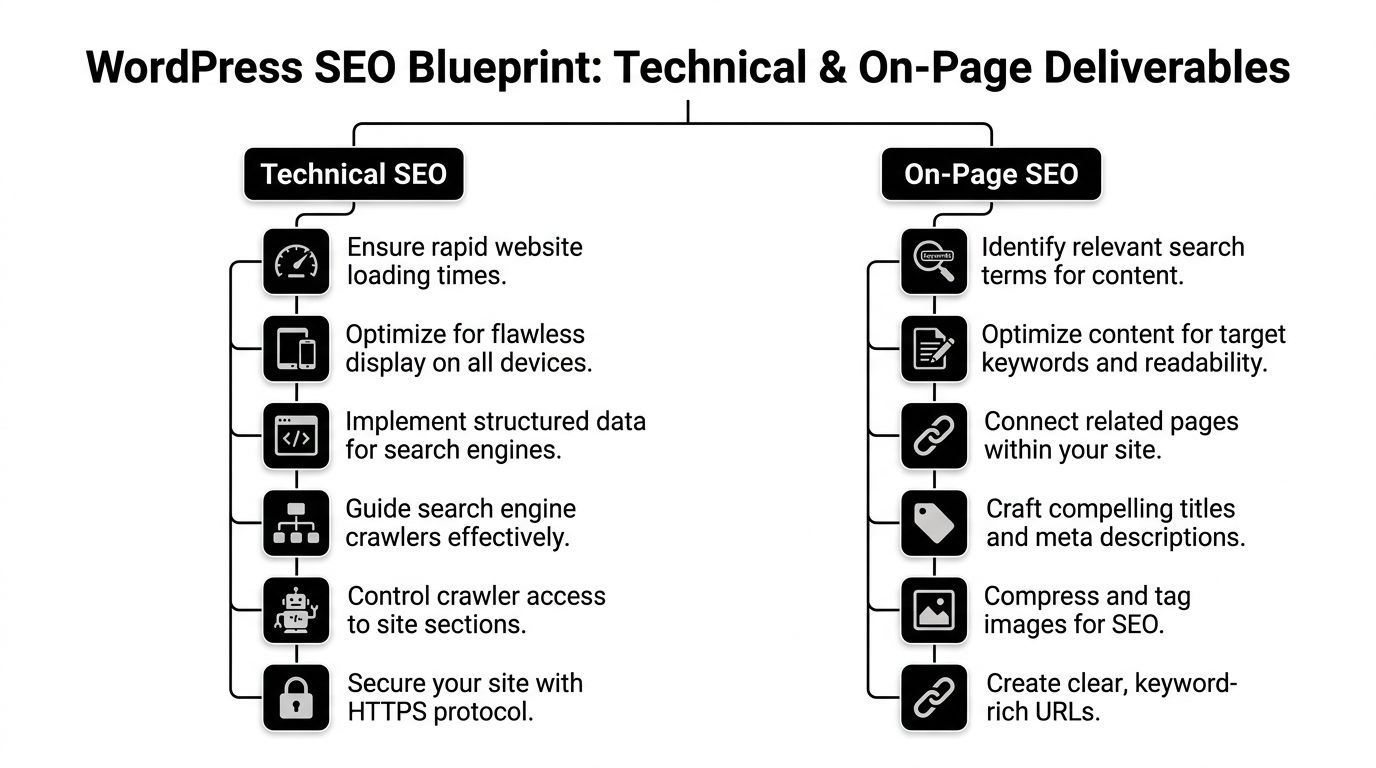
The Blueprint Technical and On-Page Deliverables
When I audit a WordPress site, I’m not looking for “SEO effort”. I’m looking for the deliverables that change performance. If those aren’t in place, the campaign stalls no matter how much content gets published.
Technical SEO that fixes the foundation
The first job is making sure search engines can crawl, interpret, and trust the site.
For Australian WordPress sites, Core Web Vitals deserve attention. According to Web Help Agency’s technical SEO for WordPress article, Australian sites that fail Largest Contentful Paint above 2.5 seconds see 32% higher abandonment on mobile, and unoptimised themes and excessive plugins can suppress organic traffic by 24 to 40%.
That’s not an academic issue. It affects whether visitors stay long enough to read anything.
The technical deliverables that matter most are:
Speed optimisation
Compress images, convert to modern formats where suitable, trim unnecessary scripts, and configure caching properly. Tools like WP Rocket and Autoptimize are common choices, but the tool matters less than the implementation.Theme and plugin cleanup
Too many WordPress sites run plugins that overlap, conflict, or add front-end weight for no business reason. Removing one bloated feature can do more than adding three “SEO” plugins.Crawl and index control
Archive pages, tag pages, filtered URLs, staging leftovers, and attachment pages often create index clutter. These need deliberate rules.XML sitemap review
Generating a sitemap isn’t enough. It should include pages worth indexing and exclude junk.Schema markup
Organisation, local business, service, product, FAQ, and breadcrumb schema need to reflect the site accurately. Plugin defaults are often incomplete.HTTPS, canonicals, and redirects
These aren’t glamorous, but weak canonical handling and messy redirect chains waste authority and create reporting confusion.
On-page work that gives pages a real job
On-page SEO is where many providers become mechanical. They stuff keywords into headings, rewrite a few title tags, and call it done.
That’s not enough. Each important page needs a clear search intent, a logical structure, and a conversion path.
Here’s what I expect to see.
Search-focused page targeting
Every key page should answer one main need. If a service page tries to rank for five different things, it usually weakens itself.
A strong setup includes:
- One primary intent per page
- Supporting subtopics built into headings and body content
- Location signals where local relevance matters
- Commercial clarity so visitors know what to do next
Metadata that earns the click
Title tags and meta descriptions don’t directly carry the whole campaign, but they influence whether searchers click your result over the one above or below.
Good metadata is:
- Specific, not vague branding fluff
- Aligned with the page content
- Written for humans first
- Distinct across important pages
Internal linking that supports priority pages
Internal links are one of the easiest wins on WordPress because most sites already have enough content to create better pathways.
Useful internal linking work includes:
- Connecting blog content to service pages
- Reducing orphan pages
- Using descriptive anchor text
- Building sensible content hubs
If you want a practical reference point for content-side implementation, this on-page SEO checklist is worth reviewing.
What doesn’t work
A lot of WordPress SEO work fails because it focuses on activity, not outcomes.
These are common wastes of time:
| Tactic | Why it underperforms |
|---|---|
| Installing multiple SEO plugins | They overlap, add clutter, and can create conflicting settings |
| Publishing weak blog posts at scale | They rarely support commercial pages if the intent is off |
| Chasing plugin “green lights” | They don’t replace page quality or technical health |
| Ignoring mobile rendering | Search traffic often lands on mobile first, not desktop |
| Leaving page builders unchecked | They can create bloated layouts and poor heading structure |
Most WordPress SEO problems aren’t caused by missing a trick. They’re caused by tolerating technical debt for too long.
The blueprint isn’t complicated. It’s disciplined. Fix crawl issues. Improve speed. tighten page intent. Strengthen internal links. Then measure what happens.
Connecting SEO to Revenue with GA4 and Conversion Optimisation
A Perth business can sit on page one for a valuable search term and still get poor commercial results. I see it regularly on WordPress sites. Traffic arrives, people browse, then nothing useful gets recorded because GA4 is half-configured, form submissions are missing from reports, and no one can tell which landing pages produce enquiries.
That is not an SEO win. It is incomplete measurement.

Why measurement changes the quality of SEO work
Rankings and traffic reports only show top-of-funnel activity. Business owners need to know which organic visits turn into calls, quote requests, booked jobs, purchases, or qualified leads. Without that link, SEO decisions get made on guesswork.
GA4 and Google Tag Manager give you that visibility if they are set up properly. On WordPress, that means more than dropping in a tracking plugin and calling it done. You need a clear event structure, reliable form tracking, thank-you page logic where it fits, click tracking for key actions, and channel attribution that does not break every time the site gets updated.
Useful reporting should answer questions like these:
- Which organic landing pages produce enquiries
- Which forms get started but abandoned
- Where mobile users lose momentum
- Which calls to action attract clicks
- How organic visitors behave compared with paid traffic
That changes the work. Instead of arguing over opinions, you can see which pages deserve more SEO investment, which templates need redevelopment, and which content attracts traffic that never converts.
The Australian compliance angle generic guides skip
Australian businesses also need to be careful about privacy handling, consent choices, and how tracking scripts are deployed. That matters even more if the site runs lead forms, booking tools, call tracking, or remarketing tags alongside SEO campaigns.
For WordPress builds targeting Australian customers, I look at compliance and implementation together. Cookie banners that block or misfire tags can wreck attribution. Poor GTM setups can fire duplicate events. Some plugins push tracking code in ways that are hard to audit later. If your team cannot explain what is being collected and when it fires, the setup needs work.
If your analytics is still in a basic state, this guide on how to set up Google Analytics 4 is a useful refresher before you start mapping custom events to real business actions.
Key takeaway: SEO reporting should show revenue paths, not just visit counts.
Conversion optimisation on WordPress pages
Once tracking is trustworthy, conversion work gets much easier to prioritise. You can test changes against user behaviour instead of internal opinions.
On WordPress sites, the biggest gains often come from simple page decisions that have been ignored for too long:
- Headlines that explain the offer fast
- Shorter forms with fewer low-value fields
- Buttons placed where mobile users reach them
- Cleaner layouts that keep the next action obvious
- Trust signals such as reviews, service areas, guarantees, pricing cues, or delivery information
For Australian service businesses, local intent matters here too. A page that says “Australia-wide” can underperform against a page that clearly names Perth, Brisbane, or the exact service region if that is what the visitor is trying to confirm.
Paid and organic traffic also do not always need the same page. In many accounts, dedicated landing pages beat broad service pages because they remove distractions, tighten the message, and make the next step clearer. Before changing layouts or form elements, it helps to review a practical explanation of what conversion rate optimisation is.
Here’s a helpful walkthrough on conversion thinking before you start changing page elements:
What a proper integrated service includes
A useful SEO setup on WordPress should leave a business with working instrumentation and a clear list of actions, not a pile of disconnected dashboards.
That includes:
- GA4 property configuration with business-relevant events
- Google Tag Manager container setup that can be maintained without guesswork
- Google Search Console integration to connect search queries with landing page performance
- Call, form, and key action tracking mapped to lead generation goals
- Landing page improvements based on drop-off points and user behaviour
- A/B testing for headings, page structure, offers, and calls to action
Some providers handle both implementation and support. Webby Website Optimisation is one example, offering WordPress support alongside GA4, GTM, Search Console setup, and landing page testing. That combined approach suits businesses that need fixes deployed, not just recommended.
If SEO is meant to grow revenue, measurement and conversion work need to be part of the job.
How to Choose Your Perth and Australian SEO Partner
Picking an SEO provider is less about who sounds confident and more about who can explain the work plainly. If the answers stay vague during the sales process, they won’t become clearer once you’re paying.
For WordPress sites, I’d treat the selection process like a technical interview. You’re hiring someone to work on a live business asset, not buying a generic marketing package.

Questions worth asking before you sign anything
The answers will tell you quickly whether the provider understands WordPress or just sells around it.
Ask these:
Who implements technical fixes
Is it an SEO strategist, a developer, or nobody? Recommendations without implementation often sit untouched for months.How do you handle WordPress-specific issues
Ask about themes, page builders, plugin conflicts, redirects, archive pages, and schema.What do your reports focus on
If the entire answer is rankings and traffic, keep probing. You want lead quality and conversion visibility as well.How do you approach local SEO in Australia
This matters even more for businesses serving Perth, multiple suburbs, or multiple states.What happens if the site is hacked, broken, or slowed by updates
SEO performance falls apart quickly if the site itself is unstable.
Why local context matters
For multi-location businesses, local nuance isn’t optional. According to New Media’s overview of WordPress SEO agencies, there has been a 15% year-on-year rise in “near me” searches in Perth and regional areas, and specialist handling of items like .au domains and local business schema can lead to 30% traffic gains.
That’s a useful reminder that local search isn’t just a Google Business Profile exercise. Your website structure, suburb pages, schema, contact details, and location relevance all need to line up.
Red flags that should put you on guard
Some warning signs are still common in this industry.
| Red flag | Why it matters |
|---|---|
| Guaranteed rankings | No one controls search results |
| No access to analytics or Search Console | You can’t verify what’s happening |
| Heavy focus on backlinks with little site work | Weak foundations don’t improve from links alone |
| Reports full of jargon and no business outcomes | It hides the lack of useful progress |
| No discussion of WordPress maintenance | A neglected site becomes an SEO problem |
If a provider talks a lot about “visibility” but not much about implementation, tracking, or conversion quality, keep looking.
Useful criteria for Australian businesses
A Perth or Australian partner brings practical advantages:
- Same time zone for support and approvals
- Local market understanding around suburbs, service areas, and buyer language
- Familiarity with AU compliance concerns
- Experience with local search intent, not just US-style keyword mapping
If you want a broader marketing-side overview before comparing providers, this clear guide to SEO SEM services for Australian businesses is a sensible companion read.
The right partner should sound organised, specific, and realistic. Not theatrical.
Understanding WordPress SEO Packages and Pricing
Pricing for WordPress SEO can look inconsistent because different providers bundle very different work under the same label. One quote may cover implementation, tracking, technical fixes, and reporting. Another may cover meetings and documents.
That’s why the structure matters more than the headline figure.
Monthly retainers
This is the most common model for ongoing SEO.
It suits businesses that need continuous work across technical improvements, content, internal linking, reporting, and conversion optimisation. It also works well when the site is active and the market is competitive.
Typical structure:
- Recurring monthly scope
- Prioritised task queue
- Reporting and reviews
- Ongoing implementation
Pros
- Good for sustained growth
- Lets the provider fix issues as they appear
- Works well when SEO, content, and CRO need coordination
Cons
- Weak retainers can become vague quickly
- You need clear deliverables, not just “ongoing optimisation”
Project-based fees
Some WordPress SEO jobs are best handled as defined projects.
That includes technical audits, site migrations, recoveries after a redesign, schema implementation, category restructuring, or a one-off landing page improvement project.
Typical structure:
- Fixed scope
- Defined start and finish
- Specific deliverables
- Limited ongoing support unless separately arranged
Pros
- Easier to budget
- Useful when the problem is specific
- Good for businesses that need clarity before committing to ongoing work
Cons
- SEO doesn’t stop when the project ends
- Gains can fade if no one maintains the work
Hourly consulting or development time
This model is practical when you already have internal marketing staff but need specialist WordPress input.
It’s often used for troubleshooting indexing issues, reviewing plugin conflicts, advising on migrations, or checking analytics setups.
Typical structure:
- Ad hoc support
- Time blocks or hourly billing
- Narrow implementation or advisory tasks
Pros
- Flexible
- Useful for experienced teams that only need specialist help
- Good for urgent fixes or second opinions
Cons
- Harder to build momentum
- Can become reactive rather than strategic
WordPress SEO pricing models comparison
| Model | Best For | Typical Structure | Pros | Cons |
|---|---|---|---|---|
| Monthly retainer | Businesses needing ongoing growth | Recurring monthly work across SEO tasks | Consistent progress, adaptable priorities | Can drift if scope is vague |
| Project-based fee | Defined technical or structural work | Fixed scope and deliverables | Clear budget and clear finish | No ongoing momentum by default |
| Hourly consulting | Teams needing specialist support | Time-based advisory or implementation | Flexible and targeted | Often reactive, not long-term |
A good quote should tell you exactly what gets done, who does it, how success is measured, and what sits outside scope. If it doesn’t, you’re not comparing proposals properly.
Success Stories Real SEO Results for Australian Businesses
A Perth business owner launches a new WordPress site, signs off on the design, and expects enquiries to follow. Six months later, rankings are patchy, calls are inconsistent, and GA4 shows traffic but gives no clear view of which pages or campaigns produce leads. That is the point where SEO stops being a content task and becomes a business systems problem.
The results that matter come from fixing how the site is built, how search intent is mapped, and how enquiries are measured. WordPress runs a large share of the web, and organic search still drives a major portion of commercial traffic and revenue. For Australian businesses, especially in competitive local service markets, that makes WordPress SEO worth treating as an operating asset rather than a plugin setting.
A local services business with a slow, underperforming site
This is common with trades, clinics, and professional services firms. The site looks fine on first pass, but service pages target broad terms, mobile performance is poor, and no one has set up clean tracking for calls, forms, or quote requests. The business cannot tell whether SEO is producing leads or just producing visits.
The work is straightforward:
- improve page speed and trim plugin bloat
- tighten service page targeting around clear commercial intent
- rewrite titles, headings, and internal links to support priority pages
- connect suburb and supporting content properly
- configure GA4 and GTM to track form submissions, phone clicks, and landing page paths
Once that is in place, the business can see which pages bring in enquiries, which suburbs convert, and where users drop off before contacting the team. That changes the conversation from “how is traffic going?” to “which service pages are generating booked work?”
An e-commerce store with traffic but weak commercial performance
WooCommerce sites often have the opposite problem. They attract visits, but category pages are thin, product templates are inconsistent, and checkout friction kills the value of the traffic.
In practice, the gains come from a mix of SEO cleanup and conversion work:
- improve category and collection page copy for search intent
- remove duplicate or low-value pages that dilute relevance
- strengthen internal linking between product, category, and guide content
- track add-to-cart, checkout steps, and purchase events properly in GA4
- use GTM to measure where buyers abandon the process. Rankings alone do not pay the bills. A category page that moves from position 9 to position 4 is useful. A category page that also lifts add-to-cart rate is what makes the work commercially worthwhile.
A multi-location operator that needs hyper-local relevance
Multi-location businesses across Perth or wider Australia often rely on one generic services page and expect it to rank everywhere. It rarely does. Search intent is local, and Google wants clearer signals about service areas, entities, and page relevance.
The better approach is operational and measurable:
- create location pages only where there is a genuine service footprint
- apply LocalBusiness and related schema correctly
- align NAP details, service areas, and on-page copy
- support key location pages with internal links from service and blog content
- track calls and forms by landing page, location, and device type
For Australian businesses, there is another layer. Privacy settings, cookie consent choices, and GA4 configuration can affect what you can measure and how reliable that data is. If analytics is poorly configured, the SEO work may look weaker than it is, or stronger than it is. Either way, decisions get made on bad information.
The best SEO results come from making the site easier for Google to index and easier for customers to act on.
That is why strong WordPress SEO work cannot sit in a silo. Technical fixes, local search signals, GA4 and GTM setup, and conversion improvements need to be handled together. Otherwise, businesses end up with rankings reports, but no clear line between search visibility and revenue.
Frequently Asked Questions About WordPress SEO
How long does WordPress SEO take to show results
It depends on the site’s condition, competition, and how much authority the domain already has. A technically weak site can show early improvements once indexing, speed, and page targeting are fixed. Commercial growth takes longer because rankings, click-throughs, and conversion behaviour all need to improve together.
SEO also isn’t a switch you turn on. It’s cumulative work.
Is Yoast or Rank Math enough on its own
No. They’re useful tools, not complete solutions.
An SEO plugin helps manage metadata, sitemaps, schema settings, and index controls. It doesn’t choose the right keyword targets, remove plugin bloat, fix poor templates, improve Core Web Vitals, or set up GA4 events properly. Plenty of weak sites have excellent plugin settings.
Can I do my own WordPress SEO
You can handle parts of it in-house if you’re organised and willing to learn. Many business owners or internal marketers can manage metadata, content updates, internal links, and basic plugin settings.
The harder parts are:
- technical diagnosis
- crawl and index management
- speed troubleshooting
- schema implementation
- analytics and tag setup
- conversion testing
If those areas are weak, bringing in a specialist is faster and less costly than trial and error.
What should a WordPress SEO provider deliver each month
You should expect visible work, not vague “optimisation”. That can include technical fixes, page updates, internal linking, reporting tied to conversions, landing page improvements, and collaboration with your developers or marketers.
If you can’t tell what changed on the site, the service is probably too abstract.
Does WordPress itself help with SEO
WordPress gives you a solid base because it’s flexible, widely supported, and plugin-friendly. But that same flexibility can create problems. Poor hosting, bloated themes, excessive plugins, bad page-builder habits, and weak archive handling can all drag performance down.
WordPress is SEO-capable. It isn’t automatically SEO-ready.
Should SEO and Google Ads landing pages be handled together
Often, yes. The traffic sources are different, but the landing page experience affects both. Clean messaging, faster pages, better forms, and stronger calls to action help paid and organic traffic alike. When analytics and landing pages are managed together, decisions get sharper.
If your WordPress site is ranking poorly, loading slowly, or generating traffic without clear leads, Webby Website Optimisation can help with the practical side of the job, including WordPress support, maintenance, GA4 and GTM setup, conversion tracking, landing page testing, and technical SEO implementation for Australian businesses.