
You’ve probably seen this happen. A business spends good money on a new WordPress site, the design looks sharp, the branding is tidy, the photos are strong, and the launch feels like progress. Then a few weeks pass and nothing much changes. Rankings don’t move, qualified leads don’t appear, and the site ends up acting more like a brochure than a sales tool.
That gap usually comes from treating design and SEO as separate jobs. For Australian SMBs, that’s expensive. The better approach is seo website design from day one, where structure, speed, content, accessibility, local relevance, and ongoing maintenance are built into the project instead of patched in later.
From a Perth WordPress developer’s point of view, the build process is straightforward when it’s done properly. Start with search intent. Shape the site architecture around real services and locations. Configure WordPress so search engines can crawl it cleanly. Keep pages fast on mobile. Make the site accessible. Write pages that answer buying questions. Then monitor what happens after launch and keep maintaining the stack so performance doesn’t slide.
Why a Great-Looking Website Is Not Enough
A Perth café owner launches a slick new WordPress site. The fonts are clean, the photography is strong, and the homepage looks polished on a designer’s monitor. Three months later, the phone is still quiet, the site barely shows up for suburb-based searches, and mobile users on a patchy 4G connection are waiting too long for the first screen to load.
That outcome is common with Australian SMB websites built around appearance first and business intent second. A site can look professional and still underperform if the service pages say very little, the headings are vague, the location signals are weak, and the build adds friction on mobile. Search engines get limited context. Prospective customers get limited confidence.
In practice, good seo website design ties every design decision to a job the site needs to do. The page structure needs to reflect how people search in Australia. The copy needs to explain services in plain language. The technical setup needs to support crawling, local relevance, speed, accessibility, and ongoing maintenance without turning every update into a rebuild.
Local context changes the brief as well. An Australian SMB is often trying to rank in one city, several suburbs, or a service region rather than nationally. That affects page structure, content depth, Google Business Profile alignment, and whether location pages are useful or just thin duplicates. If local visibility is part of the goal, Local SEO for Small Business is worth understanding early, before design decisions lock in the wrong structure.
I also see performance problems introduced by design choices that looked harmless during approval. Large hero videos, heavy sliders, bloated page builders, and off-the-shelf themes with features nobody uses are common examples. On Australian hosting, especially if the stack is poorly configured or the server is nowhere near the target audience, those choices add latency that hurts both rankings and conversions.
Accessibility gets missed for the same reason. A site can win internal praise and still fail basic checks for contrast, keyboard use, form labels, and readable structure. For Australian businesses, that is not just a usability issue. It affects who can use the site, how easily content is interpreted, and how much maintenance work piles up later when problems are discovered after launch.
A good-looking website helps credibility. It does not carry the whole job.
The expensive mistake is treating SEO, accessibility, content, hosting, and conversion paths as cleanup work for later. By the time the site is live, the URL structure, templates, navigation, and content model are often already set. Fixing those decisions after launch is possible, but it usually means more development time, more content rework, and more disruption than getting the foundation right at the start.
Planning Your SEO Foundation and Site Architecture
Most SEO problems start long before anyone installs a plugin. They start in planning.
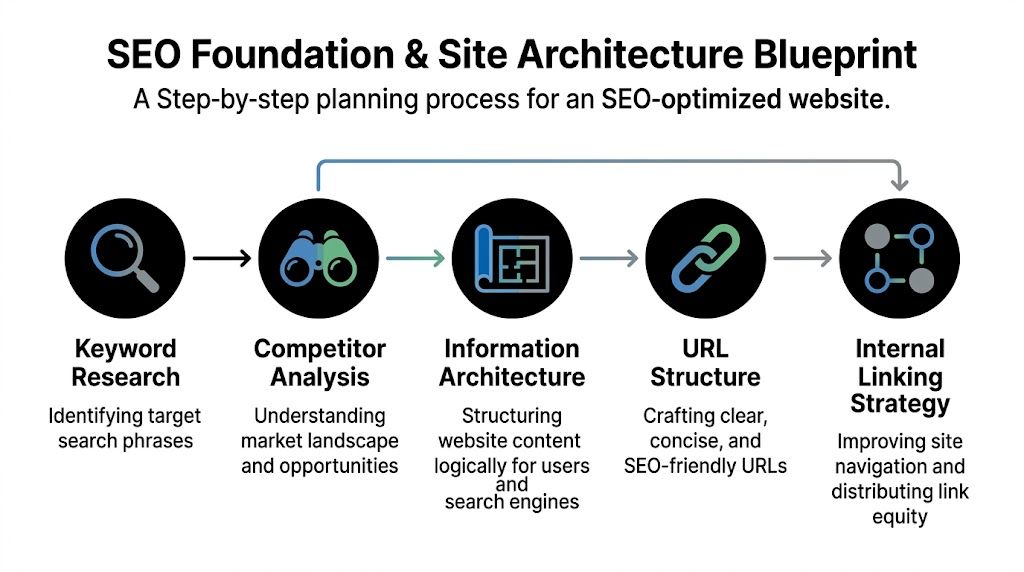
If I’m building a site for an Australian SMB, I don’t begin by choosing colours, page builders, or animation effects. I start by working out what the business needs to rank for, what pages deserve their own URL, what users are trying to do, and how the site can grow without turning into a mess six months later.
Start with service intent and business intent
A lot of SMB sites are structured around how the owner thinks about the business instead of how customers search.
That usually creates vague top-level pages like “Solutions”, “What We Do”, or “Capabilities”. They sound fine internally, but they’re weak for search and weak for users. A clearer structure uses plain-language service pages, location relevance where appropriate, and a blog or resource section only if the business can maintain it.
I usually map the initial architecture around a small set of page types:
- Core commercial pages that target the main services the business sells.
- Support pages such as About, Contact, FAQs, pricing-related pages, or process pages that reduce friction.
- Trust pages including reviews, case examples, accreditations, and policies.
- Content pages that answer common search questions and support internal linking.
For local operators, map pages to real search behaviour, not imaginary personas. If your customers search by suburb, service type, or urgent need, your architecture should reflect that. If you need a practical local search primer, Adwave’s guide to Local SEO for Small Business is a useful reference for how local visibility connects to site structure.
Build a hierarchy that can scale
A clean information architecture makes later SEO work easier. It helps search engines understand topical relationships and helps users move without friction.
A simple WordPress hierarchy often looks like this:
| Site layer | What belongs here | Why it matters |
|---|---|---|
| Homepage | Primary value proposition, key services, trust signals | Sets context and funnels users |
| Service hub or main services page | Summary of service categories | Helps users choose a path |
| Individual service pages | One page per core service | Gives each topic a clear ranking target |
| Location or area pages if justified | Genuine local relevance only | Supports local intent without duplication |
| Blog or resource content | Educational and supporting topics | Builds context and internal links |
| Contact and conversion pages | Quote, booking, call, enquiry paths | Turns traffic into leads |
The key is restraint. Don’t create ten near-identical pages just to chase slight keyword variations. That often leads to keyword cannibalisation, where multiple pages compete for the same intent and none of them performs properly.
If two pages would answer the same customer question, they probably shouldn’t both exist.
Make navigation simple enough for humans
Search-friendly architecture isn’t about pleasing a crawler at the expense of real users. In practice, both want the same thing. Clear paths, obvious labels, and a sensible page depth.
A few rules hold up well:
- Use plain menu labels. “Services” beats “Solutions”.
- Keep priority pages easy to reach. Important commercial pages shouldn’t be buried.
- Plan internal links early. Don’t wait until content is written.
- Reserve room for future content. A structure that can’t expand usually breaks.
For Australian SMBs, I also look at what’s likely to change. New services, extra locations, seasonal campaigns, new staff, and new FAQs all need somewhere to live. Good seo website design doesn’t just launch well. It stays organised when the business grows.
Configuring Your Technical SEO Settings in WordPress
Once the structure is mapped, WordPress needs to be set up properly. This is the part many builds rush through. A site can look finished on the front end while basic technical SEO settings are still wrong underneath.
The good news is that the essentials are not complicated. They just need care.
Check the settings that stop indexing mistakes
The first thing I check on any new WordPress site is whether it’s accidentally blocking search engines. During development, someone often ticks the “discourage search engines” setting and forgets to untick it before launch.
Then I move through the core items:
- Permalinks should be clean and readable.
- Indexing settings should allow public pages to be crawled.
- Preferred SEO plugin should be configured once, not stacked with another plugin doing the same job.
- XML sitemap should be generated and submitted in Google Search Console.
- Canonical settings should be sensible so duplicate versions of pages don’t compete.
If the site uses Yoast SEO or Rank Math, most of this can be handled cleanly inside the plugin. The plugin itself isn’t the strategy. It’s just the tool that helps implement one.
Use robots.txt carefully
Robots directives are useful, but they’re often misused. I still see WordPress sites blocking folders or URLs they shouldn’t, especially after redesigns, staging migrations, or hurried plugin changes.
For a practical walkthrough, Webby’s guide on WordPress robots.txt covers the common uses and mistakes. The main point is simple. Don’t use robots.txt as a blunt instrument. If you block the wrong content, Google can’t crawl what you want indexed.
Add schema where it helps understanding
Schema markup won’t rescue a weak site, but it helps search engines interpret content more accurately.
For a typical Australian SMB WordPress build, the useful schema types are often:
- Organisation or local business schema for business identity
- Service schema when service pages are clearly defined
- Product schema for e-commerce
- FAQ schema where a real FAQ section exists
- Breadcrumb schema if the site uses breadcrumbs
This needs to match the actual page content. Don’t force schema types onto pages that don’t support them. Search engines are better at spotting filler than many site owners assume.
Technical SEO should reduce ambiguity. If a setting, plugin, or schema block makes the site harder to understand, remove it.
Keep the build lean
A lot of WordPress technical issues come from plugin overload. One plugin handles redirects, another adds schema, another injects metadata, another modifies sitemaps, and now four tools are touching the same output.
That creates conflicts fast. My preference is a smaller stack with clear responsibilities. One SEO plugin. One performance layer. Only the custom fields, forms, and e-commerce components the site needs. The cleaner the stack, the easier it is to troubleshoot indexing problems later.
Technical SEO in WordPress isn’t glamorous, but it’s where many projects either become discoverable or sabotage themselves.
Optimising for Blazing-Fast Performance and Core Web Vitals
A Perth business owner signs off on a polished new WordPress site, then calls a few weeks later asking why enquiries are still flat. The design looks good. The actual problem is slower page loads on mobile, lag from interstate or overseas hosting, and a stack of heavy scripts that got added without much restraint.
Speed affects both rankings and conversion rate. If the site feels slow, people leave before the copy, offer, or call to action gets a fair shot. For Australian SMBs, that problem is often worse than expected because distance still matters. A site serving users in Perth, regional WA, or across Australia can lose time quickly if the hosting setup, cache layer, and asset delivery are poorly chosen.

The Perth hosting reality
Latency is often the first problem I check.
A lot of Australian SMB sites are built on cheap shared hosting with servers nowhere near their customers. Before WordPress renders a page, the request is already taking longer than it should. Add a page builder, large images, third-party scripts, and weak caching, and the site starts every visit behind.
Local hosting is not automatically the right answer for every business. A national e-commerce store might do well with an east coast host plus a CDN. A Perth service business targeting WA suburbs may benefit from infrastructure tuned for Australian traffic and a simpler stack. The point is to match the setup to the audience, not buy hosting on price alone.
Measure what users actually feel
Core Web Vitals are still the clearest way to judge whether the site is fast in practice.
Use these mobile benchmarks as the baseline:
- LCP under 2.5s
- INP at or below 200ms
- CLS at or below 0.1
I usually review Search Console first, then confirm issues in PageSpeed Insights and browser testing. That combination shows both the long-term pattern and the likely causes. Chasing a perfect lab score is rarely useful. Reducing render delay, layout shift, and interaction lag on real devices is what improves outcomes.
What slows WordPress sites down in the real world
The usual causes are predictable:
- Oversized images exported straight from design files or phones
- Extra scripts from sliders, chat tools, popups, heatmaps, and tracking tags
- Weak caching configuration or no caching at all
- Bloated multipurpose themes with features the business never uses
- Too many font files and weights
- Third-party embeds loading on page view instead of on interaction
Caching is one of the easier wins if the rest of the build is sensible. This guide to WordPress caching plugins for different hosting setups is a practical starting point. The right option depends on the host, the plugin stack, and whether the site needs full-page cache, object cache, browser cache, or a lighter setup.
The changes that usually produce the biggest gain
On Australian SMB builds, a small set of fixes usually does most of the work:
- Resize and compress images before upload. WebP helps, but correct dimensions matter just as much.
- Lazy load below-the-fold media. The first screen should load first.
- Defer or remove non-critical CSS and JavaScript where safe. Every change needs testing.
- Use a CDN if the audience spread justifies it.
- Cut visual effects that slow down rendering. Carousels and entrance animations often cost more than they return.
- Choose themes and templates with cleaner front-end output.
There is a maintenance angle here that gets missed. Performance work is not finished at launch. Plugin updates, tag manager changes, new ad scripts, replacement images, and extra widgets can undo months of careful optimisation. A site that passes Core Web Vitals at handover can slip within weeks if nobody is monitoring it.
This video gives a useful overview of the wider speed mindset behind technical optimisation.
Design choices can help speed or sabotage it
Some slow pages are not a hosting problem. They are a design decision.
Full-screen video banners, oversized hero sliders, layered motion effects, custom cursors, and aggressive popups all add browser work. On paper they can look impressive. On a mid-range mobile phone on a suburban 4G connection, they often feel clumsy.
High-performing seo website design usually looks more controlled behind the scenes. Cleaner components. Better spacing. Strong typography. Tighter use of imagery. Fewer moving parts. That approach suits Australian SMBs because it is not only faster now. It is also easier to maintain, easier to test after updates, and less likely to break as the site grows.
Designing for Mobile Users and Web Accessibility
A site can be responsive and still be hard to use.
That’s the distinction many businesses miss. They test a homepage on an iPhone, see that it “fits”, and assume the mobile job is done. But mobile usability is broader than shrinking content to a smaller screen. Buttons need room. Forms need to be easy to complete. Menus need to be obvious. Text needs to remain readable. Layout shifts can’t knock people off course.

For Australian businesses, accessibility is the bigger blind spot. The Disability Discrimination Act 1992 legally requires digital services to be accessible, yet only 12% of WordPress sites in Australia meet basic WCAG standards. The same source notes that accessible sites can gain up to a 20% uplift in organic traffic through stronger usability and crawlability, according to Elementor’s accessibility and inclusive design analysis.
Mobile-first means content-first
On mobile, the most important page content has to show up early and clearly. That affects both UX and SEO.
I generally strip the page back to the essentials:
- Clear first screen messaging so users know what the business does
- Tap-friendly buttons with direct labels
- Short forms unless there’s a reason to ask more
- Readable spacing and font sizing
- Sticky elements used sparingly, because clutter stacks quickly on small screens
If a desktop layout depends on hover states, tiny icons, or side-by-side content blocks carrying equal weight, it usually needs rethinking for mobile.
Accessibility improves more than compliance
Accessible design often produces cleaner SEO outcomes because it forces clarity into the build.
The practical elements matter:
- Heading hierarchy should follow a logical order
- Alt text should describe useful image meaning, not stuff keywords
- Colour contrast needs to support readability
- Forms need proper labels and error handling
- Keyboard navigation should work without traps
- Link text should make sense out of context
- Semantic HTML should do the heavy lifting before ARIA is added
A lot of “modern” websites fail here because they prioritise visual novelty over solid structure. The irony is that accessible pages often rank and convert better because they’re easier for everyone to use.
Accessibility isn’t a visual style. It’s a build standard.
What doesn’t work
Some common patterns hurt both users and search performance:
| Weak pattern | Why it causes problems | Better approach |
|---|---|---|
| Text embedded in images | Harder to read and harder to interpret | Use live text in HTML |
| Placeholder-only form labels | Confusing and inaccessible | Use persistent visible labels |
| Low-contrast brand colours | Reduces readability | Adjust palette for contrast |
| Heading misuse for styling | Breaks page structure | Style headings without changing order |
| Hidden content without context | Users miss critical information | Keep important content visible |
For Australian SMBs, this isn’t about turning every site into a compliance exercise. It’s about building pages that more people can use without friction. Good seo website design supports that naturally.
Crafting On-Page Content and Strategic Internal Links
A well-built WordPress site still needs pages worth ranking.
Many redesigns lose momentum. The technical setup is fine, the templates are clean, and then the actual page copy is vague, repetitive, or too thin to answer real search intent. Design can improve clarity, but it can’t replace substance.
Write pages around decisions, not slogans
On-page SEO starts with understanding what the visitor needs to decide.
A strong service page usually answers practical questions quickly. What is the service? Who is it for? What problem does it solve? How does the process work? Why trust this business? What should the visitor do next?
That pushes the writing in a better direction than empty brand language. Instead of “solutions designed for dynamic businesses”, use the terms your buyers use. If you’re targeting a commercial intent page, say what you do in plain English and support it with useful detail.
For content structure, I like this simple pattern:
- Primary heading that matches the page topic cleanly
- Short introduction that confirms relevance
- Body sections built around objections, process, outcomes, and FAQs
- Trust elements such as testimonials, examples, or credentials
- Clear CTA matched to the stage of buyer intent
Get the search snippet right
Title tags and meta descriptions won’t fix a bad page, but they influence how that page appears in search.
A good title tag should identify the page topic and business context without trying to cram every variation into one line. Meta descriptions should read like ad copy. Clear, relevant, and written for clicks from the right audience.
I also pay close attention to heading use on the page itself. One H1. Logical H2s. Supporting H3s where they help readability. This helps users scan and helps search engines understand the page hierarchy.
For a practical checklist, Webby’s guide to on-page SEO covers the key elements worth checking before and after launch.
Internal links are not housekeeping
Internal linking is one of the easiest wins on a WordPress site, and it’s often handled badly or ignored.
A strategic internal link does three jobs at once. It helps search engines discover related pages. It gives users a useful next step. It reinforces the relationship between topics across the site.
Here’s the difference in practice:
Weak internal link
- “Click here to learn more”
Better internal link
- “See our website maintenance service for ongoing plugin, theme, and core updates”
The second version gives context. It tells both users and crawlers what sits behind the link.
Build links from relevance, not habit
I usually plan internal links in layers:
- Navigation links for top-level discoverability
- Contextual links inside page content where topics overlap
- Footer or utility links for important support pages
- Blog-to-service links that move readers from information to action
The best internal links feel like help, not like optimisation.
What doesn’t work is adding random links purely to increase volume. If the destination page isn’t a natural next step, leave it out. Good on-page SEO feels organised because the content and the linking strategy are working together.
Launching, Monitoring, and Maintaining Your SEO Health
A Perth business launches a new WordPress site on Friday, then spends the next few weeks wondering why enquiries dropped. The design looks sharp. Pages load fine on the office NBN. But a few old URLs were missed, Search Console was never checked, GA4 events were firing twice, and east coast users were getting slower response times than expected from the hosting setup. That is a normal post-launch failure pattern, and it is avoidable.
Launch puts the live site under real conditions. Google starts crawling it properly. Customers start using it on mobile, on patchy 4G, and across different devices. Marketing tools, forms, caching, and redirects all have to hold up outside staging.
Use a proper go-live checklist
Before a site goes live, I check the build in the same order problems usually appear after launch: indexing, redirects, tracking, forms, and server behaviour.
| Category | Check Item | Status |
|---|---|---|
| Indexing | Search engine visibility is enabled for live pages | Pending / Done |
| Indexing | XML sitemap is available and ready for submission | Pending / Done |
| Indexing | Canonical settings are reviewed | Pending / Done |
| Redirects | Old URLs redirect to the most relevant new URLs | Pending / Done |
| Content | Title tags and meta descriptions are in place | Pending / Done |
| Content | H1s, page copy, and internal links are reviewed | Pending / Done |
| Performance | Mobile speed has been tested on key pages | Pending / Done |
| Accessibility | Headings, alt text, labels, and keyboard checks are complete | Pending / Done |
| Tracking | GA4 is installed and verified | Pending / Done |
| Tracking | Google Tag Manager is publishing expected events | Pending / Done |
| Tracking | Google Search Console is connected | Pending / Done |
| Conversion | Forms, calls, bookings, and thank-you pages are tested | Pending / Done |
| Security | SSL, backups, updates, and malware protection are active | Pending / Done |
For Australian SMBs, I also check location-specific issues that get missed in generic launch lists. That includes testing site speed from Australian locations, confirming hosting and CDN behaviour for users outside WA, and making sure contact details and service areas are consistent enough to support local SEO. If the business serves Perth only, the content and schema should reflect that. If it serves multiple cities, the architecture and landing pages need to support that cleanly from day one.
Monitor the site like an asset
The first month after launch usually tells you more than the design phase did.
GA4 shows whether users are reaching key pages and completing actions. Google Search Console shows whether Google is indexing the right URLs, ignoring the wrong ones, or flagging coverage issues. Google Tag Manager helps control event tracking without editing theme files every time marketing wants a new conversion event.
Those tools are only useful if someone reviews them. I look for practical issues. Are service pages getting impressions but weak clicks because the snippets are poor? Are users dropping off on mobile before they reach the form? Are branded searches landing on the wrong page? Is Google spending crawl budget on tag archives, parameter URLs, or thin utility pages?
If you’re comparing support providers for this kind of work, this guide on how to choose the best SEO company is a reasonable checklist for evaluating process, communication, and technical scope.
Maintenance is part of SEO performance
WordPress sites rarely fail all at once. They slip.
A plugin update adds extra JavaScript. A form stops sending reliably after a PHP version change. A campaign page uploads 6 MB hero images. A schema setting gets overwritten. A redirect rule breaks after a permalink tweak. None of those issues looks dramatic on its own, but together they drag down speed, usability, crawl efficiency, and conversion rate.
That matters even more for Australian businesses because distance still affects performance decisions. Hosting a site in Perth can work well for WA customers, but national targeting often needs tighter caching, a CDN, and regular speed checks from multiple Australian regions. The right setup depends on the client’s audience, budget, and stack. There is no single hosting choice that suits every SMB.
Accessibility also needs ongoing checks, not just a pass before launch. New team members add PDFs, images, popups, and page-builder sections over time. If nobody reviews headings, link labels, contrast, focus states, and form behaviour, compliance drifts. For Australian businesses, that is not just a UX problem. It can become a legal and commercial risk.
A dedicated support layer becomes key at this stage. That can sit with an internal developer, a retained freelancer, an agency, or a WordPress specialist such as Webby Website Optimisation, which provides maintenance, backups, malware scanning, performance work, hosting support, and GA4 or Tag Manager setup for Australian businesses.
A well-built WordPress site needs ongoing technical care to keep rankings stable, protect conversions, and stay easy to manage.
Frequently Asked Questions About SEO Website Design
Is seo website design different from regular web design
Yes. Regular web design often focuses on visual presentation and brand feel first. Seo website design starts with search intent, page structure, crawlability, speed, accessibility, and conversion paths, then builds the visuals around that foundation.
A good result still looks polished. It just performs better because the structure underneath is doing real work.
Can I use a pre-made WordPress theme and still rank
Yes, sometimes. A good lightweight theme can work well if it has clean code, flexible templates, and doesn’t force bloated features onto every page.
The problem isn’t that themes are pre-made. The problem is when the theme is heavy, overbuilt, hard to customise properly, or dependent on visual gimmicks that hurt speed and usability. For many SMBs, a carefully configured theme is enough. For others, custom development makes more sense because it removes unnecessary weight and gives tighter control.
How long does SEO take after a new site launch
It depends on the site’s history, competition, content quality, technical health, and how well the business supports the site after launch.
What matters more is the sequence. First get indexing, structure, page quality, internal links, speed, and tracking right. Then keep publishing and improving based on data. Businesses that expect instant rankings from a redesign alone usually end up disappointed.
Does SEO-friendly design help paid ads too
Yes. The same page qualities that help organic search often help paid campaigns. Faster load times, stronger mobile UX, clearer messaging, cleaner forms, and better page relevance all support ad landing page performance.
Should I redesign my whole site to improve SEO
Not always. Sometimes the right move is a structural repair, content rewrite, performance overhaul, or template cleanup rather than a full rebuild. If the current site has good bones, keep what works and fix what doesn’t.
If your WordPress site feels slow, hard to manage, or underwhelming in search, Webby Website Optimisation can help with practical support across maintenance, speed optimisation, technical setup, tracking, and ongoing WordPress improvements for Australian businesses.