
For most small businesses running a 1–2 person team, the best starting point is Ahrefs (best overall for prospecting depth), Semrush (best all-in-one), Linkody (best budget monitoring), Hunter.io (best for contact discovery), and Webby Website Optimisation (best managed-service option when you’d rather not run outreach yourself).
TL;DR: If you want one affordable tool to start with, Linkody or Mangools/LinkMiner gives you solid monitoring and prospecting without the enterprise price tag. If outreach is the bottleneck, pair Hunter.io with either one.
Here’s the quick shortlist:
- Best overall: Ahrefs — unmatched backlink database depth, strong prospecting, built for teams that want serious research capability
- Best all-in-one: Semrush — research, outreach, and reporting under one subscription, consistently ranked among the top platforms for teams that want everything in one place
- Best budget monitoring: Linkody — lightweight, affordable, purpose-built for small teams tracking live placements
- Best for contact discovery: Hunter.io — finds verified email addresses fast, pairs cleanly with any prospecting tool
- Best managed-service option: Webby Website Optimisation — handles discovery, outreach, and reporting for local service businesses that don’t have time to run campaigns in-house
Backlinks remain among the top three Google ranking factors, which means skipping link building isn’t a neutral choice — it’s ceding ground to competitors who aren’t skipping it. If running outreach in-house sounds like too much, Webby Website Optimisation’s managed SEO service is worth a conversation before you commit to a tool stack.
Table of Contents
- Which backlink tools match your budget and primary need?
- How should a small business choose a backlink tool?
- Tool-by-tool breakdown: features, fit, and quick verdicts
- What do backlink tools cost, and when will you see results?
- A 4-week link-building workflow for a 1–2 person team
- Key Takeaways
- The case for outsourcing sooner than you think
- Skip the tool stack: Webby’s managed SEO and backlink service
- Sources and further reading
Which backlink tools match your budget and primary need?
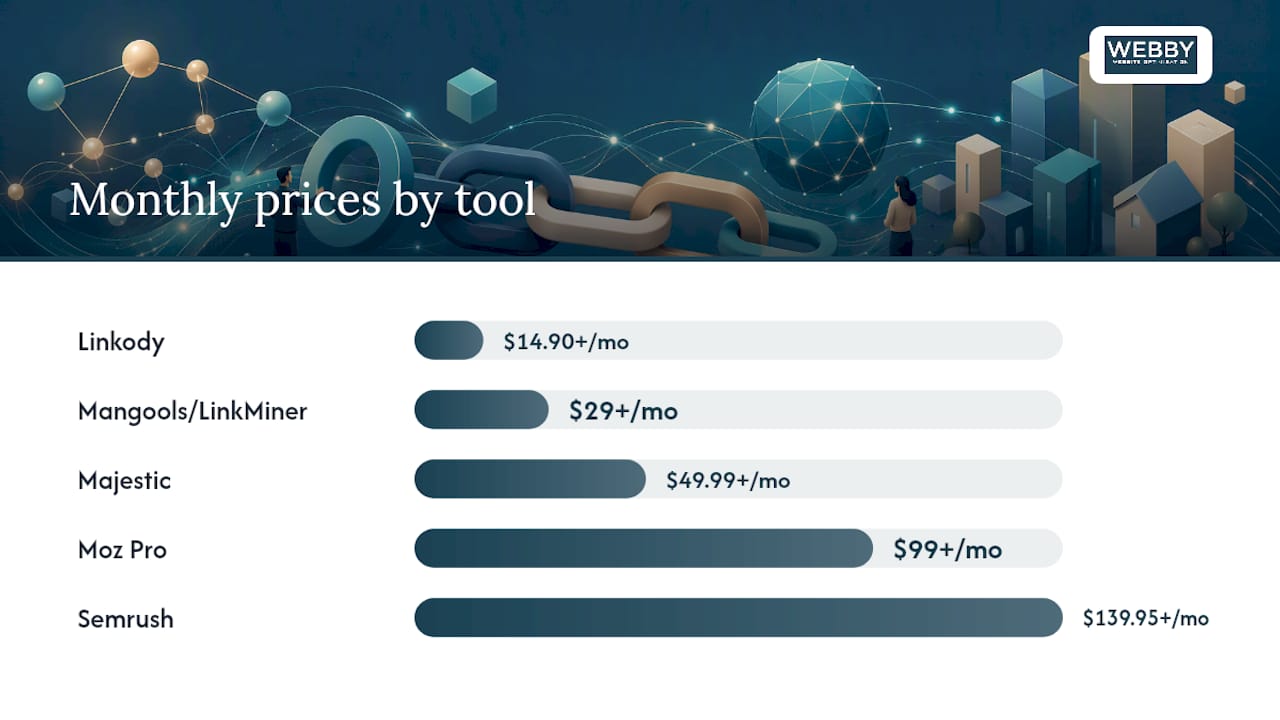
The table below covers every tool by price band, core feature strength, and fit for small teams. Price bands: Budget = under $50/mo, Mid = $50–$150/mo, Premium = $150+/mo.
| Tool | Best For | Price Band & Free Trial | DB Size & Freshness | Prospecting & Broken-Link Discovery | Outreach Support | Monitoring & Alerts | Integrations & CSV/CRM | Ease of Use (1–2 person team) |
|---|---|---|---|---|---|---|---|---|
| Ahrefs | Deep research & competitor analysis | Premium ($99+/mo); limited free tools | Very large, frequently updated | Yes, strong | Limited (no built-in email) | Yes | CSV export, API | Moderate |
| Semrush | All-in-one research + outreach | Premium ($139.95+/mo); free trial | Very large, updated regularly | Yes, strong | Yes (outreach module) | Yes | CRM integrations, CSV | Moderate |
| Moz Pro | Beginners & DA-focused research | Mid ($99+/mo); 30-day free trial | Large, reliable | Yes, moderate | Limited | Yes | CSV, limited CRM | High |
| Majestic | Trust Flow & link history analysis | Mid ($49.99+/mo); no free trial | Very large, deep history | Yes, moderate | No | Limited | CSV | Moderate |
| Mangools/LinkMiner | Budget prospecting & solo founders | Budget ($29+/mo); 10-day free trial | Mid-size, good freshness | Yes, good | No | Limited | CSV | Very high |
| Linkody | Affordable link monitoring | Budget ($14.90+/mo); 30-day free trial | Small, focused | Limited | No | Yes, strong | CSV, Google Analytics | Very high |
| Link Whisper | Internal + external links for WordPress sites | Budget ($97/yr one-time); no free trial | N/A (site-level) | Limited (external) | No | Limited | WordPress only | Very high |
| Hunter.io | Contact discovery & email verification | Budget ($34+/mo); free plan (25 searches/mo) | N/A (email finder) | No | Yes (email sequences) | No | CSV, CRM (HubSpot, Salesforce) | Very high |
| Webby Website Optimisation | Managed outreach for local service businesses | Custom retainer; pilot available | Managed externally | Yes (managed) | Yes (fully managed) | Yes (reporting) | Reporting delivered | Very high |
Quick best-for tags:
- Solo founders on a tight budget: Mangools/LinkMiner or Linkody
- WordPress site owners: Link Whisper for internal linking, pair with Ahrefs for external prospecting
- Teams that want one login for everything: Semrush
- Contact discovery only: Hunter.io free plan to start
- Local service businesses with no time for outreach: Webby Website Optimisation managed service
How should a small business choose a backlink tool?
The four criteria that actually matter for small teams: fit to team size, prospecting quality (especially topical relevance), contact accuracy, and whether the tool’s outreach workflow matches how your team actually works. Everything else is secondary.
Most small businesses waste money on enterprise features they never use. A solo founder running five outreach emails a week doesn’t need a platform built for a 10-person agency. Start with what you’ll actually use, not what looks most impressive in a demo.
Questions to ask before you buy
- Who will run this tool week to week? (One person vs. a team changes everything.)
- How many outreach emails do you realistically plan to send per month?
- Do you need a backlink database, or just contact discovery, or both?
- Does the tool export to CSV or connect to the CRM you already use?
- Is there a free trial long enough to run a real test campaign (at least 7–10 days)?
Red flags to avoid
- “Guaranteed links” — any vendor promising guaranteed live placements is almost certainly using private blog networks (PBNs) or low-quality directories. These can trigger Google penalties. Industry practitioners consistently warn that guaranteed link claims frequently hide PBN tactics.
The 7–14 day trial test
Sign up for a free or trial plan. Pull a list of 20–30 prospecting targets in your niche. Check whether the tool surfaces sites that are actually relevant to your business (not just high Domain Authority). Draft three outreach emails using the tool’s workflow. If you hit friction at any step, that friction will compound over months. A tool that feels clunky in week one rarely gets better.
DIY tools vs. managed service: a decision checklist
- Do you have 3–5 hours per week to dedicate to outreach? If no, go managed.
- Is your monthly budget under $100? Start with a budget DIY tool.
- Do you have someone on your team comfortable with cold email? If no, go managed or use Hunter.io with a simple sequence.
- Are you targeting local service keywords where speed matters? A managed pilot often gets placements faster than a solo founder learning a new tool.
- Have you already tried DIY and stalled after the first month? That’s the clearest signal to outsource.
Pro Tip: Run a two-week trial on one tool before paying for a second. Most small teams don’t need a stack — they need one tool used consistently.
Tool-by-tool breakdown: features, fit, and quick verdicts
Link Whisper
Price band: Budget ($97/year, one-time). No free trial.
Link Whisper is a WordPress plugin that uses AI to suggest internal links as you write. It also surfaces some external link opportunities, but its core strength is internal linking — a frequently overlooked factor that affects how Google crawls and weights your pages.
For a WordPress-based small business, fixing internal linking is often faster and cheaper than external outreach, and the SEO impact is real. Pair Link Whisper with a prospecting tool for external links.
- Cons: — WordPress only; limited external link data; not a replacement for a backlink database
Hunter.io
Price band: Budget ($34+/mo). Free plan available (25 searches/month).
Hunter.io finds and verifies email addresses for any domain. You give it a website, it returns the most likely contact emails with a confidence score. The free plan is genuinely useful for testing: 25 searches per month is enough to run a small outreach campaign before committing to a paid tier.
Hunter also includes email sequence functionality, so you can send and track outreach without a separate tool. It integrates with HubSpot, Salesforce, and most major CRMs. For a small team that already has a prospecting list and just needs to find contacts, Hunter.io is the most direct path to an inbox.
- Cons: — Not a backlink database; no prospecting; limited to contact discovery and outreach
Pro Tip: Before paying for Hunter.io’s paid tier, use the free plan alongside backlink outreach automation guidance to map your outreach process. You’ll know within two weeks whether you need the volume a paid plan provides.
What do backlink tools cost, and when will you see results?
Tool pricing ranges from free utilities to enterprise outreach platforms above $550/mo. For most small businesses, the realistic spend falls into three bands:
| Price Band | Monthly Cost | What You Get | Time to First Link | Time to Organic Impact |
|---|---|---|---|---|
| Free/Basic | $0–$14 | Monitoring only or very limited searches | N/A (no outreach) | N/A |
| Budget | $15–$50 | Prospecting basics, monitoring, or contact discovery | 2–6 weeks | 3–6 months |
| Mid-range | $50–$150 | Research + some outreach features | 2–4 weeks | 3–9 months |
| Premium | $150+ | Full research, outreach, and reporting | 1–3 weeks | 3–6 months |
| Managed service | Custom retainer | Done-for-you discovery, outreach, and reporting | 4–8 weeks | 4–9 months |
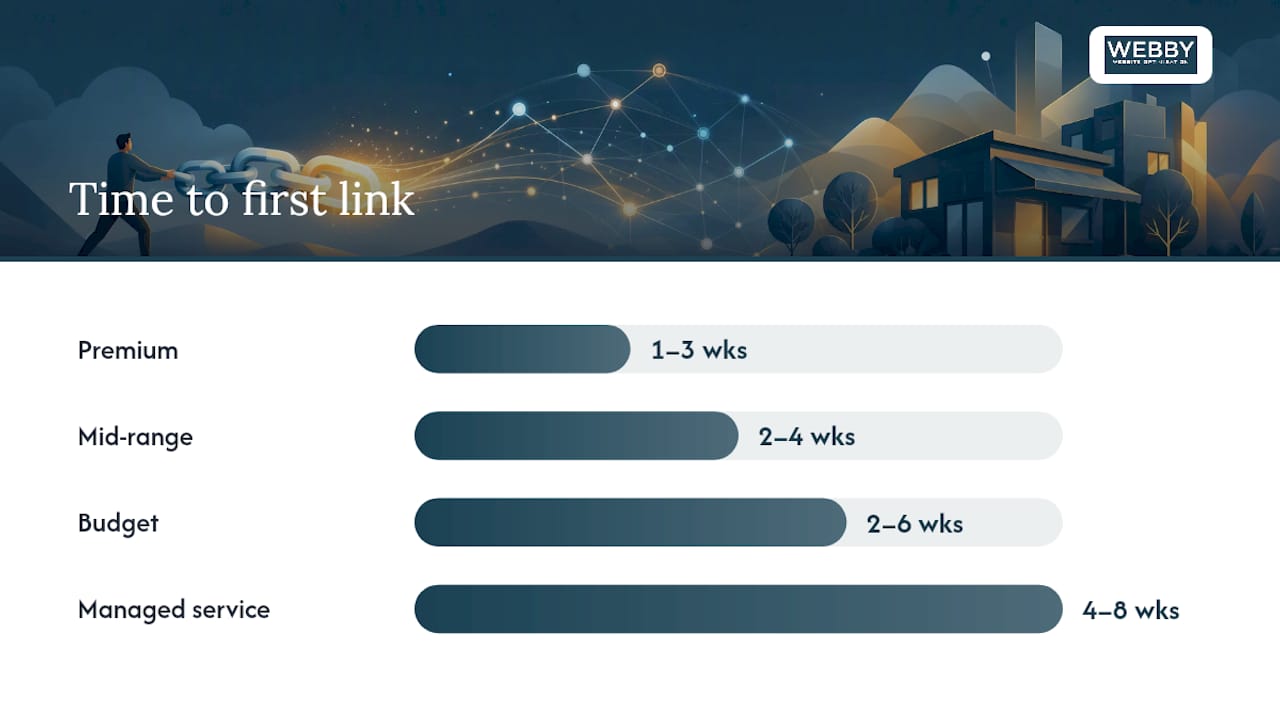
A few things to understand about these timelines. Getting your first reply from a prospect typically takes 1–3 weeks. Getting a link actually placed takes 1–3 months, depending on the site’s editorial process. Seeing that link move your organic rankings takes another 3–6 months on top of that. Anyone promising faster results is either working with very low-quality sites or not being straight with you.
Budgeting checklist:
- Monthly tool subscription vs. one-off outreach buys: tools are better for ongoing campaigns; one-off link purchases are rarely worth it
- DIY tool stack ($50–$150/mo) vs. managed retainer: the managed option costs more upfront but removes the time cost entirely
- Factor in your hourly rate: if outreach takes 5 hours/week and your time is worth $75/hour, a $500/mo managed service is cheaper than your own labor
- Start with a niche directory and community platform strategy before targeting high-authority editorial sites — it builds your profile and increases acceptance rates on harder targets
A 4-week link-building workflow for a 1–2 person team
The minimal stack that works: one prospecting tool (Ahrefs, Mangools, or Semrush) plus one contact finder (Hunter.io). Time commitment: 3–5 hours per week. That’s it.
Pairing one research database with a lightweight outreach tool is the standard recommendation across practitioner reviews — it keeps costs down and avoids the feature bloat that kills small-team momentum.
Week-by-week plan
Week 1 — Research and list building
- Use your prospecting tool to pull 30–50 topically relevant prospects (filter by niche relevance, not just DA)
- Check each site manually: is it real, active, and editorially credible?
- Use Hunter.io to find verified contacts for each prospect
- Build a simple tracking spreadsheet: site, contact email, DA/DR, outreach status
Week 2 — Outreach drafting and first sends
- Write three outreach templates (guest post pitch, resource page addition, broken-link replacement)
- Personalize each email with a specific reference to the target site’s content
- Send to your first 15–20 prospects; log send dates
- Start with attainable targets — niche directories and community resource pages — before pitching editorial sites
Week 3 — Follow-up and first replies
- Send one follow-up to non-responders (wait at least 5 business days)
- Respond to any replies within 24 hours; move interested prospects to a “negotiating” column
- Review any placements that go live: check anchor text, page relevance, and link status in Linkody or your monitoring tool
Week 4 — Review, adjust, and scale
- Audit what worked: which templates got replies? Which site types accepted?
- Pull a new prospect list based on what converted
- Decide whether to continue DIY or escalate to a managed service based on your reply rate and time spent
Pro Tip: Require approval of every outreach email before it sends and every placement before it goes live. One bad placement on a spammy site can undo weeks of good work. Speed is not worth that risk.
For AI-assisted outreach workflows, tools like LinkIntel claim to automate discovery, personalization, and negotiation — useful context if you’re evaluating automation-first options, but always verify what sites you’re being placed on before any link goes live.
Additional quality checks for each outreach email:
- Is the target site genuinely relevant to your business topic?
- Does the site have real editorial standards (not just a “write for us” page with no guidelines)?
- Is the contact a real person with a verifiable name and role?
- Have you reviewed the site’s existing content for quality?
Key Takeaways
Backlinks remain a top Google ranking signal, and for small businesses, the right tool is the one your team will actually use consistently — not the one with the most features.
| Point | Details |
|---|---|
| Start with fit, not features | Choose a tool based on who will run it; a solo founder needs simplicity, not enterprise dashboards. |
| Budget tools cover the basics | Linkody ($14.90+/mo) and Mangools ($29+/mo) handle monitoring and prospecting for most small teams. |
| Pair prospecting with contact discovery | One research tool plus Hunter.io covers the full outreach workflow at a budget price. |
| Expect a 3–9 month timeline | First placements typically appear in 1–3 months; measurable organic impact follows in 3–9 months. |
| Webby Website Optimisation handles it for you | For local service businesses short on time, Webby’s managed service covers discovery, outreach, and reporting end to end. |
The case for outsourcing sooner than you think
The conventional advice is to try the tools yourself first, then hire help if you get stuck. After working with local service businesses on SEO and link building, the pattern that actually plays out is different. Most small teams spend two or three months learning a tool, running inconsistent outreach, and getting a handful of placements — then stall when the next busy season hits.
The businesses that see faster results tend to be the ones that either commit fully to DIY (3–5 hours per week, every week, no exceptions) or hand it off early to a managed service and focus their own time on the work only they can do.
The math is worth running honestly. If your time is worth $75/hour and outreach takes 4 hours per week, that’s $1,200/month in opportunity cost before you’ve paid for a single tool. A managed pilot at a comparable cost gets you actual placements, a reporting dashboard, and none of the learning curve.
That doesn’t mean DIY is wrong. For a founder who enjoys the research side of SEO, tools like Ahrefs or Semrush are genuinely satisfying to use, and the skills compound over time. But if link building feels like a chore you keep deprioritizing, that’s the signal. Deprioritized outreach produces no links. A managed service running in the background produces links whether or not you had a busy week.
For local service businesses specifically — plumbers, consultants, clinics, trades — the ROI from structured SEO and backlink work shows up in calls and bookings, not just rankings. That’s the metric that matters, and it’s worth measuring against whatever you’re spending on tools or management.
Skip the tool stack: Webby’s managed SEO and backlink service
Running your own outreach is one route. Webby Website Optimisation is the other — and for local service businesses that need results without the weekly time commitment, it’s often the faster path.

Webby’s managed service covers the full workflow: prospect discovery, outreach drafting, placement approval (you sign off before anything goes live), and monthly reporting. You stay in control of what gets published under your brand without having to manage the process yourself.
What the service includes:
- Topically relevant prospect research for your niche and location
- Outreach managed by the Webby team with your approval at every placement
- Monthly reporting on placements, link status, and organic performance
- Guidance on SEO strategy for local service businesses — not just link counts
For local service businesses in the US, a managed pilot typically runs 4–8 weeks to first placements, with measurable organic movement in the 4–9 month window. Pricing is retainer-based and scoped to your business size and outreach volume.
Ready to skip the tool learning curve? Talk to the Webby team about a managed SEO pilot for your business.
Sources and further reading
The sources below informed this guide. Each one is worth reading if you want to go deeper on a specific area.
- Are Backlinks a Google Ranking Factor? Complete 2026 Analysis
- 10 AWESOME Link Building Tools in 2026
- 16 Link Building Software Solutions for 2026 | LinkBuilder.io
- Mentiohunt – Backlink Placement Autopilot for Founders
- Link building software — Mentiohunt
- LinkIntel – AI Link Building Agent | Automated Backlink Outreach Software
- Backl.io
- SEO for Small Business Owners – Webby Website Optimisation
This article is general information, not professional SEO or legal advice. Tool pricing and features change frequently — confirm current plans directly with each vendor before purchasing.