
Use a 301 when a page has moved for good, and a 302 when the move is temporary and the original address will come back. That one choice decides which URL Google shows in search results and whether the old page’s ranking signals follow the visitor to the new one. For a local service business, a wrong choice during a redesign or a move to a new domain can quietly cost you enquiries. Getting it right takes a few minutes per URL and is easy to verify.
TL;DR
- A 301 means moved permanently: Google shows the new URL and treats it as the page to keep. A 302 means moved temporarily: Google keeps showing the old URL.
- Per Google’s crawling documentation, a 301 is a strong signal that the target should be processed, and a 302 is a weak one.
- Redirect old pages to the closest matching replacement, never to the homepage, and keep each redirect to a single hop.
- After a WordPress migration or permalink change, 404s usually come from rewrite rules, which are fixed in Settings > Permalinks, and from old URLs with no redirect.
- Keep permanent redirects in place for at least a year.
Table of Contents
- What a 301 and a 302 actually do
- Does the choice change your rankings?
- When to use a 301
- When to use a 302
- A worked example: a Fremantle electrician rebuilds their site
- Setting up redirects without creating a mess
- Check the redirect before you walk away
- WordPress 404s after a migration or permalink change
- Reading Search Console: “Not found (404)” and crawl errors
- How much does the code matter, honestly?
- Where we can take this off your hands
- Our view on redirects
- FAQ
- Sources
What a 301 and a 302 actually do
When someone types in or clicks an old address, your server can answer with a status code. A redirect is that answer: “this page is not here, go to this other address.” The number tells browsers and search engines how long to believe it.
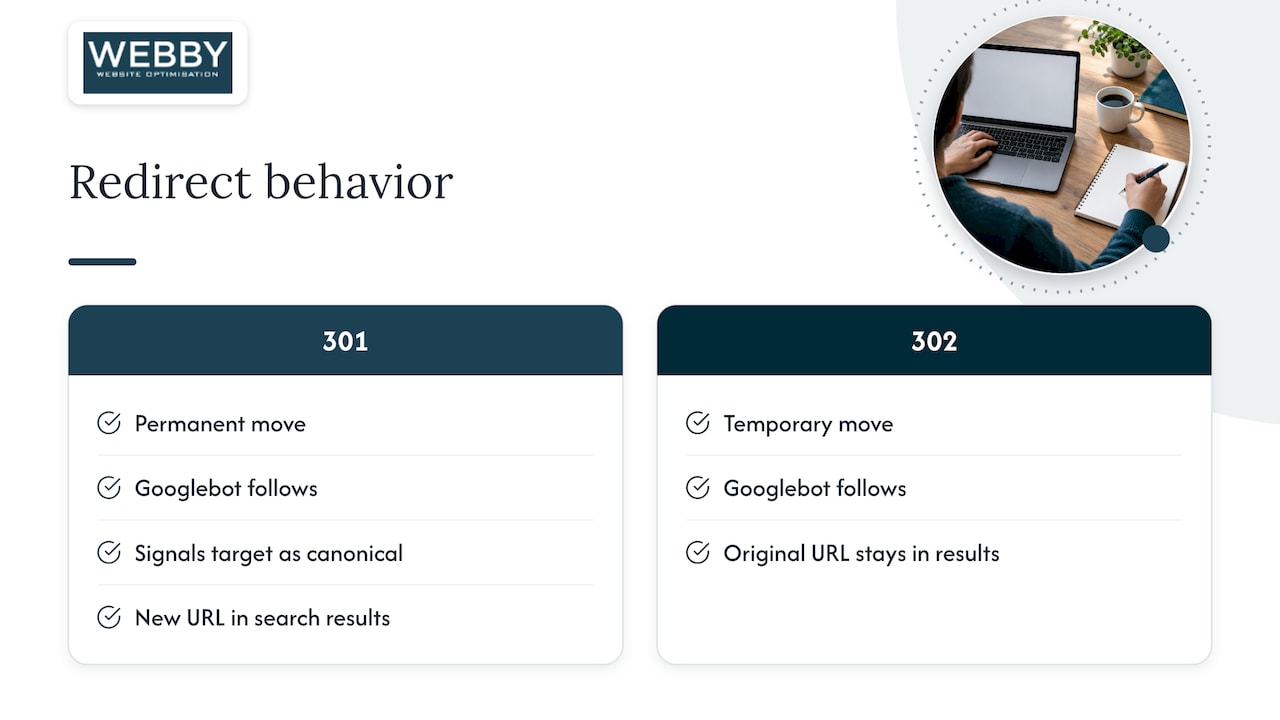
301 (Moved Permanently). The page now lives at a new address for good. Google Search Central explains that Googlebot follows it and uses it as a signal that the target should be the canonical URL, meaning the version Google chooses to show. The new URL appears in search results.
302 (Found, formerly Moved Temporarily). The page is elsewhere for now. Googlebot follows it, but the old URL stays in search results, because you are telling Google the original is coming back.
There are two newer codes you may see in a hosting panel or plugin. Google treats 307 as equivalent to a 302 and 308 as equivalent to a 301. The MDN HTTP guide adds that 307 and 308 preserve the request method, which matters for forms and software integrations more than for ordinary web pages. For a standard service page, 301 and 302 are the two you need to understand.
Does the choice change your rankings?
Yes, but not in the dramatic way old SEO folklore suggests. Google’s Gary Illyes, as reported by Search Engine Journal in November 2026, described the real difference as one of deduplication. Both codes help Google group related URLs. Only a 301 causes Google to hand the old page’s ranking signals to the new URL. With a 302, Google assumes you will return and keeps the old URL in results.
In practice this means:
- Permanent move with a 302: Google may keep showing the old address for longer than you want, and the new page may be slow to collect the old page’s strength.
- Temporary change with a 301: Google may swap in the new URL, and when you remove the redirect later, you have to win the old position back.
Over time, Google can also reinterpret a long-standing 302 as permanent. Do not rely on that. If you know the move is permanent, say so with a 301 from day one.
The cost of a proper 301 is small. Google’s site move guidance states that permanent redirects do not cause a loss in PageRank, its term for the link-based strength a page has built up.
When to use a 301
Choose a 301 whenever the old address is not coming back:
- A page’s URL changes. You renamed “/plumber-perth” to “/plumbing-services-perth” and want the old link to keep working.
- You change your permalink structure in WordPress, for example removing dates from blog post addresses.
- You move to a new domain or rebrand.
- You switch from HTTP to HTTPS, or choose between the “www” and non-“www” versions of your site.
- You merge two pages that compete for the same search, such as two near-identical service pages, into one stronger page.
- A service or product is retired and a clearly related replacement exists.
If you are planning a bigger move, our site migration SEO checklist walks through the sequence, and our guide on what a redirect is in SEO covers the basics in more detail.
When to use a 302
Choose a 302 when you genuinely intend to put the original page back:
- A service is temporarily unavailable and you send visitors to a related page meanwhile. Google’s documentation gives this as a use case for sending users elsewhere without compromising the original URL.
- A site is briefly down for maintenance or upgrades. Cloudflare’s documentation lists maintenance, upgrades and A/B testing as typical temporary uses.
- You are testing two versions of a landing page and will pick a winner.
- A seasonal offer page temporarily takes over from a standard page.
The test is simple: will this redirect still exist in six months? If yes, it is not temporary. Use a 301.
A worked example: a Fremantle electrician rebuilds their site
Imagine an electrician with a site at “/electrician-fremantle”, ranking on page one for local searches. In a redesign, the page becomes “/services/electrician-fremantle”.
- The old address has years of links and search history. A 301 from the old to the new address tells Google the new URL is the page to keep.
- If the developer sets a 302 by mistake, Google may continue to show the old URL, and the new page may not inherit the old page’s strength. Rankings can stall for weeks without any visible error, because the site still “works” for visitors.
This is why a redirect bug is hard to spot. Nothing looks broken. The phone just rings less.
Now the reverse. The same electrician runs a two-week “summer switchboard upgrade” promotion and sends the main service page to a promo page with a 301. When the promotion ends and the redirect is removed, the original page has to regain what the promo page absorbed. A 302 would have kept the original in place throughout.
Setting up redirects without creating a mess
The code is only half of it. These rules keep redirects from hurting you.
Redirect to the closest match
Send each old URL to the page that answers the same question. Google’s technical SEO fundamentals advise returning a true 404 for removed pages rather than a soft 404, which is a page that looks like an error but is served as if it were fine. Sending every missing URL to the homepage is the classic way to create soft 404s. If no genuine replacement exists, let the page return a proper 404 (or a 410, “gone”).
Avoid chains and loops
A chain happens when A goes to B, which goes to C. Each hop adds delay and risk. Googlebot follows up to 10 hops, but Google’s migration guidance recommends redirecting directly to the final destination, with chains ideally no longer than three hops and fewer than five. Chains build up on sites that have been redesigned more than once, so when you add a new redirect, update the older ones to point at the latest address.
A loop (A to B and B back to A) shows visitors a browser error and gives Google nothing. Test every redirect after you create it.
Keep them in place
Google’s site move guidance advises keeping permanent redirects live for at least one year. Many businesses keep them indefinitely, because old links on directories, social profiles and other websites do not update themselves.
Update your own links
A redirect is a safety net. Your menu, buttons, blog posts and sitemap should point straight to the new address, so visitors and Google never need the net.
Redirect on the server
Google notes that server-side redirects are the most likely to be interpreted correctly. On WordPress, that usually means a redirect manager or a rule in the server configuration, not a script that runs in the visitor’s browser.
Check the redirect before you walk away
For each important old URL:
- Open it in a browser and confirm you land on the right page.
- Check the status code. Browser developer tools (Network tab) show whether it is a 301 or 302.
- Confirm there is one hop, not several.
- Confirm the final page itself returns a normal 200 (OK) status, not an error.
- Come back in a week and check Google Search Console for new errors.
When a site has hundreds of URLs, the manual check does not scale. It is the part of a migration where mistakes hide, which is why we run it as a structured crawl in our Website Audit, priced at $1,250 one-off.
WordPress 404s after a migration or permalink change
Most redirect questions on WordPress sites start with a 404, the “page not found” error. Two different problems cause them, and they need different fixes.
Problem one: every inner page is a 404
If your homepage loads but posts and pages show 404, the pretty-permalink rules are probably not working. The WordPress developer documentation says this can happen when Apache’s mod_rewrite is not enabled. The fix it gives:
- Go to Settings > Permalinks and save, without changing anything, to regenerate the rules.
- If that fails, add the standard WordPress rewrite block to the .htaccess file.
- Failing that, ask your host to enable mod_rewrite.
WooCommerce’s permalinks documentation agrees that re-saving the permalink settings forces WordPress to rebuild its rewrite rules and typically resolves the problem.
This tends to appear after a migration, a restored backup or a plugin install that rewrites .htaccess. Hostinger’s Australian tutorial lists those same triggers, along with update incompatibilities and manual .htaccess edits.
Problem two: old URLs 404 because the address changed
If you changed your permalink structure or moved content, the old addresses now point at nothing. WooCommerce’s documentation notes that when a permalink structure changes, old links return 404 unless redirects are set up. This is where 301s earn their keep: map each old address to its new one.
It helps to separate the two quickly. If new URLs also fail, it is a rewrite problem. If new URLs work and only old ones fail, it is a redirect problem.
Reading Search Console: “Not found (404)” and crawl errors
Google Search Console is free and is where Google reports what it could not find. Under the Indexing > Pages report, look for the “Not found (404)” reason, and for a “Submitted URL not found (404)” message, which means a URL in your sitemap returns an error.
Work through the list this way:
- Ignore URLs that never existed. Bots and typos generate junk addresses. A 404 there is correct behaviour.
- Look for patterns. Many failing URLs with the same old prefix suggest one redirect rule can fix the lot.
- Redirect with a 301 where a real page used to exist and a close replacement exists now.
- Fix the source. If an internal link or your sitemap points at a missing page, correct it there.
- Leave true removals as 404 or 410. Google’s guidance favours a real 404 over a disguised one.
- Remove dead URLs from the sitemap so you are not submitting errors.
A 404 is not a penalty. Google does not mark your site down for having them. The real harm is when pages that earned traffic or links start returning errors and nobody notices. Understanding how pages enter and leave Google’s database helps here, and our guide on what a Google index is explains it plainly.
How much does the code matter, honestly?
Google’s John Mueller has said in the past that both redirect types work fine and the difference is small. The newer Search Engine Journal report is consistent with that: crawlers do not care which code you use, but the choice affects which URL Google keeps and where signals go.
So the practical rule is not to agonise. Use the code that matches your intent, and put the real effort into the things that actually lose businesses traffic: redirecting to irrelevant pages, long chains, forgotten redirects after a migration, and 404s on pages that used to rank.
Where we can take this off your hands
Redirects are small jobs that cause expensive problems when they are missed. If you are redesigning a site, switching domains or fixing a pile of 404s, we can map the old addresses to the new ones as part of the work. Our Website Audit costs $1,250 one-off, and our Business Website Optimisation Campaign costs $3,125 one-off. For WordPress sites that need ongoing care, Monthly Maintenance is $59 per month, and Emergency Services are $120 per hour when something breaks.

If you would rather start with a conversation about your own site, you can claim a free website audit.
Our view on redirects
Most redirect damage we see is not caused by choosing 301 over 302. It comes from redirects nobody planned. A redesign goes live, the old URLs are never mapped, and a business that ranked well for years loses its best pages overnight.
Our approach for local service businesses is to treat the old URL list as an asset. Before anything changes, we list the pages that bring in calls and enquiries, decide where each should land, and only then build. Each important page gets a 301 to its closest equivalent, one hop, and we check the result afterwards.
We would rather you know this up front than learn it from a drop in leads three weeks after launch. If you do one thing after reading this, make a list of your ten most valuable pages and confirm each one still works.
Steve Doig
FAQ
Is a 301 or a 302 better for SEO?
Neither is better in general: they do different jobs. A 301 is right for permanent moves, because Google then shows the new URL and passes the old page’s signals to it. A 302 is right for temporary ones, because Google keeps the original URL in results.
Do 302 redirects pass link value?
Google treats a 302 as a weaker signal, and Gary Illyes has said that with a 302 Google keeps the old URL and basically ignores the new one. If the move is permanent, use a 301 so the signals are passed on.
How long should I keep a 301 redirect?
Google advises keeping permanent redirects for at least one year. Keeping them longer costs nothing and protects links from other sites that still point to the old address.
Why do my WordPress pages show 404 after a migration?
The usual cause is that the rewrite rules were not carried across. Go to Settings > Permalinks and click Save Changes, which regenerates them. If that fails, the .htaccess file or the server’s mod_rewrite setting needs attention, which your host can help with.
Should I redirect all my 404 pages to the homepage?
No. Redirect a missing page only when a genuine replacement answers the same need. Mass redirects to the homepage tend to be treated as soft 404s, and a real 404 is the better answer for pages that are gone for good.
Sources
- Redirects and Google Search, Google Search Central
- How HTTP status codes affect Google’s crawlers
- Site moves and migrations, Google Search Central
- Technical SEO fundamentals, Google Search Central
- Google explains how redirects affect ranking signals, Search Engine Journal
- Redirections in HTTP, MDN
- 3xx redirection, Cloudflare Support docs
- Common WordPress errors, WordPress developer documentation
- Permalinks documentation, WooCommerce
- WordPress permalinks not working, Hostinger Australia
- HTTP 301 vs. 302 redirect, Conductor