

Yes, tradies should run Google Search ads and, where eligible, Local Services Ads. Search captures the person who just found a burst pipe and is searching for help right now. Before you spend a dollar, turn on call tracking and set your campaign goal to “leads,” not “traffic” or “awareness.”
- First move: enable conversion and call tracking, set campaign goal = leads, then switch campaigns live.
- Timeline: budget for a 2 to 4 week learning phase before judging results.
- Money: start with a daily budget your business can absorb while data comes in, not the smallest number that “feels safe.”
A minimum meaningful budget matters more than a clever headline. A campaign running $15 a day in a competitive metro market rarely collects enough clicks to tell you anything useful, and you’ll burn a month figuring that out the hard way.
TL;DR:
- Running Google Search ads requires setting up call and conversion tracking first to accurately measure lead generation.
- A minimum daily budget of at least $15 is insufficient; more realistic budgets of $30 to $150 per day are necessary for meaningful data.
- Targeting should be set to “Presence only” to avoid irrelevant clicks from outside the service area, and keywords should focus on exact and phrase matches.
- Using broad match keywords without proper negative keywords is a primary driver of wasted spend and poor lead quality in trade campaigns.
- Front-loading the campaign budget for the first two to four weeks helps Google’s algorithm learn and optimizes toward genuine leads.
Table of Contents
- Quick-Start Checklist for Google Ads for Trades Success
- Getting the Campaign Settings Right From Day One
- Which Keywords Should Tradies Actually Bid On?
- Setting Your Service Area, Bids, and Budget
- What Makes Trade Ad Copy and Landing Pages Convert
- How Do You Track Which Ads Actually Book Jobs?
- Common Mistakes That Drain a Trade Ad Budget
- Real Results From Trade and Home Service Clients
- Why “Set and Forget” Advice Fails Tradies
- How Webby Website Optimisation Gets Trade Ads Working Faster
- Key Takeaways
- Sources
Quick-Start Checklist for Google Ads for Trades Success
Get a lead-generating account live inside a week using this order of operations:
- Turn on tracking first. Conversion tracking and call tracking go live before ads do, not after.
- Check Local Services Ads eligibility. If your trade qualifies, apply and let verification run in parallel.
- Build a Search backup. Whether or not LSA approves you, set up a call-only or standard Search campaign.
- Lock down location. Set targeting to “presence” only and list actual service suburbs, not a giant radius.
- Pick one service to lead with. Don’t launch five trades in one ad group.
- Build or fix your landing page. One page, one service, one phone number, above the fold.
- Set a daily budget that buys data fast, not one that trickles out five clicks a day.
Pro Tip: Launch on a Monday morning, not a Friday afternoon. You want your first full week of data to be a real week, not two weekend days followed by a weird Monday recalibration.
Getting the Campaign Settings Right From Day One
Most wasted ad spend traces back to campaign settings, not bad keywords. Fix these before you touch bidding.
Set your campaign goal to Leads and choose Search as the campaign type, either standard Search ads or call-only depending on how much you want to push phone calls specifically. Uncheck the Display Network and Search Partners checkboxes. Both are on by default, both dilute lead quality, and neither belongs in a tight trade campaign until you’ve proven the core Search setup works.

Location settings trip up more tradies than any other single setting. Google defaults to targeting “people in, regularly in, or who’ve shown interest in” your area, which means someone three states away googling your suburb can trigger your ad. Change this to “Presence: people in or regularly in your targeted locations.” It’s a small toggle with an outsized effect on wasted clicks.
Match your ad schedule to real operating hours, including any after-hours or emergency availability you actually staff. Running ads at 2 a.m. for a business that doesn’t answer the phone until 7 a.m. wastes impressions on searchers who’ll just call your competitor instead.
For bidding, start with manual CPC or Maximize Clicks for the first week or two. You need volume to teach Google’s algorithm what a good lead looks like. Once conversion tracking is firing reliably, and you have at least a couple dozen recorded conversions, switch to Maximize Conversions.
| Setting | Recommended Choice | Why |
|---|---|---|
| Campaign goal | Leads | Aligns Google’s optimization with phone calls and form fills |
| Campaign type | Search (call-only or standard) | Captures active, high-intent searches |
| Networks | Search only (uncheck Display, Search Partners) | Keeps traffic to genuine search intent |
| Location option | Presence only | Blocks clicks from people outside your area |
| Bidding (weeks 1 to 2) | Manual CPC or Maximize Clicks | Builds conversion data fast |
| Bidding (after tracking is reliable) | Maximize Conversions | Lets Google optimize toward actual leads |
Which Keywords Should Tradies Actually Bid On?
Keyword strategy for trades comes down to intent, not volume. Someone typing “emergency plumber Bayswater” is closer to booking than someone typing “plumbing,” and your match types should reflect that gap.
- Lead with phrase and exact match on service-plus-location terms: “emergency electrician [suburb],” “blocked drain [suburb],” “roof leak repair [suburb].”
- Start with 10 to 20 tightly focused keywords per service. Spraying 200 broad terms across an ad group is how budget disappears without producing calls.
- Avoid broad match until you have months of negative-keyword data to control it. Broad match without a mature negative list is the single biggest driver of wasted spend in trade campaigns.
- Build a negative keyword list before launch, not after: jobs, career, apprentice, apprenticeship, training, course, DIY, how to, parts, tools, salary, hiring.
These block searchers looking for employment, education, or a weekend DIY fix, none of whom will ever become a paying customer.
Pro Tip: Run a search-terms report every single week for the first two months. This is where you catch the odd query, like “electrician salary Perth,” that’s quietly eating $40 a week for zero return.
Setting Your Service Area, Bids, and Budget
Your service area should match how your business actually works, not an arbitrary map circle. If you serve defined suburbs, list them by name or postcode. If you’re a mobile trade covering a wider patch, a 5 to 20km radius from your base usually beats a scattergun statewide setting.
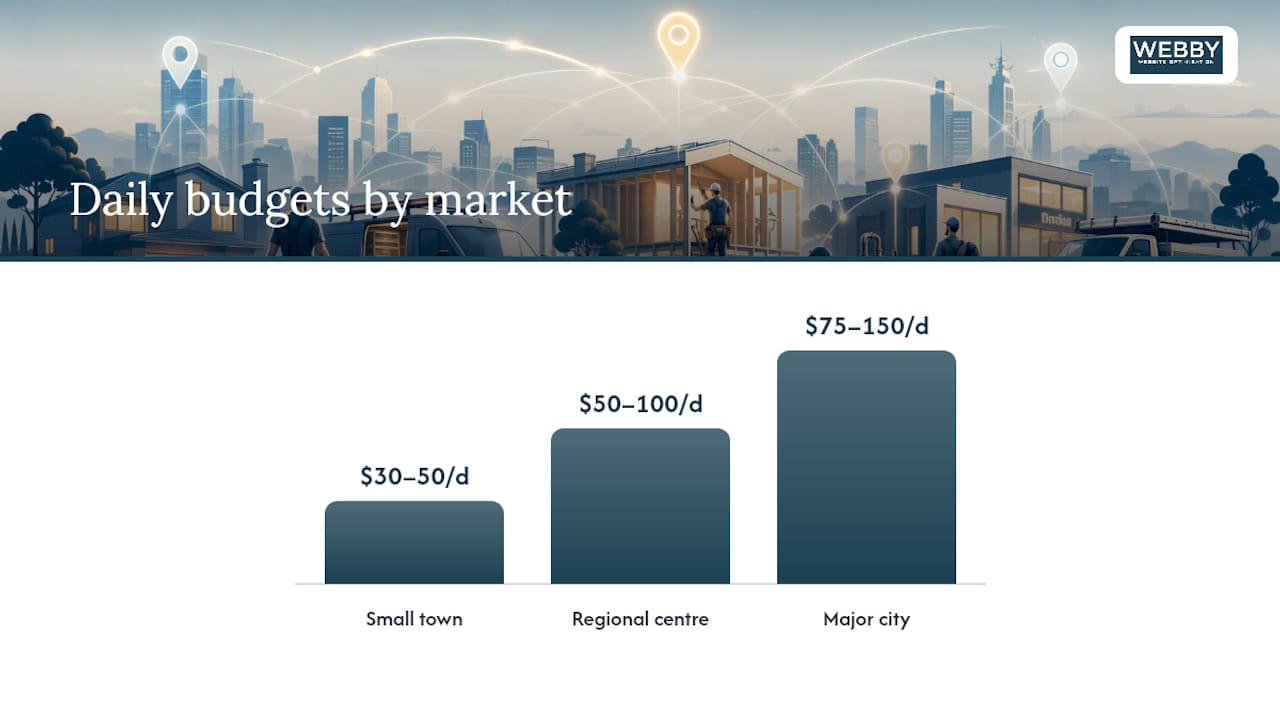
Daily budgets vary a lot by market size and by the value of an average job:
- Small town: $30 to $50 per day is often enough to generate steady, manageable lead flow.
- Regional centre: $50 to $100 per day gives you room to test multiple services.
- Major city: $75 to $150 or more per day is typically needed for stable volume, and metro accounts often need $1,000 to $3,000 or more per month before the data becomes genuinely reliable.
Front-load your budget for the first 2 to 4 weeks so Google’s system has enough signal to work with, then dial it back once you know your real cost per lead. If your trade is eligible for Local Services Ads, the math changes entirely: you pay per verified lead rather than per click, which can lower your effective cost once volume kicks in, according to the guide to Google Business Profile verification that explains local trust signals and location extensions.
What Makes Trade Ad Copy and Landing Pages Convert
A tradie’s ad copy needs three things in the headline: service, location, and urgency or a concrete benefit. “24/7 Gas Plumber Fremantle, Same Day Service” beats a generic “Quality Plumbing Services” every time, because it answers the exact question the searcher typed.
- Write the headline formula first, then build supporting lines around license status, guarantees, or years in the trade.
- Add call extensions so the phone number appears directly in the ad, not buried on a landing page.
- Add location or service-area extensions to reinforce that you cover the searcher’s suburb.
- Use sitelinks for your highest-value services and structured snippets to list specific service types.
- Match the landing page to the ad, one service per page, phone number visible without scrolling, license or guarantee proof near the top, and a load time under three seconds.
Sending a click-to-call search for “hot water system repair” to your generic homepage is one of the fastest ways to burn budget without a single booked job. A tightly matched service page that mirrors the ad’s promise routinely converts better than a homepage ever will.
Pro Tip: Put your phone number as clickable text in at least two places on mobile: right under the headline and again at the very bottom of the page. Most tradie leads happen from a phone, not a desktop.
How Do You Track Which Ads Actually Book Jobs?
You cannot manage what you can’t measure, and for tradies that means tracking calls, not just clicks. Set up conversion actions for both calls from call extensions and calls placed from your website, plus any contact form submissions.
Use Google’s call forwarding numbers or a third-party call-tracking service to attribute each call back to the specific campaign and keyword that generated it. Without this, you’re guessing which service or suburb is actually profitable.
- Prioritize cost per lead (CPL) and cost per booked job over vanity metrics like click-through rate.
- Track your booked-job conversion rate, meaning what percentage of calls turn into paying work.
- Review search terms weekly; review booked-job ROI monthly.
| Metric | What It Tells You | Review Frequency |
|---|---|---|
| Cost per lead (CPL) | How much you pay for each call or form fill | Weekly |
| Booked-job conversion rate | What share of leads become paying jobs | Monthly |
| Cost per booked job | True return on ad spend, factoring in job value | Monthly |
| Search terms report | Which queries triggered your ads | Weekly |
A good grasp of how leads convert into customers upstream makes this tracking far more useful than staring at click volume alone.
Common Mistakes That Drain a Trade Ad Budget
The same handful of errors show up in almost every underperforming trade account. Recognizing them early saves months of wasted spend.
- Running broad match with no negative list. This is the fastest way to burn a budget on irrelevant clicks.
- Skipping call tracking entirely. Without it, you’re optimizing blind.
- Sending traffic to a homepage instead of a service page. Generic pages convert worse across the board.
- Leaving location targeting on the default setting. This lets clicks in from outside your actual service area.
Weekly routine: check search terms, add fresh negatives, watch call volume and click-through rate, pause anything irrelevant. Monthly routine: review cost per lead, test two ad variants against each other, refresh the landing page, and shift budget toward whichever suburb or service is producing the cheapest booked jobs.
Pro Tip: If a keyword hasn’t produced a single call after 50 clicks, it’s not “still learning.” Pause it and put that budget toward something proven.
Real Results From Trade and Home Service Clients
Numbers tell the story better than promises. Webby Website Optimisation’s work with trade and home service clients has produced measurable jumps in both visibility and lead flow, not just prettier websites.
- Masters Window Cleaning saw a 4x improvement in search visibility after combined SEO and website work.
- Geographe Canvas saw a 10x improvement in visibility over the same kind of engagement.
- Both results came from pairing website and conversion-rate work with the kind of targeted campaign structure this article walks through, not from paid ads alone.
Visibility gains like these only translate into real revenue when the landing page behind the ad is built to convert. A search campaign can put a tradie’s number in front of the right person, but a slow, generic page will still lose that lead at the last step.
Why “Set and Forget” Advice Fails Tradies
Most Google Ads advice aimed at small businesses treats every industry the same, and that’s exactly where it fails trades. A dentist’s patient might book a checkup three weeks out. A tradie’s caller usually wants someone on-site today or tomorrow. That urgency changes what “good” looks like: response speed and call tracking matter more than clever ad copy.
The conventional advice to “just turn on Smart Campaigns and let Google optimize” hands away the control that trade accounts actually need. Automated campaigns often produce lower-quality traffic for trades precisely because they strip out the negative keyword control and match-type precision that keep a tight trade budget pointed at real jobs, not curious browsers.
If you take one thing from this article, make it this: fix your tracking before you fix your keywords. A tradie running mediocre ad copy with solid call tracking will outperform one running brilliant copy blind, every time, because the first business can see what’s working and the second is guessing. Get the measurement right first. Everything else is refinement.
— Steve Doig
How Webby Website Optimisation Gets Trade Ads Working Faster
Webby Website Optimisation is the alternative to hiring a generalist agency or muddling through Google Ads alone: a Perth-based team that builds the landing page and the tracking setup together, so your ad spend has somewhere effective to land from day one.

Running Search ads or Local Services Ads without a matched, fast-loading service page is like buying a billboard and pointing it at an empty lot. Webby Website Optimisation handles both sides: campaign structure and the website design and development that turns clicks into booked jobs. The same conversion-focused thinking behind the Masters Window Cleaning and Geographe Canvas results applies directly to paid traffic, since a visibility gain only pays off when the page behind it converts. For tradies who need something live fast, the rapid-build landing page service gets a conversion-ready page online without weeks of back and forth.
If your current setup is sending ad clicks to a slow homepage with no call tracking, request a free audit from Webby Website Optimisation and find out exactly where the leads are leaking.
Key Takeaways
Google Ads works for tradies when call tracking, tight location targeting, and a matched landing page are in place before the campaign goes live.
| Point | Details |
|---|---|
| Track calls before launch | Set up call tracking and conversion actions before turning any campaign on. |
| Check Local Services Ads eligibility | LSA charges per verified lead and carries a trust badge, making it the first buy where available. |
| Keep keywords tight | Run 10 to 20 phrase or exact match keywords per service, backed by a solid negative list. |
| Match budget to market size | Daily budgets from $30 in small towns to $150 or more in major cities, front-loaded for the first month. |
| Get expert help fast | Webby Website Optimisation pairs campaign setup with conversion-focused landing pages, drawing on results like the 4x visibility gain for Masters Window Cleaning. |
Recommended
- Online Lead Generation Explained for Local Service Businesses
- 4x increase in Google visibility for Masters Window Cleaning – Webby Website Optimisation
- Turn Website Visitors Into Leads: A Local Service Guide
If this post raised some questions feel free to ask me a question