

Starting an online business in Australia can feel like a massive undertaking. It's exciting, sure, but the sheer number of things to do can be overwhelming. You've got an idea, but then you're hit with questions about business models, legal stuff, website builds, and how on earth you're supposed to get customers.
It doesn’t have to be so complicated. This guide is your practical roadmap, specifically built for the Australian market, to get you from a spark of an idea to a running business, one manageable step at a time.
Your Roadmap To Australian E-Commerce Success
There's never been a better time to jump into the Australian online market. Seriously. Aussies are spending a staggering AU$65 billion online every year, which now makes up nearly 15% of all retail sales.
With 18 million Australians shopping from their devices and the average person spending over AU$4,000 annually, the opportunity is huge. The market is not just growing; it's hungry for new, unique businesses.
To help you get a piece of that pie, we've broken the entire process down into four clear phases. Think of this as your strategic blueprint, designed to cut through the noise and give you a clear path forward.
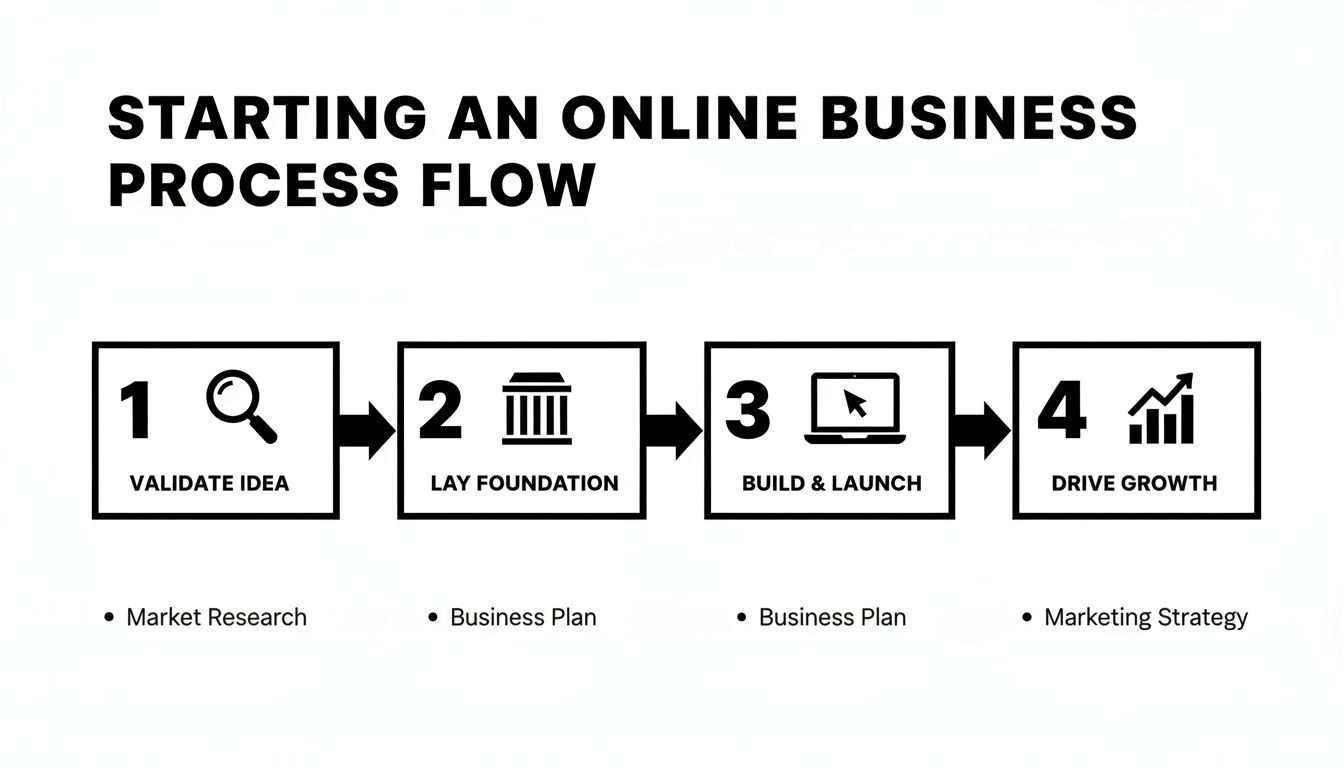
The Four Phases of Launching Your Online Business
Launching a business is a journey, not a single leap. Trying to do everything at once is a recipe for burnout. By focusing on one stage at a time, you build momentum and ensure you’re not putting the cart before the horse—like building a website for a product no one wants.
Here's a high-level look at the road ahead, broken down into a simple table.
| Phase | Key Objective | Core Activities |
|---|---|---|
| Phase 1: Validate | Confirm there's a real market for your idea. | Researching your niche, analysing competitors, and testing your concept with potential customers. |
| Phase 2: Foundation | Set up the legal and financial backbone of your business. | Registering your ABN, sorting out GST, and choosing a business structure. |
| Phase 3: Build | Create your professional online storefront. | Choosing a domain, setting up hosting, and building your WordPress/WooCommerce site. |
| Phase 4: Growth | Attract customers and generate sales. | Implementing SEO, setting up analytics, launching marketing campaigns, and planning for ongoing maintenance. |
Each phase builds directly on the last, creating a strong and stable business from the ground up.
The biggest mistake I see entrepreneurs make is jumping straight to the 'Build' phase. By tackling each step in order—validating your idea before you spend a cent, and setting your foundation before you launch—you dramatically increase your chances of building something that lasts.
If you’re keen on more high-level strategy, this external guide on how to start an online business offers some great additional perspective.
Now, let's dive into the details of this roadmap, starting with the most critical phase of all: validating your business idea.
Look, everyone gets excited about a brilliant business idea. But I've seen far too many aspiring entrepreneurs fall into the same trap: they build first and ask questions later. The reality is, an unvalidated idea is just a guess, and guesses are a terrible foundation for a business.
Before you even think about a website, your first job is to confirm that real people will actually open their wallets for what you're selling. This validation step isn't just a box to tick; it's your best insurance policy against wasting months of your life and thousands of dollars on a project that was never going to fly.
It all starts with a bit of detective work. Instead of getting fixated on a product, focus on a problem. Passion is great—you'll need it—but it has to line up with what the market actually wants. You might have a genuine love for hand-carved dog bowls, but are enough people in Australia actively looking for them and willing to pay what they're worth? Let's find out.
See What People Are Actually Searching For
Before you spend a cent, you need to get inside the heads of your potential customers. This is where a little bit of smart market research pays off big time.
Start by reframing your idea. Don't think, "I want to sell soy candles." Instead, think, "People want their homes to feel cosy and smell amazing." This small shift in perspective helps you understand the desire driving the purchase, which opens up a whole world of marketing angles.
Now, let's get practical. Jump onto a free tool like Google Trends. You can quickly see if interest in your niche is growing or shrinking right here in Australia. For example, comparing search interest for "eco-friendly cleaning products" against "DIY cleaning recipes" will instantly show you where the commercial intent really is. It’s a simple check to make sure you're not jumping on a trend that's already on its way out.
For a much deeper look, you need to dig into the exact phrases people are using. Learning how to do keyword research is one of the most powerful skills you can develop. It gives you raw data on customer language and search volume, directly telling you just how big your potential audience really is.
Test the Waters Before You Build the Ship
Okay, so you've found evidence that a market exists. Great! The next move is to test your specific concept without breaking the bank. Your goal is to get a clear "yes" or "no" from your target audience before you commit to building a full-blown website.
Here are a few simple, low-cost ways to do this:
The Landing Page Test: This is a classic. Set up a simple, one-page site describing your product or service as if it's ready to go. Use great photos, focus on the benefits, and have a clear call-to-action like "Get Notified on Launch" or even "Pre-order and Save 20%." Then, run a small, targeted ad campaign on Facebook or Instagram pointing to this page. The number of people who sign up is a powerful signal of real interest.
Talk to Real People: Use a tool like SurveyMonkey or a simple Google Form to ask your ideal customers some direct questions. The trick here is not to ask, "Would you buy this?" Instead, ask about their current frustrations and what they've paid in the past to solve similar problems. People's past spending habits are a much better predictor of future behaviour than their opinions.
Scope Out the Competition: Find who is already winning in your space. What are they doing right? But more importantly, what are their customers complaining about? Scour their product reviews and social media comments. Those complaints and one-star reviews are pure gold—they're gaps in the market just waiting for you to fill.
I want to be really clear about this: finding out your idea is a dud at this stage is a massive win. It’s not a failure; it’s a successful discovery that saves you from a world of hurt. It frees you up to pivot to a much better, more profitable idea.
Choose Your Online Business Model
Once you've got a validated idea, it's time to decide how you're going to make money from it. The business model you choose will dictate your day-to-day operations, your startup costs, and your potential profit margins.
Most online businesses fall into one of these buckets:
E-commerce (Physical Products): The classic online store. You can either manage your own inventory or go with a dropshipping model where a supplier handles all the picking, packing, and shipping for you.
Digital Products: This is where you sell your knowledge or creativity. Think e-books, online courses, software plugins, or design templates. The beauty here is you create it once and can sell it infinitely, leading to fantastic profit margins.
Services: Your website becomes a lead generation machine for your skills. This could be anything from graphic design and business consulting to online personal training or copywriting.
There's no single "best" model. A service business often has the lowest startup costs, while a digital product can eventually become a source of passive income. Think about your skills, your budget, and the kind of business you actually want to run day-in and day-out.
Alright, you've got a killer idea and you've confirmed people actually want it. Fantastic. Now for the less glamorous—but absolutely critical—part: making it all official. This is where your concept transforms from a side project into a real-deal business.
It’s tempting to skip this stuff and jump straight into building your website, but trust me, getting your legal and financial house in order from day one will save you a world of pain later on. Think of it as the boring but essential paperwork that protects you, your customers, and keeps the tax office happy.
Getting Your Business on the Books
First up, you'll need an Australian Business Number (ABN). This unique 11-digit number is your ticket to the game. You literally can't run a business in Australia without one. You’ll need it to register your business name, open a business bank account, and crucially for us, to secure a .com.au domain name. The good news? Applying for an ABN is free through the Australian Business Register.
Next on the list is the Goods and Services Tax (GST). This is a big one. You're legally required to register for GST once your business turnover hits $75,000 a year. But you don't have to wait.
Many new businesses register for GST voluntarily right from the start. Why? Because it allows you to claim back the GST you pay on all your business expenses—think hosting fees, software subscriptions, and stock. If you have a lot of upfront costs, this can be a huge help. The trade-off is that you'll need to add 10% GST to your prices and file regular Business Activity Statements (BAS), which adds a bit of admin to your plate.
Sole Trader or Company? Choosing Your Structure
One of the biggest decisions you'll make early on is your business structure. This choice affects everything from your personal liability and tax obligations to the amount of paperwork you'll be doing. Before you commit, it's worth taking the time to understand the different business structures available in Australia.
For most new online ventures, it usually boils down to two main options:
- Sole Trader: This is the simplest and most common path. It’s just you, running the business under your own ABN. Setup is cheap and easy, but there's no separation between you and the business. That means if things go south, your personal assets could be at risk.
- Company (Pty Ltd): Setting up a company creates a completely separate legal entity. This is the key difference. The company itself is responsible for its debts, which offers you a powerful layer of personal protection. The downside? It's more expensive to set up and manage, with stricter reporting rules.
If you take away one thing from this section, let it be this: separate your business and personal finances. Always. Even if you're a sole trader, open a dedicated business bank account and run everything through it. Mixing your money is a recipe for a bookkeeping nightmare and can lead to serious headaches at tax time.
Opening the Doors to Customer Payments
Now, let's talk about the exciting part—getting paid! To accept money from your customers online, you need a couple of things in place.
First, take that ABN and registered business name to your bank and open a dedicated business bank account. We just talked about this, but it’s so important it’s worth repeating.
Second, you need to choose your payment gateways. These are the services that securely handle credit card transactions on your website. For a WordPress site, you can't go wrong with the two biggest players:
- Stripe: My personal favourite for letting customers pay directly with their credit card without ever leaving your site. It’s slick and professional.
- PayPal: An absolute must-have. So many people have PayPal accounts and trust it implicitly. Not offering it can genuinely cost you sales.
The best approach is to offer both. Giving customers a choice is always a good move. You'll simply set up an account with each service and then use a plugin to connect them to your WordPress store, which we'll get to soon.
Speaking of your online presence, once you have your ABN sorted, you can officially lock in your online identity. This is the perfect time to explore how to go about registering a domain name in Australia and grab that all-important .com.au address for your brand.
Building Your Professional WordPress Storefront
With all the legal and financial groundwork sorted, we can get to the part everyone looks forward to: actually building the digital home for your business. This is your corner of the internet, a space you own and control completely.
While there are plenty of 'quick-start' platforms out there, we’re focusing on WordPress for a very good reason. It gives you the freedom to build exactly what you want, without being boxed in.
When you pair WordPress with its powerful e-commerce engine, WooCommerce, you're using the same combination that powers a huge chunk of the internet. Because it's open-source, you have total ownership. You can customise every pixel and every function without worrying about another company’s rules or surprise monthly fee hikes.
This is the kind of control that savvy Australian entrepreneurs value. It’s a setup that can start with a handful of products and scale with you to a multi-million dollar operation, all on your own terms. And you'll be in good company. While Shopify has a lot of stores, WooCommerce is right behind it, powering 93,610 stores, which is 27.45% of Australia's entire eCommerce ecosystem. It's a testament to its power and flexibility. You can see a full breakdown and other interesting market statistics for yourself.
Choosing Your Digital Address
Before you can start building, you need to secure your address and your plot of land. Online, that means a domain name and website hosting.
Your Domain Name is your online address, your yourbusiness.com.au. It needs to be memorable and easy for customers to type. Since you’ve already registered your business name, grabbing the matching .com.au domain should be a top priority. It's a huge trust signal for Australian shoppers.
Your Website Hosting is the 'land' where your website's files live and are served to visitors. It can be tempting to save a few dollars with a cheap overseas host, but this is a classic false economy. For an Australian business, choosing a local, high-quality managed WordPress host is one of the smartest early investments you can make.
Here’s why it matters so much:
- Speed: Local servers mean your website loads lightning-fast for Australian visitors. Speed isn't just a nice-to-have; it directly impacts your sales and Google rankings.
- Support: When you need help at 3 PM in Sydney, you get a support team that's actually awake and in your timezone, not one just starting their day on the other side of the world.
- Optimisation: The best managed hosts are WordPress specialists. Their entire infrastructure is fine-tuned for it, often including performance perks like built-in caching and automatic updates that keep your site running smoothly.
Installing Your Foundation
Once you've got your domain and hosting sorted, the technical part begins—but it's easier than you might think. Most quality hosts provide a 'one-click' WordPress installation, taking all the guesswork out of the process.
With a fresh, empty WordPress site ready to go, the next move is to give it e-commerce power. You'll do this by installing the WooCommerce plugin. It's a free add-on that instantly transforms your basic website into a fully-featured online store, ready for products, payments, and orders.
Think of WordPress as the chassis of a car and WooCommerce as the engine. WordPress provides the core structure—the pages, the blog, the framework—while WooCommerce bolts on all the specialised parts you need to sell online, like the shopping cart, checkout, and payment systems.
Designing Your Storefront with a Theme
Your website's theme is what controls the look and feel—the layout, colours, typography, and overall first impression. It's the interior design for your digital shop, and getting it right is crucial.
When you're hunting for a theme, keep these three things in mind:
- Mobile-Responsive: This is absolutely non-negotiable in 2026. Your site has to look and work flawlessly on a smartphone.
- Well-Supported: Stick with themes from reputable developers who provide regular updates and have a good support system. An old, un-updated theme is a major security headache waiting to happen.
- Fast and Lightweight: Steer clear of bloated themes that promise hundreds of features you’ll never touch. They just slow you down. A lean, clean theme makes for a much faster site.
You can browse thousands of options on marketplaces like ThemeForest, or you could go for a trusted standalone theme like Astra or Kadence, both of which are famous for their speed and tight integration with WooCommerce.
Configuring Your E-Commerce Essentials
With your theme installed, it's time to run through the WooCommerce setup wizard. This is where you'll dial in the practical, day-to-day settings for running your Australian online business.
The wizard will guide you through setting up the most important areas of your store. You’ll be prompted to configure:
Shipping: This is where you'll create shipping zones for Australia. You can set simple flat rates, offer free shipping for orders over a certain amount, or even get fancy by integrating directly with carriers like Australia Post for real-time shipping quotes at checkout.
Payments: You’ll connect the payment gateways you organised earlier, like Stripe and PayPal. WooCommerce makes it incredibly simple to switch these on so you can securely start taking your customers' money.
Products: And now, the fun part—getting your products online! For every item, you'll want to add compelling descriptions, upload several high-quality photos, set your pricing, and manage stock levels. Spend some real time here. Write product copy that doesn't just list features, but sells the benefits and the story behind what you're offering.
Choosing to build your own WordPress storefront is a powerful move. You’re not just renting a temporary space on someone else's platform; you are building a genuine, valuable asset for your business—a foundation you can grow, adapt, and rely on for years to come.
Keeping Your Site Fast and Secure
Your website is never truly ‘finished’. After the launch, its ongoing health is what will actually drive sales and protect all your hard work. Two things, more than anything else, can make or break your online business: speed and security.
Think about it from your customer's point of view. A slow, clunky website feels unprofessional and is just plain frustrating. On the other hand, a security breach can shatter customer trust in a heartbeat. Nailing these two elements isn't just a technical box to tick; it’s fundamental to building a business that lasts.
This is your practical guide to keeping your WordPress store fast, safe, and reliable, so both you and your customers can feel confident.
Making Your Website Lightning Fast
In Australia, a fast website isn’t a luxury—it’s the bare minimum. With internet penetration sitting at 97.1% and connection speeds constantly improving, your customers have zero patience for a site that lags. Median fixed internet download speeds jumped by a massive 32.6% in just one year, which means people are used to a snappy, instant experience. A slow site doesn’t just annoy them; it costs you sales. You can get a better sense of the high expectations of Australian digital consumers to see just how critical speed is.
Here’s how you can get your WordPress site performing at its peak:
- Image Compression: Huge, unoptimised images are the number one killer of website speed. Get a plugin like Smush or ShortPixel to automatically shrink every image you upload, keeping the quality high but the file size low.
- Caching: This is one of the biggest wins for site speed. Caching essentially creates a lightweight, static version of your pages so they can be served to visitors almost instantly. To get the full picture, check out our guide on the best WordPress caching plugins and find the right one for your setup.
- Content Delivery Network (CDN): A CDN is a network of servers that stores copies of your website’s files in different locations. When a customer in Perth visits your site, the content is delivered from a nearby server instead of your main one in Sydney, drastically cutting down load times.
Locking Down Your Digital Storefront
Just as important as speed is the security of your online store. You're not just protecting your business; you're responsible for the sensitive customer information you collect. A single security incident can do permanent damage to your brand’s reputation.
Being proactive is the only way to handle security. Waiting for something to go wrong is a gamble you simply can’t afford to take.
Building trust takes time, but you can lose it in an instant. Prioritising security isn't just about protecting data—it's about protecting the customer relationships you've worked so hard to build.
These are the non-negotiable security measures every WordPress store owner needs to have in place:
- Install an SSL Certificate: The 'S' in HTTPS stands for 'Secure'. An SSL certificate encrypts the connection between your customer's browser and your server, protecting things like credit card details and personal info. Any decent Australian host will include one for free.
- Use Strong Passwords and Two-Factor Authentication (2FA): This is a simple but powerful step. Enforce strong, unique passwords for all users, especially your admin account. Then, turn on 2FA, which adds a second layer of security by requiring a code from your phone to log in.
- Keep Everything Updated: WordPress itself, your theme, and all your plugins must be kept up to date. Outdated software is the most common way hackers get in. A professional maintenance plan can handle this for you, ensuring you’re always protected.
- Run Regular Malware Scans: Think of this as a security guard for your website. A plugin like Wordfence or Sucuri will constantly scan your site for malicious code and monitor for any suspicious activity.
Optimising your site’s speed and security isn’t a one-off job; it's an ongoing commitment. By making these a priority from day one, you create a safe, fast, and trustworthy experience that keeps customers coming back.
You're in the home stretch. The digital scaffolding is down, your WordPress store is built, and it’s looking sharp. But before you flick the switch and tell the world you’re open for business, you need to run through one final pre-flight check.
This is your dress rehearsal. It’s where you catch the tiny, embarrassing glitches—like a broken link or a clunky checkout process—before they can cost you a sale. Trust me, spending an hour on this now saves you countless headaches later.

Final Pre-Launch Systems Check
It's time to put on your customer hat and try to break your own website. Don't just browse—get in there and click everything, test every form, and challenge every function. This is your last chance to find problems while the stakes are still zero.
Your final sweep should feel like a proper audit. Pay close attention to these critical areas:
- Process a Real Test Order: This is the big one. Use a real credit card and buy something cheap. Does the payment go through? Do you get the right confirmation emails? Does the order show up correctly in your WooCommerce dashboard?
- Hunt for Broken Links: Click every single link you can find. Menus, footers, in-text links, buttons—all of it. A 404 "Page Not Found" error is a dead end for a customer and a credibility killer.
- Proofread Until Your Eyes Hurt: Read every word on the site. From the homepage banner to your About Us page and deep into the fine print of your Returns Policy. A simple typo can make a professional business look amateur.
- Test the Mobile Experience: Pull out your phone. Then borrow a friend's different-sized phone. Can you easily browse and buy? Is the text readable without zooming? With well over 50% of web traffic coming from mobile devices, a clunky mobile site is no longer an option.
Completing a full end-to-end test order is non-negotiable. It's the only way to be 100% sure that your payment gateway, shipping rules, and email notifications are all working together correctly. Discovering a checkout bug after launch can be a costly mistake.
Before you go live, use this checklist to make sure you've covered all your bases. It’s a simple way to stay organised and ensure nothing gets missed in the final rush.
Essential Pre-Launch Checklist
| Check Area | Task | Status (Done/Not Done) |
|---|---|---|
| E-commerce Functionality | Process a live test transaction from start to finish. | |
| Links & Navigation | Click every menu item, button, and internal link on the site. | |
| Content & Proofreading | Read all page copy, product descriptions, and policies for errors. | |
| Mobile Responsiveness | Test the complete shopping and checkout experience on multiple phones. | |
| Forms & Communication | Submit your contact form and sign up for your newsletter. | |
| Legal Pages | Ensure Privacy Policy, Terms of Service, and Shipping/Returns are visible. | |
| Analytics & Tracking | Confirm GA4 and Google Search Console tracking codes are installed. |
Running through this list methodically provides peace of mind, knowing your first real customer will have a smooth, professional experience.
Setting Up Your Growth Engine
Going live isn't the finish line—it's the starting gun. To really grow an online business, you need to make decisions based on data, not just guesswork. That’s where a couple of Google’s free, powerhouse tools come in.
Google Analytics 4 (GA4) is your business intelligence dashboard. It shows you how many people are visiting your site, where they’re coming from (e.g., Google, social media), and what they do once they're there. Setting this up from day one is crucial for understanding your customers.
Google Search Console (GSC), on the other hand, is your direct line to Google itself. It shows how Google sees your site, tells you which search terms people are using to find you, and flags any technical problems that could be hurting your search ranking. Many professional WordPress support services will handle the GA4 and GSC setup to ensure you're capturing accurate data from the moment you launch.
Your First Foray into SEO
Now, let's talk about getting found. Search Engine Optimisation (SEO) is the ongoing process of helping your ideal customers find you on Google when they're searching for what you sell.
A great place to start is with your meta titles and descriptions. The meta title is that blue, clickable headline you see in Google search results, and the description is the short snippet of text below it. These two elements are your digital shop window. They don't just tell Google what your page is about; they have to convince a real person to click your link instead of the ten others on the page.
Make them compelling, pop your main keyword in there naturally, and clearly communicate the value a visitor will get by clicking through.
Answering Your Burning Questions
When you're just starting out, a handful of questions tend to pop up again and again. Getting clear answers is the key to moving forward with confidence. Let's tackle some of the most common ones I hear from new Aussie entrepreneurs.
How Much Does It Cost to Start an Online Business in Australia?
This is the big one, isn't it? The honest answer is: it varies. You can get the ball rolling for a few hundred dollars, or you can invest several thousand. It all depends on how you approach it.
Your essential startup costs will typically include:
- Business name registration: Around $39 with ASIC.
- Domain name: Expect to pay about $20/year for a
.com.au. - Website hosting: Quality managed WordPress hosting can range from $25-$100/month.
- WordPress theme: A professional, well-supported theme is a one-off cost, usually $60-$100.
Starting lean with a self-hosted WordPress and WooCommerce setup is often the most cost-effective path. You avoid the high monthly platform fees that come with other all-in-one solutions, giving you more control over your budget from day one.
Do I Really Need an ABN to Sell Online in Australia?
Without a doubt, yes. If you’re setting up a business in Australia (even a tiny side-hustle), you need an Australian Business Number (ABN). It’s not optional.
For anyone wanting to start an online business, obtaining an ABN is non-negotiable. It's the first official step that legitimises your venture and opens the door to everything else, from banking to domains.
The good news is it’s free to apply for on the Australian Business Register website. Think of it as your business’s tax file number—it’s essential for lodging tax returns, registering for GST, and even securing a .com.au domain name. It’s the ticket that proves you’re a real, legitimate business.
Can I Run an Online Business Without Holding Any Stock?
You absolutely can. This is the whole idea behind dropshipping, and it’s an incredibly popular way for people to get started in e-commerce with minimal risk.
Here’s how it works: you market and sell products on your website, but you don’t actually buy or store any of them yourself. When a customer places an order, you simply pass that order on to your supplier (the third party), who then ships the product directly to the customer.
It's a fantastic model because it takes the stress of inventory management and the high upfront cost of buying stock completely off your plate. This frees you up to focus your time and money on what really matters in the beginning: building your brand and finding customers.
If the thought of juggling all the technical pieces of a new WordPress store feels a bit much, you don't have to go it alone. The team at Webby Website Optimisation offers a helping hand with expert WordPress support and maintenance to ensure your site stays fast, secure, and ready for customers. You can learn more about their WordPress help and support services here.
If this post raised some questions feel free to ask me a question