

You offer a great service, your work speaks for itself, but your phone isn’t ringing the way it should. For many Perth local service businesses, the problem isn’t the quality of what they do. It’s that Google can’t figure out what they do or where they do it. Learning to perform a DIY website SEO audit is one of the most direct ways to change that without spending thousands on an agency before you even know what’s broken. This guide walks you through every step, in the right order, so your fixes actually move the needle.
Table of Contents
- What you need to prepare before conducting your DIY SEO audit
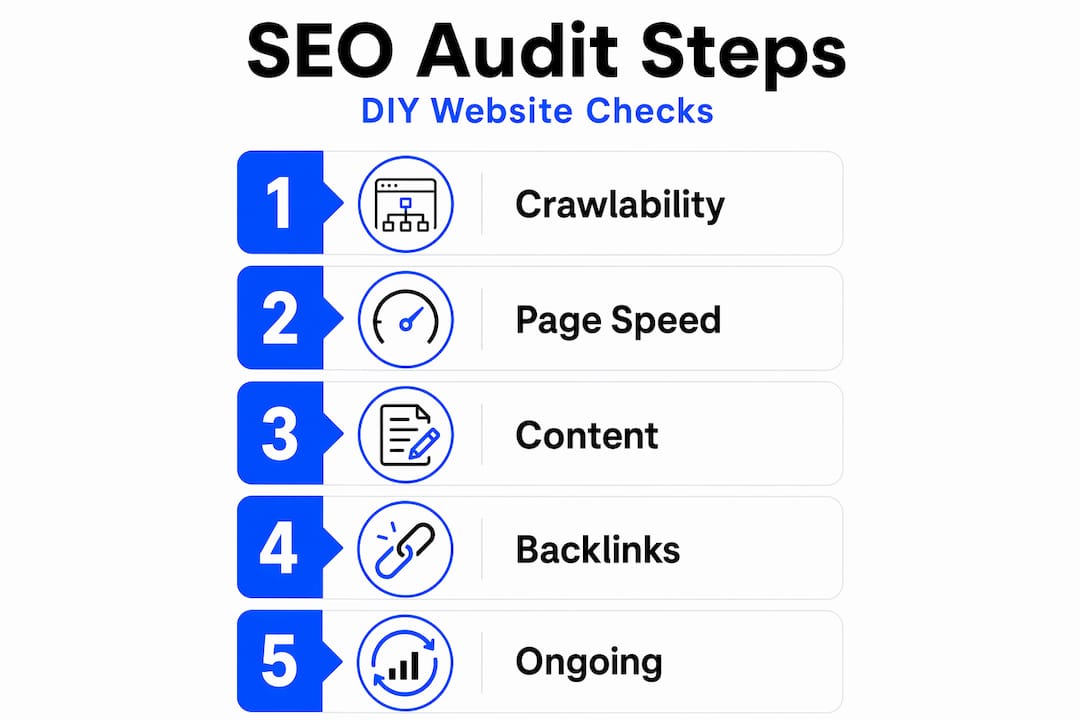
- Step 1: Check your website’s crawlability and indexability
- Step 2: Evaluate user experience through Core Web Vitals and page speed
- Step 3: Optimize your on-page content for local relevance and keyword targeting
- Step 4: Assess and enhance your off-page SEO signals and local prominence
- Step 5: Perform ongoing audit verification and maintenance for sustained SEO success
- Why prioritizing technical SEO before content fixes is the game-changer for Perth businesses
- Ready to boost your Perth business with expert SEO support?
- Frequently asked questions
Key Takeaways
| Point | Details |
|---|---|
| Quarterly SEO audits | Perform a full website SEO audit every 90 days to catch technical and content issues early. |
| Technical SEO first | Ensure your site is crawlable and indexable before optimizing content or off-page factors. |
| Core Web Vitals matter | Optimize loading speed, interactivity, and visual stability to improve search rankings. |
| Local relevance | Use geo-specific keywords and unique location content to align with local search intent. |
| Build local authority | Acquire quality backlinks, consistent citations, and positive reviews to boost prominence. |
What you need to prepare before conducting your DIY SEO audit
Having the right preparation and tools is essential before diving into your website SEO audit. Walking in without the basics set up is like showing up to a job site without your tools. You’ll waste time and miss things.
Here’s what you need to gather before you start:
- Google Search Console (free): This is your primary window into how Google sees your site. If you haven’t verified your site yet, do it now.
- Google PageSpeed Insights (free): Gives you real user performance data and diagnostic suggestions.
- A spreadsheet: Use Google Sheets or Excel to log every issue you find, its priority level, and the action you plan to take.
- Your target keyword list: Write down your core service plus location combinations, like “emergency electrician Perth” or “Fremantle house cleaning.” These are the terms you’ll check throughout the audit.
- Access to your website’s CMS or hosting panel: You’ll need this to make changes or hand off fixes.
A full SEO audit should be performed at least every 90 days to monitor technical health and content quality. That’s not arbitrary. Google’s evaluation cycles and ranking standards shift regularly, and quarterly checks keep you aligned.
| Tool | Cost | What it checks |
|---|---|---|
| Google Search Console | Free | Crawl errors, indexing, search performance |
| PageSpeed Insights | Free | Core Web Vitals, speed diagnostics |
| Google Business Profile | Free | Local presence, reviews, NAP data |
| DebugBear | Paid (trial available) | Continuous Core Web Vitals monitoring |
| Screaming Frog | Free up to 500 URLs | On-page elements, broken links, redirects |
Pro Tip: Create a dedicated “SEO Audit” folder in your Google Drive. Store every report, screenshot, and action log there. When you run your next quarterly audit, you’ll have a clear before-and-after record that shows real progress.
Step 1: Check your website’s crawlability and indexability
Once the groundwork is in place, let’s verify your website is accessible and properly indexed by search engines. This is the most important step in the entire audit, and it’s the one most DIY auditors skip straight past.
Follow these steps in order:
- Open Google Search Console and go to “Coverage” or “Indexing.” Look for pages marked as errors or excluded. These are the ones Google can’t or won’t show in search results.
- Check your robots.txt file. Type your domain followed by /robots.txt into your browser. Make sure it isn’t accidentally blocking your key service pages or your homepage.
- Review meta robots tags. In your CMS, check that important pages don’t have a “noindex” tag applied. This is a surprisingly common mistake after website redesigns.
- Identify “Crawled – Currently Not Indexed” pages. These pages were visited by Google but excluded from search results. Pages with this status are quality issues rather than technical bugs and should be handled by improving content value, not by tweaking technical settings.
- Check your XML sitemap. Go to yoursite.com.au/sitemap.xml. Confirm it exists, lists your key pages, and has been submitted inside Google Search Console.
Fixing content before resolving crawl errors wastes resources. That’s the audit priority sequence that separates results-driven audits from wasted weekends.
Pro Tip: In Google Search Console, filter your indexed pages by “Discovered – currently not indexed” separately from “Crawled – currently not indexed.” The first group needs crawl budget attention. The second needs content quality work. They require completely different fixes.
Step 2: Evaluate user experience through Core Web Vitals and page speed
With your site technically accessible, improving the user experience with fast load times and responsiveness is the next crucial step.
Core Web Vitals are a confirmed ranking factor that differentiate sites with similar content quality. For a Perth plumber or electrician competing against five other local businesses, this is where you can quietly pull ahead.
Here’s what each metric measures:
- LCP (Largest Contentful Paint): How fast the main content of your page loads. Usually a hero image or headline.
- INP (Interaction to Next Paint): How quickly your page responds when a user clicks or taps something.
- CLS (Cumulative Layout Shift): How much the page visually jumps around while loading. Annoying layout shifts hurt both users and rankings.
| Metric | Good | Needs improvement | Poor |
|---|---|---|---|
| LCP | ≤ 2.5s | 2.5s to 4.0s | > 4.0s |
| INP | ≤ 200ms | 200ms to 500ms | > 500ms |
| CLS | ≤ 0.1 | 0.1 to 0.25 | > 0.25 |
Google’s Core Web Vitals thresholds require LCP ≤ 2.5s, INP ≤ 200ms, and CLS ≤ 0.1 at the 75th percentile to avoid visibility penalties.
Common issues to fix:
- Large, uncompressed images (biggest LCP killer for local service sites)
- Render-blocking JavaScript and CSS files
- Slow hosting or server response times
- Elements without defined width and height attributes (causes CLS)
Optimizing LCP focuses on resource discovery and delivery, while optimizing INP means reducing main thread blocking. These are separate problems that need separate solutions.
Pro Tip: Run your audit using PageSpeed Insights on your mobile version first, not desktop. Most Perth locals searching for a tradie or service provider are on their phones. If your mobile score is poor, that’s where your leads are leaking.
Step 3: Optimize your on-page content for local relevance and keyword targeting
After ensuring good site performance, let’s deepen your site’s local relevance by optimizing your content and keywords.
Local SEO relevance depends on matching service and location signals in content, using geo-specific keywords naturally. Google needs to understand not just what you do, but where you do it and for whom.
Here’s how to work through your on-page content systematically:
- Build a keyword map. Assign one primary keyword to each page. “Perth roof repairs” goes on your roof repair page. “Fremantle gutter cleaning” gets its own dedicated page. Never stack multiple services onto one generic page.
- Audit your title tags. Every page needs a unique title tag that includes the primary keyword and ideally the suburb or city. Keep it under 60 characters.
- Check your H1 headings. Each page should have exactly one H1 that clearly states the service and location. “Roof Repairs in Perth” beats “Welcome to Our Services.”
- Review your meta descriptions. These don’t directly affect rankings, but they influence click-through rates. Write them like a short ad: service, location, and a reason to click.
- Add LocalBusiness schema markup. This structured data tells Google your business name, address, phone number, hours, and service area in a format it can read directly. Many Perth service sites skip this entirely and lose a clear relevance signal.
Key on-page elements to check on every service page:
- Primary keyword in title tag, H1, first paragraph, and at least one subheading
- NAP data (Name, Address, Phone) matching your Google Business Profile exactly
- A clear call to action with a local phone number
- At least one mention of the specific suburb or service area you’re targeting
Step 4: Assess and enhance your off-page SEO signals and local prominence
Strengthening your site’s local authority with quality backlinks and citations complements your on-site optimization.
Local prominence in search rankings depends on authority signals such as backlinks, citations, and quality reviews. Think of it this way: on-page SEO tells Google what you do, off-page SEO tells Google how trusted you are.
Here’s what to audit and build:
- Backlink quality check. Use Google Search Console’s “Links” report to see who links to your site. Look for links from local Perth news sites, industry associations, or community organizations. A single link from a reputable local source is worth more than fifty from random directories.
- Citation audit. Search your business name in Google and check how your Name, Address, and Phone number appears across directories. Consistent and accurate citations across at least 50 local directories reinforce your location’s trust signals.
- Review strategy. Ask recent customers to leave a Google review that mentions the specific service and suburb. “Great roof repairs in Melville” is more valuable than “Great service!” for local SEO purposes.
- Review responses. Reply to every review, positive or negative. This signals active engagement to Google and builds trust with potential customers reading your profile.
- Local Pack tracking. Search your primary keywords from a Perth location (or use a rank tracking tool with location settings) to see where you appear in the map results. This is the most visible real estate for local service businesses.
Step 5: Perform ongoing audit verification and maintenance for sustained SEO success
SEO is an ongoing effort, and regular audits and monitoring ensure your website maintains competitive visibility.

A full SEO audit every 90 days helps you catch unauthorized changes and stay aligned with ranking standards. Set a calendar reminder now before you close this tab.
Here’s your ongoing maintenance checklist:
- Re-run Google Search Console checks. Look for new crawl errors, coverage drops, or manual actions that appeared since your last audit.
- Re-test Core Web Vitals. Monitoring Core Web Vitals continuously helps detect regressions before they affect rankings. A plugin update or new image can quietly tank your LCP score.
- Check your Google Business Profile. Google allows third parties to suggest edits to your listing. These can go live without your approval. Log in monthly and verify your address, phone, hours, and categories are still correct.
- Review your action log. Mark off completed fixes. Add new issues discovered. This log becomes your SEO history and makes future audits faster.
- Check for new citation inconsistencies. New directories and data aggregators appear regularly. Run a quick search of your business name every quarter to catch any rogue listings.
Pro Tip: Set up a free Google Alert for your business name and phone number. If either appears incorrectly on a new website, you’ll know immediately and can request a correction before it dilutes your NAP consistency.
Key things to monitor between full audits:
- Organic traffic trends in Google Search Console (sudden drops signal a problem)
- Keyword ranking changes for your primary local terms
- New reviews and your response rate
- Page speed scores after any website updates
Why prioritizing technical SEO before content fixes is the game-changer for Perth businesses
Here’s something most DIY SEO guides won’t tell you plainly: the order you fix things matters as much as what you fix.
Most DIY audits fail by trying to fix all issues simultaneously without prioritizing technical crawlability first. We’ve seen Perth business owners spend weeks rewriting service page content, only to discover that Google couldn’t index those pages at all. Every hour of content work delivered zero SEO benefit because the technical foundation was broken underneath it.
The correct sequence is not a suggestion. It’s a system. Fix technical crawlability first. Then address page experience and Core Web Vitals. Then refine your content and local relevance signals. Then build off-page authority. When you work in this order, each layer amplifies the one before it. When you skip ahead, you’re building on sand.
This matters especially for local service businesses in Perth because your competitors are often small operations with the same limited time you have. The business that audits methodically, fixes in the right sequence, and monitors consistently will outrank the one that publishes more blog posts while ignoring a broken sitemap.
Pro Tip: After every audit, label your action items as Technical, Experience, Content, or Off-page. Work through them in that order every single time. It takes discipline, but it’s the difference between an audit that produces results and one that produces a long to-do list that never gets done.
Ready to boost your Perth business with expert SEO support?
Knowing how to perform a DIY website SEO audit is genuinely powerful. But implementing every finding, maintaining the fixes, and keeping pace with Google’s changes is a significant ongoing commitment for a business owner who also has jobs to quote, clients to manage, and a team to run.
At Webby, we work with Perth service businesses every day, turning audit findings into real ranking improvements and lead generation results. If you’ve run your audit and want someone to fast-track the fixes, or if you’d rather hand the whole process to people who do this for local businesses specifically, our professional SEO services are built exactly for that. Bring your audit report and we’ll show you exactly where the biggest gains are hiding.
Frequently asked questions
How often should I perform a website SEO audit for my local business?
Experts recommend a full SEO audit every 90 days to monitor technical health and content alignment with evolving search standards. Quarterly audits also help you catch unauthorized changes to your Google Business Profile before they damage your rankings.
What are the Core Web Vitals and why do they matter for SEO?
Core Web Vitals are Google metrics measuring page loading speed, interactivity, and visual stability. Passing these thresholds (LCP ≤ 2.5s, INP ≤ 200ms, CLS ≤ 0.1) improves your ranking potential, especially when competing against other local businesses with similar content quality.
What does “Crawled – Currently Not Indexed” mean and how should I fix it?
It means Google visited the page but chose not to include it in search results. This is a content quality signal, not a technical error, so the fix is improving the page’s unique value, depth, and relevance rather than adjusting technical settings.
Can I rely solely on Lighthouse scores to assess Core Web Vitals?
No. Lighthouse is a lab tool that simulates performance rather than measuring real user experience. Field data from CrUX (Chrome User Experience Report) is what Google actually uses for ranking assessment, and it often tells a different story than your Lighthouse score.
Is it better to focus on local SEO content or backlinks for my Perth service business?
Both work together and neither replaces the other. Local SEO ranking depends on relevance signals from your content and prominence signals from backlinks and citations. Content gets you found for the right searches; authority signals determine whether you rank above your competitors when you do.
If this post raised some questions feel free to ask me a question