
Spam on Google Maps is any fake listing, misleading business name, bogus review or extortion attempt that breaks Google’s rules, and you can report all of it from Google Maps itself. Fake or misleading business information goes through the report option in Maps, wrong details can be fixed with a suggested edit, and review extortion has its own dedicated form. This guide covers how to tell the difference, what to include in a report, what to do if nothing happens, and how to keep your own Business Profile clean.
TL;DR
- Spam covers fake engagement, misleading business names, phone numbers and URLs, and reviews that are paid for or not based on a real experience.
- Wrong but honest details need a suggested edit. Misleading or fraudulent listings need a report through Maps.
- Anyone demanding payment to remove a negative review is running an extortion scam. Do not pay, and use Google’s Merchant Extortion Report Form.
- In Australia, the ACCC also expects businesses not to create or arrange fake reviews or hide negative ones.
- Your own profile can lose visibility if you break the rules, so keep your review practices clean.
Table of Contents
- What counts as spam on Google Maps
- How to recognize a fake or misleading listing
- How to report spam on Google Maps
- Review extortion: what to do and what not to do
- What happens after you report, and what if nothing changes
- How spam affects your business
- Keep your own profile compliant
- Our perspective
- Get your local presence checked by us
- FAQ
- Sources
What counts as spam on Google Maps
“Spam” gets used loosely, so it helps to separate the types. They are treated differently and reported differently.
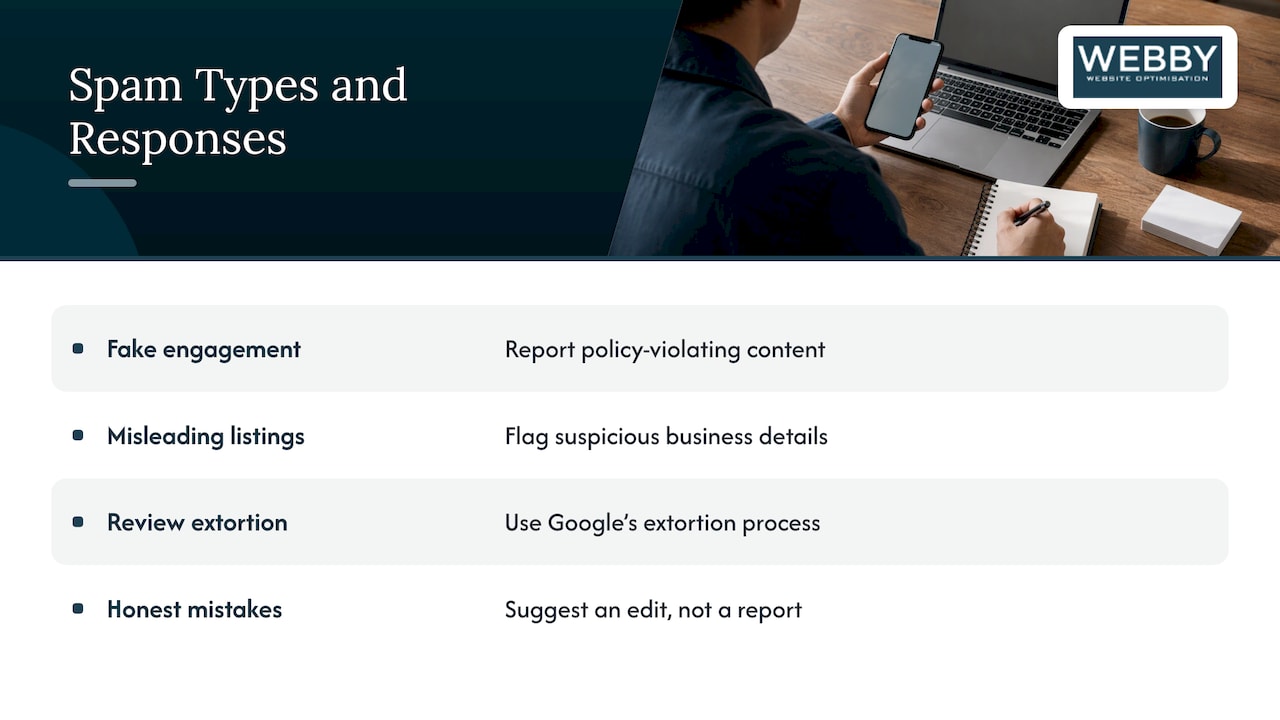
Fake engagement. Google’s contribution policy does not allow content that is not based on a real experience, and it does not allow reviews that are paid for, directly or in kind. It also prohibits merchants from offering incentives for reviews or selectively asking only happy customers to post (Google’s prohibited and restricted content policy). That last point catches plenty of well-meaning owners, which we come back to below.
Misleading listings. These are pins for businesses that do not exist at the address shown, listings with keywords stuffed into the name, or duplicate entries for a single business. Google’s reporting help treats suspicious business names, phone numbers and URLs as things you can flag (Google Maps Help: report a business).
Review extortion. Someone posts a batch of negative reviews, or threatens to, and then asks for money to take them down. Google has a separate process for this, covered further down.
Honest mistakes. An old phone number, a wrong opening time or a pin dropped a few doors down is not spam. Google’s guidance is that incorrect information unrelated to conduct or policy violations should be handled with a suggested edit, not a report.
Getting this sorting step right saves time. A spam report on a listing that is merely outdated is unlikely to go anywhere, and a suggested edit on a fraudulent listing does not address the real problem.
How to recognize a fake or misleading listing
Most local service owners notice spam in one of three places: their own search results, a competitor’s listing that suddenly outranks them, or a customer who turns up at the wrong address. Here is a practical way to check a suspicious listing.
- Compare the name with the real business. Check the Business Profile name against the official business name on the company’s own website and storefront. A guide on spam fighting for Business Profiles suggests exactly this comparison (Zoho’s Business Profile spam guide). Names padded with a suburb, a service and a phone number are a common red flag.
- Check the address on Street View. The same guide recommends using Street View to verify the address and signage. If a listing claims a shopfront and Street View shows a vacant lot, a residential house with no signage or a shared mailbox centre, it deserves a closer look.
- Search the phone number and website. If one number appears across several listings under different names, or the website belongs to a different business, the listing is probably built to grab map results in places the operator does not actually serve.
- Look at the reviews. A profile with many five-star reviews posted in a short window, from accounts that have reviewed nothing else, looks very different from one that has built up reviews gradually from varied accounts.
- Look for duplicates of your own business. Search your business name in Google Maps on your phone and on a desktop. Old listings from a previous address or a previous owner can sit there unclaimed.
None of these checks proves a listing is spam on its own. Together they give you a clear, factual account to put in a report.
How to report spam on Google Maps
The report route depends on what you are dealing with.
Reporting a fake or misleading listing
Google’s help page says that for misleading or fraudulent business information you report it through Maps. It also points to the Business Redressal Complaint form for suspicious business names, phone numbers or URLs (Google Maps Help). In practice:
- Open the listing in Google Maps.
- Use the option to report a problem or suggest an edit, and choose the report path for misleading or fraudulent information.
- Describe the issue in plain, factual terms.
- If the name, number or URL is the problem, use the Business Redressal Complaint form as well.
Reporting a fake review
Find the review, open its menu and choose the report option. Pick the reason that matches Google’s policy, for example that the review is not based on a real experience or was paid for. Policy wording matters: “this is clearly fake” gives a reviewer less to work with than “this reviewer has never been a customer, and we have no record of this job in our booking system.”
What to include
The more specific your report, the easier it is to assess. Keep a record of:
- The listing or review link, and screenshots with the date you took them.
- The exact policy issue: wrong name, address that does not exist, number used on multiple listings, review not from a real customer.
- Your proof of the real position: your registered business name, your website, a photo of your signage, or your own job records showing no matching customer.
- Any messages from someone demanding payment.
If you are reporting a rival’s listing, stay factual and leave out opinion about their character. Reports that read as a personal grievance are harder to act on.
Review extortion: what to do and what not to do
A particularly nasty form of Maps spam is the extortion scam: someone floods your profile with negative reviews, then offers to remove them for a fee. Google’s guidance is clear that you should not engage with or pay the extortionist, because payment can encourage further attempts and does not guarantee the reviews will be removed (Google Business Profile Help on extortion scams).
Instead:
- Do not reply to the messages or send money.
- Screenshot the demand, including the sender’s details and any threats.
- Report the extortion using Google’s Merchant Extortion Report Form, which is the route named for these scams.
- Report the individual reviews as well, so the content itself is flagged.
If you are ever unsure whether a demand amounts to a crime, speak to your local police or a lawyer. That is outside what any marketing guide can settle.
What happens after you report, and what if nothing changes
A report is a request for review. Google does not promise an outcome or timeline, and a listing may stay up while it is assessed. Here is a sensible way to handle the wait.
- Keep your evidence organized. A dated folder with screenshots and the link to each report makes follow-up simple.
- Recheck the listing after a reasonable gap. If it is still live, submit a fresh report with any new evidence rather than repeating the same one.
- Use the right form for the issue. Many unsuccessful reports are the right complaint filed through the wrong channel. A wrong detail goes through suggested edits, a fraudulent business goes through the report path, and an extortion demand goes through the extortion form.
- Respond publicly to reviews you cannot remove. A calm, factual reply shows future customers you are a real operator. We have a full walkthrough on responding to negative Google reviews.
- Keep building the real thing. Genuine reviews, accurate details and regular activity on your own profile are the best counterweight to a stubborn fake.
How spam affects your business
Spam on Maps is more than an annoyance for local service businesses, because Maps is often where a customer chooses who to call.
- Lost enquiries. A fake listing in your category can sit in the results alongside yours and take calls meant for you, especially when it carries your service area in its name.
- Confused customers. Duplicate or wrong listings send people to the wrong address or number, and they blame you.
- Damaged trust. A cluster of unexplained one-star reviews makes a prospect hesitate, even if you reply well.
- Risk to your own profile. Google says policy violations may lead to restricted content or restricted access to a Business Profile or merchant account (Overview of Business Profile policies). If you panic and respond to spam with tactics of your own, you can end up on the wrong side of those rules.
If your listing is not appearing where it should, spam may not be the cause at all. Our 10-point checklist for getting found on Google Maps walks through the usual culprits.
Keep your own profile compliant
The fastest way to lose the moral high ground is to commit the same offences you are reporting. A few habits keep you safe.
Be careful with review requests. Google’s policy bars merchants from offering incentives for reviews and from selectively soliciting positive ones. So no discounts for five stars, and no filtering unhappy customers out of your review invitation. Ask every customer in the same way. Our guide to getting Google reviews with compliance first shows how to do this properly.
Know the Australian rules too. The ACCC says businesses must not create or arrange fake or misleading reviews, should disclose incentives and commercial relationships that may affect how consumers understand reviews, and should avoid misleadingly suppressing or editing negative reviews (ACCC guidance on online reviews). That covers a review you write yourself, one a friend or staff member writes for you, and a review page that quietly hides the bad ones.
Use your real business name. Do not add keywords or suburbs to the name field. It may feel like a ranking shortcut, but it is exactly the kind of name Google lets people report.
Keep the profile accurate. Correct address, hours, phone number and service areas. If you run a service-area business, set it up as one. Our guides to Google Business Profile for local service owners and setting up a Business Profile in 2026 cover the setup properly.
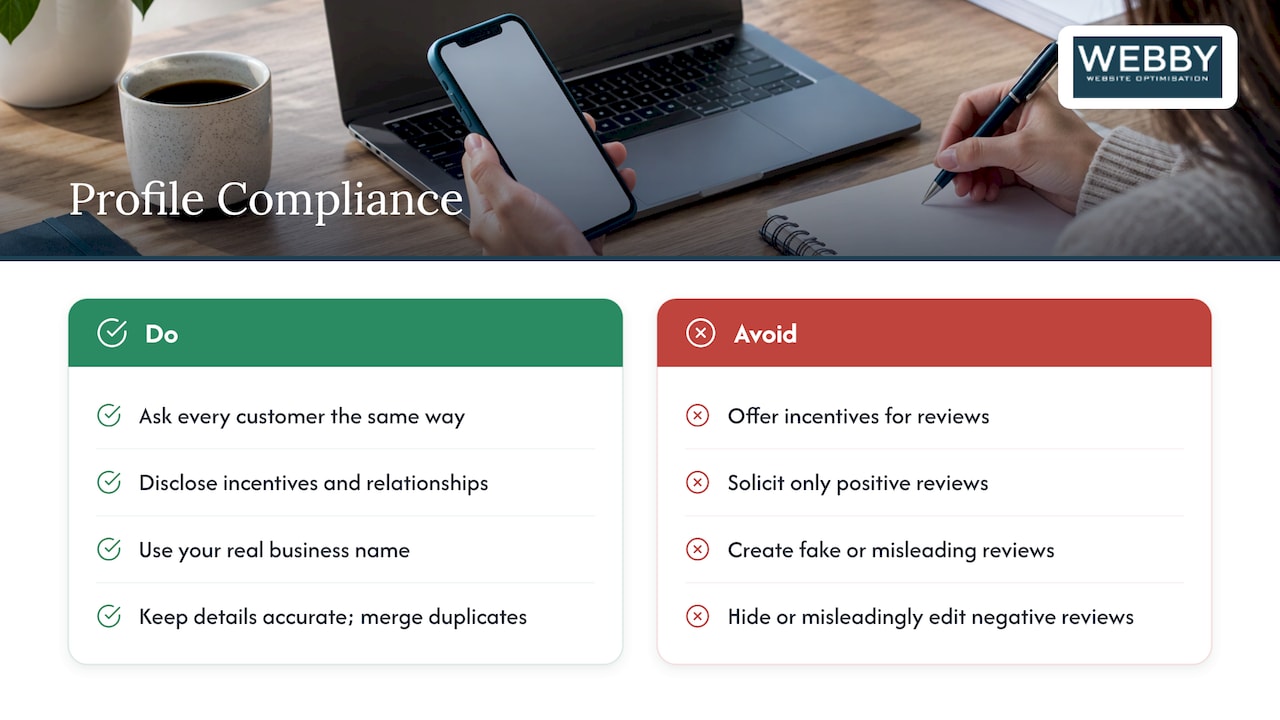
Claim and merge duplicates. Old listings from a former address are an easy target for spam edits and confuse customers. Tidy them while you are in there.
Our perspective
Most local owners we speak to treat Google Maps as something that happens to them. A competitor gets a better pin, a stranger leaves a nasty review, and they feel there is nothing to do. We see it differently.
Spam reports are worth filing, but they are the smaller half of the job. The bigger half is making your own presence so solid that one fake listing cannot dent it: a consistent name, address and phone number across your website and profile, a steady stream of genuine reviews, and a website that backs up everything your profile says.
That is why we build local visibility as one connected system rather than a set of tricks. When your site, your profile and your reviews tell the same story, it is much easier to prove which listing is the real one, and much harder for a spammer to push you aside.
Our advice is simple. Report what is clearly fake, document everything, never pay an extortionist, and spend the rest of your energy on being the obvious, trustworthy choice in your area.
Steve Doig
Get your local presence checked by us
If you suspect spam is hurting your visibility, or you simply want to know where your site and profile stand, we can look at it with you. Our Website Audit is a one-off 1,250 AUD and reviews how your website is set up to support your local search presence. If you want ongoing work on how you appear in Google, see our Search Engine Optimisation service.

You can also start with a free website audit and tell us what you are seeing on Maps.
FAQ
Can I get a fake listing removed from Google Maps?
You can report it, and that is the route Google provides. For misleading or fraudulent business information, use the report option in Maps, and use the Business Redressal Complaint form for suspicious names, phone numbers or URLs. Include screenshots and proof of the real situation. Removal is Google’s decision, so keep your records in case you need to report again.
Should I pay someone who offers to remove bad Google reviews?
No. Google advises businesses not to engage with or pay extortionists, because payment can encourage further attempts and does not guarantee removal. Report the demand using the Merchant Extortion Report Form and keep screenshots of the messages.
Is it illegal to post or buy fake reviews in Australia?
The ACCC says businesses must not create or arrange fake or misleading reviews, and it also expects them to disclose incentives and avoid misleadingly suppressing negative reviews. Google’s own policy separately bans paid reviews and content not based on a real experience. If you are unsure whether a specific practice is allowed, check the ACCC page or speak to a lawyer.
What is the difference between reporting a listing and suggesting an edit?
A suggested edit is for incorrect information that is not about conduct or policy violations, such as a wrong opening time. A report is for misleading or fraudulent information, such as a business that does not exist at the address shown. Choosing the right one makes your request easier to act on.
Can spam listings hurt my own Google Business Profile?
They can pull calls and attention away from you. Your own profile can also be restricted if you break Google’s policies, so avoid incentivized reviews, keyword-stuffed names and any other tactic that Google prohibits.
Sources
- Prohibited and restricted content, Maps User Generated Content policy
- Report a business on Google Maps, Google Maps Help
- Report negative review extortion scams on your Business Profile
- Overview of Google Business Profile policies
- Online reviews for products and services, ACCC
- Spam fighting for Google Business Profiles, Zoho