
Think of an SSL wildcard certificate as a security pass that works for an entire building, not just a single office. While a standard SSL certificate is designed to protect just one specific web address, a wildcard certificate uses a special character—an asterisk (*)—to secure your main domain and all its subdomains in one go.
What Exactly Is an SSL Wildcard Certificate?
Let’s stick with the key analogy for a moment. A standard SSL certificate is like a key cut for a single door. It works perfectly for one address, say yourdomain.com.au, but it won't open any others. This is fine if you only have one simple website, but most businesses don't stay that simple for long.
As your Australian business and its WordPress site grow, you'll likely add new sections to handle different functions. You might launch a blog, an online store, or a dedicated portal for customer support. These are usually set up on subdomains—unique addresses that branch off your main one.
The Problem with Juggling Multiple Certificates
If you stick with standard SSLs, you're forced to buy and manage a separate certificate for every single subdomain you create. It quickly becomes a costly and administrative nightmare.
Imagine managing individual certificates for:
- yourdomain.com.au (your main website)
- blog.yourdomain.com.au (where your articles live)
- shop.yourdomain.com.au (your e-commerce storefront)
- support.yourdomain.com.au (your customer help centre)
- app.yourdomain.com.au (a custom web application)
This is precisely the headache that an SSL wildcard certificate is designed to solve. By placing an asterisk (*) in the domain name field during setup, it acts as a 'catch-all' for security.
A single wildcard certificate for
*.yourdomain.com.auautomatically secures your main domain (yourdomain.com.au) and every subdomain you can think of. It’s the ultimate set-and-forget solution for securing your entire web presence.
How It Streamlines Your Security
Instead of juggling multiple certificates, renewal dates, and validation chores, you deal with just one. For small and medium Australian businesses, this simplification is a huge win. It frees up your time and resources to focus on what actually matters—growing your business—rather than getting bogged down in repetitive admin.
This unified approach also means you get consistent, reliable security across all your online properties. Every visitor interaction is encrypted, whether they're reading a blog post or buying a product. That builds the kind of customer trust that underpins your reputation and boosts sales. Plus, with Google using HTTPS as a known ranking signal, securing all your subdomains can give your SEO a nice, healthy push.
How a Wildcard Certificate Protects Your WordPress Subdomains
So, how does this actually work? At its heart, a wildcard SSL certificate creates a secure, encrypted connection between a visitor's browser and your website's server. You can think of it as a private, armoured tunnel that gets built instantly for every single conversation. This whole process is called the "SSL handshake," and while it happens in milliseconds, it's a crucial security checkpoint.
When someone lands on blog.yourdomain.com.au or any other subdomain you run, their browser immediately asks your server to prove its identity. Your server then presents its wildcard certificate. The browser quickly checks that the certificate is valid, was issued by a trusted Certificate Authority (CA), and correctly matches the domain pattern (*.yourdomain.com.au).
Once the browser gives the all-clear, a secure channel is established. From that moment on, any data exchanged—be it login details, credit card numbers, or personal info—is completely scrambled. This makes it unreadable to anyone trying to snoop on the connection. The best part? This protection is automatically applied to every single subdomain covered by the wildcard, with no extra fiddling required on your end.
The Power of Simplified Validation
Imagine life without a wildcard certificate for a moment. You’d be forced to buy, install, and manage an individual certificate for every subdomain you launch. It's not just the cost that adds up; it's the sheer administrative headache. Each certificate needs its own validation and has its own expiry date, which makes it frighteningly easy for one to slip through the cracks and trigger those dreaded "Not Secure" browser warnings.
A wildcard SSL certificate cuts through all that complexity. Suddenly, you're dealing with just one purchase, one installation, and one renewal date. This incredible efficiency is precisely why wildcard certificates have become a go-to for small and medium businesses across Australia, especially those running multiple WordPress sites.
A Domain Validated (DV) wildcard certificate can cost around $409 AUD per year, but it secures your main domain plus all your subdomains in one go. This affordability has been a huge factor in their popularity, especially as Australia's e-commerce scene continues to grow.
For the majority of Australian businesses, which are SMEs, wildcard certs deliver powerful security without the hefty price tag you'd see on options with more intensive business verification. You can explore the different SSL certificate costs and options from Australian providers like GlobalSign to get a better sense of the market.
Choosing Your Level of Trust and Validation
While a wildcard simplifies your security coverage, you still need to decide on a validation level. This choice is all about how thoroughly the Certificate Authority verifies who you are before issuing the certificate, which in turn signals a certain level of trust to your visitors.
You’ll generally find two main validation levels available for wildcard certificates:
Domain Validation (DV): This is the most common and basic level. Here, the CA simply verifies that you own or control the domain name. The whole process is usually automated and incredibly fast, often finishing up within minutes. A DV wildcard is a perfect fit for blogs, portfolios, and small business sites that don't handle highly sensitive customer data.
Organisation Validation (OV): This option takes things a step further. The CA doesn't just check your domain ownership; it also verifies your organisation's legal existence. They'll look into official business registration details to confirm you're a legitimate entity. An OV wildcard offers a higher level of assurance and is a smart move for e-commerce stores, membership sites, or any business that handles customer accounts and payments.
It's worth noting that Extended Validation (EV) certificates, which offer the highest trust signal by displaying the company name in the browser's address bar, are not available in a wildcard format. This is because EV demands strict, individual validation for every single hostname. For almost any WordPress site, however, a DV or OV wildcard strikes the perfect balance between robust security, fantastic convenience, and sensible cost.
Wildcard SSL vs Multi-Domain (SAN) Certificates
Getting your head around the world of SSL certificates can feel a bit like learning a new language. You’ll hear terms like Wildcard and Multi-Domain SAN thrown around, and while they both secure more than just one website, they’re built to solve completely different problems. Figuring out which is which is the key to getting the right security without overcomplicating things or overspending.
Let's break it down with a simple analogy.
- A Wildcard SSL certificate is like a master key for a single office building. It unlocks every single room (your subdomains) on every floor, as long as they all belong to that one building (your main domain).
- A Multi-Domain (SAN) certificate, on the other hand, is like a keychain holding separate, specific keys for different buildings scattered all over town. Each key opens a door in a completely different building (an unrelated domain).
This really gets to the heart of it. A wildcard is brilliant for securing an unlimited number of subdomains under one main brand, making it perfect for when you're scaling up your services. A SAN certificate, however, is designed to lock down a specific list of totally different domain names.
When to Choose a Wildcard Certificate
A wildcard SSL is your go-to when your entire online presence revolves around a single, core brand. It's built for businesses that grow by adding new services or sections as subdomains.
You should be looking at a wildcard certificate if your setup looks something like this:
- Your main website:
yourbusiness.com.au - Your company blog:
blog.yourbusiness.com.au - Your e-commerce store:
shop.yourbusiness.com.au - A private client portal:
clients.yourbusiness.com.au
See how they all share the yourbusiness.com.au part? That makes them the perfect fit for a single wildcard certificate. It makes life so much easier—you've got one certificate to manage, one renewal date to remember, and one validation process that covers absolutely everything you have now and anything you add later on.
When a Multi-Domain SAN Certificate Makes Sense
A Multi-Domain certificate, which gets its name from the Subject Alternative Name field, is the right tool for the job when your business manages a portfolio of separate web properties. This is a common scenario for marketing agencies juggling client sites or a company that owns several distinct brands.
A SAN certificate is the better choice if you need to secure a collection of unrelated domains, such as:
myfirstbrand.com.auanotherbusiness.neta-completely-different-site.org
With a SAN certificate, you list every single domain you want to cover. It’s a handy way to consolidate security for a diverse web portfolio, but remember that you’ll need to add each new domain to the certificate, which can sometimes mean getting it reissued.
Here's the crucial takeaway: Wildcards are for securing unlimited subdomains of a single domain. SANs are for securing a limited, hand-picked list of different domains. Getting this wrong can lead to unnecessary costs and a whole lot of admin headaches down the track.
Wildcard SSL vs Multi-Domain (SAN) SSL A Quick Comparison
To make the decision crystal clear, let's put them side-by-side. This table breaks down the core differences between Wildcard and Multi-Domain (SAN) certificates to help you choose the right option for your business needs.
| Feature | SSL Wildcard Certificate | Multi-Domain (SAN) Certificate |
|---|---|---|
| Primary Use Case | Securing one main domain and all its current and future subdomains. | Securing multiple, completely different domain names under one certificate. |
| Domain Coverage | *.yourdomain.com.au (unlimited subdomains at one level). | domain-one.com, domain-two.net.au, another-brand.org (a specific list). |
| Scalability | Excellent. Automatically secures new subdomains as you create them. | Limited. Requires you to manually add and validate each new domain. |
| Management | Simple. One certificate to manage for your entire brand ecosystem. | Moderate. You manage one certificate, but must update it for new domains. |
| Best For | Businesses scaling under a single brand (e.g., adding a blog, shop, or app). | Agencies or businesses managing a portfolio of unrelated websites. |
Once you take a look at how your business and its websites are structured, you'll be able to confidently pick the certificate that gives you the right mix of coverage, convenience, and value for money.
Installing a Wildcard Certificate on Your WordPress Site
Getting a wildcard SSL certificate up and running on your website might sound like a job for a seasoned developer, but it's often more straightforward than you'd expect. How you go about it really comes down to your hosting provider and how comfortable you are with the technical side of things.
Let’s break down the general process and the options you have.
The whole journey kicks off with picking a provider. You can source a wildcard certificate from a few different places, and each has its own pros and cons.
- Paid Certificate Authorities (CAs): Big names like DigiCert, GlobalSign, and Sectigo offer premium wildcard certificates. These often come bundled with top-notch customer support, warranties, and extra security features. They’re a fantastic choice for businesses that want a rock-solid service and someone to call if things go wrong.
- Free Automated CAs: Let's Encrypt is the undisputed king of free certificates. It provides basic, Domain Validated (DV) wildcard certificates that are more than enough for many small businesses. The catch? They only last for 90 days, which means setting up automatic renewals is pretty much non-negotiable.
Thankfully, many hosting providers—especially those offering managed WordPress services—have made this whole process a breeze. They often build integrations directly with CAs, letting you buy and install a certificate right from your hosting dashboard in just a few clicks.
The General Installation Workflow
No matter who you get your certificate from, the installation process follows a fairly standard script. You can think of it as a three-step security handshake between you, your server, and the Certificate Authority.
- Generate a Certificate Signing Request (CSR): This is your official application. A CSR is an encrypted block of text that contains key details about your organisation and the domain name you’re securing (like
*.yourdomain.com.au). You’ll usually create this from within your web hosting control panel, such as cPanel or Plesk. - Complete Domain Validation: Once you've sent the CSR to the CA, you need to prove you actually own the domain. This is typically handled by clicking a link in an email sent to an admin address (e.g., admin@yourdomain.com.au), adding a special DNS record, or uploading a specific file to your server.
- Install the Certificate Files: After you’re validated, the CA will send over the certificate files. The final step is to install these on your server, which, again, is usually done through your hosting control panel. This is what officially activates HTTPS for your main site and all its subdomains.
While the exact steps for installing an SSL certificate can differ slightly, that resource gives a great foundational overview of the core concepts involved.
Managed Hosting vs. DIY Installation
How you approach this really depends on your hosting setup. If you're on a managed WordPress host, they often handle everything for you. You just put in the request, and their team takes care of the CSR, validation, and installation. It's a completely hands-off approach, perfect for business owners who just want security without the technical headache.
If your hosting plan comes with a control panel like cPanel, you'll be a bit more hands-on, but the interface is designed to guide you. The cPanel "SSL/TLS Manager" has all the tools you need to generate a CSR and install the certificate files.
Key Takeaway: For most business owners, the easiest and most reliable path is to work directly with your hosting provider. They can simplify the whole affair, provide support when needed, and often automate renewals to make sure your site never shows an ugly security warning because of an expired certificate.
This visual comparison really clarifies the difference between a Wildcard and a SAN SSL certificate, highlighting that "master key" idea for wildcards.
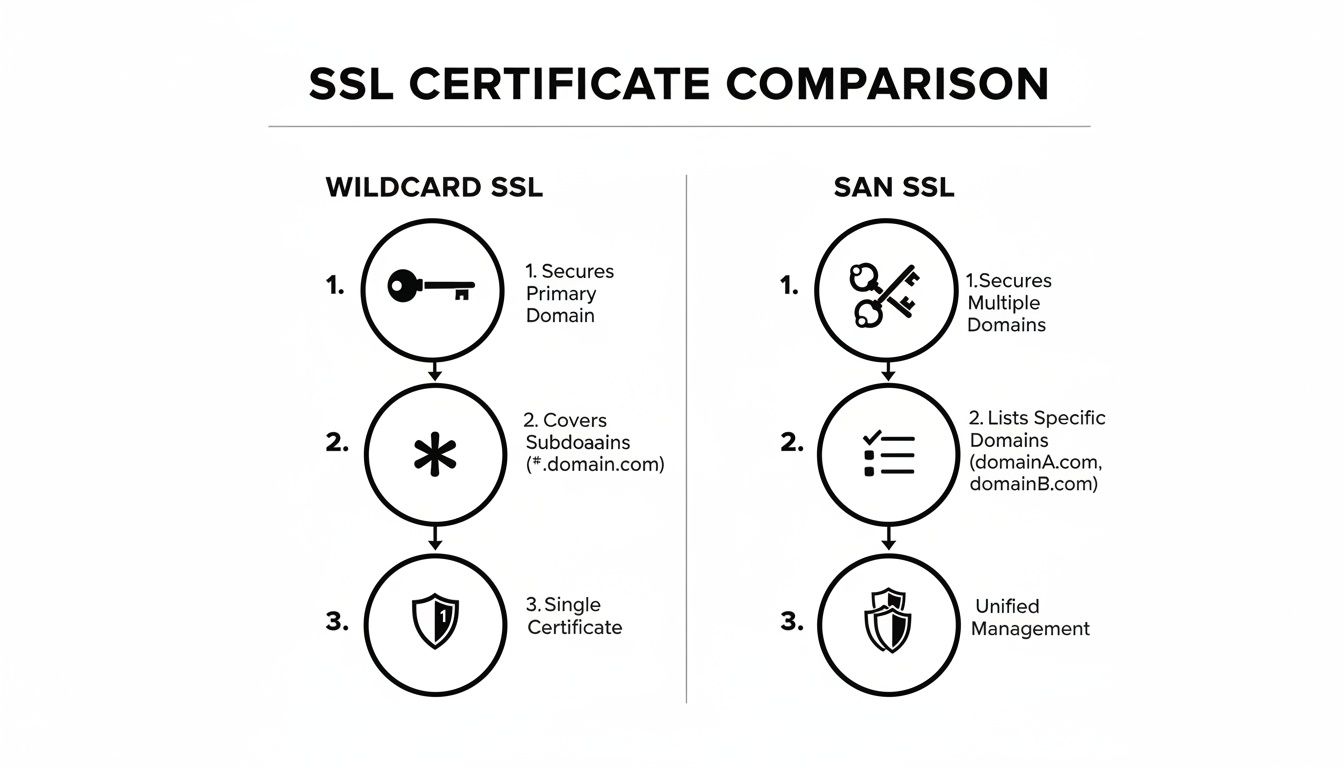
As you can see, a wildcard SSL is all about providing broad, scalable security for a single domain and its subdomains. A SAN SSL, on the other hand, gives you specific, targeted security for a list of completely different domains.
Let's be honest, even a "simplified" process can feel overwhelming. If you get stuck or just want peace of mind that everything is set up perfectly, getting professional help is a smart move. Expert teams can provide dedicated WordPress help and support to manage the entire installation and renewal cycle for you, guaranteeing a flawless setup so you can get back to running your business.
Best Practices for Managing Your Wildcard SSL

Getting a wildcard SSL certificate up and running is a fantastic first step, but real security isn't a "set and forget" deal. It's an ongoing commitment. Proactive management is what ensures your certificate keeps protecting your business and your customers, day in and day out.
Think of it like this: installing the certificate is like putting a high-tech lock on your front door. But proper management is about not leaving the key under the doormat. It means actively safeguarding your digital assets and keeping your defences up-to-date to stop vulnerabilities from creeping in.
Safeguard Your Private Key at All Costs
If there's one thing to be paranoid about, it's your SSL private key. This is the secret code that lets your server unscramble the encrypted information coming from your visitors' browsers. If it falls into the wrong hands, a hacker could intercept and read sensitive data, making your entire security setup pointless.
Protecting it is absolutely non-negotiable.
- Restrict Access: Only a handful of authorised people should ever be able to access the server where the private key lives.
- Generate It Securely: Always create the key on the same server where you'll use it. Never create it on your laptop and then email it or transfer it over an insecure connection.
- Use Strong Encryption: The private key itself should be locked down with a strong passphrase, giving you an extra layer of defence against unauthorised use.
Losing your private key is the digital equivalent of handing a master key to a thief. It compromises every single subdomain secured by that wildcard certificate.
Enforce HTTPS with HSTS
Once your wildcard SSL is active, the next job is to make sure visitors always use the secure HTTPS connection. This is where HTTP Strict Transport Security (HSTS) comes into play. HSTS is a simple instruction you add to your server that tells web browsers to only connect to your site using HTTPS.
It sounds simple, but it closes a common security loophole. Without HSTS, a visitor might first land on an insecure HTTP version of your site, creating a tiny window for a "man-in-the-middle" attack. By enabling HSTS, you tell browsers to skip that insecure step entirely and go straight to the secure connection.
Combining a wildcard SSL with HSTS creates a powerful defence for your main domain and all its subdomains. For a deeper dive on this, our WordPress best practices checklist is a great resource.
Automate Your Certificate Renewals
SSL certificates don't last forever, and their lifespans are getting shorter. Forgetting to renew one is an incredibly common—and costly—mistake. It triggers those big, scary browser warnings that send potential customers running and instantly damage your brand's credibility.
With the industry moving towards much shorter certificate validity periods—soon to be measured in months, not years—renewing them manually is just asking for trouble. Automation isn't just a convenience anymore; it's a necessity.
This is why setting up automated renewals is one of the smartest things you can do. Most modern hosting providers and certificate authorities have tools to handle this for you.
- Managed Hosting: Many hosts will automatically renew and install certificates you get through them.
- Let's Encrypt: Tools like Certbot are built from the ground up to automate renewals for free certificates.
- Renewal Notifications: At the very least, make sure you have multiple email reminders set up well before the expiry date.
The recent surge in wildcard certificate adoption among Australian SMEs is no accident. It’s a direct response to a growing awareness of these security needs. In fact, the Australian Cyber Security Centre recently highlighted that 43% of reported cyber incidents targeted sites without proper encryption, pushing businesses to take action.
A well-managed wildcard SSL isn't just a product; it's a core part of a robust security strategy that protects your reputation and builds customer trust.
Securing Your Digital Future with a Wildcard SSL
Think of a wildcard SSL certificate less as a technical chore and more as a strategic investment in your business's future. It's a clever way to deliver scalable security, make your day-to-day admin life a whole lot simpler, and save a fair bit of money as your digital footprint grows. For any Aussie business running on WordPress, it's pretty much an essential tool.
By bringing all your subdomains under the protection of one powerful certificate, you're not just ticking a security box. You're creating a safer, more professional experience for your customers and a much saner workflow for your team. It’s honestly the smartest way to protect your brand, build that all-important customer trust, and secure every corner of your online world.
A Foundational Step for Growth
The key takeaway here is pretty straightforward: getting an SSL wildcard certificate is a foundational step towards building a resilient and trustworthy online business. It sets you up for future growth, ensuring that as you roll out new services and subdomains, your security scales right along with you, no fuss.
This proactive approach doesn't just bolster your defences; it also has a real, positive impact on how much users trust you. If you're keen on other ways to boost your online presence, you can find more tips in our quick guide to SEO.
For any business wanting to build a strong, secure foundation online, a wildcard SSL is the logical choice. It solves the headache of multi-site security with a single, elegant solution, freeing you up to focus on growing your business.
To get the most out of your wildcard SSL, it’s a great idea to pair it with established cloud security best practices. This layered approach makes sure your entire setup is protected against new and emerging threats, cementing the trust you’ve worked so hard to build. At the end of the day, it's about making security a seamless part of your strategy, not a recurring administrative nightmare.
Frequently Asked Questions
Getting your head around SSL wildcard certificates can sometimes feel like one more thing on an already long to-do list. Let's cut through the noise and answer some of the questions we hear most often from business owners.
Can I Use a Wildcard Certificate on Multiple Servers?
Yes, absolutely. This is one of the best things about a paid wildcard certificate. You can take the certificate and its private key from one server and install it across as many others as you need, as long as they're all handling subdomains for that same primary domain.
This is a real lifesaver for businesses with distributed infrastructure. You might have:
- Your main website on one server.
- Your email hosted on another.
- A client portal or web app running on a third.
With a single wildcard, you can lock down all of them. It keeps your encryption consistent everywhere without the headache and cost of juggling multiple individual certificates.
How Many Subdomains Can a Wildcard SSL Secure?
A wildcard certificate will secure an unlimited number of subdomains, but only at one specific level. Think of it like a master key for one floor of a building.
If your certificate is for *.yourdomain.com.au, it will happily cover blog.yourdomain.com.au, shop.yourdomain.com.au, and login.yourdomain.com.au. You can add as many as you like.
The catch is that it only goes one level deep. That same certificate for *.yourdomain.com.au will not work for a multi-level subdomain like dev.projects.yourdomain.com.au. For that kind of setup, you'd need a separate wildcard issued for *.projects.yourdomain.com.au or a different type of certificate altogether.
What Happens if My Wildcard Certificate Expires?
This is something you really want to avoid. The moment your wildcard certificate expires, every single subdomain it was protecting goes dark. Anyone trying to visit your sites will be blocked by a big, ugly browser warning like "Your connection is not private."
This isn't just a minor inconvenience; it can be a business killer. It shatters trust, drives away potential customers, and makes your brand look careless or even compromised.
That’s why getting ahead of renewals is so important. Certificate lifespans are getting shorter, so trying to manage them manually is a recipe for disaster. Automating your renewal process is the only surefire way to prevent an outage and keep your online presence secure and trustworthy.
Is a Free Wildcard Certificate Good Enough for My Business?
For a lot of smaller businesses, personal blogs, or simple portfolio sites, a free wildcard from a provider like Let's Encrypt is a fantastic option. It gives you the exact same level of Domain Validation (DV) encryption as many entry-level paid certificates, which is all many sites need.
But before you jump in, there are a few trade-offs to keep in mind:
- Validity Period: Free certificates are short-lived, typically lasting just 90 days. This makes reliable, automated renewals an absolute must.
- Support: When you pay for a certificate, you're also paying for access to a support team. That can be a godsend if you hit a snag during installation. With free options, you're generally on your own.
- Validation Levels: Free certificates are strictly Domain Validation (DV). If you need to display a higher level of trust with Organisation Validation (OV), you'll have to go with a paid provider.
It really comes down to your budget, your technical confidence, and the level of assurance your customers expect from you.
If juggling SSL certificates and website security is pulling you away from what you do best, the team at Webby Website Optimisation can take it off your plate. We provide end-to-end WordPress help and support to ensure your site is always secure, fast, and performing at its peak.