

Website maintenance is the ongoing process of updating, monitoring, and optimizing your website to keep it secure, functional, and performing at its best. For small and medium local businesses in Perth, Fremantle, and Melville, why website maintenance matters comes down to one simple truth: your website is your most accessible storefront, and a neglected one costs you customers. The industry term for this practice is web asset management, though most business owners simply call it keeping the site healthy. Without regular upkeep, even a well-designed site deteriorates into a liability.
Why website maintenance matters for your business
Website maintenance covers every task that keeps your site running correctly after launch. That includes updating your core platform, plugins, and themes; running security scans; testing contact forms and checkout flows; and monitoring uptime. After 6 to 12 months without these updates, plugins become incompatible and performance drops, sometimes triggering complete “white screen” errors that lock visitors out entirely. That is not a hypothetical risk. It is a predictable outcome of deferred upkeep.
Think of it the way you think about servicing a work vehicle. You do not wait for the engine to seize before changing the oil. The same logic applies to your website. Preventive maintenance consistently reduces unexpected breakdowns and repair costs compared to reactive fixes after something breaks. For a local business that depends on online inquiries, that comparison is not abstract. It is the difference between a phone that rings and one that does not.

What are the key tasks in a website maintenance checklist?
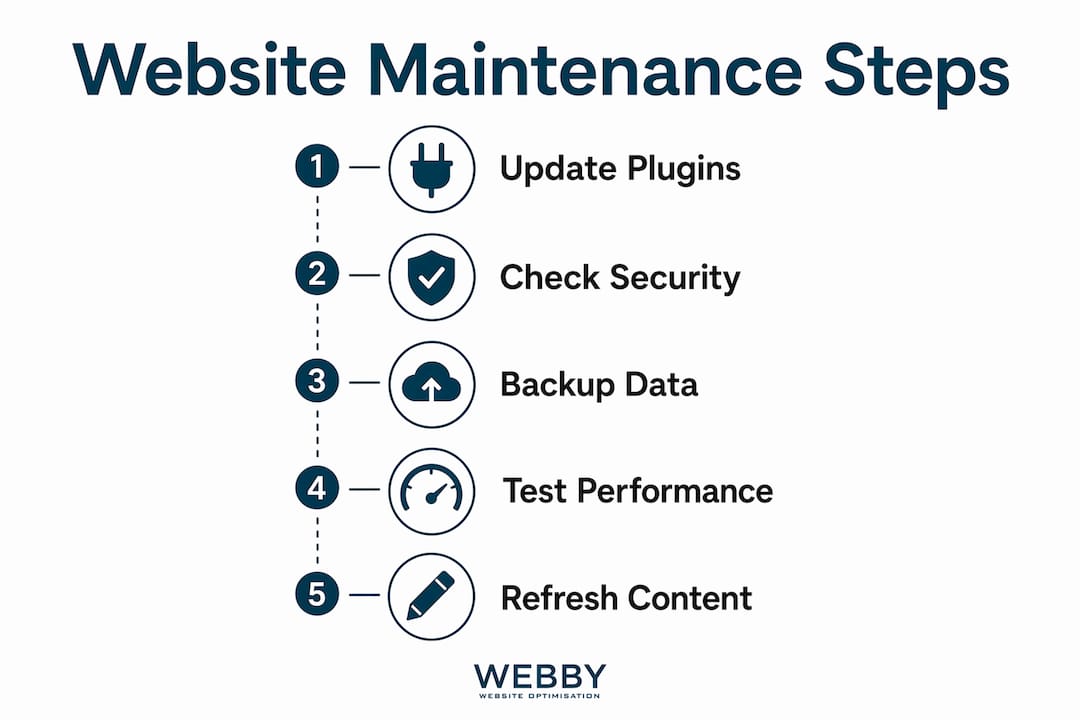
A practical website maintenance checklist covers five core areas. Each one addresses a different failure point that accumulates silently over time.
- Platform and plugin updates: WordPress core, themes, and plugins release updates to patch security holes and fix bugs. Skipping these creates vulnerabilities that automated bots actively scan for and exploit.
- Backups with off-server storage: Backup procedures must include off-server storage and restoration testing. A backup stored only on the same server is lost if that server fails.
- Security monitoring: Tools like Patchstack scan WordPress sites continuously for known vulnerabilities and alert you before an exploit becomes a breach.
- Performance checks: Page speed, broken links, and image optimization all degrade over time as content grows and plugins multiply.
- Workflow testing: A single outdated plugin can break a checkout or inquiry form without any visible error on the homepage. Testing these flows after every update catches hidden failures before customers hit them.
Pro Tip: Schedule workflow testing immediately after any plugin or theme update, not at the end of the month. Problems introduced by updates are easiest to isolate and reverse within 24 hours.
How does maintenance affect customer engagement and conversions?
A poorly maintained site loses customers at every stage of their visit. Performance issues accumulate without ongoing fixes, degrading user experience, reducing search rankings, and cutting into inquiries. For a local plumber, electrician, or consultant, a broken contact form is not a minor inconvenience. It is a direct revenue loss that may go unnoticed for weeks.
The trust dimension is equally significant. Sites with broken features or outdated content quickly lose visitor confidence and damage brand reputation. A visitor who lands on a page with a broken image, an expired offer, or a form that returns an error does not call to report the problem. They leave and contact a competitor. Research on website design and trust confirms that visual and functional professionalism directly shapes whether a visitor decides to inquire or bounce.
Site speed compounds this effect. Slow loading times reduce the likelihood that a visitor converts into a lead. The relationship between page speed and lead generation is well documented: faster sites generate more inquiries because visitors stay longer and encounter fewer friction points. Regular performance maintenance keeps load times low as content and plugins grow over time.
Why is website maintenance essential for SEO?
Search engines treat your website’s technical health as a ranking signal. Google’s crawlers assess page speed, mobile responsiveness, uptime, and content freshness every time they index your site. Proactive maintenance avoids the major overhauls that disrupt rankings and keeps the site aligned with Google’s current algorithm requirements.
Uptime is a particularly underappreciated factor. 99.9% uptime corresponds to roughly 8 hours and 46 minutes of downtime annually. That sounds acceptable until you realize Google may attempt to crawl your site during that window and log it as unavailable. Repeated downtime signals an unreliable site and can suppress rankings over time.
| Maintenance task | SEO impact |
|---|---|
| Plugin and core updates | Prevents security flags and crawl errors |
| Page speed optimization | Directly improves Core Web Vitals scores |
| Uptime monitoring | Reduces crawl failures and ranking suppression |
| Fresh content and metadata | Signals relevance to Google’s ranking algorithms |
| Mobile responsiveness checks | Supports Google’s mobile-first indexing |
Pro Tip: Use Google Search Console alongside an uptime monitor like Foglift or UptimeRobot. Search Console shows crawl errors and indexing issues; the uptime monitor catches outages in real time. Together, they cover the two biggest SEO risks from poor maintenance.
Running a DIY website SEO audit every quarter helps identify technical issues before they compound into ranking drops. It takes less than an hour and surfaces problems that are invisible to the naked eye.
How often should you maintain a website?
Maintenance frequency depends on the task. Not everything needs daily attention, but nothing should go unchecked for months. Here is a practical schedule for a local business website:
- Daily: Uptime monitoring runs automatically. Set alerts to notify you within 1 to 5 minutes of any outage, which is the recommended monitoring interval for reliable detection.
- Weekly: Check for plugin, theme, and core updates. Apply security patches immediately. Non-critical updates can batch weekly.
- Monthly: Run a full performance audit, test all forms and checkout flows, review broken links, and confirm backups completed successfully.
- Quarterly: Audit content for accuracy and relevance, review metadata and page titles, and assess mobile responsiveness across current device sizes.
- Annually: Conduct a full security review, evaluate hosting performance, and assess whether the site design still reflects your brand and service offering.
The cost argument for this schedule is straightforward. Regular inspections and upkeep cost significantly less than emergency repairs, data recovery, or rebuilding a site after a breach. A monthly maintenance plan from a professional agency typically costs a fraction of what a single site recovery costs after a hack or major failure.
DIY vs. professional maintenance: which suits your business?
| Factor | DIY maintenance | Professional maintenance |
|---|---|---|
| Technical skill required | Moderate to high | Handled by the provider |
| Time investment | 3 to 5 hours per month | Minimal for the business owner |
| Risk of mistakes | Higher, especially post-update | Managed with rollback procedures |
| Response to security threats | Dependent on owner’s availability | Monitored and addressed proactively |
| Cost | Low direct cost, high opportunity cost | Monthly fee, predictable and scalable |
DIY maintenance works for business owners who are comfortable in WordPress or their chosen CMS, have time to stay current with security advisories, and can troubleshoot issues when updates break something. For most local service businesses, that profile does not fit. The time spent managing updates and monitoring security is time not spent on clients.
Professional maintenance from a provider like Webby Website Optimisation includes expert monitoring, scheduled backups with off-server storage, rapid response to security events, and performance checks. For ecommerce sites or inquiry-driven businesses where a single hour of downtime translates directly to lost revenue, professional management is not a luxury. It is risk mitigation. The connection between site performance and lead generation applies regardless of industry: a site that is slow, broken, or offline cannot convert visitors into customers.
Key takeaways
Regular website maintenance is the single most cost-effective way to protect your online presence, prevent revenue loss, and maintain search visibility.
| Point | Details |
|---|---|
| Neglect causes predictable failures | Plugins and platforms degrade within 6 to 12 months without updates, causing errors and security gaps. |
| Maintenance directly supports conversions | Broken forms and slow pages lose customers silently. Regular testing catches failures before visitors do. |
| SEO depends on technical health | Speed, uptime, and fresh content are active ranking signals that deteriorate without ongoing maintenance. |
| Preventive upkeep costs less | Scheduled maintenance is consistently cheaper than emergency repairs or post-breach recovery. |
| Professional management suits most local businesses | The time and skill required for DIY maintenance exceeds what most service business owners can realistically commit. |
The uncomfortable truth about “set and forget” websites
I have worked with enough local businesses to know the pattern. A new website goes live, everyone is pleased with it, and then nothing happens for 18 months. No updates, no backups checked, no performance review. The site looks fine on the surface. Then a plugin conflict causes the contact form to silently fail, and the business owner only discovers it when a client mentions they tried to reach out weeks ago and heard nothing.
That scenario is not rare. It is the norm for businesses that treat their website as a one-time project rather than an ongoing asset. The misconception that maintenance is optional overhead comes from confusing the cost of upkeep with the cost of doing nothing. Doing nothing has a cost too. It just arrives later and hits harder.
What I have observed consistently is that businesses with maintained sites rank better, convert more visitors, and spend less on emergency fixes. The math is not complicated. A site that loads fast, stays secure, and works correctly on every device gives visitors a reason to stay and inquire. A neglected site gives them a reason to leave. Maintenance is not about perfection. It is about keeping the site fit for purpose, month after month, so it keeps working for you when you are not watching it.
— Steve Doig
How Webby Website Optimisation keeps your site performing

Webby Website Optimisation works with local businesses across Perth, Fremantle, and Melville to manage the full scope of website upkeep, from WordPress updates and security monitoring to performance checks and backup management. If your site has not had a proper review in the past six months, there is a good chance it has accumulated issues you are not aware of. The team at Webby offers a free website audit to identify exactly where your site stands and what it needs to stay competitive. Protecting your site is protecting your leads. Get in touch today and stop leaving that to chance.
FAQ
What does website maintenance actually include?
Website maintenance covers platform and plugin updates, security monitoring, performance checks, backup management, and testing of customer-facing features like forms and checkout flows. Regular maintenance also includes uptime monitoring and content reviews to keep the site accurate and functional.
How often should a small business website be maintained?
Security updates should be applied immediately when released. Plugin and platform updates should run weekly, with full performance and workflow audits conducted monthly. Quarterly content reviews and an annual full-site assessment round out a solid maintenance schedule.
Can a neglected website hurt my Google rankings?
Yes. Google factors in page speed, uptime, mobile responsiveness, and content freshness when ranking sites. A site with frequent downtime, slow load times, or outdated content will lose ground to competitors who maintain their sites consistently.
Is DIY website maintenance realistic for a local business owner?
It depends on your technical comfort level and available time. DIY maintenance requires 3 to 5 hours per month and a working knowledge of your CMS, security practices, and performance tools. Most local service business owners find professional maintenance more practical given the time and risk involved.
What happens if I skip website maintenance entirely?
Without maintenance, plugins become incompatible, security vulnerabilities accumulate, and performance degrades. Within 6 to 12 months, these issues can cause visible errors, broken customer workflows, and ranking drops that are far more expensive to fix than the maintenance that would have prevented them.
Recommended
- Benefits of Professional Web Design for Local Services
- Why website design affects trust: A local business guide
- How to perform a DIY website SEO audit in 2026
- SME Website Design Best Practices That Convert
If this post raised some questions feel free to ask me a question
Trackbacks/Pingbacks