
A domain name transfer is simply the process of moving your domain from its current home (your registrar) to a new one. Think of it as changing the company that manages your address on the internet.
For most businesses, it's a strategic move to get better pricing, consolidate services, or improve security. The good news? It’s a standard procedure that usually takes about 5-7 days, and when done correctly, it won’t take your website offline.
Why Transfer Your Domain Name

Before we get into the nitty-gritty, let’s talk about the 'why'. Moving your domain isn't just another admin task to tick off a list; it’s a business decision that can genuinely impact your website's performance, security, and even your budget.
I’ve found that for many Australian small business owners, their first domain registrar was chosen in a hurry—often as an afterthought during the initial website setup. But as a business grows, the cracks in that initial choice can start to show.
A domain transfer is often the first real step towards getting your digital house in order.
Common Motivations for a Domain Transfer
The reasons people switch registrars are almost always down-to-earth and practical. Are you managing your domain with one company, your website hosting with another, and your professional email with a third? Bringing everything under one roof simplifies your life immensely. Think one bill, one support contact, and a whole lot less administrative hassle.
Other common drivers I see all the time include:
- Cost Savings: Renewal fees have a nasty habit of creeping up. Transferring can lock you into a much better price for years to come.
- Enhanced Security: Let's be honest, not all registrars are created equal when it comes to security. Moving to a provider that offers solid two-factor authentication (2FA) and advanced DNS security (DNSSEC) is a non-negotiable for protecting your online identity.
- Superior Customer Support: There’s nothing worse than having a website issue and being stuck on hold or dealing with unhelpful support. If that’s your reality, switching to a registrar known for its excellent customer service is a game-changer.
- Better Features: Your business might need more advanced DNS management tools, smoother integration with platforms like WordPress, or better email hosting options that your current provider just doesn't offer.
The Australian Business Context
For Australian businesses, your digital identity is everything. The Aussie domain landscape is booming, with active .au registrations on track to shoot past 3.5 million by mid-2025. This surge has brought a parallel rise in domain transfers, especially as businesses fine-tune their WordPress sites and look for specialised providers.
In fact, we’ve seen a 25% increase in these transfers since 2023. This is partly driven by ICANN's updated Registration Data Policy, which has changed how businesses manage their public WHOIS information. It's a reminder that the rules of the game are always evolving.
Sometimes, the need for a domain transfer arises from a more serious issue. A key motivation can be the resolution of a conflict, securing your brand's online integrity. If you're in that boat, getting expert advice on winning a domain name dispute is crucial for protecting your most valuable digital asset.
At the end of the day, initiating a domain transfer puts you back in the driver's seat. It's a proactive move to build a better foundation for your website—one that’s ready for better performance, tighter security, and future growth. When you look at it that way, the process feels less like a technical chore and more like a smart business upgrade.
Getting Your Domain Ready for the Move
Think of transferring a domain name like redirecting your mail before you move house. You wouldn't just pack up and hope for the best; you do a bit of prep work to make sure nothing gets lost in transit. The same logic applies here. A little bit of groundwork now will save you from major headaches and frustrating delays later.
Nailing these initial steps means the rest of the process is usually just a matter of waiting for the systems to do their thing. It’s all about ensuring a smooth, secure handover from your old registrar to the new one.
First Things First: Check Your WHOIS Contact Details
This is non-negotiable and the number one reason domain transfers fail. The entire process hinges on the administrative email address listed in your domain's WHOIS record. If that email is old, misspelled, or one you can no longer get into, the transfer is dead in the water before it even starts.
Why? Because your new registrar will send a crucial authorisation email to that specific address to confirm you're the one making the request. You absolutely must be able to open that email and click the confirmation link inside.
Log in to your current registrar's dashboard and find your domain's contact information. You’ll likely see three types:
- Registrant Contact: The official, legal owner.
- Administrative Contact: The person who manages the domain. This is the one that matters most for transfers.
- Technical Contact: Usually handles the techy side of things.
Double-check that the email for the Administrative Contact is current and that you can access its inbox. If it's not, update it immediately. Just be aware that changing your contact info can sometimes trigger a 60-day transfer lock as a security measure, so it’s always best to get this sorted well ahead of time if you can.
Unlock Your Domain and Switch Off Privacy Protection
By default, most registrars put a registrar lock on your domain. It’s a simple but effective security feature that stops anyone from transferring your domain away without your permission, whether by accident or maliciously. Before you can start the transfer, you need to log in and manually turn this lock off.
You'll usually find this setting in your domain management panel, labelled as "Domain Lock," "Transfer Lock," or something similar. It's almost always a simple on/off toggle.
Here's a common trip-up: forgetting to also disable your WHOIS privacy protection. That service is great for day-to-day security as it hides your personal contact details from the public. But during a transfer, the gaining registrar needs to see the real information to verify you're the legitimate owner. Just turn it off for now; you can (and should) re-enable it with your new provider once the transfer is done.
Get Your Hands on the EPP Code
The last key you need is the EPP code, sometimes called an Authorisation Code or Transfer Key. Think of it as a unique password for your specific domain name. It’s the secret handshake that proves to the new registrar that you've authorised the move from the old one. Without this code, the transfer simply won't happen.
Finding it is usually pretty easy. Look for an option like "Get EPP Code" or "Request Auth Code" in your current registrar's domain settings. Some will display it on-screen right away, while others will email it to the administrative contact.
Once you have it, keep it somewhere safe and don't share it. This code gives anyone who has it the power to initiate a transfer for your domain.
Domain Transfer Readiness Checklist
Before you kick off the transfer with your new registrar, run through this quick checklist. It’s a simple way to make sure you’ve covered all the essential prep work and that everything is ready to go.
| Check | Status (Ready/Not Ready) | Action Required | Why It Matters |
|---|---|---|---|
| WHOIS Info Verified | Confirm the Admin email is current and accessible. | This email receives the essential transfer approval link. | |
| Domain Unlocked | Disable the 'Registrar Lock' in your settings. | The transfer will be automatically rejected if the domain is locked. | |
| Privacy Disabled | Temporarily turn off WHOIS/Domain Privacy. | The new registrar must verify your ownership details. | |
| EPP Code Received | Request and copy your EPP (Auth) Code. | This unique code is required to initiate the transfer request. |
Once every item on this list is ticked off, you're in the best possible position for a smooth and straightforward transfer.
Kicking Off The Domain Transfer
Alright, you’ve done the groundwork. Now it's time to actually get the domain moving. This is the active part of the transfer, where you hand over your EPP code (the keys, essentially) to your new registrar and let their systems take it from there.
It’s a surprisingly automated process, but knowing what’s happening behind the scenes will save you a lot of stress. While the steps are pretty much the same everywhere, the dashboard at each registrar will look a bit different. Don't let that throw you; the core process is universal, whether you're dealing with a major Aussie provider or a smaller one.
This is a great visual summary of the prep work you've just nailed.
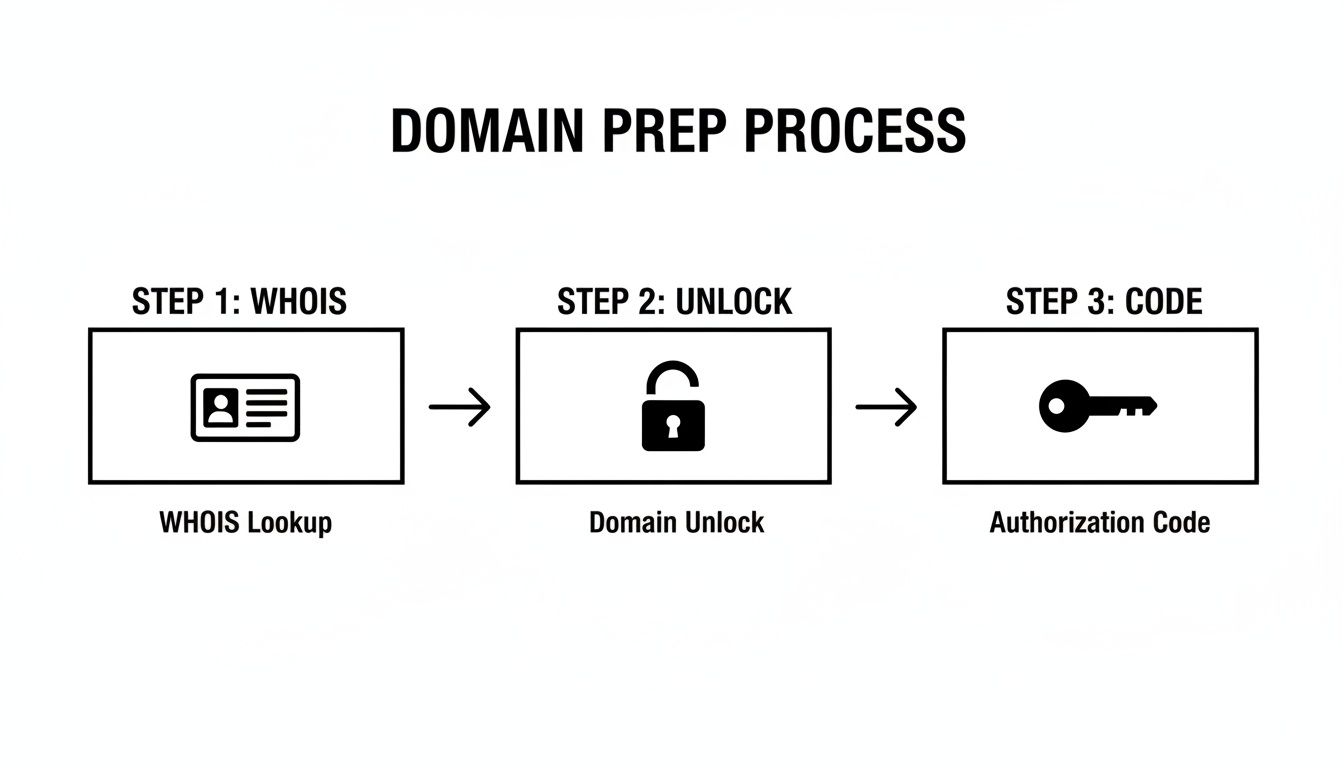
Getting your WHOIS details right, unlocking the domain, and having that EPP code ready are the three things that make sure this process starts smoothly.
Starting The Transfer At Your New Registrar
First up, log into your account with the new registrar. Look for a section in their dashboard labelled something obvious like "Transfer a Domain" or "Transfer In." Once you find it, you’ll be asked to type in the domain name you want to move.
This next step is crucial. The system will ask for your EPP code, which you should have already grabbed from your old registrar. Carefully copy and paste it into the field. This code is the official handshake that authorises the move, so getting it right is everything.
After submitting the code, you’ll usually be taken to a checkout page. Don't be alarmed if you see a fee. Most registrars in Australia bundle a one-year renewal with the transfer. It’s standard practice and just adds 12 months to your domain's existing expiry date.
Keep An Eye Out For The Authorisation Email
Once you’ve paid and submitted the request, the most important part of the whole process happens: an email is sent to the administrative contact listed in your domain's WHOIS record.
This email is the final security check. It will have a confirmation link that you must click to officially approve the transfer. You need to act on this quickly. If you miss it or ignore it, the transfer request will simply time out and you'll have to start all over again.
This email is your best defence against someone trying to fraudulently transfer your domain. It’s the official, final "Are you sure?" check from the registry. If you don't see it within an hour, be sure to check your spam folder.
Once you’ve clicked that link, your job is pretty much done. The rest is an automated conversation between the two registrars.
Watching The Progress
Now, you wait. A standard domain transfer usually takes about five to seven days to fully complete. During this time, you can check its status in both your new and old registrar dashboards. You'll see different status messages as it moves through the system.
Here’s a quick rundown of what those statuses actually mean:
- Pending Transfer: The request is in the system, waiting for you to click the link in the authorisation email.
- Awaiting Release: You've approved it, and now your old registrar has been notified. They have about five days to let it go.
- Transfer in Progress: The old registrar has given the green light, and the domain is on its way to the new one.
- Completed: All done! Your domain is now safe and sound with its new provider.
This process has become incredibly common. The .au domain transfer market, for example, saw a huge 22% increase in Q3 2025, with more than 120,000 transfers recorded. This jump is partly due to new ICANN policies that have seriously beefed up data privacy and cut down fraudulent transfer attempts by 18%. For small business owners, this means the whole system is more secure than ever. You can read more in the latest domain name industry statistics.
Here’s a pro tip: while you're waiting, log back into your old registrar's account one last time. Some providers have a button to "expedite" or "approve" the transfer out. Clicking this can sometimes shave a day or two off the waiting time. It’s not always there, but it’s definitely worth a look.
If you hit any snags or confusing errors, remember that getting an expert to look at it can save you a world of headaches. For anyone running a business on WordPress, having reliable WordPress help and support on call provides invaluable peace of mind during technical processes like this.
How To Minimise Downtime and Protect Your SEO

The biggest fear I hear from clients about moving their domain is downtime. The thought of your website or emails simply vanishing, even for a short while, is genuinely stressful. But I'll let you in on a secret: with the right approach, a domain transfer should have zero impact on your live services.
It all comes down to careful DNS management. A domain transfer only changes the company that bills you for your domain; it doesn't automatically change where your domain points. Your website and email can, and should, stay online throughout the entire 5-7 day transfer window.
The Power of Low TTL
Here’s a pro tip that makes all the difference: lower your DNS record's Time to Live (TTL) value at your current registrar 24-48 hours before you even think about starting the transfer. TTL is just an instruction telling servers worldwide how long to remember (cache) your domain’s DNS information.
Most registrars set this to something high by default, like 24 hours (86,400 seconds). By dropping it to a much lower value, say 300 seconds (5 minutes), you're essentially telling the internet to check for updates far more frequently.
This means that once the domain transfer is done and you update your DNS settings at the new registrar, the changes will ripple across the internet much, much faster. It's the key to a seamless switch.
Nameservers vs. DNS Hosting
When the transfer completes, you have two main ways to handle your DNS. Getting this right is crucial for avoiding downtime.
- Keep Using Your Existing Nameservers: This is the easiest path. If your website is hosted with a service like Cloudflare or a specialised WordPress host, your nameservers probably already point to them, not your domain registrar. In this case, you literally don’t need to do anything. The transfer will finish, and your domain will keep pointing to your web host without a single interruption.
- Switch to the New Registrar's DNS Hosting: This is the most common scenario. You'll update your nameservers to point to your new registrar. Before you do this, you absolutely must copy every single DNS record from your old registrar to the new one—meticulously.
Take a screenshot or, even better, export a list of all your DNS records before you start. This is non-negotiable. Forgetting a single subdomain or TXT record can break parts of your website or third-party services you rely on. Double-check everything before you flick the switch.
Keeping Your Emails Flowing
Email is often the first casualty of a poorly planned domain transfer. To make sure your business communication doesn't skip a beat, you need to pay close attention to your MX (Mail Exchanger) records. These records tell the internet where to deliver your email.
Before you start the transfer, write down all your current MX records, including their priority numbers and values. As soon as the transfer is complete and you're using the new registrar's DNS, your very first job is to replicate these MX records exactly. This ensures that as soon as the DNS updates, new emails start hitting the right server.
If you miss this step, any email sent to your domain during the transition will bounce back as undeliverable.
Protecting Your Hard-Earned SEO
Will transferring your domain name hurt your search rankings? It’s a common question, and the short answer is no—as long as it’s done right. Google and other search engines care about your website's accessibility and content, not which company manages your domain registration.
Since a properly handled transfer results in zero downtime, search engine crawlers won't even notice a disruption. Your website's content, structure, and hosting all stay exactly the same. However, a crucial part of protecting your SEO during any major change is managing your backlink profile. Learning about engineering link equity to boost SEO authority offers valuable insights into maintaining your rankings over the long term.
For anyone serious about their online presence, a solid grasp of the fundamentals is always a great idea. You can dive deeper into these topics in our quick guide to SEO for Australian businesses. The key is to ensure continuity for both users and search engines, and a seamless domain transfer does exactly that.
Post-Transfer Checks: Securing Your Domain in Its New Home
You’ve got the confirmation email—your domain transfer is officially complete. It’s easy to breathe a sigh of relief and get back to business, but there are a few crucial final steps you can't afford to skip. This is the last leg of the race.
Think of it like getting the keys to a new office. You wouldn't just walk in and start working; you’d check the locks, make sure the power is on, and confirm your phone line works. Doing the same for your domain now will save you from major headaches down the track.
First Things First: Check Your DNS and Services
Before you do anything else, you need to be absolutely certain your website, email, and any subdomains are all up and running smoothly. This all comes down to your DNS records making the trip from your old registrar to the new one without a hitch.
Even with careful planning, things can go wrong. It's worth taking five minutes to manually cross-reference the DNS records at your new registrar with the backup you took earlier. Pay close attention to these:
- A Record: The one that points
yourdomain.com.auto your web host. Is your site loading correctly? - CNAME Records: Used for subdomains (like
shop.yourdomain.com.au) or connecting services. - MX Records: The big one for email. These records tell the internet where to send your mail, whether it's Google Workspace or Microsoft 365.
- TXT Records: Crucial for verifying your domain with tools like Google Search Console and for email security (SPF, DKIM).
Forgetting a single TXT record can cause your emails to start landing in spam folders. It’s a small detail with big consequences, so be meticulous here. If you spot anything missing, add it to your new registrar’s DNS management area immediately.
Time to Lock the Doors
Okay, with everything confirmed to be working, security is now your top priority. To get the transfer done, you had to unlock your domain and turn off privacy settings, leaving it exposed for a short time. Now it’s time to batten down the hatches.
Your first move should be to switch WHOIS Privacy Protection back on. Sometimes called Domain Privacy, this service hides your personal details (name, address, phone number) from the public WHOIS database, which is a goldmine for spammers and scammers.
Next, and this is non-negotiable, re-enable the Registrar Lock (you might see it called a Transfer Lock). This is your single best defence against a hostile takeover of your domain. With the lock engaged, nobody can move your domain away from your account, even if they manage to get their hands on your authorisation code.
Your domain is the front door to your online business. Leaving it unlocked is an open invitation for trouble. Enabling the registrar lock takes less than 30 seconds but gives you priceless protection.
This focus on security is a huge deal for Australian businesses. Recent data reveals that a staggering 55% of small businesses pointed to better security as the main reason for transferring their domain. With over 400,000 .au domains changing hands in 2025 alone, it's clear that people are taking this seriously. You can dive deeper into the trends in the latest domain name industry report.
Add an Extra Layer of Account Security
One last job. Your domain is only ever as secure as the account that controls it. That's why you need to enable two-factor authentication (2FA) at your new registrar right now.
With 2FA active, logging in requires more than just your password; you'll also need a temporary code, usually sent to an app on your phone. This simple step makes it exponentially harder for a bad actor to force their way into your account.
For anyone running a WordPress site, strong security at every level is just part of the game. For more tips on keeping your digital assets safe, check out our WordPress best practices checklist.
Once these final checks are ticked off, you can officially call the job done. Your domain is now secure, functional, and ready for business in its new home.
Common Questions About Domain Name Transfers
Even with a good guide, it’s completely normal to have a few questions buzzing around your head. Moving your domain is a big deal for your business, and you want to be sure you're getting it right. We've put together some of the most common questions we hear from Australian business owners to give you straight-up, clear answers.
How Much Does a Domain Name Transfer Cost in Australia?
This is usually the first thing people want to know, and the simple answer is: it depends. Some Australian registrars will actually handle an incoming transfer for free, seeing it as a good way to bring you on board as a new customer.
More often than not, though, you’ll see a small fee, typically somewhere between $20-$25 AUD. The key thing to realise is that this charge almost always includes a compulsory one-year extension of your domain's registration. So, you're not just paying for the admin of the transfer; you're pre-paying for another year of ownership, which gets tacked onto your current expiry date.
Always check the fine print before you hit "confirm". Make sure you know if that fee includes a one-year renewal. It's a simple check that prevents surprises and helps you properly compare costs between registrars.
Will My Website Go Down During The Transfer?
Let's bust the biggest myth right now: if you prepare properly, your website will experience absolutely zero downtime. This is the number one fear people have, and it’s a huge relief to know it's avoidable.
A domain transfer only moves the management of your domain from one company to another. It doesn't automatically change where your domain points. The whole game is about your DNS. As long as your nameservers stay pointed at your website host throughout the 5-7 day process, your site stays live. No one will notice a thing. This is why getting a copy of your DNS records beforehand is so important – it’s your roadmap to a smooth, seamless switch.
What Happens If My Domain Transfer Fails?
A "failed transfer" sounds pretty dramatic, but it’s usually just a minor hiccup with no real consequences. If the process doesn't go through, your domain simply stays with your current registrar. Your website and emails keep working exactly as they were. Nothing breaks.
Most of the time, a transfer fails for a simple, fixable reason:
- The EPP code was wrong: A classic typo or a copy-paste error is often the culprit.
- The domain is locked: You might have just forgotten to flick the "registrar lock" switch to off.
- WHOIS privacy is still on: The new registrar couldn’t see your details to verify ownership.
- You missed the confirmation email: That all-important authorisation link has a time limit.
Your new registrar will almost always email you explaining exactly what went wrong. From there, you just need to fix that one specific issue – get a new EPP code, unlock the domain – and start the transfer again. Most registrars won’t charge you again for the second attempt.
Can I Transfer an Expired Domain Name?
The short answer is no, you generally can't transfer a domain after it has expired. Once it passes the expiry date, it enters a "Grace Period," which can last up to 45 days. During this time, it's locked to prevent transfers. After that, it might go into a "Redemption Period," where it's still locked and becomes a lot more expensive to get back.
The only real way to deal with this is to first renew the domain with your current registrar. Once it's active again and any post-renewal transfer locks are lifted (which can take a few days), you’re free to start the transfer. If your domain is getting close to its expiry date, the safest bet is always to renew it before you even think about starting a transfer. It'll save you a world of potential headaches.
Juggling the technical side of a domain transfer can feel like a lot, especially when you’re busy running your business. If you’d rather have peace of mind knowing every step is handled perfectly, the team at Webby Website Optimisation is here to help. We provide expert WordPress support to ensure your website remains fast, secure, and always online. Find out how we can help at https://www.webby.net.au/services/wordpress-help-support.