
You’re probably in one of two spots right now.
Either your business has outgrown a basic brochure site and you’re tired of relying on someone else every time you need to change a heading, add a service, or update a product. Or you’ve been meaning to build a proper site for months, but every guide you read turns into a tangle of hosting jargon, plugin lists, and advice written for a US blogger instead of an Australian business owner.
That’s where most generic “wordpress create site” guides fall down. They show you how to click buttons. They don’t tell you which choices matter in Australia, which shortcuts come back to bite you, or why a site that looks fine on launch day can become slow, exposed, and hard to maintain six months later.
A good WordPress site isn’t just something you publish. It’s a business asset. It needs to load fast for local visitors, work on mobile, meet accessibility obligations, stay secure, and give you clean data so you can see what’s working.
Why WordPress is the Smart Choice for Your Australian Business
Most small businesses don’t need a custom-coded platform from scratch. They need a site that looks professional, can grow over time, and doesn’t lock them into a single developer forever.
That’s where WordPress still makes a lot of sense.
WordPress powers 43.5% of all websites worldwide as of 2026, up from 13.1% in 2011, and it holds 59.9% of the CMS market according to Hostinger’s WordPress statistics roundup. For an Australian business owner, that scale matters more than the headline number.
It means you’re not betting your business site on a niche system. You’re choosing a platform with a huge ecosystem of developers, themes, plugins, hosting options, and support. If one developer disappears, another can pick it up. If your business grows, the platform can grow with it. If you need bookings, ecommerce, landing pages, SEO tools, training, or custom integrations, there’s already a mature path for most of it.
That’s also why WordPress works for very different businesses. A Perth tradie, a medical practice, a B2B services firm, and an online retailer can all use the same core platform while building very different front ends and workflows.
If you want a broader view of where WordPress fits, Webby has a useful guide on the benefits using WordPress.
Practical rule: Pick the platform that gives you flexibility without making every future change expensive.
A key benefit isn’t WordPress’s popularity. It’s that its popularity reduces risk. You get choice, continuity, and room to improve the site over time instead of rebuilding every time your business changes direction.
Laying the Groundwork Your Domain Name and Hosting
A lot of small business websites go off track before the homepage even exists.
I see it often with Perth businesses. They register a rushed domain, grab the cheapest hosting plan, then try to fix speed, email problems, and downtime after the site is live. That usually costs more than setting it up properly from the start.
Your domain and hosting choices affect trust, admin control, performance, and how painful the next 12 months will be.

Choosing the right domain for an Australian business
For an Australian business, the domain is a trust signal first and a branding choice second.
A .com.au domain gives local visitors a quick cue that they’re dealing with a real Australian operator. That matters for trades, professional services, clinics, retailers, and any business asking people to call, enquire, or pay online. A .com still has a place, especially if the brand will sell outside Australia, but many SMBs get better day-to-day value from local relevance.
There’s also a practical point. If your business trades in Australia, your domain should match how customers search, speak, and judge credibility. A polished site on the wrong domain can still feel slightly off.
A simple way to choose:
| Option | Usually suits | Trade-off |
|---|---|---|
| .com.au | Local services, Australian retailers, professional firms | Strong local trust, less global feel |
| .com | Brands targeting multiple countries or future expansion | Flexible branding, weaker local cue |
| Both | Businesses protecting brand variations | Slightly more admin, better brand control |
If both are available, register both. Pick one primary domain and redirect the other. It’s a cheap way to protect the brand and avoid headaches later.
Keep the name short. Make sure someone can hear it once on the phone and type it correctly. Hyphens, awkward abbreviations, and made-up spellings usually create confusion for customers and staff alike.
Also check ownership details carefully. The domain should be registered in the business name, with an email address the business controls. Not your old IT contractor. Not a marketing agency account you can’t access.
Hosting is not just server space
Cheap hosting causes expensive problems.
Business owners usually notice hosting only when something breaks. The site goes down during a campaign. Enquiry forms stop sending. Admin pages crawl. Support replies with generic scripts instead of fixing the issue. At that point, the savings from a bargain plan disappear fast.
For Australian SMBs, hosting should be judged on business fit, not just price. You want fast local delivery, current PHP versions, reliable backups, SSL, staging, and support that understands WordPress. If you collect lead data, run online payments, or serve Australian customers only, local hosting and data handling are worth discussing with your provider early instead of treating them as an afterthought.
Shared, VPS, or managed WordPress hosting
The right option depends on how much risk, responsibility, and technical work you want to carry.
Shared hosting
This is the budget entry point.
It’s fine for a very small brochure site with low traffic and no business pressure on performance. The problem is that shared plans often put too many sites on the same server. If one site burns through resources, your site can slow down too. For a business that relies on calls, bookings, or sales, that trade-off is often poor value.
VPS hosting
A VPS gives you more dedicated resources and more control.
It can suit agencies, growing ecommerce stores, or businesses with a developer managing the setup. But control comes with maintenance. Someone still needs to handle updates, server tuning, security checks, and troubleshooting. Many business owners do not want another system to babysit.
Managed WordPress hosting
After one bad hosting experience, many established SMBs choose managed WordPress hosting.
Managed WordPress hosting usually includes server settings tuned for WordPress, backups, caching, staging, and support from people who work with WordPress every day. It costs more than entry-level hosting, but it usually saves time and reduces avoidable failures. That matters if the website is part of your sales process rather than a side project.
If you’re weighing local options, this guide to best WordPress hosting Australia is a practical place to compare providers.
Cheap hosting often turns into lost enquiries, repair work, and staff time.
What to check before you buy
Ignore plan names and promo discounts. Ask what happens after launch, because that’s when a host's quality becomes apparent.
- Server environment: Does the host keep PHP, database software, and WordPress-related services current?
- Backups: Are backups automatic, stored separately, and simple to restore?
- Support: Can you get help from staff who know WordPress, not just basic hosting scripts?
- Staging: Can changes be tested safely before they hit the live site?
- SSL and security response: Is HTTPS easy to enable, and what happens if the site is compromised?
- Performance tools: Is caching configured properly, and can a CDN be added without fuss?
- Scaling: Can the plan handle a promotion, ad campaign, or seasonal traffic spike?
- Email separation: Do they encourage proper business email through Microsoft 365 or Google Workspace, instead of bundling it poorly with hosting?
That last point matters more than many owners expect. Website hosting and business email should usually be treated as separate services. It makes troubleshooting cleaner and reduces the fallout when one provider has an issue.
If you plan to add lead generation tools after launch, including a WordPress online chat plugin, choose hosting that won’t fall over once those extra scripts and integrations are added.
The boring details that save headaches later
These jobs are dull, but they prevent drama.
Store your registrar login, hosting login, and WordPress admin details in a secure shared password manager. Record who has access. Remove old contractors when the job ends. Keep a plain-English note of where DNS is managed, where email is managed, and who can approve changes.
For Australian businesses, I’d add one more check. If your site needs to meet accessibility expectations under the DDA, or you operate in a sector where trust and compliance matter, make sure the foundation is stable before design work starts. Accessibility fixes, form improvements, and performance work are all harder on shaky hosting.
This video gives a useful high-level primer before you commit to a provider:
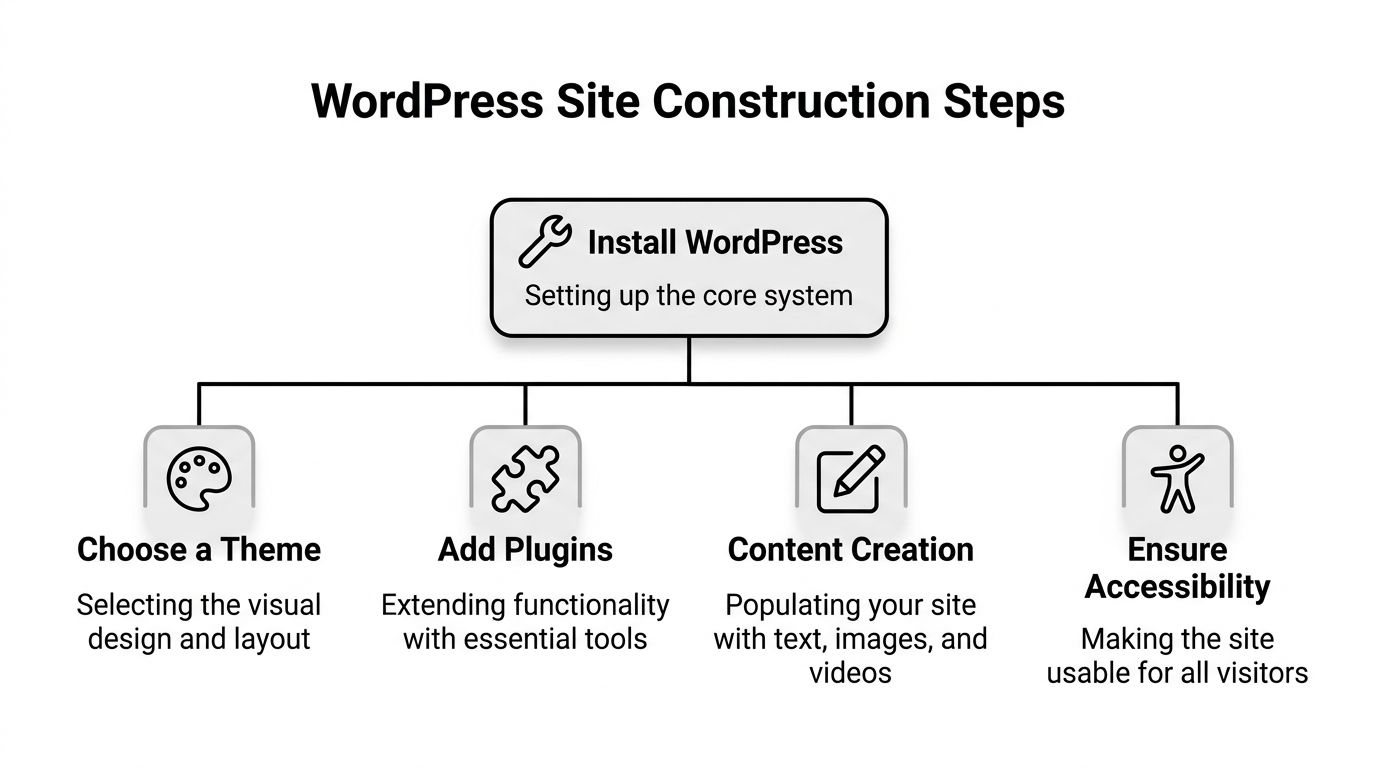
Building Your Site Structure Themes Plugins and Accessibility
This is the stage where people often get excited and messy at the same time.
They install WordPress, add a flashy theme, pile on plugins, and start tweaking colours before they’ve worked out what pages the business needs. A cleaner approach saves money and produces a better site.
Start with structure, not design
Before you choose a theme, map the site.
For most Australian SMBs, that means a practical structure such as:
- Home: Clear offer, proof, calls to action
- Services or products: Focused pages, not one overloaded page
- About: Credibility, team, location, experience
- Contact: Form, phone, service areas, opening details if relevant
- Privacy and legal pages: Especially important if you collect leads or sell online
- Blog or resources: Useful if you’re investing in search traffic
If you’re building a store, add category planning early. Don’t wait until after products are loaded to decide how buyers should browse.
Theme choice affects more than looks
A theme controls far more than fonts and layout. It affects speed, editing experience, accessibility, and how painful future changes will be.
You’ve got three broad paths.
| Approach | Good for | Watch-outs |
|---|---|---|
| Traditional theme | Simpler brochure sites | Can feel limited if poorly built |
| Block theme with Full Site Editing | Owners wanting more native control | More moving parts, steeper maintenance reality |
| Theme plus page builder | Marketing-heavy sites and landing pages | Can become bloated if overused |
I still see plenty of businesses do well with a lightweight theme plus a restrained page builder setup. The mistake isn’t using a builder. The mistake is using it everywhere, nesting layouts inside layouts, and turning each page into a design experiment.
For conversion-focused pages, Elementor remains a common choice. If you also want live chat or instant lead capture on service pages, this guide to a WordPress online chat plugin is useful because it looks at practical implementation rather than treating chat as a gimmick.
Keep plugins on a short leash
Plugins are one of WordPress’s biggest strengths and one of the easiest ways to ruin a good setup.
You don’t need dozens. You need the right few.
A sensible base stack for many businesses includes:
- SEO plugin: Yoast SEO or Rank Math
- Security plugin: something with monitoring, hardening, and alerts
- Caching or optimisation plugin: depending on the host setup
- Forms plugin: for enquiries, quote requests, bookings, downloads
- Backup support: if not already handled properly by hosting
- Image optimisation: especially for media-heavy sites
- Ecommerce tools: only if you’re selling
When you evaluate a plugin, look at update history, support responsiveness, compatibility with your setup, and whether it solves a real business need. If a plugin adds one small visual flourish and another plugin can already do it, skip it.
Plain advice: Every plugin should earn its place. If you can’t explain why it’s installed, it probably shouldn’t be there.
Accessibility isn’t optional in Australia
This is one of the biggest blind spots in small business WordPress builds.
Australian small businesses often overlook accessibility compliance with the Disability Discrimination Act 1992. With 20% of Australians having a disability, and only 12% of AU WordPress sites passing basic audits, WCAG 2.1 AA compliance is a practical legal and usability issue, based on the verified data linked to this Australian accessibility reference.
That matters in real terms. If your navigation can’t be used by keyboard, your forms don’t announce errors properly, your colour contrast is poor, or your images have no useful alternative text, you’re shutting people out.
What accessibility work looks like in practice
- Use heading structure properly: Don’t jump from H1 to H4 because it looks right.
- Choose readable contrast: Pale grey text on white still turns up everywhere. It shouldn’t.
- Make forms usable: Labels, error states, and focus order matter.
- Check keyboard navigation: Menus, popups, and carts should work without a mouse.
- Write meaningful alt text: Describe the function or content where it helps.
- Add an accessibility statement: It’s part of taking the issue seriously.
A theme can help or hinder all of that. Some themes look modern but create real issues with focus states, mobile menus, or block patterns that are hard to use accessibly. That’s why theme choice should never be based on demos alone.
Content entry should stay simple
When you start adding content, don’t build every paragraph with custom blocks unless you need to. WordPress is easier to maintain when the content model is clean.
Use reusable templates for service pages. Standardise button styles. Keep image sizes consistent. Create page patterns for landing pages instead of reinventing each one.
That discipline makes later edits much easier, especially if someone on your team will be updating the site without a developer beside them.
Securing and Optimising for Peak Performance
A Perth café owner launches a new site, then calls two weeks later because the contact form has stopped sending, the homepage takes ages on 4G, and WordPress is nagging about updates. That’s a common post-launch mess. Security and performance are not separate clean-up jobs. They’re part of building a site that keeps working for real customers across Australia, especially on mobile and during busy periods.
A WordPress site usually gets into trouble through ordinary neglect. Old plugins stay installed. Admin logins are too broad. Cheap hosting buckles under load. Large images get uploaded straight from a phone. Each problem looks small on its own. Together, they create a site that is slower, less reliable, and easier to compromise.

Security starts with reducing avoidable risk
For Australian SMBs, the goal is straightforward. Cut the obvious attack paths and make recovery simple if something goes wrong.
If I’m checking a business site before launch, I want to see these basics in place:
- Strong admin access: unique passwords, two-factor authentication, and as few administrator accounts as possible
- Clear user roles: staff should only get the permissions they need for their job
- HTTPS everywhere: SSL should be active across the whole site, not just on checkout or form pages
- Managed updates: WordPress core, themes, and plugins need a schedule and a person responsible
- Working backups: backups should be tested with a real restore, not just assumed to be fine
- Security logs and alerts: failed logins, plugin changes, and file edits should be visible
- Unused plugins and themes removed: inactive software still creates risk if it sits there forgotten
This matters even more if your site collects enquiries, runs bookings, or takes payments. Customer data brings responsibility. If a form plugin is outdated or a user account is over-permissioned, the problem is not theoretical anymore.
For teams that want a broader framework, this web application security checklist is worth reading because it gives non-security specialists a practical way to review common gaps.
Common causes of a slow WordPress site
Business owners often blame WordPress itself. In my experience, the slower site usually comes from build decisions and hosting choices, not the CMS.
| Performance issue | What it looks like | Better approach |
|---|---|---|
| Oversized images | Pages feel heavy, especially on mobile data | Resize before upload and use modern formats where supported |
| Too many plugins | Slow dashboard, front-end delays, plugin conflicts | Keep only plugins tied to a clear business need |
| Heavy themes or page builder layouts | Sluggish rendering, layout shifts, messy code output | Use lighter templates and keep page sections simple |
| Weak hosting | Random slowdowns, timeouts, poor response under traffic | Use hosting that can handle Australian traffic patterns and business hours |
| No caching plan | Repeat page loads stay slow and server load stays high | Set up server-side caching or one well-configured caching plugin |
Caching trips up a lot of small businesses. Some Australian hosts already run page caching at server level, so adding multiple caching plugins can create conflicts instead of speed gains. If your host does not handle it for you, one properly configured tool is usually enough. This guide to best WordPress caching plugins helps sort out which setup fits which type of site.
Fast sites usually come from restraint. Fewer moving parts. Better hosting. Cleaner builds.
Practical habits that keep sites fast after launch
Optimise images before upload. A homepage banner exported at huge dimensions wastes bandwidth and slows mobile users first. WordPress can create resized versions, but it should not be your first line of defence.
Audit third-party scripts. Chat widgets, review feeds, booking tools, ad tags, heatmaps, and social embeds all add weight. Marketing teams often add them one by one and nobody checks the combined cost. Review them every quarter and remove anything that no longer supports leads or sales.
Build for mobile conditions in Australia. Plenty of your visitors are on patchy connections, not office fibre. Test service pages on a phone, on mobile data, and outside perfect conditions. That will tell you more than a desktop speed test ever will.
Keep the stack simple. Fancy animations, sliders, popups, and auto-playing video look impressive in demos and often underperform in practice. If an effect does not help a visitor choose, enquire, or buy, it is probably adding drag.
Ongoing maintenance is where many SMB sites slip. Updates get postponed, backups are forgotten, and performance declines slowly enough that nobody notices until leads drop or the site breaks. Webby Website Optimisation handles core, theme, and plugin updates, backups, malware scanning, and performance work for Australian WordPress sites, which is one practical option if you do not want your internal team carrying that operational load.
Getting Ready for Visitors SEO Analytics and Ecommerce
Once the build is stable, the next job is making the site useful to marketing and sales.
A lot of businesses launch with pages that look fine but can’t answer simple questions. Which page generated the enquiry? Which campaign produced the sale? Which service page gets traffic but doesn’t convert? If you skip SEO and analytics setup, you’re driving without instruments.

Foundational SEO that most businesses can handle
Start with the simple things that have lasting value.
- Clean permalinks: Use readable URLs based on page or post names
- Unique title tags: Write them for searchers, not just keywords
- Useful meta descriptions: These won’t fix bad content, but they do affect click appeal
- Logical heading structure: Good for users and search engines
- Internal linking: Link related pages where it helps users
- XML sitemap: Make sure search engines can discover your content cleanly
Yoast SEO and Rank Math are both common choices. Either can do the essentials if configured properly. The mistake is installing an SEO plugin and assuming rankings will follow on their own. It’s a tool, not a strategy.
Analytics setup should happen before launch
Don’t wait until a campaign is live to think about tracking.
For most businesses, I’d have these in place before the site goes public:
Google Analytics 4
Use it for event tracking, engagement, traffic sources, and conversion paths.
Google Tag Manager
This gives you more control over tracking changes without editing theme files every time a marketer wants to add a tag.
Google Search Console
This helps you monitor indexing, search appearance, and technical issues that affect visibility.
Form and call tracking
If leads come through forms or phone calls, make sure those actions are measurable. Otherwise, you’ll understate what the site is doing for the business.
If you can’t track the main action you want visitors to take, the site isn’t finished.
WooCommerce changes the build requirements
Adding WooCommerce is easy. Running it well is the main job.
The verified guidance for Australian ecommerce sites is clear. With over 70% of internet traffic on mobile, performance is critical. A/B tested landing pages can lift conversions by 23%, but heavy images, slow database queries, and hosting flaws damage both sales and security, with hosting flaws responsible for 41% of hacks according to this Coalition Technologies ecommerce and WordPress resource.
That has practical consequences for how you build the store.
Where ecommerce sites usually go wrong
- Product images are too heavy: They look sharp, but category pages crawl.
- Checkout has friction: Too many fields, poor mobile spacing, or confusing validation.
- Too many plugins handle the store: Promotions, filters, shipping, reviews, upsells, wishlists, and popups can snowball quickly.
- Payment setup is treated casually: SSL, gateway settings, and testing need care.
- No landing page discipline: Paid traffic gets sent to generic category pages instead of purpose-built pages.
Better store habits
Keep your catalogue organised. Test product and checkout pages on actual phones. Use a hosting stack that suits dynamic ecommerce traffic. Review cart and checkout plugins carefully before adding anything non-essential.
If you’re running ads, build landing pages that match the campaign intent. The nice part about WordPress is that you can do this without rebuilding the whole site. The dangerous part is that teams often create too many disconnected pages with inconsistent offers and tracking gaps.
Your Launch Checklist and Ongoing Maintenance Plan
Launch day isn’t the finish line. It’s the handover from build mode to operating mode.
Before the site goes live, run through a practical checklist.
Pre-launch checks that catch common mistakes
- Test every form: Make sure submissions arrive where they should
- Check mobile layouts: Don’t trust the editor preview alone
- Review links: Internal links, buttons, download links, and social profiles
- Proofread key pages: Homepage, services, product pages, contact details
- Confirm indexing settings: Make sure the live site can be crawled
- Verify tracking: GA4, Tag Manager, and form events need to fire correctly
- Test backups and security tools: Don’t assume they’re working
- Check legal and trust pages: Privacy policy, terms if relevant, and accessibility statement
After launch, the recurring pattern starts. WordPress core updates. Plugins update. Browsers change. Payment gateways change. Staff install things they shouldn’t. Tracking breaks. Content editors accidentally move layouts around.
That’s normal. What matters is whether someone is watching the site closely enough to catch problems before customers do.
Maintenance is part of ownership
The biggest trap with DIY WordPress is assuming a stable site will stay stable by itself.
That’s even more relevant now because DIY Full Site Editing can increase maintenance needs by 30%, while 72% of AU web sessions are mobile and 40% of AU sites are already seeing Core Web Vitals failures, according to this Learn WordPress reference on responsive site building.
A maintenance plan should cover:
| Ongoing task | Why it matters |
|---|---|
| Core, theme, and plugin updates | Closes security gaps and preserves compatibility |
| Backups and restore checks | Gives you a workable recovery path |
| Security scans | Helps spot malware or suspicious changes early |
| Performance reviews | Catches slowdowns before they hurt enquiries or sales |
| Uptime monitoring | Alerts you when the site is down |
| Content and form checks | Finds broken pages, expired offers, and failed forms |
If you enjoy the technical side, you can manage that yourself. Most owners shouldn’t. Your business probably makes money from serving clients, selling products, or running operations, not from babysitting plugin updates on a Tuesday night.
Frequently Asked Questions
How long does it take to create a WordPress site for a small business?
It depends on scope and decision speed more than code. A lean brochure site with clear content moves much faster than a site with custom layouts, ecommerce, integrations, and rounds of revisions. Most delays come from unclear structure, missing content, and changing direction mid-build.
Should I use a free theme or pay for one?
A free theme can work if it’s maintained well and suits a simple site. Paid themes often give you better support, stronger features, and a more polished editing experience. The key question isn’t price alone. It’s whether the theme stays lightweight, accessible, and maintainable.
Is WordPress good for Australian ecommerce?
Yes, especially with WooCommerce, but only when the store is built with performance and maintenance in mind. Product images, checkout usability, hosting quality, and plugin restraint matter much more than the choice of platform alone.
Do I need Australian hosting?
Not always, but local suitability matters. For many Australian businesses, hosting decisions should consider latency, support quality, and business requirements around data handling and performance. Generic offshore bargain hosting often creates more issues than it solves.
Can I build the site myself and get help later?
Yes, but be realistic about the trade-off. DIY can save money upfront and cost more later if the build becomes messy. If you do it yourself, keep the stack simple, document what you install, and avoid customising the site in ways nobody else can untangle.
What pages should every business site have?
At minimum, most businesses need a homepage, service or product pages, an about page, a contact page, and core legal pages. If you want search visibility over time, add a blog or resource section only if you’re willing to maintain it properly.
If your WordPress site needs more than basic advice, Webby Website Optimisation can help with support, maintenance, speed work, updates, recovery, hosting, and tracking setup for Australian businesses that want the site kept secure and usable without managing the technical overhead themselves.