
You’re probably in the same spot as a lot of small business owners. Your current website feels dated, too slow, hard to update, or it never did much for enquiries in the first place. Now you’re comparing Squarespace, WordPress, and Wix, and every platform claims to be the easiest, fastest, and smartest option.
The problem is that “easy to launch” and “good for the business” aren’t always the same thing.
A website platform isn’t just a design choice. It affects how easily you can rank, how much control you have, how expensive future changes become, and whether you can grow without rebuilding the whole thing later. That matters even more for Australian businesses that need local SEO, reliable performance, clean analytics, and a site that can keep up as the business gets more serious.
Choosing Your Online Home The Right Way
Most businesses start with the wrong question.
They ask, “Which platform is easiest to use?” That matters, but only at the start. The better question is, which platform still makes sense in three to five years when you need stronger SEO, better integrations, more pages, more products, more landing pages, and fewer compromises.
Squarespace, Wix, and WordPress all solve different problems.
Squarespace is polished. It suits businesses that want a clean brochure-style site with minimal setup. Wix is flexible for beginners and gives you an all-in-one environment. WordPress is different. It asks for more decisions up front, but gives you much more control over what the site can become.
That trade-off gets missed in a lot of comparisons.
A platform that feels simple today can become restrictive once you need custom forms, better page speed, stronger content architecture, event tracking, or a serious SEO setup. Then the “cheap” option stops being cheap because you’re paying in workarounds, add-ons, and eventually migration.
For a small business, that’s the core issue. You’re not choosing a template library. You’re choosing the rules your website will operate under.
If you're still sorting out what your site needs to do before you even choose a platform, this guide to web design for small business is a good place to get clear on the commercial side of the decision.
An At-A-Glance Comparison for Business Owners
Some business owners need the short version first. Here it is.
WordPress is usually the strongest long-term option.
Squarespace is often the neatest short-term option.
Wix sits in the middle for ease and built-in convenience.
That doesn’t mean WordPress is right for everyone. It means the decision should be tied to how much control, growth, and ownership you want.
WordPress powers over 43% of all websites as of 2025, far ahead of Wix at approximately 3% and Squarespace at a smaller share, according to this comparison citing Search Engine Journal market data. For business owners, that matters because market share usually reflects ecosystem depth, developer familiarity, plugin availability, and long-term resilience.
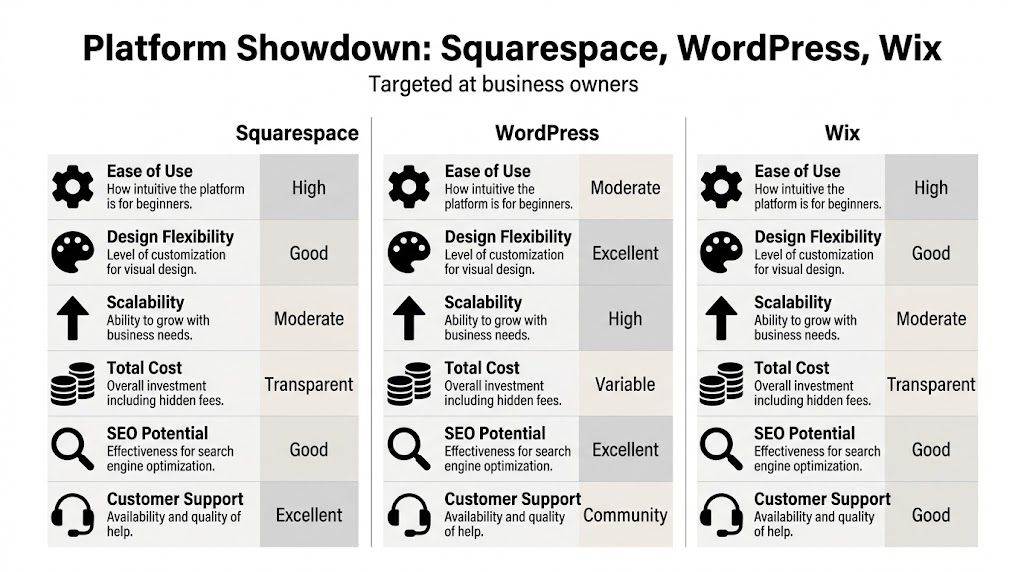
Squarespace vs Wix vs WordPress Decision Matrix
| Criterion | Squarespace | Wix | WordPress |
|---|---|---|---|
| Ease of getting started | Very good | Very good | Moderate |
| Design polish out of the box | Strong | Strong | Depends on build quality |
| Flexibility for custom features | Moderate | Moderate | Excellent |
| SEO control | Good | Good | Excellent |
| Performance control | Limited | Limited | Strong |
| E-commerce growth potential | Moderate | Moderate | High |
| Total cost predictability | Predictable at first | Predictable at first | Variable, but more controllable long term |
| Platform lock-in risk | Moderate | High | Low |
| Best fit | Portfolio, brochure, service sites | Small business sites needing quick launch | Businesses planning to grow |
Quick verdict by business type
- Choose Squarespace if you want an elegant site, you don’t need deep customisation, and design quality matters more than platform freedom.
- Choose Wix if you want a guided setup, built-in tools, and you’re comfortable living inside one vendor’s system.
- Choose WordPress if the website is a real business asset, not just an online brochure.
A website builder should remove friction, not create a future rebuild.
What this means in practice
If your website only needs to look credible and stay simple, Squarespace or Wix can do the job.
If the site needs to support SEO content, custom lead generation, WooCommerce, customized tracking, specialist integrations, or ongoing optimisation, WordPress usually gives you more room to operate without hitting platform ceilings.
That’s the difference between a website you publish and a website you can develop over time.
A Deep Dive Into Core Platform Capabilities
The short version is useful, but platform decisions usually go wrong in the details.
A business owner doesn’t feel the downside of the wrong platform on day one. They feel it later when the marketing plan matures, the site needs to do more, and the original platform starts pushing back.
Ease of use and learning curve
Squarespace is the calmest editor of the three. It’s structured, tidy, and usually easier for a non-technical owner to keep visually consistent. That’s one reason it suits consultants, photographers, architects, and service businesses that don’t need much backend complexity.
Wix feels more flexible at the page level. You can move things around more freely, which many owners like at first. The downside is that flexibility can lead to inconsistent layouts and a messier editing experience over time if too many people touch the site.
WordPress has the steepest learning curve if you compare it directly to the two builders. That part is real. It asks you to think about hosting, plugins, themes, forms, backups, security, and who is maintaining it.
But ease of use needs context.
There’s a big difference between:
- Easy to start when you’re building a few pages yourself
- Easy to manage when marketing needs become more advanced
- Easy to scale when the business outgrows its original setup
Squarespace and Wix win the first category. WordPress often wins the second and third.
Design flexibility and brand control
Squarespace produces attractive sites quickly. Its design language is strong, and for some businesses that’s enough. If you want a minimalist service site, a portfolio, or a simple offer-based website, it can look good without much effort.
Wix offers broad visual freedom. For owners who want to drag elements around and experiment, that can feel particularly satisfying. It also creates a common problem. Without design discipline, pages become inconsistent, mobile layouts need extra attention, and the site can feel pieced together rather than designed.
WordPress has the widest range of outcomes.
That’s both its strength and its risk.
With WordPress, a good developer or strategist can shape the site around the business instead of shaping the business around the platform. You can choose a lightweight theme, build custom templates, structure content properly, and integrate tools in a way that supports how the company sells.
With a poor setup, though, WordPress can become bloated fast. Too many plugins, weak hosting, and a generic theme create avoidable problems.
Practical rule: WordPress gives you the best ceiling, but only if the build is disciplined.
SEO and performance
Many comparisons often become too shallow.
Most platforms can handle basic SEO fields like titles, descriptions, and image alt text. That’s not the same as having real SEO control.
For Australian businesses prioritising SEO, WordPress with high-quality managed hosting can deliver dramatically faster load times than all-in-one builders because you can choose hosting optimised for speed, while Squarespace and Wix rely on their own managed infrastructure, as outlined in this WordPress, Wix, and Squarespace hosting comparison.
That distinction matters because performance isn’t just a technical preference. It affects crawl efficiency, user experience, and how much freedom you have to optimise.
Where each platform tends to land
| Area | Squarespace | Wix | WordPress |
|---|---|---|---|
| Basic metadata control | Good | Good | Excellent |
| Technical SEO flexibility | Moderate | Moderate | High |
| Hosting choice | None | None | Full choice |
| Plugin-based SEO tooling | Limited | Limited | Extensive |
| Performance tuning options | Limited | Limited | Strong |
On WordPress, you can choose the hosting stack, the caching setup, the image optimisation approach, the schema tool, the redirect logic, the SEO plugin, and the analytics implementation. That’s a big advantage if the site needs to compete in a crowded local market.
On Squarespace and Wix, you work with the system you’re given. That’s simpler. It’s also more limiting.
E-commerce power
Business owners often underestimate future needs.
A simple online shop can run on any of the three. The question is what happens when the catalogue grows, shipping rules get more complex, product variations expand, paid traffic increases, and marketing automation becomes more important.
Squarespace can support straightforward selling well enough. It works for curated product ranges, digital products, or service-based selling where the shop is part of the business, not the entire engine.
Wix is often chosen by businesses that want commerce features built in without much setup. That can work in the early stage, especially if convenience is the priority.
WordPress, usually through WooCommerce, is the strongest fit when the store is expected to grow and the business wants freedom over product structure, checkout behaviour, integrations, tracking, and content-led SEO.
A few practical signs you may outgrow a builder-based store:
- Catalogue complexity increases and you need more control over product relationships, variants, or category logic.
- Marketing gets more advanced and you want custom landing pages, campaign tagging, and deeper conversion tracking.
- Operations become more specific and off-the-shelf app choices stop matching how the business works.
- SEO becomes a sales channel and category pages, product content, guides, and internal linking all need tighter control.
Integrations and business systems
Most growing businesses eventually need the website to connect with other tools.
That might include:
- GA4 and Google Tag Manager
- Mailchimp
- CRM forms
- booking systems
- custom events and goals
- landing page experiments
- search-focused content hubs
Squarespace and Wix cover common needs. They become weaker when your setup moves beyond common needs.
WordPress is stronger because it’s not trying to keep you inside a closed platform. You can build around the business process instead of settling for whatever the vendor includes.
If your website is tied to lead generation, campaigns, search visibility, and ongoing optimisation, platform control is not a technical luxury. It’s part of the commercial model.
What works and what doesn’t
What works with Squarespace
- Clean brochure sites
- Portfolio-led brands
- Small service businesses with simple content needs
- Owners who value design polish and low admin overhead
What doesn’t work well with Squarespace
- Deep custom functionality
- Complex SEO programs
- Businesses likely to need unusual integrations
- Sites that will outgrow a neat template structure
What works with Wix
- Fast launches
- Beginner-friendly editing
- Small business sites that need built-in convenience
- Owners who want one dashboard for most tasks
What doesn’t work well with Wix
- Businesses that may need to leave the platform later
- Highly customised SEO or performance work
- Teams that need stronger long-term structural control
What works with WordPress
- SEO-led businesses
- Content-heavy websites
- WooCommerce stores
- Marketing teams that need flexibility
- Businesses treating the site as a long-term asset
What doesn’t work well with WordPress
- DIY owners who want zero maintenance responsibility
- Businesses unwilling to pay for proper hosting or support
- Teams that install tools without governance
The most expensive website isn’t always the one with the highest monthly fee. It’s often the one that makes ordinary business growth awkward.
Calculating The True Cost of Your Website
The advertised monthly fee is only one part of the cost.
That’s why so many platform decisions look sensible at the start and feel expensive later. The platform seemed affordable. The business didn’t count the costs that show up after launch.

The critical gap in most comparisons is a real long-term cost view for Australian SMBs. That includes pricing increases, platform limits that force migration, and the difficulty of moving off systems like Wix, all of which are highlighted in this Total Cost of Ownership analysis angle.
A practical TCO framework
When comparing squarespace vs wordpress vs wix, look at these cost categories together:
| Cost area | What to ask |
|---|---|
| Setup cost | How much work is needed to launch properly? |
| Monthly platform spend | What are you paying to keep the site live? |
| Add-ons and apps | Which features require extra subscriptions? |
| Maintenance time | Who handles updates, break fixes, backups, and testing? |
| Performance cost | Are you losing leads because the site is slow or clunky? |
| Growth cost | What happens when you need more than the platform handles easily? |
| Migration cost | How hard is it to rebuild elsewhere later? |
The hidden costs people miss
A simple builder can look cheaper because it rolls hosting and software together. That’s tidy. It also hides the fact that your options are constrained by that bundle.
The hidden costs usually show up as one of these:
Feature compromise
You don’t get the exact booking flow, form logic, shop setup, or SEO structure you want, so the business adapts to the platform instead of the other way around.Operational workarounds
Staff end up manually handling tasks the site should automate.Marketing limitations
Tracking, landing page control, or technical SEO becomes harder than it should be.Rebuild pressure
Once the business grows, a migration becomes less of an upgrade and more of a rescue job.
Cheap monthly software can still be expensive if it creates a rebuild two years later.
Why WordPress often wins on ownership
WordPress has a different cost pattern.
It may need more careful setup. It may also need ongoing technical support if you don’t want to manage it yourself. But the upside is that you’re investing into a platform you can continue shaping, rather than renting space inside a fixed system.
That’s especially relevant if the website supports lead generation, SEO, content, e-commerce, or advertising campaigns.
If you want a clearer view of what website construction really involves, this breakdown of website construction cost helps separate build cost from ownership cost.
Understanding Maintenance Security and Support
Most platform comparisons spend too much time on templates and not enough time on responsibility.
That’s a mistake. When something breaks, gets hacked, conflicts after an update, or stops tracking conversions properly, the key question is simple. Who fixes it, and how fast?
The closed-platform model
Squarespace and Wix handle the platform layer for you.
That means the vendor manages core infrastructure, server-side updates, and much of the base security environment. For many owners, that’s reassuring. You log in, edit content, and don’t think much about the machinery underneath.
The trade-off is control.
If the platform doesn’t support what you need, you usually can’t solve it completely. You wait, work around it, or accept the limitation. Support also tends to be platform-level support, not business-specific technical strategy.
The open-platform model
WordPress works differently.
You control the stack, which means you control more of the outcome. It also means you inherit more responsibility. Hosting quality matters. Plugin quality matters. Updates matter. Backups matter. Security hardening matters.
Ignore those things and WordPress can become fragile.
Manage them properly and WordPress becomes far more capable than a closed builder.
What maintenance actually includes
Good website maintenance isn’t just “keeping plugins updated”.
A proper WordPress maintenance routine usually includes:
- Core updates so the CMS stays current
- Theme and plugin updates with compatibility checks
- Backups stored safely offsite
- Security monitoring for malware and suspicious changes
- Performance work such as caching, image optimisation, and cleanup
- Recovery planning so a broken site can be restored quickly
What business owners should decide
The decision isn’t “Is WordPress more work?”
It is. The better question is whether you want that work handled professionally or hidden inside a platform that limits what you can do.
A closed platform gives you convenience by reducing choice. WordPress gives you choice, then asks you to manage it properly.
For many Australian businesses, the best arrangement is not pure DIY and not full builder lock-in. It’s managed WordPress support that keeps the technical side under control while preserving flexibility.
That gives you the upside of WordPress without expecting the business owner to act like a part-time sysadmin.
Real Use Cases Who Should Use Which Platform
The cleanest way to decide is to match the platform to the job.
The Fremantle creative with a portfolio site
A solo photographer, illustrator, or designer often wants a site that looks refined, showcases work cleanly, and doesn’t require technical effort every week.
Squarespace fits well here.
Its templates are polished, the editing experience is orderly, and the content model is usually enough for galleries, service pages, contact forms, and a journal. If the business isn’t trying to build a large SEO footprint or a customised sales funnel, Squarespace can be the most sensible option.
Best fit: Squarespace
The suburban café or local service brand launching fast
A new café, salon, trainer, or small service operator might need a site live quickly with menus, bookings, enquiry forms, and some basic marketing tools.
Wix can work well in this scenario.
It gives owners a guided path, a broad set of built-in features, and a comfortable way to get online without sourcing separate pieces. If the goal is speed and the site won’t need heavy customisation, it’s often enough.
Best fit: Wix
The Perth business relying on Google enquiries
A trade business, clinic, legal practice, consultant, or professional service firm that depends on search visibility usually needs more than a nice homepage.
They need content architecture, service pages, location targeting, speed, structured internal linking, strong forms, analytics clarity, and room to keep improving. Given these requirements, WordPress usually makes more commercial sense.
The site becomes a marketing asset, not just an online brochure.
Best fit: WordPress
The ambitious e-commerce brand
An online retailer shipping nationally usually starts with a few products and a simple idea. Then the store grows. Product ranges expand. Content marketing starts. Paid traffic comes in. Tracking matters. Customer journeys matter. Platform limitations become more expensive.
That business should usually start on WordPress with WooCommerce if growth and control are priorities.
Best fit: WordPress
The owner who never wants to touch technical settings
Some owners are clear about this. They don’t want to think about hosting, plugins, backups, or updates. They want to add text, swap a photo, and move on.
That owner is often better on Squarespace or Wix than on unmanaged WordPress.
This is one of the few cases where the “best” platform is the one with fewer moving parts, even if it gives up long-term flexibility.
The business that expects change
If the business model may evolve, WordPress is safer.
New service lines, content campaigns, landing pages, custom lead funnels, advanced forms, or e-commerce expansion are all easier to support on an open platform than on a closed one. The exact shape of growth might be unclear now, but platform freedom matters more when the future isn’t fixed.
A simple rule helps here:
- Stable and small often suits Squarespace
- Quick and guided often suits Wix
- Growing and strategic usually suits WordPress
Choosing Your Ideal WordPress Path
Once a business decides WordPress is the right platform, there’s still another decision to make. How are you going to run it?
DIY on cheap hosting
This is the most common mistake.
It looks economical. In practice, it often creates slow performance, poor support, weak backups, update issues, and a site that becomes stressful to manage. The business saves money at the start, then pays for it in downtime, patch jobs, and lost confidence.
Standard managed hosting
This is a better baseline.
A decent managed host handles server-level performance and some WordPress-specific support. For a smaller business with a straightforward site, this can be enough if someone competent still oversees plugins, SEO setup, and maintenance discipline.
Specialist managed WordPress support
This is the strongest option for businesses that depend on the site.
The best setup usually combines quality hosting with proactive technical oversight. That means updates are tested, backups are monitored, performance is tuned, and problems are handled before they become expensive.
If you want a broader perspective on why businesses choose strategic web development with WordPress, that resource is worth reading because it frames WordPress as a business platform, not just a content tool.
If you’re still deciding how to start, this guide on creating a WordPress site covers the core paths clearly.
The key point is simple. Choosing WordPress is only half the decision. Choosing the right operating model is what determines whether it feels powerful or painful.
Frequently Asked Questions
Is WordPress better than Squarespace and Wix for every business?
No. It’s better for businesses that need flexibility, stronger SEO control, deeper integrations, or room to grow. If your needs are simple and likely to stay simple, Squarespace or Wix may be a better fit.
Is it hard to move from Wix or Squarespace to WordPress?
It can be.
Content can often be moved in some form, but design, structure, and functionality usually need rebuilding. That’s why platform choice matters early. Migration is rarely just a switch. It’s often a partial rebuild.
Will changing platforms hurt SEO?
It can if the migration is handled poorly.
The risk usually comes from changed URLs, missing redirects, altered page structure, metadata loss, or weaker content mapping. A well-planned migration protects what matters. A rushed one can create avoidable ranking loss.
Can I manage WordPress myself?
Yes, if you’re comfortable learning the system and staying on top of updates, backups, plugin quality, and security.
Many business owners can handle content updates. Fewer want responsibility for the technical side long term.
Which platform is best for a small Australian business?
It depends on the role of the site.
If the site is mainly a digital brochure, Squarespace and Wix can work well. If the website is part of lead generation, SEO, e-commerce, or long-term digital growth, WordPress is usually the stronger business decision.
What’s the biggest mistake people make when comparing platforms?
They compare startup convenience and ignore ownership cost.
That’s why squarespace vs wordpress vs wix shouldn’t be judged on the first month alone. The better comparison is how the platform performs once the business needs more traffic, more functionality, more control, and fewer compromises.
If your business runs on WordPress, or you want to move to a setup that’s faster, safer, and easier to maintain, Webby Website Optimisation helps Australian businesses with WordPress support, maintenance, hosting, recovery, and performance work that keeps the site reliable long after launch.