
If you're managing more than one website, you've probably felt the pain of juggling multiple SSL certificates. Each site needs its own security, which means tracking separate expiry dates, handling different renewals, and repeating the installation process over and over. It's a recipe for administrative headaches and potential security gaps if one slips through the cracks.
There’s a much smarter way to handle this. It’s called a SAN SSL certificate, and it’s designed to secure a whole collection of different websites and subdomains under a single, easy-to-manage certificate.
A Master Key For Your Digital Front Doors

Think of a traditional SSL certificate as a key cut for a single door. A SAN SSL certificate, on the other hand, is like a master key. It can unlock (or in this case, secure) several different doors at once.
The secret is right in the name. "SAN" stands for Subject Alternative Name. This is a special field inside the certificate that acts like a VIP guest list. You simply add all the different domain and subdomain names you want to protect to this list. When a browser connects to any of them, the certificate presents this list to prove it's the legitimate security provider for that specific address.
Putting It Into Practice
Let's imagine your Australian business has a few different online properties:
- Your primary website:
mybusiness.com.au - A blog on a subdomain:
blog.mybusiness.com.au - The mail server for your company email:
mail.mybusiness.com.au - A separate promotional site for a new product:
newproductlaunch.com
Without a SAN certificate, you'd be buying and managing four individual SSL certificates. With a SAN certificate, you purchase just one and add all four of those names to its Subject Alternative Name field. Suddenly, one renewal date and one installation process cover everything.
Here's a quick look at what makes a SAN SSL certificate so useful.
SAN SSL Certificate at a Glance
| Feature | Description |
|---|---|
| Multi-Domain Coverage | Secures multiple, completely different domain names (e.g., site-a.com.au and site-b.net). |
| Subdomain Flexibility | Protects various subdomains across one or more primary domains (e.g., shop.site-a.com.au). |
| Unified Management | Consolidates all your domains under a single certificate for simplified renewal and administration. |
| Cost-Effective | Often cheaper than buying individual certificates for every single domain and subdomain you own. |
| Scalable Security | You can usually add or remove names from the certificate over its lifetime as your business needs change. |
This consolidated approach not only saves you time but also makes robust security more affordable and manageable, especially for small and medium businesses.
Why This Level of Security Is Standard Practice
In today's digital world, that little padlock icon in the browser address bar isn't just a nice-to-have; it's a requirement. An encrypted HTTPS connection is a baseline expectation for customers, and search engines like Google actively favour secure sites.
With an incredible 88% of websites globally now using HTTPS, any site without it immediately stands out as unprofessional or untrustworthy. You can see more data on these security trends in this analysis of SSL/TLS adoption. A SAN certificate is a practical tool that helps you meet this modern standard across your entire web presence, ensuring you present a secure, unified front to all your visitors.
Comparing SAN, Wildcard, and Single-Domain SSL Certificates
Picking the right SSL certificate can feel a bit overwhelming. You've got single-domain, Wildcard, and SAN certificates all vying for your attention. While they all do the same basic job—encrypting your website's data—they’re designed for very different scenarios. Getting your head around the differences is the key to making a smart, cost-effective choice for your business.
Let’s start with the most straightforward option. A single-domain SSL certificate is like a standard key to your front door. It’s cut for one specific lock and does its job perfectly. It secures your primary website (e.g., yourbusiness.com.au) and that’s it. If you only have one website to protect, this is the simplest and most affordable way to go.
When Subdomains Enter the Picture
But what happens when your business grows? You might decide to add a blog at blog.yourbusiness.com.au or a private area for clients at portal.yourbusiness.com.au. All of a sudden, that single key isn’t enough.
This is where a Wildcard SSL certificate comes in handy. Think of it as a passkey for your entire building. It secures your main domain plus an unlimited number of subdomains sitting under it. The certificate uses an asterisk as a placeholder (*.yourbusiness.com.au), which automatically covers any subdomain you create now or in the future. We dive deeper into this in our guide on what Wildcard SSL certificates cover.
The catch? A Wildcard certificate only works for subdomains of one specific domain. It won’t secure a completely separate brand you own, like your-other-business.com, or an external service.
The Master Key for a Diverse Digital Presence
And that brings us to the SAN SSL certificate. If a Wildcard is a passkey for one building, the SAN certificate is the master key for your entire property portfolio. It’s built for businesses managing a mix of websites, servers, and applications that don't all share the same domain name.
A SAN certificate is the only type that lets you bundle completely different domain names, subdomains, and even server names under a single certificate. It offers incredible flexibility for any business with a complex online footprint.
For instance, you could use just one SAN SSL certificate to secure all of these at once:
mybusiness.com.au(your main Aussie site)mybusiness.co.nz(your New Zealand branch)shop.mybusiness.com.au(a specific subdomain)our-new-brand.com(a completely different website)mail.server.internal(an internal mail server name)
This is a game-changer for anyone juggling multiple brands, regional sites, or different online services. Instead of buying, installing, and renewing a handful of separate certificates, you consolidate everything into one. It just makes management so much simpler.
Comparison of SSL Certificate Types
To help you visualise which certificate fits your needs, let's lay them out side-by-side. This table breaks down the core differences to make your decision a bit easier.
| Certificate Type | Primary Use Case | Domains Secured | Cost & Management | Best For |
|---|---|---|---|---|
| Single-Domain | Securing one website. | www.example.com & example.com | Lowest cost and simplest management. | Small businesses, personal blogs, or portfolio sites with a single domain. |
| Wildcard | Securing a domain and its subdomains. | *.example.com, covering blog.example.com, shop.example.com, etc. | Mid-range cost. One certificate for unlimited subdomains. | Businesses with multiple services or sections hosted on subdomains of one primary domain. |
| SAN | Securing multiple, different domains. | A list of specific names, e.g., example.com, anothersite.net, blog.example.com. | Higher initial cost but often cheaper than multiple individual certs. One certificate to manage. | Businesses managing multiple brands, regional sites, or a mixed web infrastructure. |
Ultimately, the right choice comes down to your business's online structure. By looking at not just what you have now, but what you plan to build in the future, you can confidently pick the certificate that will keep all your digital doors securely locked without overcomplicating things.
When to Use a SAN SSL Certificate
Alright, so we've covered the technical side of SAN SSL certificates. But the real trick is knowing when to actually use one. While they aren’t the right fit for every single business, for some, they are an absolute lifesaver for both your budget and your sanity.
Think of a SAN certificate as your go-to solution once your brand starts spreading its wings across more than just a single website. It really comes into its own when you need to lock down a mix of different domains and specific subdomains without wanting to manage a whole stack of separate certificates.
Consolidating Your Digital Assets
The most common trigger for getting a SAN SSL certificate is when you find yourself juggling multiple websites for one business. It’s a smart way to get off the merry-go-round of tracking different expiry dates and renewal processes for each individual certificate.
Let’s look at a pretty standard setup for an Australian business:
- Your main website:
mybusiness.com.au - Your email server:
mail.mybusiness.com.au - A promotional landing page:
special-campaign.com.au - A client portal:
portal.mybusiness.net
Instead of buying and installing four separate SSL certificates, a single SAN certificate neatly covers the lot. This unified approach is brilliant for keeping your security consistent across all your digital properties without creating four times the admin work. As more businesses encrypt every customer touchpoint, the demand for flexible solutions like this has skyrocketed; you can see the data for yourself in the full research on SSL market adoption.
Securing an International Presence
Another perfect scenario for a SAN certificate is when your business goes global. If you’re operating in different countries, you probably own several country-code domains to build a local presence and cater to those audiences.
For any business managing a portfolio of international domains, a SAN certificate is a perfect fit. It lets you secure domains like your
.com.au,.co.nz, and.comall under one roof, from one server.
This drastically simplifies your security setup for your worldwide operations, giving customers in every region the same trusted experience. The diagram below does a great job of showing how a SAN certificate’s coverage stacks up against other types.
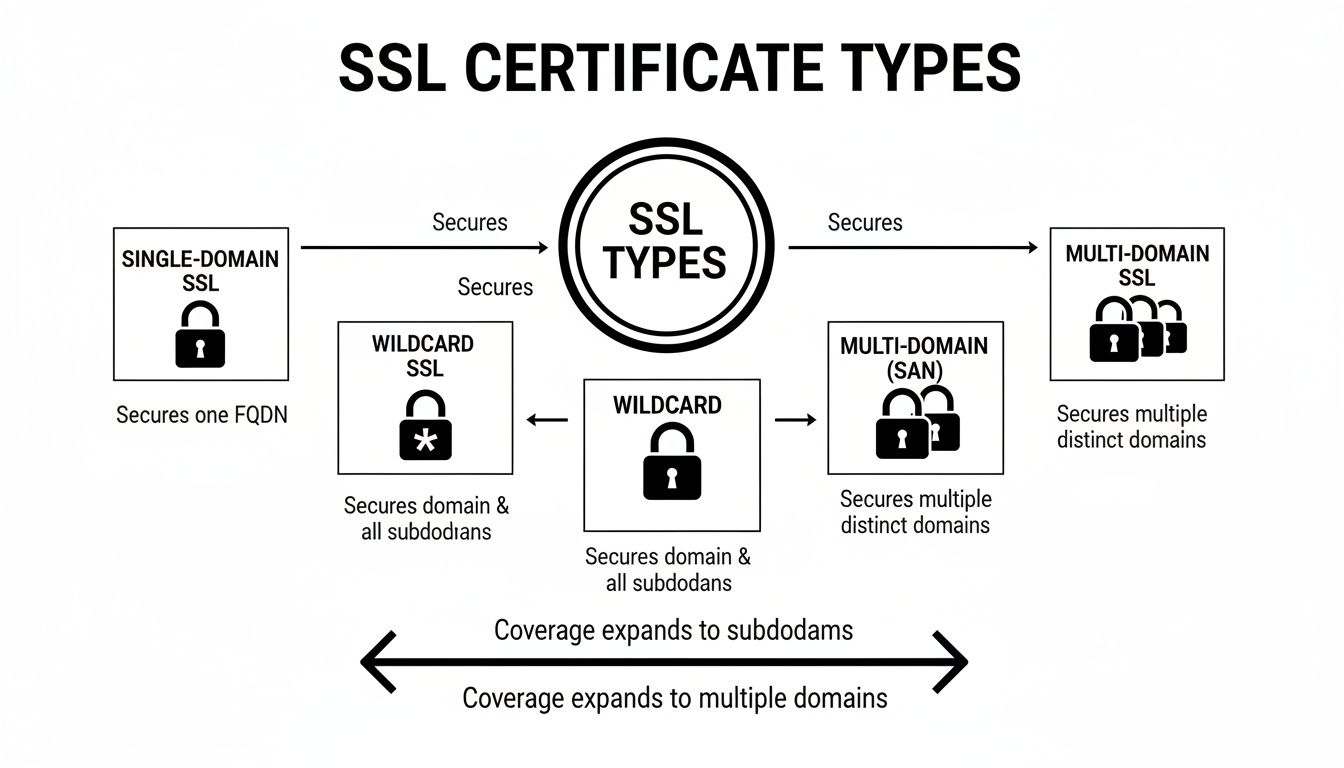
At the end of the day, it's all about that unique flexibility. The SAN certificate is the only type purpose-built to protect multiple, totally different domains at the same time. It’s the best tool in the shed for any business whose digital footprint is diverse and growing, giving you simple, centralised security management.
How to Install a SAN Certificate on WordPress
Getting a SAN certificate up and running on your WordPress sites might seem technical, but it’s a pretty logical process. The journey starts with your hosting provider or a trusted Certificate Authority (CA) and finishes with a few simple tweaks inside your WordPress dashboard.
First things first, you need to buy the certificate. You’ll want to find a SAN SSL certificate that covers the number of domains you need to secure. Most CAs offer different tiers—maybe for 5, 10, or 25 domains—so you just pick the package that matches your business's online footprint.
Once you’ve made the purchase, the actual installation follows a fairly standard procedure, even though the screens will look a bit different depending on who you host with.
The General Installation Steps
From the moment you buy the certificate to seeing that secure padlock on your sites, the process is all about generating a request, proving you own the domains, and installing the files you get back. Your web host can usually lend a hand, but it’s always good to understand what’s happening behind the scenes.
Generate a Certificate Signing Request (CSR): Think of this as the official application for your SSL. It's a block of encrypted text with details about your organisation and your main domain. You'll create this right from your hosting control panel, such as cPanel or Plesk.
Complete the Validation Process: The CA has to confirm you’re the legitimate owner of the domains you want to secure. This is typically done one of two ways: either by clicking a verification link sent to an email like admin@yourdomain.com.au, or by adding a specific text record to your domain's DNS settings.
Install the Certificate Files: Once you're validated, the CA will email you the certificate files (usually files ending in .crt and .ca-bundle). You then take these files and upload them through your hosting control panel, which officially installs the certificate on your server and links it to your websites.
Getting your certificate installed is a huge part of your website's security. It's also the perfect time to step back and look at your overall security posture. Treating this as one step within a larger strategy of WordPress security best practices helps you build a much stronger defence against all sorts of online threats.
Finalising the Setup in WordPress
Here’s a crucial step that many people miss: installing the certificate on your server is only half the job. You still need to tell WordPress to actually use this new secure HTTPS connection for all your website traffic. If you skip this, you’ll run into dreaded "mixed content" warnings, which break the padlock in your visitors' browsers.
The simplest fix is to use a plugin. A tool like 'Really Simple SSL' is fantastic for this—it finds your new certificate and automatically updates all your WordPress settings to push traffic through HTTPS. It sorts out potential issues in just a couple of clicks.
After you activate the plugin, it gets to work rewriting your site’s URLs and making sure everything—images, scripts, you name it—is served securely. It's always a good idea to click through your live site afterwards, checking a few pages to make sure that reassuring padlock is showing up everywhere.
If you hit any snags, our guide on how to troubleshooting a GoDaddy TLS certificate has some extra tips that often apply to other providers, too.
Managing and Renewing Your SAN Certificate

Getting your SAN SSL certificate installed is a fantastic milestone, but website security isn’t a one-and-done job. The ongoing management of your certificate is something many business owners don't think about until a problem pops up.
Like any SSL, a SAN certificate has an expiry date—these days, it’s typically one year. Letting it expire is a costly mistake. The moment it does, anyone visiting your sites will be hit with a big, ugly browser warning, suggesting your website is untrustworthy or even dangerous.
Those warnings are a huge turn-off. They instantly break trust and send potential customers running. Beyond the immediate loss of sales, an expired certificate can also hurt your SEO rankings, as search engines prioritise websites that are secure and accessible. Timely renewal is absolutely essential.
Reissuing: Adapting Your Certificate as Your Business Grows
One of the best things about a SAN SSL certificate is its flexibility. Your business changes, and your certificate can change right along with it. As your online presence evolves, you can easily add or remove domains covered by the certificate.
This is handled through a process called reissuing. Let's say you launch a new website for a special promotion. You can simply contact your Certificate Authority, add the new domain name to your SAN list, and reissue the certificate. The same goes for when you shut down an old site—you just remove its name and reissue.
This ability to tweak the certificate without buying a whole new one is a massive advantage for dynamic businesses. It ensures your security setup always reflects your current needs.
The Peace of Mind of a Managed Service
Juggling renewal dates, reissuing certificates, and keeping an eye on everything can quickly become another headache on your already long to-do list. For most Australian business owners, that time is far better spent on what you do best—running your business. This is where managed services are a lifesaver.
Handing over the entire SSL lifecycle to a dedicated team means you never have to worry about an expired certificate again. It provides complete peace of mind, knowing your sites are always secure and trusted by visitors.
A managed service provider can take care of it all for you:
- Proactive Renewals: They track expiry dates and handle the renewal well in advance, so there's no downtime or security lapse.
- Installation and Configuration: All the technical work of installing and correctly setting up the certificate on your server is done for you.
- On-Demand Reissuing: Need to add or remove a domain? They’ll manage the entire reissue process from start to finish.
- Ongoing Monitoring: They keep a constant watch on your certificate's status to ensure it stays valid and is working correctly across all your sites.
Getting a professional to handle this is a lot like having dedicated IT support for your website. If you're ready to offload these technical tasks, exploring professional WordPress website maintenance packages is a smart next step to keep your online presence secure and professionally managed.
Is a SAN Certificate Right for Your Business?
So, how do you know if a SAN SSL certificate is the right move for your business? It’s not a one-size-fits-all solution, but for many companies, it’s easily the most sensible and cost-effective option on the table.
A good way to figure this out is to ask yourself a few simple questions. Do you manage a handful of different websites for your brand? Do you need to secure not just your main domain, but also specific subdomains like a mail server? And honestly, would you prefer to simplify your certificate management and maybe even trim your annual security costs? If you're nodding along, a SAN certificate is probably a fantastic fit.
When a SAN Makes Perfect Sense
Think about your current (and future) setup. A SAN certificate really shines in a few common scenarios.
- You're Juggling Multiple Domains: You own several distinct websites, like
brand-a.com.auandbrand-b.net, and need to secure them all. - Your Needs Go Beyond Websites: You have to lock down more than just your public-facing site. This often includes non-website hostnames like
mail.brand-a.com.auor internal applications. - You Crave Simplicity: You're tired of tracking multiple expiry dates. A SAN lets you consolidate all your SSL renewals into a single, predictable date and a much simpler process.
For any business with a diverse and growing collection of online properties, a SAN certificate is the smart play. It streamlines all the admin while wrapping everything in solid, unified security.
Before you make the final call, it’s worth remembering that an SSL certificate is just one piece of the security puzzle. Getting a broader perspective by reading up on essential website security best practices will give you the context needed to make a truly informed decision.
And if you’re an Australian business looking for some expert advice on the right security for your WordPress site, our team is always here to help. Just reach out for a chat about what you need.
Common Questions About SAN Certificates
When you're digging into SAN SSL certificates, a few questions always seem to pop up. Let's clear the air and get you some straight answers so you can make the right call for your business.
Can You Change the Domains on a SAN Certificate?
Absolutely. In fact, this flexibility is one of the biggest reasons to choose a SAN certificate in the first place. Most providers let you add or remove domains throughout the certificate's life.
The process involves what's called a "reissue". It's a straightforward task that means your security can grow and change with your business. You don't have to start from scratch and buy a whole new certificate just because you've launched a new service or retired an old domain.
Is There a Limit to the Number of Domains?
Yes, there's a limit, but it's usually very generous. The exact number of domains you can protect with a single SAN certificate really depends on the Certificate Authority (CA) you buy from.
As a general rule, a single SAN certificate can secure anywhere from 25 to 250 different domains. It's crucial to check the fine print of any package you're considering to make sure it covers your needs, both now and for the future.
What’s the Difference Between a SAN and a Multi-Domain Certificate?
This is something that often trips people up, but the answer is surprisingly simple: they're the exact same thing. "Multi-Domain SSL" is just a more user-friendly marketing name for a SAN certificate.
Under the hood, both use the Subject Alternative Name (SAN) field in the certificate to list all the different hostnames they secure. So, whether you see it labelled as SAN or Multi-Domain, you’re looking at the same powerful, flexible security tool.
Ready to simplify your security and manage all your WordPress sites under one roof? The team at Webby Website Optimisation offers expert WordPress help and support to ensure your sites are fast, secure, and always up-to-date. Find out more about our WordPress support services.