
To optimize a service page for Google, use a single primary keyword in your H1, open with the customer’s problem, add three visible CTAs, implement Service/LocalBusiness and FAQPage schema, build an internal topical cluster, and verify indexing in Google Search Console. Done right, structured service pages convert at a noticeably higher rate than generic pages.
Your first-week checklist:
- Write an H1 that includes your primary keyword and a clear benefit (not your company name)
- Open the page with the customer’s problem and the outcome you deliver, within the first 100 words
- Place a CTA above the fold, one mid-page, and one at the bottom
- Add Service and FAQPage schema using JSON-LD (see schema.org for field definitions)
- Submit the URL in Google Search Console and request indexing
- Run Google PageSpeed Insights and fix any issues pulling your score below 90 on mobile
- Link the page from at least two related internal pages (a blog post, a related service page, or your homepage)
Realistic timeline: Google typically crawls a newly submitted URL within days. Ranking movement usually shows up in 6–12 weeks for competitive queries. Lead improvements follow traffic quality, so expect meaningful conversion data after 8–10 weeks of organic traffic.
Table of Contents
- Why a dedicated service page matters for Google and customers
- How to structure a service page that ranks and converts
- On-page SEO checklist: title tags, meta descriptions, headings, URLs, and schema
- Technical and indexing checks every service page needs
- Local signals and when to build location pages vs. service pages
- How to measure success and when to expect results
- Common service-page SEO mistakes and how to fix them
- How topical clusters signal authority to Google
- Key Takeaways
- What actually moves the needle on service pages (and what most guides miss)
- Webby Website Optimisation can audit and fix your service pages
- Tools and sources to implement this guide
Why a dedicated service page matters for Google and customers
Google reads a service page as a commercial-intent signal. Someone searching “roof repair contractor Denver” or “bookkeeping services for small businesses” is not browsing. They are close to a decision. Google knows this, and it ranks pages that match that intent precisely, not pages that bundle five services into one scrollable wall of text.

A single focused service per URL is the right call for two reasons. First, it lets you target one primary keyword without diluting relevance across competing terms. Second, it prevents your own pages from competing against each other in the same search results, a problem called keyword cannibalization. Each major service should occupy its own dedicated URL, long enough to fully answer buyer intent.
From the buyer’s side, the calculus is simple. When someone lands on your page, they are asking four questions in about eight seconds: Is this the service I need? Does this business serve my area? Can I trust them? What do I do next? A page that answers all four above the fold engages visitors effectively. One that leads with your founding story or a stock photo of a handshake loses them before the second scroll.
AI answer engines add another layer. Tools like Google’s AI Overviews and Perplexity parse structured headings and FAQ schema to pull direct answers. A service page with clear H2 questions and FAQPage schema is far more likely to appear in those panels than a page with dense unbroken paragraphs.
How to structure a service page that ranks and converts
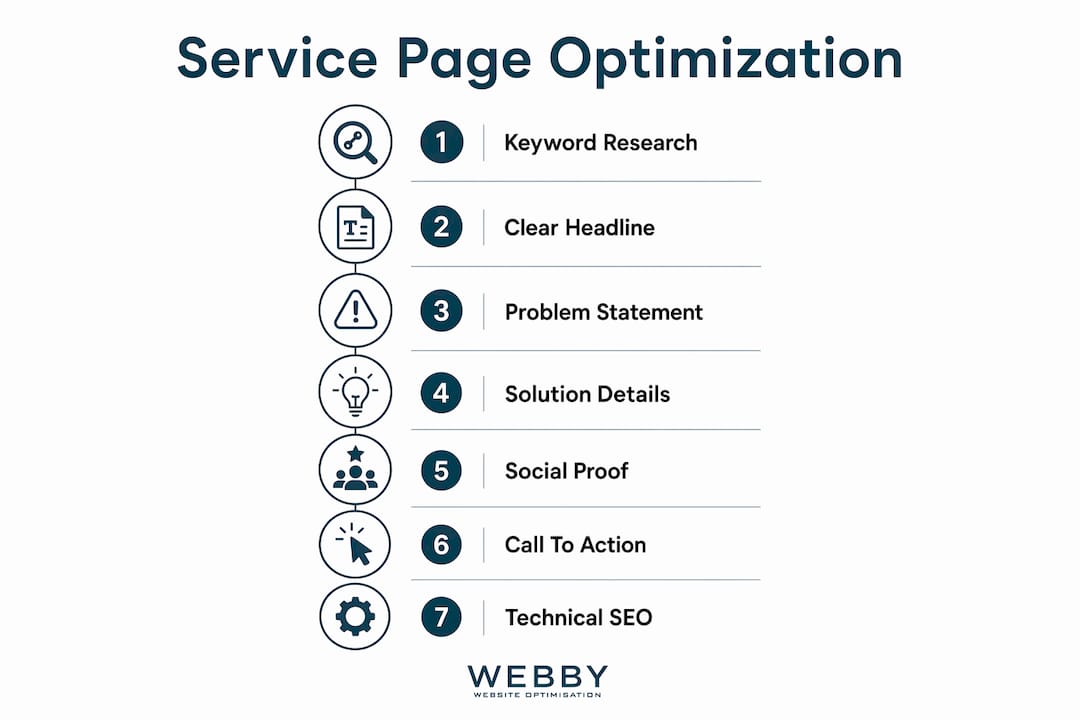
Think of your service page as a short sales conversation in written form. It moves through a predictable sequence: confirm the visitor is in the right place, explain what you do, prove you can deliver, handle objections, and make the next step obvious. Here is a reusable template you can apply to any service.
Hero block
Your H1 should include the primary keyword and a benefit. “Commercial Cleaning Services in Austin — Offices Ready by 7 AM” beats “Our Cleaning Services” every time. Place a subheadline that names the customer’s problem in one sentence. Put your first CTA here: a phone number, a “Get a Free Quote” button, or a calendar link. Visitors who arrive with high intent will click it immediately.
Problem → solution → proof → action
The body of the page follows this four-part flow. The problem section (two to three sentences) confirms the pain the customer is experiencing. The solution section explains what you do and how it works, step by step. Proof is where you add specific testimonials with numbers (“reduced our energy bill by 22%”), case study snippets, years in business, and certifications. Action is your second CTA, placed mid-page before the reader has to scroll to the bottom.

Pages that lead with the customer’s problem and include specific social proof consistently outperform company-first copy. “We’ve been in business since 1998” is not proof. “We’ve completed many jobs across Dallas with excellent average ratings” is.
Suggested H2/H3 structure
| Section | Suggested H2 Example | Purpose |
|---|---|---|
| Process | “How our [service] works” | Reduces anxiety, builds trust |
| Deliverables | “What’s included in every job” | Handles objections, adds keyword depth |
| Timeline | “How long does [service] take?” | Matches long-tail search queries |
| Pricing | “What does [service] cost?” | Qualifies leads, pricing transparency improves lead quality |
| FAQ | “Common questions about [service]” | Targets voice search, supports FAQ schema |
Aim for 800–1,500 words across the full page. That range is enough to answer buyer intent, include process detail, and give Google enough content to assess topical relevance, without padding.
Schema placement
Place your JSON-LD schema block in the <head> or at the top of the <body>. For a local service business, nest a Service object inside a LocalBusiness schema. Add a separate FAQPage schema block that mirrors the FAQ section visible on the page. The schema.org documentation covers every required and optional field.
Pro Tip: Place CTAs in three spots: immediately below the H1, after the proof section, and at the very bottom of the page. Visitors who read to the end are your most qualified leads. Don’t make them scroll back up to find a phone number.
On-page SEO checklist: title tags, meta descriptions, headings, URLs, and schema
This is the section to copy into your audit spreadsheet. Work through it top to bottom before publishing or re-launching any service page.
Title tag and meta description
- Title tag: 50–60 characters, primary keyword near the front, one differentiator. Example: “Roof Repair in Denver | Free Same-Day Estimates” (52 characters)
- Meta description: 140–160 characters, include the keyword, a benefit, and a soft CTA. Example: “Licensed Denver roofers with same-day estimates. We fix leaks, storm damage, and full replacements. Call now for a free inspection.” (131 characters)
- Never duplicate title tags across service pages. Each page needs a unique tag.
H1, H2, and H3 hierarchy
- One H1 per page, containing the primary keyword and a benefit
- Primary keyword or a close variant in the first 100 words of body copy
- H2s should read as real questions a buyer would type (“How much does roof repair cost in Denver?”)
- H3s break down sub-topics within each H2 section
- Never skip heading levels (H1 → H3 with no H2 in between)
URL structure
- Keep slugs short and keyword-rich:
/services/roof-repair-denverbeats/our-services/what-we-do/roofing-and-repair-services-in-the-denver-colorado-area - Use hyphens, not underscores
- Set a canonical tag (
<link rel="canonical">) pointing to the preferred URL if the page is accessible at multiple paths
Images
- File names should describe the image:
roof-repair-denver-contractor.jpg, notIMG_4821.jpg - Alt text: descriptive and specific, include the keyword where it fits naturally (“licensed roofer repairing storm-damaged shingles in Denver”)
- Use WebP format for smaller file sizes without quality loss
- Add
widthandheightattributes to prevent layout shift (a Core Web Vitals factor)
JSON-LD schema examples
**FAQPage schema (minimal):
**
{
  "@context": "https://schema.org",
  "@type": "FAQPage",
  "mainEntity": [{
    "@type": "Question",
    "name": "How much does roof repair cost in Denver?",
    "acceptedAnswer": {
      "@type": "Answer",
      "text": "Most residential roof repairs in Denver range from $300 to $1,500 depending on damage extent and materials."
    }
  }]
}
**Service schema (minimal, nested inside LocalBusiness):
**
{
  "@context": "https://schema.org",
  "@type": "LocalBusiness",
  "name": "Your Business Name",
  "hasOfferCatalog": {
    "@type": "OfferCatalog",
    "itemListElement": [{
      "@type": "Offer",
      "itemOffered": {
        "@type": "Service",
        "name": "Roof Repair",
        "description": "Emergency and scheduled roof repair for residential properties in Denver."
      }
    }]
  }
}
Full on-page audit checklist:
- [ ] Title tag: 50–60 characters, primary keyword present
- [ ] Meta description: 140–160 characters, unique per page
- [ ] H1: one per page, keyword + benefit
- [ ] Primary keyword in first 100 words
- [ ] H2s written as buyer questions
- [ ] URL slug: short, hyphenated, keyword-rich
- [ ] Canonical tag set correctly
- [ ] All images: descriptive file names, alt text, WebP format
- [ ] FAQPage JSON-LD implemented and matches visible FAQ content
- [ ] Service/LocalBusiness JSON-LD implemented
- [ ] Internal links to at least two related pages
- [ ] CTA visible above the fold
For a deeper look at how Google search features interact with schema markup, that reference covers rich result types in detail.
Technical and indexing checks every service page needs
A perfectly written service page that Google cannot crawl or render correctly will not rank. These checks take less than an hour and catch the issues that silently kill performance.
Google Search Console and URL Inspection
Open Google Search Console, paste your service page URL into the URL Inspection tool, and check three things: whether the page is indexed, whether the last crawl rendered it correctly (check the “View Tested Page” screenshot), and whether any mobile usability errors are flagged. If the page shows “URL is not on Google,” hit “Request Indexing.” If the rendered screenshot looks broken, you likely have a JavaScript rendering issue that needs a developer’s attention.
Sitemap and robots.txt
Confirm the page URL appears in your XML sitemap and that the sitemap is submitted in Search Console. Check your robots.txt file to make sure the page is not accidentally blocked with a Disallow rule. Both are two-minute checks that catch surprisingly common mistakes.
Mobile-friendliness
Google indexes the mobile version of your page first. Open the URL on a real phone, not just a browser resize. Check that buttons are tappable without zooming, text is readable without horizontal scrolling, and your CTA is visible without scrolling past the hero image. Search Console’s “Mobile Usability” report flags specific issues by URL.
Page speed with PageSpeed Insights and Lighthouse
Run your URL through Google PageSpeed Insights. Aim for a mobile score above 90. The most common culprits dragging scores down are uncompressed images, render-blocking JavaScript, and third-party scripts (live chat widgets, analytics tags, social embeds). Pages that load under 3 seconds see meaningfully lower bounce rates and a compounding ranking advantage over time.
Lighthouse (built into Chrome DevTools) gives you a more granular breakdown. Focus on Largest Contentful Paint (LCP), Cumulative Layout Shift (CLS), and Interaction to Next Paint (INP) — the three Core Web Vitals Google uses as ranking signals.
Pro Tip: The fastest server-level wins are enabling GZIP or Brotli compression, setting browser cache headers for static assets, and switching to a CDN for images. A WordPress site can get most of this from a caching plugin like WP Rocket or LiteSpeed Cache without touching code.
Local signals and when to build location pages vs. service pages
Not every service business needs location pages. But if you serve multiple cities and those cities each have meaningful search volume for your service, a single service page will not rank well for all of them. Here is how to decide.
Build a single service page when:
- You serve one city or a tight metro area
- Search volume for “[service] + [city]” is low or non-existent
- Your Google Business Profile covers the service area adequately
Build separate location pages when:
- You serve multiple distinct cities, each with its own search demand
- You have unique proof, testimonials, or case studies for each location
- You can write genuinely different content for each page (not just swapping the city name)
URL patterns that work:
/services/roof-repair/(single service page)/services/roof-repair/denver/(service + location)/locations/denver/(location hub linking to all services in that city)
Avoid /services/roof-repair-denver-colorado-roofing-contractor/ — that is keyword stuffing in the slug.
LocalBusiness schema and NAP consistency
Nesting Service schema inside LocalBusiness schema helps Google connect your service offerings to a verifiable physical entity, which improves the chance of rich results and local pack appearances. Your Name, Address, and Phone number (NAP) must match exactly across your website, Google Business Profile, and any directory listings. A mismatch between “St.” and “Street” is enough to create a local signal conflict.
Google Business Profile sync checklist:
- [ ] Business name, address, and phone match the website exactly
- [ ] Service categories in GBP match your service page topics
- [ ] Business hours are current
- [ ] Service area is set correctly in GBP
- [ ] Photos are recent and location-specific (not stock images)
- [ ] GBP posts link back to relevant service pages
Avoiding thin location pages: Write at least 400 unique words per location page. Include a local testimonial, a local case study reference, or a description of the specific neighborhoods or zip codes you serve. A page that only swaps the city name is thin content and will not rank.
How to measure success and when to expect results
Tracking the right metrics from day one means you will know whether your changes are working, not just guess. Set this up before you publish the optimized page.
-
Impressions and clicks (Search Console): Open the Performance report in Google Search Console, filter by the service page URL, and track impressions, clicks, average position, and CTR weekly. A rising impression count with a flat click count usually means your title tag or meta description needs work.
-
Organic leads (GA4): Set up a GA4 conversion event for form submissions and phone call clicks. If your form redirects to a thank-you page, use that URL as a destination event. For phone numbers, use a click event on the
tel:link. -
Phone call tracking: Use a call tracking tool (many CRM and marketing platforms include this) to attribute inbound calls to organic search. This is the metric most service businesses overlook, and it is often where the majority of leads actually come from.
-
Conversion rate: Divide organic leads by organic sessions for the page. A well-structured service page should convert at 3–8%. If you are below 2%, the issue is usually a buried CTA, weak social proof, or a mismatch between what the searcher expected and what the page delivers.
-
Verify rich result appearance: Use Google’s Rich Results Test (search.google.com/test/rich-results) to confirm your FAQ and Service schema are valid. Then check Search Console’s “Enhancements” tab to see whether Google has processed the schema.
-
Run a monthly audit: Once a month, re-run PageSpeed Insights, check Search Console for new coverage errors, and review the top queries driving impressions to the page. New long-tail queries appearing in the data often reveal content gaps worth expanding.
Realistic timeline expectations:
- Technical fixes (indexing, schema, speed): visible in Search Console within days
- Content and UX changes: measurable CTR and engagement shifts in 2–6 weeks
- Ranking movement for competitive keywords: typically 6–12 weeks
- Meaningful lead volume from organic: expect 8–10 weeks minimum after indexing
Common service-page SEO mistakes and how to fix them
Most service pages fail for the same handful of reasons. Here are the most common, with before-and-after fixes you can apply today.
Thin content with no process detail
Before: “We offer professional landscaping services. Contact us today.”
After: A 900-word page covering what’s included in each service tier, how the process works (consultation → quote → scheduled visit → follow-up), typical timelines, and a pricing range.
Company-first headlines
Before: “Welcome to Green Thumb Landscaping — Serving Austin Since 2005”
After: “Austin Lawn Care & Landscaping — Weekly Maintenance From $89”
The second version tells the visitor what they get and what it costs before they read a single word of body copy.
Buried or missing CTAs
A CTA at the bottom of the page only is a conversion killer. Visitors who decide quickly never reach it. Place one above the fold, one after your proof section, and one at the bottom. Make the CTA text specific: “Get a Free Lawn Care Quote” outperforms “Contact Us.”
No schema
A service page with no structured data is invisible to AI answer panels and misses rich result eligibility entirely. Adding FAQPage and Service JSON-LD takes under an hour and has no downside.
Mixed-intent pages
A single page targeting “landscaping services,” “lawn care tips,” and “how to overseed a lawn” confuses Google about the page’s intent. Split informational content into blog posts and keep service pages focused on commercial intent.
Duplicate city pages
Copy-pasting a service page and swapping only the city name creates thin, near-duplicate content. Google will typically index one and ignore the rest. Write unique content for each location or use a single service page with a well-optimized Google Business Profile instead.
Mobile speed issues
A hero image that is 4MB on desktop becomes a page-abandonment trigger on mobile. Compress images to WebP, set explicit dimensions, and defer non-critical JavaScript. A one-second improvement in mobile load time can meaningfully reduce bounce rates.
How topical clusters signal authority to Google
A single well-optimized service page is a good start. A cluster of connected pages covering related topics is what actually builds the kind of authority that holds rankings over time.
Google values clusters of connected pages covering related services over isolated, catch-all pages. The logic is straightforward: a site with a roofing service page, a storm damage repair page, a roof inspection page, three city-specific location pages, and four blog posts answering common roofing questions looks like an expert. A site with one page that mentions all of those things in passing does not.
Topical cluster implementation checklist
- Identify your core service pages (these are your “pillar” pages)
- Create sub-service pages for distinct offerings within each pillar
- Build location pages for each city with meaningful search volume
- Publish supporting blog posts that answer the questions your customers ask before hiring you
- Link every supporting page back to the relevant service page
- Link service pages to each other where the services are related
Internal linking map (generic template)
| Level | Page Type | Links To |
|---|---|---|
| Pillar | Main service page | Sub-service pages, location pages |
| Sub-service | Specific service variant | Pillar page, related blog posts |
| Location | City-specific service page | Pillar page, other location pages |
| Blog post | How-to or FAQ article | Pillar page, sub-service pages |
This structure distributes internal link authority toward your money pages and gives Google a clear map of your topical expertise. For small business SEO, this cluster approach is often the difference between page 3 and page 1.
Testing topical authority gains
After launching a new cluster (or adding internal links to an existing one), pull the Search Console Performance report for the pillar page and filter by impressions. Compare the 90 days before and after the change. Rising impressions for a broader set of queries, not just the exact-match keyword, is the clearest signal that Google is recognizing topical authority.
A quick experiment worth running: take a catch-all service page that ranks poorly and split it into two focused pages, each targeting a distinct keyword. Track impressions for both URLs over 60 days. In most cases, the two focused pages together outperform the single mixed page, often significantly.
Key Takeaways
Optimizing a service page for Google requires a keyword-focused H1, a problem-led opening, three visible CTAs, Service and FAQPage schema, and a topical cluster of internally linked supporting pages.
| Point | Details |
|---|---|
| Lead with the customer’s problem | Open with the pain point and outcome, not your company name or founding year. |
| Three CTAs minimum | Place one above the fold, one mid-page, and one at the bottom — never make a ready buyer scroll to find contact options. |
| Schema is non-negotiable | FAQPage and Service/LocalBusiness JSON-LD improve rich result eligibility and AI answer panel visibility. |
| Speed and mobile first | Pages loading under 3 seconds see lower bounce rates; fix images, render-blocking scripts, and cache settings before anything else. |
| Webby Website Optimisation | Provides service page audits, schema implementation, speed fixes, and SEO for local service businesses. |
What actually moves the needle on service pages (and what most guides miss)
Most service page guides spend 80% of their word count on title tags and meta descriptions. Those matter, but they are table stakes. The real leverage is in two places most business owners skip entirely.
The first is the proof section. Not a generic “our clients love us” paragraph, but specific, verifiable evidence: a named client, a measurable outcome, a before-and-after comparison. The difference between “we helped a local plumber grow their business” and “we helped a Perth plumbing company go from page 4 to position 2 for their primary keyword in 11 weeks” is the difference between a claim and a reason to believe. Specificity is what makes social proof actually work.
The second is internal linking. Most service pages are islands. They get built, published, and then nobody links to them from anywhere else on the site. A service page with no internal links pointing to it is telling Google it is not important, regardless of how well the on-page elements are optimized. The fix is not complicated: add a link from your homepage, from two or three related blog posts, and from any adjacent service pages. That redistribution of internal authority often produces ranking movement faster than any content rewrite.
There is also a subtler point about schema that most guides gloss over. Adding FAQPage schema is not just about winning a rich result snippet. It is about making your page’s content machine-readable for AI answer engines. As Google’s AI Overviews pull more answers directly from structured content, a service page with clear Q&A schema has a structural advantage over one that buries the same information in paragraph form. That advantage will compound as AI-driven search features expand.
The businesses that win at service page SEO are not the ones with the most technically perfect pages. They are the ones who understand that every element, the H1, the proof section, the schema, the internal links, is answering a specific question either a human buyer or a search crawler is asking. Get those answers right, and the rankings follow.
Webby Website Optimisation can audit and fix your service pages
Faster results than a DIY rewrite, without the guesswork: Webby Website Optimisation audits your existing service pages, rewrites copy to lead with buyer intent, implements Service and FAQPage schema, fixes speed issues, and builds the internal linking structure that signals topical authority to Google.

The typical engagement covers a full on-page audit, schema implementation, a PageSpeed fix list, and a content brief for any thin pages, delivered with clear before-and-after benchmarks so you can see exactly what changed and why. For businesses that need a new page built from scratch, the website design and development service covers the full build, from structure and copy to technical SEO and launch.
The starting point is a free service page audit. Webby Website Optimisation reviews your page against the checklist in this guide and returns a prioritized fix list within a few business days. Request yours at webby.net.au.
Tools and sources to implement this guide
Every tool listed here is free and available directly from Google or the relevant standards body.
-
Google Search Console: Use this first. Submit your URL, check indexing status, monitor impressions and clicks, and catch mobile usability errors. Run a coverage check after every major page change.
-
Google PageSpeed Insights: Paste any URL to get a mobile and desktop performance score with specific fix recommendations. Run this before and after any speed optimization work to confirm the improvement.
-
Lighthouse: Built into Chrome DevTools (F12 → Lighthouse tab). Gives a more detailed breakdown of Core Web Vitals (LCP, CLS, INP) than PageSpeed Insights alone. Use it for diagnosing specific rendering or layout issues.
-
schema.org: The authoritative reference for every schema type mentioned in this guide, including FAQPage, Service, and LocalBusiness. Check here for required vs. optional fields before implementing JSON-LD.
-
Google Business Profile (formerly Google My Business): Manage your local entity data here. Keep NAP, service categories, and hours in sync with your website. Link GBP posts to relevant service pages to reinforce topical signals.
-
Google’s Rich Results Test (search.google.com/test/rich-results): Validate your FAQPage and Service schema before publishing. Catches syntax errors that would prevent Google from processing the markup.
For teams that need help beyond what these tools surface, performance engineering (Core Web Vitals at the server and rendering level) and schema development are the two areas where specialist help pays off fastest. The service page structure guide on the Webby Website Optimisation blog covers the conversion architecture side in more detail if you want to go deeper on page layout before touching the technical layer.